International Police Association Virus
 Written by Tomas Meskauskas on (updated)
What is International Police Association?
International Police Association screen locker is a scam released by Internet criminals. It targets European computer users by displaying fake information and demanding the payment of a fine for supposedly distributing copyrighted content.
Recently, such screen lockers have become popular among Cyber criminals, resulting in many computer users observing this fake message on their screens. To distribute this ransomware, Internet criminals use various misleading strategies.
Commonly, the Internet Police Association scam is disguised as a software update. For example, a user clicks on an online video and is asked to download a Flash Player update - instead of the update, the screen locker is downloaded.
Another common methiod of infecting PCs with this scam is via email messages. Internet criminals actively employ spam campaigns to trick computer users into installing this misleading software on their machines.
After installation, the International Police Association screen locker makes some modifications to your operating system registry and configures itself to start automatically on each system start-up. When you boot your PC, you will observe a full screen International Police Association warning message demanding that you pay a fine for copyrighted content.
You will be unable to access your desktop.
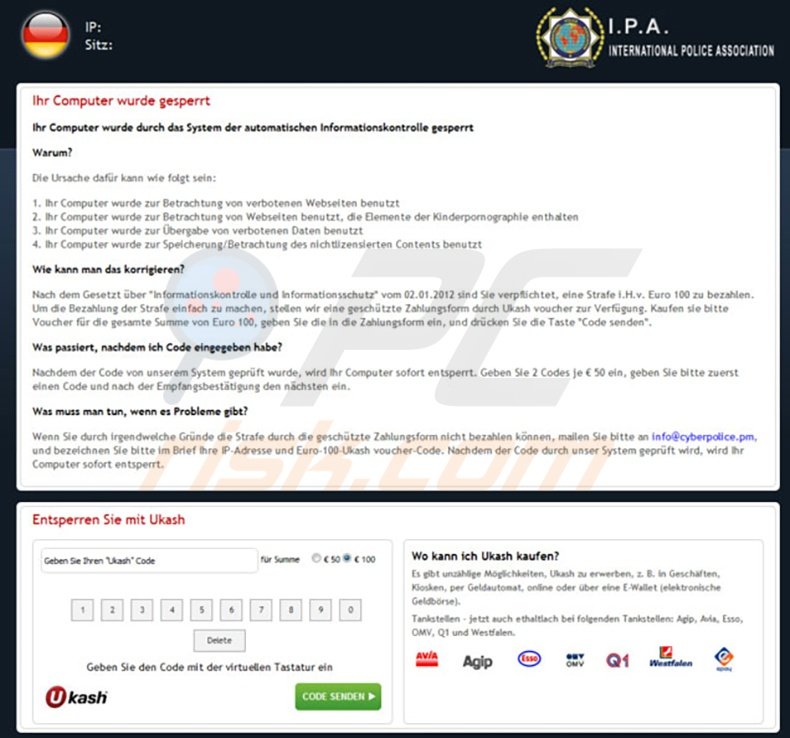
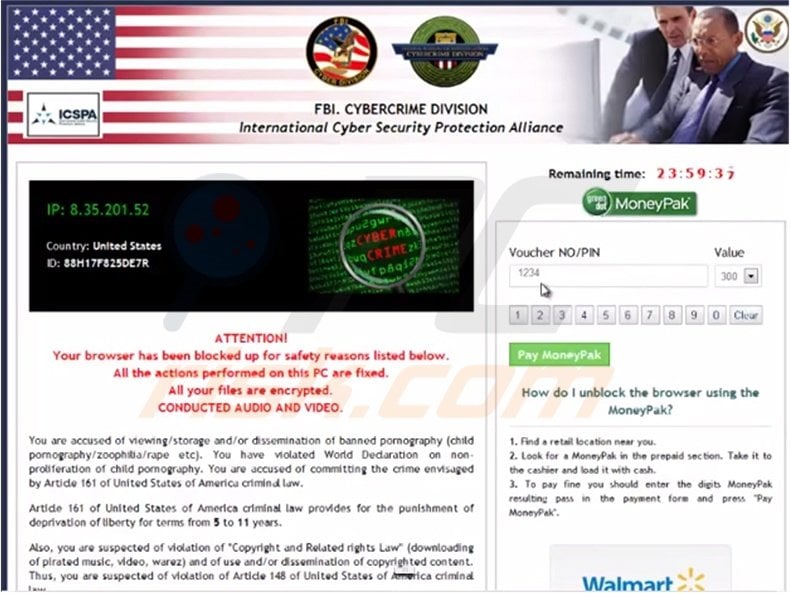
International Police Association screen locker is similar to other ransomware distributed by Internet criminals. While this scam exploits the name of the International Police Association, other versions use the name of the FBI (example: FBI Your Computer Has Been Locked scam).
No authorities use screen lockers to collect fines for Internet piracy - these messages are fake. Use this removal guide to remove International Police Association screen locker from your computer.
A fake message displayed by the International Police Association ransomware:
International Police Association - IAC International Administration Center. All activity on this computer has been recorded. If you use web-cam, videos and pictures, these were saved for identification.
Illegally downloaded material (MP3's Movies or Software) has been located on your computer. By downloading, they were reproduced, thereby involving a criminal offense under Section 106 of the Copyright Act. The downloading of copyrighted material via the Internet or music sharing networks is illegal and is, in accordance with Section 106 of the Copyright Act, subject to a fine or imprisonment for a period of up to 3 years
Furthermore, possession of illegally downloaded material is punishable under Section 184 paragraph 3 of the Criminal Code and may also lead to the confiscation of the computer, with which the files were downloaded. Please note: The fine may only be paid within 48 hours, if you let 48 hours pass without payment, the possibility of unlocking your computer expires.
This fake message varies according to your location. This ransomware detects your IP address and correspondingly displays a message in your language.
For example, if you live in Germany, you will see the following message: Ihr Computer wurde gesperrt. Ihr Computer wurde durch das System der automatischen Informationskontrolle gesperrt.
Instant automatic malware removal:
Manual threat removal might be a lengthy and complicated process that requires advanced IT skills. Combo Cleaner is a professional automatic malware removal tool that is recommended to get rid of malware. Download it by clicking the button below:
▼ DOWNLOAD Combo Cleaner
By downloading any software listed on this website you agree to our Privacy Policy and Terms of Use. To use full-featured product, you have to purchase a license for Combo Cleaner. 7 days free trial available. Combo Cleaner is owned and operated by Rcs Lt, the parent company of PCRisk.com read more.
Quick menu:
- What is International Police Association?
- STEP 1. "International Police Association" virus removal using safe mode with networking.
- STEP 2. "International Police Association" ransomware removal using safe mode with command prompt.
International Police Association screen locker removal:
Step 1
Start your computer in Safe Mode. Click Start, click Shut Down, click Restart, click OK.
During your computer starting process press the F8 key on your keyboard multiple times until you see the Windows Advanced Option menu, then select Safe Mode with Networking from the list.
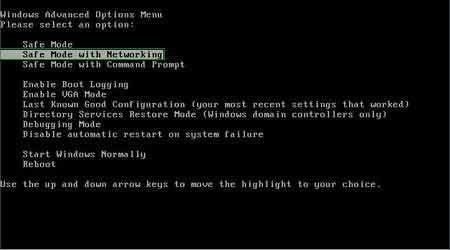
Video showing how to start Windows 7 in "Safe Mode with Networking":
Step 2
Log in to the account infected with International Police Association scam. Start your Internet browser and download a legitimate anti-spyware program.
Update the anti-spyware software and start a full system scan. Remove all the entries detected.
After completing these steps, your computer should be clean. Reboot your computer in Normal Mode.
Alternative International Police Association scam removal guide:
If this ransomware blocks your screen when you start your computer in Safe Mode with networking, try starting your PC in Safe Mode with Command prompt.
1. During your computer starting process press F8 key on your keyboard multiple times until Windows Advanced Options menu appears, then select Safe Mode with Command Prompt from the list and press ENTER.
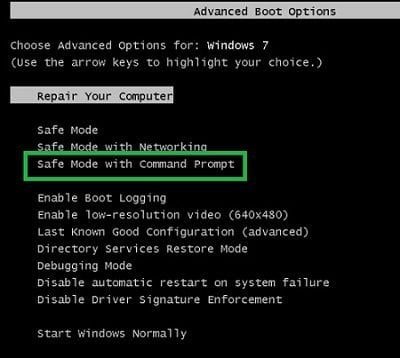
2. In the opened Command Prompt, type explorer and press Enter. This command will open the explorer window.
Do not close it and continue to the next step.
3. In the Command Prompt type regedit and press Enter. This will open the Registry Editor window.
4. In the Registry Editor window, navigate to HKEY_LOCAL_MACHINE\SOFTWARE\Microsoft\Windows NT\CurrentVersion\Winlogon\
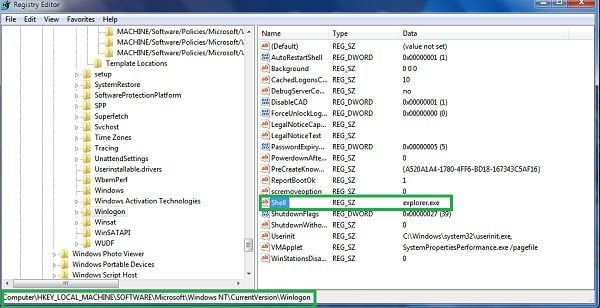
5. In the right side of the window, locate "Shell" and right click on it. Click on Modify.
The default value data is Explorer.exe if you see anything else in this window, remove it and type Explorer.exe (make a note of whatever else appeared in the data section - this is the path of the rogue execution file).
Use this information to navigate to the rogue executable and remove it.
6. Restart your computer, download and install legitimate anti-spyware software and perform a full system scan to eliminate any remnants of International Police Association scam.
If you cannot start your computer in Safe Mode with Networking (or with Command Prompt), boot your computer using a rescue disk. Some variants of ransomware disable Safe Mode, making its removal more complicated.
For this step, you need access to another computer. After removing International Police Association scam from your PC, restart your computer and scan it with legitimate antispyware software to remove any remnants of this security infection.
Other tools known to remove International Police Association scam:

 Outstanding!
▼ Show Discussion