Windows Anytime Upgrade Virus
 Written by Tomas Meskauskas on (updated)
What is Windows Anytime Upgrade?
Windows Anytime Upgrade is ransomware, which demands that you pay a £100 fine to unlock your computer. This screen locker is one of many scams actively distributed across the Internet by Cyber criminals.
Windows Anytime Upgrade targets unsuspecting PC users, stating that they have to pay a fine for using unlicensed software. This screen lock uses a slightly different tactic to trick PC users - other versions of this scam state that you have to pay a fine for copyrighted content or for watching pornography.
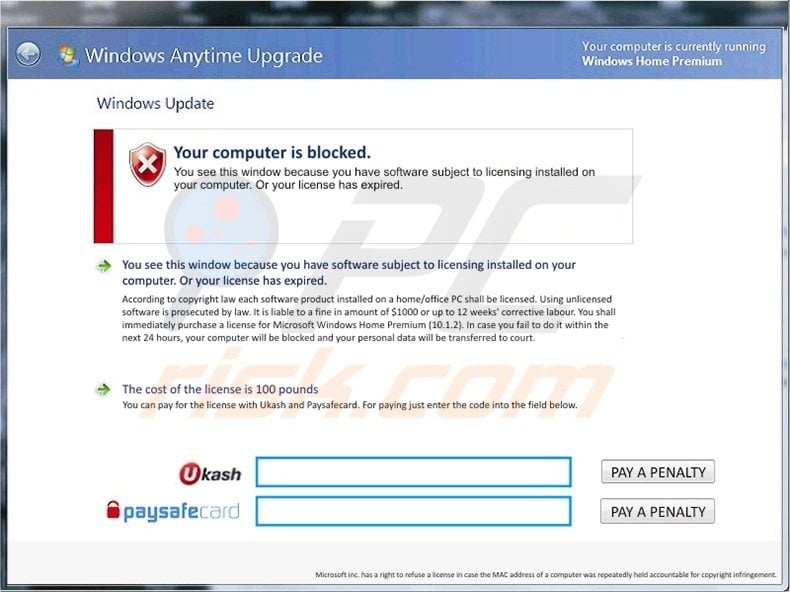
This screen lock is a scam. The Windows logo and name are merely exploited by Cyber criminals to make their message seem authentic.
When this rogue infiltrates your computer, it detects your operating system and changes its message accordingly. Microsoft does not use any such screen lockers to collect fines for using unlicensed copies of their software.
Therefore, ignore this message - it is a scam - and do not pay the fabricated fine.
The Windows Anytime Upgrade scam uses Ukash and Paysafecard to collect the fake fines. To make the situation worse, this ransomware also encrypts all files stored on your computer hard drive.
Even after removal of this screen lock, you will have to complete several manual removal steps in order to regain visibility and control of your encrypted information. Do not pay the fake penalty for Windows Anytime Upgrade and use the information provided here to eliminate this scam from your computer.
A fake message displayed in the Windows Anytime Upgrade screen lock:
Windows Anytime Upgrade Your computer is blocked.
You see this window because you have software subject to licensing installed on your computer. Or your license has expired.
You see this windows because you have software subject to licensing installed on your computer. Or your license has expired. According to copyright law, each software product installed on a home/office PC shall be licensed. Using unlicensed software is prosecutable by law. It is liable to a fine of the amount of $1000 or up to 12 weeks’ corrective labour. You shall immediately purchase a license for Microsoft Windows Home Premium (10. 1.2). If you fail to do it within the next 24 hours, your computer will be blocked and your personal data will be transferred to court.
The cost of the license is 100 pounds
You can pay for the license with Ukash or Paysafecard. For paying just enter the code into the field below.
Instant automatic malware removal:
Manual threat removal might be a lengthy and complicated process that requires advanced IT skills. Combo Cleaner is a professional automatic malware removal tool that is recommended to get rid of malware. Download it by clicking the button below:
▼ DOWNLOAD Combo Cleaner
By downloading any software listed on this website you agree to our Privacy Policy and Terms of Use. To use full-featured product, you have to purchase a license for Combo Cleaner. 7 days free trial available. Combo Cleaner is owned and operated by Rcs Lt, the parent company of PCRisk.com read more.
Quick menu:
- What is Windows Anytime Upgrade?
- STEP 1. "Windows Anytime Upgrade" virus removal using safe mode with networking.
- STEP 2. "Windows Anytime Upgrade" ransomware removal using safe mode with command prompt.
Windows Anytime Upgrade screen lock removal:
Step 1
Start your computer in Safe Mode. Click Start, click Shut Down, click Restart, click OK.
During your computer starting process press the F8 key on your keyboard multiple times until you see the Windows Advanced Option menu, then select Safe Mode with Networking from the list.
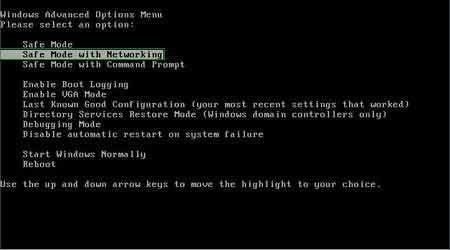
Video showing how to start Windows 7 in "Safe Mode with Networking":
Step 2
Log in to the account infected with the Windows Anytime Upgrade scam scam. Start your Internet browser and download a legitimate anti-spyware program. Update the anti-spyware software and start a full system scan.
Remove all the entries detected.
Alternative Windows Anytime Upgrade scam removal guide:
If this ransomware blocks your screen when you start your computer in Safe Mode with Networking, try starting your PC in Safe Mode with Command Prompt.
1. During your computer starting process, press the F8 key on your keyboard multiple times until the Windows Advanced Options menu appears, and then select Safe Mode with Command Prompt from the list and press ENTER.
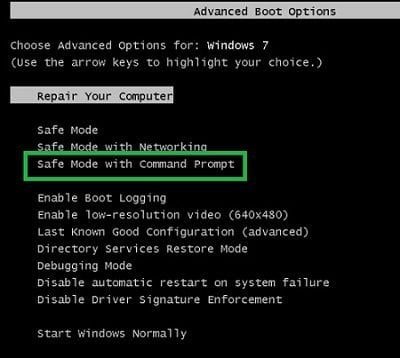
2. In the opened Command Prompt type explorer and press Enter. This command will open the Explorer window - do not close it and continue to the next step.
3. In the Command Prompt, type regedit and press Enter. This will open the Registry Editor window.
4. In the Registry Editor window, navigate to HKEY_LOCAL_MACHINE\SOFTWARE\Microsoft\Windows NT\CurrentVersion\Winlogon\
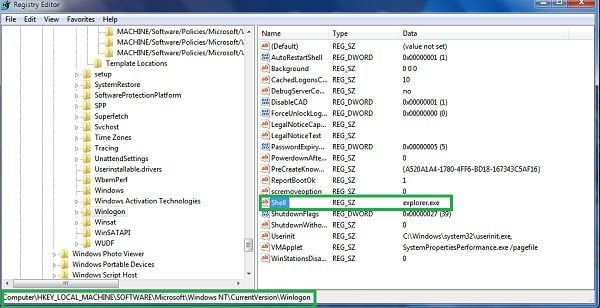
5. In the right side of the window, locate "Shell" and right click on it. Click on Modify. The default value in the Data column is Explorer.exe - if you see something else displayed in this window, remove it and type Explorer.exe (take a note of whatever else was displayed in the Data column - this is the path of the rogue execution file).
Use this information to navigate to the rogue executable and remove it.
6. Restart your computer, download and install legitimate anti-spyware software and perform a full system scan to eliminate any remnants of Windows Anytime Upgrade scam.
If you cannot start your computer in Safe Mode with Networking (or with Command Prompt), boot your computer using a rescue disk. Some variants of ransomware disable Safe Mode, making its removal more complicated.
For this step, you need access to another computer. After removing Windows Anytime Upgrade scam from your PC, restart your computer and scan it with legitimate antispyware software to remove any possible remnants of this security infection.
Step 3
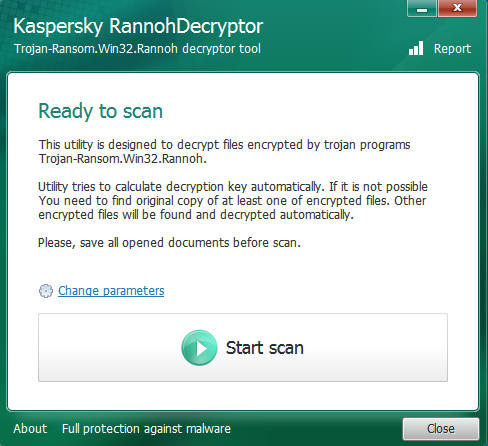
This ransomware encrypts the files on your computer. To decrypt your files, download and run Kaspersky's Rannoh Decryptor.
After launching this software click the "Start Scan" button. Average scan time is approximately 2 hours.
After completing these steps, your computer should be clean. Reboot your computer in Normal Mode.
Other tools known to remove Windows Anytime Upgrade screen lock:
If you continue to have problems removing this ransomware, try booting your computer using a rescue disk.


 Outstanding!
▼ Show Discussion