

Get free scan and check if your device is infected.
Remove it nowTo use full-featured product, you have to purchase a license for Combo Cleaner. Seven days free trial available. Combo Cleaner is owned and operated by RCS LT, the parent company of PCRisk.com.
What is Ireland's National Police Service?
Ireland's National Police Service is a screen locker scam distributed by Cyber criminals. This ransomware targets computer users from Ireland and is often spread using Trojans and misleading websites, which exploit your computer's security vulnerabilities.
After infiltrating your computer, this ransomware blocks your desktop with a message demanding that you pay a 100 Euro fine for watching child pornography, storing pirated content, etc.
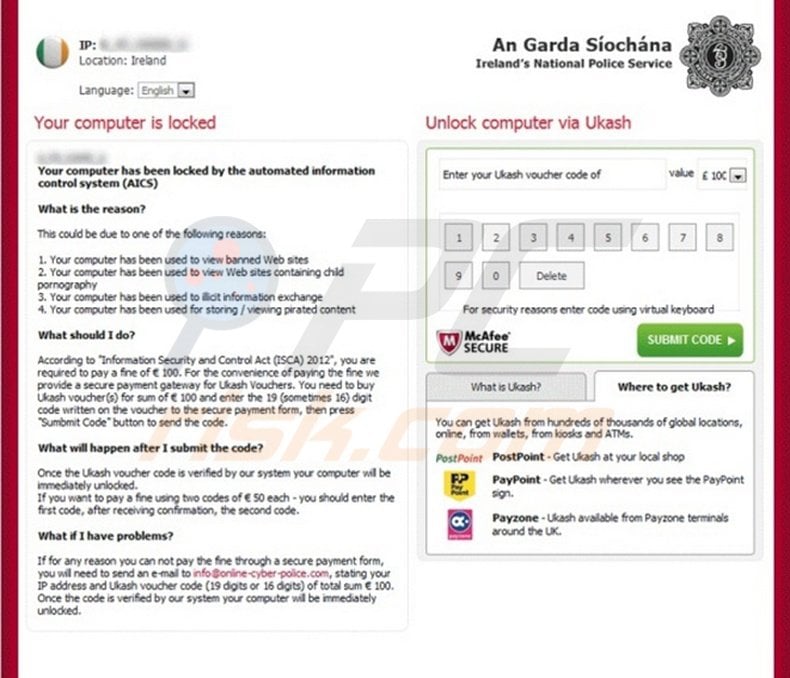
No authorities use screen lockers such as this to collect fines for any illegal activities. This message it a scam created by Internet criminals in the hope that you will fall for their trickery and send Ukash codes to them.
In fact, Ireland's National Police Service does not collect fines using screen lockers, therefore, ignore this message and do not pay this fabricated fine to Cyber criminals.
Update July 19, 2013 - Cyber criminals have released a new variant of this ransomware virus targeted at PC users from Ireland: GARDA "Your computer has been blocked" virus
Ireland's National Police Service is just one of many ransomware variants infecting Internet users' systems worldwide. For example, computer users from the USA are being targeted by rogue FBI ransomware.
To prevent these security infections from infiltrating your PC, use legitimate antivirus and antispyware programs and update your operating system and your installed programs regularly.
Ukash (Smart Voucher Limited) is a legitimate company and not related to ransomware viruses - Cyber criminals use the name of this service to extort money from unsuspecting PC users.
A fake message shown by Ireland's National Police Service screen lock:
Irelands National Police Service.
Your computer is locked.
Your computer has been locked by the automated information control system (AICS)
What is the reason?
This could be due to one of the following reasons:
1. Your computer has been used to view banned Web sites
2. Your computer has been used to view Web site containing child pornography.
3. Your computer has been used to illicit information exchange
4. Your computer has been used for storing/viewing pirated content
What should I do?
According to "Information Security and Control Act (ISCA) 2012", you are required to pay a fine of 100 euro. For the convenience of paying the fine we provide a secure payment gateway for Ukash Vouchers. You need to buy Ukash voucher(s) for the sum of 100 euro and enter the 19 (sometimes 16) digit code written on the voucher to the secure payment form, then press "Submit Code" button to send the code. What will happen after I submit the code? Once the Ukash voucher code is verified by our system your computer will be immediately unlocked. If you want to pay a fine using two codes of 50 euro each - you should enter the first code, after receiving confirmation, the second code. What if I have problems? If for any reason you can not pay the fine through a secure payment form, you will need to send an e-mail to info@online-cyber-police.com, stating your IP address and Ukash voucher code (19 digits or 16 digits) of total sum of 100 euro. Once the code is verified by our system your computer will be immediately unlocked.
Instant automatic malware removal:
Manual threat removal might be a lengthy and complicated process that requires advanced IT skills. Combo Cleaner is a professional automatic malware removal tool that is recommended to get rid of malware. Download it by clicking the button below:
DOWNLOAD Combo CleanerBy downloading any software listed on this website you agree to our Privacy Policy and Terms of Use. To use full-featured product, you have to purchase a license for Combo Cleaner. 7 days free trial available. Combo Cleaner is owned and operated by RCS LT, the parent company of PCRisk.com.
Video suggesting what steps should be taken in case of a ransomware infection:
Quick menu:
- What is Guard of the Peace Ransomware?
- STEP 1. Reporting ransomware to authorities.
- STEP 2. Isolating the infected device.
- STEP 3. Identifying the ransomware infection.
- STEP 4. Searching for ransomware decryption tools.
- STEP 5. Restoring files with data recovery tools.
- STEP 6. Creating data backups.
If you are a victim of a ransomware attack we recommend reporting this incident to authorities. By providing information to law enforcement agencies you will help track cybercrime and potentially assist in the prosecution of the attackers. Here's a list of authorities where you should report a ransomware attack. For the complete list of local cybersecurity centers and information on why you should report ransomware attacks, read this article.
List of local authorities where ransomware attacks should be reported (choose one depending on your residence address):
 USA - Internet Crime Complaint Centre IC3
 United Kingdom - Action Fraud
 Spain - Policía Nacional
 France - Ministère de l'Intérieur
 Germany - Polizei
 Italy - Polizia di Stato
 The Netherlands - Politie
 Poland - Policja
 Portugal - Polícia Judiciária
Isolating the infected device:
Some ransomware-type infections are designed to encrypt files within external storage devices, infect them, and even spread throughout the entire local network. For this reason, it is very important to isolate the infected device (computer) as soon as possible.
Step 1: Disconnect from the internet.
The easiest way to disconnect a computer from the internet is to unplug the Ethernet cable from the motherboard, however, some devices are connected via a wireless network and for some users (especially those who are not particularly tech-savvy), disconnecting cables may seem troublesome. Therefore, you can also disconnect the system manually via Control Panel:
Navigate to the "Control Panel", click the search bar in the upper-right corner of the screen, enter "Network and Sharing Center" and select search result: 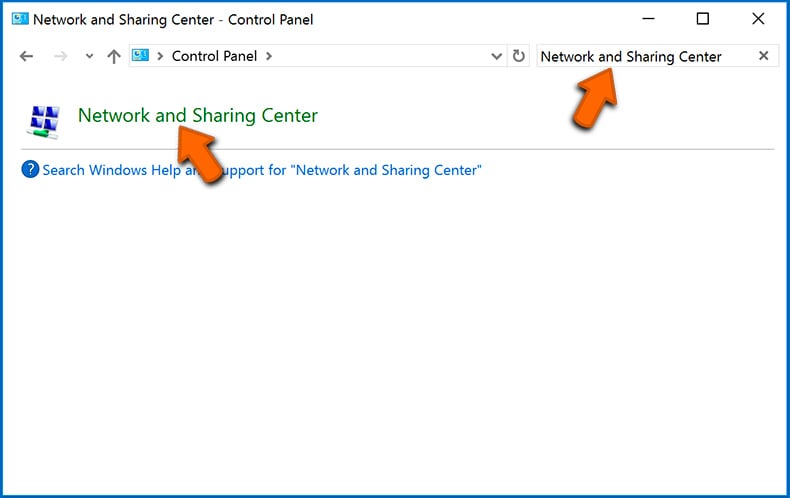
Click the "Change adapter settings" option in the upper-left corner of the window: 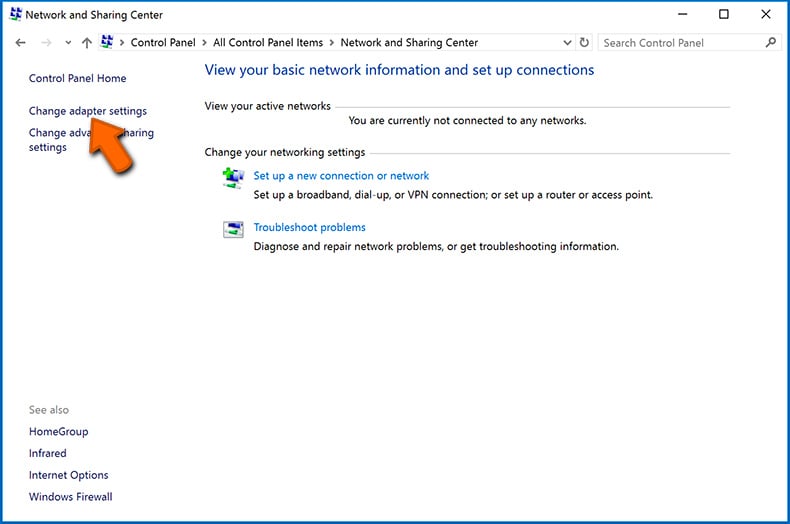
Right-click on each connection point and select "Disable". Once disabled, the system will no longer be connected to the internet. To re-enable the connection points, simply right-click again and select "Enable". 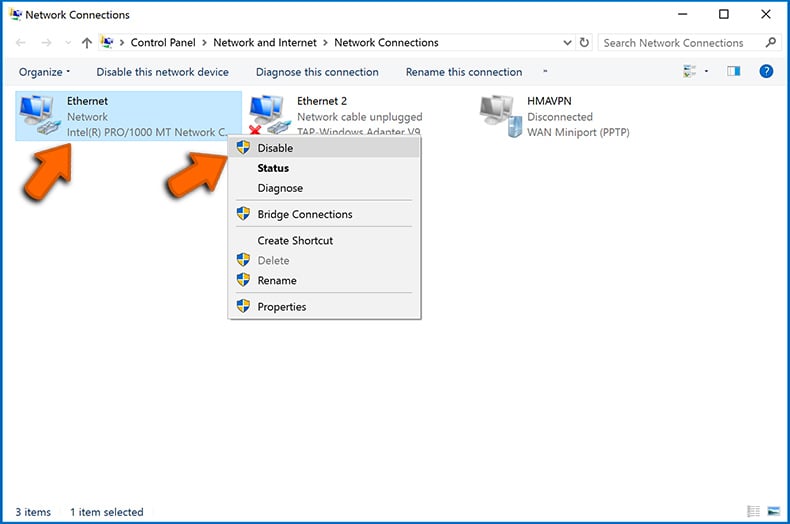
Step 2: Unplug all storage devices.
As mentioned above, ransomware might encrypt data and infiltrate all storage devices that are connected to the computer. For this reason, all external storage devices (flash drives, portable hard drives, etc.) should be disconnected immediately, however, we strongly advise you to eject each device before disconnecting to prevent data corruption:
Navigate to "My Computer", right-click on each connected device, and select "Eject": 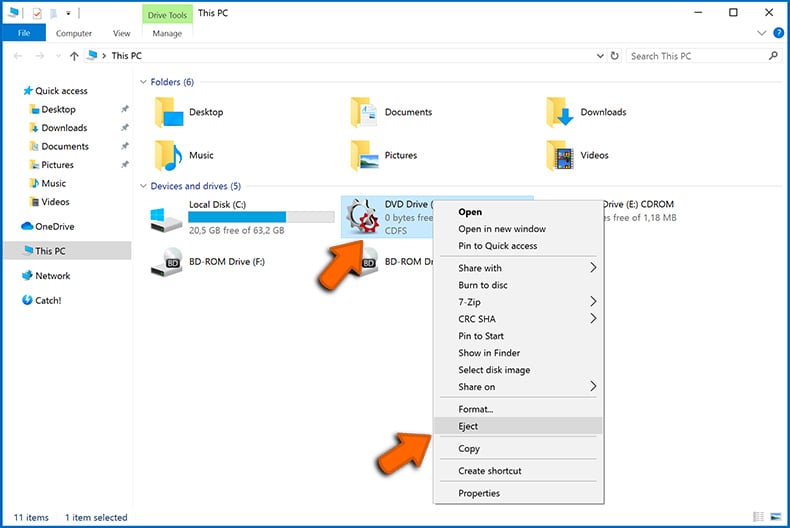
Step 3: Log-out of cloud storage accounts.
Some ransomware-type might be able to hijack software that handles data stored within "the Cloud". Therefore, the data could be corrupted/encrypted. For this reason, you should log-out of all cloud storage accounts within browsers and other related software. You should also consider temporarily uninstalling the cloud-management software until the infection is completely removed.
Identify the ransomware infection:
To properly handle an infection, one must first identify it. Some ransomware infections use ransom-demand messages as an introduction (see the WALDO ransomware text file below).
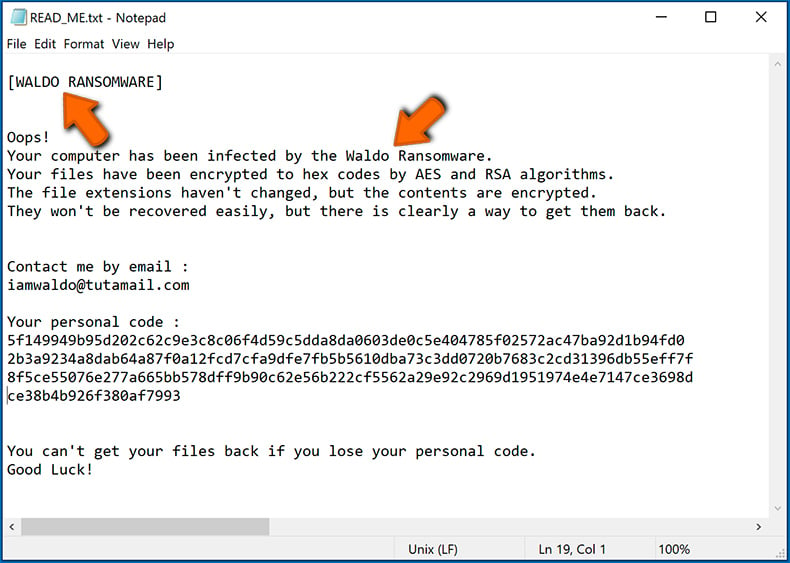
This, however, is rare. In most cases, ransomware infections deliver more direct messages simply stating that data is encrypted and that victims must pay some sort of ransom. Note that ransomware-type infections typically generate messages with different file names (for example, "_readme.txt", "READ-ME.txt", "DECRYPTION_INSTRUCTIONS.txt", "DECRYPT_FILES.html", etc.). Therefore, using the name of a ransom message may seem like a good way to identify the infection. The problem is that most of these names are generic and some infections use the same names, even though the delivered messages are different and the infections themselves are unrelated. Therefore, using the message filename alone can be ineffective and even lead to permanent data loss (for example, by attempting to decrypt data using tools designed for different ransomware infections, users are likely to end up permanently damaging files and decryption will no longer be possible even with the correct tool).
Another way to identify a ransomware infection is to check the file extension, which is appended to each encrypted file. Ransomware infections are often named by the extensions they append (see files encrypted by Qewe ransomware below).
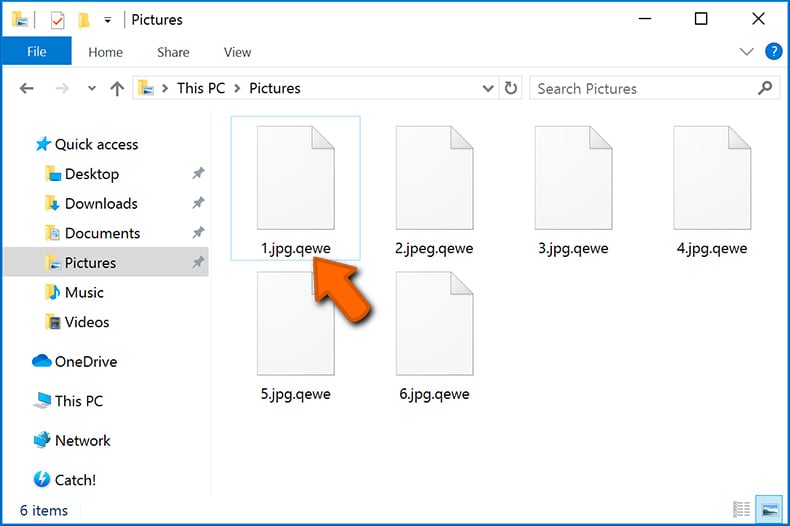
This method is only effective, however, when the appended extension is unique - many ransomware infections append a generic extension (for example, ".encrypted", ".enc", ".crypted", ".locked", etc.). In these cases, identifying ransomware by its appended extension becomes impossible.
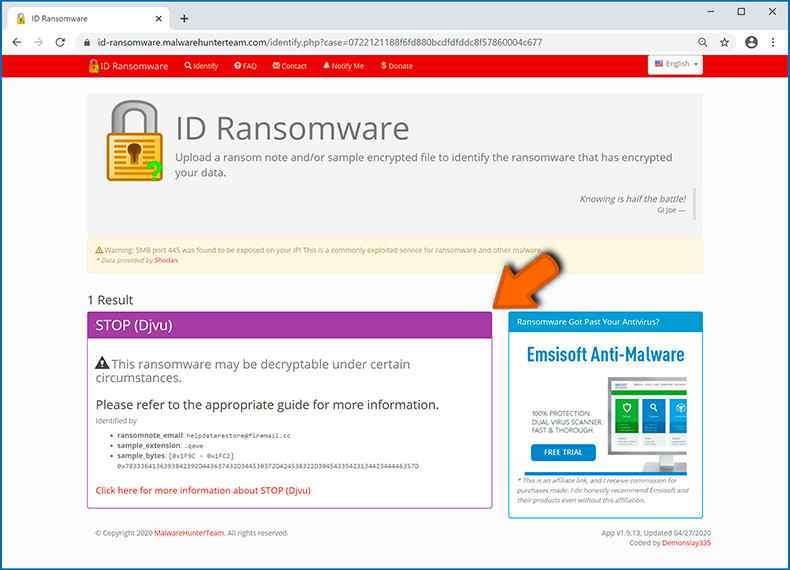
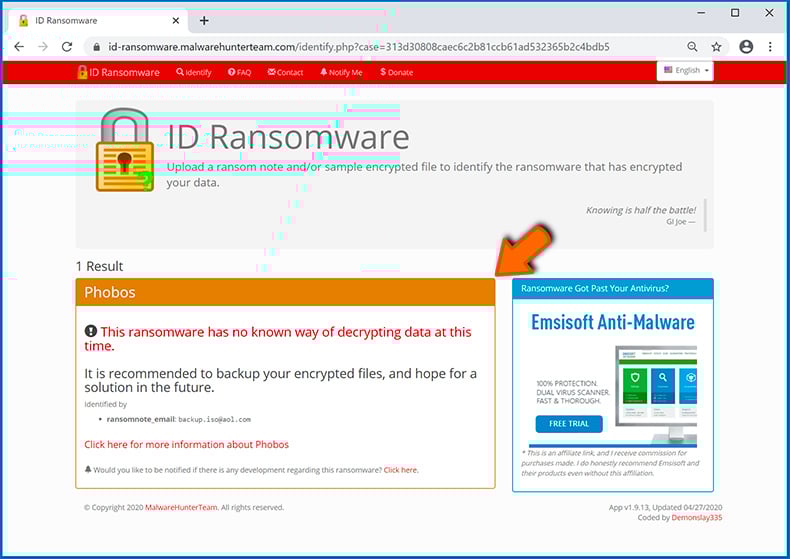
One of the easiest and quickest ways to identify a ransomware infection is to use the ID Ransomware website. This service supports most existing ransomware infections. Victims simply upload a ransom message and/or one encrypted file (we advise you to upload both if possible).
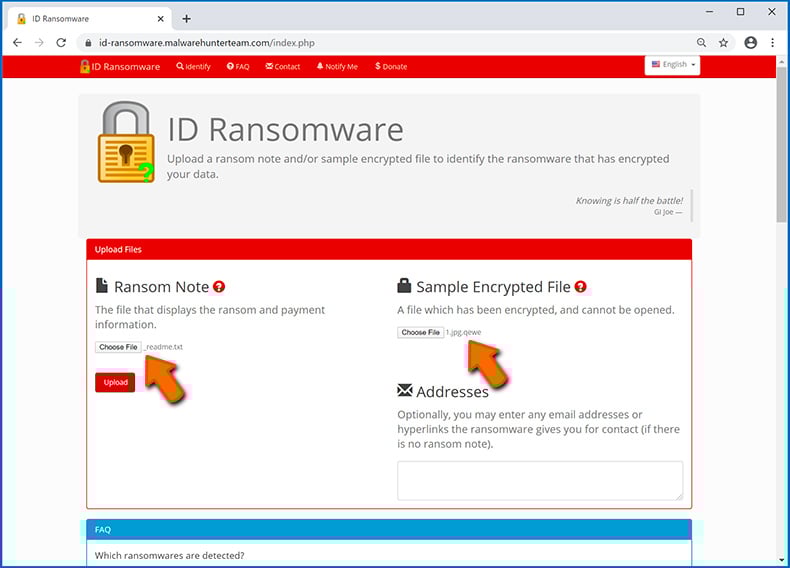
The ransomware will be identified within seconds and you will be provided with various details, such as the name of the malware family to which the infection belongs, whether it is decryptable, and so on.
Example 1 (Qewe [Stop/Djvu] ransomware):
Example 2 (.iso [Phobos] ransomware):
If your data happens to be encrypted by ransomware that is not supported by ID Ransomware, you can always try searching the internet by using certain keywords (for example, a ransom message title, file extension, provided contact emails, crypto wallet addresses, etc.).
Search for ransomware decryption tools:
Encryption algorithms used by most ransomware-type infections are extremely sophisticated and, if the encryption is performed properly, only the developer is capable of restoring data. This is because decryption requires a specific key, which is generated during the encryption. Restoring data without the key is impossible. In most cases, cybercriminals store keys on a remote server, rather than using the infected machine as a host. Dharma (CrySis), Phobos, and other families of high-end ransomware infections are virtually flawless, and thus restoring data encrypted without the developers' involvement is simply impossible. Despite this, there are dozens of ransomware-type infections that are poorly developed and contain a number of flaws (for example, the use of identical encryption/decryption keys for each victim, keys stored locally, etc.). Therefore, always check for available decryption tools for any ransomware that infiltrates your computer.
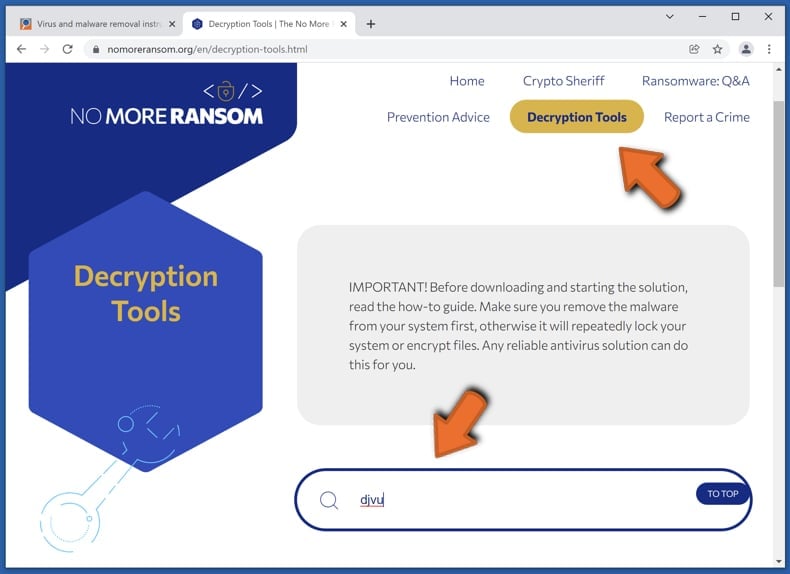
Finding the correct decryption tool on the internet can be very frustrating. For this reason, we recommend that you use the No More Ransom Project and this is where identifying the ransomware infection is useful. The No More Ransom Project website contains a "Decryption Tools" section with a search bar. Enter the name of the identified ransomware, and all available decryptors (if there are any) will be listed.
Restore files with data recovery tools:
Depending on the situation (quality of ransomware infection, type of encryption algorithm used, etc.), restoring data with certain third-party tools might be possible. Therefore, we advise you to use the Recuva tool developed by CCleaner. This tool supports over a thousand data types (graphics, video, audio, documents, etc.) and it is very intuitive (little knowledge is necessary to recover data). In addition, the recovery feature is completely free.
Step 1: Perform a scan.
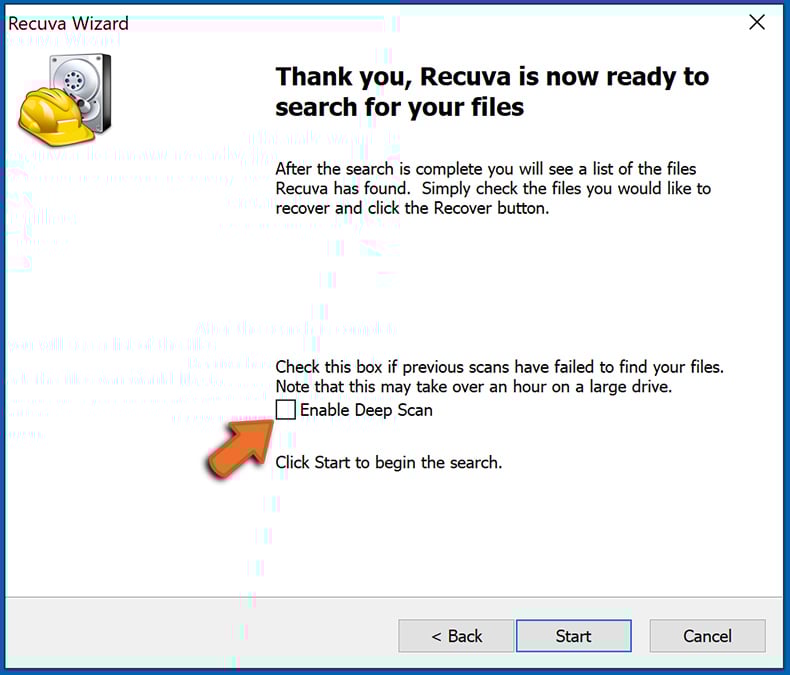
Run the Recuva application and follow the wizard. You will be prompted with several windows allowing you to choose what file types to look for, which locations should be scanned, etc. All you need to do is select the options you're looking for and start the scan. We advise you to enable the "Deep Scan" before starting, otherwise, the application's scanning capabilities will be restricted.
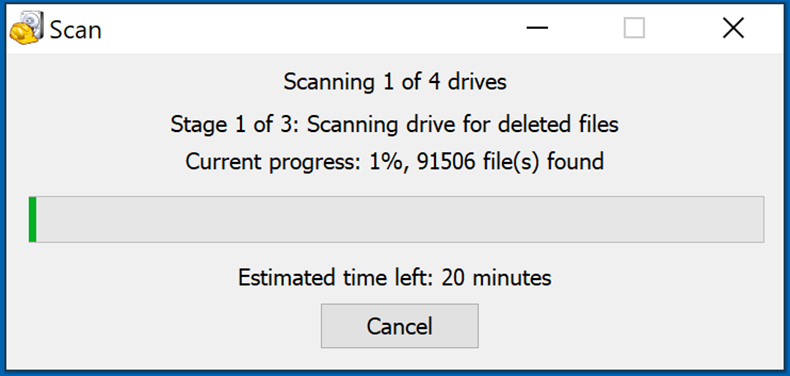
Wait for Recuva to complete the scan. The scanning duration depends on the volume of files (both in quantity and size) that you are scanning (for example, several hundred gigabytes could take over an hour to scan). Therefore, be patient during the scanning process. We also advise against modifying or deleting existing files, since this might interfere with the scan. If you add additional data (for example, downloading files/content) while scanning, this will prolong the process:
Step 2: Recover data.
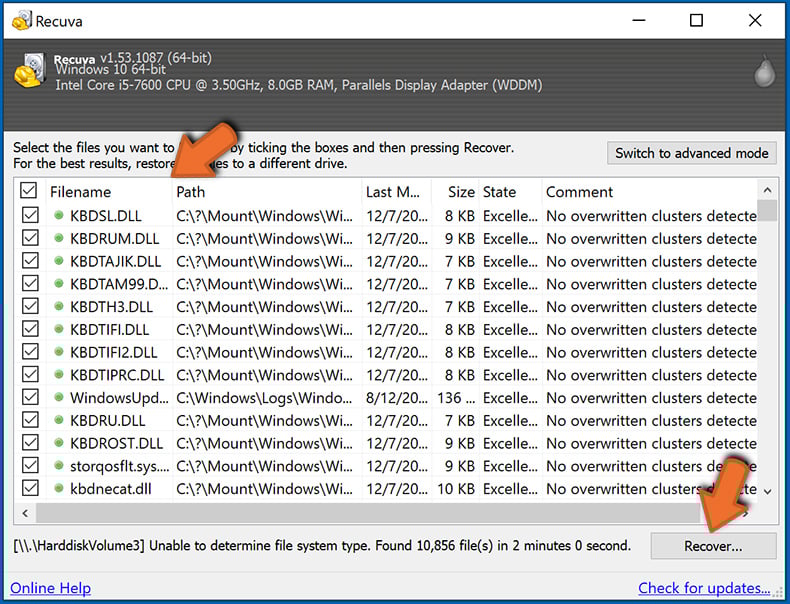
Once the process is complete, select the folders/files you wish to restore and simply click "Recover". Note that some free space on your storage drive is necessary to restore data:
Create data backups:
Proper file management and creating backups is essential for data security. Therefore, always be very careful and think ahead.
Partition management: We recommend that you store your data in multiple partitions and avoid storing important files within the partition that contains the entire operating system. If you fall into a situation whereby you cannot boot the system and are forced to format the disk on which the operating system is installed (in most cases, this is where malware infections hide), you will lose all data stored within that drive. This is the advantage of having multiple partitions: if you have the entire storage device assigned to a single partition, you will be forced to delete everything, however, creating multiple partitions and allocating the data properly allows you to prevent such problems. You can easily format a single partition without affecting the others - therefore, one will be cleaned and the others will remain untouched, and your data will be saved. Managing partitions is quite simple and you can find all the necessary information on Microsoft's documentation web page.
Data backups: One of the most reliable backup methods is to use an external storage device and keep it unplugged. Copy your data to an external hard drive, flash (thumb) drive, SSD, HDD, or any other storage device, unplug it and store it in a dry place away from the sun and extreme temperatures. This method is, however, quite inefficient, since data backups and updates need to be made regularly. You can also use a cloud service or remote server. Here, an internet connection is required and there is always the chance of a security breach, although it's a really rare occasion.
We recommend using Microsoft OneDrive for backing up your files. OneDrive lets you store your personal files and data in the cloud, sync files across computers and mobile devices, allowing you to access and edit your files from all of your Windows devices. OneDrive lets you save, share and preview files, access download history, move, delete, and rename files, as well as create new folders, and much more.
You can back up your most important folders and files on your PC (your Desktop, Documents, and Pictures folders). Some of OneDrive’s more notable features include file versioning, which keeps older versions of files for up to 30 days. OneDrive features a recycling bin in which all of your deleted files are stored for a limited time. Deleted files are not counted as part of the user’s allocation.
The service is built using HTML5 technologies and allows you to upload files up to 300 MB via drag and drop into the web browser or up to 10 GB via the OneDrive desktop application. With OneDrive, you can download entire folders as a single ZIP file with up to 10,000 files, although it can’t exceed 15 GB per single download.
OneDrive comes with 5 GB of free storage out of the box, with an additional 100 GB, 1 TB, and 6 TB storage options available for a subscription-based fee. You can get one of these storage plans by either purchasing additional storage separately or with Office 365 subscription.
Creating a data backup:
The backup process is the same for all file types and folders. Here’s how you can back up your files using Microsoft OneDrive
Step 1: Choose the files/folders you want to backup.
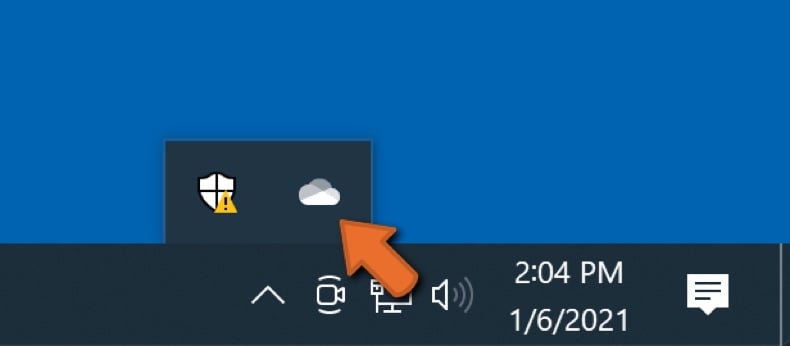
Click the OneDrive cloud icon to open the OneDrive menu. While in this menu, you can customize your file backup settings.
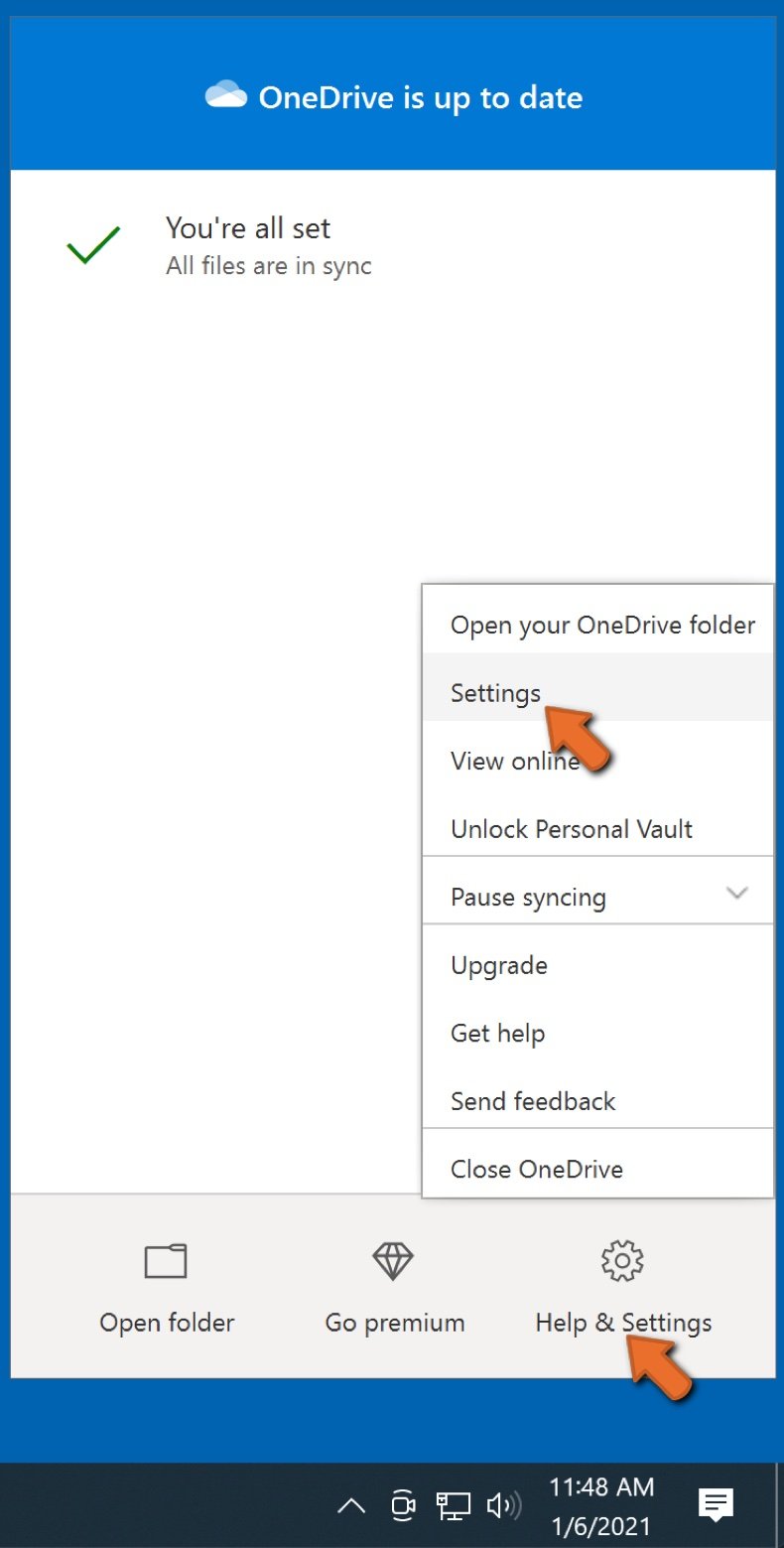
Click Help & Settings and then select Settings from the drop-down menu.
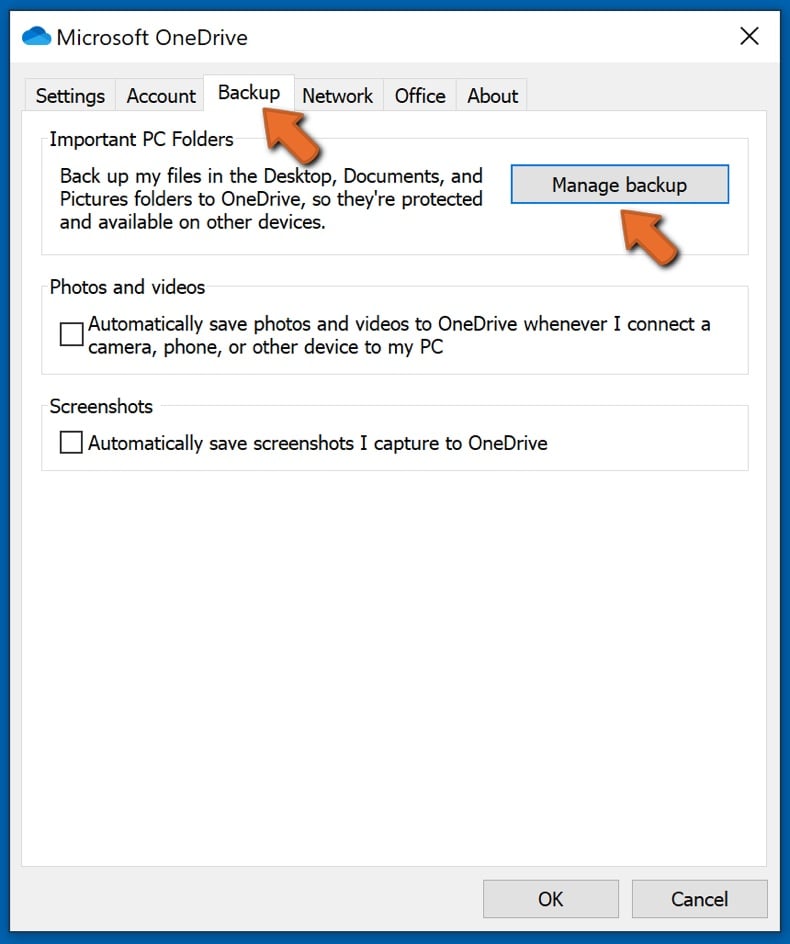
Go to the Backup tab and click Manage backup.
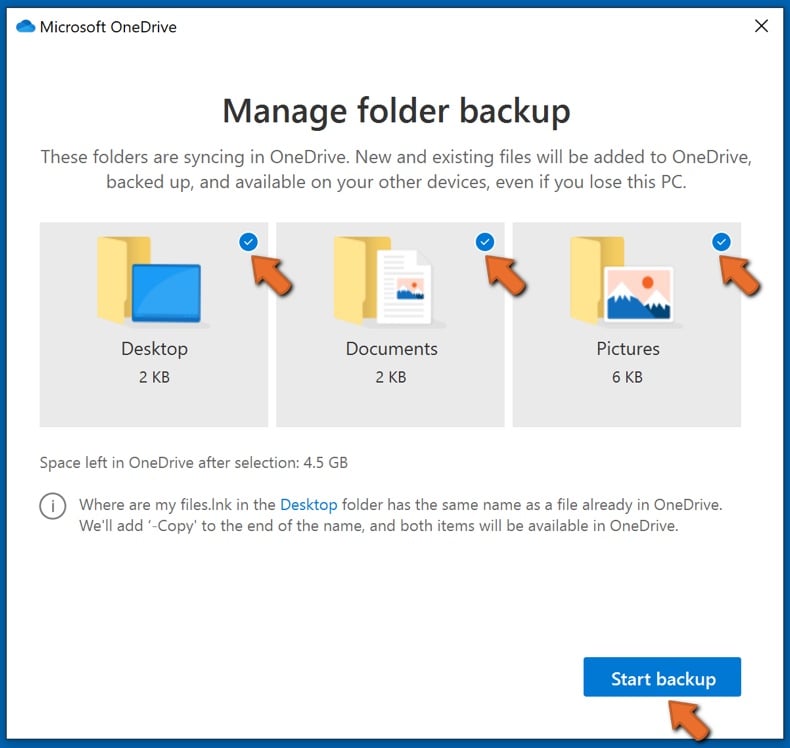
In this menu, you can choose to backup the Desktop and all of the files on it, and Documents and Pictures folders, again, with all of the files in them. Click Start backup.
Now, when you add a file or folder in the Desktop and Documents and Pictures folders, they will be automatically backed up on OneDrive.
To add folders and files, not in the locations shown above, you have to add them manually.
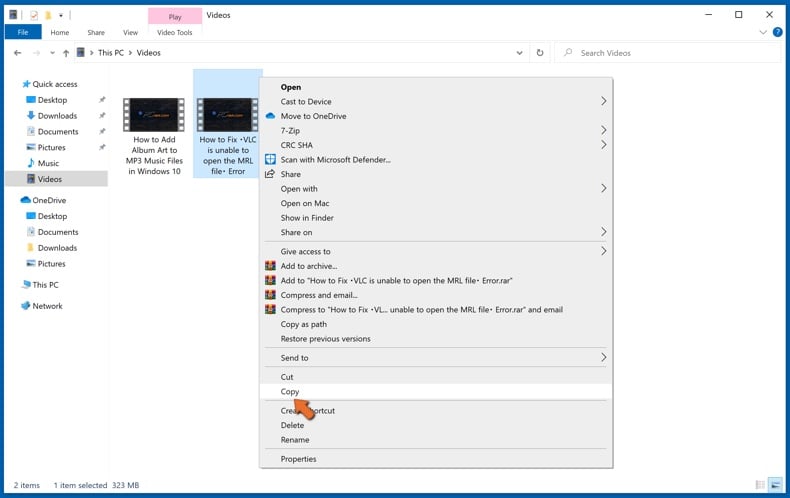
Open File Explorer and navigate to the location of the folder/file you want to backup. Select the item, right-click it, and click Copy.
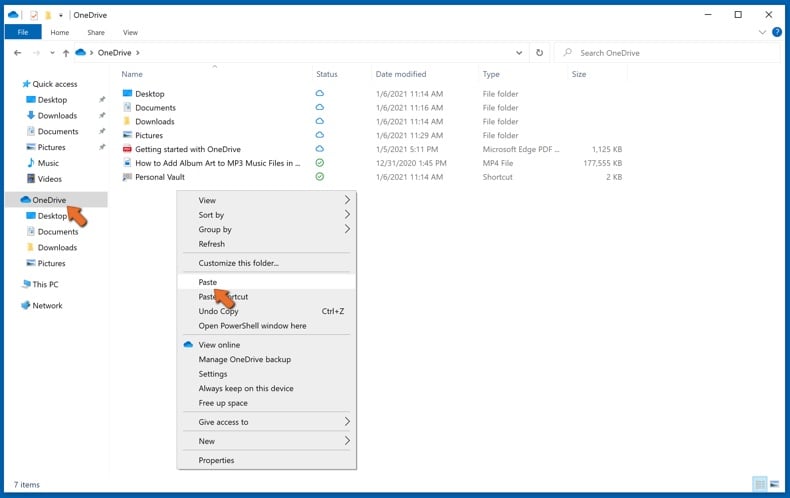
Then, navigate to OneDrive, right-click anywhere in the window and click Paste. Alternatively, you can just drag and drop a file into OneDrive. OneDrive will automatically create a backup of the folder/file.
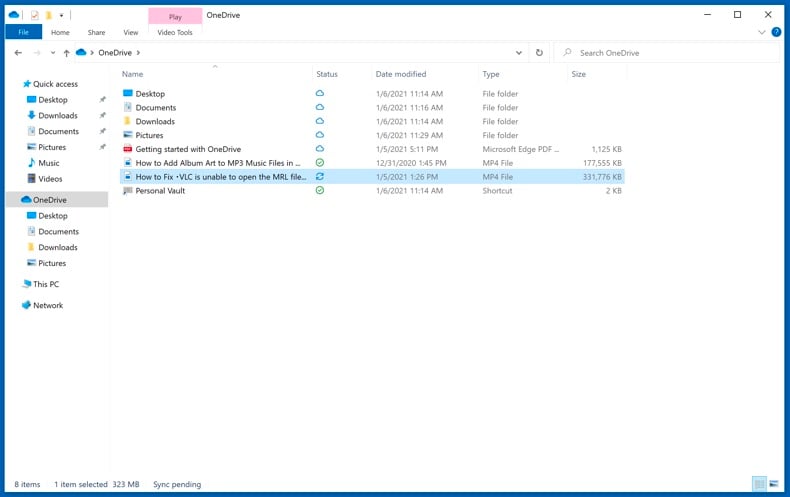
All of the files added to the OneDrive folder are backed up in the cloud automatically. The green circle with the checkmark in it indicates that the file is available both locally and on OneDrive and that the file version is the same on both. The blue cloud icon indicates that the file has not been synced and is available only on OneDrive. The sync icon indicates that the file is currently syncing.
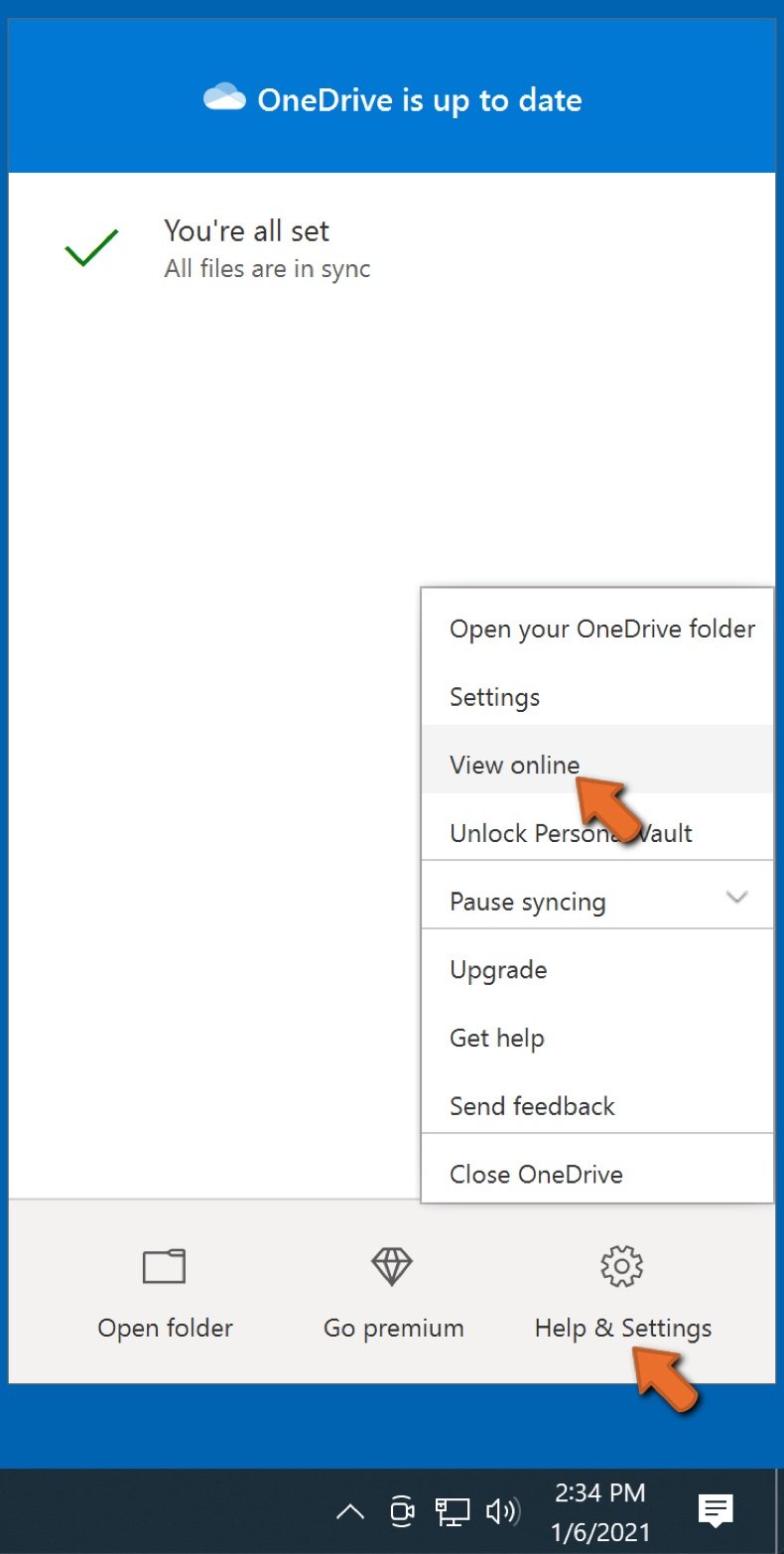
To access files only located on OneDrive online, go to the Help & Settings drop-down menu and select View online.
Step 2: Restore corrupted files.
OneDrive makes sure that the files stay in sync, so the version of the file on the computer is the same version on the cloud. However, if ransomware has encrypted your files, you can take advantage of OneDrive’s Version history feature that will allow you to restore the file versions prior to encryption.
Microsoft 365 has a ransomware detection feature that notifies you when your OneDrive files have been attacked and guide you through the process of restoring your files. It must be noted, however, that if you don’t have a paid Microsoft 365 subscription, you only get one detection and file recovery for free.
If your OneDrive files get deleted, corrupted, or infected by malware, you can restore your entire OneDrive to a previous state. Here’s how you can restore your entire OneDrive:
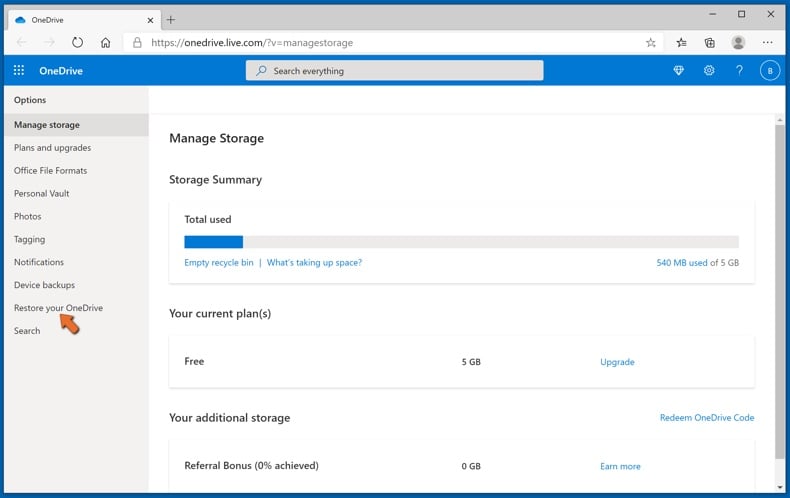
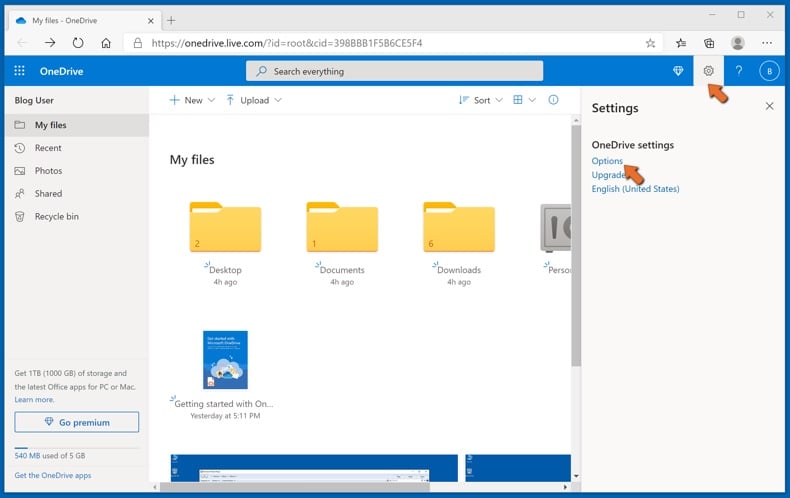
1. If you're signed in with a personal account, click the Settings cog at the top of the page. Then, click Options and select Restore your OneDrive.
If you're signed in with a work or school account, click the Settings cog at the top of the page. Then, click Restore your OneDrive.
2. On the Restore your OneDrive page, select a date from the drop-down list. Note that if you're restoring your files after automatic ransomware detection, a restore date will be selected for you.
3. After configuring all of the file restoration options, click Restore to undo all the activities you selected.
The best way to avoid damage from ransomware infections is to maintain regular up-to-date backups.
Share:
 Facebook
 X.com
X.com
 LinkedIn
 Copy Link

Tomas Meskauskas
Expert security researcher, professional malware analyst
I am passionate about computer security and technology. I have an experience of over 10 years working in various companies related to computer technical issue solving and Internet security. I have been working as an author and editor for pcrisk.com since 2010. Follow me on Twitter and LinkedIn to stay informed about the latest online security threats.
PCrisk security portal is brought by a company RCS LT.
Joined forces of security researchers help educate computer users about the latest online security threats. More information about the company RCS LT.
Our malware removal guides are free. However, if you want to support us you can send us a donation.
DonatePCrisk security portal is brought by a company RCS LT.
Joined forces of security researchers help educate computer users about the latest online security threats. More information about the company RCS LT.
Our malware removal guides are free. However, if you want to support us you can send us a donation.
Donate
▼ Show Discussion