Fake Windows Genuine Advantage Notifications
 Written by Tomas Meskauskas on (updated)
What is Fake Windows Genuine Advantage Notifications?
Original Windows Genuine Advantage Notifications (WGA) notifies computer users if their copy of the Windows operating system is not genuine. Recently, Cyber criminals began exploiting the name of Windows Genuine Advantage Notifications within their 'ransomware' (a computer infection that locks users' computer screens and demands payment for a copyright violation, sofware update, etc.)
Such screen lockers are popular amongst Cyber criminals who design their ransomware using names of authorities and reputable companies. In this way, they make their fake messages appear authentic.
Furthermore, these computer infections are configured by country - ransomware is capable of identifying your computer's IP address and thus able to determine the language in which the fake message is delivered.
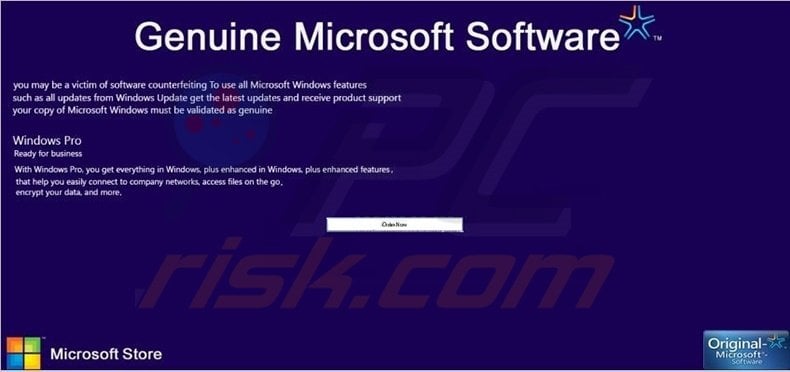
Our researchers discovered a type of 'Windows Genuine Advantage Notifications' ransomware that targeted Internet users from Germany. In the near future, however, Cyber criminals could translate their deceptive message for distribution to other countries.
When fake Windows Genuine Advantage Notifications ransomware infects your computer, you will be unable to access your desktop and a message will state that your copy of the Windows operating system in not genuine. It then presents computer users with two options: to pay 50 Euros for your existing copy of Windows, or; pay 100 Euros and upgrade to Windows 8.
Furthermore, this message reports that, after successful payment, you have to wait 12 hours in order to unblock your PC. There are two methods of payment offered: Paysafecard and Ukash.
Do not pay anything - it is a scam.
If you observe messages as presented in the screenshot, or similar, do not pay anything - if you do, you will send your money to Cyber criminals and your PC will remain blocked. Cyber criminals use the payment methods of Ukash and Paysafecard in order to make tracking their activities more difficult.
Furthermore, the message states that you have to wait 12 hours before your PC will be unlocked - this time frame is used to clear your money. Ignore the information presented by this fake Windows Genuine Advantage Notifications (WGA) screen, and use this removal guide to unblock your PC.
A message displayed by Fake Windows Genuine Advantage Notifications:
Windows Genuine Advantage-Benachrichtigungen ist ein Bestandteil des Bemühens von Microsoft, Softwarepiraterie einzudämmen. Diese Software hilft dabei, zu bestimmen, ob es sich bei der auf Ihrem Computer installierten Windows Version um eine Originalversion oder Raubkopie handelt. Leider konnte diese Prüfung nicht erfolgreich abgeschlossen werden, daher wurde der Zugriff auf Ihren Computer temporär gesperrt. Als Gründe hierfür gelten eine abgelaufene oder mehrfach verwendete Windows-Lizenz, sowie eine illegal erworbene Windows-Lizenz (Raubkopie). Um den Zugang zu Ihrem PC und den darauf befindlichen Daten wieder zu erlangen, können Sie über das Bezahlfeld eine neue Original-Lizenz erwerben. Um eine Lizenz zu erhalten, erwerben Sie bitte einen Code eines unserer offiziellen Partner Paysafecard oder ukash und geben Sie diesen in das unten vorgesehene Fenster ein und bestätigen Sie mit "OK". Eine Lizenzierung erfolgt automatisch innerhalb der nächsten 12 Stunden, bitte lassen Sie Ihren Computer in dieser Zeit eingeschaltet, damit der Vorgang durchgeführt werden kann. Falls Sie ein Upgrade auf Windows 8 wünschen, ist dies zu einem Einführungspreis von nur 100 € möglich.
Vielen Dank für das in Windows und Microsoft gesetze Vertrauen.
Instant automatic malware removal:
Manual threat removal might be a lengthy and complicated process that requires advanced IT skills. Combo Cleaner is a professional automatic malware removal tool that is recommended to get rid of malware. Download it by clicking the button below:
▼ DOWNLOAD Combo Cleaner
By downloading any software listed on this website you agree to our Privacy Policy and Terms of Use. To use full-featured product, you have to purchase a license for Combo Cleaner. 7 days free trial available. Combo Cleaner is owned and operated by Rcs Lt, the parent company of PCRisk.com read more.
Quick menu:
- What is Fake Windows Genuine Advantage Notifications?
- STEP 1. "Fake Windows Genuine Advantage Notifications" virus removal using safe mode with networking.
- STEP 2. "Fake Windows Genuine Advantage Notifications" ransomware removal using safe mode with command prompt.
Fake Windows Genuine Advantage Notifications removal:
Step 1
Start your computer in Safe Mode. Click Start, click Shut Down, click Restart, click OK.
During your computer starting process press the F8 key on your keyboard multiple times until you see the Windows Advanced Option menu, then select Safe Mode with Networking from the list.
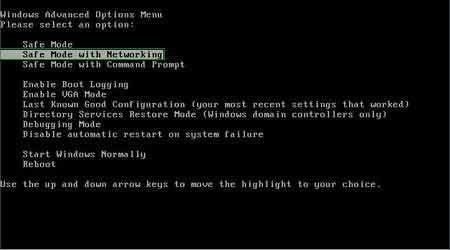
Video showing how to start Windows 7 in "Safe Mode with Networking":
Step 2
Log in to the account infected with Fake Windows Genuine Advantage Notifications. Start your Internet browser and download a legitimate anti-spyware program.
Update the anti-spyware software and start a full system scan. Remove all the entries detected.
After completing these steps, your computer should be clean. Reboot your computer in Normal Mode.
Alternative Fake Windows Genuine Advantage Notifications removal guide:
If this ransomware blocks your screen when you start your computer in Safe Mode with Networking, try starting your PC in Safe Mode with Command Prompt.
1. During your computer starting process, press the F8 key on your keyboard multiple times until the Windows Advanced Options menu appears, and then select Safe Mode with Command Prompt from the list and press ENTER.
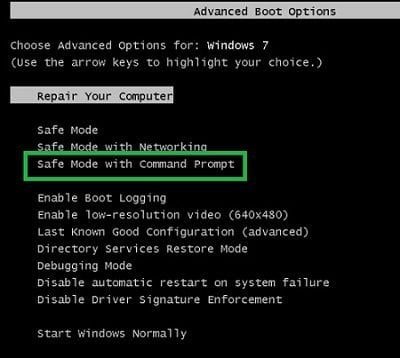
2. In the opened command prompt type explorer and press Enter. This command will open explorer window.
Do not close it and continue to the next step.
3. In the Command Prompt type regedit and press Enter. This will open the Registry Editor window.
4. In the Registry Editor window, navigate to HKEY_LOCAL_MACHINE\SOFTWARE\Microsoft\Windows NT\CurrentVersion\Winlogon\
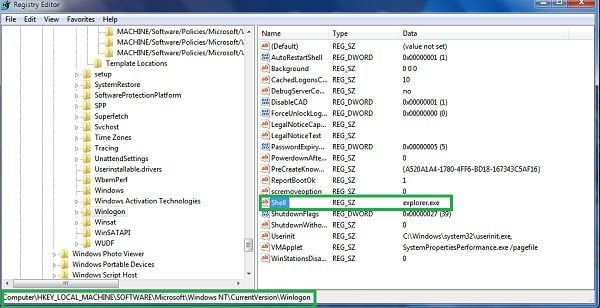
5. In the right side of the window, locate "Shell" and right click on it. Click on Modify. The default value in the Data column is Explorer.exe - if you see something else displayed in this window, remove it and type Explorer.exe (take a note of whatever else was displayed in the Data column - this is the path of the rogue execution file).
Use this information to navigate to the rogue executable and remove it.
6. Restart your computer, download and install legitimate anti-spyware software and perform a full system scan to eliminate any remnants of Fake Windows Genuine Advantage Notifications.
If you cannot start your computer in Safe Mode with Networking (or with Command Prompt), boot your computer using a rescue disk. Some variants of ransomware disable Safe Mode, making its removal more complicated.
For this step, you need access to another computer. After removing fake Windows Genuine Advantage Notifications from your PC, restart your computer and scan it with legitimate antispyware software to remove any possible remnants of this security infection.
Anti-spyware programs known to detect and remove Fake Windows Genuine Advantage Notifications:

 Outstanding!
▼ Show Discussion