

Get free scan and check if your device is infected.
Remove it nowTo use full-featured product, you have to purchase a license for Combo Cleaner. Seven days free trial available. Combo Cleaner is owned and operated by RCS LT, the parent company of PCRisk.com.
What is BundesPolizei?
BundesPolizei is a screen locker created by Cyber criminals with the intention of stealing money from unsuspecting computer users. This scam is proliferated through Trojans and misleading websites.
When installed on your computer, BundesPolizei scam will lock your desktop. This ransomware is targeted at German-speaking computer users.
The message reported by the screen locker states that you have been watching porn and performed some illegal activities whilst browsing the Internet. You are asked to pay a 100 Euro fine to unlock your computer.
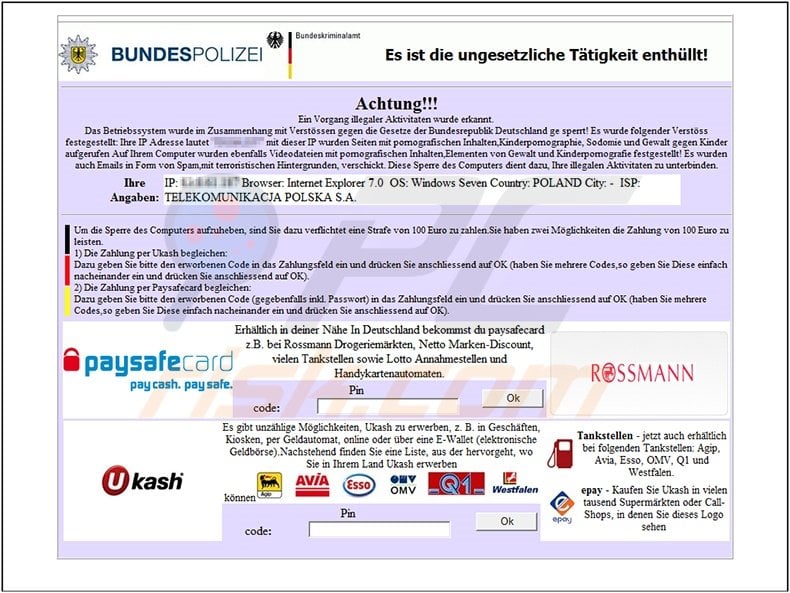
You should not trust this message - it is a scam. Internet criminals created this screen locker to steal money from your credit card account.
If you have already paid the to unlock your computer, you should contact your credit card company and dispute the charges. To make the message appear authentic, the bogus software displays your ISP, IP address, and a name of a browser you were using.
Ignore the message and remove this ransomware from your PC. Use the removal guide provided to completely remove BundesPolizei fake message from your computer.
Instant automatic malware removal:
Manual threat removal might be a lengthy and complicated process that requires advanced IT skills. Combo Cleaner is a professional automatic malware removal tool that is recommended to get rid of malware. Download it by clicking the button below:
DOWNLOAD Combo CleanerBy downloading any software listed on this website you agree to our Privacy Policy and Terms of Use. To use full-featured product, you have to purchase a license for Combo Cleaner. 7 days free trial available. Combo Cleaner is owned and operated by RCS LT, the parent company of PCRisk.com.
Quick menu:
- What is BundesPolizei?
- STEP 1. "BundesPolizei" virus removal using safe mode with networking.
- STEP 2. "BundesPolizei" ransomware removal using System Restore.
BundesPolizei virus removal:
Step 1
Start your computer in Safe Mode. Click Start, click Shut Down, click Restart, click OK.
During your computer starting process press the F8 key on your keyboard multiple times until you see the Windows Advanced Option menu, then select Safe Mode with Networking from the list.
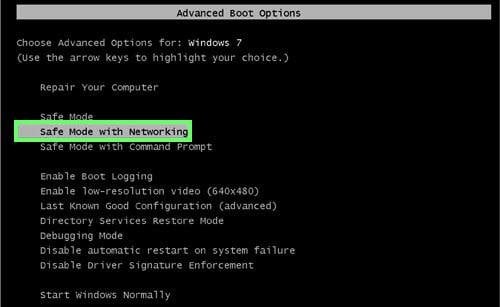
Here is a video demonstrating how to start Windows in "Safe Mode with Networking":
Windows XP users:
Windows Vista / 7 users:
Windows 8 users:
Step 2
Log in to the account that is infected with BundesPolizei virus. Start your Internet browser and download recommended anti-spyware program. Update the anti-spyware software and start a full system scan. Remove all the entries that it detects.
DOWNLOAD remover for malware infections
Combo Cleaner checks if your computer is infected with malware. To use full-featured product, you have to purchase a license for Combo Cleaner. 7 days free trial available. Combo Cleaner is owned and operated by RCS LT, the parent company of PCRisk.com.
BundesPolizei virus removal using System Restore:
This removal method can be used if you cannot boot your computer in Safe Mode with Networking (BundesPolizei ransomware blocks this mode).
Video showing how to remove ransomware virus using 'Safe Mode with Command Prompt' and 'System Restore':
1. Start your computer in Safe Mode with Command Prompt. During the computer starting process, press the F8 key on your keyboard multiple times until the Windows Advanced Options menu shows up, then select Safe mode with command prompt from the list and press ENTER.
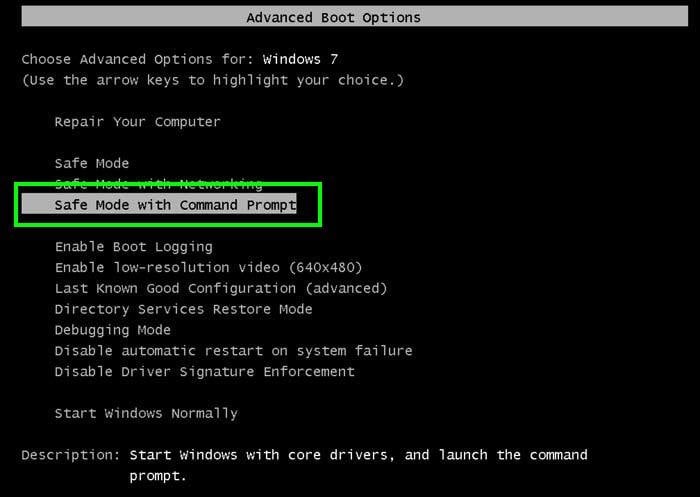
2. When the command prompt mode loads, enter the following line: cd restore and press ENTER.

3. Next, type this line: rstrui.exe and press ENTER.

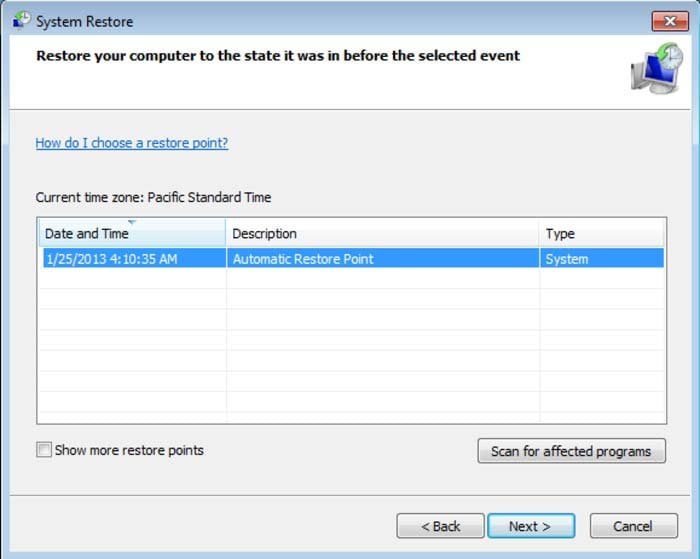
4. In the opened window, click "Next".
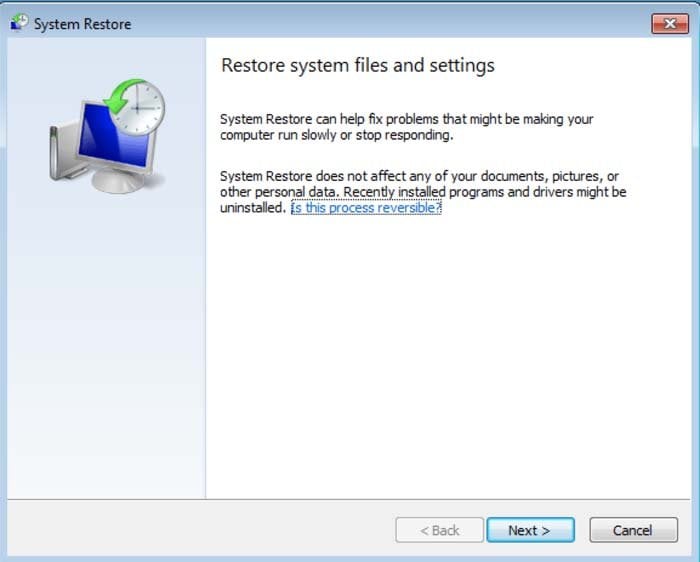
5. Select one of the available restore points and click "Next" (this will restore your computer's system to an earlier time and date, before the ransomware infiltrated your PC).
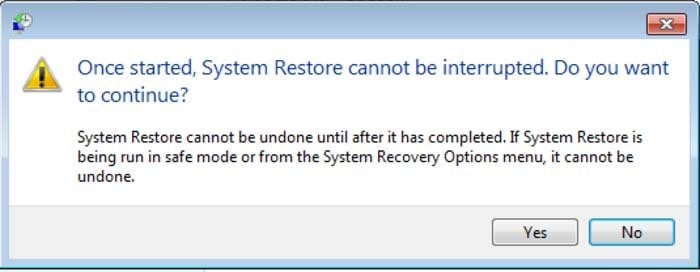
6. In the opened window, click "Yes".
7. After restoring your computer to a previous date, download and scan your PC with recommended malware removal software to eliminate any remnants of the BundesPolizei virus.
Share:
 Facebook
 X.com
X.com
 LinkedIn
 Copy Link

Tomas Meskauskas
Expert security researcher, professional malware analyst
I am passionate about computer security and technology. I have an experience of over 10 years working in various companies related to computer technical issue solving and Internet security. I have been working as an author and editor for pcrisk.com since 2010. Follow me on Twitter and LinkedIn to stay informed about the latest online security threats.
PCrisk security portal is brought by a company RCS LT.
Joined forces of security researchers help educate computer users about the latest online security threats. More information about the company RCS LT.
Our malware removal guides are free. However, if you want to support us you can send us a donation.
DonatePCrisk security portal is brought by a company RCS LT.
Joined forces of security researchers help educate computer users about the latest online security threats. More information about the company RCS LT.
Our malware removal guides are free. However, if you want to support us you can send us a donation.
Donate
▼ Show Discussion