Den Svenska Polisen IT-Sakerhet Virus
 Written by Tomas Meskauskas on (updated)
What is Den Svenska Polisen IT-Sakerhet?
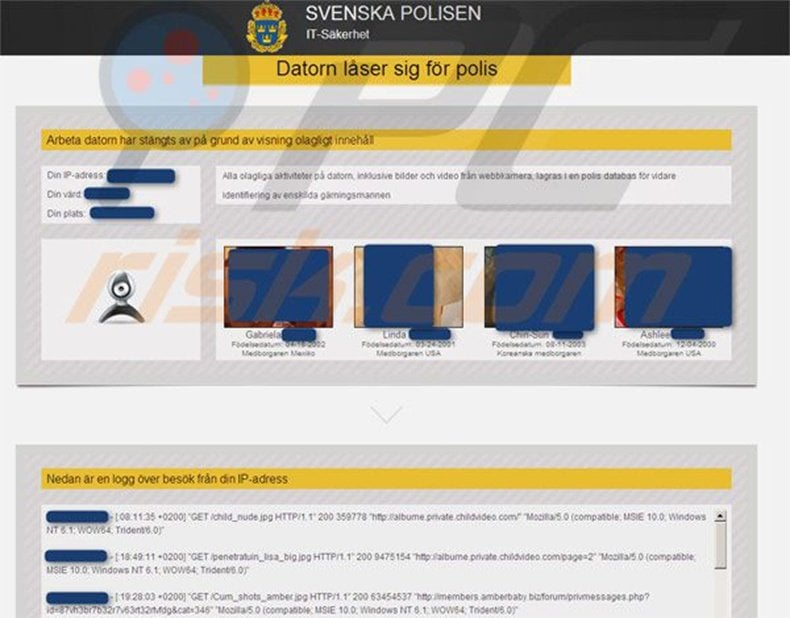
Den Svenska Polisen IT-Sakerhet is a fake screen locker derived from a family of ransomware called Reveton. It is a scam created by Cyber criminals and targeted at computer users from Sweden.
The message that blocks your computer does not actually originate from Den Svenska Polisen IT-Sakerhet, rather, it is created by Cyber criminals who exploit the name of this authority in order to gain the confidence of unsuspecting computer users. The message displayed by this ransomware states that your computer was blocked because you were watching or distributing copyrighted content.
This information is false, since authorities do not use screen lockers to collect fines for law infringements.
Do not pay this fine - you will lose your money and your PC will remain blocked. To make the message appear authentic, Cyber criminals incorporate a video recording window, supposedly used to display recorded video and photos of the computer user.
Do not be intimidated by this message - it is a scam. Other variants of this ransomware target computer users from USA and exploit the name of United States Cyber Security.
This type of infection (ransomware) is able to identify your computer's IP address and display a localized version of the fake message.


Another variant of this ransomware virus, Svenska Polisen "Datorn låser sig för polis", originates from a family called Revoyem (DirtyDecrypt). At time of writing, no known tools are available to decrypt the files encrypted by this ransomware virus.
Commonly, Den Svenska Polisen IT-Sakerhet and other ransomware infections are distributed using drive-by downloads. Internet criminals use Blackhole exploit kits and Trojans to distribute their fake screen lockers to Internet users all over the world.
If you see such a message blocking your computer screen, use the removal guide provided to unlock your PC.
A fake message displayed by Den Svenska Polisen IT-Sakerhet ransomware:
Din dator är låst - för ett eller flera skäl som anges nedan. Du har brutit mot lagen 'om upphovsrätt och närsående rättigheter" (Video, Musik, Software) eftersom du har olagligt användat och / eller distribuerat innehåll som skyddat för upphovsrätt och därmed du har brutit mot §l28 Straffrätt Sverige. §128 Straffrätt Sverige föreskriver ett straff från 2 till 500 gånger minimilönen eller fängelse från 2 till s är. Du har tittat eller distribuerat ett pomografiskt innehåll som är förbjudet (Child Porno /Zoofilia och etc). Det är ett brott mot §202 Straffrätt Sverige. § 202 Straffrätt Sverige föreskriver fängelse för en period av 4 till 12 år. Från din dator gjordes en olaglig tillgång till uppgifter eller du §208 Straffrätt Sverige föreskriver ett straff till 100.000C eller fängelse för en period av från 4 till 9 år. Eftersom från din dator gjordes olagligt tillträde utan din vetskap, år det möjligt att din datom blev infekterad med skadlig programvara. Det heter också att du bryter mot lagen om "En försummelse att använda en dator." §210 Straffrätt Sverige föreskriver ett straff från 20006 till 80006. Eftersom från din dator (också om utan din vetskap) gjordes spam - sendning eller andra olagliga verksamheter med mål att göra en vinst, är det möjligt att din dator blev infekterad med skadlig programvara.
§212 Straffrätt Sverige föreskriver ett straff till 250.000C och fängelse för en period av till 6 år. Om operationen utförs utan din vetskap, omfattas du av i det här avsnittet §210 Straffrätt Sverige. Just nu bestäms din personlighet och din lokalisering. Inom 24 timmar kommer att vara ett
kriminalfall emot dig enligt en eller flera av de nämnda artiklama. I samband med ändringen av strafflagen i Sverige, den 28 maj 2012, (om det inte är ett återfall - altså som händes den första gången) brottet kan avbrytas om betalning av böter kommer till staten. Böter kan endast betalas ut för 24 timmar efter brott. Vid utgången av 24 timmar löper ut på förmågan att betala böterna och inom de närmaste 24 timmama kommer att öppnas ett kriminalfall emot dig! För att låsa upp datorn måste du betala böterna genom Ukash på 500 kr. Din dator kommer att frigöras i tidsintervallet från de första 24 timmarna efter pengar för att betala böter kommer in på bekostnad av staten. Efter upplåsning får du sju arbetsdagar på sig för att rätta till alla överträdelser. Om alla kränkningar inte kommer att korrigeras inom 7 arbetsdagar blockeras din dator igen och du kommer att öppnas automatiskt ett brottmål på en av ovanstående objekt eller flera objekt. Följande betalningssätt kan ses böter till staten.
Instant automatic malware removal:
Manual threat removal might be a lengthy and complicated process that requires advanced IT skills. Combo Cleaner is a professional automatic malware removal tool that is recommended to get rid of malware. Download it by clicking the button below:
▼ DOWNLOAD Combo Cleaner
By downloading any software listed on this website you agree to our Privacy Policy and Terms of Use. To use full-featured product, you have to purchase a license for Combo Cleaner. 7 days free trial available. Combo Cleaner is owned and operated by Rcs Lt, the parent company of PCRisk.com read more.
Quick menu:
- What is Den Svenska Polisen IT-Sakerhet?
- STEP 1. "Den Svenska Polisen IT-Sakerhet" virus removal using safe mode with networking.
- STEP 2. "Den Svenska Polisen IT-Sakerhet" ransomware removal using System Restore.
Den Svenska Polisen IT-Sakerhet virus removal:
Step 1
Start your computer in Safe Mode. Click Start, click Shut Down, click Restart, click OK.
During your computer starting process press the F8 key on your keyboard multiple times until you see the Windows Advanced Option menu, then select Safe Mode with Networking from the list.
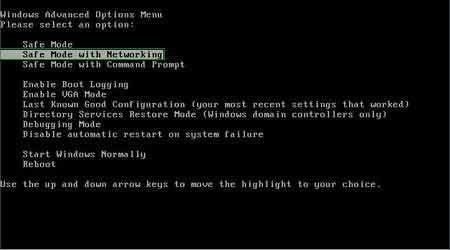
Video showing how to start Windows 7 in "Safe Mode with Networking":
Step 2
Log in to the account infected with Den Svenska Polisen IT-Sakerhet ransomware. Start your Internet browser and download a legitimate anti-spyware program.
Update the anti-spyware software and start a full system scan.
Remove all the entries detected.
After completing these steps your computer should be clean. Reboot your computer in Normal Mode.
Alternative Den Svenska Polisen IT-Sakerhet virus removal guide:
If this ransomware blocks your screen when you start your computer in Safe Mode with Networking, try starting your PC in Safe Mode with Command Prompt.
Video showing how to remove ransomware virus using "Safe Mode with Command Prompt" and "System Restore":
1. During your computer starting process, press the F8 key on your keyboard multiple times until the Windows Advanced Options menu appears, and then select Safe Mode with Command Prompt from the list and press ENTER.
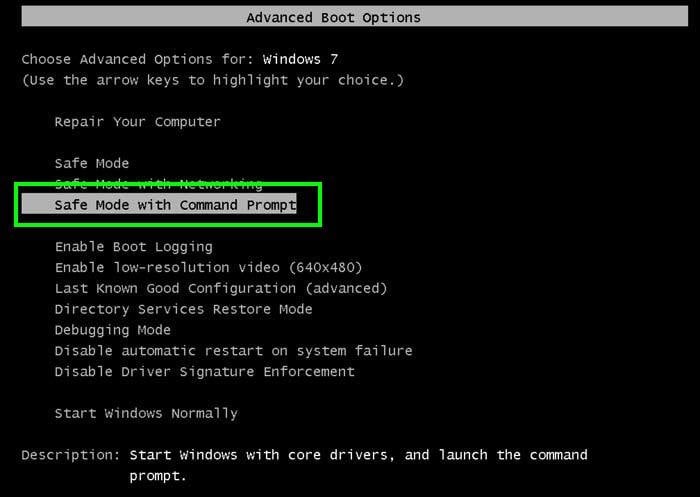
2. When Command Prompt mode loads enter the following line: cd restore and press ENTER.

3. Next, type this line: rstrui.exe and press ENTER.

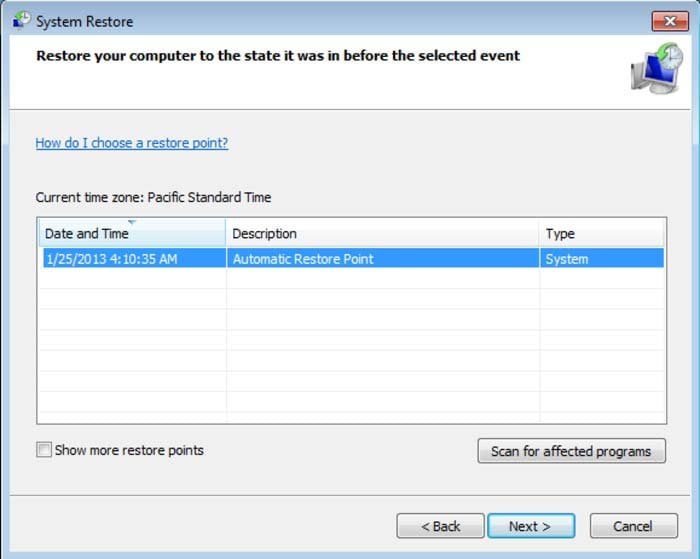
4. In the opened window, click "Next".
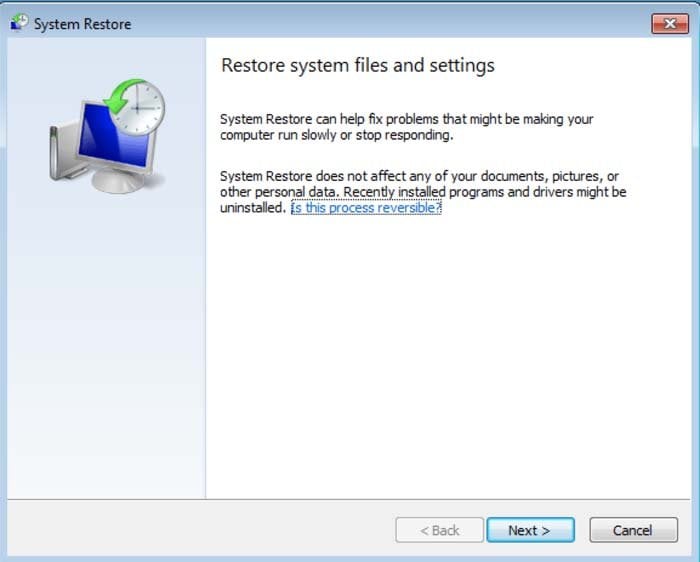
5. Select one of the available restore points and click "Next" (this will restore your computer's system to an earlier time and date, prior to the ransomware infiltrating your PC).
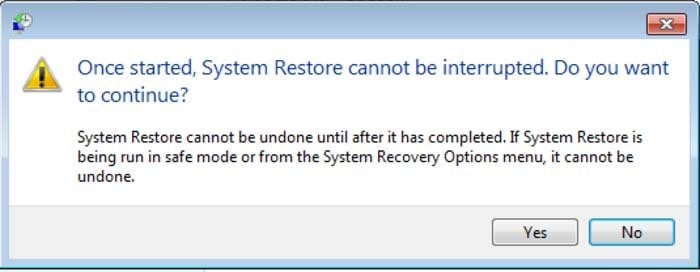
6. In the opened window, click "Yes".
7. After restoring your computer to a previous date, download and scan your PC with recommended malware removal software to eliminate any remnants of Den Svenska Polisen IT-Sakerhet virus.
If you cannot start your computer in Safe Mode with Networking (or with Command Prompt), boot your computer using a rescue disk. Some variants of ransomware disable Safe Mode, making its removal more complicated.
For this step, you need access to another computer. After removing Den Svenska Polisen IT-Sakerhet ransomware scam from your PC, restart your computer and scan it with legitimate antispyware software to remove any possible remnants of this security infection.
Anti-spyware programs known to detect and remove Den Svenska Polisen IT-Sakerhet ransomware scam:

 Outstanding!
▼ Show Discussion