How to remove spyware?
Malware Threats
Encountering malware is a threat faced by anyone with a device that connects to the Internet in some form or the other. Malicious code which was designed to propagate from computer to computer, similar to the way a viral infection spreads from person to person, gave such code its name of computer virus. Over the years the term computer virus lost its meaning as “computer viruses” were discovered that did not propagate from computer to computer. It was deemed more appropriate by the InfoSec community to call all types of malicious software, malware which included viruses as well as a host of other strains of malware that had been discovered by this stage.
The numerous threats posed by numerous malware strains could now be classified under an umbrella term making it easier to convey important safety measures. What does this mean to the average user base which has increased exponentially over the last 20 years? Very little if honest, while creating a malware family tree of sorts where malware can be broadly classified, the average person and even the biggest corporation can be turned into a malware victim just like some were victims of a computer virus. Rather, the big question to be asked is how to mediate infection and ultimately remove the offending piece of malware?
Whether it is an infected computer, mobile phone, network server, or even a smart TV, the answer to this question has become significantly more complex. As with medicine, a whole host of questions need answering before treatment can successfully occur. Where did the infection occur? How to determine if your computer is infected with malware? What type of malware-infected the machine in question? And only then, how to remove the malware?
The rest of this article is dedicated to answering those questions in a short, concise, and easily understandable way. Lastly, a brief look at how infections can be prevented in the first place will be given because the old medical maxim of prevention is better than cure applies equally to malware.
Table Of Contents
- Introduction
- How infection occurs?
- How to determine if the device is infected?
- The most common types of malware
- How to remove malware?
- Safe computing tips
How infection occurs?
When looking to remove malware an understanding of how the malware was spread in the first place can help determine the best way forward. Hackers will generally use what works and copy the tactics of those that went before, for that reason they will often rely on tried and tested methods of distributing malware to gain a foothold on a soon to be victim’s device. The vast majority of malware infections can be traced back to one of these distribution methods.

Spam Emails with Malicious Attachments or Links
The hacker in many cases will resort to sending out spam emails to vast lists of addresses, or as seen in the case of modern ransomware infections a targeted mail will be sent to employees. The email is made to look official often closely mimicking a company or even government organization and composed in such a way as to prompt the recipient to some kind of action, using various social engineering tactics. The action often entails the clicking of a link or opening of an attachment. If in the case of a link the recipient will be redirected to a webpage under the control of the hacker and malware can subsequently be downloaded. With an attachment the malware is often embedded in a document, image, or PDF and when opened the infection routine of the malware begins.
At the time of writing this article two examples of malware being distributed like this have occurred. The first involved the abuse of a well-known video game. Researchers believe spam emails were sent containing a download of what appeared to be the game's launcher, in truth it contained the LokiBot trojan. The second incident involved the distribution of the RobbinHood ransomware. Distribution via email has long been a favored method by ransomware operators, this time however emails are sent to major corporations targeted by the operators in the hope of securing a much larger ransom payment.
Downloading Malware from Malicious Sites
It is never advisable that users download pirated software or other pirated files. Other than the legal implications of dealing with pirated material, these files are often laced with various types of malware. Hackers will often follow trends and popular TV shows or movies to better distribute their malware. When Game of Thrones was popular and often right before the release of a new season, hackers would upload supposedly leaked episodes which contained malware instead.
It is not only pirated files that users need to be wary of. In the past hackers have created websites that spoof other known and reputable software sources that distribute malicious versions of the software the user wants. Sometimes this method is combined with spoofed emails that contain links that redirect to these spoofed websites. Adobe Flash has been abused like this in the past.
Malvertising
Also called by its full name of malicious advertising is yet another way hackers can gain a foothold onto a victim’s device. This is done primarily by placing ads on trusted websites that when clicked upon will begin to download malware. The ad often starts out clean to pass initial security checks by advertising software but then is latter embedded with malware.
Another method of malvertising can be seen as a hybrid between malvertising and spam email campaigns. This was seen when French users were targeted with the Varenky malware. Initially, a malvertising campaign was created to collect email addresses that would later be used in a spam email campaign which would further a sextortion, a specific type of blackmail, campaign.
Social Media
Similar in approach to abusing email, social media websites have also been used to distribute malware. This will often be in the form of sending malicious links to users via posts or direct messages. In some instances, the malware could be associated with a video, that when clicked requires a special plugin to play, rather than downloading and installing the plugin malware is installed.
Social media has also been used for the spread of disinformation which works differently to normal cyber threats. Rather than spreading malware hackers will create fake news articles and spread them across social media platforms. This, in turn, can be used to sway public opinion or damage the reputation of a company.
Unpatched Software
We are constantly reminded to keep software updated, however, it is commonly viewed as a pain and a waste of time. The poor record of people updating software and OS packages is something hackers are keen to exploit. The truth of the matter is that both the various OS packages and software packages are not infallible. More often than not these are released to the public containing zero-day vulnerabilities, put differently unintended security loopholes that can be exploited. Updates often contain patches to fix these loopholes and prevent exploitation by hackers.
Many of these vulnerabilities allow hackers to gain access to devices by other means than those covered above, sometimes without any user interaction. The hacker can then escalate privileges and install malware on the vulnerable device. One of the more recent instances of this happening involved a discovered vulnerability code named BlueKeep.
How to determine if the device is infected?
Once a device is infected with a specific type of malware, the malware will begin to do what it is designed to do. These means it will carry out certain tasks that influence how the device operates. These are indicators that the device is infected. Some of these indicators are subtle and others are not so subtle, while others are so obvious that they are impossible to ignore.
If you are asking yourself “Have I been infected with malware?” the likelihood is that you are experiencing changes in how your device is expected to run. The answer may well be “Yes.” What follows is a brief list of indicators that may point to an infection of one type or the other:
- Slowed system performance
- Crashes or the dreaded Blue Screen of Death occurring frequently
- Annoying ad and pop-up messages are displayed continually
- Browser homepage changes automatically
- Internet traffic is increased expectantly resulting in slower than normal speeds
- Antivirus software disabled automatically
- Friends reporting that they are getting odd emails from your address or odd posts from a social media profile you own
- Suspicious files or icons on your device
- Unusual error messages
Indicators for Common Malware Infections
The above list is by no means an exhaustive list but any of those situations may indicate that something is not right and directly caused by one malware strain or multiple. However, some malware indicators are very specific to certain malware types. Ransomware, which will be discussed more detail later in this article, is a good example of showing unique indicators. Encrypted files that cannot be accessed when in the past they could and a ransom note been displayed on the device are all indicators that the victim has suffered a ransomware infection. These indicators are far from subtle and make it easier to determine that not only is the device infected but with what.
Other indicators are far more subtle. Cryptominers or crypto jackers also discussed later, use computer resources, namely CPU processing power, to mine cryptocurrency without the victim’s knowledge. These infections often result in a small increase in CPU usage id done correctly by the malware’s author. If not a greater spike in CPU usage may occur which in turn can cause damage to the hardware. Spyware often used by various nation-state hacking groups is needed to stay undetected on devices for extended periods of time in order to harvest as much data as possible. This often means that indicators associated with this malware type must be as undetectable by the user as humanly possible.
These indicators are often referred to by security researchers as indicators of compromise or IoCs and used by researchers to determine what type of malware is dealt with much in the same way a user will notice something is wrong and begin investigating. Obviously, security researchers are far more versed in the ins and outs of malware and can provide far more detailed descriptions of the malware discovered. However, users are able to access many resources created by those researchers which in turn can help them determine what threat they are currently facing.
The most common types of malware
A few different types of malware were alluded to in the above sections of this article. The purpose of this section is to take a deeper dive into the most common types of malware encountered by the general public and see how they have been deployed in real-world instances.
Trojan Horse
More often than simply referred to as trojans, these are typically disguised as normal non-malicious files in order to try and trick users into downloading them. These specific pieces of malware are normally used to gain access to the infected device and create a backdoor onto the device which can be exploited later. The backdoor allows the hacker to have remote access to the device which can later be used to drop other kinds of malware.
In the past trojans have been used to steal sensitive data. Over the last decade or so trojans have been further weaponized to steal banking related data and have caused massive financial loss to individuals and financial institutions alike. These modified trojans which target banking data are referred to as banking trojans, with Zeus perhaps being the most infamous. Given the rise of cryptocurrency as an economic force, banking trojans have been modified to steal cryptocurrency wallet details along with banking credentials.
Ransomware
The first emergence of this type of malware occurred in the early 2010s and generally involved locking the device's screen so that the user could not use the device. The locking of the screen was then followed by a ransom demand, generally equal to a couple of hundred dollars. Ransomware evolved from such an unsophisticated beginning to one of the major threats faced by corporate and government institutions today, this threat is not only an organizational problem but one which affects individual users.
Modern ransomware like Sodinokibi, Ryuk, and Dharma do not lock the screen but rather they encrypt certain file types, often important documents, which render the use of the device near impossible. A ransom note is displayed with instructions on how to pay the ransom using a Tor browser and paying the ransom in Bitcoin. In the past individuals were targeted, now ransomware operators go after “big game”, namely companies and government institutions, and demand massive sums in return for decrypting the data. These sums can run into millions of dollars.
Adware
Short for advertising-supported software is designed to automatically deliver advertisements to the infected device. One of the indicators listed above was the repetitive displaying of pop-ups or other messages and is a key indicator your device may be infected with adware. These pieces of malware are often delivered bundled with “free” software and are used to generate click revenue for the advertisers. They can also be used to spread other malware strains such as spyware which can harvest data useful to advertisers.
Often seen as more of a nuisance than a threat, this attitude can be adopted mistakenly without the knowledge that they can be leveraged to drop other more dangerous malware strains. The Adload family of adware, of which SearchOptical (a Mac OS malware) is a member, appear legitimate and often are distributed via legitimate-looking Adobe Flash installers. Other than been potentially leveraged to drop ransomware, for example, they can collect data that can later be used for identity theft.
Cryptominers
Alluded to above, cryptominers or crypto jackers can be defined as code designed to mine cryptocurrency without the victim’s knowledge and done without their permission. Such malware has been seen recently bundled with other malware types been distributed in pirated textbooks and research essays targeting students. For a period, distribution and infections of cryptominers were the most numerous encountered by security firms across the globe. Their popularity caused the community to declare ransomware dead as ransomware infection declined sharply while crypto-miner infections increased exponentially. Ransomware never died but rather tactics evolved to better target big game high-value targets.
Cryptominers abused Coinhive, marketed as an alternative to web advertising which would load JavaScript code onto a website and mine cryptocurrency while the webpage was open. This abuse led those behind Coinhive to cease operations and crypto-miner detections tailed off. However, newer cryptominers like BlackSquid prove that the threat is far from dead.
Botnets
Bots are programs that carry out repetitive tasks automatically, they can be useful additions to programs and software packages that eliminate users from having to carry out repetitive tasks. However, they can be malicious. Botnets are an example of the malicious use of bots. A botnet is a collection of devices, sometimes hundreds of thousands, infected with malware to carry out a specific task. Devices include computers, networks, as well as Internet of Things devices such as smart TVs and routers.
Botnets can be used to carry out a Distributed Denial of Service (DDoS) attack which can prevent a website or network from functioning. Botnets like Emotet have been used to distribute trojans and ransomware across the botnet network.
Spyware
This type of malware does exactly what the malware and spies on the victim. It does this by silently monitoring the infected device and logging user activity. One method it does this is by using a keylogger which can be further defined as a computer program that records every keystroke made by a computer user, especially in order to gain fraudulent access to passwords and other confidential information. Spyware will also silently modify network connections in order to send the stolen data to servers under the hacker's control.
How to remove malware?
You have determined that you have been infected with malware and have an idea of what type of malware it may be, now you want to remove it. Unfortunately, not all of us have a security researcher on hand to clean our computer. That being said there are a number of steps which victims can perform which can remove malware from the infected computer be it a Windows or Mac PC (and yes, Macs and other iOS devices can be infected with malware as well).
Step One: Disconnect from the Internet
This will prevent the further sending of data to the hacker’s server as well as preventing the spread of the malware further. If connected to a company network, the network should also be disabled as to stop the spread of the malware laterally across the network.
Step Two: Enter Safe Mode
Sometimes called safe boot, it is a method of starting your computer without running all the software on the computer. A lot of malware strains are set to load automatically much in the same way some software packages are. Booting in Safe Mode will prevent the malware from initiating.
For Mac:
- Restart your computer, then immediately press and hold down the shift key. An Apple logo will appear.
- Release the Shift key when asked to login. On the right-upper corner of the screen you will see that the system is running in "Safe Boot" mode:

For Windows:
- Restart your PC. When you see the sign-in screen, hold down the Shift key and select "Power" → "Restart":

- After your PC restarts to the “Choose an option” screen, select "Troubleshoot" → "Advanced Options" → "Startup Settings":
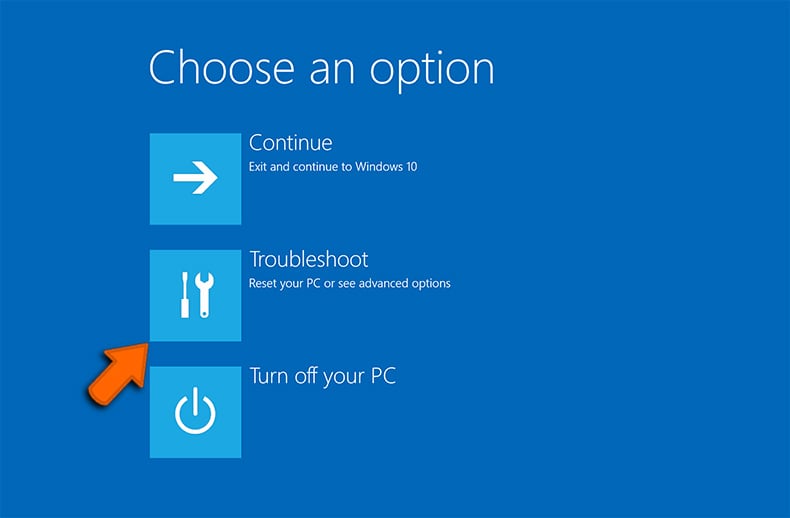
- On the next window, click the "Restart" button and wait for the next screen to appear:
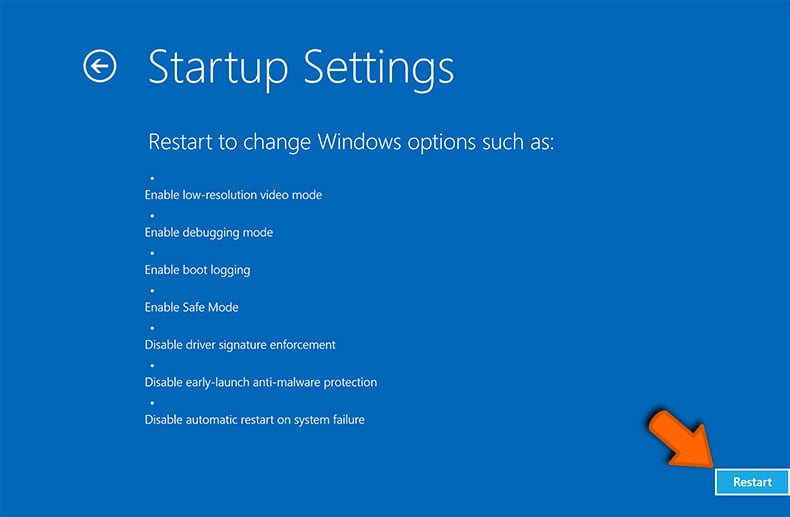
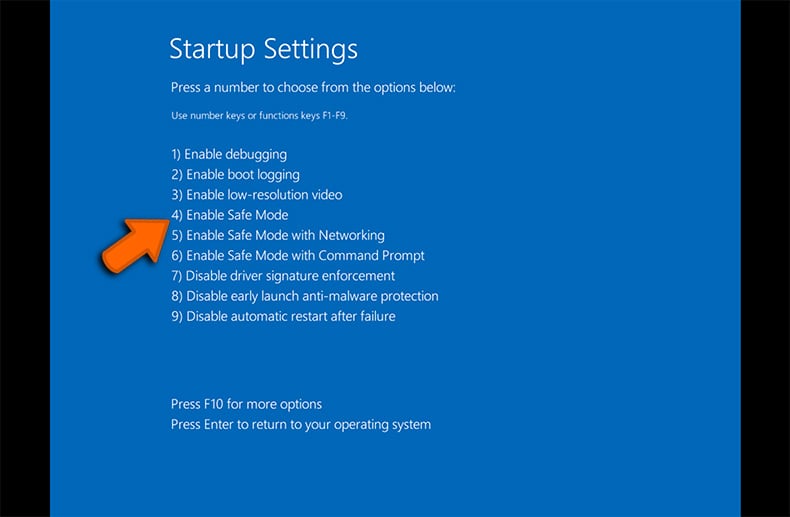
- A menu will appear with numbered startup options. Select number 4 or F4 to start your PC in "Safe Mode":
Step Three: Do not login into user accounts
This step will prevent certain types of malware, like keyloggers from stealing login credentials. This step applies throughout the process and as soon as an infection is believed to have occurred logging in to user accounts should be avoided.
Step Four: Monitor System Resources
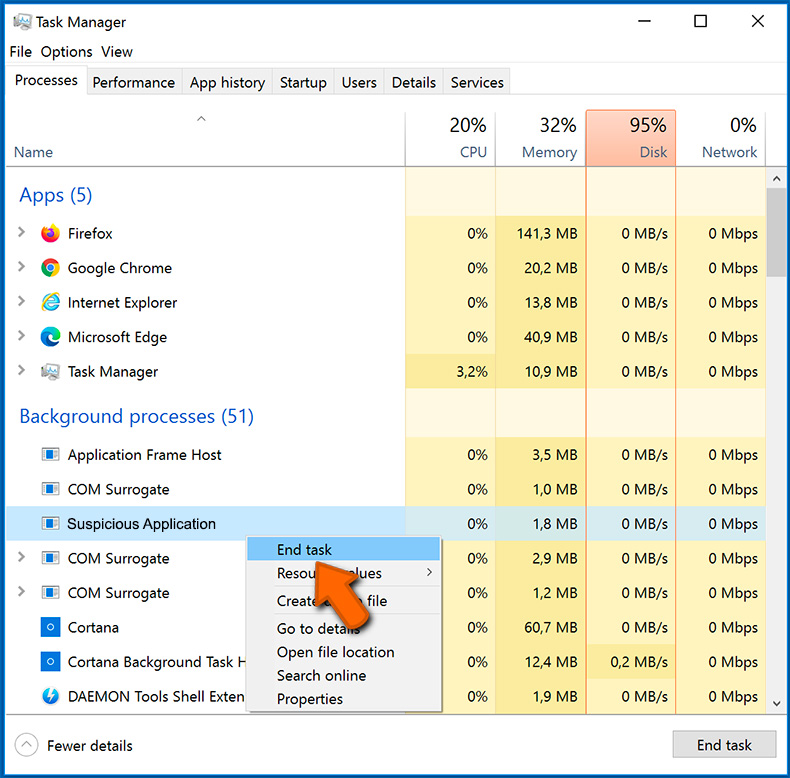
As was mentioned above malware can take up and use system resources such as the CPU and RAM, see crypto miners in particular above. By opening the OS’s activity monitoring application suspicious applications can be spotted and stopped.
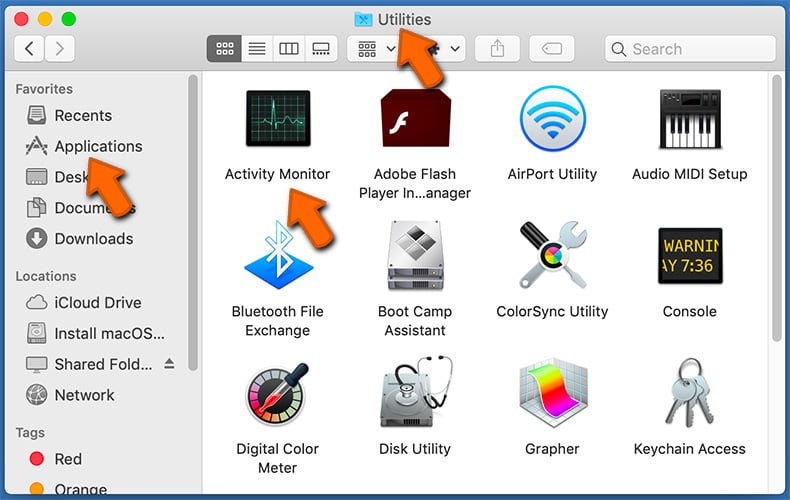
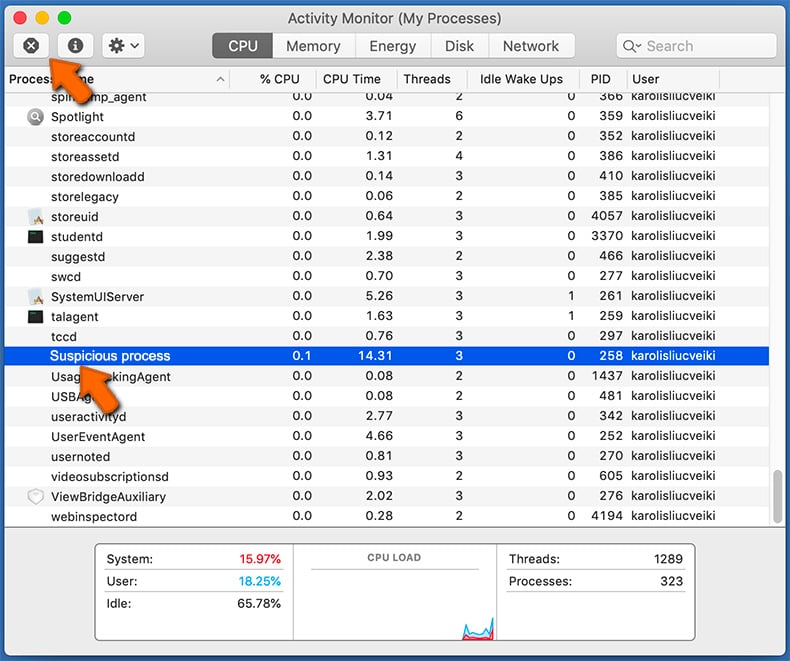
To open system monitor (Activity Monitor) and close suspicious application on a Mac:
- In Finder select → Applications → Utilities → Activity Monitor:
- Select Application → Quit:
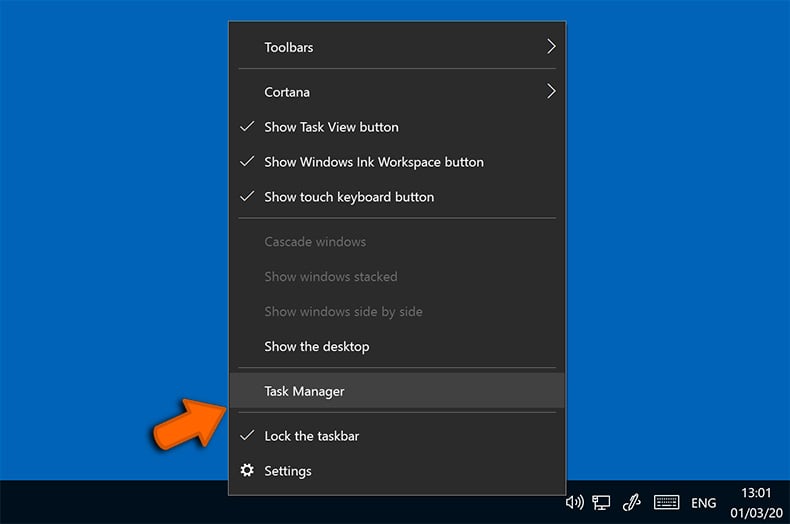
To open system monitor (Task Manager) and close suspicious application on Windows:
- Right-click on the Start Menu → Task Manager:
- Locate the suspicious process → Right-click the process → Select "End Task":
Step Five: Run a Malware Scan
If you have security software installed, if not this is highly recommend that you install software from a reputable security firm, initiate a full system scan. Most products can detect and remove most types of malware. Further it is advised that users have two separate software solutions installed as one may not detect what the other is capable of detecting.
Step Six: Fix Default Search Engine, Homepage and Clear Cache
Certain strains of malware like adware will often change the user’s homepage. Users must correct this as to prevent the further possibility of reinfection. The following details how to do this on the most popular web browsers.
Internet Explorer (for Windows only):
Changing the default search engine:
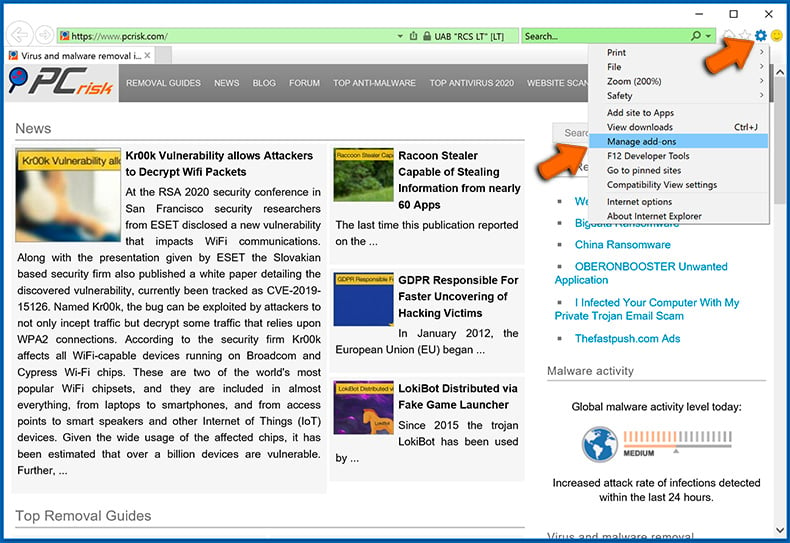
- Click the "Menu" button (gear icon) and select "Manage add-ons":
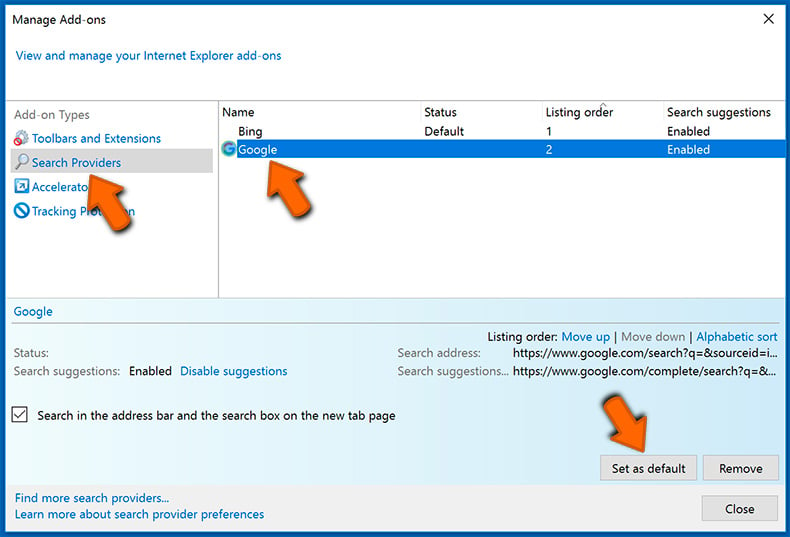
- Select the "Search Providers" tab, locate your preferred search engine, select it and click "Set as default". We advise you to remove questionable search engines as well:
Changing the homepage and clearing browsing data:
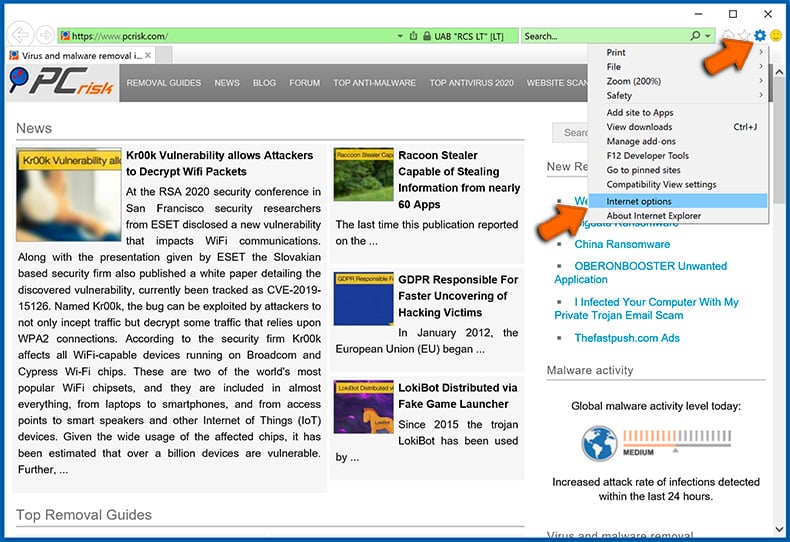
- Click the "Menu" button (gear icon) and select "Internet options":
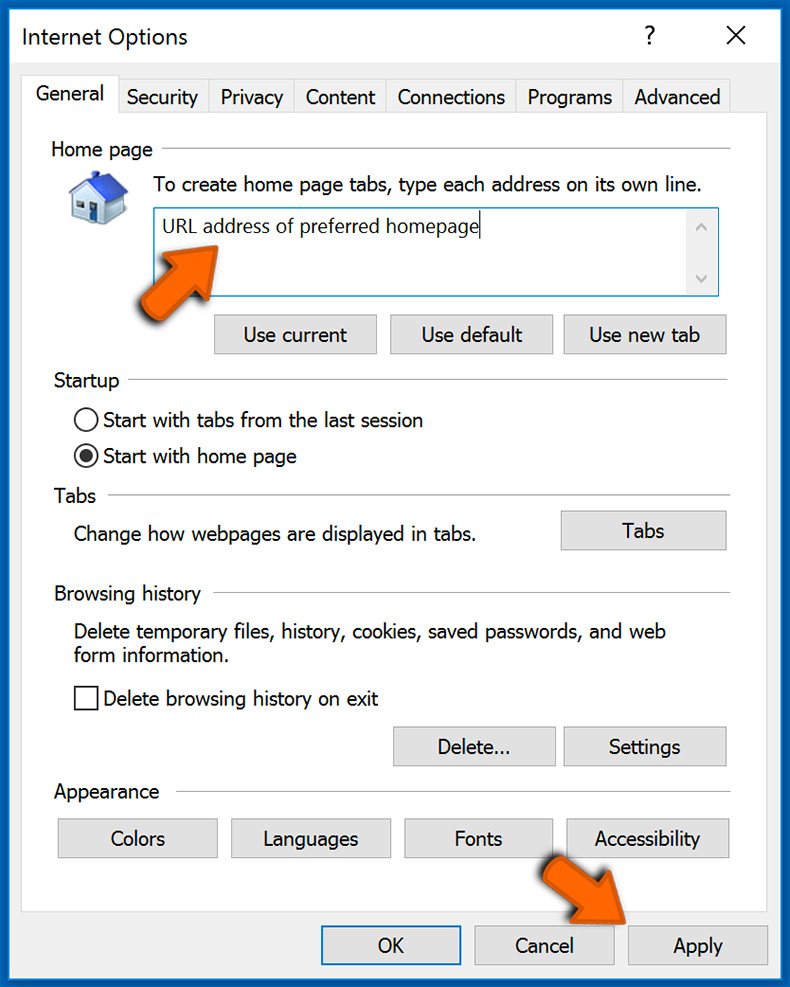
- Enter a preferred URL address and click "Apply":
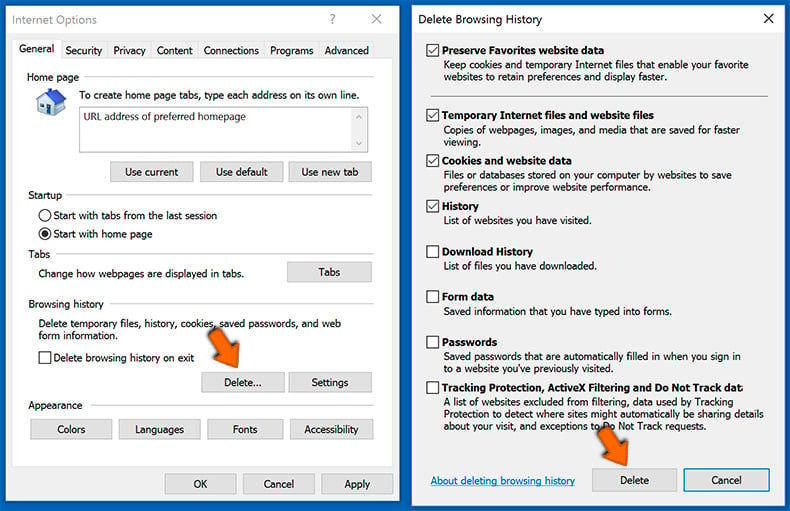
- Click the "Delete" button under "Browsing history" section, choose the data types and click "Delete":
Chrome (for Windows and Mac):
Changing the default search engine, homepage (new tab) URL and clearing browsing data:
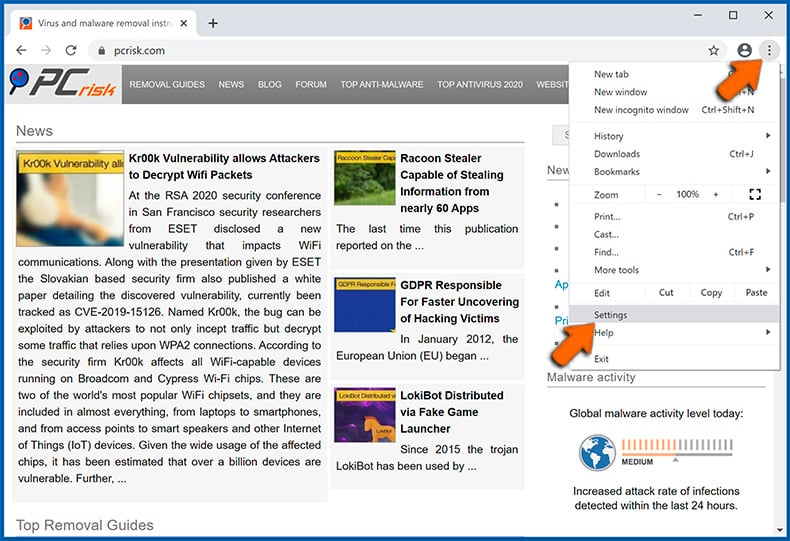
- Open settings by clicking the Menu button (three dots) selecting "Settings":
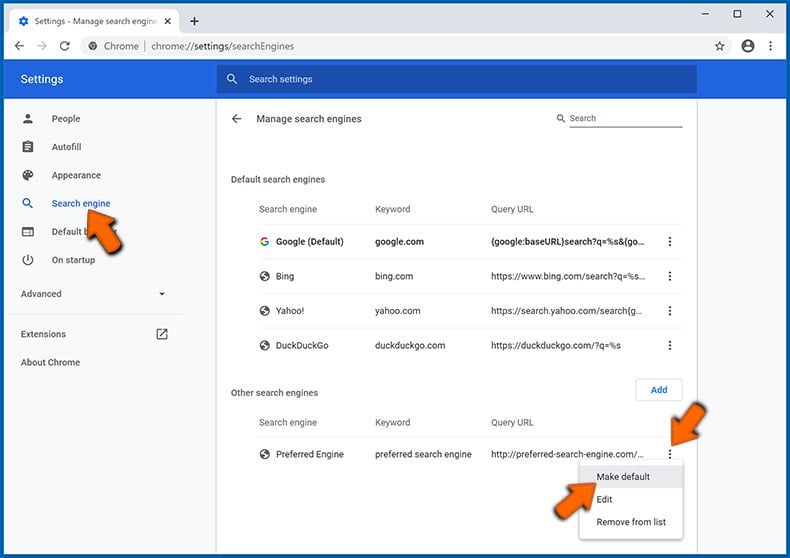
- Choose the "Search engine" tab on the left side of the screen, click the three dots next to your preferred search engine and select "Make default". You can also delete a search engine (which is not set as default) using the same pop-up menu:
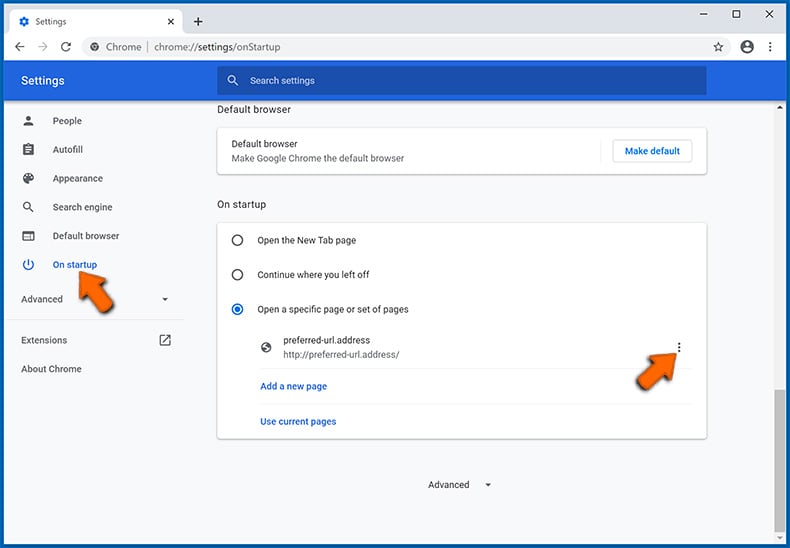
- Choose "On startup" tab on the left side of the screen, opt for "Open a specific page or set of pages", click the three dots next to the appeared entry, select "Edit" and enter your preferred URL address:
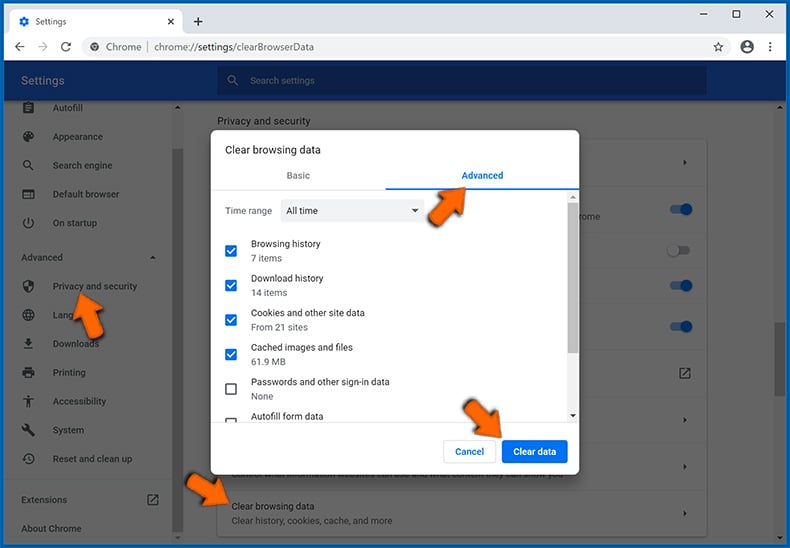
- Choose the "Privacy and security" tab under the "Advanced" section on the left side of the screen, navigate to "Clear browsing data", choose the "Advanced" tab, select the time range and data types you want to remove, and click "Clear data":
Safari (for Mac only):
Changing the homepage URL, default search engine and clearing browsing data:
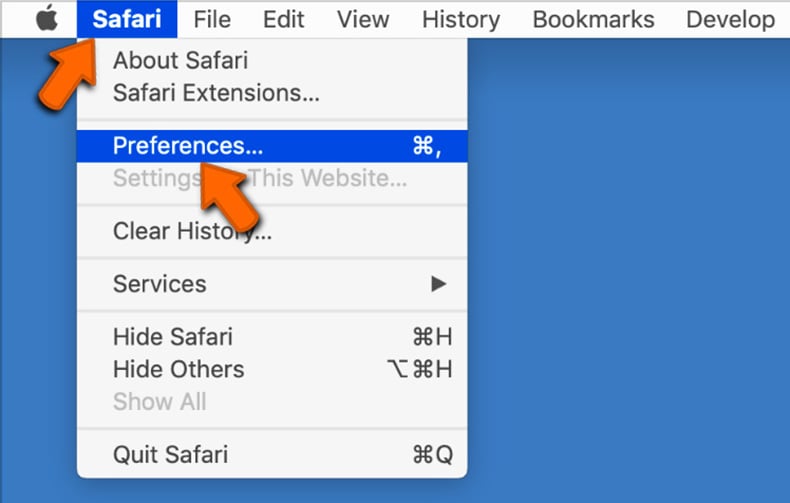
- Click on the "Safari" button in the left-upper corner of the screen and select "Preferences":
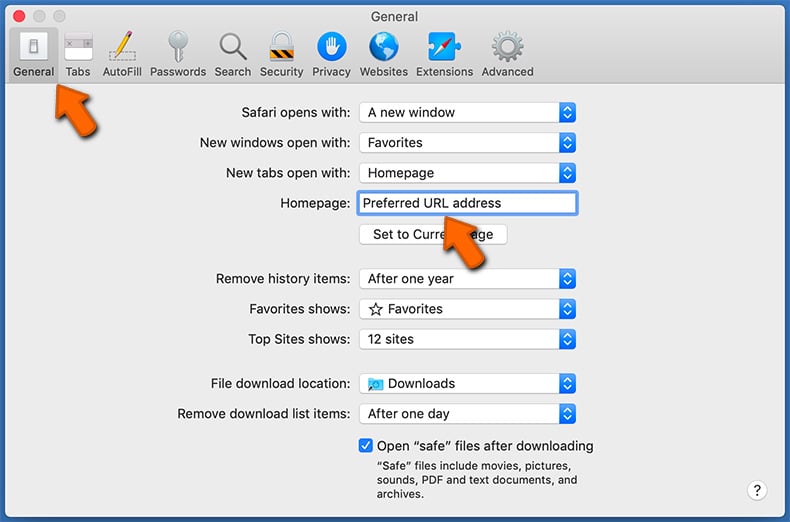
- Select the "General" tab, locate the "Homepage" field and enter your preferred domain:
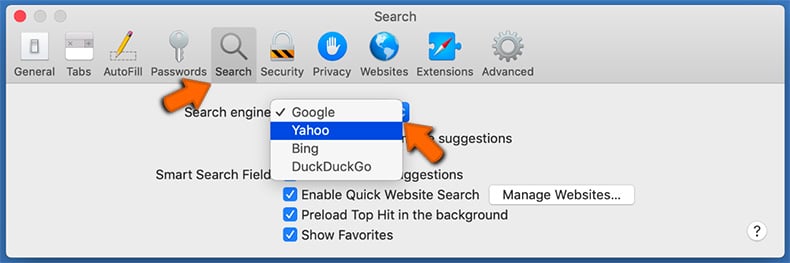
- Select the "Search" tab, click on the "Search engine" drop-down menu and select your preferred search engine:
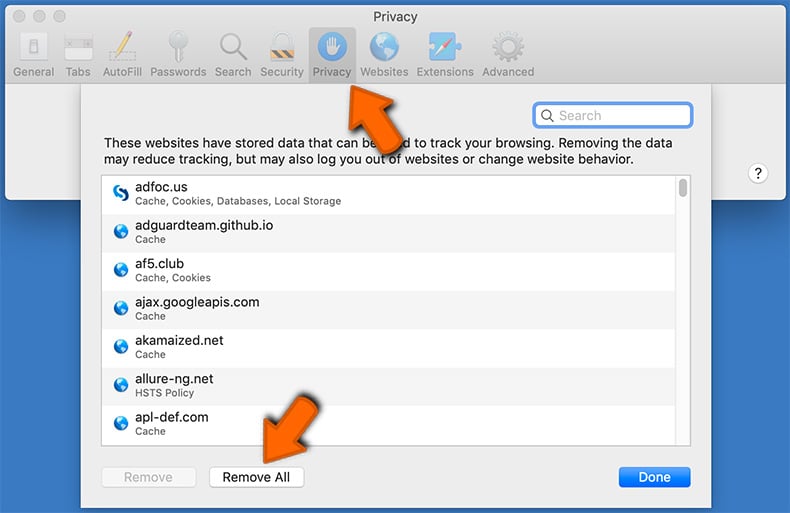
- Select the "Privacy" tab, click the "Manage Website Data..." button, wait for the data to load and then click the "Remove All" button:
What if these measures fail?
Even after you have completed these steps, in very rare cases malware may still be on the system. There remains one more option available to users, it is equivalent to a nuclear option but will get the job done. That option is to re-install the computer’s operating system. It is advised that a backup of all important data should be made first and to consult the relevant technical support platforms offered by Apple and Microsoft before hitting the big red button.
Safe computing tips
By following these easy adoptable measures and habits you greatly reduce the chances of infection by many of the malware families listed above. The measures themselves do not require a degree in computer science but can be incorporated into easy to carry out habits. If malware attacks can be prevented all that was covered above is not necessary, although it is hoped that it is still an interesting read full of important information.
Patch
As detailed above one of the common ways hackers gain a foothold on a victim’s device is through the exploitation of vulnerabilities found in software and applications. By making sure that updates are downloaded and installed regularly these vulnerabilities are effectively patched greatly reducing the chances of falling victim.
Backup
By making regular backups of important data you protect yourself not only against the unexpected but also ransomware. Not strictly a way to prevent the attack, per se, it will help the recovery from an attack eliminating the need to pay the ransom.
Install Anti-Virus and Anti-Malware Software
With the number of free anti-virus editions from the world-leading security firms, there really is no excuse not to have some form of security software installed. For a far more comprehensive protective barrier with a host of added recommended features like password managers and VPN, the paid versions come highly recommended.
Choose Strong Passwords
Avoid simple to remember passwords. They are convenient but hackers know them two and can brute force their way into your accounts if you rely on default or simple passwords. Changing passwords regularity or having a dedicated password manager are further recommendations.
Enable Two-Factor Authentication (2FA)
Where ever possible enable two-factor authentication on your user accounts. The simple receiving of an SMS, call, or logging into an app as an additional security barrier when logging into accounts drastically reduces the chances of having the account compromised.