Celas Ransomware
 Written by Tomas Meskauskas on (updated)
What is Celas Ransomware?
Celas screen locker is a familiar scam, whereby Internet criminals exploit the name of a legitimate organization in order to trick PC users into paying a fine for supposed infringement of copyrighted material. This ransomware targets European computer users. In the latest press release, Celas clearly states that its organization has nothing to do with this scam: "CELAS does not charge users to watch music videos online and never has."
The message presented by this screen locker asserts that the user owns pirated copies of music files and thus has violated copyright laws. Ransomware such as Celas is especially devious since, while infected, you will be unable to access your desktop or any programs.
PC users are given one option: to pay the bogus fine of 50 Euros. Do not pay for Celias to unlock your PC, it is a scam; you will be sending your money to Internet criminals and your computer will remain locked.
Ignore the false statements issued by this screen locker and remove it from your computer immediately. There are many variants of similar ransomware distributed through misleading websites and spam campaigns, so never pay for any software to unlock your computer.
No authorities or organizations employ such methods to collect commissions or fines relating to copyrighted content. To avoid infections such as Celas ransomware, update your operating system and your installed programs regularly.
Use legitimate antivirus and anti-spyware programs to protect your PC.
Celas ransomware is distributed by Internet criminals who use malicious websites, which exploit security vulnerabilities in users' PCs to install rogue screen lockers. Another popular method of proliferating these misleading screen lockers, is via spam messages.
If your PC has been inadvertently infected with this ransomware, do not trust it and use these removal instructions to eliminate it.
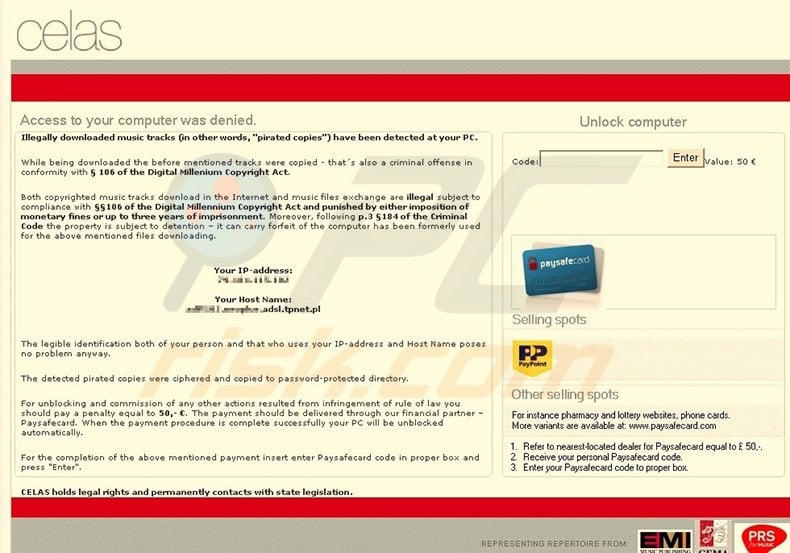
A fake message displayed by Celas ransomware:
Access to your computer was denied.
Illegally downloaded music tracks (i.e. “pirated copies”) have been detected on your PC. As well as being downloaded, the aforementioned tracks were copied – that is a criminal offense conforming with section 106 of the Digital Millennium Copyright Act. Both Copyrighted music tracks downloaded on the Internet and music files exchanged, are illegal subject to compliance with section 106 of the Digital Millennium Copyright Act and punished by either imposition of monetary fines or up to three years imprisonment. Moreover, following section 184 of the Criminal Code, the property is subject to retention and can forfeit the right to use the computer which has been formerly used for the above mentioned file downloading.
The identification both of your person and users of your IP-address and Host Name poses has been established.
The detected pirated copies were ciphered and copied to a password-protected directory.
For unblocking and commission of any other actions resulted from infringement to rule of law you should pay a penalty equal to 50 Euros. The payment should be delivered through our financial partner - Paysafecard. When the payment procedure is completed successfully, your PC will be unblocked automatically.
For the completion of the above mentioned payment, insert your Paysafecard code in the proper box and press "Enter".
CELAS holds legal rights and conforms to state legislation.
Instant automatic malware removal:
Manual threat removal might be a lengthy and complicated process that requires advanced IT skills. Combo Cleaner is a professional automatic malware removal tool that is recommended to get rid of malware. Download it by clicking the button below:
▼ DOWNLOAD Combo Cleaner
By downloading any software listed on this website you agree to our Privacy Policy and Terms of Use. To use full-featured product, you have to purchase a license for Combo Cleaner. 7 days free trial available. Combo Cleaner is owned and operated by Rcs Lt, the parent company of PCRisk.com read more.
Quick menu:
Celas ransomware removal:
Step 1
Start your computer in Safe Mode. Click Start, click Shut Down, click Restart, click OK.
During your computer starting process press the F8 key on your keyboard multiple times until you see the Windows Advanced Option menu, then select Safe Mode with Networking from the list.
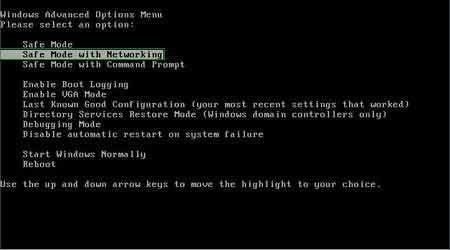
Video demonstrating how to start Windows 7 in "Safe Mode with Networking":
Step 2
Log in to the account infected with the Celas scam message. Start your Internet browser and download a legitimate anti-spyware program.
Update the anti-spyware software, and start a full system scan. Remove all the entries detected.
After completing these steps, your computer should be clean. Reboot your computer in Normal Mode.
Other tools known to remove Celas ransomware:


 Outstanding!
▼ Show Discussion