

Get free scan and check if your device is infected.
Remove it nowTo use full-featured product, you have to purchase a license for Combo Cleaner. Seven days free trial available. Combo Cleaner is owned and operated by RCS LT, the parent company of PCRisk.com.
What is Windows Security System?
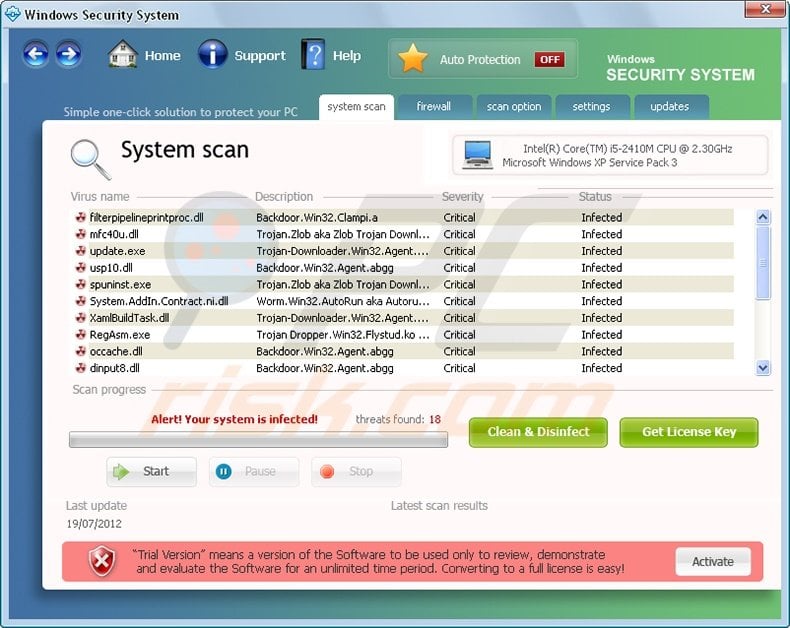
Windows Security System is malicious software, which imitates a legitimate antivirus program. In fact, this bogus software has none of the features required of an antivirus program - it is merely a scam released by Internet criminals.
They designed Windows Security System to imitate the processes of a computer security scanner and to scare unsuspecting PC users into believing that their computers have various malware and virus infections. To distribute this fake program, Internet criminals use Trojan infections, which infiltrate users' computers and install this rogue software without permission.
These Trojans serve as downloaders, which can spread various types of infections from key-loggers to fake antivirus programs such as Windows Security System. The Trojans used to proliferate this scam are distributed via spam campaigns, P2P networks, and various misleading websites.
To keep your PC clean from such infections, update your operating system and use legitimate anti-spyware and antivirus programs. After infecting your PC, this misleading program modifies your operating system and configures itself to start on each system start-up.
Furthermore, it generates various random files in your Windows temporary files folder. Windows Security System 'detects' these newly-created random files as malware - all part of its fake security check-up.
It then advises PC users to 'convert to a full version' (i.e. purchase a license for Windows Security System) in order to remove them.
This program is not unique, and is derived from a family of similar rogues whose distribution dates back to 2011. Predecessors of Windows Security System were named Antivirus Protection 2012 and Security Monitor 2012.
Do not trust any information displayed by this rogue software, since its main goal is to trick you into purchasing a useless license key. If you click 'Clean and Disinfect' after the fake security scan displayed by Windows Security System, you will be asked to purchase this program to clean the 'detected' security infections.
Do not buy this program, it is a scam. Security threats supposedly found by this program do not exist on your computer. Use this removal guide to help eliminate this scam from your PC.
Before downloading the remover: Click the "Activate" button located at the bottom right corner of the Windows Security System program window, and when the registration window opens, enter this registration key:
9YW1-KI7D-V7GG2
This will trick Windows Security System into behaving as if you have purchased a licence, restore your Internet connection, and other disabled Windows features. After registering this fake program, download a legitimate antispyware program and completely remove this rogue software from your PC.
DOWNLOAD remover for malware infections
Combo Cleaner checks if your computer is infected with malware. To use full-featured product, you have to purchase a license for Combo Cleaner. 7 days free trial available. Combo Cleaner is owned and operated by RCS LT, the parent company of PCRisk.com.
Instant automatic malware removal:
Manual threat removal might be a lengthy and complicated process that requires advanced IT skills. Combo Cleaner is a professional automatic malware removal tool that is recommended to get rid of malware. Download it by clicking the button below:
DOWNLOAD Combo CleanerBy downloading any software listed on this website you agree to our Privacy Policy and Terms of Use. To use full-featured product, you have to purchase a license for Combo Cleaner. 7 days free trial available. Combo Cleaner is owned and operated by RCS LT, the parent company of PCRisk.com.
Quick menu:
- What is Security System?
- STEP 1. Remove Security System using a registration key.
- STEP 2. Remove Security System using Safe Mode with Networking.
Windows Security System removal:
1. Start your computer in Safe Mode. Click Start, click Shut Down, click Restart, click OK.
During your computer starting process press the F8 key on your keyboard multiple times until you see the Windows Advanced Option menu, then select Safe Mode with Networking from the list.{jcomments on}
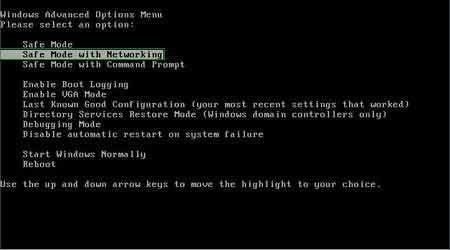
Video showing how to start Windows 7 in "Safe Mode with Networking":
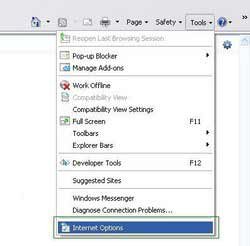
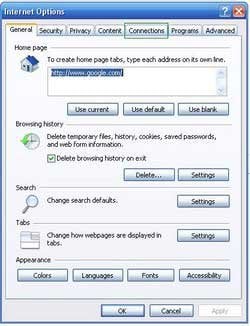
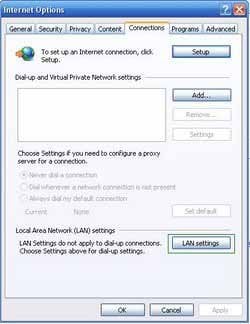
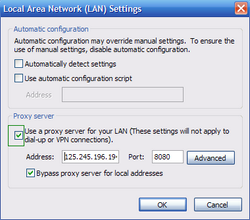
2. Open Internet Explorer, click Tools, and select Internet Options. Select Connections, then click LAN settings. If 'Use a proxy server for your LAN' is checked, uncheck it, and press OK.
3. Download HijackThis and save it to your desktop. Some malicious programs are able to block HijackThis, so when you click the download link, in the Save dialog, rename HijackThis.exe to iexplore.exe and only then click the Save button.
After saving the file to your desktop, double click it. In the main HijackThis window click the “Do a system scan only” button. Select the following entries (place a tick at the left of the entries):
O4 - HKCU\..\Run: [Security Manager] C:\Documents and Settings\[User Name]\Application Data\Windows Security System\windowssecuritysystem.exe
O4 - HKCU\..\Run: [Windows Security System] "C:\Documents and Settings\[User Name]\Application Data\Windows Security System\windowssecuritysystem.exe" /STARTUP
After selecting the required entries, click "Fix Checked". After this procedure, close HijackThis and proceed to the next removal step.
4. Download and install antispyware software to completely remove the infection.
DOWNLOAD remover for malware infections
Combo Cleaner checks if your computer is infected with malware. To use full-featured product, you have to purchase a license for Combo Cleaner. 7 days free trial available. Combo Cleaner is owned and operated by RCS LT, the parent company of PCRisk.com.
Summary:
The fake antivirus programs (also known as "rogue antivirus programs" or "scareware") are applications that tries to lure computer users into paying for their non-existent full versions to remove the supposedly detected security infections (although the computer is actually clean). These bogus programs are created by cyber criminals who design them to look as legitimate antivirus software. Most commonly rogue antivirus programs infiltrate user's computer using poop-up windows or alerts which appear when users surf the Internet. These deceptive messages trick users into downloading a rogue antivirus program on their computers. Other known tactics used to spread scareware include exploit kits, infected email messages, online ad networks, drive-by downloads, or even direct calls to user's offering free support.
A computer that is infected with a fake antivirus program might also have other malware installed on it as rogue antivirus programs often are bundled with Trojans and exploit kits. Noteworthy that additional malware that infiltrates user's operating system remains on victim's computer regardless of whether a payment for a non-existent full version of a fake antivirus program is made. Here are some examples of fake security warning messages that are used in fake antivirus distribution:
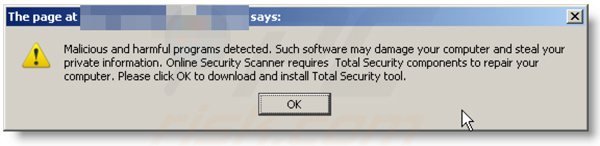
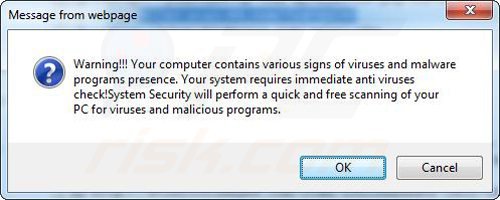
Computer users who are dealing with a rogue security software shouldn't buy it's full version. By paying for a license key of a fake antivirus program users would send their money and banking information to cyber criminals. Users who have already entered their credit card number (or other sensitive information) when asked by such bogus software should inform their credit card company that they have been tricked into buying a rogue security software. Screenshot of a web page used to lure computer users into paying for a non-existent full version of windows security system rogue and other rogue antivirus programs:
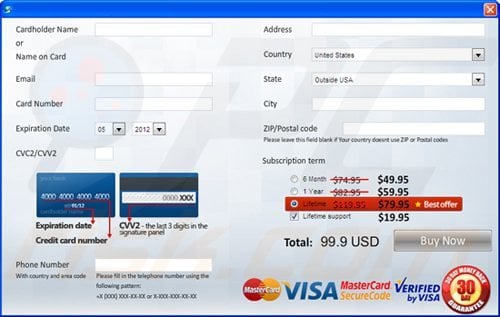
To protect your computer from windows security system rogue and other rogue antivirus programs users should:
- Keep their operating system and all of the installed programs up-to-date.
- Use legitimate antivirus and anti-spyware programs.
- Use caution when clicking on links in social networking websites and email messages.
- Don't trust online pop-up messages which state that your computer is infected and offers you to download security software.
Symptoms indicating that your operating system is infected with a fake antivirus program:
- Intrusive security warning pop-up messages.
- Alerts asking to upgrade to a paid version of a program to remove the supposedly detected malware.
- Slow computer performance.
- Disabled Windows updates.
- Blocked Task Manager.
- Blocked Internet browsers or inability to visit legitimate antivirus vendor websites.
If you have additional information on windows security system rogue or it's removal please share your knowledge in the comments section below.
Share:
 Facebook
 X.com
X.com
 LinkedIn
 Copy Link

Tomas Meskauskas
Expert security researcher, professional malware analyst
I am passionate about computer security and technology. I have an experience of over 10 years working in various companies related to computer technical issue solving and Internet security. I have been working as an author and editor for pcrisk.com since 2010. Follow me on Twitter and LinkedIn to stay informed about the latest online security threats.
PCrisk security portal is brought by a company RCS LT.
Joined forces of security researchers help educate computer users about the latest online security threats. More information about the company RCS LT.
Our malware removal guides are free. However, if you want to support us you can send us a donation.
DonatePCrisk security portal is brought by a company RCS LT.
Joined forces of security researchers help educate computer users about the latest online security threats. More information about the company RCS LT.
Our malware removal guides are free. However, if you want to support us you can send us a donation.
Donate
▼ Show Discussion