Gesellschaft zur Verfolgung von Urheberrechtsverletzungen Virus
 Written by Tomas Meskauskas on (updated)
What is Gesellschaft zur Verfolgung von Urheberrechtsverletzungen?
GVU Gesellschaft zur Verfolgung von Urheberrechtsverletzungen (Bundesamt für Sicherheit in der Informationstechnik) scam is a ransomware infection, which attempts to trick PC users into paying a bogus fine of 100 Euro for supposed copyright law violations. This deceptive message completely locks users' computers and demands payment of the fake fine using Ukash.
This scam originates from a family of ransomware named Reveton and is a widely distributed security threat translated into many languages. This particular ransomware targets PC users from Germany and exploits the name of 'GVU' in order to make the fake message appear authentic. Computer users should ignore this message and not pay the 100 Euro fine under any circumstances.
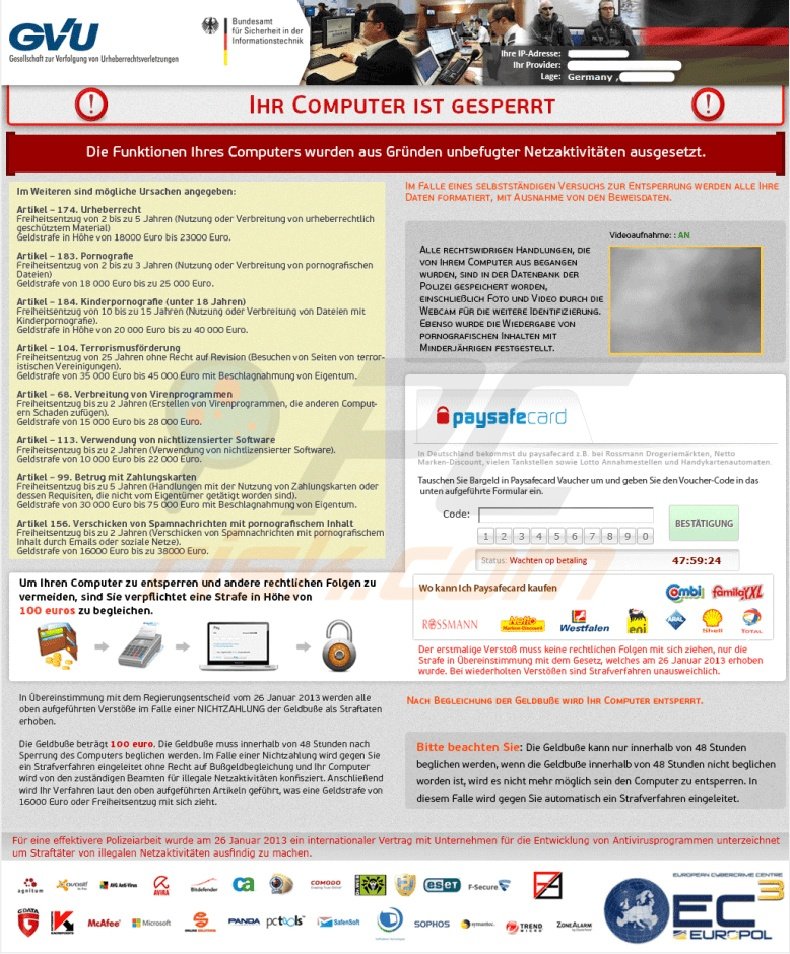
If you pay this fine, you will send your money to cyber criminals and your computer will remain locked. Commonly, ransomware infections such as this are distributed using Trojans. Computer users should express caution when opening email attachments and using P2P networks.
The best practice to avoid these infections is to use legitimate antivirus and antispyware software, and frequently update your operating system and installed programs.
A screenshot of different graphics and text used in a variant of the GVU ransomware virus:
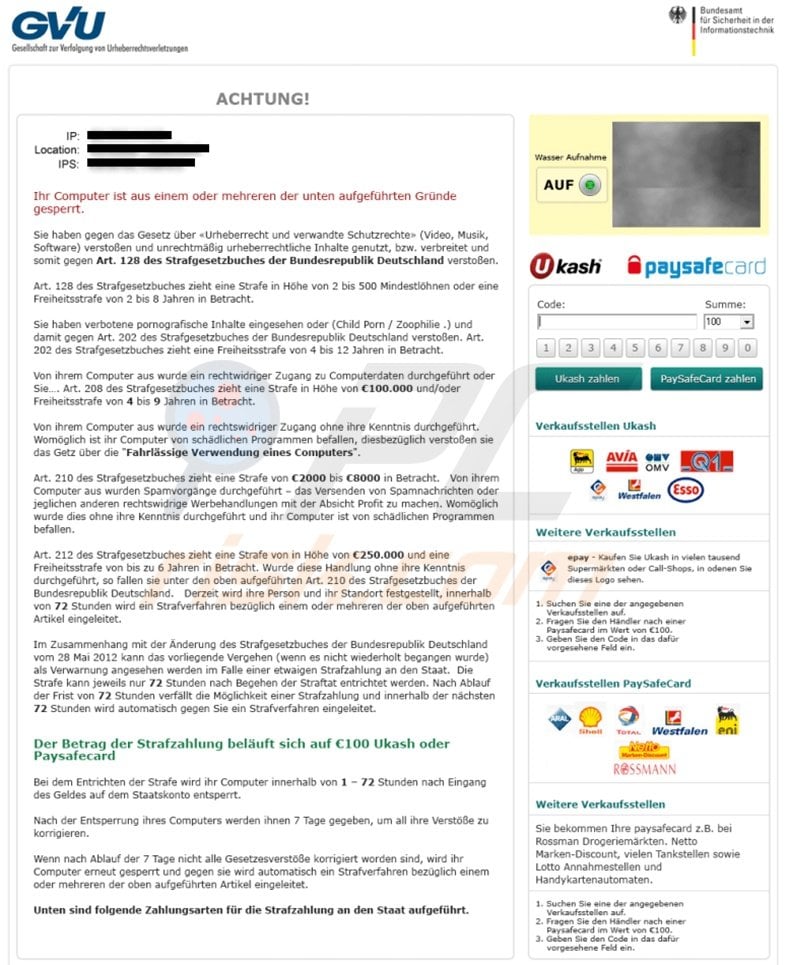
Update July 19, 2013 - Cyber criminals have created a new variant of this ransomware virus: BundesKriminalamt "Ihrem persönlichen Computer wurde gesperrt"
Cyber criminals responsible for releasing this scam use the Ukash and Paysafecard services for money transfers.
These services are prepaid cards, and sending money using these cards is very unsafe. Whilst authorities can easily trace money transactions made by wire transfers and other standard services, using Ukash and paysafecard enables cyber criminals to remain untraceable.
If your PC is locked with this ransomware, use the removal guide provided to eliminate this scam from your computer.
A fake message shown by the GVU Gesellschaft zur Verfolgung von Urheberrechtsverletzungen scam:
Die Funktion ihres Computers wurde aufgrund unerlaubter Internethandlungen außer Kraft gesetzt. im Folgenden werden mögliche Verstöße aufgelistet, die von ihnen begangen werden konnten:
Artikel 274- Urheberrechte Eine Ge dstrafe oder Freiheitsstrafe von bis zu 4 Jahren. (Die Benutzung oder Verbreitung von Daten, die urheberrechtich geschützt sind - Ei me, Software( Artikel 263- Pornografie Eine Ge dstrafe oder Freiheitsstrafe von bis zu 2 Jahren. (Die Benutzung oder Verbreitung von pornografischen Daten) Artikel 184 - Kinderpornografie (bis 28 Jahre) Eine Fre-heitsstrafe von b-s zu 15 Jahren (Die Benutzung oder Verbreitung von pornografischen Daten' Artikel 104- Terrorismusförderung Eine Fre-heitsstrafe von b-s zu 25 Jahren (Sie haben Seiten von Terrororganisationen besucht: Artikel 297- Fahrlässige Computernutzung mit schwerwiegenden Konsequenzen Eine Geldstrafe oder Freiheitsstrafe von bis zu 2 Jahren (ihr Computer ist von e-nem Virus infiziert welcher bereits andere Computer infiziert hat) Artikel 108 - Glücksspiel Eine Geldstrafe oder Freiheitsstrafe von bis zu 2 Jahren. (Sie nahmen am Glücksspiel teil, jedoch ist dies entsprechend der Gesetzgebung ihres Landes verboten) in Bezug auf den Regierungsentscheid vom 22 August können alle verstöße bei einer Geldbuße als bedingt angesehen werden. Die Summe der Geldbuße beträgt ic0 Euro. Die Bezahlung muss innerhalb von 48 Stunden nach Kundgabe des verstoßes entrichtet werden. wenn die strafe nicht entrichtet wird, wird automatisch ein Strafverfahren gegen Sie eingeleitet.
...
Instant automatic malware removal:
Manual threat removal might be a lengthy and complicated process that requires advanced IT skills. Combo Cleaner is a professional automatic malware removal tool that is recommended to get rid of malware. Download it by clicking the button below:
▼ DOWNLOAD Combo Cleaner
By downloading any software listed on this website you agree to our Privacy Policy and Terms of Use. To use full-featured product, you have to purchase a license for Combo Cleaner. 7 days free trial available. Combo Cleaner is owned and operated by Rcs Lt, the parent company of PCRisk.com read more.
Quick menu:
- What is Gesellschaft zur Verfolgung von Urheberrechtsverletzungen?
- STEP 1. "Gesellschaft zur Verfolgung von Urheberrechtsverletzungen" virus removal using safe mode with networking.
- STEP 2. "Gesellschaft zur Verfolgung von Urheberrechtsverletzungen" ransomware removal using System Restore.
GVU virus removal:
Step 1
Start your computer in Safe Mode. Click Start, click Shut Down, click Restart, click OK. During your computer starting process press the F8 key on your keyboard multiple times until you see the Windows Advanced Option menu, then select Safe Mode with Networking from the list.
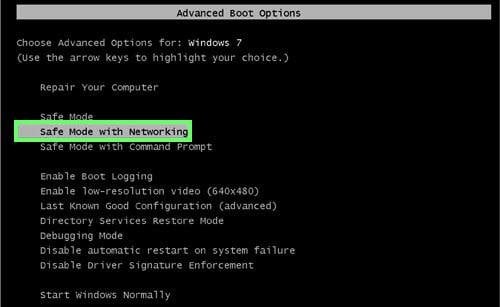
Video showing how to start Windows 7 in "Safe Mode with Networking":
Step 2
Log in to the account infected with the GVU virus. Start your Internet browser and download a legitimate anti-spyware program. Update the anti-spyware software and start a full system scan. Remove all entries detected.
If you cannot start your computer in Safe Mode with Networking, try performing a system restore.
Video showing how to remove ransomware virus using "Safe Mode with Command Prompt" and "System Restore":
1. During your computer starting process, press the F8 key on your keyboard multiple times until the Windows Advanced Options menu appears, and then select Safe Mode with Command Prompt from the list and press ENTER.
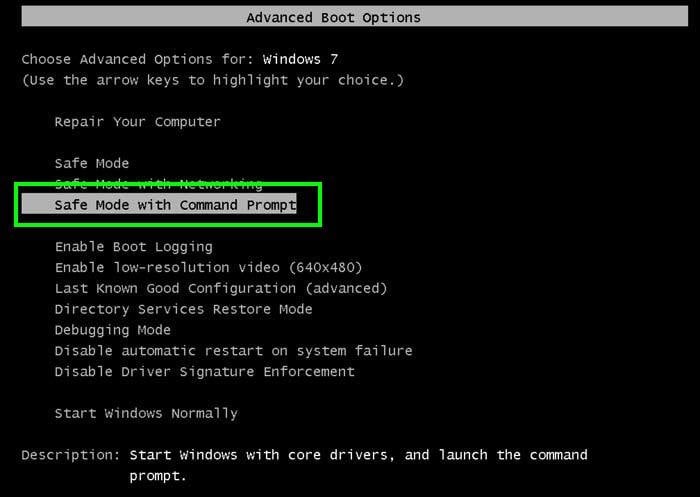
2. When Command Prompt Mode loads, enter the following line: cd restore and press ENTER.

3. Next, type this line: rstrui.exe and press ENTER.

4. In the opened window, click "Next".
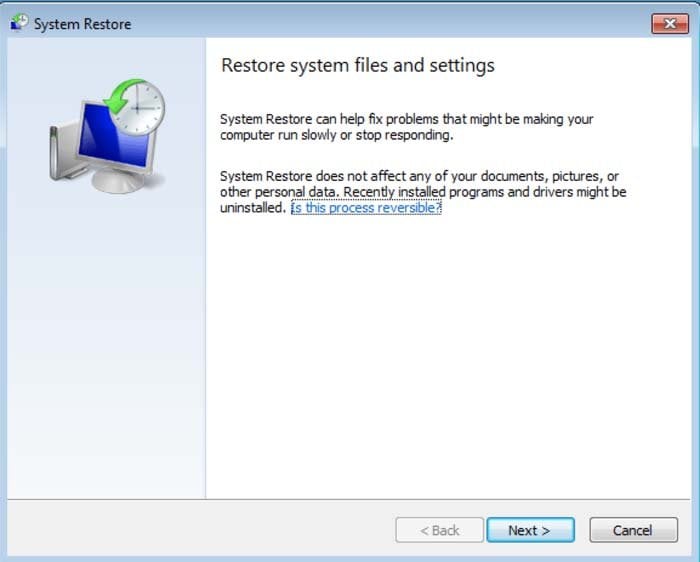
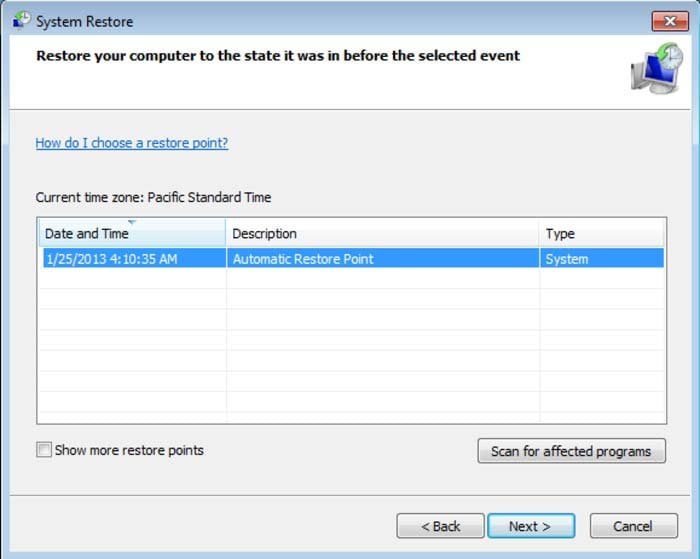
5. Select one of the available restore points and click "Next" (this will restore your computer's system to an earlier time and date, prior to the ransomware infiltrating your PC).
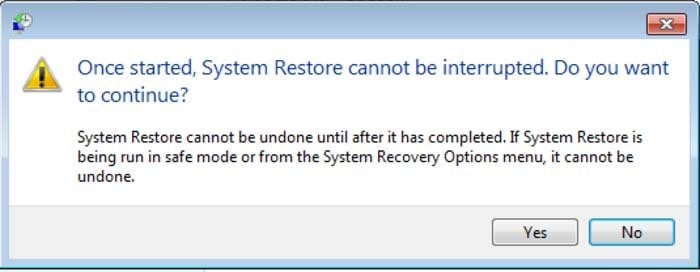
6. In the opened window, click "Yes".
7. After restoring your computer to a previous date, download and scan your PC with recommended malware removal software to eliminate any remnants of GVU virus.
If you cannot start your computer in Safe Mode with Networking (or with Command Prompt), boot your computer using a rescue disk. Some variants of ransomware disable Safe Mode, making its removal more complicated. For this step, you need access to another computer.
After removing GVU Gesellschaft zur Verfolgung von Urheberrechtsverletzungen scam from your PC, restart your computer and scan it with legitimate antispyware software to remove any possible remnants of this security infection.
Other tools known to remove GVU Gesellschaft zur Verfolgung von Urheberrechtsverletzungen scam:


 Outstanding!
▼ Show Discussion