Rikspolisstyrelsen Virus
 Written by Tomas Meskauskas on (updated)
What is Rikspolisstyrelsen?
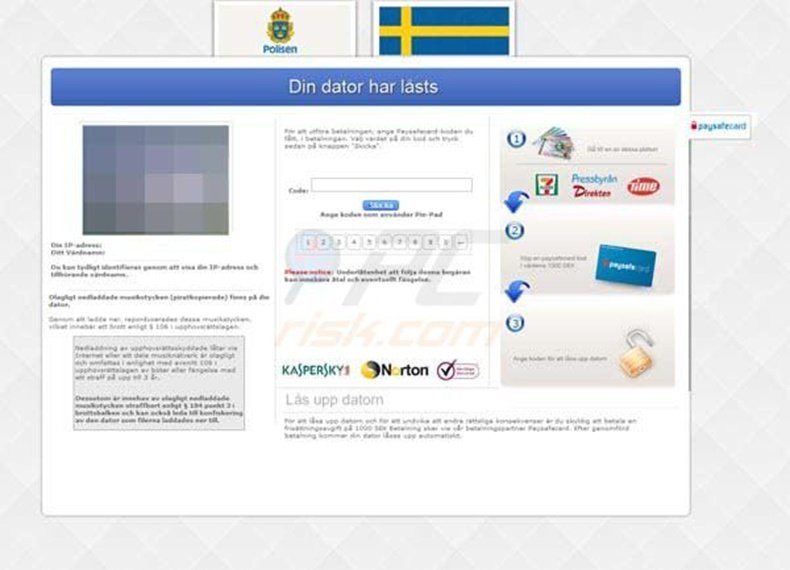
The Rikspolisstyrelsen message, a scam demanding payment of a fine, was created by cyber criminals. The deceptive message demands computer users from Sweden pay a fine of 100 Euros for supposedly committing law violations. It states that the PC was locked due to the user watching pornography, or downloading copyrighted video and audio files.
Infections such as these, which block computer users' screens and demand payment of bogus fines, are termed 'ransomware'. This particular infection is derived from a family of ransomware called Urausy and targets PC users predominantly from Sweden. Cyber criminals use localized graphics and translated text in order to make their deceptive messages appear authentic.
This ransomware infection detects computer IP addresses and is thus able to determine the user's country. Using this information, the computer user is presented with a screen lock that appears to be delivered from a local authority.
This ransomware is translated into many languages so that PC users from different countries observe the results of the infection in their local language. Do not trust the message presented by Rikspolisstyrelsen ransomware, it is a scam aimed at stealing your money.

The Rikspolisstyrelsen scam is distributed using Trojans and blackhole exploit kits. Cyber criminals strive to infect as many computers connected to the Internet as possible. To avoid infection, PC users should express caution when opening email attachments and browsing lesser-known websites.
To protect your computer, use legitimate antivirus and antispyware programs and keep them updated. If your PC screen is locked by this type of message, do not pay the 100 Euro fine - you will send your money to cyber criminals and your computer will remain locked. To unlock your computer, use the removal information provided.
A fake message displayed by the Rikspolisstyrelsen scam:
Polisen Enheten för databrott .
VARNING! Datorn har blockerats.
VARNING! Din dator har blockerats av ett system för automatisk information kontroll. Varför? Detta skulle kunna bero på en av följande skäl: 1. Datorn har använts för förbjudna webbsidor. 2. Datorn har använts för webbsidor som innehåller barnpornografi. 3. Datorn har använts för överföring av förbjuden information. 4. Datorn har använts för förvara/visa piratkopierat innehåll. Enligt lag, om 'information kontroll och skydd av information" från den 28 augusti 2012 skyldig måste betala böter på SEK 1000 eller €100. För att underlätta betalning av böterna, erbjuder vi en säker form av utbetalning med hjälp av Ukash/PaySafeCard kuponger. Allt du behöver är att köpa en voucher (ar) för totalt SEK 1000 eller €100, och skriva dem i formen för avbetalning, sedan klicka på "Pay Ukash" eller "Pay PaySafeCard". Vad händer när jag skickat koden?
Nar koden har verifierats av vårt system din dator kommer omedelbart upp. Vad händer om jag har problem? Om du av någon anledning inte kan betala böterna via en saker form av betalning, måste du skriva ett brev via e-post databr ott i'polisen.se och ange i brevet din adress och numret (er) kupongen (ar) Ukash/PaySafeCard i mängden SEK 1000 eller €100. Nar koden har verifierats av vårt system din dator kommer omedelbart upp.
Instant automatic malware removal:
Manual threat removal might be a lengthy and complicated process that requires advanced IT skills. Combo Cleaner is a professional automatic malware removal tool that is recommended to get rid of malware. Download it by clicking the button below:
▼ DOWNLOAD Combo Cleaner
By downloading any software listed on this website you agree to our Privacy Policy and Terms of Use. To use full-featured product, you have to purchase a license for Combo Cleaner. 7 days free trial available. Combo Cleaner is owned and operated by Rcs Lt, the parent company of PCRisk.com read more.
Quick menu:
- What is Rikspolisstyrelsen?
- STEP 1. "Rikspolisstyrelsen" virus removal using safe mode with networking.
- STEP 2. "Rikspolisstyrelsen" ransomware removal using System Restore.
Rikspolisstyrelsen ransomware removal:
Step 1
Start your computer in Safe Mode. Click Start, click Shut Down, click Restart, click OK. During your computer starting process press the F8 key on your keyboard multiple times until you see the Windows Advanced Option menu, then select Safe Mode with Networking from the list.
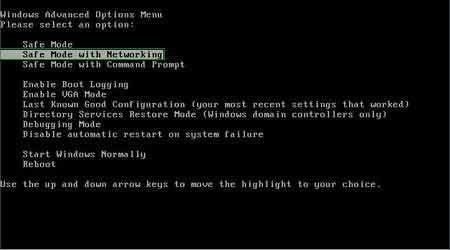
Video showing how to start Windows 7 in "Safe Mode with Networking":
Step 2
Log in to the account infected with Polisen Enheten för databrottt virus. Start your Internet browser and download a legitimate anti-spyware program. Update the anti-spyware software and start a full system scan. Remove all entries detected.
After completing these steps your computer should be clean. Reboot your computer in Normal Mode.
Alternative Rikspolisstyrelsen ransomware removal guide:
Video showing how to remove ransomware virus using "Safe Mode with Command Prompt" and "System Restore":
1. During your computer starting process, press the F8 key on your keyboard multiple times until the Windows Advanced Options menu appears, and then select Safe Mode with Command Prompt from the list and press ENTER.
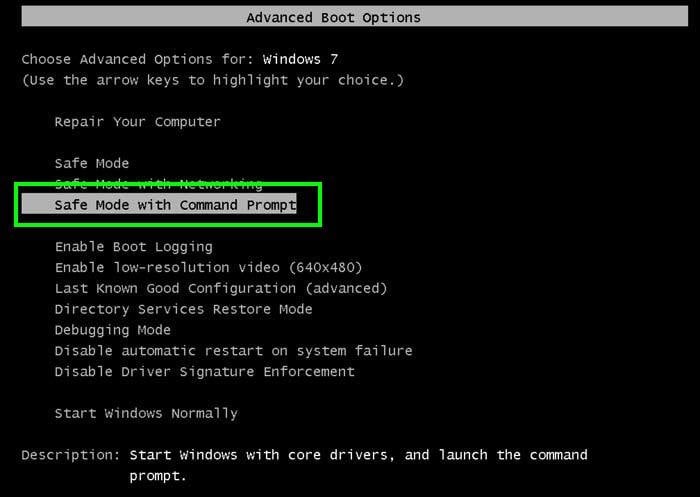
2. When Command Prompt Mode loads, enter the following line: cd restore and press ENTER.

3. Next, type this line: rstrui.exe and press ENTER.

4. In the opened window, click "Next".
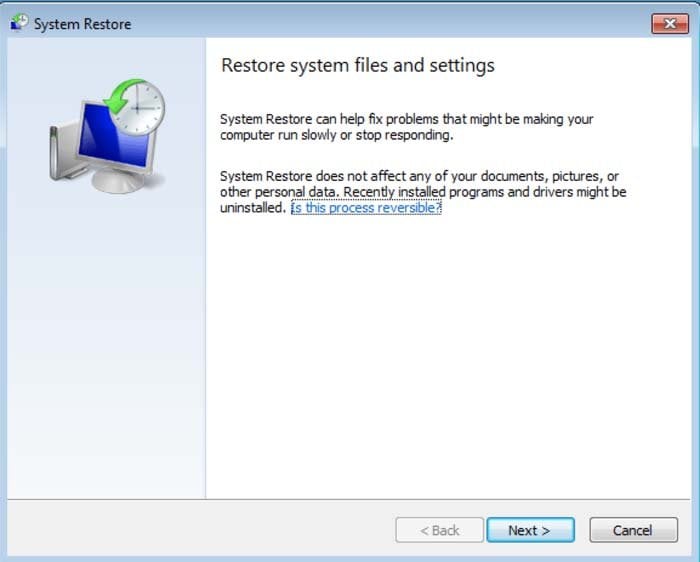
5. Select one of the available restore points and click "Next" (this will restore your computer's system to an earlier time and date, prior to the ransomware infiltrating your PC).
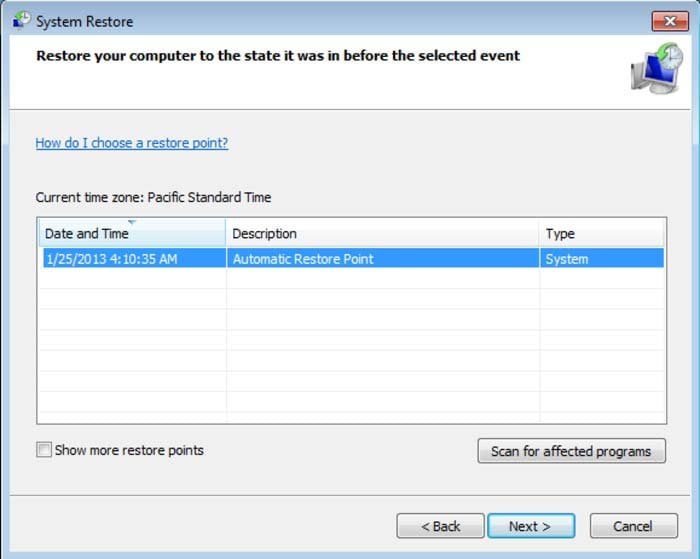
6. In the opened window, click "Yes".
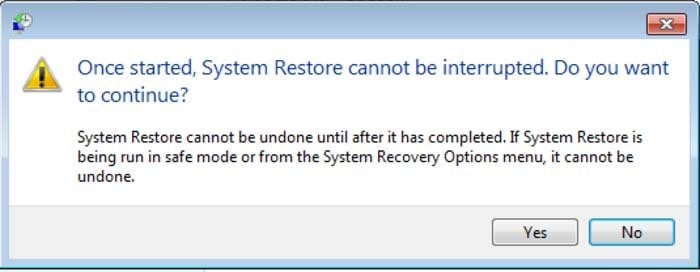
7. After restoring your computer to a previous date, download and scan your PC with recommended malware removal software to eliminate any remnants of Rikspolisstyrelsen virus.
Other tools known to remove Rikspolisstyrelsen scam:
Other methods used to eliminate this ransomware infection from your PC:
Remove Rikspolisstyrelsen virus using a Rescue Disk.

 Outstanding!
▼ Show Discussion