

Get free scan and check if your device is infected.
Remove it nowTo use full-featured product, you have to purchase a license for Combo Cleaner. Seven days free trial available. Combo Cleaner is owned and operated by RCS LT, the parent company of PCRisk.com.
What kind of malware is Covert?
Covert is a remote access Trojan (RAT) developed in Rust and typically delivered via spear‑phishing emails. The RAT can perform various malicious tasks on infected devices, allowing cybercriminals to steal information, upload files, and more. If detected on the system, Covert should be removed as soon as possible.
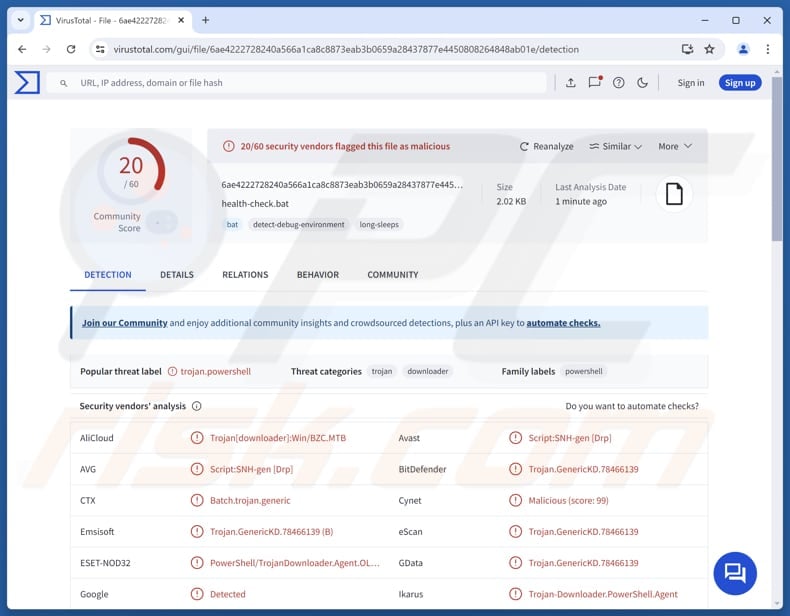
More about Covert
Before running, Covert uses multiple checks to detect virtual machines, sandboxes, and analysis tools. It checks the system manufacturer, scans for known VM registry keys, files, MAC addresses, sandbox paths, and debugging tools, and monitors running processes for analysis software. If any indicator is detected, the malware terminates execution.
After those checks (if none of the indicators are detected), Covert collects system information, including the hostname, username, operating system, and privilege level. It uses WMI and command‑line queries to gather these details and checks privileges by determining whether the user has administrative access.
The RAT then attempts to connect to its control server. It tries different address formats and, if those fail, uses a built‑in backup server. Once connected, it identifies itself so it can receive commands.
The commands Covert supports allow the malware to add entries to Windows startup settings so it runs every time the user logs in. The entries are given names that appear legitimate, such as "security" or "Microsoft software", to avoid suspicion. It also creates scheduled tasks that automatically run the malware, sometimes with high privileges, to ensure persistence.
If the server sends a specific command, the malware can clean up after itself by deleting the startup registry entries and scheduled tasks it created. Furthermore, Covert can receive a command used to steal files from the infected device. The malware collects a file's name, size, and contents and sends them to the threat actor.
Using the upload command, cybercriminals can place files on the victim's device. This is commonly used to deliver additional malware, load malicious DLLs, or run further attack stages. Also, the RAT can activate a credential‑stealing and ransomware module (it can encrypt or decrypt files in a specified folder).
Additionally, Covert attempts to gain administrator privileges by running a PowerShell script that triggers a User Account Control (UAC) prompt. If successful, the malware gains higher access.
| Name | Covert remote access trojan |
| Threat Type | Remote Access Trojan |
| Detection Names | Avast (Script:SNH-gen [Drp]), Combo Cleaner (Trojan.GenericKD.78466139), ESET-NOD32 (PowerShell/TrojanDownloader.Agent.OLJ Trojan), Kaspersky (HEUR:Trojan.BAT.Agent.gen), Microsoft (Trojan:Win32/Alevaul!rfn), Full List (VirusTotal) |
| Symptoms | RATs are designed to stealthily infiltrate the victim's computer and remain silent, and thus no particular symptoms are clearly visible on an infected machine. |
| Possible distribution methods | Infected email attachments, online repositories, social engineering. |
| Damage | Stolen passwords and banking information, identity theft, the victim's computer added to a botnet, file encryption, monetary loss, account hijacking. |
| Malware Removal (Windows) |
To eliminate possible malware infections, scan your computer with legitimate antivirus software. Our security researchers recommend using Combo Cleaner. Download Combo CleanerTo use full-featured product, you have to purchase a license for Combo Cleaner. 7 days free trial available. Combo Cleaner is owned and operated by RCS LT, the parent company of PCRisk.com. |
Conclusion
In conclusion, Covert is a remote access Trojan designed to evade detection, maintain long‑term persistence, and give attackers control over infected systems. The utilized techniques and capabilities make it a serious threat. Victims of Covert may experience issues like monetary loss, account hijacking, additional infections, identity theft, or other outcomes.
Some examples of other RATs are EndRAT, SpecRAT, and MetaRAT.
How did Covert infiltrate my computer?
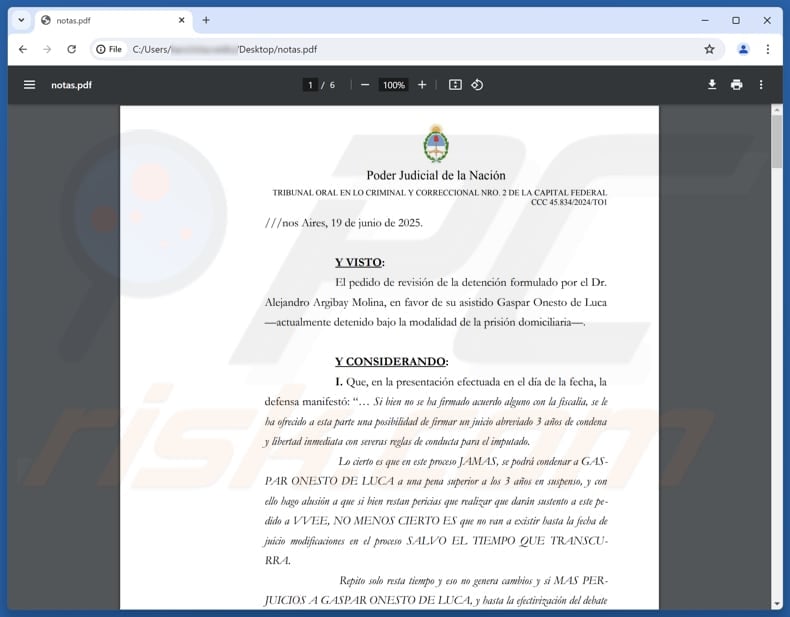
Cybercriminals use spear‑phishing emails that appear legitimate to deliver the malware. It is known that their targets are mainly people in Argentina's judicial sector. The emails contain a ZIP attachment with three files: a malicious Windows shortcut (.LNK), a batch script (.BAT), and a decoy PDF that seems to be an official document.
When the recipient opens the shortcut file, it appears to be a PDF but actually runs a hidden PowerShell command that executes the .BAT file. That file downloads Covert RAT from a repository (e.g., GitHub), saves it under a name and location that mimics legitimate software, and executes it.
How to avoid installation of malware?
Be cautious when dealing with unsolicited emails or messages, and avoid opening attachments or clicking links, especially if they come from unknown senders. Regularly install updates for the operating system and installed apps, and perform scans with a reputable security solution.
Download software only from official websites or trusted app stores, and stay away from pirated software, cracks, and keygens. Also, steer clear of suspicious websites, do not interact with pop‑ups, ads, or buttons on such pages, and never grant them permission to send notifications.
If you believe that your computer is already infected, we recommend running a scan with Combo Cleaner Antivirus for Windows to automatically eliminate infiltrated malware.
Malicious attachment distributing Covert:
Instant automatic malware removal:
Manual threat removal might be a lengthy and complicated process that requires advanced IT skills. Combo Cleaner is a professional automatic malware removal tool that is recommended to get rid of malware. Download it by clicking the button below:
DOWNLOAD Combo CleanerBy downloading any software listed on this website you agree to our Privacy Policy and Terms of Use. To use full-featured product, you have to purchase a license for Combo Cleaner. 7 days free trial available. Combo Cleaner is owned and operated by RCS LT, the parent company of PCRisk.com.
Quick menu:
How to remove malware manually?
Manual malware removal is a complicated task - usually it is best to allow antivirus or anti-malware programs to do this automatically. To remove this malware we recommend using Combo Cleaner Antivirus for Windows.
If you wish to remove malware manually, the first step is to identify the name of the malware that you are trying to remove. Here is an example of a suspicious program running on a user's computer:
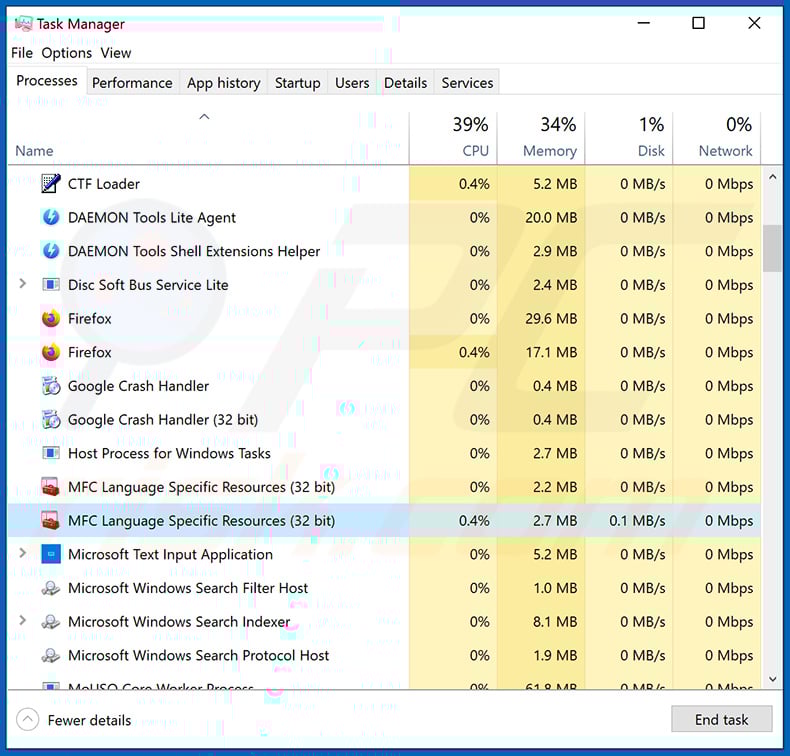
If you checked the list of programs running on your computer, for example, using task manager, and identified a program that looks suspicious, you should continue with these steps:
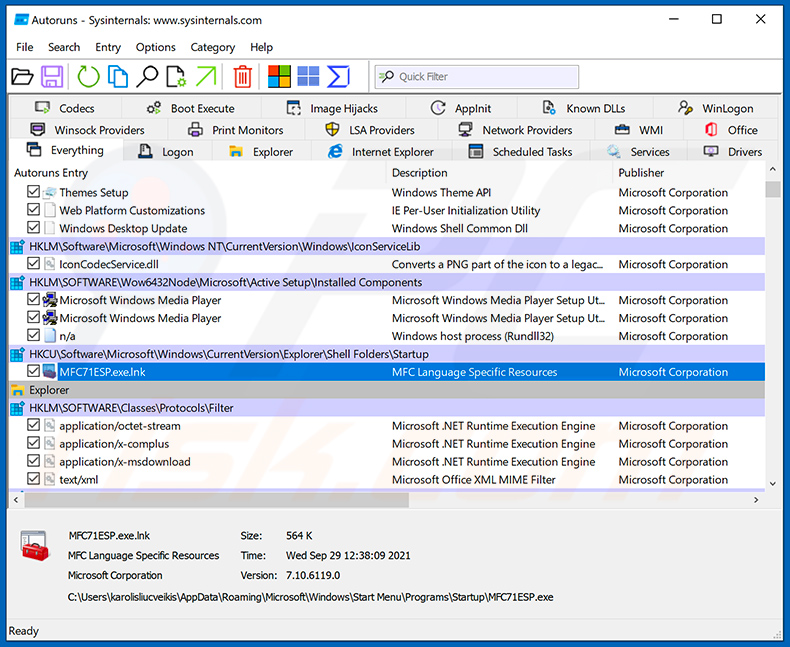
 Download a program called Autoruns. This program shows auto-start applications, Registry, and file system locations:
 Restart your computer into Safe Mode:
Windows XP and Windows 7 users: Start your computer in Safe Mode. Click Start, click Shut Down, click Restart, click OK. During your computer start process, press the F8 key on your keyboard multiple times until you see the Windows Advanced Option menu, and then select Safe Mode with Networking from the list.
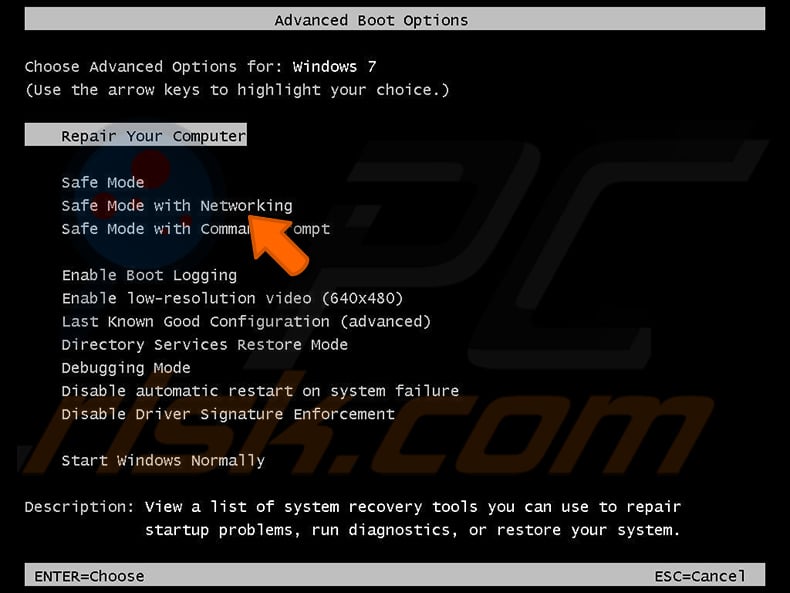
Video showing how to start Windows 7 in "Safe Mode with Networking":
Windows 8 users: Start Windows 8 is Safe Mode with Networking - Go to Windows 8 Start Screen, type Advanced, in the search results select Settings. Click Advanced startup options, in the opened "General PC Settings" window, select Advanced startup.
Click the "Restart now" button. Your computer will now restart into the "Advanced Startup options menu". Click the "Troubleshoot" button, and then click the "Advanced options" button. In the advanced option screen, click "Startup settings".
Click the "Restart" button. Your PC will restart into the Startup Settings screen. Press F5 to boot in Safe Mode with Networking.
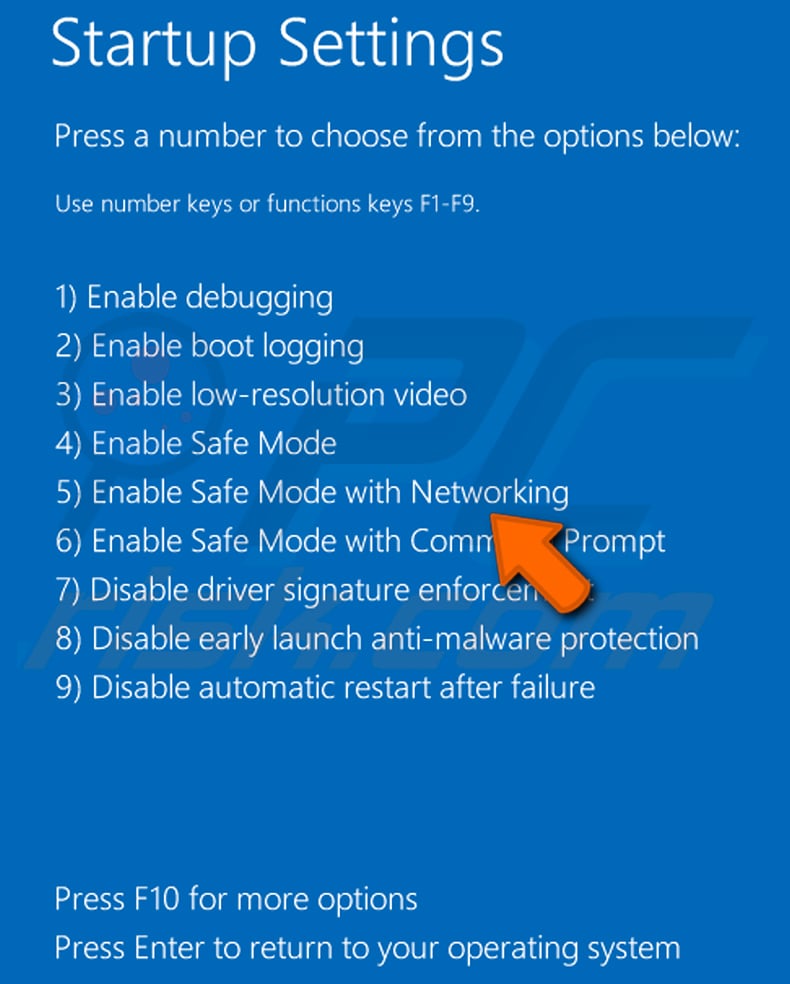
Video showing how to start Windows 8 in "Safe Mode with Networking":
Windows 10 users: Click the Windows logo and select the Power icon. In the opened menu click "Restart" while holding "Shift" button on your keyboard. In the "choose an option" window click on the "Troubleshoot", next select "Advanced options".
In the advanced options menu select "Startup Settings" and click on the "Restart" button. In the following window you should click the "F5" button on your keyboard. This will restart your operating system in safe mode with networking.
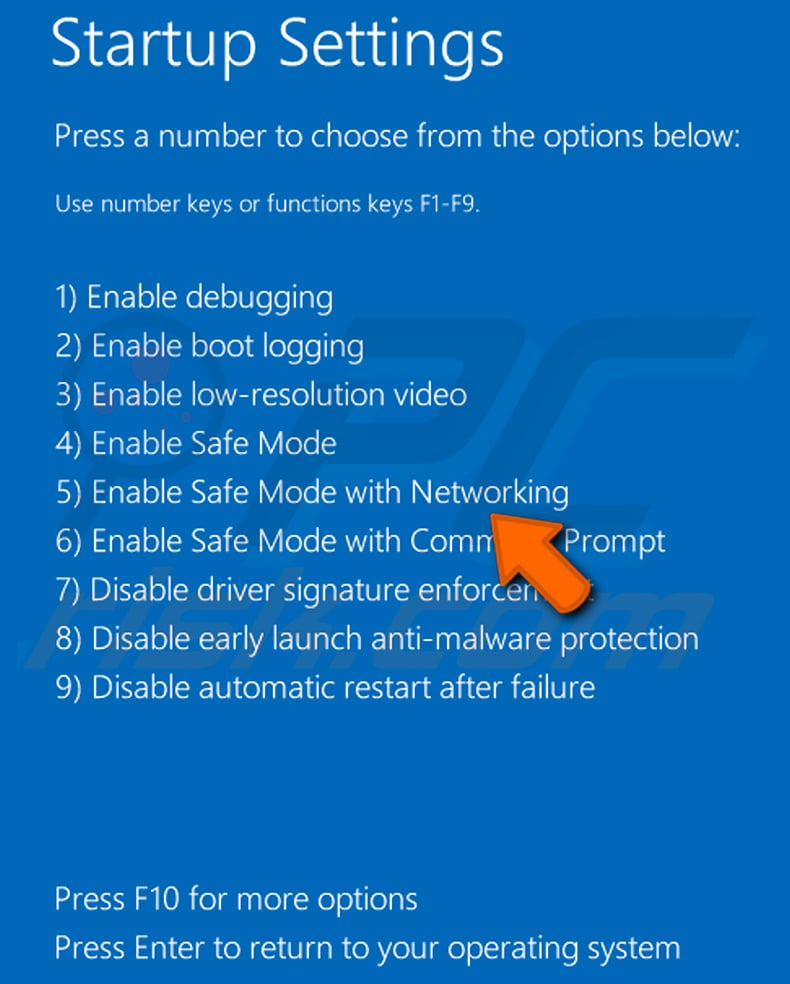
Video showing how to start Windows 10 in "Safe Mode with Networking":
 Extract the downloaded archive and run the Autoruns.exe file.
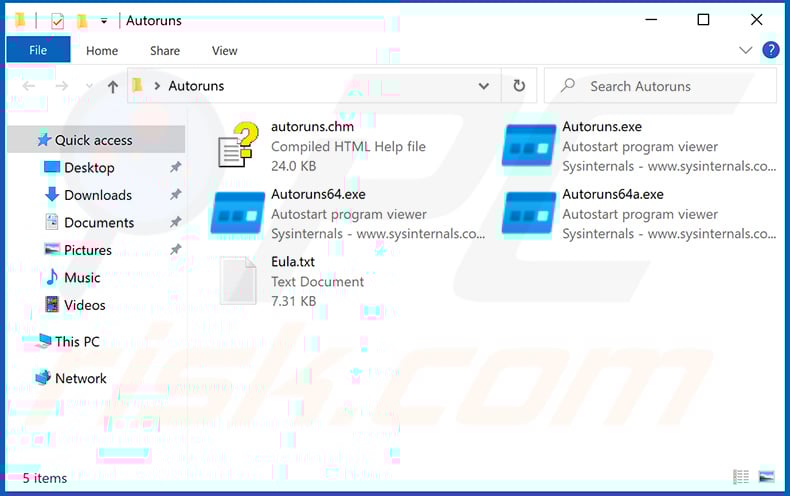
 In the Autoruns application, click "Options" at the top and uncheck "Hide Empty Locations" and "Hide Windows Entries" options. After this procedure, click the "Refresh" icon.
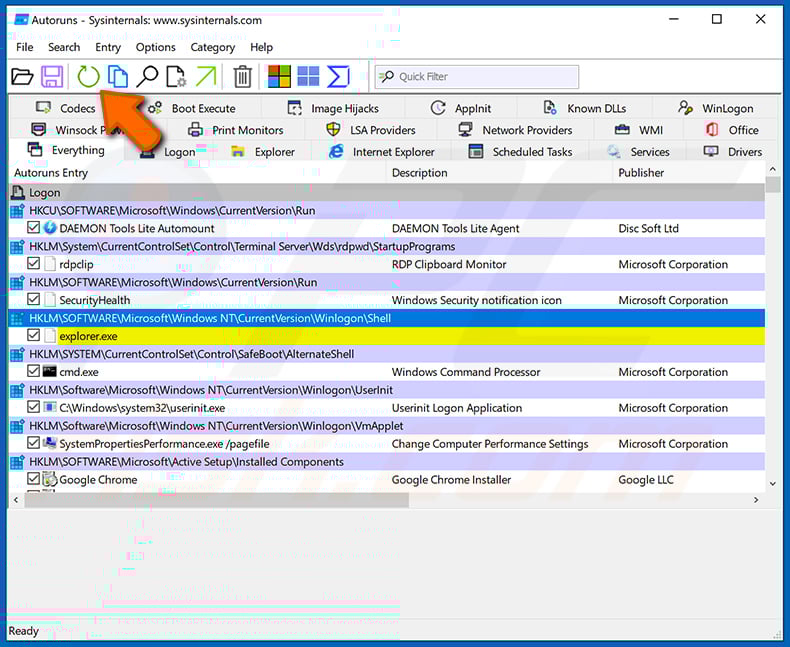
 Check the list provided by the Autoruns application and locate the malware file that you want to eliminate.
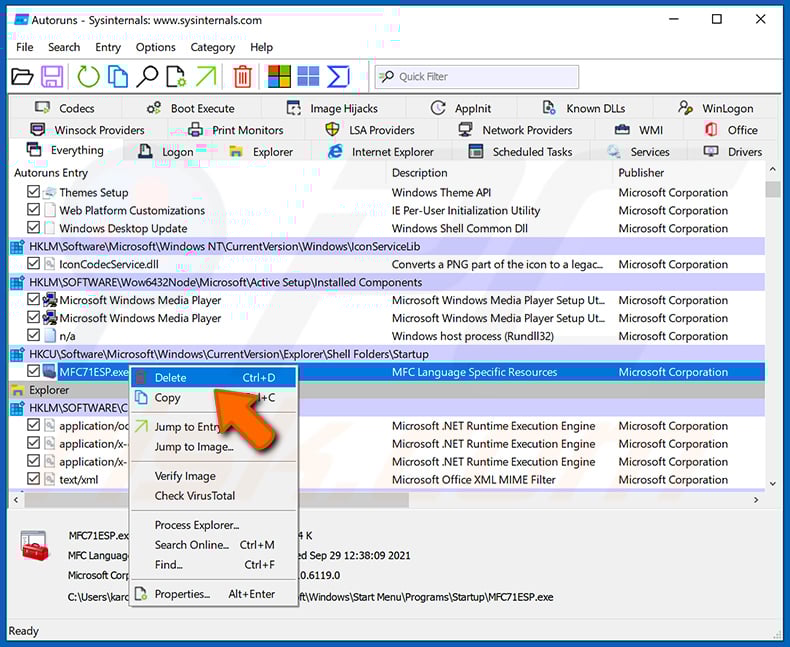
You should write down its full path and name. Note that some malware hides process names under legitimate Windows process names. At this stage, it is very important to avoid removing system files. After you locate the suspicious program you wish to remove, right click your mouse over its name and choose "Delete".
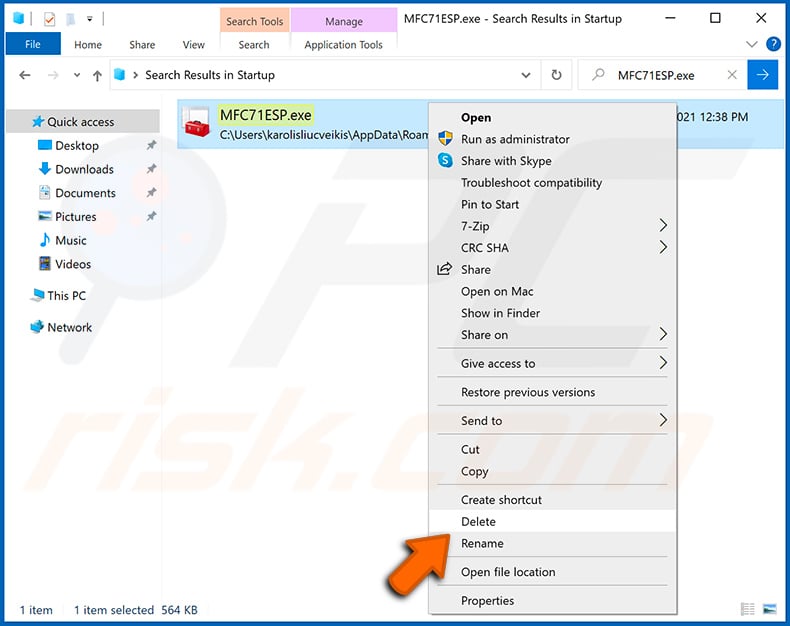
After removing the malware through the Autoruns application (this ensures that the malware will not run automatically on the next system startup), you should search for the malware name on your computer. Be sure to enable hidden files and folders before proceeding. If you find the filename of the malware, be sure to remove it.
Reboot your computer in normal mode. Following these steps should remove any malware from your computer. Note that manual threat removal requires advanced computer skills. If you do not have these skills, leave malware removal to antivirus and anti-malware programs.
These steps might not work with advanced malware infections. As always it is best to prevent infection than try to remove malware later. To keep your computer safe, install the latest operating system updates and use antivirus software. To be sure your computer is free of malware infections, we recommend scanning it with Combo Cleaner Antivirus for Windows.
Frequently Asked Questions (FAQ)
My computer is infected with Covert malware, should I format my storage device to get rid of it?
Formatting your storage device will remove Covert, but this will also erase all your files. As a safer alternative, you can use security tools like Combo Cleaner, which can eliminate malware like Covert without deleting your data.
What are the biggest issues that malware can cause?
Malware can be used to steal sensitive information like passwords and financial data, encrypt files, execute other malicious software, grant attackers remote access to a device, mine cryptocurrency, and more.
What is the purpose of Covert?
The purpose of Covert is to give attackers remote control over infected systems. It is designed to quietly collect information, maintain persistence, upload and download files, escalate privileges, and deploy additional malware such as credential stealers or ransomware.
How did Covert infiltrate my computer?
Covert typically infiltrates systems through emails. These emails contain a malicious attachment (often a ZIP file) that includes a disguised shortcut file (.LNK) designed to look like a legitimate document, such as a PDF. When the attachment is opened, the shortcut silently runs hidden commands that download and execute the Covert RAT in the background.
Will Combo Cleaner protect me from malware?
Yes, Combo Cleaner can detect and remove nearly all known malware. However, advanced threats often hide deep within the system, so it is essential to run a full system scan.
Share:
 Facebook
 X.com
X.com
 LinkedIn
 Copy Link

Tomas Meskauskas
Expert security researcher, professional malware analyst
I am passionate about computer security and technology. I have an experience of over 10 years working in various companies related to computer technical issue solving and Internet security. I have been working as an author and editor for pcrisk.com since 2010. Follow me on Twitter and LinkedIn to stay informed about the latest online security threats.
PCrisk security portal is brought by a company RCS LT.
Joined forces of security researchers help educate computer users about the latest online security threats. More information about the company RCS LT.
Our malware removal guides are free. However, if you want to support us you can send us a donation.
DonatePCrisk security portal is brought by a company RCS LT.
Joined forces of security researchers help educate computer users about the latest online security threats. More information about the company RCS LT.
Our malware removal guides are free. However, if you want to support us you can send us a donation.
Donate
▼ Show Discussion