

Get free scan and check if your device is infected.
Remove it nowTo use full-featured product, you have to purchase a license for Combo Cleaner. Seven days free trial available. Combo Cleaner is owned and operated by RCS LT, the parent company of PCRisk.com.
What kind of malware is DesckVB?
DesckVB is a type of malware called a Remote Access Trojan (RAT), written using .NET. A RAT lets attackers secretly control an infected computer. DesckVB is modular, meaning it uses plugins. Instead of delivering everything at once, the attacker can add extra features later after the system is already infected.
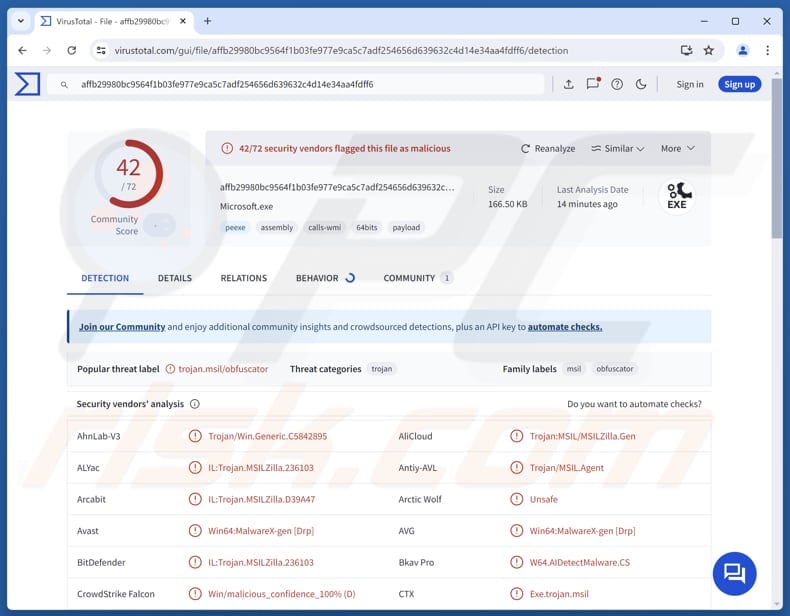
More about DesckVB
Remote Access Trojans (RATs), such as DesckVB, are malicious programs that allow cybercriminals to control infected systems and perform malicious actions remotely. They are often used to steal data and deploy additional malware. As mentioned in the introduction, tools included in DesckVB can be separately loaded after the infection only when needed.
One of the plugins available in DesckVB scans the system to identify installed antivirus and security products. The collected information is sent back to the attacker so they can adjust their activity to avoid detection. The RAT also includes a keylogger that monitors keyboard input to capture everything the victim types. This tool is also capable of tracking active applications, reading clipboard contents, and secretly sending the stolen data to the attacker.
Another tool accesses the system's webcam to capture images and transmit them to the attacker. It attempts to disable the camera indicator light, though success depends on the hardware and drivers. Additionally, DesckVB can load a plugin that checks whether the system has an active internet connection. This tool can also be instructed to retrieve data from websites specified by cybercriminals.
Generally, cybercriminals can use DesckVB to steal sensitive information (e.g., login credentials and credit card details) and misuse it to steal identities, hijack personal accounts, or for other malicious purposes. It is important to note that the RATs capabilities could be expanded and used to deliver additional payloads, such as ransomware.
| Name | DesckVB remote access trojan |
| Threat Type | Remote Access Trojan |
| Detection Names | Avast (Win64:MalwareX-gen [Drp]), Combo Cleaner (IL:Trojan.MSILZilla.236103), ESET-NOD32 (Generik.DIHCGDM Potentially Unwanted Application), Kaspersky (HEUR:Trojan.MSIL.Agent.gen), Microsoft (Trojan:Win32/Wacatac.B!ml), Full List (VirusTotal) |
| Symptoms | Remote Administration Trojans are designed to stealthily infiltrate the victim's computer and remain silent, and thus no particular symptoms are clearly visible on an infected machine. |
| Possible distribution methods | Infected email attachments, malicious online advertisements, social engineering, software vulnerabilities, software 'cracks'. |
| Damage | Stolen passwords and banking information, identity theft, the victim's computer added to a botnet. |
| Malware Removal (Windows) |
To eliminate possible malware infections, scan your computer with legitimate antivirus software. Our security researchers recommend using Combo Cleaner. Download Combo CleanerTo use full-featured product, you have to purchase a license for Combo Cleaner. 7 days free trial available. Combo Cleaner is owned and operated by RCS LT, the parent company of PCRisk.com. |
Conclusion
DesckVB is a Remote Access Trojan designed to be stealthy and adaptable. By using modular tools that are loaded only when required, attackers can reduce detection while maintaining control over infected systems. Such capabilities make the RAT a significant threat and emphasize the need for effective security measures.
More examples of RATs are GopherRAT, StarshellRAT, and JelusRAT.
How did DesckVB infiltrate my computer?
DesckVB is delivered using a malicious JavaScript file, which hides its code, copies itself, and secretly builds a PowerShell command. This command checks for internet access, avoids analysis tools, downloads hidden data, and rebuilds malware in memory. Then, DesckVB is loaded and executed directly in memory using a .NET loader.
The JavaScript file used in the first stage is likely distributed using deceptive emails containing malicious files or links, pirated software (or keygens, cracking tools), or malicious advertisements. Other channels, such as software vulnerabilities, tech support scams, P2P networks, or third-party downloaders, could also be used for delivery.
How to avoid installation of malware?
Avoid opening attachments or clicking links in irrelevant, unexpected emails or messages from unknown senders, and ignore suspicious pop-ups, ads, or buttons on untrustworthy websites. Always download software from official sites or reputable app stores, and steer clear of pirated programs, cracks, or key generators.
Keep your operating system and applications up to date, and regularly scan your device with reliable security tools. Also, reject notification requests from dubious websites. If you believe that your computer is already infected, we recommend running a scan with Combo Cleaner Antivirus for Windows to automatically eliminate infiltrated malware.
Instant automatic malware removal:
Manual threat removal might be a lengthy and complicated process that requires advanced IT skills. Combo Cleaner is a professional automatic malware removal tool that is recommended to get rid of malware. Download it by clicking the button below:
DOWNLOAD Combo CleanerBy downloading any software listed on this website you agree to our Privacy Policy and Terms of Use. To use full-featured product, you have to purchase a license for Combo Cleaner. 7 days free trial available. Combo Cleaner is owned and operated by RCS LT, the parent company of PCRisk.com.
Quick menu:
- What is DesckVB?
- STEP 1. Manual removal of DesckVB malware.
- STEP 2. Check if your computer is clean.
How to remove malware manually?
Manual malware removal is a complicated task - usually it is best to allow antivirus or anti-malware programs to do this automatically. To remove this malware we recommend using Combo Cleaner Antivirus for Windows.
If you wish to remove malware manually, the first step is to identify the name of the malware that you are trying to remove. Here is an example of a suspicious program running on a user's computer:
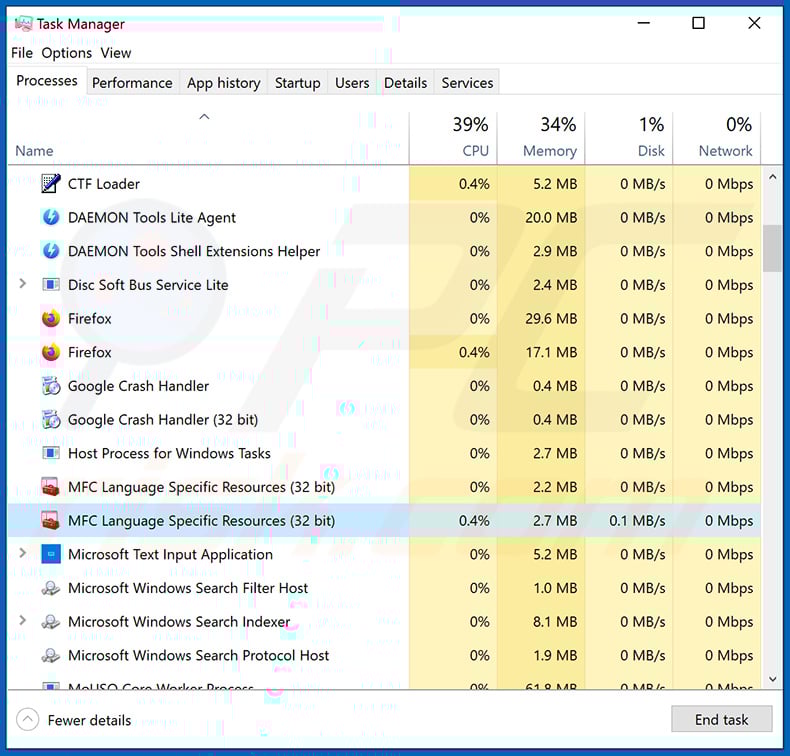
If you checked the list of programs running on your computer, for example, using task manager, and identified a program that looks suspicious, you should continue with these steps:
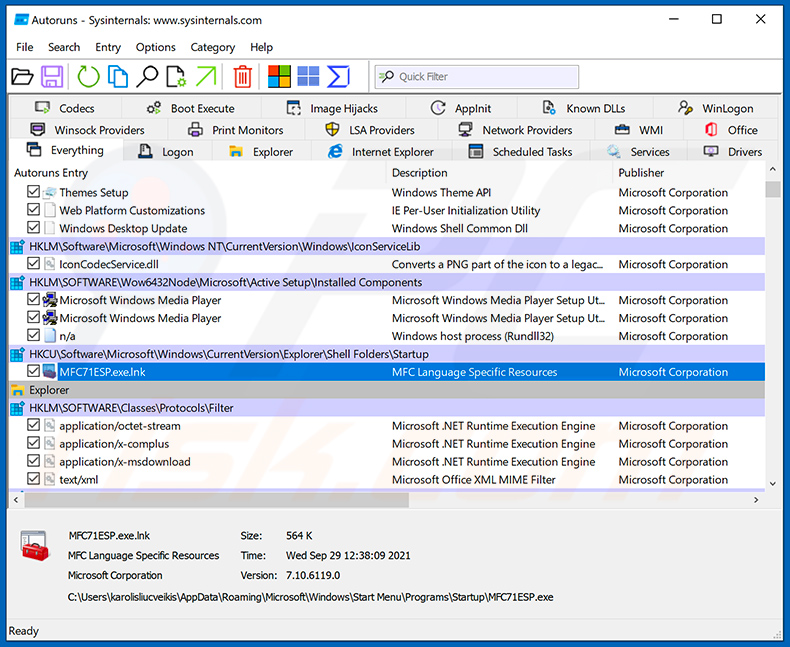
 Download a program called Autoruns. This program shows auto-start applications, Registry, and file system locations:
 Restart your computer into Safe Mode:
Windows XP and Windows 7 users: Start your computer in Safe Mode. Click Start, click Shut Down, click Restart, click OK. During your computer start process, press the F8 key on your keyboard multiple times until you see the Windows Advanced Option menu, and then select Safe Mode with Networking from the list.
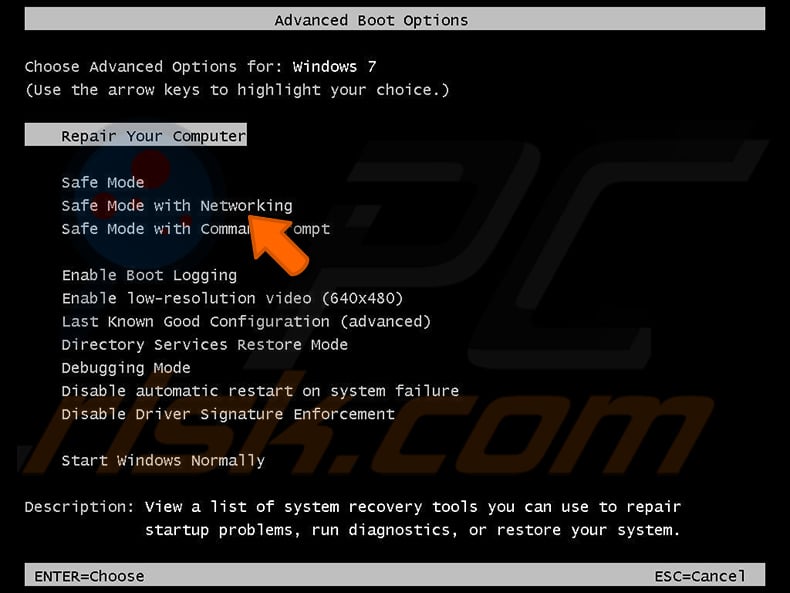
Video showing how to start Windows 7 in "Safe Mode with Networking":
Windows 8 users: Start Windows 8 is Safe Mode with Networking - Go to Windows 8 Start Screen, type Advanced, in the search results select Settings. Click Advanced startup options, in the opened "General PC Settings" window, select Advanced startup.
Click the "Restart now" button. Your computer will now restart into the "Advanced Startup options menu". Click the "Troubleshoot" button, and then click the "Advanced options" button. In the advanced option screen, click "Startup settings".
Click the "Restart" button. Your PC will restart into the Startup Settings screen. Press F5 to boot in Safe Mode with Networking.
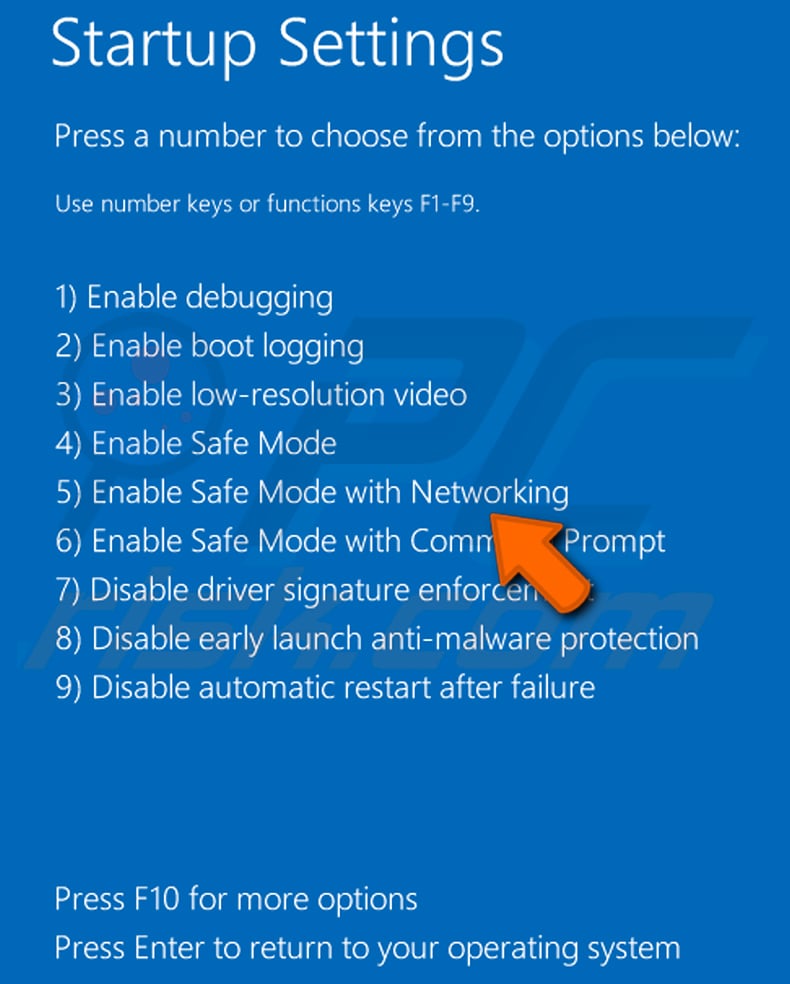
Video showing how to start Windows 8 in "Safe Mode with Networking":
Windows 10 users: Click the Windows logo and select the Power icon. In the opened menu click "Restart" while holding "Shift" button on your keyboard. In the "choose an option" window click on the "Troubleshoot", next select "Advanced options".
In the advanced options menu select "Startup Settings" and click on the "Restart" button. In the following window you should click the "F5" button on your keyboard. This will restart your operating system in safe mode with networking.
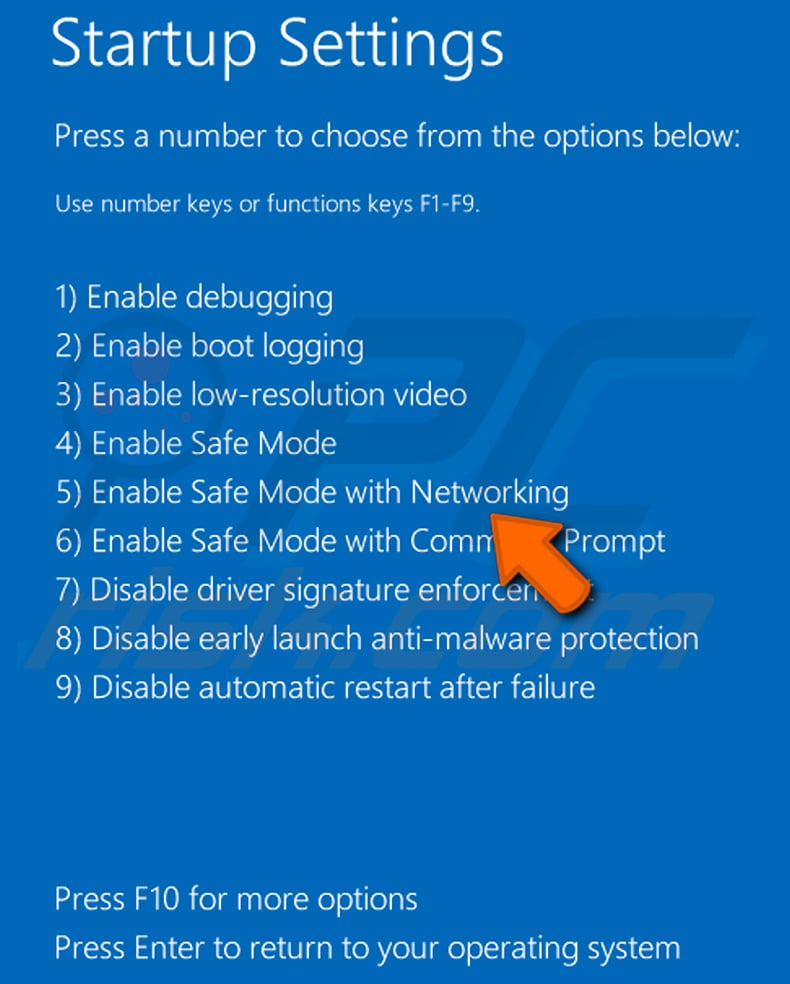
Video showing how to start Windows 10 in "Safe Mode with Networking":
 Extract the downloaded archive and run the Autoruns.exe file.
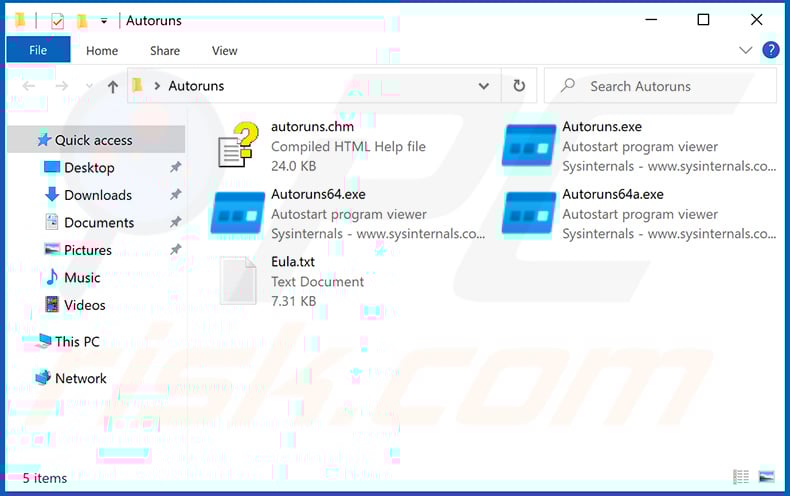
 In the Autoruns application, click "Options" at the top and uncheck "Hide Empty Locations" and "Hide Windows Entries" options. After this procedure, click the "Refresh" icon.
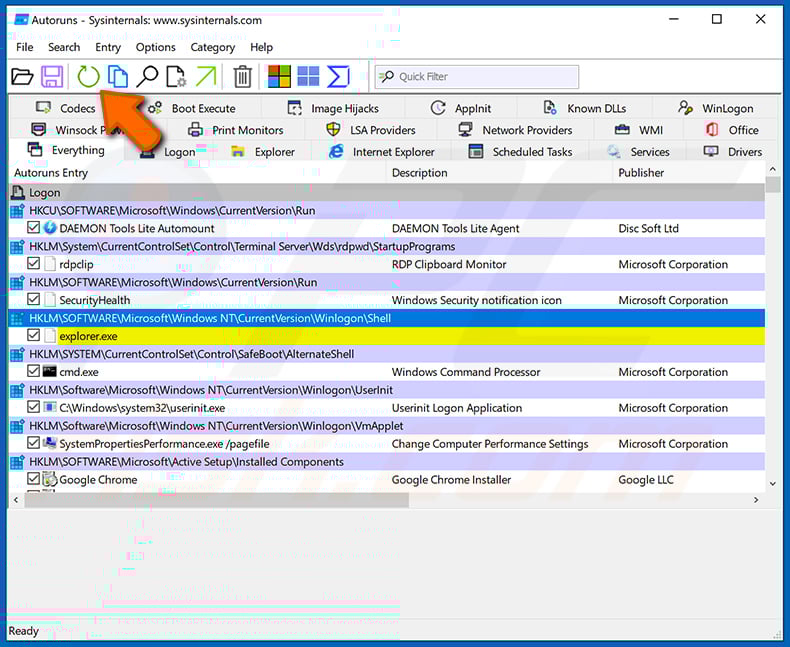
 Check the list provided by the Autoruns application and locate the malware file that you want to eliminate.
You should write down its full path and name. Note that some malware hides process names under legitimate Windows process names. At this stage, it is very important to avoid removing system files. After you locate the suspicious program you wish to remove, right click your mouse over its name and choose "Delete".
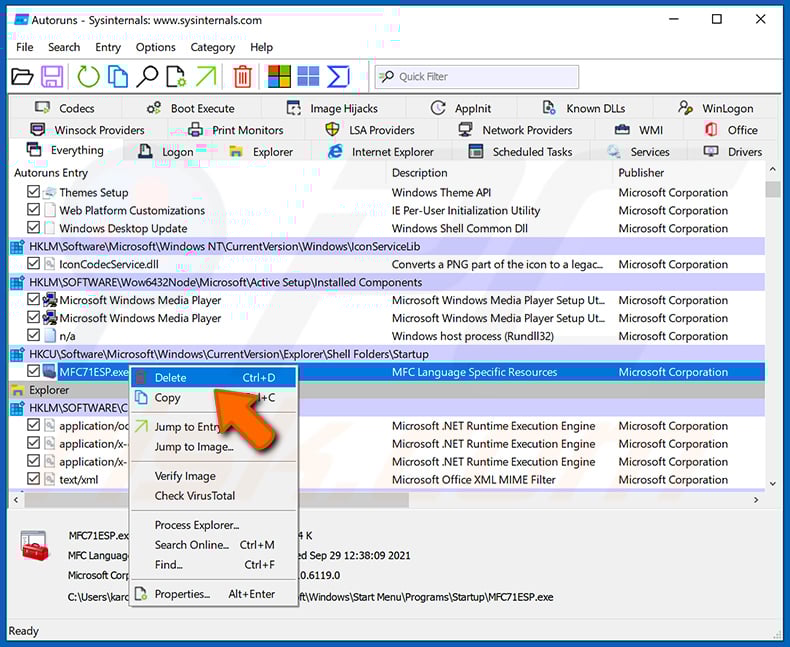
After removing the malware through the Autoruns application (this ensures that the malware will not run automatically on the next system startup), you should search for the malware name on your computer. Be sure to enable hidden files and folders before proceeding. If you find the filename of the malware, be sure to remove it.
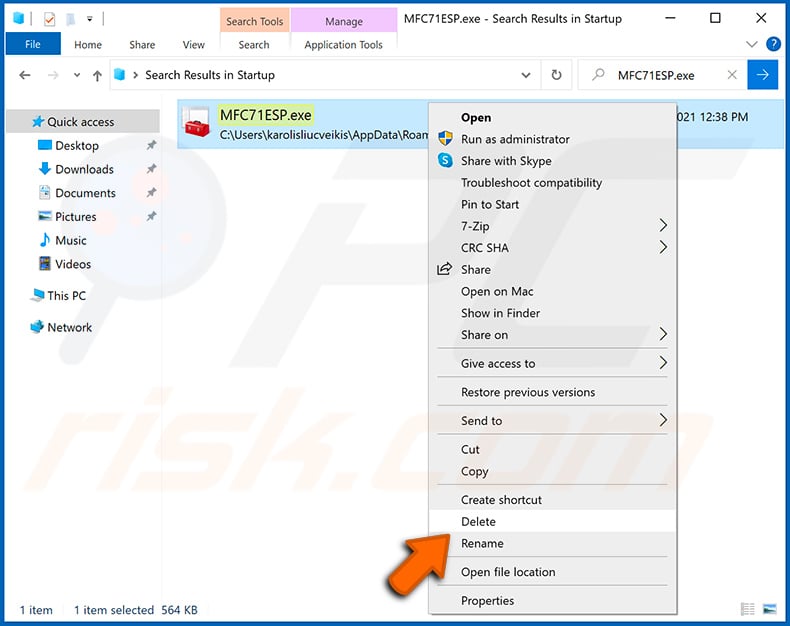
Reboot your computer in normal mode. Following these steps should remove any malware from your computer. Note that manual threat removal requires advanced computer skills. If you do not have these skills, leave malware removal to antivirus and anti-malware programs.
These steps might not work with advanced malware infections. As always it is best to prevent infection than try to remove malware later. To keep your computer safe, install the latest operating system updates and use antivirus software. To be sure your computer is free of malware infections, we recommend scanning it with Combo Cleaner Antivirus for Windows.
Frequently Asked Questions (FAQ)
My computer is infected with DesckVB malware, should I format my storage device to get rid of it?
DesckVB can be removed by completely erasing your storage, though this deletes all data. A safer alternative is running reliable malware removal tools like Combo Cleaner to clean the system without losing your files.
What are the biggest issues that malware can cause?
Malware can lead to slower computer performance, stolen identities, system crashes, monetary losses, the risk of further infections, and file encryption.
What is the purpose of DesckVB?
The purpose of DesckVB is to give attackers remote control over an infected system. It allows them to spy on users and steal sensitive data. It may also be updated to include tools that will enable cybercriminals to deploy additional malware.
How did DesckVB infiltrate my computer?
DesckVB likely infected your computer through a malicious JavaScript file. This file may be spread via phishing emails, pirated software, fake ads, tech support scams, though other deceptive methods may also be used.
Will Combo Cleaner protect me from malware?
Yes, Combo Cleaner can identify and eliminate most known malware, but because advanced threats can hide deeply in the system, running a complete system scan might be necessary.
Share:
 Facebook
 X.com
X.com
 LinkedIn
 Copy Link

Tomas Meskauskas
Expert security researcher, professional malware analyst
I am passionate about computer security and technology. I have an experience of over 10 years working in various companies related to computer technical issue solving and Internet security. I have been working as an author and editor for pcrisk.com since 2010. Follow me on Twitter and LinkedIn to stay informed about the latest online security threats.
PCrisk security portal is brought by a company RCS LT.
Joined forces of security researchers help educate computer users about the latest online security threats. More information about the company RCS LT.
Our malware removal guides are free. However, if you want to support us you can send us a donation.
DonatePCrisk security portal is brought by a company RCS LT.
Joined forces of security researchers help educate computer users about the latest online security threats. More information about the company RCS LT.
Our malware removal guides are free. However, if you want to support us you can send us a donation.
Donate
▼ Show Discussion