
Surfshark CleanWeb Review

✓
Fact-checked by:
Tomas Meskauskas
Last updated:
November 11, 2025
Our reviews are written by Internet security experts.
Learn more.
PCRisk score:
4.4
When searching for a comprehensive ad-blocking tool, we recommend shortlisting Surfshark CleanWeb.
What we liked:
✓ Comprehensive protection: locks ads, pop-ups, and malicious sites while encrypting your connection through the VPN.
✓ Blocks YouTube ads: Effectively removes YouTube and other video ads via the browser extension.
✓ Unlimited devices: One plan works across all your devices and browsers.
What we disliked:
✗ No standalone option: You can't use CleanWeb without a Surfshark VPN subscription.
✗ Incomplete mobile coverage: Struggles to block in-app ads on iOS and some Android apps.
✗ Occasional site hiccups: Occasionally breaks website functionality, requiring whitelisting.
When you sign up for Surfshark VPN, you'll also access their CleanWeb feature, a powerful ad-blocker that sweeps away ads, trackers, and malicious websites from all your devices. This review looks at Surfshark CleanWeb's pricing, features, and performance in our tests. We also consider user feedback from the web to determine if this tool is worth buying.
Pricing: How Much Does Surfshark CleanWeb Cost?
Because CleanWeb is not a standalone product, you get it as part of a Surfshark VPN subscription. There is no separate free plan or one-time purchase for CleanWeb – you must subscribe to Surfshark to use it. Surfshark offers several subscription plans, namely Starter, One, and One+, and all of them include the CleanWeb feature:
• Monthly plan: Regarding pricing, this service is pretty pricey, coming in at around $9.99 per month for the Starter plan, but it isn't locked down for the long term.

• Annual plan (12 months): When you sign up for the Starter plan for a yearly subscription, you'll pay approximately $47.85 for the first year, which is basically $3.19 a month. When it renews, it'll be about $79.00.

• Two-year plan: If you're looking to save on a Surfshark Starter plan, you'll get the best price by committing to a 24-month, 2-year subscription, which is often priced at $1.99 per month. Coming out to a one-time total of $53.73 for the two years. Sometimes you'll get a few months for free. This 2-year plan gives you a massive 82% off what you'd pay on a month-to-month basis. The 2-year plan renews at $79.99 annually.

You'll get a 30-day money-back guarantee, essentially allowing you to try the service and its CleanWeb feature without financial risk when signing up for Surfshark. Be aware that any promotional pricing you get initially is just for the first period, and after that, the renewal rates are higher. The standard Starter plan, for instance, renews at $6.66 per month when billed annually. Coming in at that price, the plan is still quite reasonable, considering that Surfshark lets you connect unlimited devices to one account.
Plans and Available Versions
You'll get their VPN with the CleanWeb feature, and can pick from four subscription tiers, Starter, One, and One+, when choosing a Surfshark plan. The One+ plan bundles the most advanced cybersecurity features. Each tier includes CleanWeb ad blocking, but they differ in the extra cybersecurity tools bundled:
• Surfshark Starter: This is the basic plan, focused on VPN protection and privacy essentials. It includes the full VPN service with all core features (secure encryption, kill switch, MultiHop double VPN, split-tunneling "Bypasser", etc.), CleanWeb ad & tracker blocker, and an Alternative ID tool for creating disposable email addresses and aliases. Starter is ideal if you just need the VPN and ad- blocking without any add-ons.
• Surfshark One: When you sign up for the One plan, you'll get everything from the Starter, plus a lightweight anti-malware program in the form of Surfshark Antivirus, Surfshark Alert, which monitors for any personal data breaches, and Surfshark Search, a private, ad-free search engine. The One plan gives you VPN, ad blocker, antivirus, and identity protection all in one neat package, and will set you back about $2.49 a month for a two-year commitment.
• Surfshark One+: This top-tier plan is the most comprehensive package. It includes all features of Surfshark One (VPN, CleanWeb, Antivirus, Alert, Search) and adds Incogni, a privacy tool that automatically requests the removal of your personal data from data brokers. One+ is the priciest option (around $4.49/month on a two-year basis) but covers virtually every aspect of online privacy and security that Surfshark offers.
Regardless of which plan you choose, CleanWeb is included by default. It's not something that can be bought on its own. It's included for all of Surfshark's subscribers, starting with the basic Starter plan, and can be used on all supported devices. Surfshark's mobile apps also offer a 7-day free trial period, but once that's up, you'll need a paid subscription to keep CleanWeb running.
Our In-House Ad Block Test Results
To evaluate Surfshark CleanWeb's performance, we conducted a series of in-house tests. We enabled CleanWeb on both desktop (Windows 11 PC) and mobile (Android) to compare its effectiveness, using industry-standard ad-block testing tools as well as real-world browsing.
Testing Tools & Methodology: We ran CleanWeb through several benchmarking websites:
- AdBlock Tester (adblock-tester.com): This test generates a score out of 100 by checking how well the ad blocker prevents various types of ads and tracking scripts.
- EFF's Cover Your Tracks: This tool gauges the tracker and fingerprinting protection by seeing if the ad blocker stops common tracking technologies.
- Can You Block It (canyoublockit.com):A site that tests blocking of different ad formats (banner ads, pop-ups, video ads, etc.).
When testing CleanWeb, we looked at a few websites known for their heavy use of ads and bloat, such as Forbes.com, the infamous news site with thousands of banners, YouTube to see how well the app blocks video ads, and several other well-known sites with pop-ups and banners.
When testing, we used the Surfshark browser extension CleanWeb 2.0 on the desktop and the VPN app's CleanWeb feature on both PC and mobile. This allowed us to notice any differences between the brand-new CleanWeb 2.0 and the previous CleanWeb so that we could verify the improvements.
Ad blocking effectiveness: When using the CleanWeb 2.0 extension in a Chrome browser, the results for Surfshark were nothing short of impressive, and almost perfect with a score of well above 90/100 on the AdBlock Tester, signifying that CleanWeb efficiently blocked the lion's share of ads and trackers. On the Can You Block It exams, CleanWeb also performed excellently, blocking every sample ad type we tried (including pop-up ads and banner ads).
When we tested CleanWeb against the heavy advertising on Forbes.com, it filtered out dozens of ads and cleaned up the page dramatically, it was so effective that we could even navigate the site without coming across the usual "disable your ad blocker" message.
YouTube ad blocking: We found that it could block YouTube ads on the desktop, thanks in no small part to the Surfshark browser extension, which cleanly skips pre-roll and mid-roll ads on the videos we played, when testing CleanWeb. This is a significant achievement for CleanWeb 2.0, as many ad blockers falter in the face of YouTube's ads, yet CleanWeb has managed to get it right.
However, the situation was different when we tested on mobile (more on that below in the Mobile section). But in a nutshell, CleanWeb can block YouTube ads, but you need a web browser with the CleanWeb 2.0 extension installed, be it a computer or an Android browser that can handle extensions. The standard CleanWeb feature in the VPN app does not block YouTube ads in the native YouTube mobile app or other apps.
Tracker and privacy tests: It proved very effective in halting many trackers, but was far from perfect. Coming from EFF's Cover Your Tracks, our browser with CleanWeb enabled was still picked up as "not shielding against fingerprinting," which suggests that a few trackers managed to slip through the net. CleanWeb didn't block all the analytics or fingerprinting scripts in the Cover Your Tracks anti-tracking test. This aligns with Surfshark's design choice: the built-in CleanWeb primarily targets malicious ads and trackers, but leaves less severe tracking methods to pass through.
Our test results on AdBlock Tester show the same pattern. CleanWeb blocked most tracking ads but became less aggressive with more advanced tracking techniques. Coming from the AdBlock Tester, the overall score for CleanWeb was exceptional, but a few subtests related to web analytics had inconclusive results, indicating that CleanWeb couldn't fully block all web analytics or monitoring scripts.
Mobile and app ads: When testing CleanWeb on an Android phone through the Surfshark VPN app, we noticed that the ad blocker's effectiveness is quite different from what we were expecting. The AdBlock Tester in the mobile browser showed a score of only 60 out of 100, indicating a significant drop in the ad-blocking power of CleanWeb. We also noticed that in-app ads were largely unaffected. In-app ads in free games and the YouTube mobile app, for example, continued to appear.
The ad blocker works by blocking ad-serving domains, which doesn't always mean every single ad in all the apps you use will be blocked, especially if those apps don't use these well-known domains, which in turn use DNS or ad-blocking domains to load their ads, and can outsmart any VPN-based ad blocker, something that ProtonVPN's NetShield is also susceptible to as it has the same limitations. However, some users report that Proton's solution is more aggressive on mobile.
The bottom line is that Surfshark's CleanWeb on mobile will block some ads system-wide (like browser ads or ads in apps that pull from known ad servers), but it will not eliminate all ads on your smartphone.
We didn't run into any major problems when we tested CleanWeb. Pages loaded more quickly, and we didn't get bothered by ads. Coming across a few false positives, one of our team members found that CleanWeb made the Autotrader car listings site malfunction until he turned CleanWeb off. It seems that sometimes CleanWeb blocks a necessary script that a specific site relies on, probably because it thinks it's an ad or a tracker. Well-known cases like this are rare and can be easily solved by disabling CleanWeb for that particular site.
CleanWeb does, however, offer a "whitelist" feature, allowing you to add trusted sites to an exceptions list, and we confirmed that it does work. Unfortunately, you cannot customize the blacklisting or add your own filters.
Summary of test results: Overall, Surfshark CleanWeb delivered strong ad-blocking performance in our tests on supported platforms. On desktop browsers with CleanWeb 2.0, it blocked virtually all visible ads (including YouTube ads and pop-ups) and earned high marks in objective tests. It also filtered many trackers, but it isn't a comprehensive anti-tracker solution.
On mobile and in the VPN apps, CleanWeb still blocked some ads, but it left many "non-malicious" ads in place – especially in apps like YouTube or other ad-supported mobile apps. In short, if you use Surfshark's VPN primarily on a computer or via the browser extension, CleanWeb can be a capable ad blocker that complements your VPN. If you hope to block every ad on your phone, you may find CleanWeb's limitations in that area. Next, let's examine the features in more detail..
Main Features of Surfshark CleanWeb (Ad-Blocking)
Surfshark CleanWeb's primary purpose is to block unwanted ads and dangerous web content. Here are the main ad-block related features and capabilities CleanWeb provides:
• Ad Blocking in Browsers and Apps: You'll see many annoying ads disappear from the internet. This includes pop-ups, banners, video ads, and general display ads you'd otherwise see on the webpages you visit without CleanWeb enabled. CleanWeb 2.0 in Surfshark's browser extensions can even block ads on YouTube and other streaming services when watching through a web browser.
When activated at the VPN level, CleanWeb on your desktop or mobile phone will cut through all of the ads found in applications and smart TVs by shutting down the ad domains they use, giving you a clean and seamless browsing experience.
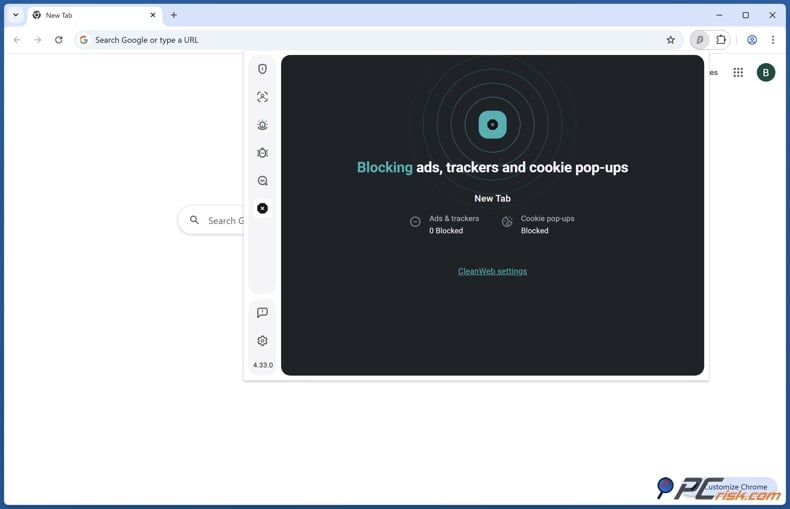
• Tracker and Analytics Blocking: In addition to visual ads, CleanWeb aims to block many trackers, hidden scripts, and cookies that advertisers and data brokers use to track your online behavior. CleanWeb maintains a blacklist of known tracking domains (as well as malware-hosting domains) and prevents your device from connecting to them. This means your browser or apps won't load those tracking elements, enhancing your privacy.
In our experience, CleanWeb effectively stops common trackers, such as ad networks and basic analytics scripts, on websites; however, extremely advanced tracking techniques may still evade detection. Still, CleanWeb helps reduce the amount of data collected about your online habits.
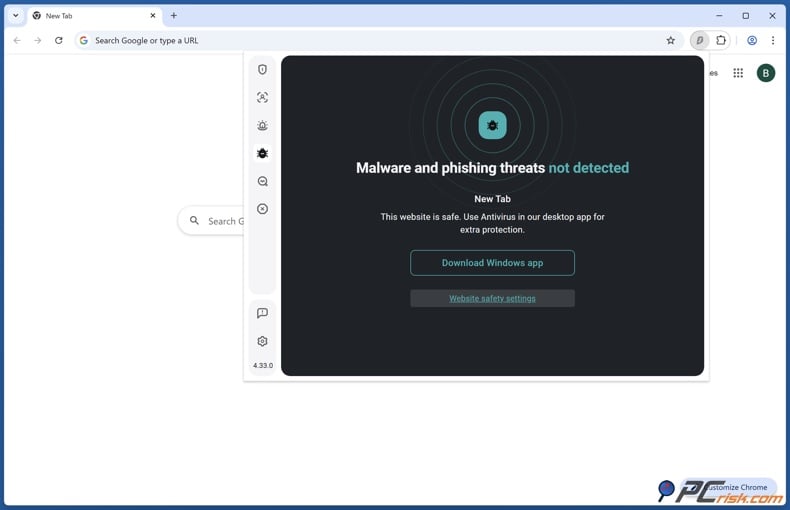
• Malware and Phishing Protection: When you use CleanWeb, you get a lot more than a nuisance-free browsing experience. It's a sophisticated security feature that actively works to block malicious websites, which can steal your money, ruin your computer, and compromise your identity.
A phishing scam site, a malware-spewing website, or a page that's known to distribute viruses won't be able to load on your browser, thanks to CleanWeb, which has its sights set on them. Suspicious ads are also blocked, those annoying ads that try to trick you into clicking on something that will harm your computer won't get past CleanWeb, either.
Distinguished as "malvertising", these ads are basically just malware, and they've caused many problems in the past. CleanWeb effectively knocks these out at the pass, saving you from falling for one of those fake PC warning ads, and gives you a much safer online experience. CleanWeb runs off Surfshark's threat intelligence feeds and acts as the first line of defense, zapping any nasty domains in real time.
• Optional Cookie Pop-up Blocking: When CleanWeb 2.0 was introduced as part of the Surfshark browser extension, it brought a cookie consent blocker. Coming across those pesky GDPR cookie consent banners on websites is a thing of the past now. CleanWeb 2.0 takes care of them by blocking or auto-declining cookie pop-ups so that you won't be bothered by them.
We've found that this feature works quite well, quietly getting rid of the cookie notification, and cuts down on a lot of browsing clutter. This feature of CleanWeb 2.0 is now a standard component of the browser extension, and can be used with Chrome, Firefox, Edge, and other browsers, as part of the expanded set of tools.
• Surfshark Alert Integration (CleanWeb 2.0): You'll notice the addition of data breach and malware alerts, made possible by Surfshark's product Alert, when you're using CleanWeb 2.0. The CleanWeb 2.0 extension provides a more scaled-back version of this feature. When you visit a site, it can check if that site has been the victim of a recent data breach and has a compromised status.
It can also throw up malware alerts, warning you if a site is known to leak user data or host malware. This is an additional layer of protection that doesn't block content but sends you warning messages. CleanWeb 2.0's integration of this feature was initially only available in the paid Surfshark Alert/One bundle, but now any Surfshark user gets access to it through the extension.

• Whitelisting (Allow List): You can allow specific websites to be unfettered by adding them to an exception list when using the Surfshark CleanWeb extension. CleanWeb will turn off its filtering on any site you have whitelisted, allowing that site's content to be loaded normally. This is a great feature if CleanWeb is causing a problem on a site you know is safe, or if you want to see what the ads are doing for a particular website.
We liked that the whitelist feature is very user-friendly. All you need to do is click a toggle or enter the website's URL, and it'll be allowed. Unfortunately, there is no blacklist beyond what Surfshark provides, and there isn't a facility to manually block any domains, nor can you customize the filter lists since all is controlled by Surfshark.

• Unlimited Device Protection: You can cover any number of devices when you sign up for Surfshark and CleanWeb. CleanWeb isn't a per-device license, so if you're already a Surfshark subscriber, you can run the VPN and CleanWeb on anything you own, like your computer, phone, tablet, or smart TV. With CleanWeb, you get ad blocking on all your devices simultaneously without extra cost, which is great for a family or someone with lots of gadgets.
Looking to clean up your online experience, Surfshark CleanWeb is here to help, focusing primarily on blocking malicious websites, ads, and trackers. A simple on/off toggle eliminates most ads, stops common trackers, and even takes care of those pesky cookie pop-ups. Surfshark CleanWeb isn't the most finely tuned ad blocker. There are no super-precise filters here, but it does get the job done, cutting back the clutter and boosting your browsing speed and online safety.
Additional Features and Benefits (Beyond Ad Blocking)
Since Surfshark CleanWeb comes bundled with the Surfshark VPN service, users benefit from various additional features that are not directly related to ad blocking. These features make Surfshark a more well-rounded online protection suite:
• VPN Privacy and Security: You'll get a complete VPN and adblocker combo. Your internet traffic will be encrypted and routed through secure servers, concealing your IP address and location. Governments, hackers on public Wi-Fi, and your ISP won't be able to snoop on you anymore, and you'll be able to bypass geo-restrictions to stream your favorite content.
Key VPN features include a no-logs policy (independently audited, meaning Surfshark doesn't record what you do online), a Kill Switch to cut internet if the VPN drops (preventing leaks), and protocol options like WireGuard for fast speeds. Combining the VPN and CleanWeb means that not only will ads be a thing of the past, but your identity and data will also be well-protected by encryption.
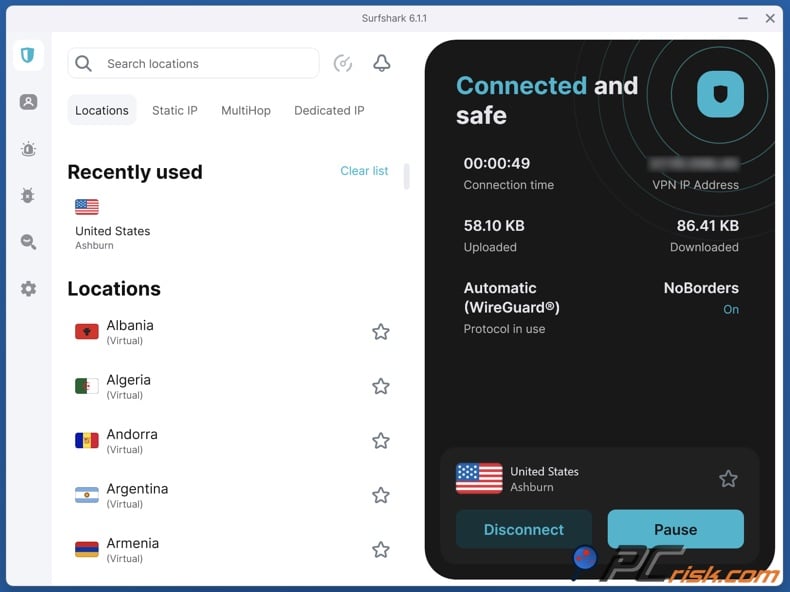
• MultiHop and Split Tunneling: You'll find some extra features that come as standard, one of them being MultiHop, also known as double VPN, which works by sending your internet traffic through two different VPN servers, like passing through two countries. MultiHop makes it even more difficult for advertisers or trackers to know what you're doing online, as your exit IP is now virtually untraceable.
Split Tunneling or Bypasser is another feature that lets you pick and choose which apps or websites go through the VPN and which go through your regular connection. This is great if you want CleanWeb's ad blocking for the majority of your online traffic, but need some apps to bypass the VPN, for example, your banking app, which may need to be excluded for speed.

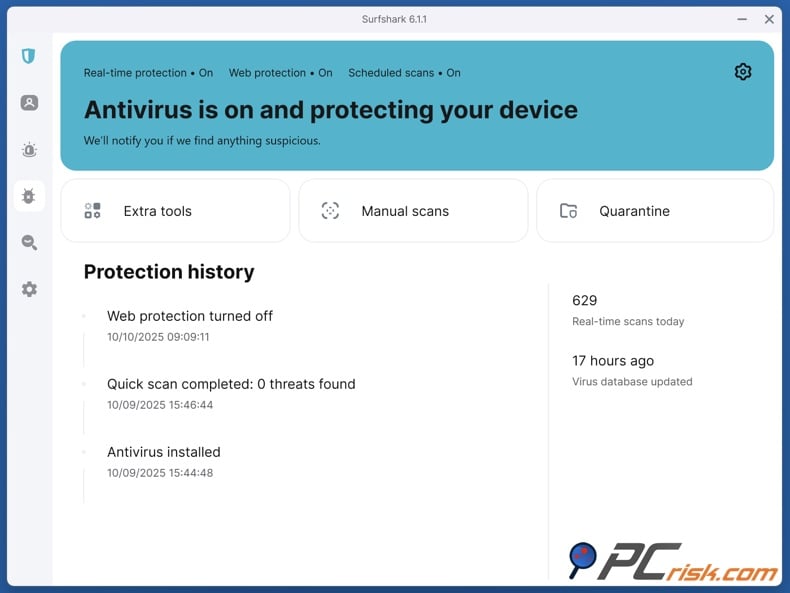
• Surfshark Antivirus: When signing up for the Surfshark One or One+ plans, you'll get the company's antivirus software, which adds a robust layer of protection to your devices against viruses, trojans, and other malware. Surfshark's antivirus includes real-time monitoring and scheduled scans.
In contrast to CleanWeb's malware blocking, which prevents you from visiting malicious websites, the antivirus will help clean up any malware that can slip through the net via an email attachment, USB stick, or some other route. It's a neat feature, and is especially convenient for those who don't want to buy a separate antivirus.
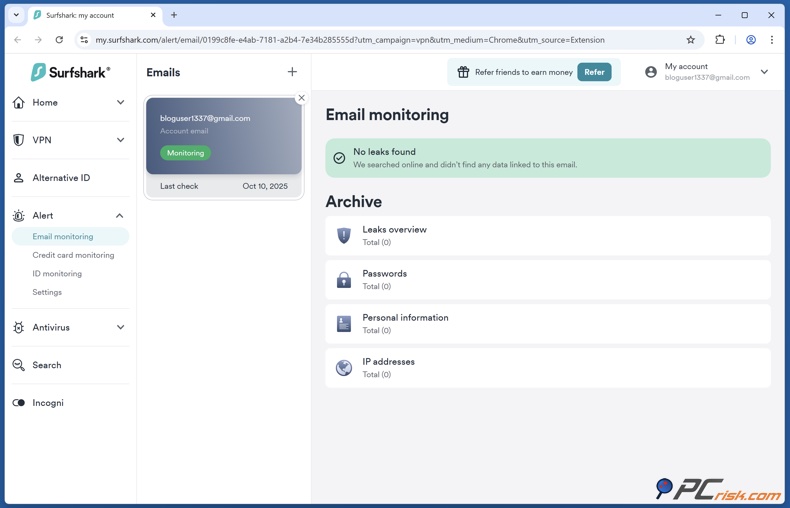
• Surfshark Alert (Data Breach Monitoring): Alert is at your disposal, silently monitoring the internet. Even the dark web has no signs of your personal information when you're part of the Surfshark One bundle. You can input your email addresses, credit card numbers, and IDs into it, and it'll send you a warning if any of them appear in a known data breach.
Alert's breach alert functionality is also built into the CleanWeb 2.0 extension. Still, if you subscribe to the full Alert service, you'll get access to a bespoke dashboard, where you can see the full story behind the breach, and get notifications sent to your email or phone app.
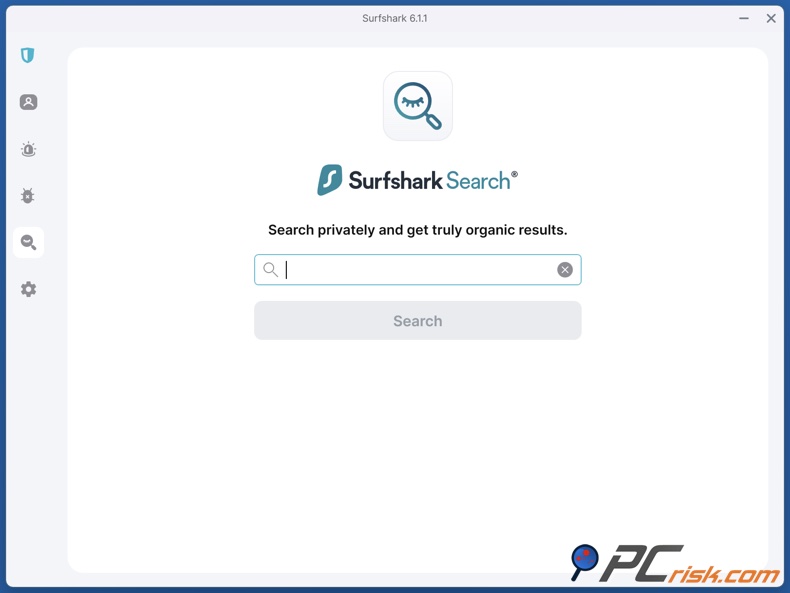
• Surfshark Search (Private Search Engine): Another feature available to you is Surfshark Search, a private search engine similar to DuckDuckGo. It lets you search the web without being tracked or shown tailored ads, and the site won't fill up the place with targeted ads, either, as the results are 100% organic. If you don't like the idea of Google or Bing logging everything you search for and tying it to ads, Surfshark Search is a good way to avoid this.
Coming as part of the Surfshark One plan and higher, it's designed to be a nice pairing to the ad-blocking function CleanWeb, which knocks out ads on the pages you visit, blocking any use of your search history to create advertising profiles.
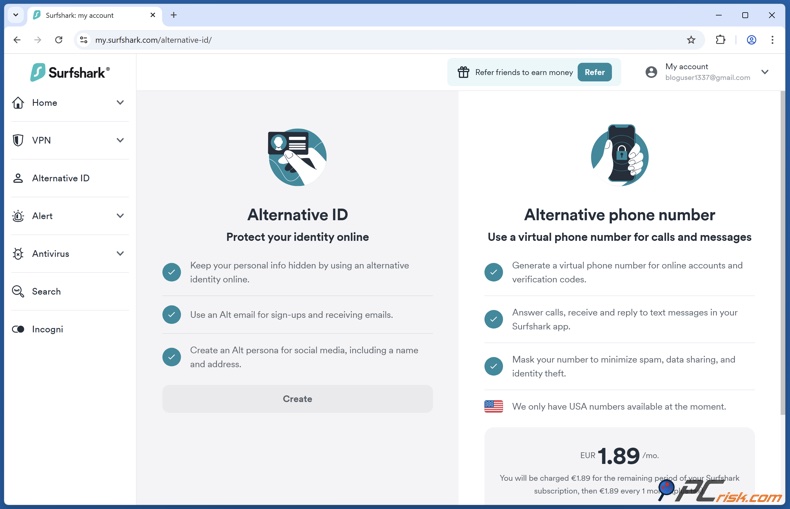
• Alternative ID: If you're looking for a VPN, even the Surfshark Starter plan comes with the lesser-known feature of Alternative ID. This feature essentially gives you a brand-new identity to fall back on. A disposable email address and other alias information, which you can use when signing up for websites, newsletters, or any other services.
You don't have to hand over your real contact information to companies or worry about spam and your real data being sold to advertisers. Since you're using fake personal details and an alternate email, it also makes it much harder for marketers to track you, which has a knock-on effect on ad reduction.
• Unlimited Devices & Cross-Platform Support: It's worth highlighting again that Surfshark allows unlimited simultaneous connections. Many VPNs and security suites limit you (5 or 10 devices), but Surfshark does not. This means all the features – VPN, CleanWeb, antivirus, etc. – can be deployed on every device you own without worry.
CleanWeb is also compatible with a wide range of platforms. We tested it on Windows, Android, and it works just as well on macOS, iOS, Linux, Amazon Fire TV, and there's a Chrome, Firefox, Edge browser extension, and now even a Safari one. If you're planning on getting Surfshark for yourself and your family, each member can have the full service, with CleanWeb on their phone, laptop, and tablet, all at the same time, and still be covered under one account.

• Bypassing VPN for Local Devices: A small feature called "Bypasser" can be used to send local network traffic through the VPN except in cases where it isn't needed. For example, if you're printing or casting to a TV, you don't need to turn off the VPN – the app can allow local LAN traffic outside the VPN tunnel. This ensures CleanWeb and VPN can stay on without disrupting your connection to devices in your home. It speaks to the overall ease of integrating Surfshark into daily use.

In summary, subscribing to Surfshark for CleanWeb means you're also getting a comprehensive toolkit of security and privacy features. You not only block ads, but also encrypt your connection, protect against malware with antivirus, get alerted on data breaches, search privately, and more. These additional features enhance your safety online beyond ad-blocking.
For many users, the combination of VPN + Ad Blocker is especially attractive, since the VPN hides your identity and location, while CleanWeb stops ads and trackers, so advertisers can't easily profile you. The whole package works together to reduce your digital footprint significantly.
(In terms of the features of our software, ad blocking is the fundamental aspect that you'll find in all of our plans. Coming in at the base level, the ad-blocking service provides a clean browsing experience, but if you want the extra layers of antivirus and data protection, you'll need to sign up for one of the higher-tier plans.)
Ease of Use
Surfshark CleanWeb scores high on ease of use. We found that even beginners can quickly get CleanWeb up and running without trouble. Here's a breakdown of the user experience:
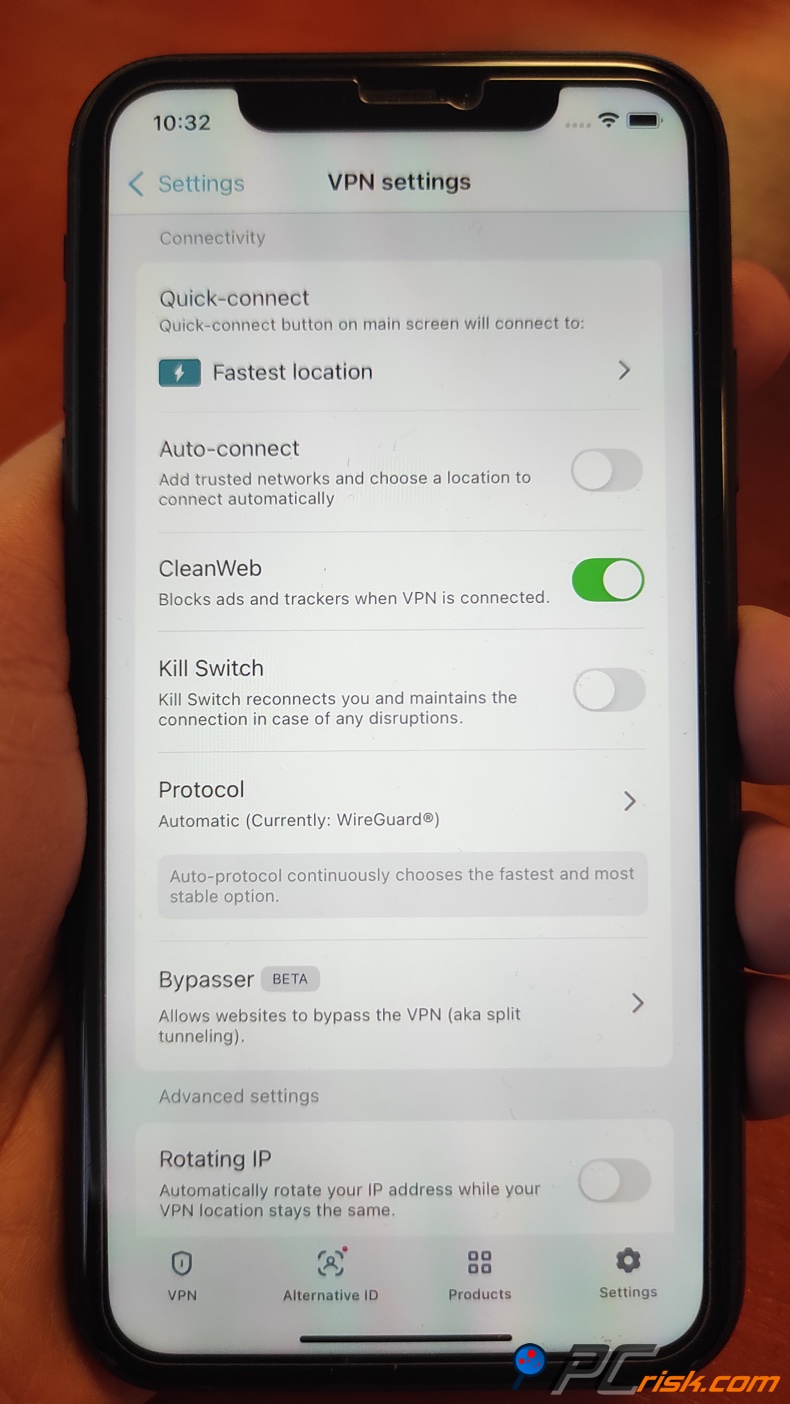
• Enabling CleanWeb: It is basically at your fingertips; all you need to do is go to Settings > VPN Settings > CleanWeb, then flip the toggle to turn it on when you're using the Surfshark VPN app. Note: On the latest app versions, CleanWeb might be enabled even when the VPN isn't actively connected, but it's generally paired with the VPN.
CleanWeb can be a bit hard to find as it's not right on the main screen, and it's buried in the settings menu, but the interface of Surfshark is very tidy, so the settings won't overwhelm you. Once you figure out where it is, activating CleanWeb is a breeze. It's literally just one click, and the label and description in the app tell you exactly what it does: blocks ads, trackers, and malware.

• Using the Browser Extension: For the Surfshark CleanWeb 2.0 experience, you install the Surfshark extension for your browser (available for Chrome, Firefox, Edge, and Safari). Logging into the extension with your Surfshark account will show you a sidebar with the main feature, CleanWeb 2.0, front and center, unlike the single toggle you'd find in the app.
Unlike the app's single toggle, the extension provides four toggles: Ad Blocker, Tracker (pop-up) Blocker, Data Breach Alert, and Malware Alert, giving you a bit more fine-grained control over what you want to block. For example, you can turn off the data breach alerts and still keep the ad blocker running.
When you activate the extension, all the toggles are enabled but can be turned on or off individually. The extension was very modern and user-friendly, took just seconds to add to Chrome and get up and running, and doesn't require you to log in to the VPN to function. CleanWeb 2.0 works independently of the VPN in the browser, so you can click the extension icon and start blocking ads immediately.
• User Interface: For its appearance, Surfshark's VPN service has a consistent design that is both simple and user-friendly. Its desktop and mobile applications come with an attractive dark theme, intuitive buttons for the VPN, and labels that are clear as day in the settings menu. CleanWeb's feature includes a snappy name, a description, and a question mark icon that will teach you more about its purpose.
We really liked how they throw in helpful advice and explanations, and when CleanWeb kicks in, a notification reminds you that it will block ads and malicious sites. The browser extension's new dashboard (CleanWeb 2.0) also has a visually pleasing layout, showing the status of each toggle at a glance. Overall, you don't need to be tech-savvy to use CleanWeb – if you can install a web extension or tap a toggle in an app, you're set.

• Performance and Lightweight Operation: Thanks to the feature's lightweight design, it works behind the scenes and doesn't eat up any CPU or power. When we turned on CleanWeb, we didn't notice any slowdowns in browsing or performance. On Android, CleanWeb didn't affect the battery life we could see in regular usage. Websites actually loaded faster after ads were blocked, and the VPN itself is blazing fast.
Surfshark is renowned for its rapid speeds, especially with the WireGuard protocol, so even when CleanWeb is turned on, we could stream HD video and browse with virtually no loss in speed. Surfshark's servers and apps seem perfectly optimized, so you won't feel the difference when you turn on the CleanWeb feature.

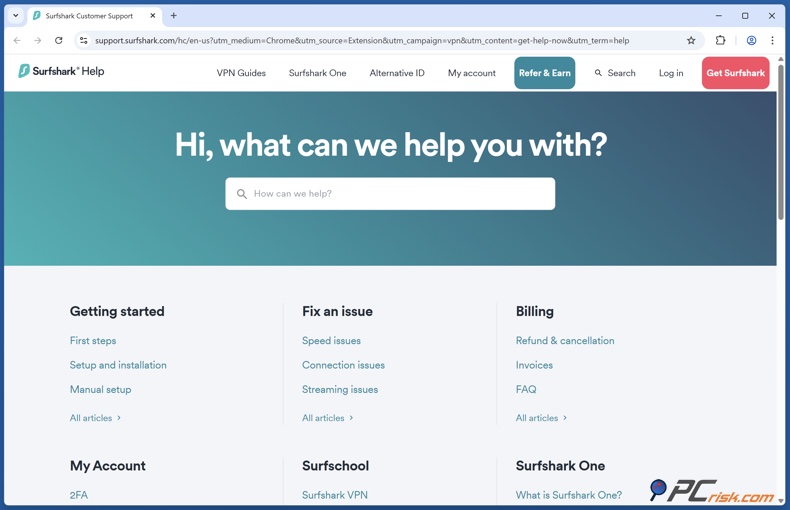
• Support and Guidance: When you're having any issues with Surfshark, you'll find the help you need within the app and extension, thanks to the links to the Help Center and the live chat feature. Surfshark's support is available 24/7, and our users rave about their response times and helpfulness. Surfshark's website has a wealth of step-by-step guides, and even within the extension, they send you to a quick guide on how to use CleanWeb 2.0.
For instance, if you're unsure how to install the extension or how to whitelist a site, Surfshark's support resources make it easy to find the answer. This emphasis on customer support contributes to ease of use, especially for those new to VPNs or ad blockers.
• Automatic Updates: The filter lists and features are automatically updated, so you don't have to lift a finger when using CleanWeb from Surfshark. Coming across the odd app update, Surfshark will prompt you to download the latest version. It's one click away, and these updates can contain brand-new improvements to CleanWeb.
For example, if Surfshark improves the ad-blocking algorithm or adds new features like CleanWeb 2.0, updating the app or extension will seamlessly give you those benefits. It's a hands-off maintenance approach since the software keeps itself current.
In essence, Surfshark CleanWeb is extremely easy to use, whether you're launching it through the app or from your browser. It's very intuitive: installation is a breeze, the interface is minimalistic, and you're using the feature with one click. We believe anyone could figure out how to operate CleanWeb, even an older family member.
The unified Surfshark ecosystem further simplifies things. There's no need to juggle multiple subscriptions or apps as it's all integrated. This cohesiveness and user-friendly design are big pluses for CleanWeb.
Mobile Apps Experience
Surfshark offers mobile apps for Android and iOS, both of which include the CleanWeb feature. For this review, we tested the Android app and will also cover what's in store for iOS users.
Android App: When using the Surfshark Android app, you'll find the CleanWeb feature under Settings, in the VPN settings section. Tap on it to activate the ad blocker for your entire device, which will stay on as long as the Surfshark VPN connection is active.
Our Android app tests showed that it runs smoothly and is very user-friendly, and we could connect to the VPN with just one tap. The interface on mobile mimics the desktop app, so if you use both, there's no learning curve switching between them. For example, the CleanWeb toggle on Android is in the same relative spot and works the same way as Windows.
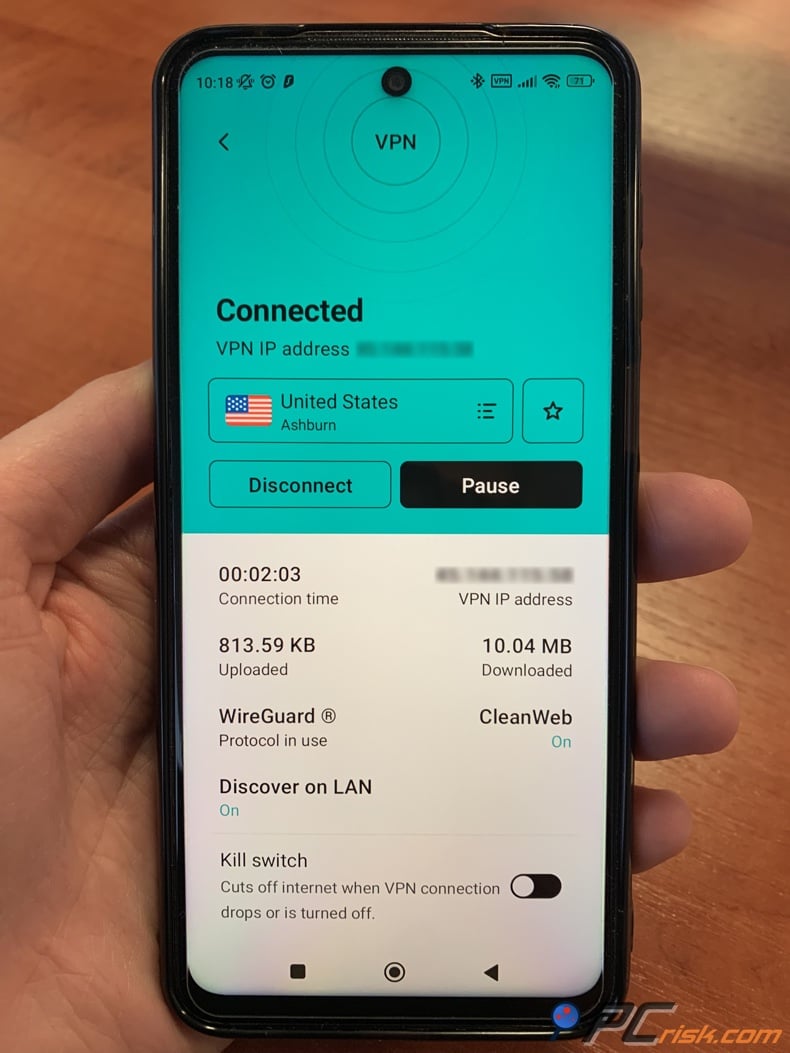
While browsing on Android with CleanWeb, we found that regular websites in Chrome had most ads removed (similar to desktop). The VPN essentially became a DNS-level ad blocker on our phone when using Surfshark's VPN with its CleanWeb feature. We found that news sites and other websites no longer displayed banner ads and pop-ups, making mobile browsing much nicer.
However, as noted in our test results section, the Android CleanWeb is the original version, not CleanWeb 2.0. That means it does not have the advanced ad-block rules that block all ads, and it lacks the cookie pop-up blocker. Its focus is more on malicious ads and domains. Therefore, some ads still got through on Android, especially those that aren't considered dangerous (e.g., Google AdSense text ads might appear, or certain sponsored content).

A major limitation on mobile is YouTube and in-app ads. Using the Surfshark VPN app's CleanWeb, YouTube ads were not blocked. When we opened the YouTube app and played a video, we had to sit through the ads, which is pretty much par for most VPN-based ad blockers, as they don't work well with how YouTube delivers its ads. The same problem was present in other apps. A free game that shows ads between levels didn't block them, because those ads are fetched from the app itself (unless they're coming from a blocked domain, and many weren't).
Basically, CleanWeb won't shield you completely from ads in apps. It's more of a general-purpose solution for web browsers and network calls, not a one-size-fits-all ad blocker for all apps. Many Android users use browser-based ad blockers or custom DNS/ad-blocking apps to get around in-app ads, and Surfshark's approach is more moderate on Android.
We also looked at performance on mobile. When testing the VPN and CleanWeb combination, we saw that the battery life was affected, but not to a large extent. Any VPN will consume some power, but a modern phone can efficiently run Surfshark all day. If you have a weaker battery, it might be a good idea to turn it on only when you need it, but our testing didn't show any slowdowns.
CleanWeb, in particular, on Android, didn't cause any issues, and streaming video, browsing Instagram, and checking email all functioned normally, but now a lot of third-party ads are gone, which is great.
One thing to watch for: compatibility with certain websites or services. When CleanWeb is enabled, it may not play well with some websites, and a few Redditors have mentioned that it clashed with Craigslist and Autotrader on mobile, likely because CleanWeb has blocked something it thought was an ad or tracker, but these sites need that something to function.
We encountered a similar issue with one site, but didn't see it often. The workaround is simple – temporarily disable CleanWeb (or use the Whitelist feature if available in the mobile app via settings).
iOS App: You'll also notice that the CleanWeb feature is available when using the Surfshark iOS app. It works like its Android counterpart; you turn on the toggle to start blocking ads when connected to the VPN. However, from user feedback (and Surfshark's own notes), CleanWeb on iOS is the least powerful implementation. Apple's strict policies on VPN apps mean that CleanWeb doesn't do as much on iOS as on other platforms. Users have said that it's not very effective and barely noticeable.
In our limited test, basic web ads were somewhat reduced, but in-app ads in free iPhone games and apps didn't budge. This could be due in part to the way iOS handles VPNs. One of the main features of Safari is its built-in content blocker support, but Surfshark's CleanWeb doesn't use this feature, unlike some dedicated iOS ad blockers that install as Safari content blockers.
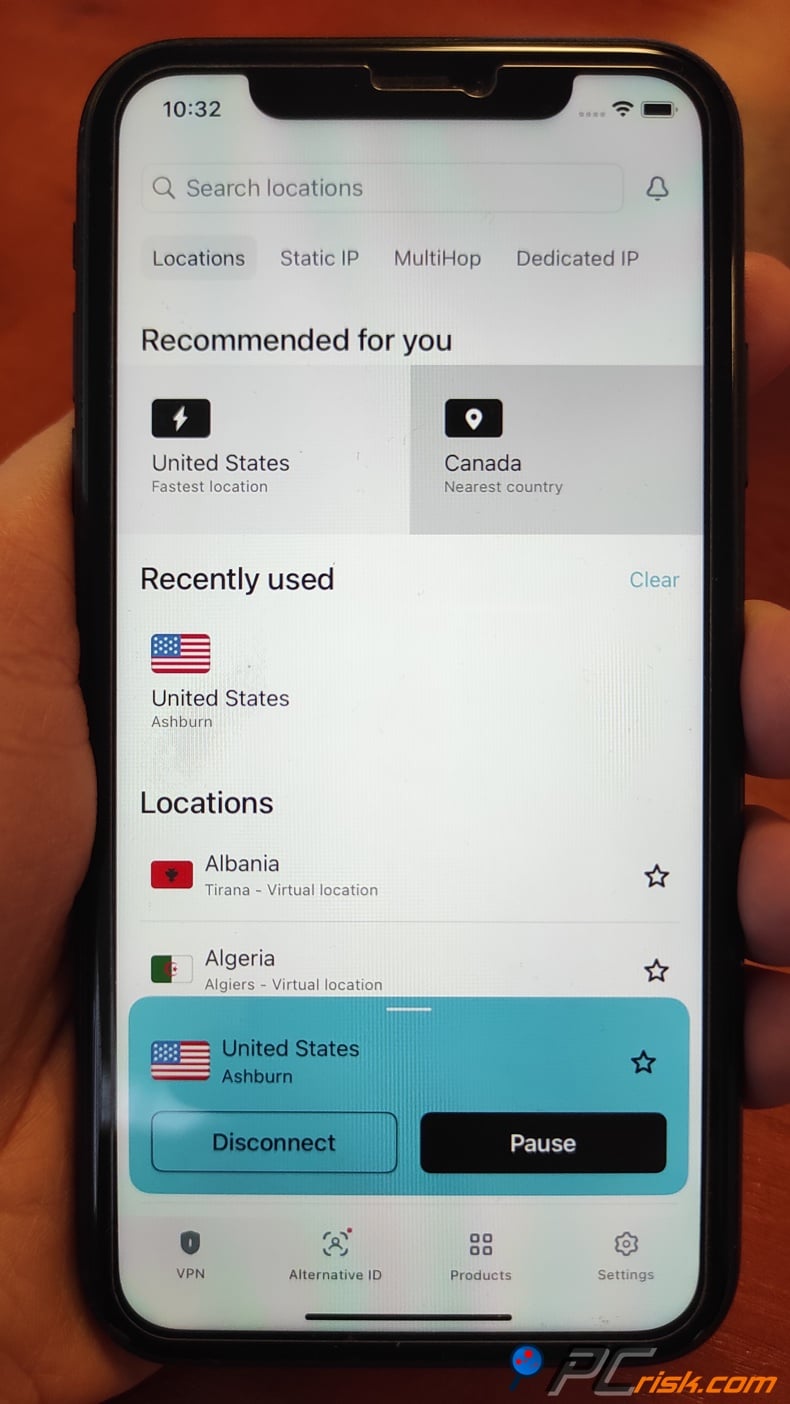
The CleanWeb feature's interface is sleek, and turning it on was as simple on the iOS app. But once on, the differences it made were subtle. We'd say that iOS users should keep their expectations in check. CleanWeb will block well-known malicious sites and possibly a few dodgy ad domains, shielding you from nasty stuff, but it won't remove every single ad from your iPhone or iPad.
This isn't really by accident, Surfshark has said that CleanWeb is all about blocking harmful ads, and doesn't want to interfere with the functionality of other apps. You'll need a separate Safari ad-blocker app if you want more aggressive ad blocking.
That said, the benefit for mobile users is that CleanWeb is a nice bonus that runs with your VPN. It's convenient, as you don't have to install a separate ad-block app or browser. If you're already using Surfshark to secure your connection (which many do on public Wi-Fi or cellular data to encrypt traffic), CleanWeb piggybacks on that to at least cut down the worst ads and known trackers.
We also liked that on Android, CleanWeb could even block some ads in apps like the CNN news app and others, which pull ads from web sources – that was a pleasant surprise.
Mobile summary: You'll find that the Surfshark mobile apps are just as polished and user-friendly as the desktop. On desktop, CleanWeb is a breeze to turn on, and on Android, it provides a pretty good level of ad blocking in browsers and a few apps, though it won't eliminate every single ad, especially video ads in apps. On iOS, the impact of CleanWeb is relatively minor, basically just cutting off malicious websites.
Both platforms are protected by CleanWeb's additional phishing and malware-blocking capabilities, so we view mobile users as using CleanWeb to beef up their online safety, not as a comprehensive ad-blocker.
Lastly, the consistency across devices is a plus. If you enable CleanWeb on your laptop and phone, you'll enjoy a generally ad-reduced environment everywhere. And if something isn't working, you can quickly disable the feature in two taps. The ability to have an ad blocker that works even on a smart TV or other device via Surfshark (for example, using Surfshark on an Amazon Fire TV Stick to block some ads) is an added benefit of the mobile/TV support that standalone ad blockers often can't achieve.
User Reviews and Feedback
To assess Surfshark's CleanWeb's performance, we reviewed user reviews on Trustpilot, Reddit, and other tech forums. The general sentiment is mostly positive, though there are some mixed opinions regarding the ad-blocking feature specifically.
Trustpilot: You'll see a highly impressive picture of a well-known VPN provider when checking out the reviews for Surfshark on Trustpilot. With an average rating of 4.5 out of 5 stars from tens of thousands of users, people are raving about Surfshark's VPN service for its rock-solid reliability, lightning-fast speeds, and value for money.
While most Trustpilot reviews focus on the VPN, some do mention CleanWeb or the ad blocker in passing. Users who mention it typically appreciate that "Surfshark provides a killer VPN and even better customer service," and note the "lots of options" including the ad-block feature.
The ease of use is often highlighted – customers love that they can protect all their devices and block annoying ads with minimal effort. A common theme is people feeling safer online; some explicitly state that they "feel somewhat safer surfing with my IP hidden," and presumably CleanWeb contributes to that safe feeling by keeping malicious ads at bay.
Negative comments on Trustpilot related to Surfshark (and by extension CleanWeb) are relatively rare. Still, a few users have reported issues such as: "Doesn't do the job as described – pages do not load and geo-restricted content stays blocked." In context, this was likely a VPN server issue rather than CleanWeb, but it shows that if CleanWeb ever blocks something essential, it could lead to frustration until the user figures out the cause. However, Surfshark's team is very active in responding to negative reviews, often helping users troubleshoot.
Overall, Trustpilot feedback indicates that most users are very satisfied, seeing Surfshark (and CleanWeb) as delivering on its promises. The ad blocker is considered a valuable addition, especially since it comes at no extra cost.
Reddit and Forums: As for CleanWeb, Reddit communities on Reddit's r/Surfshark and r/VPN have much to say. Tech-savvy users dig into the strengths and limitations. Positive feedback includes comments like: "I hadn't seen those annoying ads in a while. Confirmed the ad blocker does work for the most part," and "Surfshark's CleanWeb basically turned my browsing experience into a whole lot better by eliminating trackers."
Some people have shared stories of going to shady streaming sites or torrent sites and noticing that CleanWeb made a huge difference in the number of pop-ups and fake download buttons they get. Users like that CleanWeb is basically a baseline level of protection that doesn't require a separate ad-blocking extension.
On the flip side, critical feedback is often about CleanWeb's limitations. Several users have noted that "CleanWeb doesn't work [well] on iOS – I still see the same ads as without it." iPhone users comparing Surfshark's CleanWeb to other solutions (like Proton's NetShield or dedicated ad blockers) sometimes feel CleanWeb is too conservative.
Android users have reported instances where "with CleanWeb on, some apps or websites break (e.g., images not loading)," requiring them to turn it off for those cases. This can be inconvenient if it happens frequently, though it appears to be a case-by-case issue.
A particularly common remark among power-users: "CleanWeb only blocks malicious ads; it doesn't block all ads by design. They've said this a lot." This aligns with our findings that Surfshark intentionally doesn't block "legit" ads on the system-level mobile filter to avoid unintended side effects. Some users are unhappy with that approach, preferring a more aggressive blocker.
There were also a few conspiracy-tinged comments speculating "maybe they get paid to let some ads in?" (There is no evidence of Surfshark whitelisting ads for payment; it's more likely they focus on malicious domains by philosophy).
Reviews by tech experts: Outside user communities, professional reviewers from sites like AllAboutCookies, Cybernews, and others generally rate Surfshark CleanWeb as one of the better VPN-based ad blockers. It's often commended for blocking YouTube ads (a rare capability) and being included cheaply. Coming in at a very low price is another point in its favor.
Experts have pointed out, however, that CleanWeb is not available as a standalone app and has trouble with advanced tracking. These critiques mirror what savvy users say on Reddit: it's excellent for casual ad blocking and obvious threats, but not a cure-all for privacy or a replacement for dedicated tracker-blocking extensions.
Overall impression from users: Regarding Surfshark's CleanWeb feature, it seems that most users are more than happy to have it as part of their package, seeing it effectively block most pop-ups, flashing ads, and malicious links.
From the perspective of non-technical users, CleanWeb "just works", and they're not seeing nearly as many online annoyances, which leads to glowing reviews and word-of-mouth. The unlimited devices and simple setup get lots of compliments, think a reviewer protecting their whole family's devices, and none of them see any more intrusive ads or nasty sites.
The negative feedback tends to come from users who expected CleanWeb to be as robust as uBlock Origin or other dedicated ad blockers. These users are somewhat disappointed that CleanWeb has its limits, particularly on mobile Safari or when it comes to deep tracking blocking. This has led some of these users to turn to stacking another ad blocker on top of CleanWeb. However, even among this group, few outright dismiss CleanWeb – they acknowledge it's a useful baseline, just not the ultimate ad blocker.
In conclusion, user reviews on various platforms indicate that Surfshark CleanWeb is well-received and considered a valuable feature. Trustpilot shows mainstream users enjoying a smoother, safer internet thanks to CleanWeb. Reddit and forums may offer some constructive criticism, but on the whole, they commend CleanWeb. The suggestion from the feedback is that Surfshark could take CleanWeb to the next level, particularly on iOS and in its tracker-blocking feature.
Still, it's already doing so well that many users are tipping the scales in Surfshark's favor when deciding on a VPN. The promise of an ad blocker was a significant selling point for Surfshark, and the company has largely met the expectations, according to the users.
Is It Worth Buying Surfshark CleanWeb?
Evaluating whether Surfshark CleanWeb is worth the investment, we've taken a deep dive into the world of pricing, features, test results, and user feedback. If you are in the market for a combined VPN and ad-blocking solution, the answer to this question will very likely be yes. Here are the key points to weigh in making your decision:
Value proposition: Surfshark offers tremendous value. You'll get top-of-the-line VPN service plus the CleanWeb ad blocker and other protective features for a few dollars a month commitment to a longer-term plan. If you were to go out and buy a five-star VPN, plus a separate ad blocker and security package, it would cost a lot more.
If you already desire a VPN for privacy or streaming, Surfshark becomes a top contender because CleanWeb sweetens the deal considerably. In our opinion, the low cost of entry (especially with discounts) makes it absolutely worth trying. Even if CleanWeb didn't quite cut it, you'd still be left with an excellent VPN and could add an ad blocker if needed.
Ad-block performance vs alternatives: In the case of ad-blocking, Surfshark's CleanWeb is one of the more polished VPN-based ad blockers on the market. Competitors like NordVPN (with its Threat Protection) or ProtonVPN (NetShield) have similar features, but Surfshark's ability to block YouTube ads and its CleanWeb 2.0 improvements set it apart.
Compared to standalone ad blockers (browser extensions like uBlock Origin or AdGuard), CleanWeb is less flexible and thorough. If you only care about blocking every ad and tracker in your browser, a free extension might do that job slightly better. However, those won't protect you in other apps or at the network level, and they don't come with a VPN's privacy benefits.
CleanWeb takes a holistic approach to protecting you; it won't catch every benign ad. Still, it will clear the clutter from your browsing, shield you from malicious content, and throw a veil of encryption over your internet traffic, which is pretty much what most people need. If you've already built a complex ad-block setup and don't require a VPN, then Surfshark might be more than you need.
Ease and convenience: When deciding whether to buy Surfshark CleanWeb, you'll get the convenience of a multi-layered protection system wrapped up in one neat package. Install the app or extension, and you're done, no juggling multiple tools, no hassle.
For someone who isn't tech-savvy or just doesn't want the hassle, CleanWeb delivers a plug-and-play ease that's hard to beat. And since you can run it on any number of devices, it's an economical way to cover your entire household. Plus, because you don't have to configure individual ad blockers on every one of those devices, it will save you a lot of time.
Use case - who should consider it: When you're scrolling through many websites and can't help but feel bombarded with ads and pop-ups, CleanWeb is here to make your life a lot easier. Especially if you're a YouTube enthusiast and watch many videos on a desktop device, CleanWeb is a godsend. If you spend time on public Wi-Fi or travel, the combination of Surfshark's VPN with CleanWeb will shield you from any threats and cut down the annoyances of the web.
On mobile, if you're on Android, CleanWeb can cut out a chunk of the ads and save some data usage, which might be worth it if you have a limited data plan or hate seeing ads in apps. For iOS users specifically looking for ad blocking, the value is a bit less clear – you might want an additional solution – but if you also want a VPN, Surfshark is still a strong contender for overall benefits.
Comparing to not having it: Ask yourself: Without CleanWeb, what am I using? Perhaps a free browser ad blocker, but that won't cover ads in other apps or provide malware protection. Perhaps nothing at all, in which case you're exposed to annoying or harmful content. Given the relatively low cost of Surfshark's service, the uplift in your browsing quality and safety is significant.
During our testing, going from an ad-filled, tracker-filled internet to one where pages were tidy and threats were blocked was almost night and day. It's one of those quality-of-life improvements you quickly get used to and wouldn't want to give up.
Limitations to consider: When considering Surfshark CleanWeb, it's worth noting that if you already have a VPN subscription elsewhere, and all you're looking for is a decent ad blocker, switching to Surfshark might not be worth it, since you can use a standalone ad blocker.
If you primarily use iOS and your main concern is ad-blocking in apps like YouTube, CleanWeb (as part of Surfshark) might not fulfill that need completely – an alternative approach could be required. Users who are extremely privacy-conscious and want maximum tracker blocking will likely supplement Surfshark with other tools.
Future improvements: Surfshark is actively improving CleanWeb (as seen with the version 2.0 rollout). Investing in Surfshark means you'll get even better ad-blocking capabilities over time through updates. They've already shown they listen to user feedback (for example, adding the cookie blocker and more customizations in CleanWeb 2.0.) So, buying in now could mean you benefit from those improvements for "free" as they come.
Verdict: Security and ad-free browsing, Surfshark CleanWeb is an excellent choice when you need a top-notch combination of privacy. Coming with a highly reasonable price, it's doing its job well, and the user experience is smooth. If you're in the market for a VPN, Surfshark is a great option since CleanWeb adds a lot of value to it. It's no magic bullet, eradicating ads from every website, but it knocks out most of the unwanted content and gives you a much safer online experience, and doesn't require much effort.
For the average user, the time and hassle saved by not having to close pop-ups, the protection against threats, and the pleasant browsing experience will be more than enough to make CleanWeb pay for itself.
In conclusion, when discussing a cleaner, safer internet experience, Surfshark CleanWeb is the way to go, and if you sign up for a Surfshark VPN subscription, you'll get it. CleanWeb is widely regarded as one of the best in the business, earning consistently positive user feedback. Given the low risk (with a 30-day refund option) and high potential reward (an internet largely free of ads and dangers), it's certainly worth trying to see if it fits your needs.
Frequently Asked Questions (FAQ):
Can I use Surfshark CleanWeb for free?
No, CleanWeb is not something you can get for free, since it's a feature that comes with a paid subscription when using Surfshark. Surfshark does offer a 7-day free trial for mobile users and a 30-day money-back guarantee, which is basically the way to test CleanWeb. Still, after these periods expire, you'll need to have an active Surfshark VPN plan to be able to use CleanWeb.
What is the difference between CleanWeb and CleanWeb 2.0?
When discussing the Surfshark VPN, CleanWeb is the original ad-blocking feature built into its apps for Windows, macOS, Android, iOS, and so on. When the VPN is turned on, it blocks ads, trackers, and malicious domains at the network level. CleanWeb 2.0 is basically the upgraded version, and it's exclusive to the Surfshark browser extensions for Chrome, Firefox, Edge, and Safari.
CleanWeb 2.0 has a brand-new control panel and allows you to turn on/off ad blocking, pop-up/cookie blocking, data breach alerts, and malware alerts separately. Technically, CleanWeb 2.0 can block a wider range of ads (including YouTube ads and cookie consent pop-ups) because it operates within the browser with more refined filtering rules.
The original CleanWeb (in the VPN app) focuses on blocking mainly malicious ads/trackers at the DNS level and does not include the cookie blocker or breach alerts. Both CleanWeb and CleanWeb 2.0 can be used at the same time. For example, you could turn on the VPN app's CleanWeb and also fire up the browser extension CleanWeb 2.0 for a complete clean sweep.
Does Surfshark CleanWeb block YouTube ads and other video ads?
Yes, Surfshark CleanWeb is indeed able to block YouTube ads, but this is mainly thanks to its CleanWeb 2.0 browser extension, which is available on supported devices. Based on our tests, we found that the extension knocked out pre-roll and mid-roll ads on YouTube so that we could watch our videos without interruptions.
However, if you're using the Surfshark VPN app by itself, without the extension, CleanWeb won't be able to block ads within the YouTube mobile app or other streaming services. Smart TVs and similar devices are also out of the picture, as CleanWeb can't remove those ads either.
So, in summary, through a browser, YouTube and many video ads will be blocked; through standalone apps (mobile or smart TV), CleanWeb generally cannot block those due to technical limitations.
How do I enable or disable CleanWeb?
You'll find the CleanWeb feature in the Settings, probably under the "Privacy" or "Security" tab, and need to toggle it on. You'll get a confirmation that it's working. CleanWeb stays active until you turn it off, so you'll want to do this on each device if you want the feature to be enabled everywhere. You'll need to install the Surfshark VPN extension, log in, and then the CleanWeb features should be right there, possibly already enabled, but you can check by clicking on the Surfshark icon and ensuring the "Ad blocker" toggle is on.
CleanWeb is enabled by default on the extension, but you need to switch the toggle off to disable it. If you just want to disable it for a single site, you can add that site to the whitelist via the browser extension settings, which is probably going to be a lot easier than turning off CleanWeb completely, or doing it on the VPN app.
Do I need to be connected to a VPN server for CleanWeb to work?
When using the CleanWeb feature in the Surfshark app, a VPN connection is usually required because CleanWeb essentially filters your internet traffic through the Surfshark DNS once you're connected to the VPN, and it won't work if the VPN is off. However, the CleanWeb 2.0 browser extension can function as an ad blocker in your browser even if you don't have an active VPN connection.
You need to be logged into the extension, and it can be used to block ads, but a VPN connection isn't necessary. This allows you to use the extension as an ad blocker separate from the VPN. If you don't have a VPN connection, you miss out on encryption and IP masking, but the ad-blocking still works. VPN-based CleanWeb in the app isn't going anywhere, as it's tied to the VPN.
Can CleanWeb replace my existing ad blocker (like uBlock or Adblock Plus)?
When deciding if CleanWeb can replace your existing ad blocker, the answer is that it probably will for many people, especially those who want to get rid of most of the ads and known threats they encounter on the web, which CleanWeb is very good at doing. CleanWeb blocks most common ads, malicious ads, and pop-ups, and will give you a similar web surfing experience to a browser ad-blocker like uBlock or Adblock Plus, but doesn't offer the advanced features or community-driven filters that those tools do.
If you're an expert user who likes to fine-tune the filters, or if you count on an ad blocker to kill off custom elements on websites, social media widgets, etc., you'll find CleanWeb falls short in these areas. It also doesn't target and block all benign ads and trackers that some dedicated blockers zero in on. However, ad blockers like uBlock Origin can be run in tandem with CleanWeb and give a more holistic solution to the problem.
Some users take a middle-ground approach to run both: keep CleanWeb on for broad protection and use a lightweight browser ad blocker for cosmetic filtering or additional tracker-block lists. However, for an average user, running multiple blockers is usually unnecessary. We suggest trying CleanWeb on its own for a while – if you find it's catching nearly everything and you're happy, it can replace your separate ad blocker, simplifying your setup.
Will CleanWeb interfere with any websites or cause issues?
The risk of it interfering with websites is low when using CleanWeb. However, like any ad blocker, it may incidentally block a website reliant on third-party content, causing it to malfunction or prevent maps, forms, and other features from loading. Some users have noted that maps or forms don't load when the domain is blocked, thinking it was an ad. A few websites may break or display problems when CleanWeb is active in the worst-case scenario. You're unlikely to run into these issues, and sites that have been reported, were rare.
When you suspect that CleanWeb is the issue, simply toggle it off, refresh your site, and see if it works. CleanWeb could also be conflicting with websites' revenue streams or cause revenue streams to drop. There's a relatively rare possibility that when sites know about ad blockers, they'll ask you to turn one off. In CleanWeb's case this might require a site or a brief pause in CleanWeb's filtering to avoid ads. In almost all cases, the exceptions mentioned above, websites work without issues on CleanWeb.
Is Surfshark CleanWeb safe to use?
Yes, Surfshark CleanWeb is safe to use. It is a feature of a reputable VPN provider and is designed to increase your safety online by blocking malicious elements. It does not go around installing dodgy certificates or root access like some questionable ad-blockers, as it's run through Surfshark's own system.
What CleanWeb does is reroute all of your DNS queries through their servers, then kick out the nasty stuff. Like other well-known ad blockers, the extension employs a rule-based blocking mechanism. Surfshark has an impressive reputation for security, a no-logs policy, and has had their software, which includes CleanWeb, audited for security issues, and it's squeaky clean.
Using CleanWeb will not expose you to viruses or malware; on the contrary, it helps prevent encountering those. It will shield you from the stuff you don't want. Just grab the Surfshark app or extension straight from the official sources, their website, Google Play, Apple App Store, Chrome Web Store, etc, because counterfeit versions are floating around.
CleanWeb is not a substitute for antivirus software on your machine, though. It will knock out lots of threats before they get to you, but you still need to use common sense, don't open funny emails, and run an antivirus if you download many files.
How does CleanWeb affect internet speed and data usage?
Concerning internet speed and data usage, CleanWeb has a very positive effect. It works by blocking those bandwidth-hogging ads, so your browser doesn't have to load heavy ad images or video ads, and therefore has less content to retrieve, often making pages load noticeably quicker. Popular news sites or blogs were noticeably quicker with CleanWeb turned on in our testing. CleanWeb is very lightweight when filtering, so you won't see a noticeable slowdown.
The VPN that CleanWeb uses introduces a bit of latency, as with any VPN, but Surfshark is generally fast. When we measured the difference in speed with CleanWeb on and off, it was basically negligible.
Regarding data usage, CleanWeb helps you save bandwidth because those blocked ads and trackers aren't sucking down your megabytes. If you're on a limited mobile data plan, turning CleanWeb on can knock off a few bytes here and there, especially if you visit ad-heavy sites regularly. All those megabytes of video ads and endless scrolling ads are not downloaded.
The overhead of CleanWeb's operation is tiny compared to what you would save by not loading all that ad junk, so it's no wonder CleanWeb is better than nothing. There's a small overhead for CleanWeb's operation (e.g., the DNS queries to check domains), but that overhead is tiny compared to the data saved by not loading ads. In summary, CleanWeb tends to speed up your browsing and cut down data usage more than it would ever slow it down. It's optimized to run efficiently in the background.
Share:
 Facebook
 X.com
X.com
 LinkedIn
 Copy Link

Karolis Liucveikis
Experienced software engineer, passionate about behavioral analysis of malicious apps
Author and general operator of PCrisk's News and Removal Guides section. Co-researcher working alongside Tomas to discover the latest threats and global trends in the cyber security world. Karolis has experience of over 8 years working in this branch. He attended Kaunas University of Technology and graduated with a degree in Software Development in 2017. Extremely passionate about technical aspects and behavior of various malicious applications.
▼ Show Discussion