
Malwarebytes Review

✓
Fact-checked by:
Tomas Meskauskas
Last updated:
November 04, 2025
Our reviews are written by Internet security experts.
Learn more.
PCRisk score:
4.3
When searching for a comprehensive security suite with additional functionality (like VPN and password manager), we recommend shortlisting Malwarebytes.
What we liked:
✓ Excellent malware detection and ransomware prevention, with strong real-time protection layers.
✓ Lightweight installation and fast scanning that barely impacts system performance.
✓ Simple, intuitive interface and multi-platform support make it easy to protect all your devices.
What we disliked:
✗ Lacks some features found in full "internet security" suites (no built-in firewall or parental controls).
✗ Single-device Premium subscription is a bit pricey compared to some competitors' entry-level plans.
✗ Occasional false positives and some user complaints about subscription auto-renewal and support responsiveness.
Malwarebytes has traveled a long road from being an elementary malware cleanup tool to a full antivirus program that protects home users across many platforms. In this review, we take a close look at Malwarebytes Premium's pricing, features, power (or lack thereof) to protect users from online threats, performance in various lab tests, and feedback from actual users, as we attempt to answer the question: Is Malwarebytes Premium a good choice for you?
Pricing and Versions
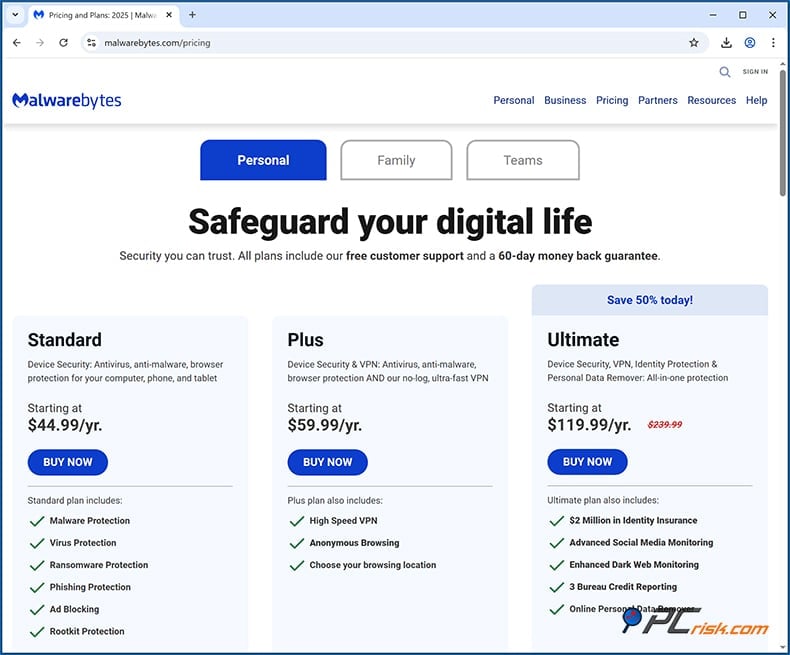
• Malwarebytes Free: Malwarebytes provides a free version, but it is restricted to on-demand scanning and removing malware. This free edition does not contain any real-time protection. It can be used as a secondary scanner to eliminate any known infections already present on the machine, but it does not stop actively emerging threats. A 14-day free trial of the full Premium features can be accessed by downloading the free version.
• Malwarebytes Premium (Standard): This is the core paid antivirus product for home users. It provides real-time protection against malware, viruses, spyware, ransomware, and malicious websites on one or multiple devices. The pricing is slightly above average for single-device coverage - around $45 per year for 1 device, whereas many competitors are ~$40. However, Malwarebytes becomes more cost-effective with multi-device plans.
For instance, a Premium license for 3 devices runs about $60 annually, which is about average for the industry, and a license for 5 devices runs about $79.99 per year. The Premium plan supports up to 20 devices for $229.99 per year. It's clear that Malwarebytes encourages opting for multi-device packages by pricing them competitively, knowing that many households have several devices to protect. All Premium subscriptions come with a generous 60-day money-back guarantee; this reflects confidence in the product.
• Malwarebytes Premium + Privacy VPN (Plus plan): The next tier combines Malwarebytes Premium with the company's VPN service (Malwarebytes Privacy). This is similar to an "internet security" suite with both kinds of protection. The Plus plan covers 3 or 5 devices, and is priced at around $79.99/year for 3 devices and $99.99/year for 5 devices (so, roughly an additional $20 over the standard Premium for the VPN inclusion). However, the Premium Plus plan can be purchased for up to 20 devices for $294.99 annually.
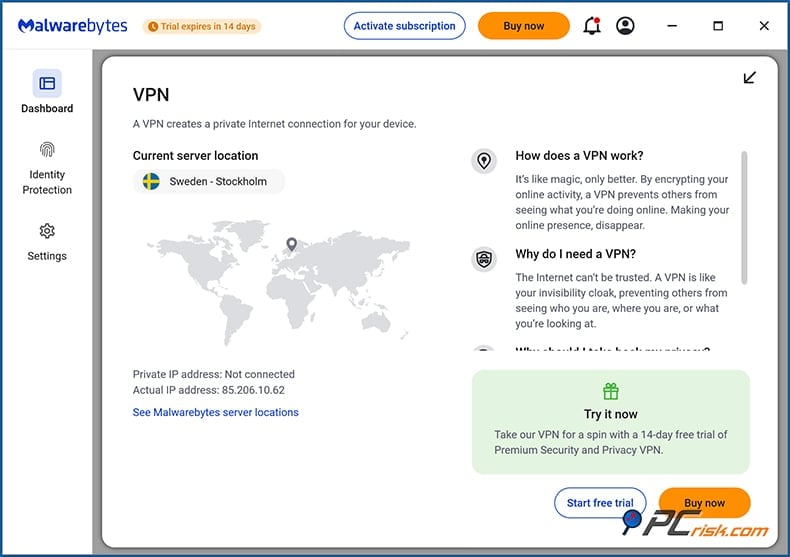
The VPN has many servers across numerous countries, allowing users to browse the web in an encrypted and anonymous way. However, it's not the fastest VPN in the world. Still, this could be your best bet if you want web security across multiple devices.
• Malwarebytes Ultimate (Premium + Privacy + Identity): If you want maximum protection, Malwarebytes has an Ultimate plan. This top-tier package includes everything in Premium and the VPN, in addition to an Identity Theft Protection service that comes with credit monitoring, dark web monitoring, personal data cleanup, and identity theft insurance up to $1-2 million. Essentially, Ultimate combines device security with privacy and identity safeguards.
The bundle costs roughly $119.99 annually (although it's frequently discounted from approximately $239.99). It covers a range of devices (the Ultimate Family Protection package covers 10 devices, with identity protection for 2 adults and up to 10 children). Sometimes, if you're securing 1 device, Ultimate is offered at a lower price point.
Ultimate's Personal Data Remover feature is a powerful privacy tool for people worried about their personal information being exposed. It works by continually scanning and deleting private data from the websites of data brokers - companies that are quite literally in the business of providing private person-to-person information.
Platform Availability: Malwarebytes Premium licenses cover all major operating systems. You can use your subscription on Windows PCs, macOS devices, as well as Android and iOS mobile devices (and even Chromebooks). The Standard and Plus plans allow mixing and matching device types under the same subscription, which is great for families with different devices.
Overview of Features and Protection
The primary focus of Malwarebytes Premium is malware defense. It takes an approach that combines traditional antivirus signatures with modern behavioral detection. The security features consist of:
• Malware and Virus Protection: Malwarebytes provides protection against a diverse array of malware, including viruses, Trojans, spyware, worms, and rootkits. It employs both a signature database and heuristic analysis to apprehend new forms of these malicious programs.
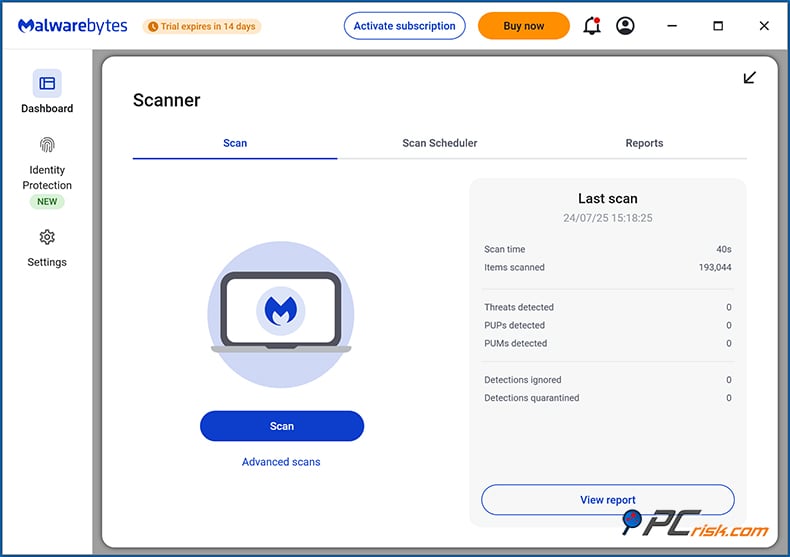
In practical terms, Malwarebytes detects and quarantines files infected with known malware during its scans and when those files try to run. It has specific algorithms for catching potentially unwanted programs (PUPs), like adware and browser hijackers, that some traditional antivirus programs might ignore by default.
• Ransomware Protection: Ransomware has emerged as one of the most perilous online threats. Malwarebytes Premium includes specialized technology to guard against it. It tracks what's happening with your device and uses that information to counter any rapidly unfolding, suspicious behavior swiftly. If a process is found trying to encode a vast number of your files (like ransomware), then our anti-ransomware tech will take appropriate action.
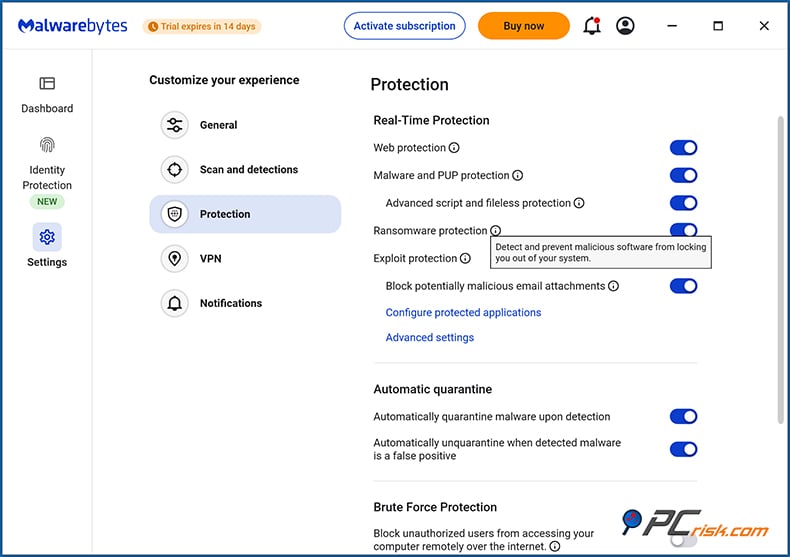
Multiple layers of security, from real-time system monitoring to behavioral rules, work together to clamp down on unauthorized encryption by ransomware. This means that even if a brand-new ransomware tries to run, our behavior engine is primed to recognize the suspicious activity and halt it. In our experience, it can block ransomware even when traditional, signature-based detection might miss it.
• Exploit Mitigation: Modern malware often tries to infect systems by exploiting vulnerabilities in software (browsers, document readers, etc.). Malwarebytes includes anti-exploit measures (a technology it pioneered in a separate tool years ago and later integrated into Premium). It can shield programs like web browsers, Microsoft Office, PDF readers, and more by detecting real-time exploit techniques. This helps prevent "drive-by" malware downloads or zero-day attacks that use unknown security holes.
• Web Protection (Anti-Phishing & Malicious URL Blocking): Malwarebytes' web protection module is another major feature. This component blocks access to dangerous websites - such as those hosting malware, phishing sites that try to steal your passwords, or fraudulent "tech support scam" pages.
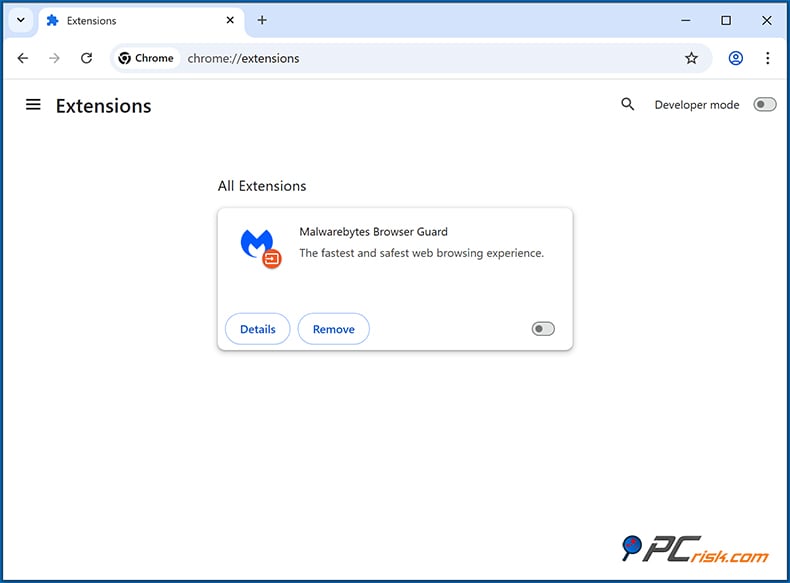
If you accidentally click a malicious link or navigate to a known bad domain, Malwarebytes will spring into action with a warning and prevent the page from loading. Moreover, you can download the free Browser Guard extension for Chrome, Firefox, or Edge to further amp up your website blocking - non-subscribers can use it, too. Thankfully, if your browser protection is ever compromised, Malwarebytes will catch that phishing attempt with a walloping round of in-app blocking.
• Real-Time Threat Detection: Unlike the free version, Malwarebytes Premium runs continuously in the background. It monitors file system activity and process behavior in real time.
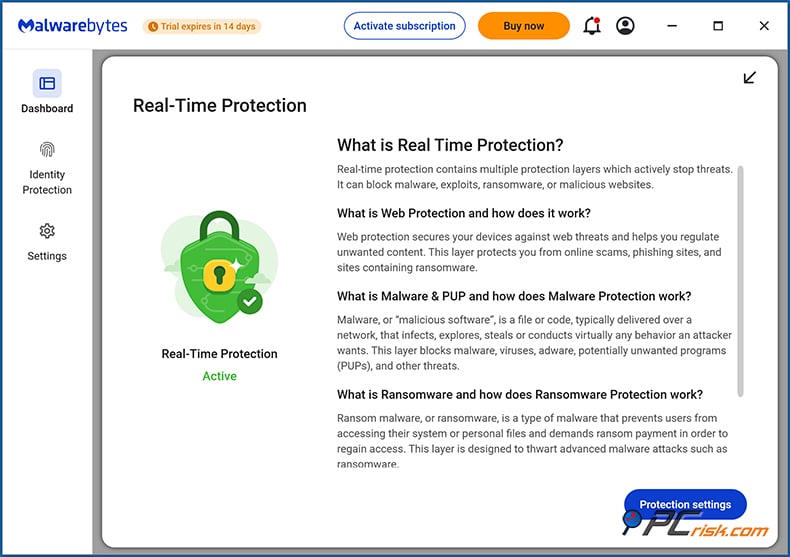
When you download a file or open an email attachment, Malwarebytes scans it on the fly. When an application launches a new process or modifies a sensitive part of the system, Malwarebytes checks that, too. This real-time engine is the key to catching threats before they can do damage.
• Scanning and Cleaning: Malwarebytes offers different types of scans, mainly the Threat Scan. This fast scan covers memory, startup items, the registry, and other critical system areas. For an in-depth check, you can run a full scan or a custom scan, though in our experience, the Threat Scan usually does a pretty good job and is what you'd want to run after a potential malware infection.
If Malwarebytes finds anything, it will present you with a list of items that are either quarantined or need further attention. This rapid scanning works in part due to clever optimization. Malwarebytes doesn't waste resources examining every file on your disk when it's not necessary.
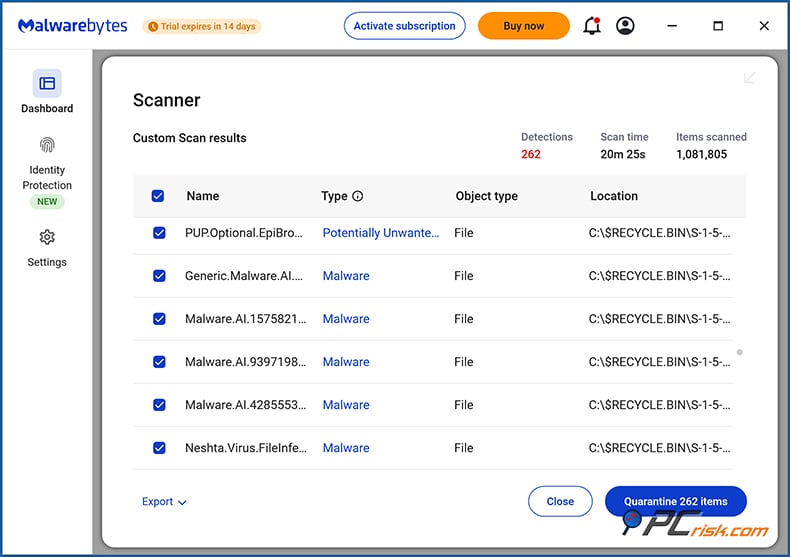
Instead, it checks the places most likely to harbor malware. If it detects infections in its responsive, high-speed manner, it will immediately isolate (and encrypt) the offending files. Then, the interface allows you to review the items and delete them if you so wish. Malwarebytes is seen as a top-tier malware-removal application. It can go where other anti-malware applications sometimes can't (or won't) and do the tasks they can't (or won't) do.
One thing to note: Malwarebytes Premium lacks certain features: parental controls, password managers, performance tuning, shredder, backup, and restore files. Its feature set remains concentrated on providing security and privacy, rather than utilities for enhancing system performance.
To wrap things up, Malwarebytes handles the fundamentals of today's antivirus software very well. We were impressed by its malware and ransomware protection. On the other hand, you shouldn't rely on any modern antivirus to protect you from sophisticated web exploits, but most serious exploit protection comes bundled with security software that is not strictly antivirus.
We were impressed by Malwarebytes's core protection. It's not quite full-featured enough to recommend as an all-in-one security suite, but it's definitely recommendable as a top-notch antivirus—particularly given that it has a free version with good enough protection to be useful.
In-House Malware Protection Test Results
An in-house assessment was performed on the protective abilities of Malwarebytes Premium to determine its effectiveness against actual threats.
We designed our malware lab test to encompass various threats that noncommercial users might face. We employed the subsequent sets of malware samples:
• Potentially Unwanted Programs (PUPs) - 5 samples: These included adware, browser toolbars, and other unwanted software that, while not outright "viruses," are commonly bundled with downloads and can be harmful or annoying. Out of 5 introduced samples, Malwarebytes detected 4.
• Trojans and Info-Stealers - 20 samples were taken. They included numerous Trojan horse malware, including password-stealers, keyloggers, backdoors, and spyware. Detectable malware comprised 85% of the sample (17 out of 20).
• Ransomware - 20 samples: We assembled 20 genuine ransomware samples from the real world to conduct a simulation. Malwarebytes detected all 20 malware samples.
• Latest Malicious Email Attachments - 20 samples: To produce an email-borne malware scenario (a very common infection vector), we obtained 20 recent malicious attachments (documents with macro viruses, compressed EXE malware, etc.). None of our 20 introduced samples were detected. However, when we tried to open 8 of the 20 files, resolution real-time protection module intervened and blocked access.
• Mac-Specific Malware - 20 samples: Since Malwarebytes is also effective on macOS, we selected 20 malware samples for macOS (including fake software installers carrying adware, Mac trojans, etc.). Testing on the Windows version of Malwarebytes showed no detection of these files, suggesting that Malwarebytes uses different underlying technology with its applications across operating systems.
Appearance of Malwarebytes for Mac:
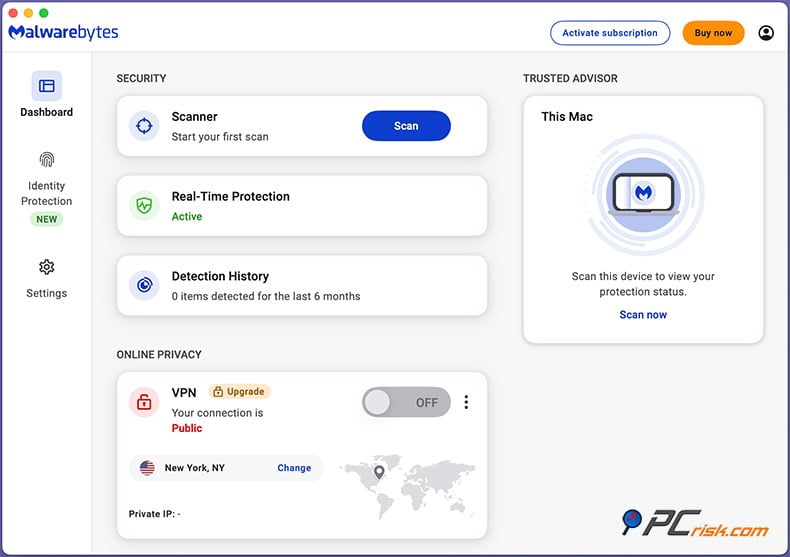
Take note when testing on a Mac machine - we found that the Mac version of Malwarebytes doesn't have any option for custom/full scans, only a default scan. When we put the sample files on the desktop and ran the scan, Malwarebytes detected nothing. But when we tried to open the files, one by one, the real-time protection module (and in some cases the macOS operating system) blocked all of them.
Testing Procedure: We performed both on-demand scans and real-time protection tests for each category. After moving the sample files to the test machine, the Malwarebytes real-time scanner didn't warn us at all - and it's around this point where we started to become very surprised and somewhat unnerved by the testing process.
This lack of reaction from Malwarebytes is quite different from the other antivirus programs we have tested. However, as soon as we attempted to execute any sample files, Malwarebytes showed up and promptly shut down the malicious programs.
Independent Antivirus Lab Test Results
To obtain an objective measurement of how effective Malwarebytes is, we turned to the results of several well-known antivirus testing labs: AV-Comparatives, MRG-Effitas, and others. These labs do the hard work of evaluating security products in many important areas, like detection rates, false positive rates, and performance impact — evaluations that allow us to get a good sense of where security products stand in relation to one another. This is how we judged Malwarebytes: in relation to the labs we trust.
• AV-Comparatives: Malwarebytes only began participating in AV-Comparatives' public consumer tests a couple of years ago, and its participation has been pretty hit-or-miss. But we have data from the Real-World Protection Test (February-May 2025). In that large-scale exam of 18 products against active online threats, Malwarebytes scored a 99.5% protection rate (with 421 out of 423 test cases blocked and 2 cases requiring user interaction).
This protection rate is on the higher end of the spectrum, essentially matching products like Avast, Norton, and Trend Micro in that regard. Notably, AV-Comparatives also pointed out that Malwarebytes had a higher-than-normal number of false positives during this test (32 false positives, when the average was around 11).
As a result, Malwarebytes received an AV-Comparatives "STANDARD" award level for that time. To put it simply: Malwarebytes showed that it could prevent almost all kinds of threats from getting to users, but it also flagged a few too many safe files and websites as dangerous.
• MRG-Effitas: In the 360° Assessment & Certification Q3 2023 test (a comprehensive test that includes real-world scenarios with malware, ransomware, banking trojans, and more) run by MRG Effitas, Malwarebytes performed excellently.
Malwarebytes attained a Level 1 certification, which signifies that it achieved 100% threat blocking during real-time operation or immediate elimination upon executing said threat. This was accomplished with the usual set of specialized tests (ransomware, file-less malware, exploits, financial malware), which are intended to gauge just how well a security product can protect against some of the most prevalent types of threats today. Not only did Malwarebytes pass these tests, but it worked perfectly on the first try and met all the expected requirements.
In summary, lab results indicate Malwarebytes is a highly competent antivirus, usually ranking among the top for protection. It especially shines in defending against malware and ransomware (with perfect or near-perfect blocking rates). The labs that do these tests sometimes note downsides. They mention some occasional false positives and that Malwarebytes isn't always present in every comparative test they run (which makes direct comparison between it and the other antivirus programs they test a little tricky).
Impact on System Performance
A widespread worry about antivirus programs is whether they will affect computer performance. Malwarebytes has a pretty good rating in that department. In our tests, we found Malwarebytes Premium to be just that: very lightweight. This seemed to hold across various platforms and hardware types. We tested it on a fairly wide-ranging set of system configurations, including some older machines.
In our observation, Malwarebytes uses about 200–300 MB of RAM when operating normally (real-time protection on, working in the background). This is a modest footprint, comparable to many competitors (and only a fraction of what your web browser likely uses).
When the computer is at idle, CPU usage hovers near zero. Malwarebytes will hit the CPU for a brief period when a new app is launched or a file is being scanned, and then immediately go back to not hitting the CPU at all. You probably won't even notice those bursts if you're on an SSD-based system.
Scanning Speed: As mentioned earlier, scans go very quickly. A Threat Scan took less than a minute to scan 200K objects — this is much quicker than the traditional full scans of many AVs that are often 30-60 minutes long. Part of this is because Malwarebytes doesn't scan every single object, but rather the places where malware is known to hide. If you decide to do a custom full disk scan, expect to wait quite a while (that's rarely needed on a frequent basis).
Because the quick scan time is so short, you're more likely to run them regularly. And they're not a chore to run. Note that if you run a full scan of your entire hard disk drive, the CPU can peg at 100% and your machine can slow down to a crawl. This was the case on our test machine, which was also harboring infected files. Ultimately, the full disk scan of one million files took 20 minutes to complete. But system resources were totally maxed out at 100%, right up until the point when the last file was scanned.
To summarize, Malwarebytes is very resource-friendly. It has been optimized to prevent the kind of heavy system drag that older security suites were infamous for. Most users won't notice any difference in everyday computer responsiveness with Malwarebytes running.
Ease of Use
Perhaps Malwarebytes' strongest points are its simplicity and user-friendly design. The product is clearly aimed at being effective and easy to use for everyone, from non-technical home users to tech experts who want manual control.
• Installation: Installing Malwarebytes is a quick and hassle-free process. The installer file is about 3 MB. After it is downloaded, the setup wizard needs just a couple of clicks to complete the installation. There's no complicated arrangement - within a few seconds, the installer files are on your hard drive and ready to go.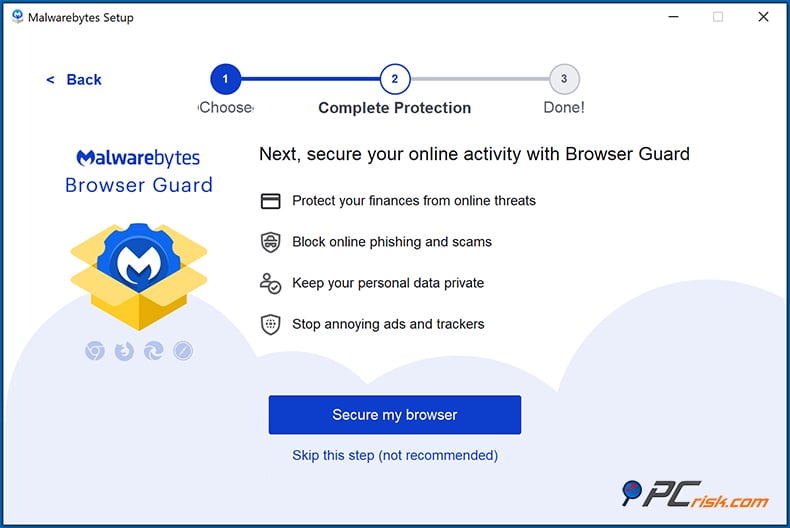
When you install on Windows and you're in the free version, you can enable a nice 14-day Premium trial for testing features. Also, during installation, you'll be prompted to install Browser Guard, a Chrome extension supposed to help secure your Internet browsing.
• Interface Layout: When you install Malwarebytes, the first window you will see is the Dashboard. Immediately, it shows your device's protection status (e.g., "Your device is secure" if all is well, or if there are some problems, what those might be). Right next to that is a big button that says "Scan" and invites you to click and start a scan with one simple, big action.
• Navigation: On Windows, the left sidebar has sections like Dashboard, Scanner, Quarantine, and Settings. Navigation between them is instant and smooth. You can start a Threat Scan or choose other scan types in the Scanner section. Detection History (or Quarantine) shows any threats found and quarantined - from here, you can restore or delete them permanently. Real-Time Protection settings show toggles for the four shields (Malware, Ransomware, Exploit, Web) – all can be toggled off individually if needed.
• Trusted Advisor: This is a built-in assistant that evaluates your system's security posture and offers suggestions.
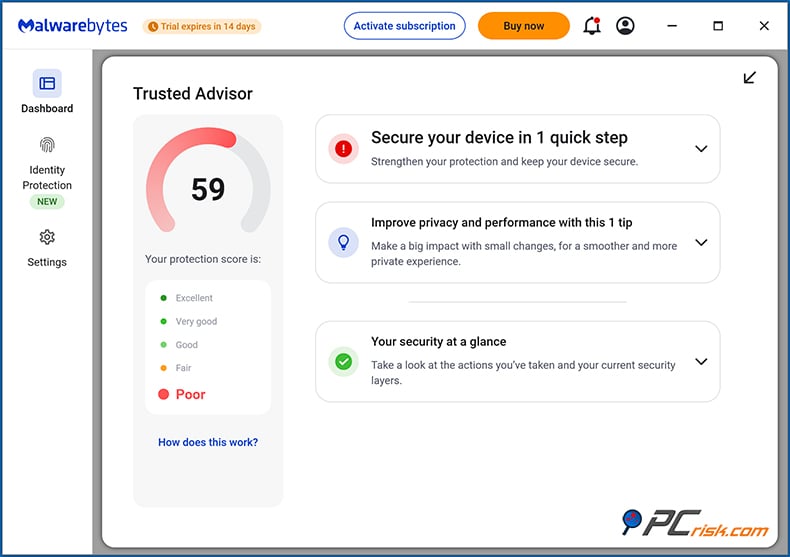
For instance, if a particular protective setting isn't enabled or software is outdated, Trusted Advisor might issue an alert or provide some direction.
• Notifications: Malwarebytes keeps pop-ups to a minimum. You'll see a brief notification if it blocks a website or quarantines a threat, which you know about. But you won't get it constantly.
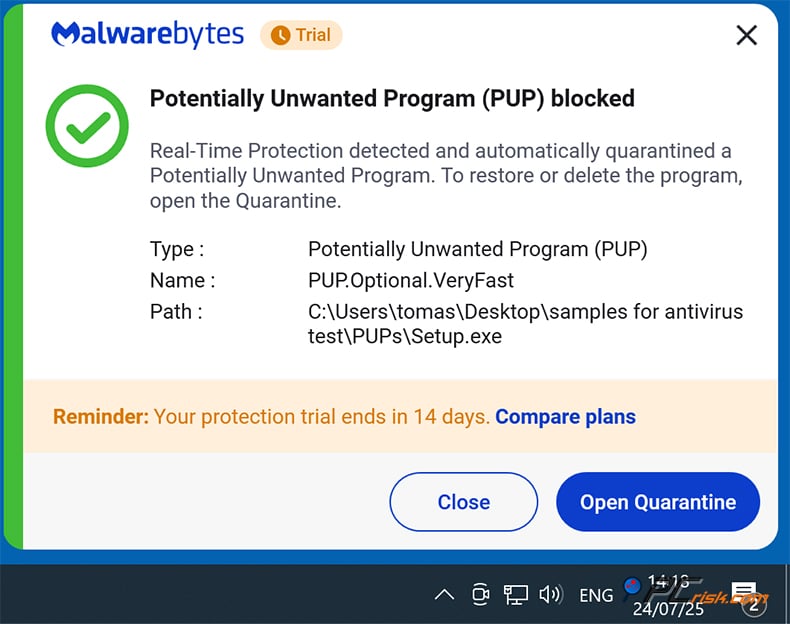
It's worth mentioning that when the free version expires, Malwarebytes will be sure to let you know that your real-time protection is no longer active. Of course, the program would like you to upgrade to the premium version to get that protection back.
• Scheduling and Customization: Regarding user control, Malwarebytes strikes a good balance. It provides reasonable levels of customization without requiring you to sift through an excessive number of settings, many of which you'd have to agree or disagree with before you get to any options that allow you to set things the way you want. If you want to set up a scan on a schedule, that scan can happen at any time you want. The options are varied enough that you'll definitely find a combination that works for you.
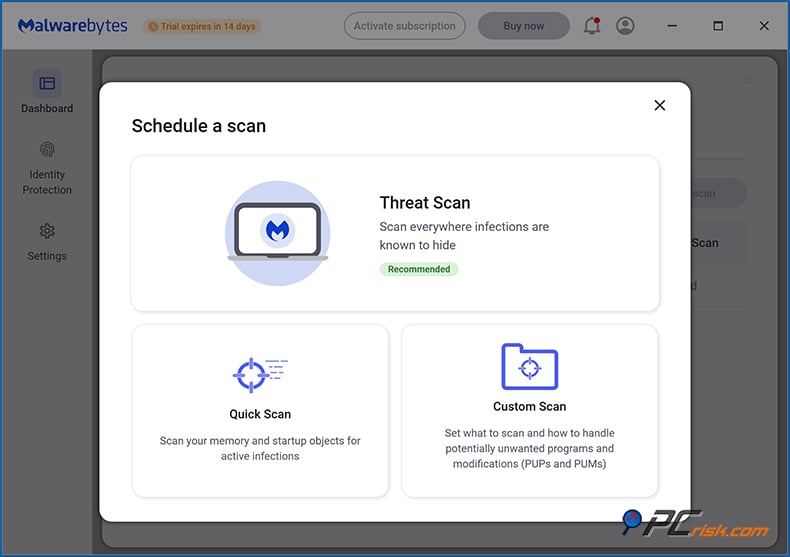
One can also select the duration for which items stay in quarantine; automatically quarantining upon detection is enabled by default and recommended. For those who are more experienced, there's an option for scanning for rootkits (enabled by default and recommended, unless you have a strong reason to suspect that you've got a deep-seated problem). This scanning does tend to slow things down, so if you need a fast scan, tell your computer to skip scanning for rootkits.
• Multi-Platform Consistency: If you use Malwarebytes on multiple platforms, you'll appreciate the consistent user experience. The Mac interface is almost identical to Windows, with slight Mac stylistic differences.
The Android app has a similar blue theme and is very simple: a big scan button and a status of protections (and it integrates into the Android settings to allow web protection via a local VPN, etc.). The iOS app, too, is clean, using Apple's design conventions but still recognizably Malwarebytes. This consistency makes switching devices easy - you don't have to learn from scratch for each platform.
We found Malwarebytes to be almost like installing it and forgetting about it, in a good way. Once it is set up, it does not call for constant attention. It will automatically scan on a schedule (by default, I believe it schedules a Threat Scan daily or weekly at a time when the PC is likely idle, but you can adjust that). If it finds something, it clearly shows what action was taken.
For most people, leaving everything at default will keep them well protected. Power users can tweak some settings, but there aren't a dozen confusing toggles to flip like other AVs.
Mobile Apps (Android & iOS)
Besides protecting our desktops, Malwarebytes also protects our mobile devices. It has dedicated apps for both Android and iOS. Since we all use our phones so much these days, it's necessary to cover these devices as part of the Malwarebytes ecosystem. Here's an overview of what the Mobile versions of Malwarebytes offer and how well they do their job:
Malwarebytes for Android - the Android app is essentially a mobile antivirus and security app that mirrors many features of the desktop version.
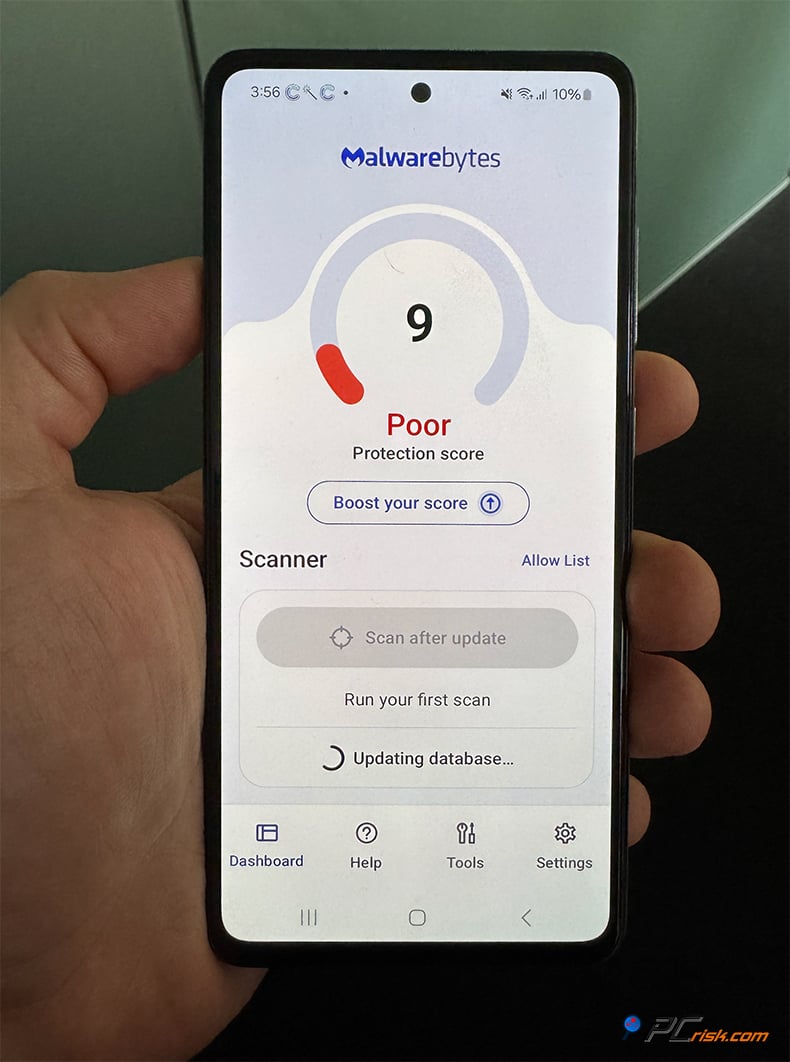
• Malware Scanning: The application can check your Android device for malicious software and potentially unwanted programs. This entails checking not only the apps that have been installed but also the APK files and any files in the storage system. The scanning routine uses the Malwarebytes database of Android-specific malware. This includes trojanized apps, adware, and other spyware (like the stalkerware variety). You can run the app on demand or schedule it for scanning at a regular interval.
• Real-Time Protection: This type of protection is available with a Premium license on the Android app. That means it monitors apps as they run and periodically scans the device in the background.
The real-time protection is designed to catch anything malicious that an app might try to do. That could be anything from suddenly dropping a suspicious file to doing something spyware-like. While actual Android malware isn't as common as on Windows, it definitely exists. Often it's in the form of fake apps or trojans that, for example, send premium SMS messages, etc. So having a layer of protection like this is definitely useful.
• Web Protection: Malicious website blocking is included in the Android app, just like in the desktop version. On Android, it's implemented through the Android VPN API, a common technique used by security apps. (It's actually local traffic filtering; we're not sending your browsing data to an external server.) With that in place, if you visit a site we've identified as being malicious or a phishing site in any browser, Malwarebytes will block the communication between that site and your device.
• SMS Scam Protection: It can identify suspicious messages. For instance, it can find texts with phishing links or specific scam characteristics. If it comes across such a message, it warns you. Of course, it's not perfect, and some bad texts might be missed or flag some good ones as bad. But it beefs up the security of your SMS communication.
• Privacy Audit: The application has a privacy audit feature that enumerates all your installed applications and categorizes them according to their permissions (like which apps can access your contacts, your microphone, your location, etc.). This isn't an active kind of protection, but it's a fantastic way to very quickly see which apps may be overstepping the boundaries of your privacy.
In summary, Malwarebytes is a decent anti-malware and anti-phishing tool that functions well on Android. Its significant strength is dealing with apps you might download outside of the Play Store. If you want to clean up an adware-ridden phone, this tool can help find the crazy app that got you into that situation. Of course, since this is a list, it is probably worth discussing all the features that make Mishap Protection a decent tool.
Malwarebytes for iOS - Security on iOS works differently because Apple's system doesn't allow third-party apps to scan the iPhone's file system or other apps. So Malwarebytes for iOS doesn't scan for "viruses" (indeed, iOS malware is rare and iOS sandboxing prevents security apps from even seeing other apps).
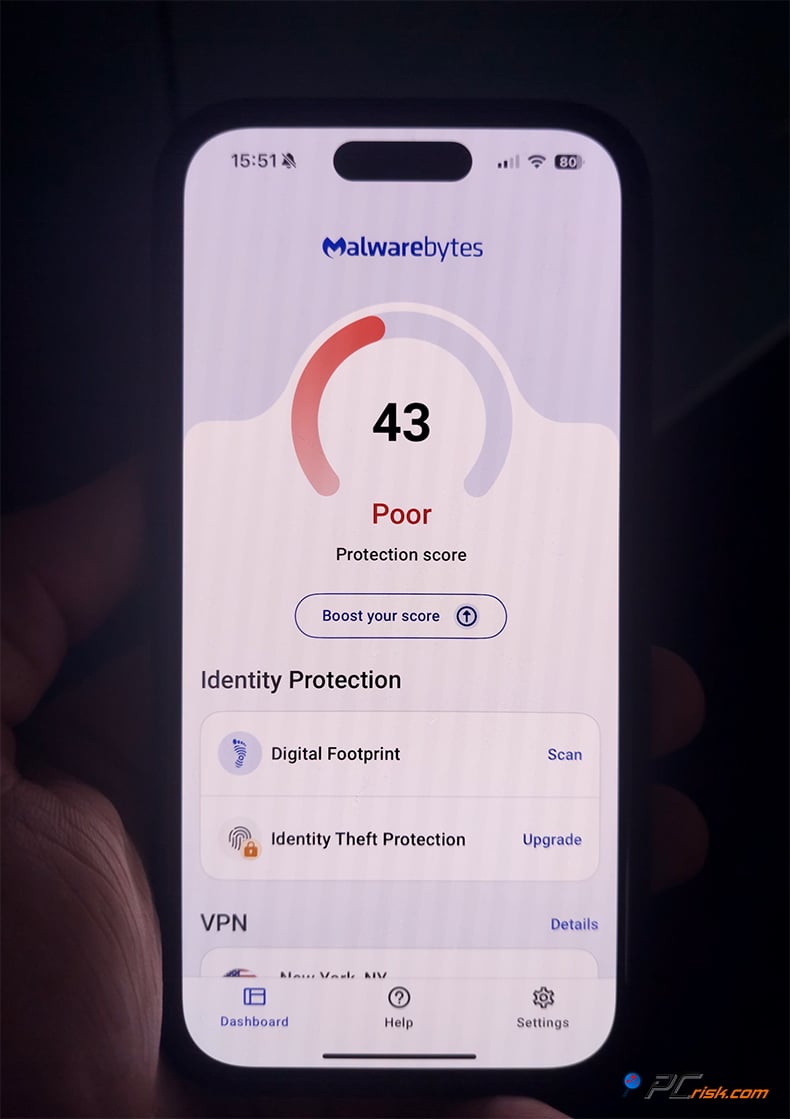
On the other hand, Malwarebytes for iOS emphasizes stopping scams and undesired material, which is a brilliant kind of wall to throw up, considering what sort of fiendish threats iPhone users are facing these days:
• Call Protection (Spam Call Blocking): Malwarebytes for iOS can integrate with the Phone app's call blocking & identification feature. It holds a database of known spam and scam numbers (like robocallers, IRS tax scam calls, tech support scams, etc.). When enabled, incoming calls from those numbers can be auto-flagged as "Scam Likely" or sent to voicemail, depending on your settings. This is a very useful feature, given the plague of robocalls. It's similar to what apps like Truecaller or your carrier's spam blocking solution do.
• Text Message Filtering: The app connects to iOS's SMS filtering. It uses artificial intelligence to weed out messages that it thinks are spam or phishing. These messages will go to the "Junk" tab in the Messages app, so they don't clutter your main inbox.
For instance, SMS spam about phony package deliveries or prize winnings would be sent straight to Junk. Unless you go looking for them in Junk, you won't see them. This is useful for two reasons: it limits the kinds of messages we (and by we, I mean you) interact with, and also limits the kinds of messages that ask us to click a link. This whole issue of link clicks is crucial because a lot of malware is distributed via links.
• Web Protection (Safari): Malwarebytes on iOS can function as a content blocker for Safari. Once enabled, it blocks known malicious websites and ad/tracker networks. It is essentially like having the Browser Guard functionality on mobile Safari. If you try to navigate to a bad site (maybe through a phishing email link), Safari will display a blocking page courtesy of Malwarebytes.
Your iPhone is protected against phishing, malicious redirects, and scam websites. Since most mobile attacks come via the web, such as the sketchy pop-up that says, "Your iPhone is infected, call this number," this feature is highly relevant.
• Ad Blocking: Safari content blocking also stops ads and trackers, which not only improves privacy but can speed up web page loading on iOS. Fewer ads means less data and faster page rendering, plus less annoyance.
• Scam Guard (AI Assistant): An AI-powered chatbot within the Malwarebytes app. On iOS, you can access Scam Guard, copy-paste a suspicious email or message, or even a screenshot, and ask the AI if it's legitimate. The AI is trained to analyze common scam patterns and will advise you.
• VPN on iOS: If you have Malwarebytes Premium + Privacy, the iOS app also includes the ability to use the Malwarebytes VPN right from the app. This provides encrypted browsing on public Wi-Fi and other such networks. It's basically the same VPN as on the desktop, integrated into the mobile app for convenience.
• Identity Monitoring: If you are on the Ultimate plan, the iOS app can show your identity monitoring dashboard. It lets you input info to monitor (email, etc.) and shows alerts if something is found on the dark web. This means you don't need a separate app for that.
• Ease of Use on iOS: The iOS app is very simple to set up. Because of Apple's restrictions, there's no "scan" button (no device scan needed). Instead, you toggle on the features like Call Protection and Safari protection.
The app walks you through the initial setup steps (to enable call blocking, for instance, our instructions direct you to go to Settings > Phone > Call Blocking & Identification and to enable Malwarebytes). It just runs in the background once you let it do its thing.
In conclusion, Malwarebytes' mobile apps cater to the most significant mobile threats. For Android, this means not just malware but also potentially unwanted programs (PUPs) and phishing attempts. While iOS users don't have to worry about traditional "viruses," they do face attempts at phishing, plus scam calls and texts. All these threats are well within the purview of the Malwarebytes mobile protection app, which is included at no extra charge with your Malwarebytes subscription.
User Reviews and Reputation
Apart from laboratory tests and our internal evaluations, we must assess what real-world users are communicating about Malwarebytes. We scoured user testimonials from multiple platforms, such as Trustpilot, technology-oriented forums, and Reddit, to understand general customer satisfaction. We also attempted to uncover any prevalent compliments or criticisms noted by each group's users.
Trustpilot Reviews: Malwarebytes has a mixed but overall average rating on Trustpilot. (https://www.trustpilot.com/review/malwarebytes.com) As of mid-2025, it holds around a 3.3 out of 5 stars on Trustpilot (categorized as "Average") with a few thousand reviews logged. However, many users on Trustpilot praise Malwarebytes for its effectiveness in removing viruses and malware.
Countless 4-star and 5-star evaluations exist from individuals who have relied upon Malwarebytes for several years. These commendable reviews proclaim that the software not only detected and eliminated infections that other antivirus programs missed but also gave the user a sense of security due to its real-time protection. On top of this, users frequently describe Malwarebytes as easy to operate and devoid of any "slow down" effect on their PCs.
Nevertheless, the bad reviews usually center on a few repeating grievances: problems with subscriptions and payments, and support that is slow to respond. For instance, some users expressed that they were not just frustrated, but borderline infuriated, that their subscriptions renewed - automatically, at a much higher price than the initial term, with no forewarning. Then there's the matter of the "promo" price that's supposed to last for several months, but, in actuality, doubles on renewal without the user being warned or aware that it was going to happen.
Furthermore, several 1-star assessments mention challenges in contacting customer service to work through problems related to billing or canceling the subscription. Some users noted they had to wait a long time to get a response by email, and others mentioned they had trouble even locating a phone number for customer service. So, while Malwarebytes does appear to offer some level of support, it seems there have been some hiccups that have caused customers' frustration.
On the positive side, many customers are loyal to Malwarebytes; they say, "I've been using it for X years, and it's kept me safe." Reliability and security while under Malwarebytes's watch is a common theme among reviewers. Another thing that stands out from many reviews is that people really like how non-intrusive the program is. Some even go so far as to say that Malwarebytes is exactly the program you want in terms of not being a distraction.
Reddit and Tech Forums: Some forums, such as Reddit (e.g., r/antivirus, r/Malwarebytes), offer polarized opinions on Malwarebytes. Generally, it's seen as one of the best, if not the best, on-demand malware removal tools. Tech-savvy users recommend it and use it themselves in conjunction with a primary antivirus for scanning and cleaning systems. It's also fairly common to hear IT professionals endorse its powerful cleaning capabilities.
Reddit provides mixed opinions about using Malwarebytes as a full replacement for antivirus software. Some users recommend Malwarebytes Premium as a solid, lightweight product that can be the sole antivirus on Windows without any issues. These users are supportive of Malwarebytes in this role. However, some Redditors are not supportive of using Malwarebytes in this way. They argue that Malwarebytes is "mediocre" compared to other well-known antivirus solutions like Norton and Bitdefender.
For example, one conversation pointed out that Malwarebytes, as a full AV, is about as good as Windows Defender, which is not an insult since Windows Defender is decent. The point was made that Malwarebytes is not clearly superior to the built-in free protection.
It's significant to point out that Malwarebytes has a great standing in the cybersecurity community for malware research. The Malwarebytes Labs blog (https://www.malwarebytes.com/blog) is often cited for new threat analysis. This elicits trust - people know if Malwarebytes says something is a threat, it is.
When it comes down to what users overwhelmingly feel about Malwarebytes, it is clearly a powerful anti-malware tool trusted by most of the people who use it. The general user consensus appears to be that customer communication regarding subscriptions could be improved. Some users have reported what might be considered overly aggressive or even borderline false positive detections, particularly in the latest version. That said, the overall protection is excellent, and the program remains very user-friendly.
Is Malwarebytes Premium Worth Buying?
You're left with a huge and important question when you look at Malwarebytes from every angle - its features, how well it performs, any results you'd care to see from various tests, and what users have to say about it. That question is this: Is the Premium version of Malwarebytes worth buying, or can you just as easily get by with the free version or some other solution?
For many home users, Malwarebytes Premium is definitely something to think about. This is our assessment:
If you depend solely on Windows Defender (a free and quite good antivirus), installing Malwarebytes Premium will strengthen your protection, even in areas where Windows Defender is already working.
Windows Defender does a decent job with known viruses. Still, Malwarebytes' multi-layered approach and its aggressive stance on suspicious behavior can catch threats that Defender might let slip or only catch later. We've seen scenarios where Defender allowed a PUP or adware to install (since it sometimes categorizes those as lower threat), whereas Malwarebytes blocked or removed it immediately.
Another consideration: If you are mainly searching for an on-demand scanner to use in conjunction with another antivirus program, you may do just fine with Malwarebytes Free. It's an excellent tool for manual, on-demand scans and cleaning up after an infection. However, it simply does not offer any active protection of your system. And in the current threat landscape, the landscape is so bad that we need active protection from things like ransomware that can hit oh-so-fast in spans of 10 to 24 hours.
Thus, the no-cost version of Malwarebytes serves well as a second-layer, occasionally, for running checkups. However, should you miss the moment and click a malicious link instead, only Premium will act in real time to keep you safe. If you do not have another sturdy AV solution going simultaneously, Malwarebytes Premium is worth it.
Malwarebytes Premium is worth buying if any of the following statements are true:
• If you want an antivirus that directly fits the description of being simple, set and forget, has an excellent track record against malware, and doesn't slow you down, we recommend Malwarebytes. It is consistently rated among the best in terms of not just hitting rate, but also dealing with all types of malware. Not to mention, it has been relatively light on the system.
• Ransomware protection is something you place a lot of merit on, or have vital files, and don't want to put them in jeopardy. Among consumer products, Malwarebytes is one of the better defenses against ransomware.
• If PUPs, adware, or browser hijackers bother you, Malwarebytes is known for being very aggressive in getting rid of them. That's why I think it's a solid buy if you regularly help clean up the PCs of your relatives or friends.
• If you have to protect several devices and operating systems, and fancy the thought of one product safeguarding your family's Windows PCs, a MacBook, and a couple of smartphones.
It could be of little value if:
• If your budget is nonexistent, you will naturally have to rely on no-cost remedies (Malwarebytes Free + Defender is a decent duo). Pay heed, however, that this tandem is missing real-time web protection, which is layered in above and beyond what Defender does, and that it's a bit less layered than Premium would be.
• You anticipate a one-stop package containing every conceivable feature (firewall, cloud backup, system tune-up). Malwarebytes pointedly is not that. It specializes in being an exceptionally fine security tool.
• Considering Malwarebytes has a 60-day money-back guarantee, there's not much risk in trying out the Premium version and seeing if it suits you better than whatever solution you're using now. Two months is a long time in the world of protection software, and you can easily find out in that span if it works well on your system and if you prefer it in day-to-day operations.
We evaluated Malwarebytes Premium and found that it is definitely a product worth paying for, especially if you want top-notch malware protection. The program is very straightforward to use and pleasant in its clean, simple user interface.
Frequently Asked Questions (FAQ)
What's the difference between Malwarebytes Free and Malwarebytes Premium?
Malwarebytes has a free version that only allows for on-demand scans. It will find malware, but only after you've let it by running a scan yourself. It does not protect you in real time. If you run into trouble while using your computer, know this: Malwarebytes can help you know whether your computer is infected and eliminate the threats, but it will offer no real-time protection.
Malwarebytes Premium delivers round-the-clock, real-time protection that stops malware, ransomware, and harmful websites in their tracks. Premium enhances protection with scheduled scans and automatic updates. So while Free is an excellent tool for scanning and removing malware, it's Premium that's needed to stop a machine from getting infected in the first place.
Can Malwarebytes replace my antivirus (like Windows Defender)?
Yes. Malwarebytes Premium is a complete antivirus alternative for home users. It defends against viruses, worms, trojans, spyware, rootkits - virtually all the same perils that a conventional AV safeguards against. Furthermore, it possesses advanced anti-exploit and anti-ransomware proficiencies.
When you install Malwarebytes Premium on Windows, it becomes the "active" antivirus, and you don't need any other AV. (Windows 11/10 will, in effect, disable Windows Defender when Malwarebytes is active.) Many users run Malwarebytes as their only protection and are well protected.
Even so, certain users opt to run Malwarebytes in addition to another antivirus program for layered security. In fact, if you configure exclusions, most of Malwarebytes' real-time competitors play nicely with it. Malwarebytes itself, however, is compatible with almost all mainstream antivirus software. Running two real-time antivirus programs can be redundant, but using Malwarebytes and another AV in tandem is a safe bet.
Does Malwarebytes protect against ransomware?
Certainly, one of the features of Malwarebytes Premium is protection against ransomware. It is very probable, almost certain, that when you are reading this, a hardworking group of criminal hackers is holed up in some undisclosed location, coming up with new ways to bypass the protections on your computer.
It can also assist in retrieving/restoring files if any encryption has started (using a rollback mechanism on Windows). Remember that no security software can promise 100% safety, but the way Malwarebytes approaches ransomware—even several layers down, where the malware is likely to strike—is among the most effective in consumer antivirus software.
I have an older PC – can I still run Malwarebytes?
Yes. The system requirements for Malwarebytes are quite reasonable. It operates on any PC running Windows 7, 8, 10, or 11. It can work on virtually every machine with at least 2 GB (3 GB for Windows 11) of RAM. It also works with x86 and x64 systems. The initial scan might take a bit longer on older hardware, but overall performance should still be just fine. If you did find it heavy (which is uncommon), of course, you could adjust settings—like scan scheduling—to avoid the app being active while you're active.
Does Malwarebytes work on Mac?
Yes, there is a version of Malwarebytes for macOS, and you can use your license purchased for a Windows PC on a Mac. Malwarebytes for Mac offers real-time protection against threats unique to Macs, such as adware and potentially unwanted programs. It also protects you against the kinds of malware that target macOS (yes, Macs get malware, too, though not as frequently as Windows machines do).
The Mac version also stops harmful websites. If you're a Mac user, especially one who hunts for software beyond the App Store and lives online, Malwarebytes is your best bet. Lighter than many Mac antivirus apps, it targets the nasty stuff that plagues our platform— threats like browser hijackers and adware. That's common with Macs; remember, we also have Safari.
While macOS has its own built-in security, Malwarebytes offers another layer of protection and is recommended if you want that extra buffer or have been troubled by adware.
How many devices does a Malwarebytes license cover?
Your choice of plan affects the number of devices you can use. Home users often purchase Malwarebytes Premium in 1-device, 3-device, or 5-device configurations. The kind of plan you buy determines how many devices you can use the software on. The 5-device plan is the most popular and protects the whole house.
The Premium + Privacy (Plus) and Ultimate plans frequently default to 5-device bundles, too. Always confirm the particulars at purchase. But you can sleep soundly, knowing that Malwarebytes supports installation on a wide range of platforms—for instance, with a 5-device license, you could protect 2 Windows PCs, 1 Mac, 1 Android phone, and 1 iPhone (that's five) from the installed version of Malwarebytes. Nevertheless, you can manually select up to 20 devices when purchasing a plan. The price is recalculated according to the device amount.
Your account is used to manage activations. If necessary, you can deactivate a device and transfer the license to a different one (for instance, if you have replaced a computer).
Share:
 Facebook
 X.com
X.com
 LinkedIn
 Copy Link

Karolis Liucveikis
Experienced software engineer, passionate about behavioral analysis of malicious apps
Author and general operator of PCrisk's News and Removal Guides section. Co-researcher working alongside Tomas to discover the latest threats and global trends in the cyber security world. Karolis has experience of over 8 years working in this branch. He attended Kaunas University of Technology and graduated with a degree in Software Development in 2017. Extremely passionate about technical aspects and behavior of various malicious applications.
▼ Show Discussion