
Norton AntiVirus Review

✓
Fact-checked by:
Tomas Meskauskas
Last updated:
November 03, 2025
Our reviews are written by Internet security experts.
Learn more.
PCRisk score:
4.1
When searching for a comprehensive security suite with additional functionality (like VPN, and password manager), we recommend shortlisting Norton.
What we liked:
✓ Excellent malware protection
✓ Feature-rich suite
✓ Cross-platform and user-friendly
What we disliked:
✗ High renewal price
✗ Occasional upselling/pop-ups
✗ Interface could be more unified
If you're looking for a reputable name in the cybersecurity world, Norton is one of the first that comes to mind. This brand has been safeguarding computer systems for over two decades. Now part of the Gen Digital umbrella (having merged with Avast and AVG in 2022), Norton now presents a comprehensive security suite designed to work across Windows, macOS, Android, and iOS platforms.
Here, PCrisk.com will dissect Norton's capabilities, weighing in on features, price, and performance. This review delves into the details of Norton's subscription arrangements and its results in lab tests, our in-house malware tests, and unfiltered feedback from real users. Our review will provide a clear understanding, and you can decide if Norton's antivirus suite is for you.
Pricing and Available Versions
Norton's Norton 360 suite contains several tiers of plans, each with a unique assortment of features and device allowance. Since the brand does not have a completely free version apart from a fleeting free trial, you will need a paid subscription.
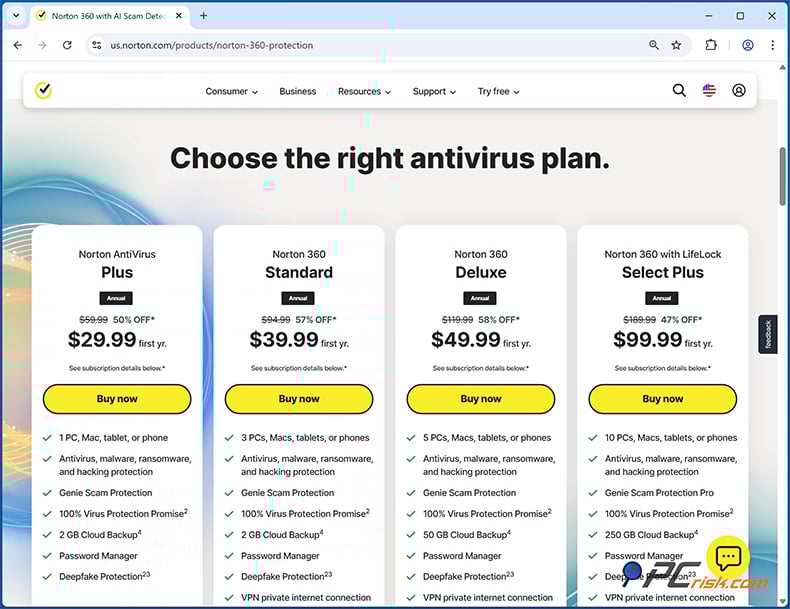
The main consumer plans in 2026 include:
• Norton AntiVirus Plus - Entry-level plan for 1 PC, Mac or mobile. It provides basic antivirus protection, firewall, password manager, and 2 GB cloud backup. First-year pricing is around $29.99 per year (renewing at a higher rate thereafter). This plan lacks some extras like the VPN or parental controls.
• Norton 360 Standard - Mid-tier plan for up to 3 devices (Windows, Mac, or mobile). It includes everything in AntiVirus Plus and adds a Secure VPN (unlimited browsing data) and Dark Web Monitoring for your personal information. The first-year price is about $39.99 per year. Still no parental controls in this tier.
• Norton 360 Deluxe - The most popular plan, covering 5 devices (any combination of PC, Mac, Android, iOS). It introduces a feature called Norton Family, which is essentially parental controls. It also increases the cloud backup storage to 50 GB and still includes all the features of the AntiVirus Plus tier. The first year's subscription is $49.99, and then renews at around $119.99 a year. It's the sweet spot for people with families or many devices.
• Norton 360 Premium (or Norton 360 with LifeLock, depending on region) - This package has the most comprehensive features and will cover up to 10 devices with over 100 GB of backup. Norton bundles LifeLock identity theft protection in the US, so you can choose from various plans that add features such as identity/credit monitoring, SSN and credit alerts, and identity theft insurance up to $1M.
Looking at Norton's plans, the base price starts at $99.99 for the first year (renews at $189.99) and includes a comprehensive suite of features, including identity protection, VPN, and credit monitoring. Higher tiers, such as Norton Advantage and Norton Ultimate Plus, cost more, increase insurance coverage, and add features such as credit freeze assistance. It may be a worthwhile investment for individuals who wish to maximise their protection.
Renewal pricing is steeply higher, however. For example, Norton 360 Deluxe renews at $119.99 per year, over double its introductory price, and Norton Premium/LifeLock plans renew at over $150 a year, depending on the tier. Norton uses auto-renewal as its default, and you often find that discounts or speaking with their customer support get you a much better price at the time of renewal.
Free trial: If you're considering Norton and want to try it out before committing to a plan, Norton offers a fourteen-day free trial. However, make sure you're aware that after this time, you will require a payment. Annual plans, however, are protected with a sixty-day money-back guarantee and offer the flexibility that Norton can provide a refund on request.
Norton's suite of programs can sometimes be confusing, as old names such as "Norton Internet Security" were folded into these "360-branded" suites. Basically, Norton 360 Deluxe is the all-in-one security suite that we're reviewing, and other versions vary in terms of the number of devices they cover or add identity protection. For antivirus software, there's no such thing as a "forever-free" option, but Norton 360's paid suites have it all covered.
Overview of Security Features
Norton 360 is more than just an antivirus scanner. It's a full security suite packed with features to protect against all sorts of threats.
Here's a quick overview of its core security features:
• Malware and Virus Protection: At its core, Norton uses signature-based detection coupled with advanced machine learning and heuristic analysis to catch viruses, Trojans, spyware, worms, rootkits, and more. Its real-time scanning engine always works behind the scenes, sorting through files and processes, and can also be triggered for a complete system check or a targeted scan of specific files.
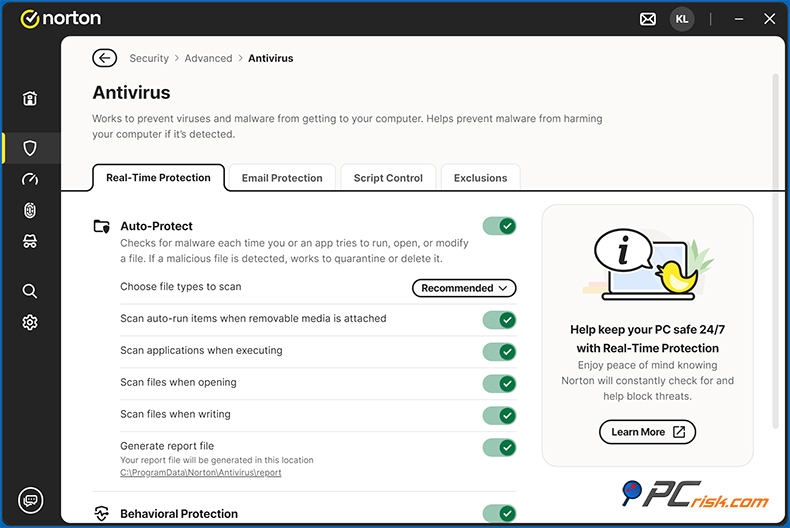
Well-known for its strength against brand-new, "zero-day" malware, Norton uses behavioral analysis and AI to detect these kinds of threats. It's now sharing the underlying threat detection tech with Avast/AVG under the Gen Digital umbrella, which has upped its detection rates.
• Firewall: Norton's two-way smart firewall monitors incoming and outgoing network traffic, automatically blocking unauthorised connections. It can also control what programs can send data out, striking a nice balance between ease of use and technical prowess that makes it a cinch even for non-experts.

Coming in as an added layer is the Intrusion Prevention System, or IPS, which scans network traffic for suspicious patterns that have slipped past the firewall, and is basically the best way to spot exploit attacks or dodgy traffic on trusted ports.
• Anti-Phishing & Web Protection: Norton provides anti-phishing and web protection by installing its browser extensions and tapping into its cloud-based intelligence to block malicious websites, phishing pages, and hazardous downloads in real time, when you're browsing the internet. If you try to visit a known phishing site or click on a link to a malware-infested URL, Norton will typically kick in and block access, warning you with a message.
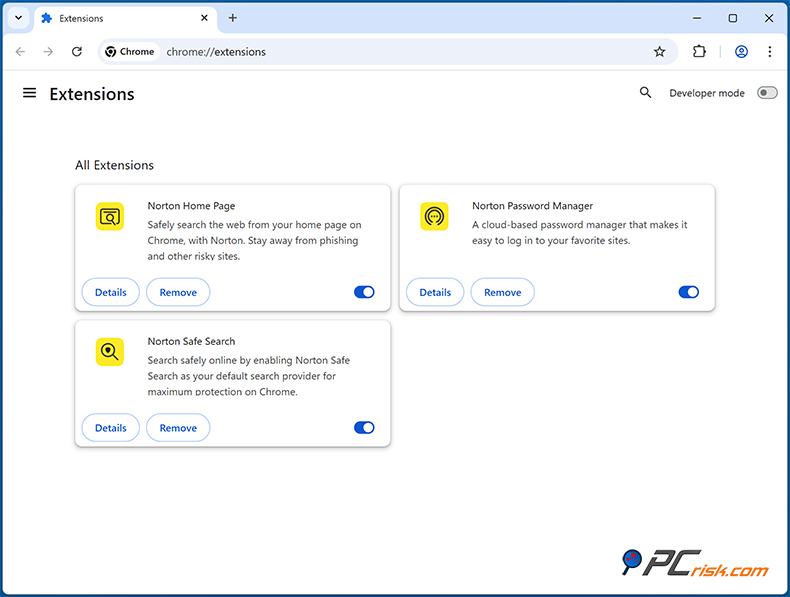
This feature is constantly updated, and, according to tests, it blocks over 95% of phishing/test URLs. However, it may flag a few harmless websites as well. Norton's database of fraudulent sites is quite extensive. It also scans encrypted (HTTPS) traffic to keep you safe, and the Norton Safe Web extension will grade search engine results and send you a warning for any potentially unsafe sites.
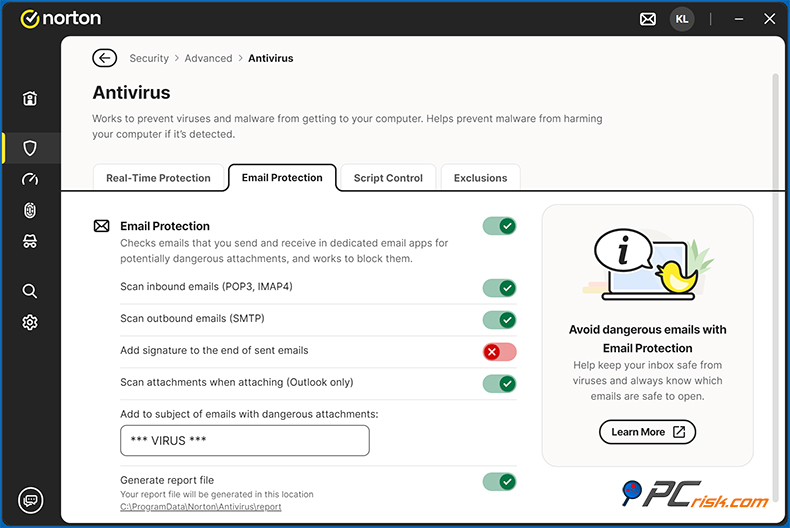
• Email and Spam Filtering: If you're using a local email client, Norton can be integrated to scan the email attachments you receive and weed out phishing emails or spam. This feature is most useful for POP/IMAP email clients, but webmail is handled through browser safety features.
• Ransomware Protection: Norton employs multiple strategies to counter ransomware. It monitors the odd patterns associated with ransomware-type activities, like file mass changing, and can instantly stop the process. When you sign up for Norton, you'll get up to 100+ GB of Cloud Backup, a feature designed to rescue you in the event of a ransomware attack and restore your files.
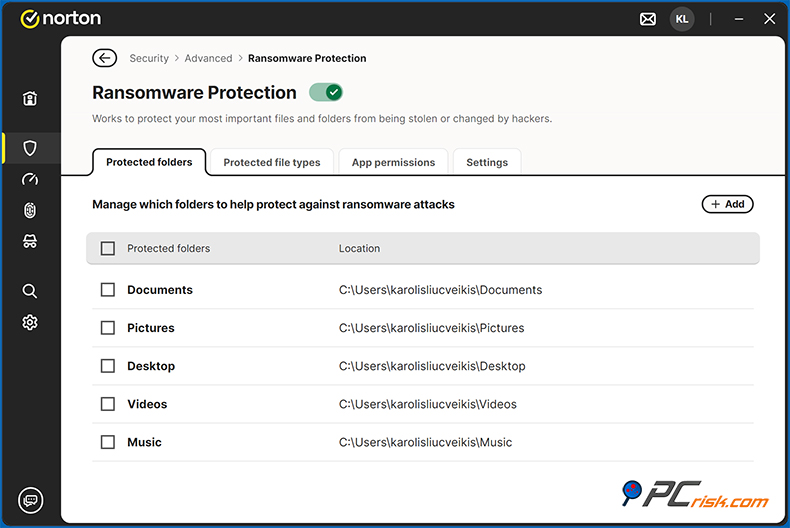
The Norton 360 settings also give you a SafeCam to block unwanted webcam access, and a feature called File Guard to stop any untrustworthy programs from messing around with your files. These features are available in some versions.
Combined, these measures give a strong defense: prevent ransomware intrusions, and ensure you have backups if the worst happens.
• Other protections: Norton offers exploit prevention to block network attacks, a System Shield to protect your system settings, a Power Eraser to eliminate the toughest infections, and regular LiveUpdates that feed new virus definitions and threat intelligence straight to your system.
Distinguished for its lightning-fast response to new threats, Norton's malware research team can add new threats to the database in minutes. On Windows, Norton can also integrate with the OS Security Centre and will knock out Windows Defender's real-time protection when it's active, so it can step in as the main defender.
Overall, Norton covers every front: file-based malware, internet threats, network intrusions, phishing scams, and anything else, and its recent lab test scores speak to its comprehensiveness.
Additional Features and Tools
Beyond virus and threat protection, Norton 360 packs a variety of additional features that go above and beyond a basic antivirus.
These tools can add significant value, although some are available only in higher-tier plans:
• Secure VPN: By choosing the Norton 360 Standard plan or above, you'll get an unlimited VPN. Norton's VPN kicks in automatically, doesn't eat up all your data, and uses 30+ international servers.
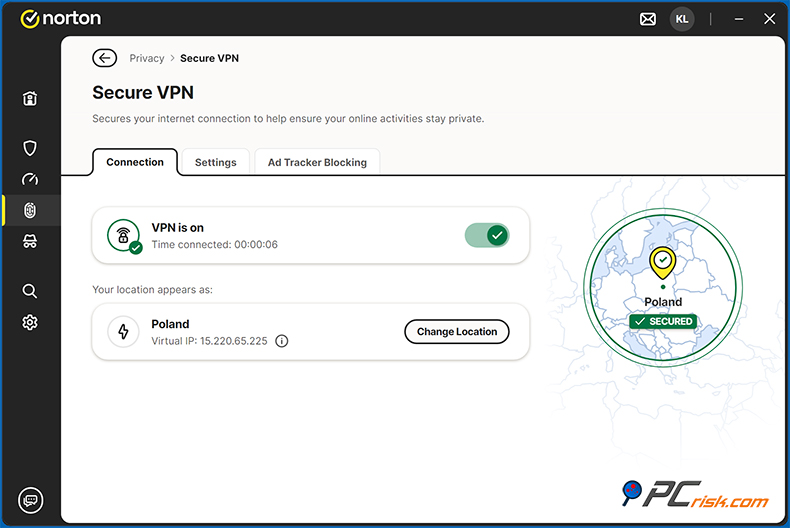
It even has a kill switch, ad blocker, and has just started offering rotating IP addresses. It may not be as flexible as a dedicated VPN service, but it's a great addition to the suite and will cover your basic secure browsing and streaming requirements.
• Password Manager: Norton's Password Manager is included in all plans, and this is essentially a secure storage facility for your logins, credit cards, and notes, protected by encryption, and will auto-fill your login details in browsers and synchronize between devices. It's a decent, but not top-of-the-line password manager, living as a browser extension and lagging behind dedicated managers like LastPass and Bitwarden, which are more fully featured.

The password manager covers the basics and is free, but it's convenient because it's tied to Norton, and it will usually pop up and ask you to use it when it detects a login form.
• Parental Controls: With the Norton Family package, parental controls let you monitor and control what your kids are doing on their devices. Norton 360 Deluxe and above plans are the way to go when choosing a family-friendly antivirus. You can set up child profiles, block or allow specific websites or categories, see what they've been up to online, impose time limits or schedules for device use, and monitor app use on their mobile phones.
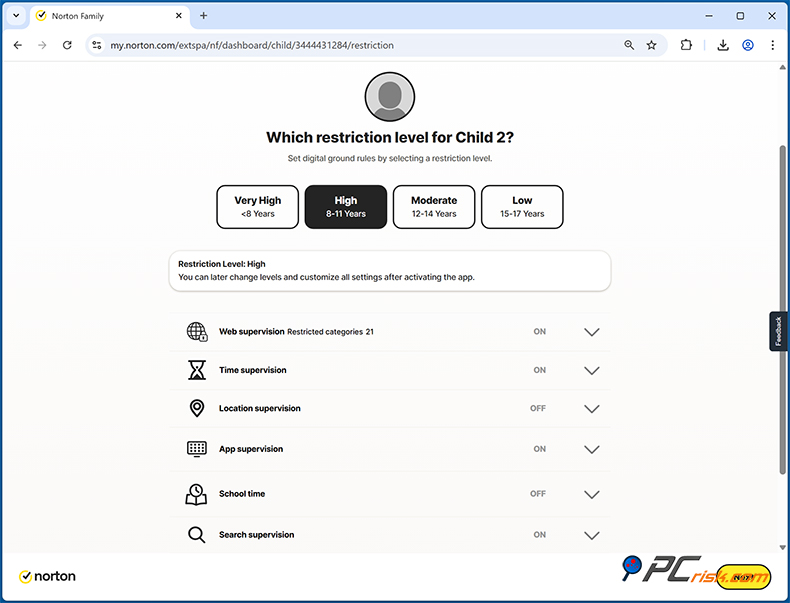
One of the standout features is GPS-based location tracking for your child's phone and geofencing. You'll receive an alert if the device leaves a designated area, giving you peace of mind. However, it's worth noting that the setup is pretty straightforward. You'll have to install the Norton Family app on your child's device and link it to yours. Norton Family isn't supported on macOS, but it is on Windows and Android and has limited iOS compatibility.
• Cloud Backup: Norton's cloud backup is secure, and depending on the plan you choose, it gives anywhere from 2 GB (AntiVirus Plus/Standard) to 50 GB (Deluxe) or even more than 100 GB of space (Premium). You can set a regular backup of specific files or folders, safeguarding them against disk failures and ransomware.

These backups are encrypted and saved in Norton's cloud, which is run by their servers. Note that cloud backups are exclusive to Windows users and require an NTFS drive.
• Identity Theft Protection (LifeLock): You'll get a top-notch identity theft protection feature set when you're signed up for Norton 360 with LifeLock in the US. This includes continuous monitoring of your personal data, including your SSN, emails, bank accounts, and the like, across the dark web, credit report monitoring across bureaus, fraud alerts, and a direct line to fraud specialists if you fall prey to identity thieves. LifeLock plans also offer identity theft insurance with coverage of $25k to $1 million, depending on the tier.
These services can be compelling, and even rival dedicated identity protection services, and if you want all-in-one identity security, Norton 360 with LifeLock is definitely worth considering. For people outside the US, Norton's Dark Web Monitoring is still a useful feature that will send you a notification if your registered emails are mentioned in a data breach, but the comprehensive credit monitoring and insurance needs LifeLock, which is only available to US customers.
• SafeCam & Privacy Monitoring: Norton's SafeCam feature on Windows will let you know when any program is trying to access your webcam and can even block the access when using Norton. Norton's Privacy Monitor is also available to scan data broker websites for your personal information and then help you opt out of or remove that information.
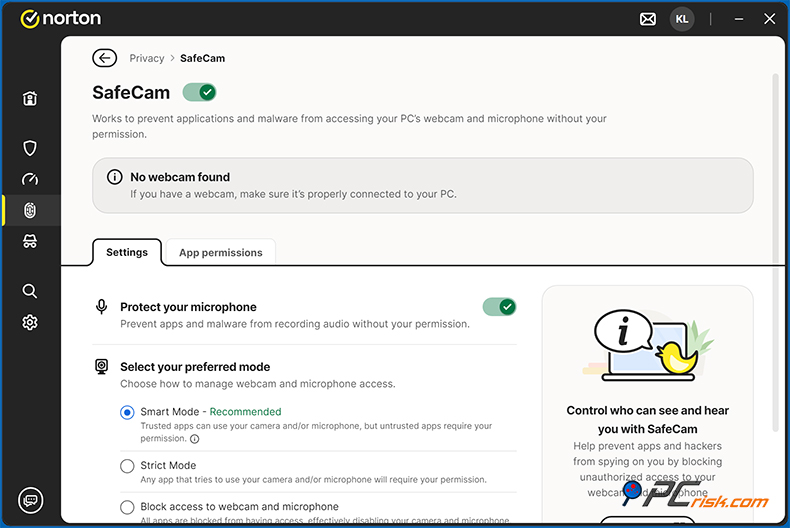
The Deluxe plan has the basic Privacy Monitor, and Norton's separate Privacy Monitor Assistant can be bought for more advanced, aggressive removal of your data from broker databases. Norton may try to sell you this, but the basic Privacy Monitor is still a nice feature to have if your personal information is out there and can be used.
• Performance and Utility Tools: When you sign up for Norton 360, you'll find a suite of PC maintenance tools that will make your life a little easier. There's a Startup Manager, Disk Optimiser, File cleaning tools to get rid of temporary files, and a Software Updater that checks if any of the apps on your system are out of date.
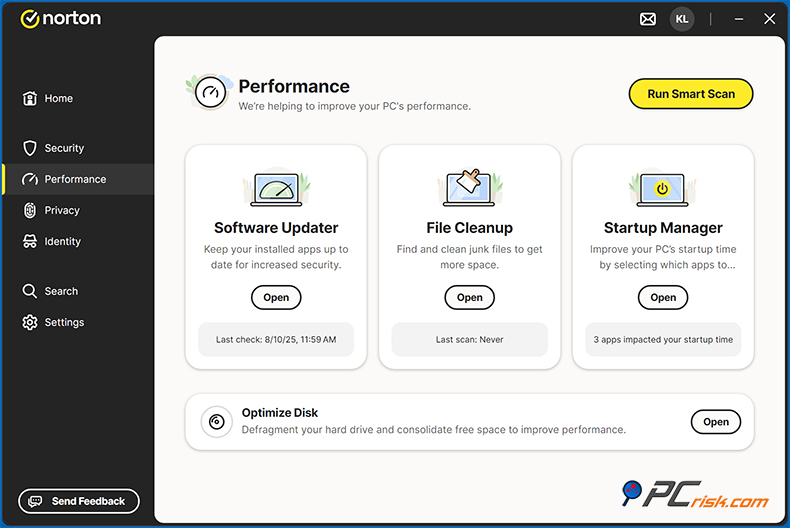
You'll also see a Driver Updater in the interface, but this is an add-on subscription service - it will ask you to sign up for it. Norton 360's cleaning and general performance tools are suitable for a basic clean-up, ensuring your system hums along nicely. Still, they're not as serious about deep cleaning as specialized PC tune-up software. Nevertheless, having all these tools in one place is a big plus.
• Cross-Platform Support: A significant benefit of Norton is that one subscription protects multiple platforms. On Mac, Norton provides antivirus scanning, firewall, and Safe Web, though the feature set is a bit more limited (for example, no cloud backup on Mac, and the interface looks different).
On Android, Norton Mobile Security removes malware and nasty apps, keeps web browsing safe, scans for Wi-Fi vulnerabilities, filters out scam texts, and even lets you track or wipe a lost phone.
Regarding iOS, since traditional virus scanning isn't allowed, Norton focuses on web protection, sending you warnings if your OS is out of date or has been compromised, throws up a handy Wi-Fi scanner, and backs up your contacts.
There's also a Norton Secure Browser on your phone, a heavily fortified browser that will give you the safest browsing experience. Lots of the desktop features, like Password Manager and VPN, come across to mobile, too, so you won't need to buy them separately, making Norton 360 even more attractive.
Well-known for its impressive list of additional features, Norton 360 is a top-notch all-in-one cyber safety package. However, some features open in separate windows, which might feel a bit disjointed.
For example, the password manager and some other settings open up in your web browser, rather than inside the Norton app, which could be a bit confusing for people who are new to the system.
Our In-House Malware Test Methodology
To assess Norton's effectiveness, we run it through a very strict in-house malware test suite. We set up a test environment on a Windows 11 PC, completely updated it, and fed it a set of malicious samples that we think could be what regular users would encounter.
Specifically, our test set includes:
• Potentially Unwanted Programs (PUPs) - 5 samples of adware, browser hijackers, or junkware that aren't outright viruses but unwanted. We check if Norton flags these nuisances during scans or blocks their installation.
• Trojans and Info-stealers - 20 samples of trojan malware, including keyloggers, backdoors, and credential stealers. These are very common threats that aim to steal data or open up a backdoor for hackers, and we checked if Norton identifies and removes them.
• Ransomware - Our test suite also includes 20 ransomware samples, basically simulated or inactivated versions of real ransomware, to see if Norton can spot and stop ransomware behavior, and if its features such as cloud backup and File Guard intervene to save our files if ransomware does manage to slip through the cracks.
• Malicious Email Attachments - 20 samples of malware delivered as email attachments (e.g. Office documents with macros, PDF exploits, compressed executables). This tests Norton's email protection and its handling of threats that arrive via phishing emails. We open or scan these attachments to see if Norton catches the payloads.
• Mac-Specific Malware - 20 samples targeting macOS (Norton is multi-platform service). We're checking how well the Mac component of Norton can deal with Mac adware and trojans, and running them on a Mac with Norton Security to check detection rates.
Our testing is divided into two main parts: Real-Time Protection and On-Demand Scanning.
Real-time protection: We run the malware samples with its auto-protection enabled and check if the threat is effectively blocked before it can do any harm when testing Norton's real-time protection. This simulates a user's attempt to open a malware file or visit a suspicious website and allows us to see the strength of Norton's immediate defenses. We also pay attention to Norton's notifications, whether it quarantines the files, or blocks the network connection.
We have included a new set of updated and entirely new samples to see how Norton's behaviour-based detection or SONAR functions in brand-new cases.
For on-demand scanning, to see how well Norton can detect existing threats, we turn off the real-time guard to stop the immediate quarantine and run a full manual scan on a folder filled with malware samples. We count the number of known malicious samples detected and also monitor for any system impact. This gives us a good picture of Norton's detection rate and also notes if the program takes too much time scanning.
Additionally, we also check Norton's phishing and malicious URL blocking. Using a contained environment, we try to access a list of phishing websites and download URLs known to host malware while taking great care not to infect the system. We see Norton's Safe Web in action, and want it to either block or give a stern warning when we try to access these hazardous sites.
We have a batch of 20 phishing URLs, mimicking the style of fake bank login pages and email providers, and 20 malware URLs, links that send you straight to malware files. This gives us the chance to test Norton's web protection.
Our In-House Malware Test Results
In our testing, Norton 360 Deluxe showed strong protection against the most dangerous threats but had mixed results with lower-priority nuisances like PUPs. Real-time protection was identical to full-scan detection rates, which is fantastic news, as it means the program is on the job the moment it detects a threat.
Norton blocked 100% of ransomware samples and 80% of trojans, both in real-time and during full scans — an excellent result for safeguarding critical files and stopping major system compromises. Email-borne malware was caught in 100% of cases during full scans, though the quick scan only detected 9 out of 20 samples, showing that a full scan is far more thorough for this vector.
Norton's protection against Mac-specific threats wasn't perfect. It found 85% of the samples in a full scan but only 70% in a quick scan, showing that it's really a full scan that's going to get the job done. However, Web and phishing protection performed like a dream, blocking access to over 90% of malicious URLs we sent, including those delivered via malicious email attachments.
The area where Norton disappoints is with PUPs, where it found only 1 out of the 5 samples in both the quick and full scans. While these are less severe than ransomware or trojans, it suggests Norton's default settings may lean conservative to avoid over-blocking borderline software.
Performance Impact
When scanning the system, we noticed CPU usage spiked to 70% at one point, averaging around 20%, which is perfectly normal for modern antivirus programs. The full scan, taking in 600,000 files, ran for about 10 minutes, and, interestingly, the quick scan that covered 50,000 files finished in around 5 minutes, showing that the scan's time was largely occupied with the analysis of the malicious samples.
It's a sign that Norton takes a deeper and more thorough look at the files under the scanner's spotlight and gives them individual attention, without throwing anything else off track.
Antivirus Lab Test Results
Concerning its excellent reputation, Norton's high scores in independent lab tests are a testament to its capabilities. Checking the latest results from AV-TEST, AV-Comparatives, and others, Norton consistently sits at the top of the pack.
AV-TEST: In AV-TEST's evaluations (a leading German antivirus testing lab), Norton regularly achieves the maximum 6 out of 6 points in each category (Protection, Performance, and Usability). For example, in the April 2025 test, Norton 360 landed a rare "Top Product" award with an impossibly high score of 18/18 (100% in every single area with no errors). AV-TEST's bi-monthly Windows tests have often seen Norton knock out threats at a 100% rate and rack up either 5.5 or 6 points for performance and usability, but rarely drops a single point.
Therefore, Norton's dominance led it to bag AV-TEST's annual awards: the "Best Protection 2022" for home users in Windows, Best Android Security 2022, and Best MacOS Security 2022, showing that it's on top of the game. Coming in as the number one in a year-long period is no mean feat, and in both 2022 and '23 Norton put up a top-notch defence against a wave of common and previously unknown malware.
AV-Comparatives: An Austrian lab that pushes antivirus software to the limit, gave Norton the top rating of ADVANCED+, in most of its key tests, like the Real-World Protection Test from February to May 2025, where it blocked almost all the malicious threats out there and took home the Advanced+ award (the highest you can get).
Famous for low false positive rates, Norton's is also very much in the clear in this area. Coming in with an almost negligible system impact score of just 4.6 in the Performance Test April 2025, Norton is one of the lightest of all antiviruses. Returning to other well-known AVs, those had scores of over 10 and 15 in the same test.
This fits in with the story of Norton and McAfee really upping their game in recent years. AV-Comparatives have even certified Norton in several areas. It breezed through the 2025 Anti-Phishing Certification test and got an Approved rating for its Mobile Security product in '25. Regarding general malware protection, Norton delivers well-known and respected results.
SE Labs: A UK-based lab, is also very impressed with Norton, and often awards it a AAA rating, the highest possible, for home security. Coming out as the "Best Home Anti-Malware Solution" in SE Labs' 2023 Annual Report is something to boast about. And, according to the CEO, Norton's impressive track record in their very challenging tests is exactly what won them this award.
Virus Bulletin (VB100): Virus Bulletin's VB100 certification is yet another benchmark. It's all about recognising products that can pick out 100% of in-the-wild malware samples and don't send up false alarms. Norton has a history of doing well in this area but has not participated in every test. Based on the detection rates reported by other labs, we're confident it will meet the standards.
Other Certifications: MRG-Effitas is another lab that's taken note of Norton, which is almost always gets top marks here, achieving their Level 1 certification, and neutralised or blocked over 98% of the threats they tested.
We're also seeing that PCMag has given Norton 360 Deluxe Editor's Choice award in the antivirus category in its 2023 rating, with a score of 4.5 or higher and praised its feature set and high level of protection. While these magazine reviews are subjective, they align with the objective lab findings.
Coming straight from these independent labs, the verdict is that Norton is a top performer in the realm of malware protection. It consistently recognises and blocks brand-new threats, is very sparing with false alarms, and does this with basically no impact on your system. There aren't a lot of other antivirus tools that have such a spotless record of good results from multiple labs.
Impact on Performance
In the case of security suites and their potential to slow down your computer, Norton has made significant improvements over the past decade. Norton 360's light footprint is very evident, and it does not take up much of your system's resources.
In the present day, on a modern PC, Norton 360 runs quietly in the background and barely uses any CPU or RAM power except when it's running an active scan. The interface responds well and the background noise is virtually absent. As launching apps, copying files, and browsing the web does not make your computer feel any slower with Norton's presence.

When AV-Comparatives tested Norton in April 2025, it stood out as one of the top performers. Out of the 17 products tested, Norton had a paltry impact score of 4.6, coming in just a hair behind the very best. Such a good score indicates that Norton's background operations have minimal effect on things like file downloads, application installs, launches, or web browsing speed.
Distinguished for its cutting-edge efficiency techniques, Norton offers smart scanning and resource optimization. It even uses an idle-time scanner that waits for your PC to be idle before running heavy scans. Its Insight technology also pinpoints trustworthy files that don't require repeated scanning, so you don't waste processing power. By spreading out its updates and background tasks, it doesn't overload the CPU.
Our test results showed that the core Norton processes, Norton Security, Norton CrashHandler, and so forth, took up a reasonable 200-300 MB of RAM on our test machine, virtually nothing. When idle, the CPU was practically zero.
However, full system scans or the initial removal of malware require some resources, much like other antivirus software. On a mid-range or older PC, you may notice a slowdown when a heavy scan is in progress. In a recent PCWorld review, Norton 360 Deluxe was found to cause a "dip in performance" on budget PCs during scans, and this basically means that older, dual-core CPU or limited RAM laptops won't be able to handle a full scan in the background very well.
In a test we ran, Norton completed a full disk scan on ~600,000 files in ten minutes, and averaged 20% of CPU usage. It did spike up to 70% for a short time, but it's roughly on par with the other top-rated antiviruses. When running Norton antivirus, you can schedule your scans to run when you're not using your computer, and the software will pause its scanning if you start using the system for anything else, so it won't bog down your machine.
Your computer won't be slowed down by Norton either as opening applications and files is virtually instantaneous. Norton also has a silent mode (or "Do Not Disturb" mode) that kicks in when running a full-screen application like a game or movie, stopping any notifications and background tasks from getting in the way. As a result, Norton is pretty much a must-have for gamers.
We didn't experience any noticeable drops in frame rates in the games we tested, and according to independent reviews, Norton is one of the better antivirus software for gaming PCs, and doesn't cause frame lag.
Common issues with Norton include its initial full update and system scan after installation, which are fairly intensive. This is when it downloads the latest threat definitions and runs a baseline scan. Once the initial period is over, it goes quiet and doesn't use much disk space. Coming in at around 2 GB in Windows after downloading all the modules is perfectly reasonable for most modern systems.
All in all, Norton's performance impact is now very low. If we look at how it's changed over the years, we can see it was really racking up the system resources back in the mid-2000s. However, it is running efficiently and with lots of top marks from independent benchmarks. Just be aware that lengthy scans will still use CPU (a common trait across all antiviruses), but you have options to manage when those occur.
Something that all antivirus software does, and you'll notice a slight slowdown on older machines, but the real-time protection is completely unobtrusive. The comments on Reddit and forums confirm this, too, as users rarely have any complaints, and that's saying something. It is a testament to how much Norton has improved over the years.
User Interface & Ease of Use
Although its sheer number of features can make it feel overwhelming, when setting up Norton 360, you'll see that the process is relatively easy. Here we break down the user experience:
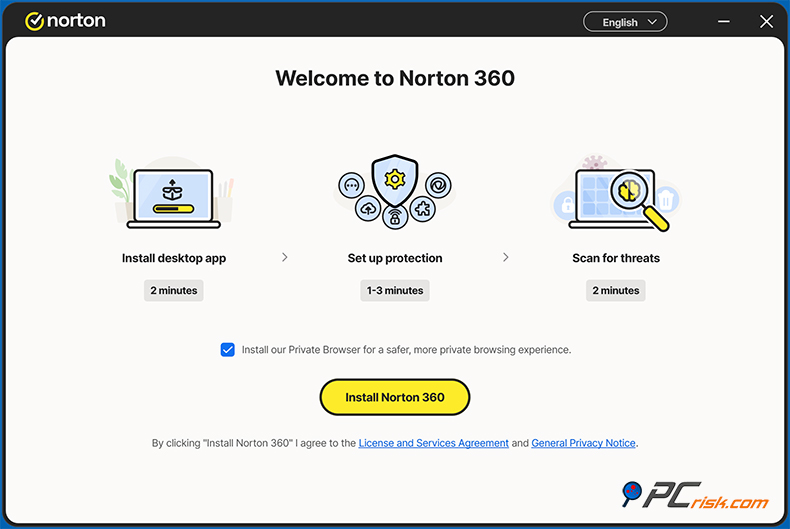
Installation: Installing Norton is simple. After purchase or signup, you download a small installer that fetches the full program (~300 MB). The installation process took around five minutes in our test, including signing into our Norton account. You will need to create or log into a Norton account because the suite links your subscription to an online account, which also lets you monitor your devices, turn on/off protection, and much more.
The installer will ask if you want to install browser extensions to get maximum protection, but won't ask you to reboot, and we found that we could start using Norton immediately after installation.
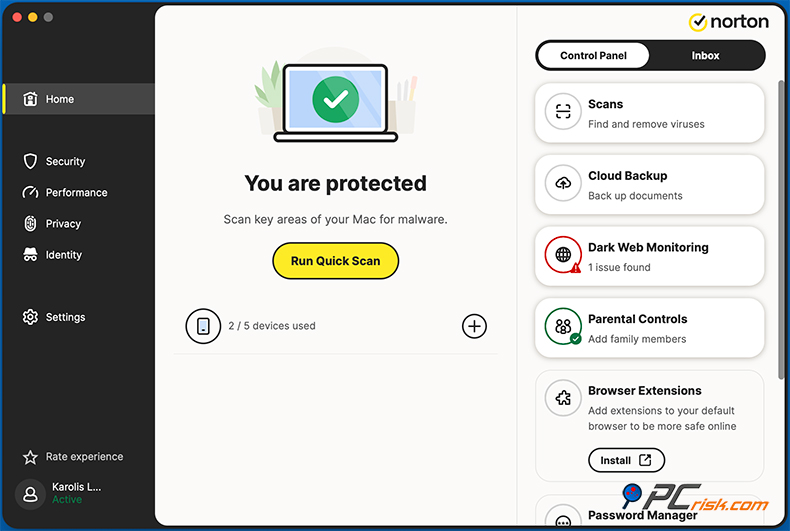
The current Norton 360 Deluxe interface brings everything under one unified design. A sleek dark sidebar runs down the left, with tabs for Home, Security, Performance, Privacy, Identity, Search, and Settings, and they all slot right into the main body of the screen, no more clutter or disorientation.
Home & Control Panel (Windows)
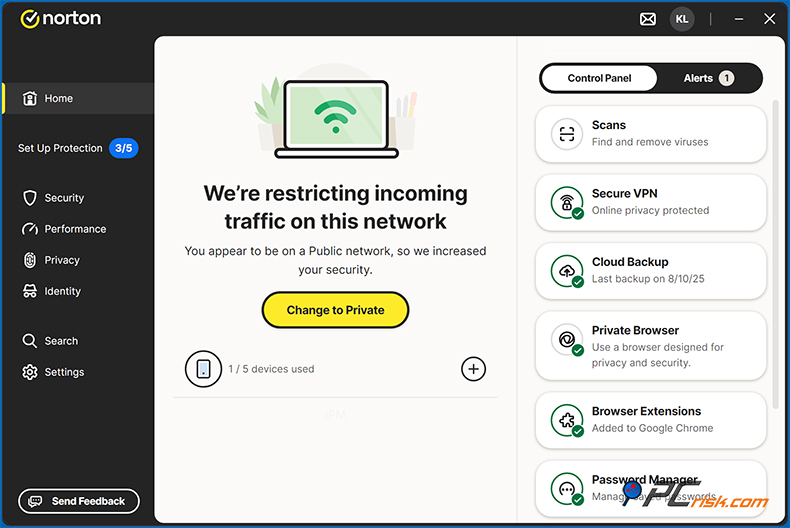
The Home screen serves as your security command center: dynamic messages appear based on system status (e.g., "We're restricting incoming traffic on this network" when on public Wi-Fi) with a clear action button like "Change to Private".
On the right, the Control Panel offers quick access to tools such as Scans, Secure VPN, Cloud Backup, Private Browser, Browser Extensions, Password Manager, and Parental Control. You can click any module to launch it directly. Switching to the Alerts tab consolidates all notifications into one view.
Ease of Use & Accessibility
It became much more user-friendly when the layout was revamped. Everyday things like scanning, turning on VPN, and checking for alerts are now neatly grouped under 'Home and Security', making them accessible to anyone, even those not tech-savvy. The more advanced features, such as fine-tuning firewalls, using Power Eraser, and tweaking behaviour detection, are cleverly hidden away in 'Settings', which keeps the interface clean, yet gives the user a huge amount of power.
Settings
Customisation is also very thorough. You can schedule scans, specify the types of files to backup to the cloud, alter the firewall's behavior, and open some things, such as managing your password vault and account/subscription, in an external browser for a more secure experience.
Parental Control
Clicking the Parental Control module opens a browser tab and takes you to the Norton Family (Parental Control) dashboard. This browser-based approach centralizes control across devices and platforms, albeit at the expense of an entirely self-contained desktop experience.
Notifications & Upsells
When you use the Norton app, clean and clear security alerts appear at the top of the screen and near the system tray. However, you'll occasionally see promotional messages such as auto-renewal and Norton Crypto, which can be disabled if you don't want to see them.
Help & Support
The app links to Norton's help docs, includes a Virtual Assistant, and offers 24/7 chat and phone support. The "Send Feedback" option in the sidebar lets you submit suggestions directly, and the user community remains active and helpful.
Multi-Device Management
Multi-device management is very straightforward through your Norton Account portal. Deactivating old devices, sending installation links to brand-new ones, and testing the deployment of these new devices, for example, on Android via Play Store, usually takes less than two minutes.
Overall Impression
The redesigned interface improves usability, delivering a cohesive experience that balances powerful features with clarity. Most everyday tasks are accessible within one or two clicks. The Parental Control system is extensive and centralized yet can be accessed via a browser. The cross-platform consistency is still good, and the mobile apps have reduced the complexity. Using common design cues helps with familiarity.
Coming from one platform to another is generally seamless. Only when switching from Windows to Mac will you notice a very different layout. This is simply because the Mac has fewer features, so it was made simpler.
Home & Control Panel (Mac)
Overview of Mobile Apps
When considering the digital security of your mobile phone or tablet, Norton offers dedicated protection for both Android and iOS devices, and given that a lot of our lives are now lived on these devices, this is a big part of what Norton does. Coming hotfooting out of the box with Norton 360 Deluxe, mobile phones and tablets are automatically covered in addition to desktops.
Norton Mobile Security for Android: This app is a full-fledged antivirus and security suite for Android phones/tablets.
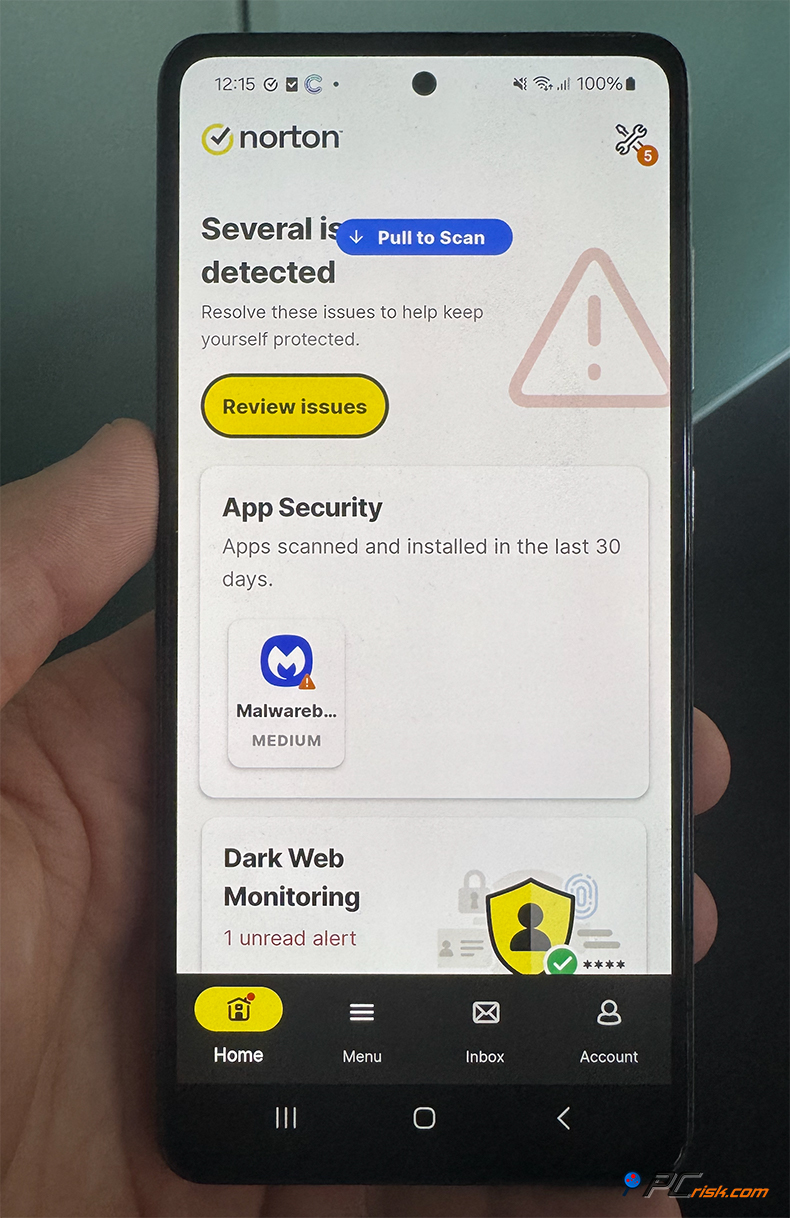
Its features include:
• Malware scanning of apps and files on your device: Norton is virtually unbeatable when it comes to Android malware detection. According to independent tests, Norton consistently scores a 100% detection rate. AV-TEST regularly gives Norton 360 (Android) a flawless 6/6 score for protection, and last year won AV-TEST's "Best Android Security 2022" award, and we have to agree.
Our own test showed the app scanned our test machine rapidly and didn't put a dent in the battery. You can expect it to perform real-time scans on new apps and allow you to run occasional full scans.
• App Advisor for Google Play: When you browse the Google Play store, Norton's exclusive feature warns you of malicious apps. It uses Norton's database to flag apps that may contain malware or even just intrusive behavior (like excessive battery usage or privacy-invasive permissions). As you review the app options in the Play Store, Norton's small pop-up will give you a rundown of its assessment, and you can steer clear of any undesirable apps.
• Web Protection: When using a desktop, Norton has a phishing and malicious website detection feature, and on Android, it works with the Chrome browser and any other default browser, basically blocking any suspicious websites that you might stumble upon. Norton uses VPN-like technology to filter out malicious websites, or it can tap into the Accessibility service to see what websites you're visiting. Our tests found that it did an excellent job blocking known scams.
• Wi-Fi Security: When you connect to a Wi-Fi network, Norton will check its security, sending you a warning if it's unencrypted or detects ARP spoofing or other network attacks. This is basically the perfect feature for when you're on public Wi-Fi and need to be sure that the hotspot is safe.
• Device Security features: When using your Android device, you can check its security posture with the OS vulnerability scan, which tells you if you're running the latest patch, and see which permissions your installed apps are using with the privacy reports. Essentially, this allows you to see if any of them are getting a bit too big for their boots.
• Anti-Theft (somewhat hidden in newer versions): When Norton first released Norton Mobile Security, it came with some top-of-the-line features, one of them being anti-theft, which included the ability to locate, lock, and wipe your device remotely. Today, Norton has either merged some of these features into the main app or rebranded them in the Norton Family app.
When you're worried about where your device is, the Norton app allows you to locate it via your Norton account online remotely.
From an Android user's perspective, the Norton app's user experience is great. It has a 4.7 out of 5-star rating on the Google Play Store, and people love how light it is, how well it works, and how it doesn't pester them with ads or unwanted messages, apart from the security ones. The VPN feature is also thrown in with Norton 360, and once you enable it within the app, it works beautifully to scramble your phone's internet traffic.
Norton Mobile Security for iOS: On iPhones and iPads, antivirus in the traditional sense isn't permitted (iOS sandboxing means apps can't scan the file system or other apps).

So Norton's iOS app focuses on what it can do to enhance security:
• Web Protection (Safe Web): Turning on a local VPN configuration on iOS can effectively block phishing and malicious sites in Safari and other browser apps. It offers functionality similar to the Android app but won't let you go anywhere near known nasty domains. In the case of iOS, it's probably the best way to shield yourself from phishing.
• Wi-Fi Security: Like Android, the iOS app assesses Wi-Fi networks for vulnerabilities and eavesdropping and warns users of any dangers.
• Device Security and Alerts: When you sign up for Norton, it will check if your iOS is up to date and also check if it's jailbroken. It will also send you a heads-up if a major breach may affect you. The built-in dark web monitoring feature is basically what allows it to do this. So, if your email appears in a brand-new data breach, you'll receive an alert on your phone.
• VPN for iOS: When you use the Norton app on iOS, Norton Secure VPN is available as part of the app. It enables you to connect to Norton's VPN servers and encrypt your internet traffic. It's very user-friendly, but on iOS, it may show up as a standalone app or buried in the Settings menu, thanks to the way iOS handles VPNs.
• Contacts Backup: This is a small feature, but Norton can back up your contacts to your cloud vault so that if you lose or change your iPhone, you can easily restore your address book.
Norton's iOS app has received an average rating of around 4.6-4.7 out of five stars on the App Store. Since no antivirus software can scan for malware on iOS, the real value of Norton's app is in its network and web protection. Considering the majority of iOS threats come from web-based attacks, including phishing links and malicious websites, this is still a great addition to what Apple provides.
The Cross-Device Experience feature of Norton's service is also very convenient. If you have Norton Deluxe, all you need to do is send a download link to your phone and sign in. Your phone is then counted as one of your devices, and the events logged by your mobile app will show up in your Norton Security history across all your devices.
One particularly beneficial aspect is that if you have children or less tech-savvy family members, installing Norton on their phones (Android or iOS) means you get alerts if something is amiss (like they download a malicious app on Android or connect to a risky network).
It provides some peace of mind for the mobile realm. And with features like parental controls in Deluxe, you can manage some aspects of their mobile usage too (Norton Family on mobile can enforce web filters and device time limits on Android; on iOS, the capabilities are more limited due to Apple's rules, but it can supervise web use through Norton's own browser).
In all, Norton's mobile applications are the perfect accompaniments to their desktop suite, Android users get one of the best antivirus programs out there, and Norton, along with Bitdefender and Kaspersky, has consistently ranked as number one in the Android protection league tables. IOS users can look forward to a reliable network and phishing shield.
If you're purchasing Norton primarily for PC security, it's good to know that it can cover your phone and tablet under the same subscription without needing to buy a separate mobile security app. And if you're often on the go, Norton's mobile VPN and Wi-Fi scanner are excellent tools for staying safe on public networks.
User Reviews and Reputation
Looking beyond lab tests and our own experience, we can also see what customers say about Norton. Surveying opinions on platforms like Trustpilot, Reddit, and technical forums, we found that Norton has a very good reputation.
Coming in at a 4.6 out of 5 stars average on Trustpilot, with over 46,000 user reviews and categorised as "Excellent" is no mean feat, especially considering that other antivirus brands tend to struggle with customer satisfaction.
Common themes in Trustpilot reviews include users appreciating the peace of mind Norton provides and feeling that their devices are well protected, even by long-term customers who have used Norton across multiple computers, attesting to its dependability.
People enjoy the user-friendly setup, features such as identity protection and continuous updates that keep them secure, and they often mention pleasant experiences with the Norton support team.
Of course, not all is perfect. At the same time, there are a handful of unflattering reviews, a minority of the total number of reviews that are, to put it mildly, less than spectacular. Concern over auto-charging and the struggle to completely uninstall the program, and a few people didn't know about the price increase on renewal.
Norton usually takes negative reviews very seriously, replying to no less than 96% of them, often offering to sort out the problem and/or clearing up the charges, so it's clear that they're very much invested in customer happiness.
In the mix of opinions on Reddit and other tech forums, you may find that the perception of Norton as "bloatware" lingers. This perception comes from some who experienced a much heavier, less efficient Norton in the early 2000s. However, many users acknowledge that the modern Norton is remarkably effective.
Regarding Norton, a user who has been using the software for 5 years with zero issues says they find the pop-up ads too aggressive. Which is a sentiment that's shared by a lot of people who've written in about Norton, that the software's protection is top-notch, but the occasional sales push is an annoyance.
For example, one Redditor in particular doesn't have anything nice to say about Norton, claiming that it has "never been good." But it's likely that this opinion is based on old experience or even just hearsay, because pressed, they wouldn't say much more about it. Others, in fact, may use the idea of cheaper, less intrusive options or recommend using the built-in Windows Defender.
Looking back, Norton's current software isn't the resource hog that it used to be, according to objective tests and many user stories. Even more to the point, because of some people's stale views on Norton from around the mid-2010s, their opinion is still stuck, but the truth is that the company has taken massive steps to improve its services since then.
Checking the Norton mobile app ratings on the app stores, we see scores of 4.6 to 4.7, where users on mobile like that Norton does everything in one place and gives them a great peace of mind, often mentioning that it caught things or clued them in to risks they wouldn't have known otherwise, such as rogue apps or insecure networks.
There are complaints from Android users about the VPN slowing down the internet, a common issue not exclusive to Norton, and some minor problems with the App Advisor, but these don't seem very prevalent.
When we look at reviews on platforms like TrustRadius or Capterra, where business and power users review software, Norton 360 gets a lot of positive marks for its feature set, but knocks for cost. On one review site, Norton scored a 7 out of 10, with users really liking the protection, but saying that the price is pretty high. This echoes the notion that while Norton isn't the cheapest, many feel the premium is justified for what you get.
In summary, user reviews of Norton are largely positive, especially compared to many competitors. People feel protected and generally find it easy to use.
The biggest recurring complaints from users include:
Pricing/renewal practices: When looking at Norton's pricing and renewal policies, some users get caught off guard by the auto-renewal at a higher price, disliking the tactic and the need to manually turn off the feature to avoid being charged full price after the first year.
Upselling and alerts: Another problem with Norton is the promotional notifications for other Norton products, or within-product ads. A request for Norton to tone these down is a common suggestion.
Perception of bloat: Some users claim that Norton is "bloatware" that slows down their systems. However, as mentioned, facts don't back this claim for the current versions, possibly due to past variations, or if installed in conjunction with a slow and older computer.
Extras not wanted: A few users are unhappy that Norton is trying to do more than they bargained for, such as adding a password manager, VPN, and so forth. For people who don't want all these frills, a simpler AV would probably be their best choice.
On the positive side, users frequently mention:
Effectiveness: They feel Norton is catching threats and keeping them safe ("never got a virus with Norton on" is a sentiment we've seen).
Feature breadth: When people use Norton, they get three great features often found in separate services: a VPN, a password manager, and backup. This is especially appealing to non-techies who wouldn't normally go out and buy each of these things individually.
Cross-device convenience: Families and people with multiple devices will also love that one Norton subscription covers all of them - their PC, spouse's Mac, children's phones, etc., all under one roof.
Customer support: Previous users are praising Norton's customer support for its ability to sort out issues, eliminate nasty viruses, and provide top-notch assistance, something that free AV programs don't do.
Established as a premium security suite, Norton in 2026 has a reputation that is basically unshakeable, with such a large user base and high satisfaction scores. Of course, it may not cut it with extreme power users who need total control, nor those who can't afford it, but for most people, Norton is a reliable performer that does exactly what it promises.
Is Norton Antivirus Worth Buying?
When looking for antivirus software, Norton 360 is definitely one of the go-to options. However, given that Windows Defender is free and there are other, more affordable options, the question is whether Norton is still worth the price. From the perspective of many users, Norton is undeniably worth the investment if you will use it for its top features.
Here's our take:
Outstanding Protection: When it comes to antivirus software, the ultimate measure of its worth is how well it protects you. Norton has a solid reputation backed up by perfect lab scores, our own testing results, and, most importantly, a long history of effectively catching threats.
Norton's layers shield you from the latest ransomware, phishing scams, and other types of malicious software. They are in place to detect and prevent such attacks.
Bitdefender and Kaspersky are two paid suites often compared to Norton. Independent tests show that Norton performs at the same level and outshines them on particular frontiers. Norton's brand-new Intrusion Prevention System monitors every byte of internet traffic, which means it is on the lookout for new threats.
Feature-Value Proposition: When looking at Norton's packages, especially the 360 Deluxe, it's clear that the price of one subscription is all you'll ever need to pay, covering a lot of bases in the world of security. If you were to buy individual VPN services, a password manager, 50 GB of cloud storage, parental control software, and ID monitoring, you'd probably spend more than the cost of Norton 360 Deluxe, and yet, the beauty of Norton is that it neatly packages all these features in one single subscription.
For example, if you're a parent, you'll love the parental control suite that's included in the Deluxe package. The value of that alone might be reason enough for you to sign up. Likewise, people who frequently travel or work remotely will highly appreciate the unlimited VPN included in the package. Buying Norton Secure VPN alone would cost around $40 a year.
A recent PCWorld review described Norton 360 Deluxe as hitting the "ideal sweet spot of wide protection and affordable pricing and termed it an "excellent all-in-one solution," which is a view that we strongly agree with. For what you pay, you really do get a complete suite of protections.
Multi-Device, Multi-Platform: Norton shows its value when you've got multiple devices, operating systems, and computers in the house. Coming in for $99.99 for a single license covering five devices, Norton lets you look after your Windows PC, your Mac, and three phones, all from one app and one account.
If you tried to sort out equivalent protection for each device with different products and especially across different operating systems, you'd face a lot of hassle and possibly higher costs. Norton gives you one app, one bill, and you're good to go.
User Profile Considerations:
Norton is particularly worth it for users who:
- Want a set-and-forget solution: Norton is very appealing if you're not inclined to tinker with multiple security tools. It handles most things automatically and gives you a broad safety net (from antivirus to web safety to identity alerts).
- Have a lot to protect: When it comes to protecting the people and data that matter most, Norton LifeLock offers comprehensive coverage, including identity theft protection, which is a welcome addition in higher tiers. Those with many devices and lots of personal data online, who are active online shoppers and bankers, will appreciate this holistic coverage.
If your old PC is used infrequently for email, then a free AV might be a better option. But if you're headlong in the digital world, Norton's breadth of features and services covers many bases.
- Are concerned about emerging threats: Well-known for its rapid adoption of the latest technologies, Norton's new AI-based detection and features like Dark Web Monitoring put in place not only shields from 'viruses' but from a wide array of more sophisticated cyber threats. If you worry about data privacy being hacked in depth, such as passwords being leaked or new scams, Norton's additional features are well-equipped to address that.
That said, Norton might not be worth it for some scenarios:
- If you're on a tight budget or only have 1 device and don't need extras, a free solution like Windows Defender (which is quite solid nowadays) plus a free VPN might suffice. Norton's AntiVirus Plus, at approximately $30 per year, is basically the entry level. Still, there are more affordable antivirus options, and people just stick with nothing, weighing up the pros and cons. Norton gives you a lot more, but you'll need to decide if those extras are something you want.
- If you can't stand any upsells or want an ultra-simplistic program, Norton might feel like overkill, and some users do prefer very basic antiviruses since Norton is more of a full-fledged security suite.
If you're very tech-savvy and manage everything manually, you probably have your own backup system, VPN of choice, etc. In that case, Norton's all-in-one package might duplicate what you already use.
When weighing the pros and cons of Norton 360, there is no doubt that many good things can be said about it. The company has even fixed some issues that used to turn people off. The performance hit is minuscule, and the cluttered interface, although still present, is much more user-friendly than it was a decade ago. Norton provides 24/7 support and a virus protection promise, showing they believe in the product's quality.
Additionally, the world of cybersecurity has changed, and what used to be sufficient is no longer sufficient. Norton's suite is well-equipped to fight back against those cyber threats. One of these new threats is phishing and identity theft. Norton's adaptive measures for beating these problems, such as its inclusion of crypto-mining malware, SMS filtration on phones, and many other brand-new features, are a safe investment in a secure digital life.
Verdict: For most home users and families who want comprehensive protection and are willing to pay for premium service, Norton 360 Deluxe (or higher) is absolutely worth buying. This package offers a mix of superior protection, privacy, and device safeguards. Although you'll pay more than you would for some other software, the quality of protection you get is top-notch, and independent lab testing confirms this.
In a nutshell, Norton is the heavyweight in the world of antivirus software, and its price is justified by its exceptional performance. We have no hesitation in recommending it to anyone who wants a complete shield and is willing to pay for the privilege. If you're still deciding, you could test Norton for free, see how it runs on your system, and get used to its interface. Coming from us, Norton is one of the best antivirus programs of 2026 for people who want comprehensive protection.
Frequently Asked Questions (FAQ):
Does Norton Antivirus have a free version?
Not exactly - When considering Norton as an antivirus option, a free version isn't really an option. Norton's subscriptions aren't cheap, but you can get a 7-day trial of Norton 360 on your device. You'll be asked to pay for the service, and as Norton doesn't have a completely free version, you'll either have to bite the bullet and sign up for the full package or consider the built-in Microsoft Defender or other free AVs, which don't have the same feature set.
How much does Norton cost after the first year?
The first year of Norton is usually at a discounted rate - for example, Norton Deluxe costs $49.99 for the initial year and then goes up to $119.99, Standard jumps from $39.99 to $84.99, and so on.
Norton does let you know what you'll be paying next year right on their checkout page, so you can see what you're getting yourself into. You can also find out if any promotions are going on or get a loyalty discount if you're up for a renewal. If you don't want to be automatically charged the higher rate, you can turn off auto-renewal in your Norton account, but you'll still be covered for the year you've already paid for.
What is the difference between Norton 360 Deluxe and Norton AntiVirus Plus?
Norton AntiVirus Plus is the basic package, covering one PC or Mac, and gives you core antivirus protection, firewall, password manager, and 2 GB of cloud backup. Norton 360 Deluxe is an all-inclusive suite for up to five devices (Phone, tablet, computer, etc.), including the works: antivirus protection, a VPN for all five devices, Dark Web Monitoring of your personal data, Parental Controls, 50 GB of cloud backup, and coverage for your mobile devices (Android/iOS).
Norton Deluxe is essentially a premium option for people who want comprehensive protection for themselves and their family, or power users who want all other extras on multiple devices.
Is Norton better than Windows Defender (Microsoft Defender)?
Microsoft's built-in Windows Defender (now called Microsoft Defender) is a very capable free antivirus included with Windows 10/11. It provides basic malware protection and has improved over the years - it even gets perfect 6/6 scores in AV-TEST at times.
Compared to Norton, the free version of Windows Defender is more about the basics. Virus scanning works well, but doesn't have the same level of comprehensive protection as Norton. Coming head-to-head with widespread malware, Norton and Defender are roughly neck-and-neck, but Norton's more aggressive approach to zero-day attacks can give it the edge.
One of the main things Norton has, and Windows Defender doesn't, is an advanced firewall with intrusion prevention and anti-phishing protection. This is something that Defender's Smartscreen does cover to some extent, but Norton takes it further. Norton also has a VPN, a password manager, backup, and more.
Also, Norton is cross-platform and can work on different types of devices, whereas Defender is specifically designed for Windows. Users who are mainly worried about viruses might be able to get by with Windows Defender and a lot of self-discipline, and it doesn't cost anything. But if you're looking for a full suite and extra layers of defence, particularly against web threats, identity theft, and multi-device mayhem, Norton is far better equipped to sort out all that.
How does Norton's Dark Web Monitoring work?
Norton's Dark Web Monitoring is a feature that's part of Norton 360, and also comes with the Standard and Deluxe plans. Basically, it's a tool to let you know if your personal info has leaked out into the world.
You supply it with a bunch of personal details, such as your email addresses, physical address, phone number, gamer tags, mother's maiden name, etc. (You decide what to input), and Norton's service, powered by LifeLock, will go hunting through dark web marketplaces, paste sites, shady forums, and other places where stolen data is bartered.
If they find your information, they'll send you a warning to change your passwords. When you sign up for a LifeLock plan in the US, Norton will monitor your Social Security number, credit reports, and more, and help you get your identity back if someone steals it. Norton Deluxe is more of a notification system, but still sends alerts and warnings, and lots of Norton users have found these timely warnings to be really helpful.
You can implement these warnings by turning on Dark Web Monitoring from your Norton account or app, feeding it the info you want monitored and then getting alerts if something shows up. It's not a foolproof system not every hack gets reported to the dark web and vice versa But adds another layer of protection for you.
Can I use Norton to protect my mobile devices?
Absolutely, most Norton plans cover many platforms. With Norton 360 Deluxe, for example, you can install the software on up to five different devices, including Android phones, iPhones, and tablets. The mobile apps are top-notch, too. They'll scan for malware (except on iOS), block nasty websites, throw up SMS spam filters, and check your Wi-Fi security.
On iOS, it focuses on web protection, Wi-Fi security, and device alerts (since iOS doesn't allow full AV scans). See our Overview of Mobile Apps section above for details. Using Norton on mobile counts towards your device quota, but gives you a unified security experience.
If you primarily work on mobile, Norton can ensure your phone is not the weak link in your security. It's especially useful if you shop or bank on your phone, as it will warn you about phishing links and dodgy networks in real time. Download the Norton Mobile Security app from the Google Play or Apple App Store and log in with your subscription. The mobile app UI is user-friendly and works in the background once set up.
So one subscription can shield your PC, your spouse's Mac, and both your smartphones, for example. This cross-device coverage is one of Norton's selling points, and (from our experience) works very well.
What if I already have a virus - will Norton 360 remove existing malware?
When you already have a virus, Norton 360 can remove it and even has a real-time feature that detects any active infections. Norton's initial scan and ongoing protection will lock down any known viruses and send them to quarantine. Its scanners are not just about blocking brand-new threats; they're also built to scrub out those entrenched ones, including viruses, trojans, rootkits, and more.
Norton will probably eliminate notorious malware automatically. However, more aggressive, deeply embedded malware like rootkits or nasty spyware might require a reboot for Norton to remove them fully. Norton includes some heavy-duty tools for this purpose, such as Norton Power Eraser. You can download Power Eraser free from Norton or run it in conjunction with Norton 360.
Additionally, it gets its teeth into hard-to-remove infections with its aggressive methods, often sorting the problem out in one go, but if it doesn't, Norton's support service is there to help, even offering a Virus Removal Assurance.
In our experience, Norton is very good at clearing out malware, and sporadic cases of persistent malware may require running a scan in Safe Mode or using Power Eraser. As long as you keep Norton up to date, it can only remove what it knows as malicious, and it's the key to preventing any nasty surprises in the future.
Overall, if you suspect you have a virus, installing Norton 360 and performing a full system scan is the logical way forward. It will capture the vast majority of infections and walk you through the removal process, and if anything remains, Norton's support will give it that final push.
How can I avoid the price increase when renewing Norton?
If you don't want to get caught by a price hike when renewing Norton, turn off auto-renewal in your account, ideally right after subscribing or before your renewal date. That way, you won't get charged the higher price. When Norton's subscription is about to end, you can choose to take a brand-new, discounted offer.
You can try using a different email to see if they'll let you purchase the service again at a discounted price for new users. When your first-year subscription is about to end and you don't like the renewal price, you could use Norton's support and live chat service as a retention strategy, asking for a price reduction.
If you're feeling resourceful, Norton may knock something off the price if you ask. Sometimes, you can even find cheaper Norton 360 Deluxe at Amazon or Newegg when it goes on sale, and then purchase it. Indeed, you can buy a retail box or key card and use that to extend your Norton account, reactivating your license at a lower cost. Just be aware that you should buy and input the new key before your current one expires. Norton's caught on to a couple of the techniques, yet still allows new activation of keys.
Lastly, if Norton has teamed up with an ISP or PC manufacturer, you could be eligible for a student discount or a package deal. All you have to do is check. Don't automatically pay the renewal price; you should always look around.
Share:
 Facebook
 X.com
X.com
 LinkedIn
 Copy Link

Karolis Liucveikis
Experienced software engineer, passionate about behavioral analysis of malicious apps
Author and general operator of PCrisk's News and Removal Guides section. Co-researcher working alongside Tomas to discover the latest threats and global trends in the cyber security world. Karolis has experience of over 8 years working in this branch. He attended Kaunas University of Technology and graduated with a degree in Software Development in 2017. Extremely passionate about technical aspects and behavior of various malicious applications.
▼ Show Discussion