
Optery Data Removal Review: Pros, Cons, and Real-World Use

✓
Fact-checked by:
Tomas Meskauskas
Last updated:
January 15, 2026
Our reviews are written by Internet security experts.
Learn more.

PCRisk score:
4.3
When searching for a comprehensive personal data removal service, we recommend shortlisting Optery.
What we liked:
✓ Strong transparency for a removal service: Screenshot-based reporting (available in higher tiers) makes it easier to trust the results.
✓ Clear upgrade path: The free scan offers a low-friction way to measure exposure before making a payment.
✓ Ongoing monitoring: Monthly rescans address the reality that brokers can republish data later.
What we disliked:
✗ U.S.-centric focus: Optery is far less valuable if your exposure is mainly outside the United States.
✗ The top tier is expensive: Ultimate can be hard to justify unless you specifically need custom removals or search result cleanup.
✗ Expectations require patience: Meaningful reductions can happen quickly, but complete cleanup often takes months rather than days.
For personal data, Optery specializes in removing the types of listings commonly found on people search sites and data brokers. These websites publish and trade all sorts of personal info, such as names, home addresses, phone numbers, email addresses, age ranges, relatives, and even location history.
A problem for many users, these listings can be the start of a never-ending stream of unwanted calls and emails, making identity theft a genuine concern, and essentially handing out home addresses to anyone who wants them, either for a fee or by simply browsing a free directory.
You're faced with filling out countless forms, going through identity checks, and waiting for each one to process your request when you try to remove your personal data from dozens of broker sites. Optery's clever solution is to scan for your data, submit opt-out requests on your behalf, monitor the progress, and repeat the process over time.
This is a crucial aspect of the service, because data broker removals are rarely ever done once and for all. Brokers often update and re-publish databases, purchase new sets of data, or republish profiles that were previously removed, therefore, even an initial cleanup won't be enough. As a practical matter, Optery has two tasks: clearing their customers' data and watching out for more, and Optery is built for this, sending out regular sweeps and additional removals.
When choosing a pricing plan for Optery, you can opt for the completely free tier, which includes scanning and reporting, or select one of the three paid tiers: Core, Extended, or Ultimate. These paid tiers remove detected content and expand coverage and support. We divide our pricing into sections for clarity and list them in US dollars. Each plan comes with its own set of features, outlining the methods of our in-house testing and what our existing users have to say about the service.
Pricing and Subscription Options
You'll have a free plan and three premium options when signing up for Optery. Paid subscriptions can be paid either monthly or annually, and you'll get a significant discount if you sign up for a full year at once. It's roughly a 17% off deal. The prices are in USD.
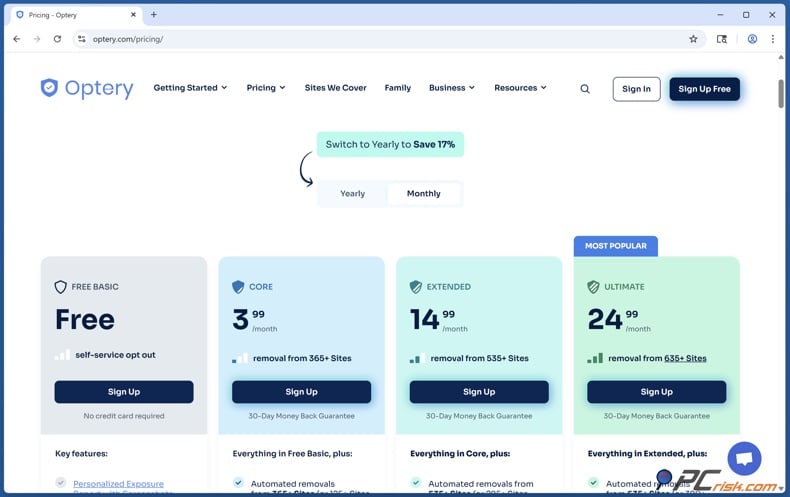
Free Basic – $0: Optery's entry point is completely free. This plan costs nothing and never expires. It allows you to run scans to see where your personal data appears, and it provides tools and instructions for manual opt-outs, but it does not include any automated removal service. Essentially, the Free Basic plan is a way to gauge your exposure risk and try out Optery's dashboard without opening your wallet.
Core – $3.99/month (or ~$39/year): The Core plan is the first paid tier, and it's quite affordable. At $3.99 per month on a monthly basis, it comes to $39 per year if you opt for annual billing (Optery applies a 17% discount for yearly subscriptions, reducing the cost to about $3.25 per month paid annually). The Core plan includes automated removal of your data from over 100 data broker sites (the exact number varies, more on that in the next section), with continuous monthly scans to catch new instances of your info.
This plan is a fully automated service (no human agents involved for QA) and supports one name (person) and one location for removals. It also comes with standard email support and detailed opt-out progress reports, giving you an ongoing view of where your data stands.
Extended – $14.99/month (or ~$149/year): The Extended plan is the mid-tier offering. Priced at $14.99 monthly, it's roughly $149 per year with annual billing (about $12.42 per month when paid annually). This plan builds on everything in Core and significantly expands the coverage – over 200 data broker sites are included for automated removals (more than double the Core plan's coverage). It also unlocks unlimited name variations and past addresses for the individual being protected, which is useful if you have aliases, maiden names, or many prior residences.
Notably, Extended introduces a hybrid "Humans + Machines" approach: you get an assigned human Privacy Agent who oversees the automated process, performs quality assurance, and handles any tricky opt-outs that might require special attention.
Additionally, Extended provides removal reports with before-and-after screenshots every ~90 days, so you can visually verify that your data was removed from each site. In terms of support, you still use email, but the responsiveness is generally good. Given its mix of broad coverage and human oversight, many users find the Extended plan to offer the best value for the money.
Ultimate – $24.99/month (or $249/year): The Ultimate plan is Optery's top-tier (sometimes referred to as the "Unlimited" plan in some materials) and is the most comprehensive – and expensive – option. At $24.99 per month, it comes out to $249 per year with the annual prepayment (approximately $20.70 per month when paid annually).
Ultimate includes everything in Extended, and then adds on even more coverage and perks. Subscribers at this level get automated removals from the maximum number of data brokers Optery supports – over 330 sites by default, and up to 630+ sites with an optional feature enabled.
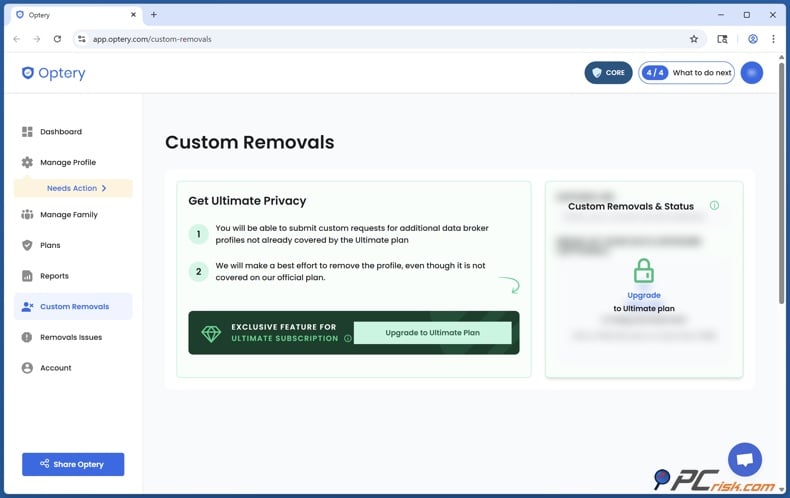
It also provides unlimited custom removal requests for sites that aren't in Optery's standard list (covering 1,300+ additional sites) – meaning if you find your data on a smaller or niche website, you can submit it to Optery and they will attempt to remove it too. Another exclusive Ultimate feature is the "Outdated Content Removal" tool integration: Optery will help expedite removal of outdated search engine results on Google, Bing, DuckDuckGo, and Yahoo. This is useful for clearing remnants of personal info that still show up in search results even after the source page was removed.
Lastly, Ultimate comes with priority customer support, ensuring that your queries are handled faster. The Ultimate plan is aimed at users who want the absolute highest level of coverage and are willing to pay a premium for it – it's roughly $100 more per year than Extended when billed annually.
They're offering a 30-day money-back guarantee on their paid plans when you sign up for Optery. You'll need to make a commitment to test their system, but this guarantee allows you to do just that without being locked in for a year. Optery's pricing can vary, and they occasionally offer promotions; however, the prices mentioned above were the standard prices at the time the source document was drafted.
Available Versions and Plan Features
When using Optery, the tiering system has a significant impact on four aspects of the service, primarily affecting the number of targeted broker sites, the level of human assistance, the transparency of the proof and reporting, and the adaptability of the service to complex identity footprints, which include multiple addresses, name variations, and unusual edge-case websites.
Free Basic Plan: When examining Optery's offerings, the Free Basic plan serves as a visibility check, running a scan to identify where your personal data is being displayed. It then generates an Exposure Report, which may include screenshots and links to view the discovered listings.
From a removal standpoint, Optery's service is manual; they cannot perform the actual opt-outs for you, but they will provide the necessary tools and instructions. Well-known to many users, this is still a massive help because half the battle is having a clear idea of where to start. If your online exposure is very limited, to just a few sites, Free Basic might be enough.
Core Plan: In relation to Optery, Core is the entry-level automation tier, which sends opt-out requests to a list of core data brokers and people search sites, and regularly rescans them.
Optery breaks down coverage into two types: a smaller, verified list that is the default, and a much larger one when you enable Expanded Reach. Coming in at around 120+ sites by default, Optery claims it can cover up to roughly 365+ sites with Expanded Reach. Expanded Reach allows Optery to cast its net wider, but people shouldn't get carried away with the idea that all these sites will be relevant to their particular profile.
Core is appropriate if you want:
- A "set it up once" baseline removal process.
- Automated monthly maintenance.
- The lowest possible cost.
Extended Plan: It feels more like a top-tier privacy service when Optery really starts to show its capabilities. Optery has a massive 228+ sites to cover by default, and goes up to around 535+ if you opt for Expanded Reach in the alpha version, and its name and historical address matching and removal capabilities just get even more accurate.
When it comes to data protection, one of the main upgrades that can be applied is the hybrid workflow. Assigning a human Privacy Agent to oversee the automated process, check the results, and help sort out websites that are difficult to manage. With the Extended plan, Optery sends periodic reports that include before-and-after screenshots, which is one of the most convincing features you can find in this category.
Extended is typically the best fit for:
- Users who have moved frequently, changed names, or have multiple identity "trails" online.
- Readers who want stronger verification and transparency.
- Those who want human QA for stubborn sites without paying top-tier pricing.
Ultimate Plan: Ultimate is the highest level of protection and, by default, covers over 333 websites and up to 630 with the help of Expanded Reach, within Optery's tier structure. One of the perks of Ultimate is the ability to submit unlimited custom removal requests to sites that aren't on the service's broker list. They mention a pool of over 1,300 sites that can be targeted upon request. If you stumble upon your information on a specialized directory or an obscure broker, you can submit it to Optery, and they'll sort it out, saving you the hassle of going back to manual work.
Ultimate takes care of outdated search results with its "outdated content" removal tool. Coming hotfooting through the internet, clearing out stale results from search engines, when a website or webpage is updated or removed. This is not about wiping the data from the broker, which the service already does; rather, it is about scrubbing what remains visible in search engines, which can take some time for caches to update. It also gives top priority to these removal requests.
Ultimate makes the most sense for:
- High-exposure scenarios (public-facing roles, doxxing concerns, or persistent spam).
- Users who repeatedly discover "odd" sites that aren't in standard broker rosters.
- Readers who want every available lever: maximum coverage, proof, custom requests, and search-result cleanup.
- Two practical caveats: Expanded Reach and geography
Expanded Reach increases the target list dramatically, but it can also include sites that are less relevant, less responsive, or more challenging to verify. In practical terms, the verified core list is the number that matters most for typical users; Expanded Reach is best treated as a "try everything" supplement.
Optery is primarily focused on U.S. data brokers and people-search sites (with some Canada-specific support referenced in the source draft). If your privacy issue mainly concerns areas outside the U.S., Optery's effectiveness may be limited.
Our In-House Data Broker Removal Test Results
We take a hands-on approach by running our own tests to evaluate what the service can truly do when assessing Optery's Data Broker Removal Service.
We also don't just believe in marketing claims, but dig in to look at the results. Our test evaluated Optery's service's ability to remove personal data from data broker websites, employing the following approach to measure its effectiveness and speed.
Test Setup: Loading the service with a real person's data, including name, address, phone number, email, past addresses, and more. When testing Optery, we chose the Ultimate plan and created an account. Drawing on our existing knowledge of people search sites, including Whitepages, Spokeo, and Radaris, we had a fairly good idea of what to expect and filled out the Optery profile accordingly.
Since we wanted to see the full extent of what Optery can do, we enabled the Expanded Reach option, which allowed the service to target a massive list of brokers, essentially presenting the test subject as someone with a very high online profile.
Initial Exposure Scan: When Optery was set up, it ran its initial scan, and we closely examined the results, gaining a baseline on where our test subject's data is located. This is where the story begins. Optery's intuitive dashboard broke down each site it found, displaying our test subject's data on it, and even provided a personalized report complete with screenshots. Upon reviewing the scan results, we discovered that our test subject's personal information was present on numerous data broker websites, dozens of them, in fact, and confirmed that they have a very large digital footprint that requires some cleaning.
Automated Removal Process: We initiated their automated opt-out procedure, which is displayed in the Ultimate dashboard's "Data Brokers" tab, when we finished the scan with Optery. Here, we can see the status of removals to the identified broker sites and track the number of removals that are "in progress", "pending", or "completed". When looking at this tab, one might not think the opt-outs have started yet, but the system had begun automatically removing data from each site; we didn't have to intervene or click anything. We essentially had to dig into the "Data Brokers" tab to verify that it was functioning correctly and that there wouldn't be a flashing "Now removing" sign.
Timeline and Progress Checks: We found that initial results appear anywhere from 24 to 72 hours, as some data brokers take a couple of days to process opt-outs on their end, when we tracked the progress of Optery's removals. We noticed a significant amount of activity in the first 24 hours. One independent review found that approximately 146 out of 180 removals were completed in just 14 hours. Our experience was on a similar scale, albeit not quite as spectacular, and we'll be laying out the exact numbers from our test in a moment.
We made a point to check the 24-hour, 48-hour, and 72-hour marks and saw that Optery's removals continued to progress, recording the number of completed and still-pending removals. We're keeping a close eye on the email side of things, too. Optery sends out notifications or reports for certain milestones, and we wanted to determine how often we needed to add additional verification to facilitate a removal.
Results and Effectiveness: During our week-long test of Optery, we compared the number of data brokers we found to the number successfully eliminated by the end of the test period. We also personally verified the removals by checking some of the significant sites and confirmed that our test subject's information had been removed. We'll sum up the statistics and results with a statement like "Out of X initial listings, Optery removed Y by day Z, and left a few still in progress or needing a human touch".
Another area we analyzed is the removal reports Optery sends. After a week, the tool sent us a report that showed the "before and after" situation of each removal, thanks to our Extended/Ultimate membership. Coming face-to-face with the fact that a profile that once listed your name and address now says "record not found" is very reassuring.
Ongoing Monitoring: We weren't satisfied with just one scan and round of removals, as that's essentially the bare minimum that many data brokers will do. When we ran our test of Optery, returning a month later to see if any of the removed data reappears is also part of our test, as it's possible that a data broker might re-upload the same data or that new brokers will obtain your data.
Optery's paid plans include regular rescans, and we're going to see if Optery's monthly rescans caught any new instances and if they were able to handle them automatically. We'll also be checking if any of these sites required a second opt-out and how much time Optery took to find those.
When we tested Optery's ability to remove personal info from listings, we were able to quantify the results. 75% of the listings were successfully removed in 7 days, but we ran into a couple of issues that will be ironed out. Our structured test aims to answer a few fundamental questions: How effectively does Optery remove personal information, how quickly it does so, and whether it significantly lightens the load for the user. Well-known results have been impressive, but our final evaluation will be based on the entire set of results, which we will update in the near future.
Main Features of Optery's Data Removal Service
As for erasing your online presence, Optery's Data Broker Removal Service is at the heart of what they do, and includes some very useful features to help make this process as painless as possible. At its core, Optery's primary function is to hunt down and eliminate your personal data from the numerous data brokers.
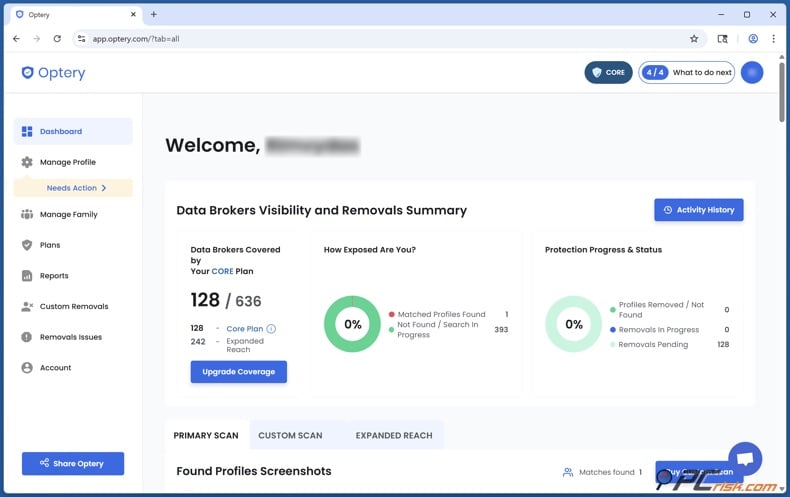
Automated opt-outs and ongoing monthly rescans
When you're on the paid tier with Optery, they'll handle sending opt-out requests for you and run another scan monthly, which is the solution to one of the biggest headaches in data cleanup. The manual process of opting out and then reappearing in a broker's database. The paid model isn't just about scanning more sites; it's about the maintenance aspect. Optery's continuous efforts to make sure your data isn't floating around on the web anymore.
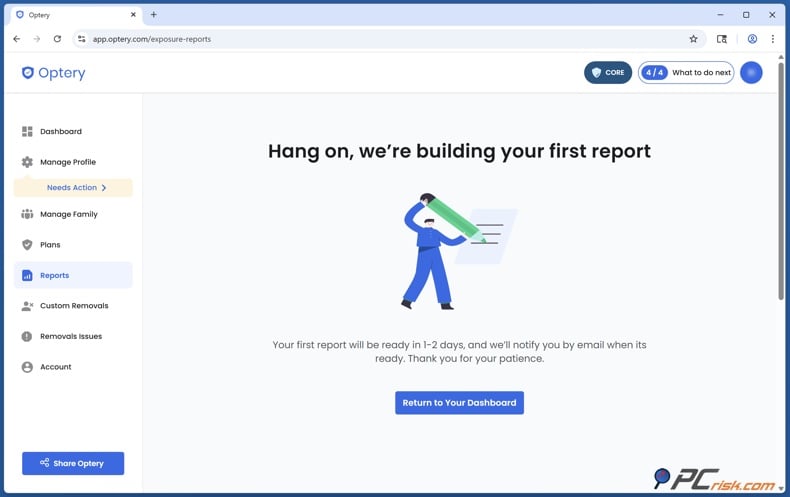
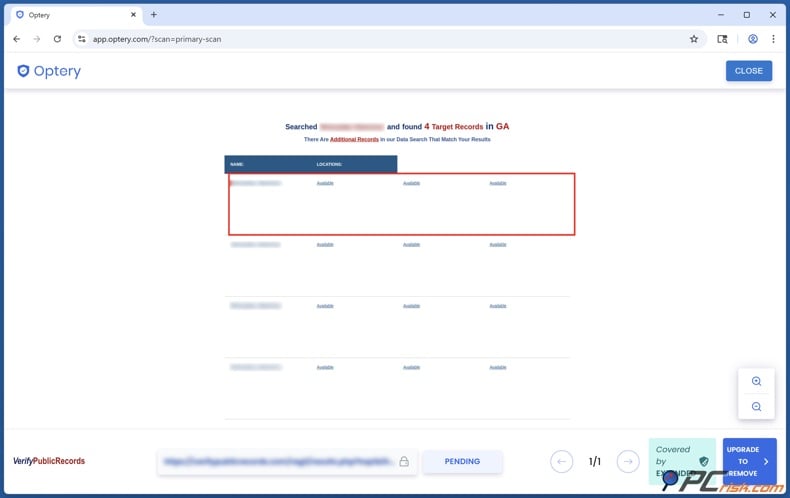
Exposure Reports with direct "view" links and screenshots
It's really what gets the process started, laying out where your data is being used and, depending on the tier, backing it up with visual proof, when you request an Optery Exposure Report. When reviewing a new website, especially one that has been previously removed, it can be challenging, and that's where visual verification comes into its own. It allows us to verify that the correct listing has been targeted, and makes it easier to identify when a broker has removed a profile page but is still displaying a 'stub' entry.
Opt-out status tracking
The removal status for each site is laid out in front of you. In progress, pending, done, and so on, when using Optery. Coming from different brokers, these labels can mean very different things. Some brokers are lightning-fast with removals, while others require an email confirmation, and a few are simply slow. A site-by-site view helps you figure out whether the problem lies with Optery or the broker's sluggishness.
Human Privacy Agent oversight (Extended/Ultimate)
Human interaction is injected into the process when working with Extended and Ultimate plans. Well-known problems with opt-out workflows are that they can change, sites add new verification measures, and "dirty" identity issues, such as shared names and numerous addresses, can cause duplicate or mismatched records. From a QA perspective, human intervention can rectify issues and really get the ball rolling, especially with brokers that are notorious for being inconsistent.
Custom removals (Ultimate)
Custom removals are the way to go for users who need to remove their online information from hundreds of sites that aren't on the typical broker lists, when mainstream removal services won't suffice anymore. Even then, there's a good chance that some of those sites are local directories or "background" sites that can be tricky to remove. Still, the ability to submit them for removal is essentially a hands-free experience for the user.
Search engine outdated content removal (Ultimate)
Even after a broker removes a page, search engines may continue showing outdated snippets or cached results for a period. Optery's outdated content feature is intended to shorten that window. It is not a substitute for broker removal; rather, it is a complementary tool for situations where search visibility is the primary concern.
Self-service tools and opt-out guidance
Optery's free tier includes self-service tools and instructions. Even paid users may occasionally rely on these resources if a broker requires a user-driven verification step. We consider this documentation a valuable feature because it reduces confusion and makes the service more useful, even for those who do not subscribe.
Additional Features and Tools
Optery includes several supporting features that improve usability or provide extra privacy value:
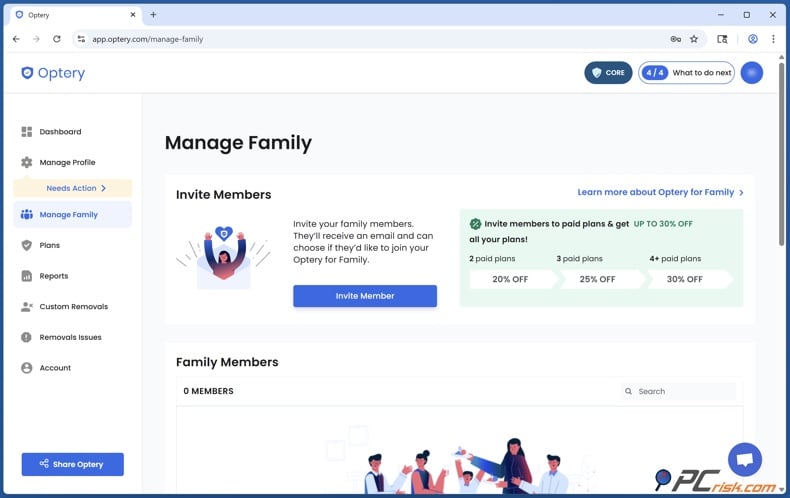
Family/household options (availability and pricing depend on the offering), allowing multiple profiles under one umbrella.
CSV export of exposure and removal data for users who want their own records or audits.
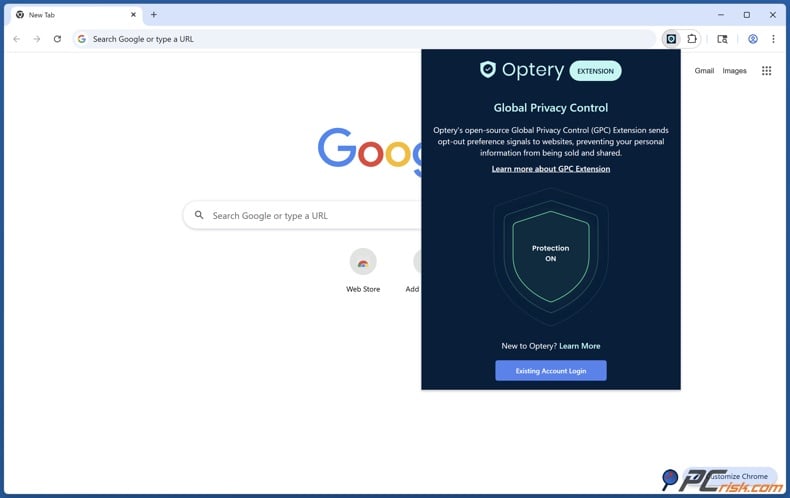
A Global Privacy Control (GPC) browser extension, which can signal opt-out preferences to supporting websites.
Mobile apps for iOS and Android, allowing you to check exposure and removal status on the go.
Security posture and credentials: Optery is described as SOC 2 Type II compliant in the source draft, which is a positive signal when a service handles sensitive personal identifiers.
These add-ons are not the primary reason to buy Optery, but they make the service easier to live with, and in some cases (exports and GPC), help privacy-conscious users build a broader "defense in depth."
Ease of Use
To remove personal data, simply upload the information you want to delete, and Optery will handle the rest. Optery's interface is well-designed, intuitive, and most of the work happens automatically.
Some users were expecting a more prominent "Start removals" button; however, in the source draft, Optery starts the process automatically when a paid plan is activated. From this angle, it's best to check the data brokers section and the status of the data being removed, rather than waiting for the "Start removals" button.
Reporting is easy to follow. The most valuable elements are:
- Site-by-site status labels.
- Exposure listings with links and screenshots.
- Periodic proof reports (Extended/Ultimate).
They won't be flooding your inbox; the approach is relatively restrained when you sign up for notifications. If you're someone who prefers a more minimalist approach, that's a plus, but for others who crave a daily rundown, it might seem less proactive.
The dashboard typically contains sufficient information to verify the progress of any removal, and as a result, it's mainly up to the user to check the status of their removals.
Support is also crucial in this category, since removals can be delayed for many reasons beyond the user's control. But, according to the source, support has been very good, and has achieved some notable successes.
Reddit and privacy forums
Regarding online experiences on Reddit, discussions about being exposed to a multitude of unsolicited messages can be found in many threads. Yet, success stories often point to a long-term reduction in unwanted messages. Users typically begin with hundreds of messages, but after a couple of months, they usually see a significant drop to a more manageable number. Coming hand-in-hand with this reduction is a decrease in spam and unwanted contact.
Criticism on Reddit tends to focus on:
- Skepticism about headline "site count" claims, especially with Expanded Reach enabled (some users argue the long-tail list includes obscure or low-value targets).
- Whether a continued subscription is worth it once the initial "big" brokers are cleared.
- General privacy concerns whenever a service mentions third-party tooling or AI-related processing (even if the practical impact is unclear).
The overall impression, however, remains favorable: users who stick with the service commonly report meaningful improvements, while criticisms are mostly related to tier selection, expectations, and transparency regarding "coverage numbers."
Is Optery Worth Buying?
Consider how much time you are willing to spend manually removing unwanted online listings and your level of exposure when deciding whether Optery is worth the investment.
If you are listed on a handful of sites, manual opt-outs may be realistic, especially if you're willing to go through the process now and then, and in that case, Optery's Free Basic tier can be seen as a sort of discovery tool and step-by-step guide.
However, if you're exposed to dozens or even hundreds of listings, manual removal becomes time-consuming, inconsistent, and it's very easy to put off. This is where Optery's paid tiers become more attractive, turning an excruciatingly repetitive task into a managed workflow with monthly monitoring.
How we'd think about tier choice:
- Core is sensible if you want a low-cost automated baseline for a single profile and you don't need detailed proof reporting.
- Extended is usually the best "balanced" option for users with multiple addresses or name variations, as well as anyone who values screenshot-based proof and human QA.
- Ultimate is best justified by specific needs: custom removals for niche sites, maximum coverage, and help in reducing stale search result visibility.
What Optery won't do (and why that matters):
- It won't erase content you posted yourself on social media or forums.
- It can't "undo" a data breach; it can only remove broker listings that publish or aggregate your data.
- It won't remove certain public records from government sources, although it can remove many broker listings that repackage those records.
Evaluating Optery, one of its main drawbacks is that it may not be effective if you're based outside the U.S. Since it primarily caters to U.S. customers, the services may not be as beneficial for you.
Well-known to people who have used Optery, the data removal process can take anywhere from a week to a few months, and the final 10 to 20% of results can be the most challenging to eliminate.
However, if you're a U.S.-based reader who is serious about reducing your online exposure and has already tried the free scan, Optery's lowest tier is a reasonable investment.
Frequently Asked Questions (FAQ)
Does Optery work outside the United States?
Optery primarily targets U.S. data brokers and people-search sites. Users outside the U.S. may see limited results unless their data appears on U.S.-based brokers or within supported regions referenced by Optery.
How quickly will my information be removed?
Some removals can be completed within days, but comprehensive cleanup typically takes weeks to months, depending on the broker, the need for verification steps, and the extent to which your data is distributed.
Is the removal permanent?
Not always. Brokers can republish data after updates or acquire new datasets. Ongoing monitoring and periodic re-removals are a key reason these services use subscriptions.
Is Optery safe to use?
Using any data removal service requires sharing personal identifiers so listings can be matched accurately. Optery is described as SOC 2 Type II compliant in the source draft and positions itself as a privacy-focused service. However, users should still treat the account as sensitive (strong password, unique email where possible).
What information do I need to provide for a scan?
At a minimum, you will be required to provide your name and current location. More complete results generally require past addresses, phone numbers, and email addresses, because broker sites often match profiles using those fields.
Can I rely solely on the free plan?
Yes, if you primarily want to see where your data is exposed and are willing to complete opt-outs manually. If you wish to have removals handled for you and maintained over time, a paid plan is the practical route.
What types of data does Optery remove?
Typically: name, addresses (current/past), phone numbers, email addresses, and related profile details shown on people-search listings (such as relatives or age). It does not remove social media posts, content you published yourself, or public records hosted directly by government sites.
Will Optery remove me from Google?
Optery's primary task is to remove listings from broker sites. Once those listings are removed, search results usually update over time. Ultimate adds an "outdated content" tool intended to expedite the removal of stale search results after the source content is removed or updated.
What if a broker refuses to remove my listing?
Most brokers provide opt-out mechanisms, but some are slow or difficult. Higher tiers with human oversight can help with edge cases; stubborn targets may remain "in progress" longer or require extra verification.
Do I need Ultimate to get good results?
Not necessarily. Many users prefer Extended because it strikes a balance between coverage, oversight, and proof of removal reporting. Ultimate is best suited for scenarios involving heavy exposure, custom removal needs, and search result cleanup.
Can I cancel after the initial cleanup?
You can, but your data may reappear over time without continued monitoring. If you cancel, be prepared to periodically rescan and re-opt-out manually, or reactivate a plan when exposure returns.
Share:
 Facebook
 X.com
X.com
 LinkedIn
 Copy Link

Karolis Liucveikis
Experienced software engineer, passionate about behavioral analysis of malicious apps
Author and general operator of PCrisk's News and Removal Guides section. Co-researcher working alongside Tomas to discover the latest threats and global trends in the cyber security world. Karolis has experience of over 8 years working in this branch. He attended Kaunas University of Technology and graduated with a degree in Software Development in 2017. Extremely passionate about technical aspects and behavior of various malicious applications.
▼ Show Discussion