Bedfordshire Police Virus
 Written by Tomas Meskauskas on (updated)
What is Bedfordshire Police?
"Bedfordshire Police - Your operating system is locked" is a ransomware infection targeted at computer users from the United Kingdom. Cyber criminals exploit the name of Bedfordshire Police in order to make their deceptive message appear authentic.
This ransomware infection originates from a family of screen lockers called Goscri. Cyber criminals responsible for creating ransomware infections from this family also target PC users from France, USA, Canada, and other countries. Cyber criminals are able to change the body and the header sections of their ransomware infection according to the country in which the computer is infected.
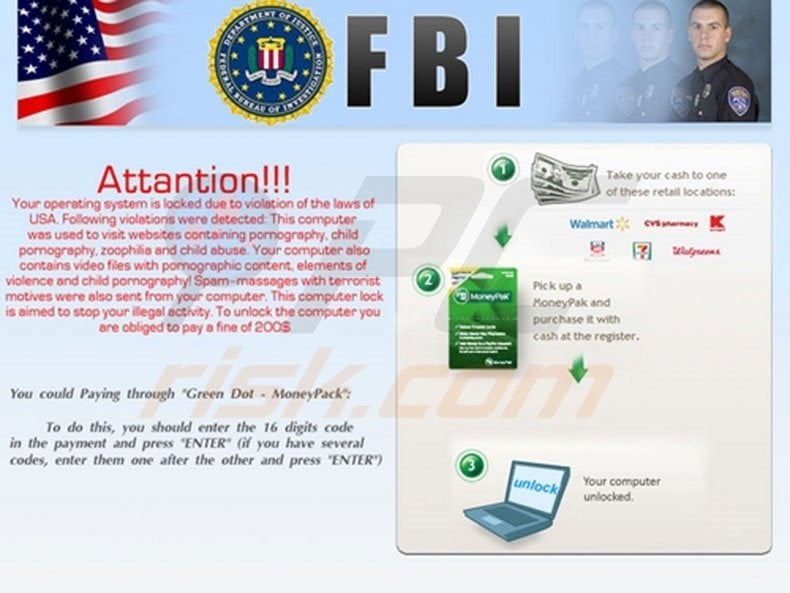
This localization is achieved by detecting the IP addresses of computers that are being infected. For example, if a computer user from the USA has his/her PC infected with this ransomware, the deceptive message appears as if originating from the FBI. No authorities use screen lockers such as this to collect fines for law infringements.
This type of screen blocking message is termed 'ransomware' and is created by cyber criminals who make money from unsuspecting PC users who pay the bogus fines.
"Bedfordshire Police - Your operating system is locked" is a scam. Do not pay the 100 Euro fine for supposed law violations. If you do, you will send your money to cyber criminals responsible for releasing this scam and your PC will remain locked.
When studying the text displayed by this ransomware, it is clear that it is a scam, since there are many grammatical errors - obviously unprofessionally compiled by someone with poor English language abilities. Do not pay the bogus fine and remove this ransmoware infection from your computer immediately.
A fake message displayed by the "Bedfordshire Police - Your operating system is locked" scam:
Bedfordshire Police POLICE.
ATTENTION!!!
Your operating system is locked due to violation of the laws of the UK. Following violations were detected: This computer was used to visit websites containing pornography, child pornography, zoophilia and child abuse. Your computer also contains video files with pornographic content, elements of violence and child pornography! Spam - messages with terrorist motives were also sent from your computer. This computer lock is aimed to stop your illegal activity. To unlock the computer you are obliged to pay a fine of 100 euro. You could pay the forfeit in two ways:
1) Paying though Ukash:
To do this, you should enter the 19 digits code in the payment and press "ENTER" (if you have several codes, enter them one after the other and press "ENTER")
2) Paying through Paysafecard:
To do this, you should enter the 16 digits code (if necessary with a password) in the payment and press "ENTER" (if you have several codes, enter them one after the other and press "ENTER"
Instant automatic malware removal:
Manual threat removal might be a lengthy and complicated process that requires advanced IT skills. Combo Cleaner is a professional automatic malware removal tool that is recommended to get rid of malware. Download it by clicking the button below:
▼ DOWNLOAD Combo Cleaner
By downloading any software listed on this website you agree to our Privacy Policy and Terms of Use. To use full-featured product, you have to purchase a license for Combo Cleaner. 7 days free trial available. Combo Cleaner is owned and operated by Rcs Lt, the parent company of PCRisk.com read more.
Quick menu:
- What is Bedfordshire Police?
- STEP 1. "Bedfordshire Police" virus removal using safe mode with networking.
- STEP 2. Remove "Bedfordshire Police" manually editing registry entries.
"Bedfordshire Police - Your operating system is locked" ransomware removal:
Step 1
Start your computer in Safe Mode. Click Start, click Shut Down, click Restart, click OK. During your computer starting process press the F8 key on your keyboard multiple times until you see the Windows Advanced Option menu, then select Safe Mode with Networking from the list.
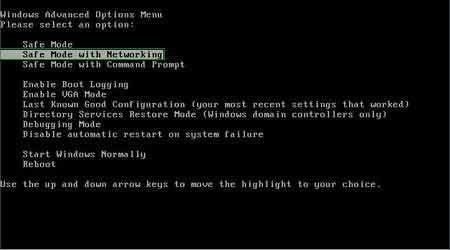
Video showing how to start Windows 7 in "Safe Mode with Networking":
Step 2
Log in to the account infected with "Bedfordshire Police - Your operating system is locked" scam. Start your Internet browser and download a legitimate anti-spyware program. Update the anti-spyware software and start a full system scan. Remove all the entries detected.
After completing these steps your computer should be clean. Reboot your computer in Normal Mode.
Alternative "Bedfordshire Police - Your operating system is locked" scam removal guide:
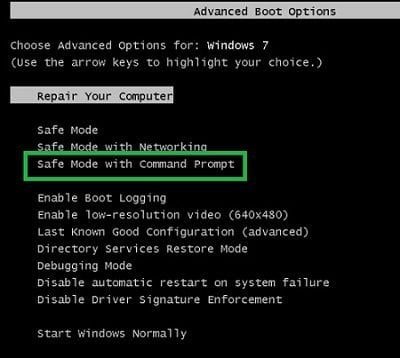
If this ransomware blocks your screen when you start your computer in Safe Mode with Networking, try starting your PC in Safe Mode with Command Prompt.
1. During your computer starting process, press the F8 key on your keyboard multiple times until the Windows Advanced Options menu appears, and then select Safe Mode with Command Prompt from the list and press ENTER.
2. In the opened Command Prompt, type explorer and press Enter. This command will open the Explorer window - do not close it and continue to the next step.
3. In the Command Prompt, type regedit and press Enter. This will open the Registry Editor window.
4. In the Registry Editor window, navigate to HKEY_LOCAL_MACHINE\SOFTWARE\Microsoft\Windows NT\CurrentVersion\Winlogon\
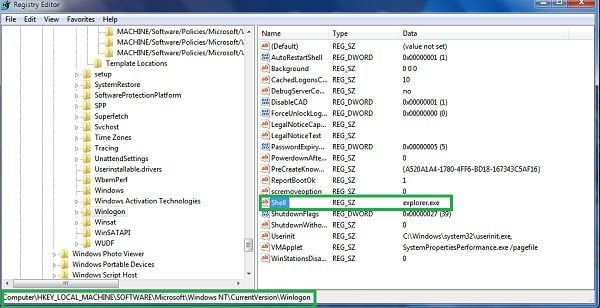
5. In the right side of the window, locate "Shell" and right click on it. Click on Modify. The default value in the Data column is Explorer.exe - if you see something else displayed in this window, remove it and type Explorer.exe (take a note of whatever else was displayed in the Data column - this is the path of the rogue execution file). Use this information to navigate to the rogue executable and remove it.
6. Restart your computer, download and install legitimate anti-spyware software and perform a full system scan to eliminate any remnants of "Bedfordshire Police - Your operating system is locked" scam.
If you cannot start your computer in Safe Mode with Networking (or with Command Prompt), boot your computer using a rescue disk. Some variants of ransomware disable Safe Mode, making its removal more complicated. For this step, you need access to another computer.
After removing "Bedfordshire Police - Your operating system is locked" scam from your PC, restart your computer and scan it with legitimate antispyware software to remove any possible remnants of this security infection.
Other tools known to remove "Bedfordshire Police - Your operating system is locked" scam:


 Outstanding!
▼ Show Discussion