
How to recognize fake "Hypurr Fun ($HFUN) Allocation" websites
Phishing/ScamAlso Known As: "Hypurr Fun ($HFUN) Allocation" crypto drainer

Get free scan and check if your device is infected.
Remove it nowTo use full-featured product, you have to purchase a license for Combo Cleaner. Seven days free trial available. Combo Cleaner is owned and operated by RCS LT, the parent company of PCRisk.com.
What is the fake "Hypurr Fun ($HFUN) Allocation" website?
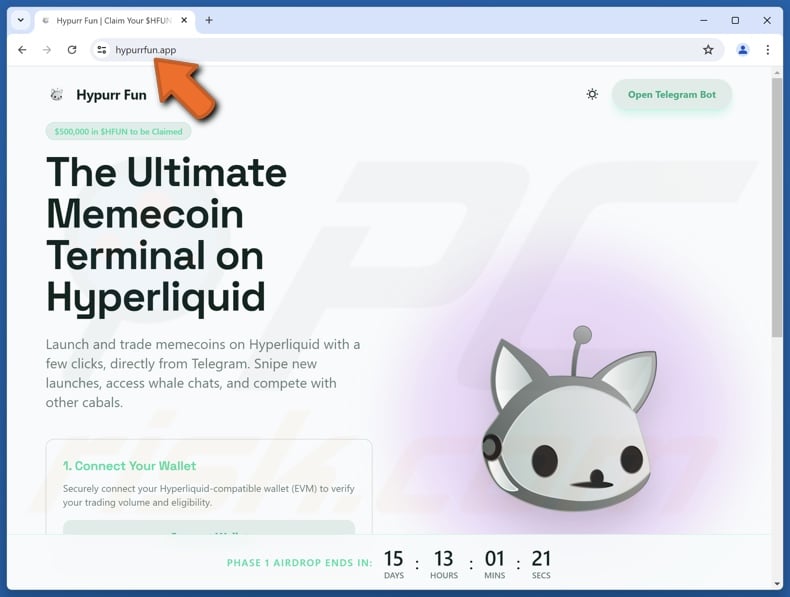
While investigating suspicious websites, our researchers discovered this fake "Hypurr Fun ($HFUN) Allocation" page. It is not associated with the actual Hypurr Fun platform. This scam aims to deceive victims into exposing their cryptowallets to a cryptocurrency drainer.
IMPORTANT NOTE: We do not review crypto projects, please do your own research when investing money.
Federal Trade Commission (FTC) states that since the start of 2021, more than 46,000 people have reported losing over $1 billion in crypto to scams – that's about one out of every four dollars reported lost, more than any other payment method.
Fake "Hypurr Fun ($HFUN) Allocation" website overview
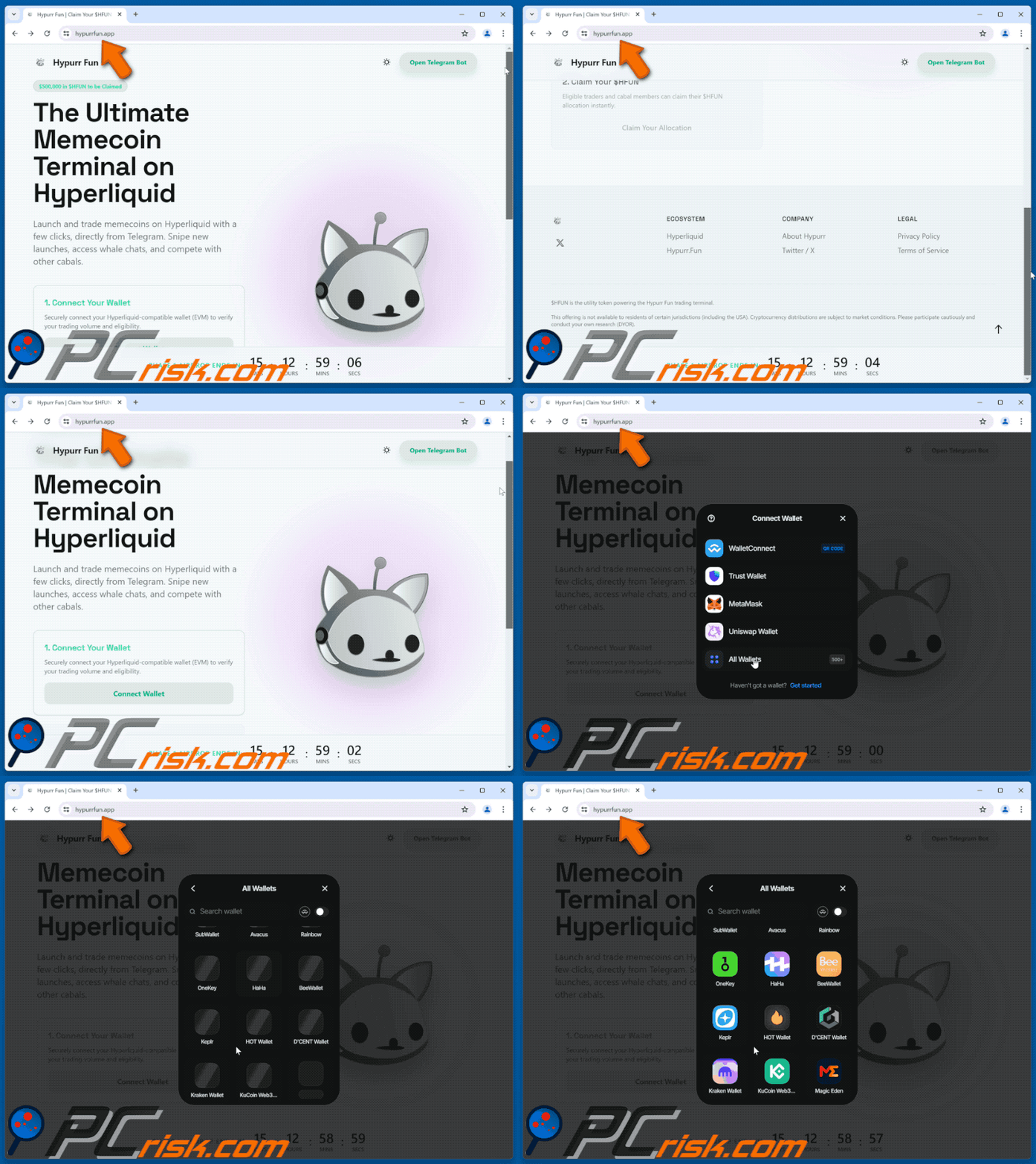
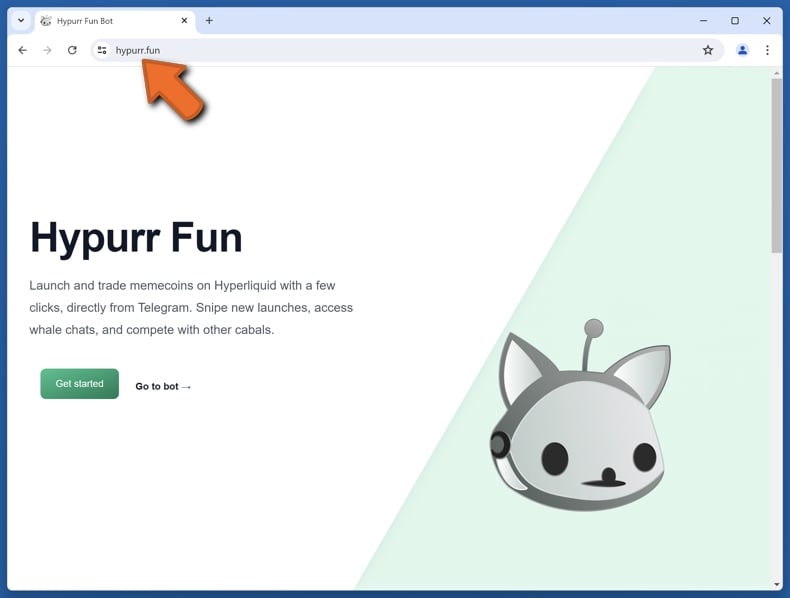
We found this scam on hypurrfun[.]app, yet it could also be hosted on other domains. It is a close visual copy of Hypurr Fun's official website (hypurr.fun). Hypurr Fun is a DeFi platform that allows users to launch and trade memecoins directly through the Telegram messaging service. This imitator states that eligible traders and members are eligible to claim an allocation of HFUN token.
It must be reiterated that this allocation is fake and in no way associated with Hypurr Fun or any other existing platforms, projects, or entities.
When a digital wallet is connected to this scam webpage, the action signs a malicious contract. It facilitates the cryptocurrency drainer – a mechanism that siphons funds from exposed wallets. These outgoing transactions are automated and may appear innocuous, so they might remain unnoticed for a significant amount of time. Some drainers can roughly estimate the value of digital assets and determine which to steal first.
It is noteworthy that cryptocurrency transactions are practically untraceable. Therefore, the victims of scams like this fake "Hypurr Fun ($HFUN) Allocation" site are unable to retrieve the stolen funds.
| Name | "Hypurr Fun ($HFUN) Allocation" crypto drainer |
| Threat Type | Phishing, Scam, Social Engineering, Fraud, Cryptocurrency Drainer |
| Fake Claim | Eligible users can claim an HFUN allocation. |
| Disguise | Hypurr Fun |
| Related Domains | hypurrfun[.]app |
| Detection Names | CRDF (Malicious), Full List Of Detections (VirusTotal) |
| Serving IP Address | 64.29.17.1 |
| Distribution methods | Compromised websites, social media spam, rogue online pop-up ads, potentially unwanted applications. |
| Damage | Monetary loss |
| Malware Removal (Windows) |
To eliminate possible malware infections, scan your computer with legitimate antivirus software. Our security researchers recommend using Combo Cleaner. Download Combo CleanerTo use full-featured product, you have to purchase a license for Combo Cleaner. 7 days free trial available. Combo Cleaner is owned and operated by RCS LT, the parent company of PCRisk.com. |
Cryptocurrency drainer scam examples
We have examined thousands of online scams; "FWOG Airdrop", "Surge Airdrop", "Niche Baby ($BABY) Airdrop", and "TOBY ($TBY) Airdrop" are merely a few of our newest articles on drainers.
Aside from employing draining mechanisms, crypto scams commonly operate by phishing for wallet log-in credentials or deceiving users into manually transferring assets to wallets in the scammers' possession.
While online scams have a reputation for being poorly constructed, they can be competently put together and convincingly disguised as content affiliated with genuine entities. Crypto scams are notorious for utilizing perfect visual copies of existing websites. Therefore, we advise vigilance when browsing and investing online.
How did I open a scam website?
Crypto drainers are often endorsed via intrusive pop-up adverts (a type of malvertising). These pop-ups may be fully functional drainers themselves, i.e., capable of executing draining scripts. Ads of this kind may be encountered on legitimate sites that have been compromised.
Another prevalent promotional technique is social media spam. The posts and direct/private messages endorsing this content can be created using hacked accounts (i.e., ones originally belonging to real projects, companies, entrepreneurs, celebrities, etc.).
Other endorsement techniques are not unlikely. Apart from those already mentioned, online scams are promoted through websites using rogue advertising networks (redirects), different types of spam (e.g., browser notifications, forum posts, emails, SMSes, cold calls, robocalls, etc.), typosquatting (misspelled URLs), and adware (advertisements/redirects).
How to avoid visiting scam websites?
Caution is essential to ensuring your online safety. Therefore, pay attention to URLs and be careful when typing them. Be wary of sites, ads, and messages that make unbelievable promises or urge immediate action against severe threats.
Do not use websites offering pirated content or other dubious services (e.g., illegal streaming, downloading, torrenting, etc.), as these webpages usually employ rogue advertising networks. Ignore or block browser notification requests from untrustworthy sites.
Be vigilant with incoming emails and other messages; do not open attachments or links found in suspicious mail. Download only from official/verified channels and be attentive during installation (e.g., study terms and options, use "Custom/Advanced" settings, and opt out of additional apps, extensions, features, etc.) – to prevent hazardous software (such as adware) from infiltrating the device.
If your computer is already infected, we recommend running a scan with Combo Cleaner Antivirus for Windows to automatically eliminate all threats.
Appearance of the fake "Hypurr Fun ($HFUN) Allocation" website (GIF):
Screenshot of the official Hypurr Fun website (hypurr.fun):
Instant automatic malware removal:
Manual threat removal might be a lengthy and complicated process that requires advanced IT skills. Combo Cleaner is a professional automatic malware removal tool that is recommended to get rid of malware. Download it by clicking the button below:
DOWNLOAD Combo CleanerBy downloading any software listed on this website you agree to our Privacy Policy and Terms of Use. To use full-featured product, you have to purchase a license for Combo Cleaner. 7 days free trial available. Combo Cleaner is owned and operated by RCS LT, the parent company of PCRisk.com.
Quick menu:
- What is "Hypurr Fun ($HFUN) Allocation" crypto drainer?
- How to identify a pop-up scam?
- How do pop-up scams work?
- How to remove fake pop-ups?
- How to prevent fake pop-ups?
- What to do if you fell for a pop-up scam?
How to identify a pop-up scam?
Pop-up windows with various fake messages are a common type of lures cybercriminals use. They collect sensitive personal data, trick Internet users into calling fake tech support numbers, subscribe to useless online services, invest in shady cryptocurrency schemes, etc.
While in the majority of cases these pop-ups don't infect users' devices with malware, they can cause direct monetary loss or could result in identity theft.
Cybercriminals strive to create their rogue pop-up windows to look trustworthy, however, scams typically have the following characteristics:
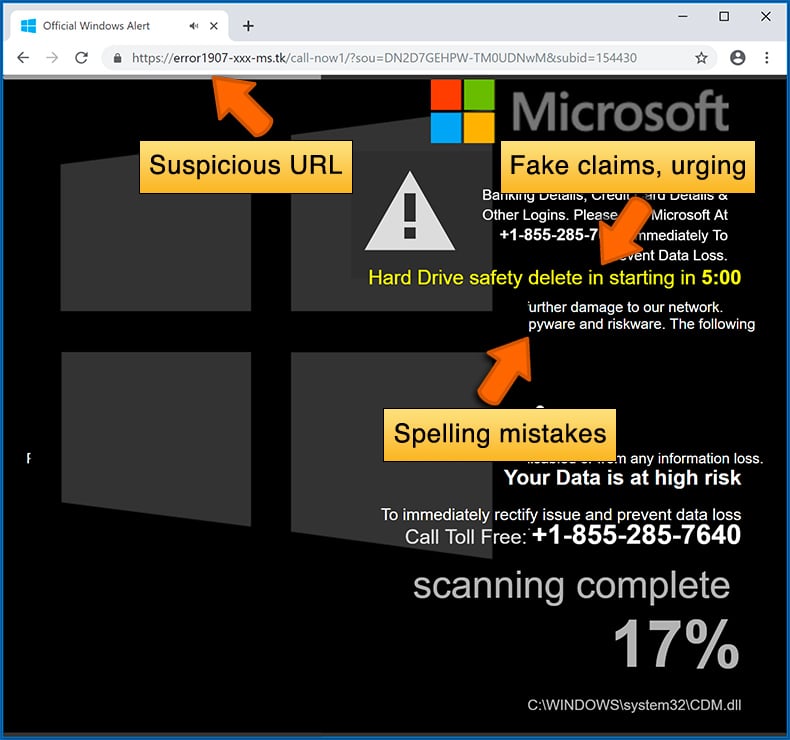
- Spelling mistakes and non-professional images - Closely inspect the information displayed in a pop-up. Spelling mistakes and unprofessional images could be a sign of a scam.
- Sense of urgency - Countdown timer with a couple of minutes on it, asking you to enter your personal information or subscribe to some online service.
- Statements that you won something - If you haven't participated in a lottery, online competition, etc., and you see a pop-up window stating that you won.
- Computer or mobile device scan - A pop-up window that scans your device and informs of detected issues - is undoubtedly a scam; webpages cannot perform such actions.
- Exclusivity - Pop-up windows stating that only you are given secret access to a financial scheme that can quickly make you rich.
Example of a pop-up scam:
How do pop-up scams work?
Cybercriminals and deceptive marketers usually use various advertising networks, search engine poisoning techniques, and shady websites to generate traffic to their pop-ups. Users land on their online lures after clicking on fake download buttons, using a torrent website, or simply clicking on an Internet search engine result.
Based on users' location and device information, they are presented with a scam pop-up. Lures presented in such pop-ups range from get-rich-quick schemes to fake virus scans.
How to remove fake pop-ups?
In most cases, pop-up scams do not infect users' devices with malware. If you encountered a scam pop-up, simply closing it should be enough. In some cases scam, pop-ups may be hard to close; in such cases - close your Internet browser and restart it.
In extremely rare cases, you might need to reset your Internet browser. For this, use our instructions explaining how to reset Internet browser settings.
How to prevent fake pop-ups?
To prevent seeing pop-up scams, you should visit only reputable websites. Torrent, Crack, free online movie streaming, YouTube video download, and other websites of similar reputation commonly redirect Internet users to pop-up scams.
To minimize the risk of encountering pop-up scams, you should keep your Internet browsers up-to-date and use reputable anti-malware application. For this purpose, we recommend Combo Cleaner Antivirus for Windows.
What to do if you fell for a pop-up scam?
This depends on the type of scam that you fell for. Most commonly, pop-up scams try to trick users into sending money, giving away personal information, or giving access to one's device.
- If you sent money to scammers: You should contact your financial institution and explain that you were scammed. If informed promptly, there's a chance to get your money back.
- If you gave away your personal information: You should change your passwords and enable two-factor authentication in all online services that you use. Visit Federal Trade Commission to report identity theft and get personalized recovery steps.
- If you let scammers connect to your device: You should scan your computer with reputable anti-malware (we recommend Combo Cleaner Antivirus for Windows) - cyber criminals could have planted trojans, keyloggers, and other malware, don't use your computer until removing possible threats.
- Help other Internet users: report Internet scams to Federal Trade Commission.
Frequently Asked Questions (FAQ)
What is an online scam?
Online scams are a type of deceptive Web content designed to trick users into performing specific actions. To elaborate, victims can be enticed/scared into connecting digital wallets to cryptocurrency drainers, disclosing vulnerable information, making monetary transactions, buying products, subscribing to services, downloading/installing software, and so on.
What is the purpose of online scams?
The purpose of online scams is to generate revenue for scammers. These cyber criminals primarily profit by acquiring funds through deception, promoting content (e.g., websites, software, products, services, etc.), abusing/selling private data, and proliferating malware.
I have lost digital assets to a fake "Hypurr Fun ($HFUN) Allocation" website, can I get my money back?
Cryptocurrency transactions are irreversible due to their nearly untraceable nature. Therefore, victims of such scams are unable to retrieve the stolen digital assets.
Why do I encounter online scams?
Widespread promotional techniques include: intrusive ads, sites utilizing rogue advertising networks, spam (e.g., social media posts, PMs/DMs, emails, browser notifications, calls, SMSes, etc.), misspelled URLs, and adware.
Will Combo Cleaner protect me from online scams?
Combo Cleaner can scan visited websites and detect rogue, deceptive, and malicious pages. Additionally, it can restrict all further access to these sites.
Share:
 Facebook
 X.com
X.com
 LinkedIn
 Copy Link

Tomas Meskauskas
Expert security researcher, professional malware analyst
I am passionate about computer security and technology. I have an experience of over 10 years working in various companies related to computer technical issue solving and Internet security. I have been working as an author and editor for pcrisk.com since 2010. Follow me on Twitter and LinkedIn to stay informed about the latest online security threats.
PCrisk security portal is brought by a company RCS LT.
Joined forces of security researchers help educate computer users about the latest online security threats. More information about the company RCS LT.
Our malware removal guides are free. However, if you want to support us you can send us a donation.
DonatePCrisk security portal is brought by a company RCS LT.
Joined forces of security researchers help educate computer users about the latest online security threats. More information about the company RCS LT.
Our malware removal guides are free. However, if you want to support us you can send us a donation.
Donate
▼ Show Discussion