
How to identify scams like "FINAL WARNING: Mailbox Upgrade Required"
Phishing/ScamAlso Known As: FINAL WARNING: Mailbox Upgrade Required fake email reminder

Get free scan and check if your device is infected.
Remove it nowTo use full-featured product, you have to purchase a license for Combo Cleaner. Seven days free trial available. Combo Cleaner is owned and operated by RCS LT, the parent company of PCRisk.com.
What kind of scam is "FINAL WARNING: Mailbox Upgrade Required"?
Our analysis shows that this is a phishing email disguised as a reminder from the email service provider regarding a mailbox upgrade. The scammers behind this scam aim to trick recipients into disclosing personal information on a fake website. Victims of this scam may have their accounts hijacked and experience further issues.
More about the "FINAL WARNING: Mailbox Upgrade Required" scam email
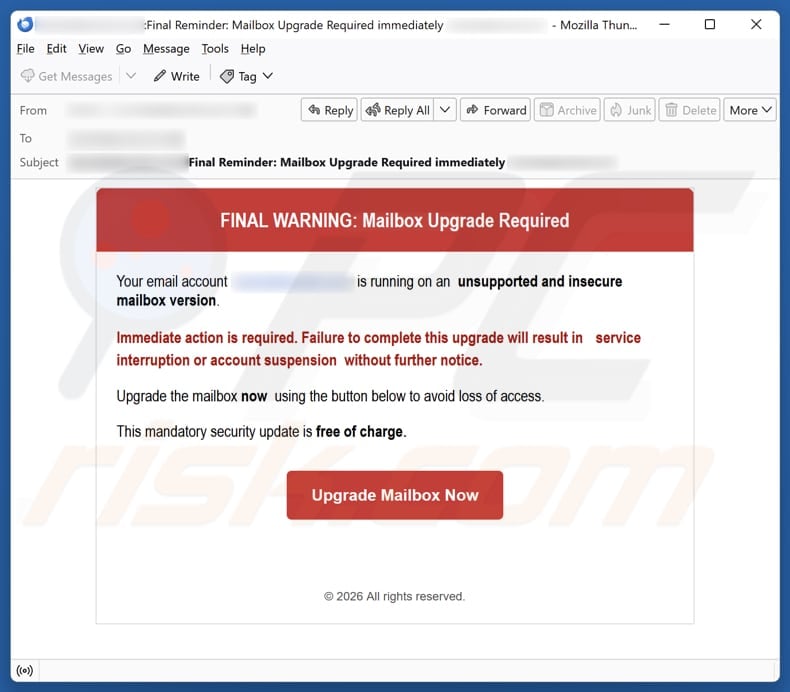
This scam email states that the recipient's email account is operating on an unsupported and insecure mailbox version. It warns that immediate action is required, or the account will be suspended or service interrupted. The email urges the recipient to perform a "mandatory" mailbox upgrade using the provided link ("Upgrade Mailbox Now") to avoid losing access.
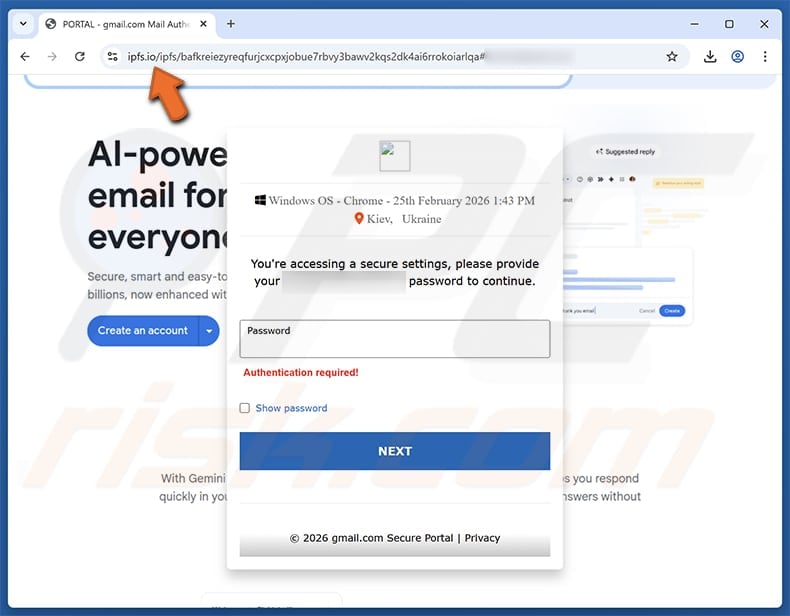
Clicking the provided link leads to a fake login website. This website is designed to look like the recipient's email service provider (e.g., Gmail or Yahoo Mail). It asks the user to enter their login information (email address and password), but the provided details are captured by cybercriminals.
These stolen credentials can then be used to access the victim's email account. Stolen accounts can be used to collect sensitive information, send scam emails, spread malware, or carry out other harmful actions. Criminals often use stolen login details to try to access other accounts, such as online banking, social media, and other services.
Therefore, any suspicious email should be examined carefully before clicking on links or sharing personal or sensitive information.
| Name | FINAL WARNING: Mailbox Upgrade Required Email Scam |
| Threat Type | Phishing, Scam, Social Engineering, Fraud |
| Fake Claim | Mailbox upgrade is required |
| Disguise | Reminder from the email service provider |
| Symptoms | Unauthorized online purchases, changed online account passwords, identity theft, illegal access of the computer. |
| Distribution methods | Deceptive emails, rogue online pop-up ads, search engine poisoning techniques, misspelled domains. |
| Damage | Loss of sensitive private information, monetary loss, identity theft. |
| Malware Removal (Windows) |
To eliminate possible malware infections, scan your computer with legitimate antivirus software. Our security researchers recommend using Combo Cleaner. Download Combo CleanerTo use full-featured product, you have to purchase a license for Combo Cleaner. 7 days free trial available. Combo Cleaner is owned and operated by RCS LT, the parent company of PCRisk.com. |
Conclusion
This scam attempts to trick recipients into providing their email login details by mimicking a legitimate service. Any information entered is stolen and can be used for further malicious activities. Users should verify emails before clicking links or sharing sensitive data. Falling for scams can also result in computer infections.
Additional examples of scam emails are "Revalidate Multi-Factor Authentication Email Scam", "Account Policy Review Email Scam", and "Account Has Breached Our Terms Of Service Email Scam".
How do spam campaigns infect computers?
One common method is through infected attachments. The email may include a document (e.g., Word, Excel, or PDF), an archive, a script, or an executable file that appears harmless. Once the recipient opens the file or enables features like macros or editing, the hidden malicious code executes and plants malware on the device.
Another technique involves using links. The message encourages the user to click a link that leads to a fake or compromised website. That site may automatically download malware or trick users into downloading and installing a malicious program.
How to avoid installation of malware?
Be cautious with emails and other types of messages. Do not open attachments or click links in unexpected or suspicious emails. Verify the sender before interacting with any files or links. Download software from official websites or trusted app stores. Avoid pirated software, cracks, and unofficial activation tools, as they often contain malware.
Regularly update your operating system, browser, and installed applications. Install a reputable antivirus or security program and run regular system scans. Avoid clicking ads, pop-ups, or links on shady websites. Do not allow untrusted sites to send notifications.
Text presented in the "FINAL WARNING: Mailbox Upgrade Required" email letter:
Subject: [********]:Final Reminder: Mailbox Upgrade Required immediately ********
FINAL WARNING: Mailbox Upgrade Required
Your email account (********) is running on an unsupported and insecure mailbox version.
Immediate action is required. Failure to complete this upgrade will result in service interruption or account suspension without further notice.
Upgrade the mailbox now using the button below to avoid loss of access.
This mandatory security update is free of charge.
Upgrade Mailbox Now
© 2026 All rights reserved.
Fake website used in this scam:
Instant automatic malware removal:
Manual threat removal might be a lengthy and complicated process that requires advanced IT skills. Combo Cleaner is a professional automatic malware removal tool that is recommended to get rid of malware. Download it by clicking the button below:
DOWNLOAD Combo CleanerBy downloading any software listed on this website you agree to our Privacy Policy and Terms of Use. To use full-featured product, you have to purchase a license for Combo Cleaner. 7 days free trial available. Combo Cleaner is owned and operated by RCS LT, the parent company of PCRisk.com.
Quick menu:
- What is FINAL WARNING: Mailbox Upgrade Required fake email reminder?
- Types of malicious emails.
- How to spot a malicious email?
- What to do if you fell for an email scam?
Types of malicious emails:
 Phishing Emails
Most commonly, cybercriminals use deceptive emails to trick Internet users into giving away their sensitive private information, for example, login information for various online services, email accounts, or online banking information.
Such attacks are called phishing. In a phishing attack, cybercriminals usually send an email message with some popular service logo (for example, Microsoft, DHL, Amazon, Netflix), create urgency (wrong shipping address, expired password, etc.), and place a link which they hope their potential victims will click on.
After clicking the link presented in such email message, victims are redirected to a fake website that looks identical or extremely similar to the original one. Victims are then asked to enter their password, credit card details, or some other information that gets stolen by cybercriminals.
 Emails with Malicious Attachments
Another popular attack vector is email spam with malicious attachments that infect users' computers with malware. Malicious attachments usually carry trojans that are capable of stealing passwords, banking information, and other sensitive information.
In such attacks, cybercriminals' main goal is to trick their potential victims into opening an infected email attachment. To achieve this goal, email messages usually talk about recently received invoices, faxes, or voice messages.
If a potential victim falls for the lure and opens the attachment, their computers get infected, and cybercriminals can collect a lot of sensitive information.
While it's a more complicated method to steal personal information (spam filters and antivirus programs usually detect such attempts), if successful, cybercriminals can get a much wider array of data and can collect information for a long period of time.
 Sextortion Emails
This is a type of phishing. In this case, users receive an email claiming that a cybercriminal could access the webcam of the potential victim and has a video recording of one's masturbation.
To get rid of the video, victims are asked to pay a ransom (usually using Bitcoin or another cryptocurrency). Nevertheless, all of these claims are false - users who receive such emails should ignore and delete them.
How to spot a malicious email?
While cyber criminals try to make their lure emails look trustworthy, here are some things that you should look for when trying to spot a phishing email:
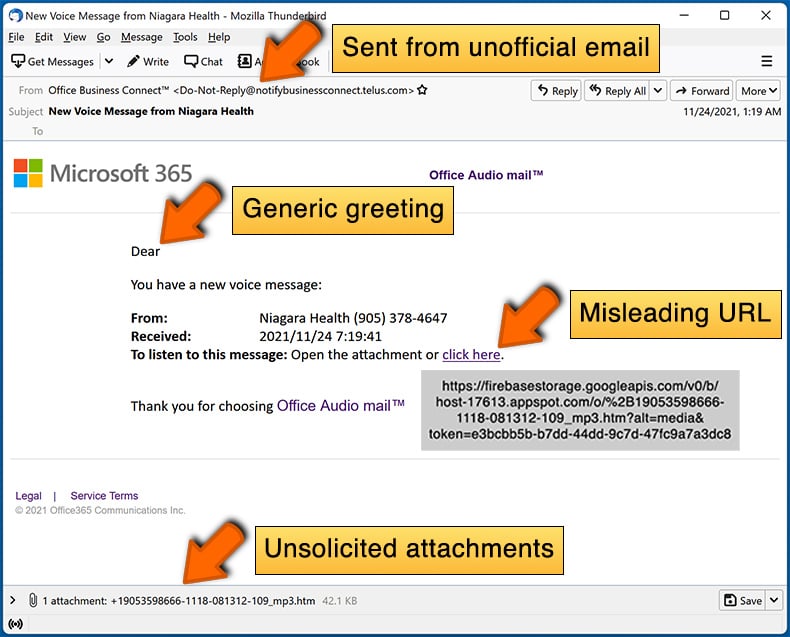
- Check the sender's ("from") email address: Hover your mouse over the "from" address and check if it's legitimate. For example, if you received an email from Microsoft, be sure to check if the email address is @microsoft.com and not something suspicious like @m1crosoft.com, @microsfot.com, @account-security-noreply.com, etc.
- Check for generic greetings: If the greeting in the email is "Dear user", "Dear @youremail.com", "Dear valued customer", this should raise suspiciousness. Most commonly, companies call you by your name. Lack of this information could signal a phishing attempt.
- Check the links in the email: Hover your mouse over the link presented in the email, if the link that appears seems suspicious, don't click it. For example, if you received an email from Microsoft and the link in the email shows that it will go to firebasestorage.googleapis.com/v0... you shouldn't trust it. It's best not to click any links in the emails but to visit the company website that sent you the email in the first place.
- Don't blindly trust email attachments: Most commonly, legitimate companies will ask you to log in to their website and to view any documents there; if you received an email with an attachment, it's a good idea to scan it with an antivirus application. Infected email attachments are a common attack vector used by cybercriminals.
To minimise the risk of opening phishing and malicious emails we recommend using Combo Cleaner Antivirus for Windows.
Example of a spam email:
What to do if you fell for an email scam?
- If you clicked on a link in a phishing email and entered your password - be sure to change your password as soon as possible. Usually, cybercriminals collect stolen credentials and then sell them to other groups that use them for malicious purposes. If you change your password in a timely manner, there's a chance that criminals won't have enough time to do any damage.
- If you entered your credit card information - contact your bank as soon as possible and explain the situation. There's a good chance that you will need to cancel your compromised credit card and get a new one.
- If you see any signs of identity theft - you should immediately contact the Federal Trade Commission. This institution will collect information about your situation and create a personal recovery plan.
- If you opened a malicious attachment - your computer is probably infected, you should scan it with a reputable antivirus application. For this purpose, we recommend using Combo Cleaner Antivirus for Windows.
- Help other Internet users - report phishing emails to Anti-Phishing Working Group, FBI’s Internet Crime Complaint Center, National Fraud Information Center and U.S. Department of Justice.
Frequently Asked Questions (FAQ)
Why did I receive this email?
These scam emails are usually distributed to many recipients at once. The email addresses are often collected from data breaches, fake or hijacked pages, and other sources.
I have provided my personal information when tricked by this email, what should I do?
Secure potentially compromised accounts by changing passwords. Notify your bank and relevant authorities if any financial information is compromised.
I have downloaded and opened a malicious file attached to an email, is my computer infected?
The probability of an infection varies based on the file type and how the user interacts with it. Executable files can harm a system as soon as they are opened, whereas documents and other file types typically need the user to take specific actions for the malware to run.
I have read the email but did not open the attachment, is my computer infected?
Opening an email is safe. Malware can only infect a system if the user opens harmful attachments or clicks on malicious links included in the message.
Will Combo Cleaner remove malware infections that were present in email attachment?
Combo Cleaner is capable of detecting and removing most known malware. Since advanced malware can hide deep within the system, running a full system scan is strongly recommended.
Share:
 Facebook
 X.com
X.com
 LinkedIn
 Copy Link

Tomas Meskauskas
Expert security researcher, professional malware analyst
I am passionate about computer security and technology. I have an experience of over 10 years working in various companies related to computer technical issue solving and Internet security. I have been working as an author and editor for pcrisk.com since 2010. Follow me on Twitter and LinkedIn to stay informed about the latest online security threats.
PCrisk security portal is brought by a company RCS LT.
Joined forces of security researchers help educate computer users about the latest online security threats. More information about the company RCS LT.
Our malware removal guides are free. However, if you want to support us you can send us a donation.
DonatePCrisk security portal is brought by a company RCS LT.
Joined forces of security researchers help educate computer users about the latest online security threats. More information about the company RCS LT.
Our malware removal guides are free. However, if you want to support us you can send us a donation.
Donate
▼ Show Discussion