
Combo Cleaner Review

✓
Fact-checked by:
Tomas Meskauskas
Last updated:
January 26, 2026
Our reviews are written by Internet security experts.
Learn more.

PCRisk score:
4.0
When searching for a comprehensive security suite with additional functionality (like VPN, and password manager), we recommend shortlisting Combo Cleaner.
SPECIAL DEAL
10% OFF
To use this coupon, go to Combo Cleaner checkout page. Coupon will be applied automatically. Or you can manually enter coupon code: PCRISK10 for a 10% discount.
What we liked:
✓ Combines solid real‑time AV, anti‑ransomware, web‑blocking, and disk‑cleanup tools in one cross‑platform app.
✓ Runs light and rarely impacts everyday performance.
✓ Offers fast human support and an in‑app AI assistant that explains threats or suspicious screenshots on demand.
What we disliked:
✗ Independent benchmark data is limited.
✗ Omits built‑in firewall and VPN.
Protecting your digital life, Combo Cleaner is an all-in-one solution developed by RCS LT, the company behind PCrisk.com. Making a powerful entrance as a comprehensive antivirus and system optimization solution, it's here to shield you from malware, adware, ransomware, and other threats on Windows, macOS, Android, and iOS, and get your device running smoothly.
Pricing and Subscription Options
Combo Cleaner operates on a subscription basis, with a free version and a premium offering. The free version is basically a scanner and cleaner, allowing you to run sweeps and use some cleaning functions. However, it won't let you remove any malware you find, nor does it offer real-time protection; a paid license is required for these features. Well-known for its 7-day free trial, the full capabilities of Combo Cleaner are available for users to test.
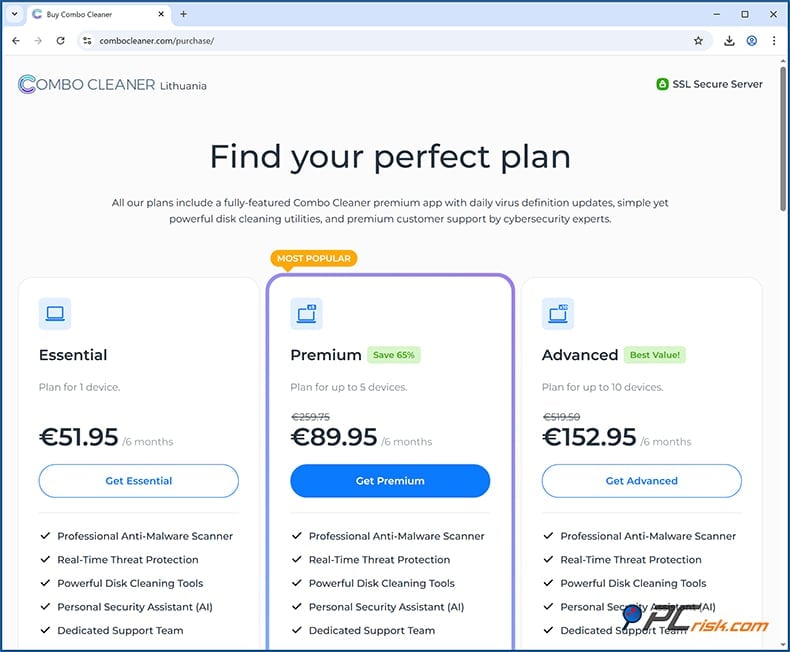
Combo Cleaner uses six-month billing instead of annual plans, so you don't have to pay for a full year upfront. The cost works out to about $45–$50 for one computer (around $7.99 per month). For those with more devices, the 5-device Premium plan is roughly $85–$90 per six months, and the Advanced plan for 10 devices is $150 per six months. This setup allows users to review their subscription twice a year while keeping payments more manageable.
Prices and available promo deals may vary depending on where you live. When choosing Combo Cleaner, you get everything you need in one go. There's no need to buy a separate antivirus, anti-malware, ransomware protection, PUP/adware cleanup, or disk cleaning utilities, as they're all included in the single premium plan. When it comes to the number of devices and the duration, the main thing you decide on is how many gadgets you want to cover, one or up to ten, and for how long.
It's also worth noting that the annual cost might seem a bit steeper than a traditional antivirus, but it's basically replacing the need for several different tools.
For example, buying a premium antivirus at $60 a year, a duplicate file finder for $10 and other cleaners, would add up to around $100, whereas Combo Cleaner will provide you with all of these features in one go for approximately $7.99 a month, and as a special treat, we have a 10% off coupon (PCRISK10, that you can use at the checkout). Combo Cleaner's transactions are done securely, offering a 30-day money-back guarantee in case you're unhappy with the service.
Available Versions and Platform Support
One of the things that sets Combo Cleaner apart is its ability to run on different platforms. It started on macOS, then made its way to Windows and mobile (Android and iOS):
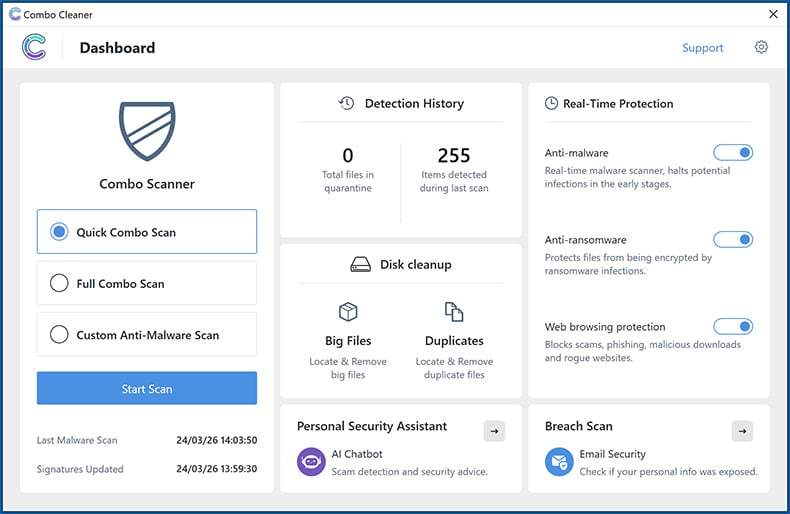
• Windows: Combo Cleaner Anti-Malware for Windows works with Windows 10 and 11, with the latest updates, and gives you access to real-time protection, on-demand scanning, web browsing protection, and ransomware defense, along with a couple of cleaning utilities, a big file finder, and a duplicate file finder.
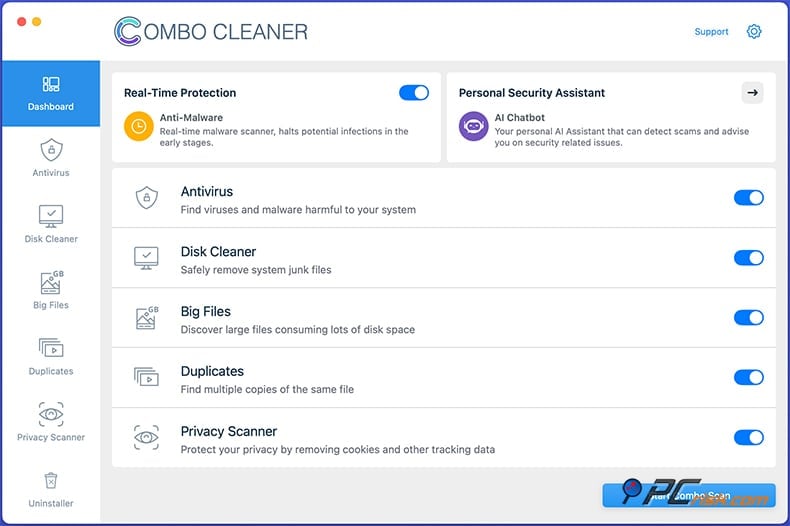
• macOS: Combo Cleaner for Mac is an antivirus and system optimizer that runs on OS X 11.3.1 Big Sur and later (including macOS 14 Sonoma). The Mac version shares the same core features with the Windows version, including virus scan, real-time protection, and a clever two-tiered scanning system, one engine with Mac-specific malware definitions and the other with PC malware definitions, so it can sniff out Windows-based malware as well.
Familiar to Mac users, Combo Cleaner for Mac combines multiple powerful features into one convenient solution, like a Disk Cleaner, Big Files finder, Duplicate Finder, Privacy Scanner, and Application Uninstaller. Many of these are free, but the antivirus and real-time protection require a paid license.
• Android: Combo Cleaner's mobile app on Android (called Combo Cleaner Antivirus) is available from the Google Play Store. It provides users with on-demand and real-time virus scans, cleans out junk files, and helps speed up their devices. It also has a data cache cleaner, a duplicate photo cleaner, an app uninstaller/manager, and, of course, an antivirus engine that provides real-time protection and blocks nasty websites.
The Android app runs on a freemium model, so basic cleaning features are free, but the anti-malware and web protection modules require a subscription that you pay through the Google Play Store, roughly the same as the desktop pricing, per month.
• iOS: When downloading Combo Cleaner on your iOS device, you'll find it in the App Store. As iOS restrictions don't allow antivirus software to sweep the entire hard drive, Combo Cleaner iOS is more of a privacy and security utility. It gives you Real-Time Web Protection that shields against phishing and scam websites in Safari and other browsers, a Secure Calendar that sifts through and blocks nasty calendar invitations, and SMS Security that weeds out texts containing phishing or dodgy links.
Well-known features of the app are a Photo Cleaner that helps you find and remove duplicate or low-quality photos and free up storage space, and a Password Leak Checker/Identity Protection tool that lets you check if your email and passwords have been exposed in data breaches.
The iOS app is free to download and has a handful of features in a limited mode, but for the full suite of functions, including Web protection, calendar, and SMS scanning, you'll need a premium in-app purchase. It's affordable, too, just $4.99 a month or $14.99 annually, and is a great value for existing subscribers.
In summary, Combo Cleaner has a free option and a paid tier on every platform. All the premium desktop editions (Windows and iOS) come loaded with the same feature set. There isn't a separate "Pro" or "Ultimate" product; one subscription gives you access to everything. The main thing to consider when choosing Combo Cleaner is the number of devices you want to cover.
In-House Malware Test
Our team put it to the test in our in-house lab to evaluate Combo Cleaner's malware protection. Below is the structure of the test that we performed:
• Potentially Unwanted Programs (PUPs) - 5 samples: Combo Cleaner detected and eliminated 4 out of 5 adware samples.
• Trojans and Info-stealers - 20 samples: Combo Cleaner detected and removed 19 out of 20 samples of introduced stealers, keyloggers, RATs, and other malicious executables.
• Ransomware - 20 samples: All 20 ransomware samples were detected and removed.
• Malicious Email Attachments - 20 samples: We gathered recent malicious files (e.g., Office documents with macros, PDFs, or scripts) that arrived via phishing emails in our honeypots. Out of 20 introduced samples, Combo Cleaner detected and removed 17 files.
• Mac-specific malware - 20 samples: Combo Cleaner uses a dual antivirus engine, so we were able to scan Mac-specific samples using a Windows machine. Out of 20 samples, it detected all of the introduced files.
Independent Antivirus Lab Test Results
Reputable independent testing labs don't yet have Combo Cleaner in their Windows test results. As a result, there isn't a traditional AV-TEST score or "Advanced+" award from those specific labs. However, Combo Cleaner has achieved some industry certifications:
• Virus Bulletin VB100 Certified: Combo Cleaner is a certified member of Virus Bulletin's VB100 program, and therefore has the Virus Bulletin certification. Regarding its effectiveness, Combo Cleaner is a VB100-certified product and has consistently passed multiple rounds of the VB100 test in the years 2022, 2023, and 2024, and has recently confirmed its status in February 2025.
This basically means that Combo Cleaner can be relied upon to pick up well-known "in the wild" viruses and doesn't falsely identify clean files, according to the VB100 test.
• OPSWAT Certification: OPSWAT has certified Combo Cleaner as a security app. OPSWAT's certification is like a gold standard for software quality, indicating that the application not only meets the necessary standards but is also capable of working harmoniously with other programs in the enterprise space.
• West Coast Labs Checkmark: Combo Cleaner also holds the Checkmark Certification by West Coast Labs, which is another independent validation of its malware detection abilities. This adds to the validity of Combo Cleaner as an anti-malware tool (West Coast Labs tests for effective malware detection according to their criteria).
Security Features and Protection Capabilities
• On-Demand Malware Scanning: Combo Cleaner offers Quick Scan, Full Scan, and Custom Scan to do a manual checkup of your system. A Quick Scan zeroes in on common locations, like the downloads folder and the temp folder, whereas a Full System Scan goes through every single file on every drive, and you can even customise the scan for specific folders or drives.
The initial full scan can take time, but Combo Cleaner's got a trick up its sleeve. It has a clever 'smart scan' feature, which skips over files that have already been verified as safe, making the whole process much quicker.
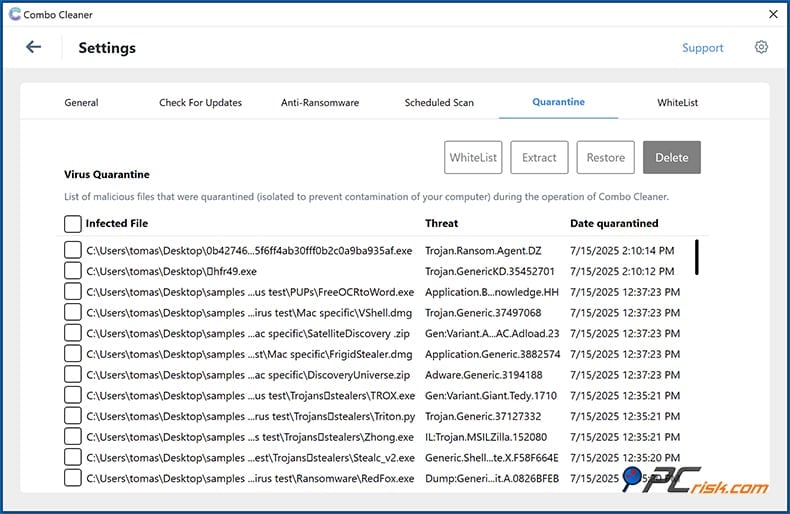
The Combo Cleaner uses its highly updated malware database when scanning your computer. Refreshed every hour in the Mac version, and almost as frequently on Windows, to take down a wide range of threats, from adware and browser hijackers to trojans and ransomware. Detected malware can be easily quarantined or removed with a click.
However, if you're running the free mode, you'll see a list of the detected threats and be prompted to either sign up for a 7-day free trial or upgrade to the Premium version to remove the malware.
• Real-Time Malware Protection: Combo Cleaner's real-time protection is also one of its standout features. It acts as a watchful eye for threats that enter your computer, scanning and checking files on the fly.
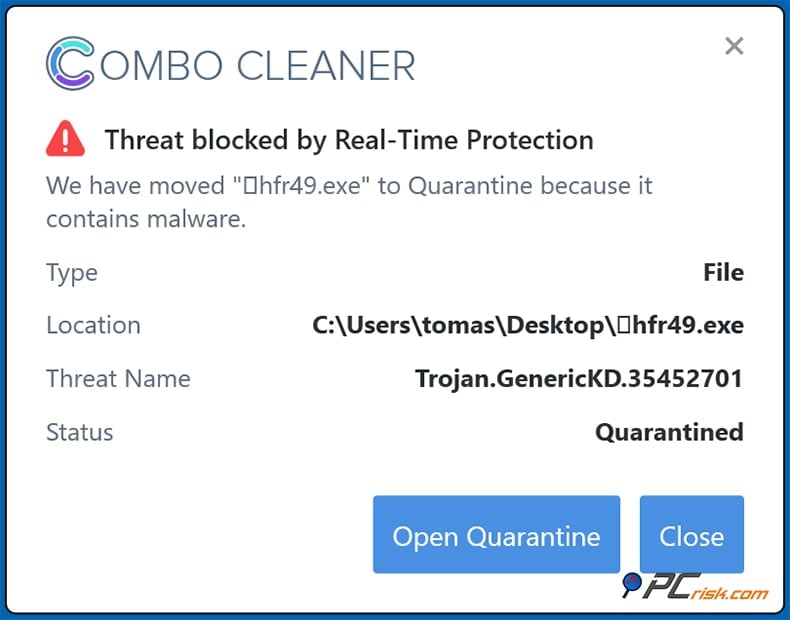
Coming in the form of a lightweight background service, the real-time engine moves in to stop brand-new threats in their tracks. If you download something new, an email attachment, for instance, or run a new program, it will be checked immediately or blocked if it's harmful. The real-time module also understands how threats behave and takes that into account to catch zero-day or polymorphic threats.
• Anti-Ransomware Protection: Ransomware poses a huge threat to computer users. Combo Cleaner responds with a two-pronged strategy. Its real-time scanner is meant to catch known ransomware files before they even get a chance to run, and its Anti-ransomware feature is designed to protect select folders from encryption attempts.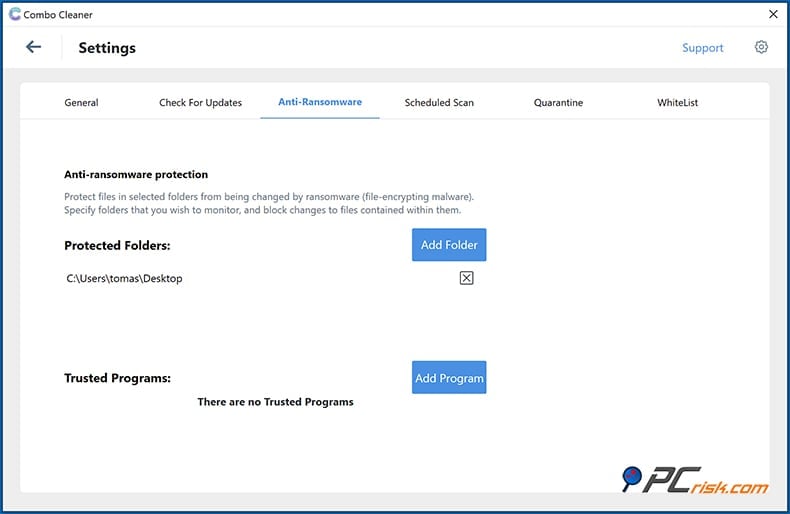
Combo Cleaner's "Protected Folders" essentially acts as a shield for the files in those folders when ransomware attempts to encrypt your computer. A ransomware attack won't be able to modify them because the software blocks it, similar to how "Controlled Folder Access" in Windows Defender or ransomware shields in other suites do.
This feature is a huge plus, giving peace of mind that brand-new ransomware won't be able to ruin your data. Trying to destroy your files won't be easy with Combo Cleaner's Anti-ransomware module. Of course, regular backups are also a must; no protection is completely foolproof.
• Web Browsing Protection: Combo Cleaner includes a Web browsing protection feature because so many infections and scams come in via the browser. This feature stops dangerous websites dead in their tracks. When turned on, the software watches all outgoing web traffic from your web browsers, including Chrome, Edge, Firefox, and the like, and runs the URLs through a list of known phishing sites, malware-hosting domains, scam sites, and more.
If you try to go to a blacklisted or dodgy site, Combo Cleaner will stop the page from loading and send up a warning signal, preventing you from entering your login credentials on a fake login page or downloading malware from a compromised site. The web protection works at the network level, doesn't require a special browser extension, and is compatible with all the major browsers straight out of the box.
It's a real-time filter that runs as part of the main app's background service. Interestingly, on mobile (Android and iOS), the web protection works too, using the phone's VPN/Accessibility features to block out the bad stuff on the go.
• Online Data Breach Scan: Combo Cleaner’s Breach Scan lets you enter your email address to see if it has appeared in any known online data breaches. If your email is found, the tool lists each incident and shows what types of data were exposed, such as email addresses, passwords, usernames, or other account details. It also gives you clear steps to follow, usually recommending that you change any compromised passwords and avoid using the same password on different sites.
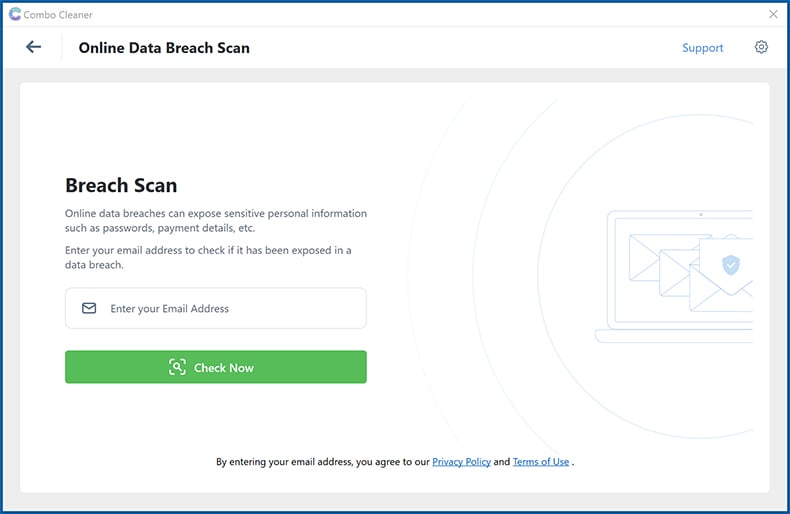
It’s important to know what Breach Scan does and does not do. It cannot remove leaked data from the internet or repair a breached service. Instead, it acts as an early warning system to help you quickly find which accounts need attention. You can then reset passwords, turn on two-factor authentication if possible, and use strong, unique passwords.
• Anti-Adware & PUP Detection: Combo Cleaner's engine zeroes in not just on traditional malware, but on Potentially Unwanted Programs, adware, toolbars, and browser hijackers, when scanning your system. Many free antivirus programs leave these types of programs behind, but Combo Cleaner has made a name for itself in the macOS space as a solution to the growing adware problem, and it's now doing the same on Windows.
Its Privacy Scanner on macOS is particularly handy, getting your browser back to its default settings after any unwanted changes made by adware, making it a must-have for Mac users.
Overall, Combo Cleaner has a broad range of security features to take down any threat. Old-school malware, brand-new ransomware, and tricky phishing sites, and then some. With signature detection, real-time analysis, web filtering, and ransomware protection all working together, you're getting a solid security net. The inclusion of its anti-adware/PUP focus and the ability to work side by side with other security measures means it's one of the most flexible protectors around.
Along with its endpoint protection, Combo Cleaner offers an identity protection feature through Breach Scan. This helps you check if your email address has appeared in any known breaches and reminds you to take standard steps like changing passwords, not reusing them, and enabling two-factor authentication.
Additional Features
Combo Cleaner is not just a one-trick pony, though. It has a suite of system cleaning and optimization tools. These are a bit more developed on the Mac, but Windows users won't be left out, as they get a set of their own.
• Disk Cleaner: This tool helps remove junk files to free up disk space. On Mac, Disk Cleaner scans for system caches, logs, downloads, and Trash contents and lets you safely remove them. It's essentially a one-click cleanup for temporary files.
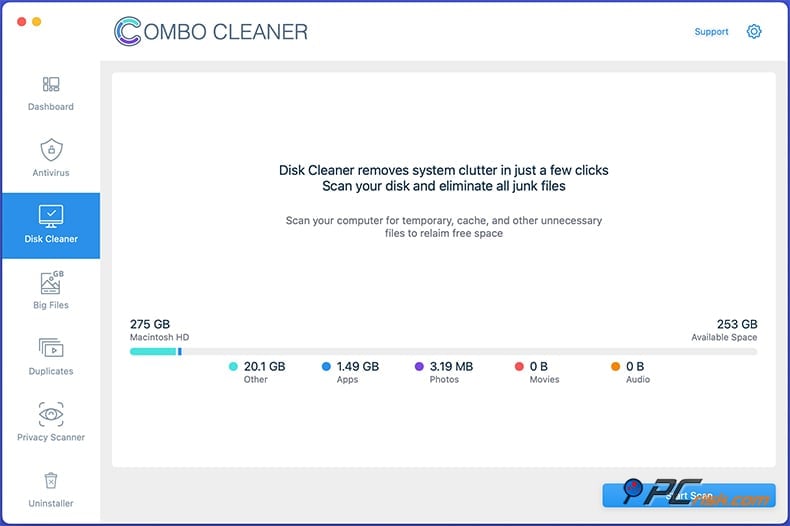
• Big Files Finder: Combo Cleaner's Big Files feature, on both Mac and Windows, digs through your hard drives and pinpoints files over 100 MB in size. This is essentially a list of files, broken down into neat categories such as 100MB-1GB, 1-5GB, and 5GB+, and is great for finding space-hogging ISO files, videos, and software installers.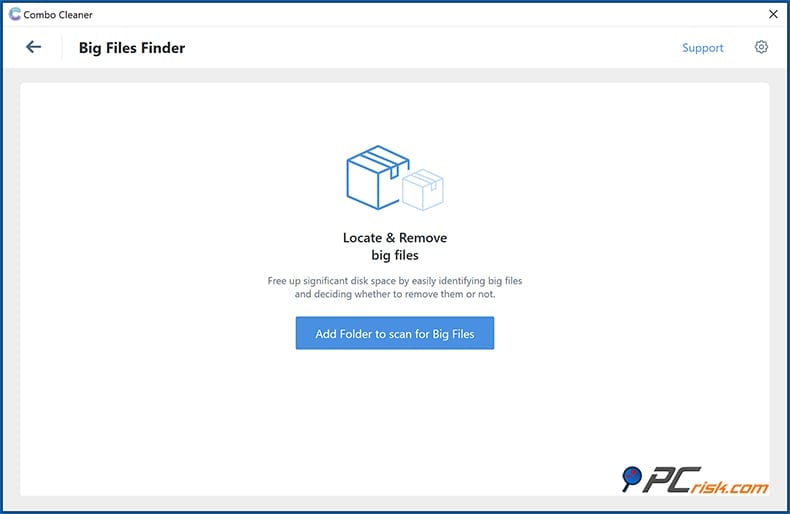
When using Windows-based Combo Cleaner, you'll be able to quickly find and sort out large and out-of-date files using its Big Files feature. The Disk Cleaner is a free feature; there is no need for a paid subscription.
• Duplicate File Finder: Over time, duplicate files, especially photographs and music, can fill up your storage space, but Combo Cleaner's Duplicate Finder gets rid of them, no matter if they have different names. It uses file signatures to know that they're really duplicates.
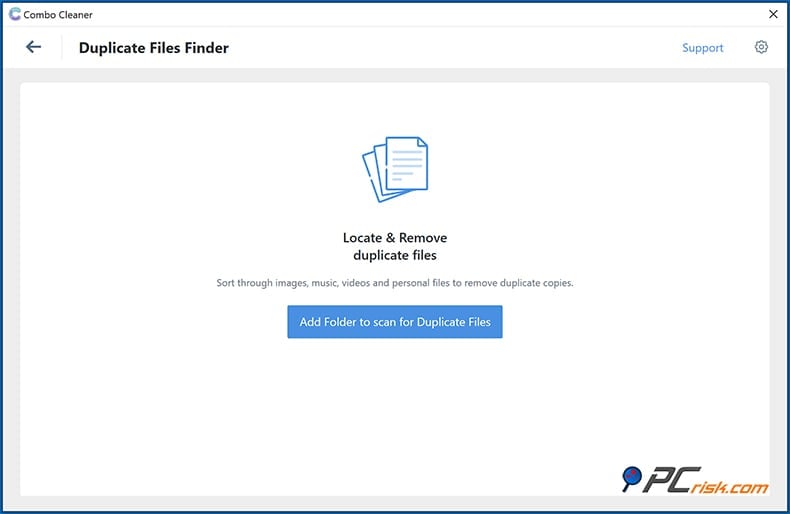
Windows has a Duplicate Finder in its toolkit too, available for free, that works in the same way, and can clear out gigabytes of space if you regularly copy files.
• Privacy Scanner (Mac-only): It is something that will catch the eye of those who value their online privacy, when using the Mac version of Combo Cleaner. It's capable of scanning the most popular web browsers Safari, Chrome, Firefox, and more to remove cookies, browsing history, saved passwords and all the other small bits of data that might be lurking on your computer. Returning to your browser after a scan is simple and requires just a single click.
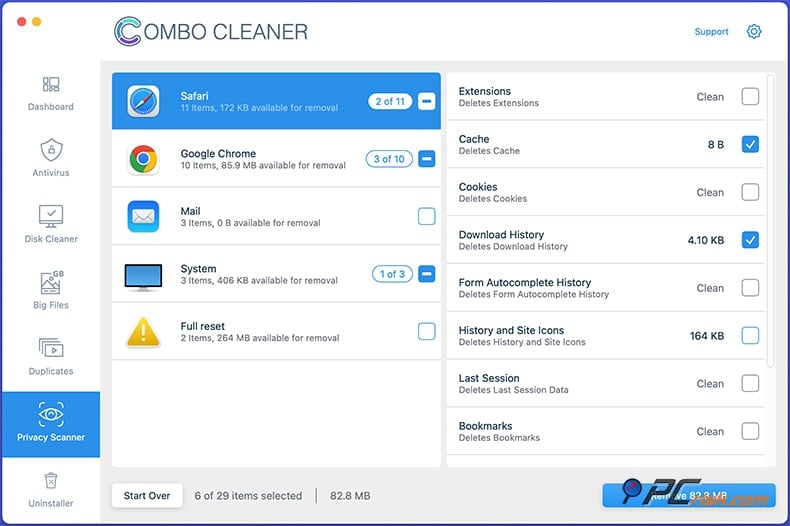
Moreover, Privacy Scanner can completely reset a browser if you feel it's been compromised by adware or is in a general state of disrepair. It'll send the browser back to its default settings, wiping out any nasty extensions too. Unfortunately, Privacy Scanner requires a premium subscription on macOS.
• Application Uninstaller (Mac-only): On macOS, simply dragging an app to Trash often leaves behind support files. The Uninstaller lists all installed apps and lets you select the ones you want to remove, including the related leftover files.
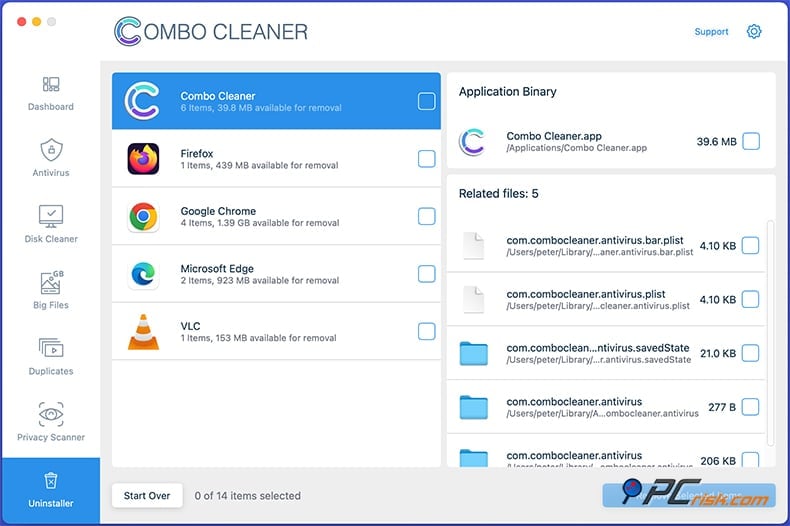
This is great for cleaning out apps you no longer need without leaving remnants. Note that this feature is exclusive to premium.
• Personal Security Assistant (AI Chatbot): A recent update introduced the Personal Security Assistant, which is basically an AI chatbot built into the app and available on Windows, Mac, and even mobile. When you're in Combo Cleaner's chat interface, you can ask the AI, "Is this email a scam?" or "What does this virus do?" and get a response to your question.
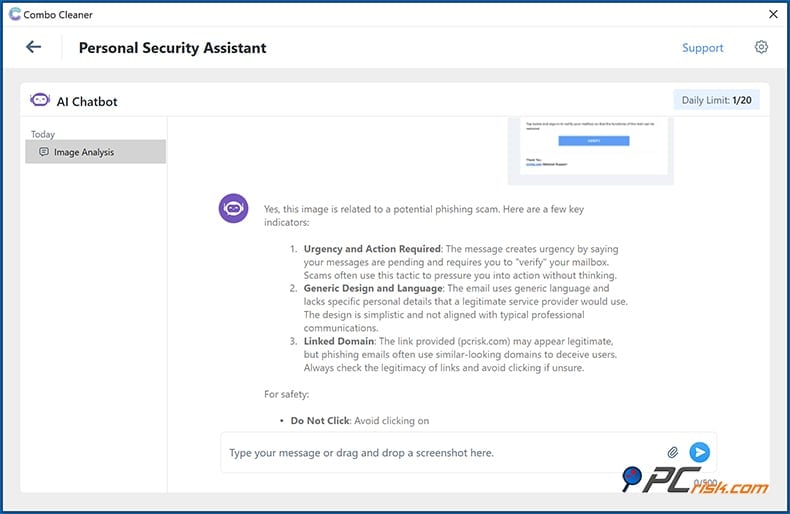
You can also upload a screenshot, such as a strange pop-up or email, and the Personal Security Assistant will examine it. When we came across a phishing email, we sent a screenshot to the AI and got back a thorough analysis. The analysis said the email was very likely a phishing scam and broke down the signs that gave it away, including the fact that the sender's address didn't match the message and trying to get us to act quickly.
This tool is a godsend for people who aren't sure what they're looking at, and can ask the antivirus to make a decision on their behalf, or help them understand the security landscape.It can be used as a quick reference too ("What is a trojan? How do I secure my router?" - you can ask anything security-related). Since it relies on internet access and AI, this feature is included in the premium package.
In summary, Combo Cleaner's additional features take your computer to the next level. On Windows, the main feature is the Big Files & Duplicates finder, which is still useful but not quite as expansive as the suite's capabilities on macOS. On macOS, it basically becomes a one-stop maintenance tool, cleaning out junk, removing duplicates, uninstalling apps, etc.
When you download Combo Cleaner, you'll find three free tools: Disk Cleaner, Big Files, and Duplicates. This can make the app appealing to install for cleanup alone, with the option to upgrade for antivirus. The value of Combo Cleaner is certainly enhanced by its cleaning abilities, and users who are after a clutter-free machine as well as a malware-free one will appreciate this.
Impact on Performance
Any security software will take up some of your computer's resources, as for the usual system impact, but the question is, does it do so efficiently? In our tests, Combo Cleaner's impact on day-to-day performance was negligible. On average, the quick system scan would take about ten minutes, and a full scan would take 40 minutes, scanning around 500,000 files. The scan times drop off dramatically, thanks to the smart scan function that skips unchanged files.
When Real-time protection is turned on, Combo Cleaner runs in the background and watches out for malware and web threats. On a Windows 11 test machine (Intel Core i7, 16GB RAM), we observed the Combo Cleaner processes using around 200-300 MB of RAM when the computer is idle and almost no CPU usage unless the app is scanning.
As for memory usage, Combo Cleaner's multi-layered protection and suite of features don't make it the absolute lightest antivirus solution. A few more basic engines use up a bit less RAM. However, considering what you get, its use of resources is sensible and finely-tuned.
Most people won't notice any slowdown in their system's performance after installing Combo Cleaner. They'll get a system free of malware, has tons of disk space back after cleaning, and has an intuitive interface that even the least tech-savvy person can work out.
Ease of Use
Combo Cleaner's user-friendliness is on point, and thanks to its interface and easy-to-follow operation, users of all levels of experience will be able to use it without any problems. Here are some aspects of its usability:
• Installation & Setup: Getting started with Combo Cleaner is hassle-free. The Windows installer is small and downloads rapidly from the official site. The usual Next, Next, Finish process is a cinch, and there is no bundled software. When you first run it, Combo Cleaner automatically updates its virus definitions. On Mac, you download and install a DMG from the official website.
Getting started with Combo Cleaner on Android and iOS couldn't be simpler. Install it via the app store and follow the initial configuration, which basically involves granting the necessary permissions, like Accessibility permission for real-time web protection to kick in on Android. Even if you don't know much about what you're doing, Combo Cleaner won't confuse you, and it doesn't require any mandatory account sign-ups. Instead, you activate the license via a key, and on mobile, via in-app purchase.
• User Interface Design: When using Combo Cleaner, you'll see a clean and modern interface that gets you right to the point. The dashboard provides an at-a-glance overview. On Windows, you see your protection status (whether real-time protection is on, last scan, etc.) and shortcuts to start a scan or enable modules. All the main features (Antivirus, Big Files, Duplicates, etc.) are listed in a sidebar menu.
Labels are also clear. You won't miss the toggle for "Anti-ransomware" or "Web protection," and each feature section has a little blurb to tell you exactly what it does, which is fantastic for those who are still getting started. Combo Cleaner has a white and light grey colour scheme with blue accents on Windows, giving it a polished, professional look. It is also completely free of clutter.
• Navigation and Settings: Navigating Combo Cleaner is no hassle. There aren't a million sub-menus, and most things are all on one level. The settings panel, Preferences, is quite basic, which is actually a positive thing for usability. You can turn individual modules on and off, schedule full scans (Windows lets you schedule daily or weekly scans for a specific time), and handle exclusions if you've got specific files or folders that Combo Cleaner shouldn't mess around with.
The scheduling feature is a nice touch for anyone who wants a full scan to run automatically overnight, and Combo Cleaner's notifications are clear-cut. They tell you what the problem is and what was done about it, and let you click to see the details.
• Learning Curve: Even if you're unfamiliar with technology, the application is easy to use. A new feature, for instance, leads you to a brief explanation in the interface, which is much appreciated. The Protected Folders section (anti-ransomware) invites you to add folders, and the Disk Cleaner and Duplicate Finder walk you through the process of selecting what to remove.
• Customer Support and Help: Ease of use is not just about the software itself. It's also about the support that it has in place. Combo Cleaner has a support link within the app, and its website has a comprehensive support section with FAQs. You can send them an email (support@combocleaner.com), and they'll get back to you 24/7.
• Updates and Maintenance: Combo Cleaner handles updates automatically. You don't need to manually check for virus definition updates as they are done automatically, and the app will alert you if a program version update is available.
We think Combo Cleaner is an excellent option for those who might be put off by the complexity of other security suites. In contrast, it keeps things straightforward, clean, and simple, and gets a top rating for the clarity of its interface.
Mobile Apps (Android & iOS) Overview
Combo Cleaner extends its protection to mobile phones and tablets as it has dedicated apps for Android and iOS. We took a look at these mobile versions to see how they stack up:
Combo Cleaner for Android: The Android app is essentially an antivirus and a phone cleaner.
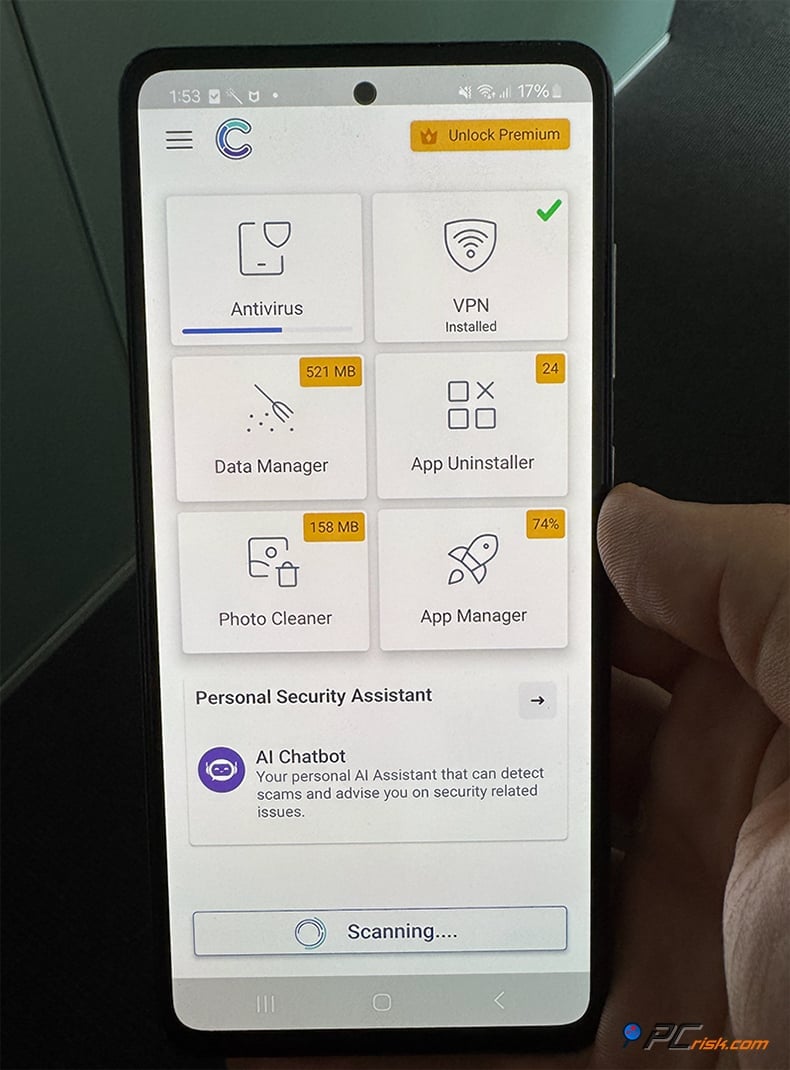
The app presents you with a clear and intuitive dashboard that shows the status of your device storage and security when you install Combo Cleaner from Google Play. The features include:
• Malware Scanner: Combo Cleaner is equipped with a sophisticated Malware Scanner, updated with a database similar to the desktop version, that lets you scan apps and files on your Android device.
• Real-Time Protection: Once enabled (it will prompt for Accessibility service permission to monitor new app installs), Combo Cleaner will actively scan new apps or files you install. It also has a feature called Web Protection for Android that basically sets up a private VPN on your phone to clean out any web junk.
• Storage Cleaner: This includes a Cache cleaner (to wipe unnecessary cache files from apps), removal of residual files and empty folders, etc. There's also a Photo Cleaner that detects duplicate or low-quality snaps that are blurry or too dark, letting you delete them and free up space.
• Apps Manager/Uninstaller: This feature is useful for hunting down seldom-used apps and large apps that you can uninstall if you want to clear out some space.
• Running Processes Manager: This app lets you see what's running in the background and shut it down to boost your phone. It requires Accessibility permissions.
• Personal Security Assistant (Mobile): The AI chatbot is also available on Android, directly in the app, so you can ask security questions on the go.
The Android app's design is clean and streamlined, not too dissimilar from the desktop version. It has clear-cut sections and big buttons for "Scan" and "Clean." It has a pretty impressive rating on Google Play, with an average of 4.4 or 4.5 out of 5 stars from hundreds of user reviews up to mid-2025, suggesting that users are highly satisfied with the app's functionality.
One thing to note: The Android app does throw up the odd ad when you're running it for free, but paying for the premium version removes the ads and gives you access to full real-time protection and web protection. The payment is done through Google Play subscriptions, either monthly or yearly, for a few dollars per month.
Combo Cleaner for iOS: As mentioned, the approach is different on the iPhone/iPad because iOS doesn't allow full device scanning by third-party apps.
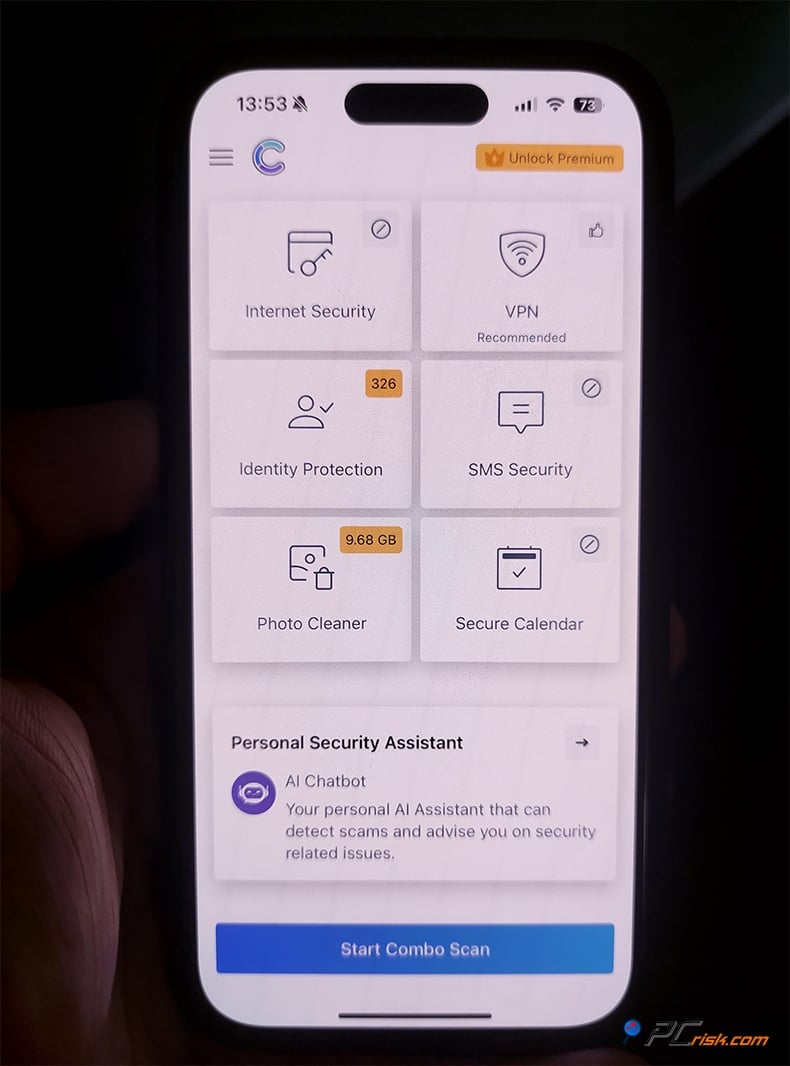
In relation to iOS, the Combo Cleaner app focuses on cleaning up and securing your browsing:
• Web Security: The app can activate a "Secure Browsing" VPN on your iOS device, which filters out malicious websites.
• Secure Calendar: It removes any calendar subscriptions and events that contain spam invitations and suspicious links, and takes a massive load off users who've fallen prey to the infamous "calendar virus" spam.
• SMS Message Scanning: The app can't intercept iMessages, a feature Apple does not allow, but can, with user permission, scan and filter standard SMS messages. It's on the lookout for scam or phishing keywords and links and sends them to a junk folder. It's like SMS spam filters, but with a security kick.
• Photo Cleaner: A separate feature of the app allows you to clean out your photo library by scanning for duplicates or clutter. Screenshots, fuzzy pictures, and any other types of files are found and marked for deletion. This feature comes in handy for those experiencing "photo clutter."
• Identity Leak Check: The app lets you check if your email is out there, floating in the cyber sea, in any known data breaches.
• AI Assistant: The chatbot in the app is basically indistinguishable from its desktop counterpart. Ask it any questions, and you'll get instant security advice. It's a neat feature.
The Android app is a traditional antivirus and phone cleaner and has built a great reputation. The iOS app takes a slightly different route and is more focused on phishing and cleaning out junk. If you're already a Combo Cleaner desktop user, the mobile app will kick your security into high gear.
User Reviews and Reputation
We reviewed user feedback from various platforms, including Trustpilot, Reddit, and app store reviews, to gauge real-world satisfaction. The consensus on Combo Cleaner is mixed but generally positive, with some caveats:
• Trustpilot: The average rating for Combo Cleaner on Trustpilot is 3.2 out of 5, but has been based on a tiny handful of reviews, just under twenty. According to those reviews, roughly one-third of them gave Combo Cleaner top marks, and roughly half left it with a 1 star. They love what it does and doesn't intrude on their systems.
On the flip side, a negative review complained about the subscription renewal process - one user felt they were charged a day early due to time zone differences and expressed distrust. The key takeaway from Trustpilot is that users who understand what they're getting tend to be happy with the product's performance. In contrast, some frustration exists around billing and the freemium model.
• Reddit and Tech Forums: There's a bit of a debate going on. Some people don't like that Combo Cleaner is being promoted on malware removal websites, such as PCrisk.com. A few cynical comments on Reddit say it's nothing but "scamware that's being pushed on every 'remove malware' site." This is because on some of these sites, we offer Combo Cleaner as a solution to malware problems, and some tech heads interpret that as aggressive marketing.
• App Stores Reviews: When checking the Google Play Store, Combo Cleaner's Android app has a fairly high rating of around 4.5 out of five stars, with people in the comments praising the ability to clear out junk files and weed out malware from their phones.
Users also mention that the app is very user-friendly and great at clearing out space, but a few of them say it displays ads in the free version and that you'll have to pay for some features. However, these issues aren't particularly different from other software. The iOS app hadn't garnered any reviews on the Apple App Store, apart from a single rating that we checked, but as the user base grows, we can expect to see more opinions on this app.
Combo Cleaner effectively does what it promises: wiping out malware and cleaning out systems. People who use it for this are usually satisfied. The only issues people tend to complain about are problems with billing. Specifically, they're miffed about the auto-renewing subscriptions, which you can cancel at any time. Some users are still surprised that it's not entirely free.
Also, as with any software, Combo Cleaner won't be able to knock out a stubborn browser hijacker with just one go. You may need to apply some manual tweaks or advice from the support team, but the very responsive support crew and their active engagement in forums are a surefire sign that the company cares about its customers.
Is It Worth Buying Combo Cleaner?
After examining all aspects of Combo Cleaner, the final question is: Should you invest in Combo Cleaner Premium, or stick with free solutions/another product? Here's our take:
Value for Money: Combo Cleaner is not the cheapest option by yearly price, but its all-encompassing utility is comparable to a basic AV and a PC cleaner, and also includes anti-adware. If you were planning on buying these three things separately, Combo Cleaner essentially combines them into one manageable subscription.
Regarding value for money, one premium license can cover several devices. In the case of the five-device plan, the price per device drops sharply, making it much cheaper than buying separate licenses for each device from other companies.
One aspect to note is that Combo Cleaner is developed by a reputable cybersecurity company, RCS LT, which also runs Pcrisk.com. They have ten years of experience wiping out malware, so this isn't a small-time operation. Regular updates give you the confidence that your investment will repay itself as the software gets more sophisticated and takes on brand-new threats.
Use Cases where Combo Cleaner shines:
• If your PC has been suffering from adware, browser redirects, or junk files, and you want a one-stop cleanup + protection tool.
• If you're worried about ransomware and want an easy way to fortify important files (Protected Folders) without tinkering with system settings.
• If you want a security tool that also helps keep your system optimized (not just fighting malware but also freeing space).
• Cross-platform users who want the same security app on both Mac and Windows - Combo Cleaner is one of the few that truly supports both with equal focus.
• Users who value convenience and could benefit from AI-powered security advice.
Take advantage of the seven-day free trial on your desktop and let Combo Cleaner scan your system. If it identifies threats or makes a serious dent in your clutter, that usually justifies buying the premium version to keep you safe long term.
Frequently Asked Questions (FAQ)
Is Combo Cleaner safe and legitimate?
Yes, Combo Cleaner was developed by RCS LT, a reputable EU-based cybersecurity company. It is not a virus or malware itself, nor does it contain spyware or adware. Coming from the makers of a well-known European cybersecurity company, it's clear that Combo Cleaner has gone through the right sort of quality control, and its certifications from Virus Bulletin's VB100 and West Coast Labs' Checkmark speak to its ability to cut through the noise and effectively detect malware.
What's included in the free version of Combo Cleaner?
The free version of Combo Cleaner lets you scan your system for free. If you're running Windows, a quick scan and use of the Big Files and Duplicate Finder are yours for free, while on Mac, you get access to Disk Cleaner, Big Files, Duplicate Finder, etc.
However, with the free version, you won't be able to remove any malware that's found or activate real-time protection. Think of it as a diagnosis and clean-up tool, but not a full cure-all for viruses. It's basically a handy way to check if you're having any problems and clean out some junk files.
How do I cancel my Combo Cleaner subscription or turn off auto-renewal?
Combo Cleaner managed subscriptions are usually handled by the payment processor Paddle.com, if you purchase it from their official website. As you purchase Combo Cleaner, it will automatically renew every subscription period. To cancel, you have a few options:
1. You should receive an email upon purchase with a link to manage your subscription - use that to cancel auto-renew so it won't bill again.
2. You can contact Combo Cleaner's support or Paddle's support with your order information, and they'll cancel the renewal for you.
3. Paddle's customer support page also offers the option to look up your order via email and cancel subscriptions.
4. If you signed up via the Mac App Store or mobile app stores, you can cancel via your Apple ID subscriptions or Google Play subscriptions settings. This will stop the next renewal but will not remove the premium features that you've already paid for.
Will Combo Cleaner slow down my computer?
Combo Cleaner won't significantly slow down your computer. It runs so efficiently that you'll only notice it's there when it spots a problem. Normal CPU and memory usage aren't affected by Combo Cleaner at all, and won't cause any lag.
The only time you'll see higher resource usage is when running a full scan, but this is because it's clearing out all the junk and unwanted programs. We feel comfortable saying that performance impact is not a concern with Combo Cleaner for typical modern systems.
Share:
 Facebook
 X.com
X.com
 LinkedIn
 Copy Link

Karolis Liucveikis
Experienced software engineer, passionate about behavioral analysis of malicious apps
Author and general operator of PCrisk's News and Removal Guides section. Co-researcher working alongside Tomas to discover the latest threats and global trends in the cyber security world. Karolis has experience of over 8 years working in this branch. He attended Kaunas University of Technology and graduated with a degree in Software Development in 2017. Extremely passionate about technical aspects and behavior of various malicious applications.
▼ Show Discussion