
We may earn commissions from products we recommend. Learn more.
Instagram Vanish Mode: What it is and how to use it

Instagram Vanish Mode: What it is and how to use it
Instagram direct messages let you share everything from memes to personal chats, but not every message needs to stay in your inbox forever. To help with this, Instagram offers temporary messaging features that automatically delete messages after certain conditions are met. Depending on your account and where you live, you might see the older Vanish Mode or the newer disappearing messages feature. Meta provides help guides for both, but the newer system is only available in some places.
These features help reduce the amount of chat history in your Instagram inbox, but they are not the same as secure, confidential messaging. Most importantly, Instagram stopped supporting end-to-end encrypted messaging on May 8, 2026. So, just because a message disappears from your chat does not mean it was protected by end-to-end encryption while being sent or stored.
In this article, we’ll cover how Instagram Vanish Mode works, how it’s different from the newer disappearing messages, how to turn these features on and off, what you can customize, and what to do if you can’t find the option.
Opt out of data broker sites with Incogni
Table of Contents:
- Introduction
- What is Instagram's Vanish Mode
- How to activate and deactivate Instagram's Vanish Mode
- How to modify Instagram's Vanish Mode
- Reasons why Vanish Mode may be unavailable to you
- If you care about your privacy, take steps to remove your personal data from data brokers
- To sum up
- Frequently asked questions (FAQs)
What is Instagram's Vanish Mode
Instagram Vanish Mode is a feature for Direct Messages that lets your messages disappear automatically instead of staying in your chat history until you delete them. In classic Vanish Mode, Instagram says messages disappear when someone leaves the chat or turns Vanish Mode off.
Meta first introduced this feature when it expanded messaging across Instagram and Messenger. As with other temporary messaging systems, you enter a special chat mode, send messages, and those messages are removed from the conversation rather than staying in your regular chat history.
Right now, Instagram’s temporary messaging system is changing. Some people still have classic Vanish Mode, while others see a new feature called "disappearing messages." Instagram’s Help Center has instructions for both, and the newer feature is only available in some places. So, what you see depends on your account and where you live.
This difference is important because the two systems work in different ways.
In classic Vanish Mode, you put the whole conversation into a temporary state where messages are set to disappear when certain conditions are met. Instagram also limits what you can do with these messages. For example, Meta says you usually can’t copy, save, or forward disappearing messages in Vanish Mode. Also, people you haven’t connected with before can’t send you message requests in Vanish Mode.
The newer disappearing messages feature gives you more control over when messages disappear. You might be able to choose to remove messages after they’ve been seen, after 24 hours, or after seven days. Instagram is rolling out this feature gradually, so two people using the app might not see the same options yet.
There’s also a third feature that can be confused with the others: disappearing photos and videos. Instagram lets you send certain photos and videos in Direct Messages that disappear on their own, separate from Vanish Mode. Depending on the settings, you can allow limited viewing or replay. Instagram also lets you see if your disappearing photo or video was viewed and, in some cases, if someone took a screenshot.
To sum up, Instagram offers several types of temporary content. Vanish Mode makes a whole conversation temporary, disappearing messages set an expiration rule for chat content, and disappearing photos or videos are a separate feature just for media.
There’s another important privacy point: "disappearing" doesn’t mean "impossible to save." Someone can still capture your message before it disappears, even by taking a photo of the screen with another device. Instagram may show screenshot alerts for some temporary content, but no app can stop someone from using another camera to record what’s on the screen.
Instagram also lets you report abusive content. You can report Vanish Mode messages for up to 14 days after they disappear, even if you can’t see them anymore. This shows that disappearing content isn’t always deleted right away from all Meta systems.
Because of these reasons, it’s best to think of Instagram’s temporary messaging features as a way to manage your chat history, not as a secure way to send very private information.
Check our top personal data removal services list
How to activate and deactivate Instagram's Vanish Mode
The wording you see in Instagram can vary based on your region, account, device, and which version of temporary messaging Meta has given you. Still, you usually activate the feature right from an Instagram chat. Meta’s latest instructions for disappearing messages use the same swipe-up gesture as Vanish Mode.
To activate Vanish Mode or disappearing messages:
1. Open the Instagram app on your smartphone or tablet.
2. Open Messages and select the person with whom you want to have the temporary conversation.
3. Open the existing one-to-one chat.
4. Starting near the bottom of the conversation, swipe upward inside the chat.
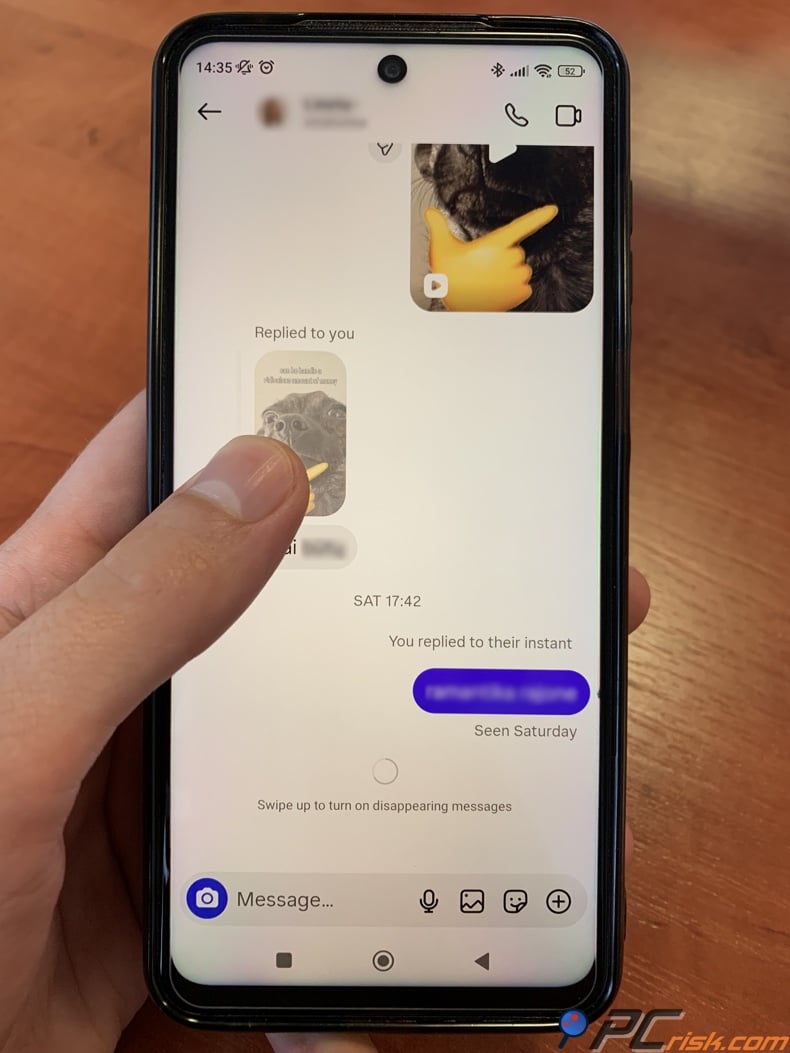
5. Continue the gesture until Instagram indicates that the temporary messaging feature is being activated.
6. Release your finger when prompted. Instagram should display a visual or written indication that Vanish Mode or disappearing messages are active.
Don’t assume Vanish Mode is on just because your chat has a dark theme. Instagram themes only change how chats look and don’t affect disappearing messages. Always check for Instagram’s clear notification that temporary messaging is active.
Once the feature is active, messages covered by the disappearing setting will follow the relevant expiration rules rather than behave like ordinary DMs.
Turning Vanish Mode off
Disabling the feature is similarly straightforward:
1. Open Instagram and return to Messages.
2. Open the conversation in which temporary messaging is enabled.
3. Swipe upward from the bottom of the chat again.
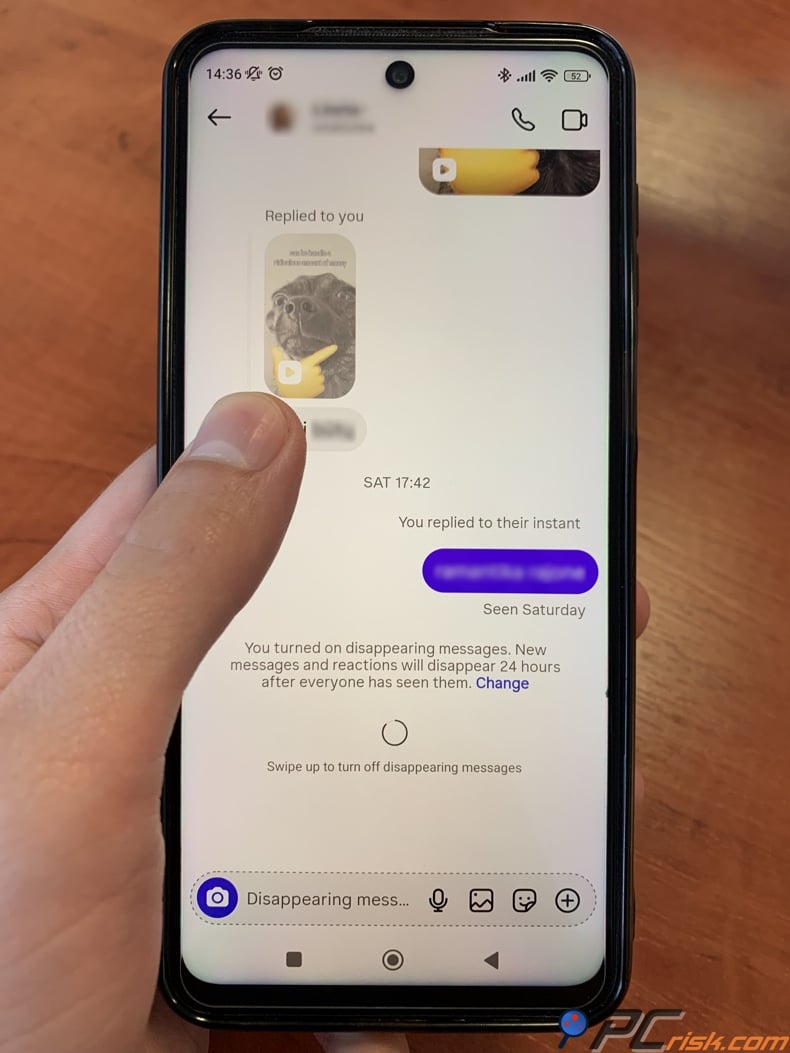
4. Release when Instagram indicates that disappearing messages or Vanish Mode will be disabled.
5. Check that the temporary-mode notification has disappeared and the chat has returned to its ordinary state.
Meta’s Help Center currently tells users to swipe up to both turn on and turn off disappearing messages. Some older guides mention different gestures because Instagram’s interface has changed over time. If your app shows different instructions, follow what you see in Instagram.
Turning off the feature won’t bring back messages that have already disappeared. If a message has expired and is no longer in the chat, there’s no way to recover it by disabling temporary messaging.
Also, keep in mind that regular messages sent before you turned on temporary messaging are separate from those sent during Vanish Mode. Turning on Vanish Mode won’t delete your normal Instagram chat history.
How to modify Instagram's Vanish Mode
The customization options you get depend on whether your account still uses classic Vanish Mode or has switched to Instagram’s newer disappearing messages.
Classic Vanish Mode offers relatively little customization. It is essentially an on-or-off state. When enabled, messages are temporary according to Instagram's Vanish Mode rules. Meta says content sent in Vanish Mode disappears when someone leaves the conversation or when Vanish Mode is switched off.
So, don’t expect classic Vanish Mode to let you set a detailed expiration schedule.
The newer disappearing messages system gives you more flexibility. In some versions, you can set messages to disappear after they’re seen, after 24 hours, or after seven days. These options may look different on your account, depending on what’s available to you.
When disappearing messages are on, look for a Change option or check the chat’s privacy settings. If you see an expiration selector, pick the time that fits your conversation.
The different timer options can make a big difference in how your messages work.
The ‘once seen’ option is good for messages that only need to be read quickly. It keeps the message in the chat for the shortest time, but remember, the other person can still save it if they want.
Choosing a 24-hour setting gives you extra time to review a conversation, but still clears temporary messages fairly quickly.
A seven-day option is more practical if you think people might need to look back at the conversation for a few days.
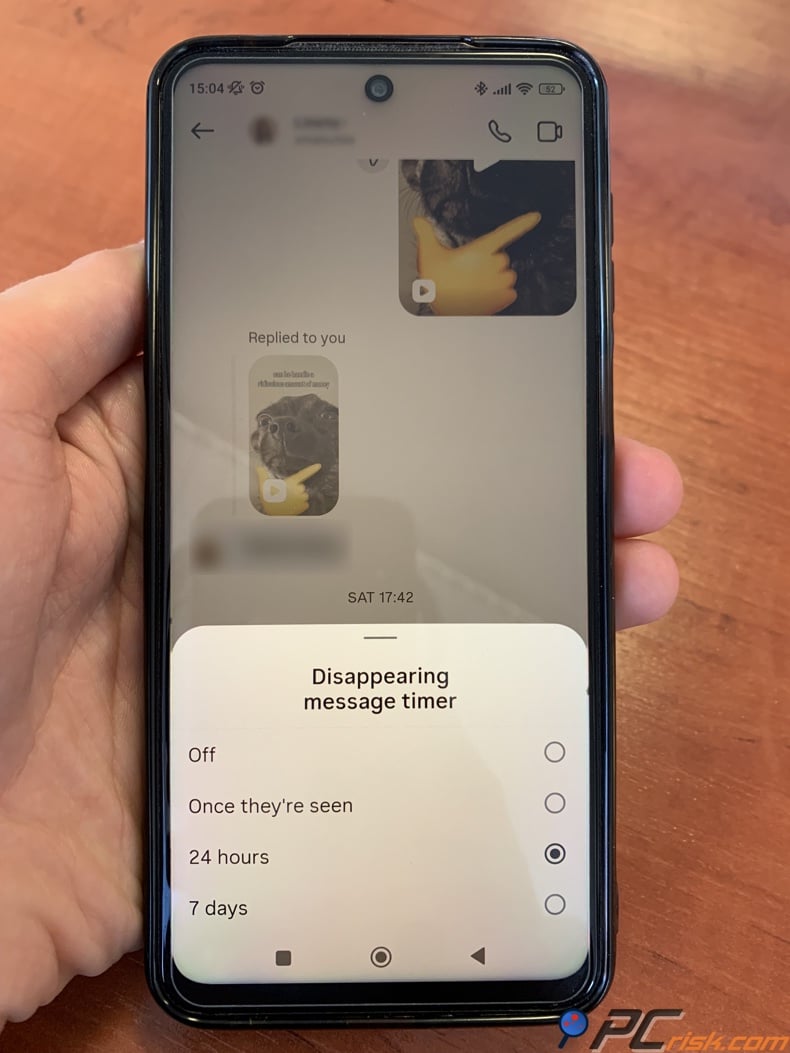
It's best not to use the shortest expiration time if you're sharing details you might need later, like appointments, addresses, instructions, transactions, or other important info.
When sending photos and videos, Instagram has separate disappearing-media controls that work independently. Usually, only people who follow you or have already approved your messages can get this kind of media.
No matter which option you pick, don't rely on disappearing messages as your only copy of important information.
Opt out of data broker sites with Incogni
If swiping up in an Instagram chat doesn't work, it doesn't always mean there's a problem with your phone.
The most common reason is that the feature isn't available in your region or for your account. Instagram says disappearing messages are only offered in certain places. Also, since both classic Vanish Mode and the new disappearing messages exist, different accounts might see different options.
Another reason could be that you're trying to use Vanish Mode in a chat type that it doesn't support. It's mainly for one-on-one conversations, not for message requests or every kind of Instagram chat. Meta says you can't get Vanish Mode message requests from accounts you haven't connected with.
If your Instagram app is out of date, some features might be missing or work differently. Since Meta often updates Instagram's messaging, try updating the app from Google Play or the App Store before thinking the feature is gone.
Business or professional accounts might have different features or restrictions. Tests show that temporary messaging can vary depending on your account type.
These controls are mainly for Instagram's mobile app. Meta's instructions focus on the mobile interface and swipe gestures. Recent tests show that Vanish Mode and disappearing messages might not work on Instagram's desktop version.
If you still can't use the feature, try updating Instagram, restarting the app, checking another one-on-one chat, and making sure you've messaged the other person before.
Don't install unofficial Instagram apps that claim to "unlock" Vanish Mode. These can put your account, messages, and personal info at risk. It's safest to use the official Instagram app.
Check our top personal data removal services list
If you care about your privacy, take steps to remove your personal data from data brokers
Deleting temporary messages on Instagram only covers a small part of your digital footprint.
A bigger privacy issue is how much of your personal information is available through data brokers and people search sites. The US Federal Trade Commission says these sites can combine details from other brokers, public social media profiles, and government records. Their reports might include your past addresses, age, work history, family members, property details, and other personal information.
This is a different privacy issue from the one you face in an Instagram chat. Even if your temporary messages disappear as planned, your name, phone number, email, home address, and information about your relatives can still be found elsewhere online.
The FTC says you can usually contact people search sites one by one to ask them to remove your information. The challenge is that there are many of these sites, each with different rules, and sometimes your data can show up again after being removed. So, the FTC points out two main options: you can opt out yourself, site by site, or pay a service to do it for you.
At PCrisk, we see removing your personal data as an important part of a broader privacy plan, especially if your address, phone number, or other details appear on several people search sites.
One service that helps with this is Incogni. Instead of having you contact every broker yourself, Incogni sends removal requests to the data brokers it covers and continues to follow up as needed. Right now, it can handle over 420 data brokers, including people search sites and private broker databases.
To use Incogni, you need to provide enough details to identify your records, like your name, email, and home address. You also grant the service permission to make privacy requests on your behalf. Incogni tracks broker responses and continues sending removal requests over time, since your information can sometimes be collected again.
Incogni’s higher-level plans also offer Custom Removals. This lets you send in links with your personal information, even if the website isn’t on their usual broker list. Right now, this feature is only available with certain plans, not all subscriptions.
Some of Incogni’s claims are backed up by outside sources. In 2025, Deloitte gave limited assurance about parts of Incogni’s removal process, like covering over 420 brokers and sending removal requests regularly.
Still, no data removal service can promise that your personal information will be gone from the Internet forever. Public records might stay online, brokers can get new data, and information about your relatives can reveal connections. Different websites also have their own legal rules. The FTC warns that opting out of people search sites doesn’t remove your data from government records, and sometimes information can show up again.
That’s why we suggest pairing data removal with smart privacy habits. Limit what you share on public social media, check your app permissions, avoid posting your home address or phone number unless needed, and search for your own information online from time to time. The FTC also recommends checking your social media privacy settings and limiting unnecessary app permissions.
To sum up
Instagram Vanish Mode is helpful if you want a conversation to be temporary instead of saved in your Direct Message history. Depending on your account and where you live, Instagram might show this as classic Vanish Mode or as the newer disappearing messages feature. The newer version lets you control how quickly messages disappear.
It’s easy to use this feature. Just open a conversation that supports it and swipe up to turn it on. Swipe up again to turn off disappearing messages.
The key thing to remember is what Vanish Mode can’t do. It doesn’t guarantee that someone else hasn’t saved your information. The other person could take a screenshot or record the screen in another way. Also, Instagram keeps enough information to allow reports of Vanish Mode content for up to 14 days after it disappears from the chat.
Also, Instagram stopped offering end-to-end encrypted messaging on May 8, 2026. So, a disappearing Instagram message isn’t the same as sending a message through a fully encrypted service.
We suggest using Vanish Mode for casual, temporary, and low-risk chats. Don’t use it for passwords, recovery codes, financial details, sensitive documents, or anything that could cause serious problems if shared.
Remember, privacy is about more than just your Instagram chats. Limiting what you share on social networks and removing your information from data brokers and people search sites can protect you better than just deleting messages. Services like Incogni can help with this, but no service can wipe out every trace of your information from the Internet.
Opt out of data broker sites with Incogni
Frequently asked questions (FAQs)
Can Vanish Mode messages be recovered?
Usually, you cannot recover Vanish Mode messages once they disappear under Instagram's rules. There is no standard way to restore them in the chat. Still, this does not mean every copy is instantly erased from Meta's systems. You can report Vanish Mode content for up to 14 days after it disappears.
Why should I turn on Vanish Mode on Instagram?
Vanish Mode is helpful if you want to send temporary messages without saving a long conversation history. It works well for jokes, quick updates, short-term plans, or anything that does not need to stay in your inbox. However, do not use it instead of secure end-to-end encrypted messaging.
How do I know if someone has me in Vanish Mode?
Vanish Mode is not meant to be a secret setting that one person can turn on without the other knowing. When it is active, Instagram changes the chat look and shows that messages will disappear. The setting applies to the whole conversation, not just one person.
Does Instagram notify the other person when Vanish Mode is turned on?
Yes. The temporary mode is visible in the chat, so the other person can see when Vanish Mode or disappearing messages are turned on. This way, no one can secretly switch a regular chat to Vanish Mode without the other person noticing.
Can someone screenshot messages in Vanish Mode?
Disappearing messages do not stop someone from saving what is on their screen. Instagram may show screenshot alerts for some disappearing content, but someone could also take a photo of the screen with another device. Do not send anything just because you think Vanish Mode makes copying impossible.
Does Vanish Mode delete messages for both people?
Classic Vanish Mode is made so that messages sent during a temporary chat disappear after Instagram's rules are met, instead of staying in your chat history. The details may change with newer disappearing message features, especially if there are expiration timers.
Why can't we find Vanish Mode on Instagram?
You might not see this feature because of your location, account type, conversation type, app version, or because Instagram is still rolling it out. Meta says disappearing messages are only in some places. Try updating Instagram and using it in a one-to-one chat as a first step.
Can Vanish Mode be used in Instagram group chats?
Classic Vanish Mode is mainly for one-to-one chats, and it does not always work in group chats. Availability may also change as Instagram updates to newer disappearing message features.
Are Vanish Mode messages end-to-end encrypted?
Do not assume Vanish Mode messages are end-to-end encrypted. Instagram stopped supporting end-to-end encrypted messaging on May 8, 2026. Vanish Mode only controls how long messages stay visible, while end-to-end encryption controls who can access messages during sending and storage. These are different privacy features.
Is Vanish Mode safer than deleting a normal Instagram message manually?
These two features do different things. Vanish Mode automatically removes temporary messages based on Instagram's rules, while regular messages can be deleted or unsent by hand. Vanish Mode is easier if you know you do not want a lasting chat history, but neither option can promise the other person did not save the information before it disappeared.
Share:
 Facebook
 X.com
X.com
 LinkedIn
 Copy Link

Rimvydas Iliavicius
Researcher, author
Rimvydas is a researcher with over four years of experience in the cybersecurity industry. He attended Kaunas University of Technology and graduated with a Master's degree in Translation and Localization of Technical texts. His interests in computers and technology led him to become a versatile author in the IT industry. At PCrisk, he's responsible for writing in-depth how-to articles for Microsoft Windows.
▼ Show Discussion