
We may earn commissions from products we recommend. Learn more.
How to watch Amazon Prime Video with a VPN in 2026

How to watch Amazon Prime Video with a VPN in 2026?
The Amazon Prime Video streaming service is available in many countries, but subscribers do not receive the same selection of movies, TV shows, sports, rentals, or add-ons. The catalog may change when you travel, and some titles available at home may not be accessible abroad. Amazon states that Prime Video content varies by location due to technical restrictions and content provider requirements.
A VPN (Virtual Private Network) improves privacy by encrypting your Internet connection and assigning the IP address of a VPN server. This can make it appear as though you are connecting from a different location, which is why VPNs are often used with streaming services. However, Amazon verifies users' geographic locations and prohibits methods that obscure them. Hence, while a VPN may assist with streaming, access to specific Prime Video catalogs is not guaranteed.
Disclaimer: PCrisk.com does not promote, encourage, or endorse bypassing geoblocks/geo-restrictions or violating streaming platforms' terms of service. This information is provided for educational purposes to help users understand geo-restrictions, privacy tools, and practical troubleshooting. Always follow local laws and use any method described at your own risk.
Watch Amazon Prime Video with NordVPNSpecial deal30-day money-back guarantee→
Table of Contents:
- Introduction
- Amazon Prime Video and geoblocking
- How can a VPN help you access Amazon Prime Video?
- Watch Amazon Prime Video with a VPN in 2026
- Best VPNs to watch Amazon Prime Video
- Can you use a free VPN to watch Amazon Prime Video?
- Common issues and solutions when accessing Amazon Prime Video with a VPN
- Amazon Prime Video alternatives
- Is using a VPN to watch Amazon Prime Video legal?
- In closing
- Frequently Asked Questions (FAQ)
Amazon Prime Video and geoblocking
Amazon Prime Video is Amazon's streaming service, offering subscription movies and TV shows. Depending on the market, it may also provide rentals, purchases, free ad-supported content, live programming, and additional channel subscriptions. According to Amazon's current Terms of Service (ToS), Prime Video is a personalized service that recommends and provides access to digital movies, television shows, and other video content.
While Prime Video operates internationally, it does not offer a single global library. Amazon states that digital content and its availability can change over time and by location. This is where geoblocking, or geographic restriction, becomes relevant. Movies, TV series, and sporting events are typically licensed for specific territories. For example, a distributor in the United States may not hold streaming rights in Germany, Japan, Australia, or other markets. Therefore, a subscription does not guarantee access to every Prime Video title worldwide. A title may be included with Prime in one country, require a separate purchase in another, or be entirely unavailable.
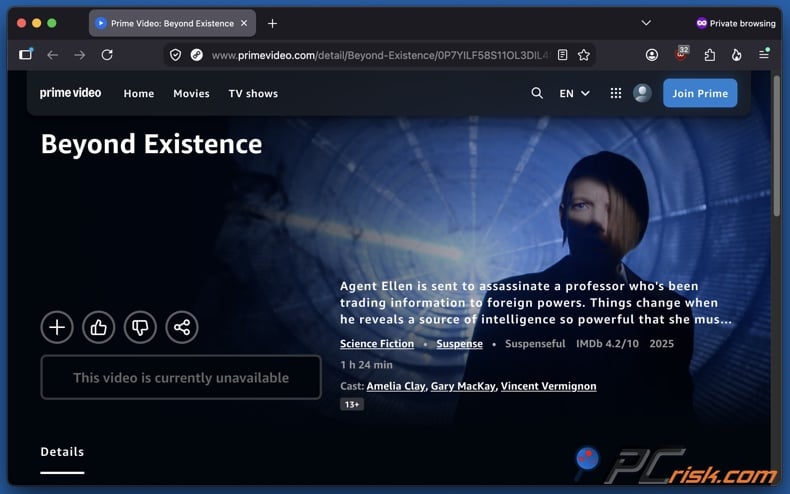
Amazon states that it uses various technologies to verify a viewer's geographic location. While an IP address is a major indicator of Internet location, streaming services may also use information linked to an account, device, application, or previous sessions. This is important to consider when using a VPN, as changing an IP address does not necessarily alter all location-related signals associated with an Amazon account.
Subscribers often notice these differences when traveling. Amazon confirms that Prime members traveling outside their home country can stream a selection of titles, though the available content may change abroad. Amazon also recommends downloading supported titles before traveling if offline playback is available.
Prime Video is widely available. Amazon expanded the service to over 200 countries and territories in late 2016, though availability has changed since then. As of September 2026, Prime Video is generally unavailable in the following markets:
- Belarus
- Mainland China
- Cuba
- Iran
- North Korea
- Russia
- Sudan
- Syria
- Vietnam
It is important to distinguish between service availability and catalog availability. Prime Video may operate in two countries but offer significantly different selections in each. Hence, a subscriber traveling between supported countries may encounter geographic restrictions even if the Prime Video website and application remain accessible.
How can a VPN help you access Amazon Prime Video?
VPNs create encrypted connections between users' devices and remote VPN servers. Internet traffic is sent through that connection before reaching websites and online services. To Amazon Prime Video and other Internet services, the public IP address associated with the connection will normally be the VPN server's IP rather than the visitor's public IP.
This offers multiple benefits. VPNs can change users' apparent locations. Connecting to a server in another country assigns you an IP address from that region, which may allow access to geoblocked or geo-restricted content, such as regional streaming titles. High-quality VPNs with servers in many countries offer greater flexibility than those with small server networks. However, streaming platforms frequently detect and block VPN addresses. Amazon's troubleshooting instructions recommend disabling VPN and proxy connections when playback issues arise, indicating that VPN use can be detected or rejected.
Our top recommendation for streaming and privacy. NordVPN consistently leads our tests with fast speeds, reliable geo-unblocking, and a strict no-logs policy.
- ✔ Unblocks geo-restricted streaming services reliably
- ✔ 202+ locations across 111 countries
- ✔ 30-day money-back guarantee · Special deal available
Furthermore, VPNs improve privacy on standard Internet connections. Encryption prevents others on the local network from reading traffic sent through the VPN tunnel. This is especially useful on hotel, airport, cafe, university, and other shared networks. These tools also prevent Internet Service Providers (ISPs) from viewing users' destination websites. Instead, the VPN provider becomes the key intermediary. Therefore, we strongly advise choosing a credible service with strong security and a transparent privacy stance.
It must be stressed that a VPN does not provide complete anonymity. Websites can still recognize signed-in accounts, cookies, browser characteristics, and other information. A VPN also does not erase information that you voluntarily provide to Amazon.
What is more, VPNs may help on networks that restrict streaming services. Schools, universities, workplaces, hotels, and other managed networks frequently block entertainment sites using DNS filtering, domain blocking, IP filtering, or firewall rules. If VPN connections are allowed, encrypted traffic may bypass these filters, thus enabling access to restricted services. However, this does not guarantee a network bypass. Administrators can block VPN protocols, server addresses, or VPN app installations. Device-management software can also enforce restrictions on institution-owned computers. For further reading on managed devices, you can check out our "How to unblock websites on school Chromebook" article.
In summary, VPNs are valuable beyond streaming. These services can protect browsing while traveling, reduce exposure on untrustworthy Wi-Fi, hide your home IP address from sites, and provide a consistent, encrypted connection across networks. Features like a kill switch, DNS leak protection, split tunneling, and automatic connection make a quality VPN useful even when Prime Video is not involved.
It must be mentioned that a VPN is not a replacement for dedicated security software. A VPN can encrypt your traffic and hide your public IP address, but it does not scan downloaded files, remove malware, or prevent access to every phishing page or malicious website. For broader protection, we recommend using Combo Cleaner alongside a reputable VPN. Combo Cleaner provides real-time malware protection, blocks harmful sites, scans suspicious files and applications, and detects and removes unwanted software and known malware.
A VPN encrypts your traffic — but your device still needs protection against malware and ransomware. Combo Cleaner adds the missing layer of defense.
Download Combo CleanerAntivirusDetect & remove malware threats→Watch Amazon Prime Video with a VPN in 2026
In 2026, setting up a VPN on a supported device is a relatively simple process:
1. Select a VPN with a consistent track record with streaming services. Also evaluate the provider's reputation, breadth of the server network, speed, and privacy stance. Streaming-specific features are an additional boon. We recommend NordVPN - our Top 2026 VPN Choice.
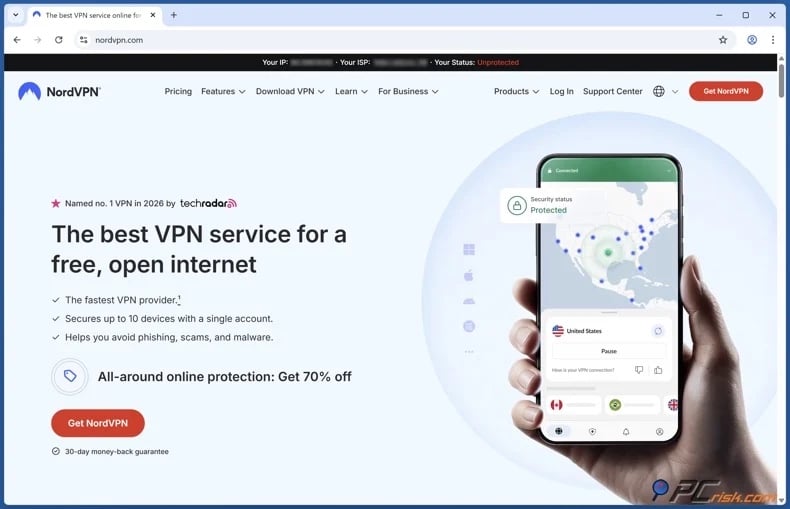
2. Install the official VPN app and sign in. Only download the application from official and trusted sources. Downloading software from third-parties can introduce unwanted or malicious programs onto the device.
3. Connect to a server in the region where your desired content is available. Keep in mind that distant servers can exacerbate speed loss and increase latency.
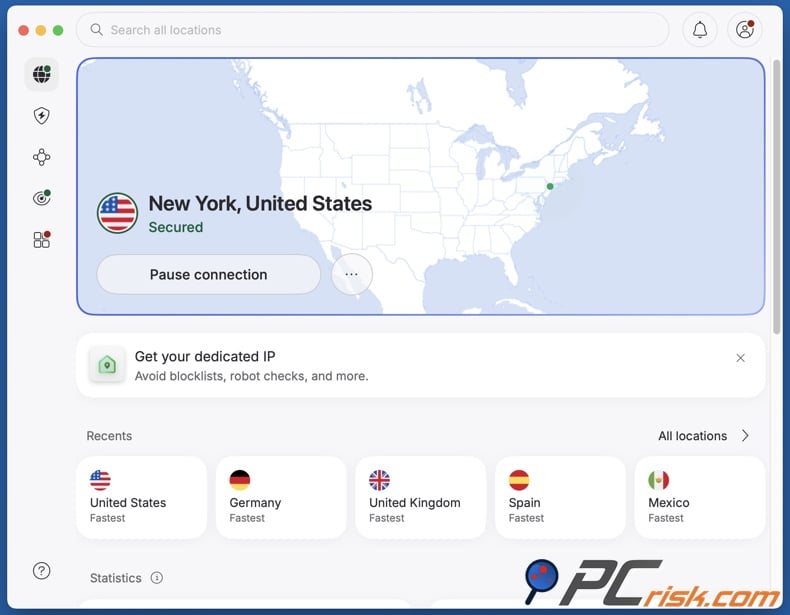
4. Open Amazon Prime Video and start streaming. Signing in after establishing the VPN connection can help prevent conflicts with existing sessions. If you encounter blocks, try another server in the same region. Streaming services frequently block shared VPN addresses, so switching servers may resolve the issue. If you keep experiencing problems, check out the "Common issues and solutions..." section of this article.
Setting up a VPN on a smart TV:
If your smart TV supports VPN applications, follow these steps:
- Open the TV app store and install your VPN provider's official application.
- Sign in to your VPN account.
- Connect to a server in the desired region.
- Open Prime Video and verify playback.
- If playback fails, try connecting to a different server in the same region.
If your smart TV does not support VPN applications, consider these alternatives:
- Set up the VPN on a compatible router to route all connected traffic, including the TV, through the VPN. Router configuration can be complex, so follow your provider's instructions for your specific router and firmware.
- Use a VPN-compatible streaming device. Installing the VPN directly on a supported device is typically easier to configure and troubleshoot than setting up a router-level connection.
- Cast or mirror from a VPN-connected device. When supported, connect a laptop, phone, or other compatible device to the VPN and display the stream on your TV.
- If available from your VPN, use Smart DNS. It can aid with compatibility for unsupported devices, but does not encrypt traffic or offer the same privacy protection as a VPN.
It must be reiterated that a VPN does not guarantee access to Amazon Prime Video or any particular regional catalog. Amazon may detect VPN use, change its detection methods, restrict accounts, or change the availability of its content.
Best VPNs to watch Amazon Prime Video
Our general VPN rankings assess privacy, security, performance, usability, features, price, and other factors. For Amazon Prime Video, we adjusted these priorities accordingly. We emphasized Prime Video compatibility, streaming speed, server selection, support for TVs and streaming devices, and effectiveness with regional restrictions. Hence, these rankings differ from our general VPN recommendations for 2026.
NordVPN - our top recommendation for 2026 and the overall best choice for Amazon Prime Video
Our tests showed that NordVPN performed strongly with region-restricted streaming services, including Amazon Prime Video. NordLynx, NordVPN's WireGuard-based protocol, delivered excellent speeds with minimal reduction from the base connection. Prime Video and other streaming services were accessible, and video playback consistently supported high-quality streaming. This combination is essential. A streaming VPN must not only access Prime Video but also maintain sufficient throughput to prevent quality drops or buffering.
NordVPN also offers a kill switch and DNS leak protection. While these are privacy features, they help ensure traffic is kept secure if the VPN disconnects. The applications support all major desktop and mobile platforms, and one account allows multiple simultaneous connections. For travelers, NordVPN's extensive network offers plenty of alternative servers if one becomes congested or is blocked by a streaming service.
ExpressVPN - best for TVs and streaming devices
In this ranking, ExpressVPN is second due to its strong streaming capabilities. In our tests, this VPN accessed Amazon Prime Video as well as other major streaming services without detection while delivering smooth HD playback. ExpressVPN ranks higher for Prime Video in part due to MediaStreamer, its Smart DNS service. MediaStreamer is useful for smart TVs and game consoles that do not support VPN apps.
ExpressVPN's Lightway protocol allows for fast connections and strong performance. Its applications support computers, phones, streaming devices, and routers. Router compatibility is especially valuable when a TV cannot run VPN software. The main drawback is price. ExpressVPN is a premium service, so users looking for basic VPN protection may prefer more affordable options.
Surfshark - best value for households
Surfshark is an excellent option for households requiring VPN protection across multiple devices. Its unlimited device policy is a key advantage, making it perfect for households with many computers, smartphones, tablets, and streaming devices. In our in-house tests, Surfshark worked reliably with Amazon Prime Video and other streaming services. Prime Video streamed in HD without stuttering over WireGuard. Surfshark also passed IP and DNS leak tests and features a kill switch.
Surfshark offers Smart DNS for devices that do not support VPN apps. Its WireGuard implementation performed well in our tests, sustaining strong bandwidth even on long-distance connections. We ranked it just below ExpressVPN for streaming, as the latter's device ecosystem and MediaStreamer offer an advantage for Prime Video. However, Surfshark remains the top choice for users who value comprehensive household coverage.
Proton VPN - best transparency and privacy option
Proton VPN provides robust privacy and consistent streaming performance on its paid plans. In our tests, Proton VPN Plus provided access to multiple streaming services, including Amazon Prime Video. HD and 4K streaming worked smoothly on the servers we used.
Proton VPN includes a kill switch, leak protection, and privacy-focused features like Secure Core. It is a strong option for those who value streaming and daily privacy, not just a wide range of streaming features. It is important to note that the free tier of Proton VPN does not offer the streaming capabilities found in the paid plans. Users seeking access to Prime Video should select a paid Proton VPN plan.
Mullvad VPN - best for privacy, not for streaming
Mullvad is a top choice for privacy, though it is less effective with Amazon Prime Video. This VPN offers strong security, fast WireGuard connections, leak protection, and a privacy-focused account system. It is well-suited for general browsing and for users who prioritize minimizing personal data linked to their VPN subscription.
Mullvad is fifth in this ranking primarily because it is less successful in streaming test results. It does not focus on bypassing streaming restrictions. In our tests, major platforms, including UK Amazon Prime Video, detected or blocked Mullvad connections. While server speeds were strong, this did not overcome streaming service blocks. Mullvad VPN is highly recommended for privacy, but it is not ideal for accessing entertainment.
It must be emphasized that no VPN can guarantee continuous, uninterrupted access to Amazon Prime Video or other streaming services. Amazon employs location and VPN-detection systems, and user reports indicate that servers may work one day but be blocked the next. Prime Video may also review account region, billing details, device location, cookies, and other indicators beyond the visible IP address. Consequently, even reputable VPNs may require frequent server changes and can still fail to provide access at times.
Can you use a free VPN to watch Amazon Prime Video?
While it may be technically possible to access geoblocked or geo-restricted streaming content using a free VPN, there are significant limitations and potential risks involved. Streaming is demanding because it requires considerable bandwidth, fast servers, suitable locations, and a provider willing to continually address VPN blocking by platforms.
Top VPN ReviewsExclusive dealsExpert-tested · hands-on reviews→
The following are some of the key limitations and risks associated with free VPNs:
Limited server selection - free VPNs often offer only a few locations, reducing your ability to select the right region and limiting alternatives if a server is blocked.
Congested servers - free servers frequently exceed their capacity, leading to long startups, buffering, or lower video quality, even if Prime Video loads.
Data or speed limits - streaming uses much more data than regular browsing. Small data allowances are quickly exhausted, and speed restrictions can make high-quality video unfeasible.
Poor streaming support - premium VPNs are incentivized to maintain streaming access, while free tiers often receive fewer resources. Some providers reserve streaming support for paid users only.
Privacy concerns - VPN operators have access to your data. While free does not always mean unsafe, unknown providers must still generate revenue. Excessive tracking, advertising, weak privacy policies, or unnecessary data collection are warning signs.
Questionable applications - avoid downloading free VPN apps from advertisements, pop-ups, unofficial sites, or unknown publishers. VPNs require trust, and unverified applications can pose serious risks.
Limited TV support - features like router configuration, Smart DNS, specialist streaming servers, and responsive technical support are typically available only with paid products.
Of the truly free options, the free tier of Proton VPN is our preferred choice due to its established, privacy-focused reputation and reliable basic protection. However, we do not recommend its free tier for Prime Video, as our tests showed streaming is not supported. Proton VPN Plus did successfully access Amazon Prime Video.
Common issues and solutions when accessing Amazon Prime Video with a VPN
Amazon Prime Video may stop working with a VPN, even if the same setup worked before. This is common, as both VPN providers and streaming platforms tend to update their infrastructure. Below are some of the most common issues and their solutions:
Prime Video detects that a VPN or proxy is being used - the server's IP address may already be flagged as belonging to a VPN. Amazon recommends deactivating VPN and proxy servers if you experience playback issues.
Potential solutions:
- Connect to another server in the target region.
- Restart the VPN app before reconnecting.
- Clear browser cookies and cache.
- Close and reopen the Prime Video app.
- Update both Prime Video and the VPN software.
- Contact your VPN support for recommendations on Prime Video servers.
Prime Video continues to display the wrong regional catalog - your IP address is not necessarily the only information affecting the service. Account settings, previous sessions, cookies, device information, and title availability rules can all affect access.
Potential solutions:
- Connect to another server in the target region.
- Sign out of Prime Video and reconnect to the VPN before signing in again.
- Clear browser cookies or application data.
- Verify that your Amazon account's country and payment information match.
- Try the Prime Video website instead of the app, or vice versa.
Video loads but constantly buffers - encryption and longer network routes can add overhead, or the VPN server may be overloaded. Amazon may also lower streaming resolution if bandwidth is limited.
Potential solutions:
- If this data is available with your VPN, connect to a less congested server in the target region.
- If possible, connect to a closer server in the target region.
- Connect to another server in the target region.
- If available with your VPN, switch to a modern protocol.
- Pause bandwidth-heavy activities (e.g., unrelated streams, downloads, cloud backups, etc.).
- Test the speed of your base Internet connection to establish whether the underlying connection is the problem.
- If possible, use a wired connection or stronger Wi-Fi.
Prime Video works on a computer but not on the TV - many smart TVs do not support VPN applications. Alternatively, the devices may use different network configurations.
Potential solutions:
- If supported by your TV, install the VPN app directly onto it.
- Configure the VPN on a supported router.
- If available with your VPN, use Smart DNS for unsupported TVs.
- Mirror or cast to the TV from a VPN-supported device.
- Connect the computer to the TV by HDMI.
VPN disconnects during streaming - Wi-Fi instability, VPN protocol issues, power-saving features, firewall software, or an overloaded server can cause disconnections.
Potential solutions:
- If available with your VPN, enable the kill switch.
- If available with your VPN, enable auto-connect or automatic reconnection.
- If available with your VPN, switch to a different protocol (some work better on certain networks).
- Connect to another server in the target region.
- Restart the router and device.
- Check whether the firewall or security software is interfering with the VPN application.
A school, workplace, hotel, or other managed network blocks the VPN - some networks may intentionally block known VPN servers or protocols. Others may prevent installation of unauthorized applications.
Potential solutions:
- Connect to another server in the target region.
- If available with your VPN, switch to a specialty protocol or use the dedicated obfuscation features.
- If you are using a managed device, ask the administrator whether VPN use is permitted.
Amazon displays a payment, subscription, or account error - a VPN cannot resolve issues such as expired subscriptions, unsupported payment methods, account restrictions, or licensing conditions tied to a purchase. A valid VPN connection does not replace the need for an active Prime Video account.
Potential solutions:
- Check your Amazon account and subscription status directly.
- Contact Prime Video support.
It is noteworthy that reputable VPN providers maintain extensive support documentation and often provide live customer support. Streaming access is prone to change. If the standard solutions cannot resolve the issue you are experiencing, contact your VPN's support team.
Amazon Prime Video alternatives
A VPN is not the only solution if a program is unavailable on Amazon Prime Video. Other streaming platforms or local broadcasters may offer the same title or a better selection in your region.
Popular internationally available alternatives include:
Netflix - leading alternative to Prime Video, offering movies, series, documentaries, and a large original catalog. It operates in over 190 countries, though its library varies by location.
Disney+ - primary option for Disney, Pixar, Marvel, Star Wars, National Geographic, and other Disney-owned or licensed content. Availability and titles differ by region.
HBO Max - strong alternative with a catalog including HBO programming, Warner Bros. films, HBO and Max Originals, and related entertainment. Service availability and branding may vary by region.
Apple TV+ - ideal for viewers seeking Apple's original movies and series. Its smaller catalog offers a distinct alternative to the larger, mixed-content libraries of Prime Video and Netflix.
Paramount+ - provides Paramount movies, television programming, original series, and other content in many international markets. The exact offering depends on your region.
Crunchyroll - valuable international option for anime fans, featuring a more specialized catalog than general streaming services.
MUBI - another specialized service, focusing on curated, independent, international, and classic cinema.
Note that these services also have licensing and regional restrictions, so switching platforms does not eliminate geoblocking. Before subscribing for a specific title, confirm that it is available in your location.
Is using a VPN to watch Amazon Prime Video legal?
In most countries, VPN use is legal. Businesses rely on VPNs for remote access, while individuals use them for privacy, secure public network connections, and other legitimate purposes. However, it is important to distinguish between VPN legality in your location and whether the streaming service allows VPN use.
Amazon's position regarding this is clear. The Prime Video Terms of Service (ToS), updated on August 26, 2026, state that Amazon verifies users' geographic locations and prohibits the use of technology or techniques to obscure or disguise location. Amazon also reserves the right to revoke access if these terms are violated. Therefore, even where VPN use is legal, using this technology to disguise your location may violate the platform's ToS.
It must be mentioned that VPNs are not legal everywhere; in some countries, regulations are incredibly strict. Because laws change, travelers to highly regulated jurisdictions should verify current local requirements rather than rely on general VPN guidance. The following are some examples of countries with significant VPN prohibitions or restrictions:
China - unauthorized VPN services are heavily restricted. The government requires approved cross-border connectivity and actively blocks unapproved VPN services.
Iran - in 2024, Iran prohibited unauthorized VPN use. Reporting indicates that these regulations may criminalize unauthorized VPNs, including tools used to bypass the country's censorship system.
Russia - while not all VPN use is criminalized, restrictions have become more severe. The government has blocked VPN services and intensified enforcement in 2026. Penalties were introduced for intentional searches that are state-designated as extremist material, including those conducted through VPNs. VPN use may also have additional legal implications in certain offenses.
Turkmenistan - Internet censorship is extremely restrictive, and VPN services are aggressively blocked. Reports also indicate pressure on individuals using circumvention tools.
Belarus - authorities have imposed extensive Internet censorship and restrictions on anonymization and circumvention tools. Anyone considering VPN use should check the current legal status and enforcement environment before connecting.
North Korea - ordinary access to the global Internet is extremely restricted. Hence, VPN use is practically impossible.
It must be stressed that a VPN does not remove legal accountability. Encryption and a changed IP address do not make unlawful activities legal and should not be considered protection against local laws. This principle applies to copyright, fraud, computer misuse, and other offenses.
In closing
Amazon Prime Video is widely available, but its catalog differs significantly by region. Licensing agreements and content-provider restrictions may cause titles available at home to become inaccessible when you travel. Some regions do not offer Prime Video at all. Amazon confirms it verifies geographic location and adjusts the availability of content accordingly.
A premium VPN can be a useful solution. It encrypts Internet traffic, hides your public IP address, and improves privacy on shared networks. In some cases, it may also allow access to streaming content unavailable on your current connection. However, be realistic with your expectations. No VPN can guarantee ongoing access to Prime Video, and Amazon's ToS prohibit obscuring or disguising your geographic location. Local laws, network policies, account restrictions, and licensing conditions remain in effect even when using a VPN.
Frequently Asked Questions (FAQ)
Why can't I watch certain content on Amazon Prime Video?
Prime Video libraries vary by territory due to licensing. Amazon notes that digital content changes over time and by location, and the platform uses technology to verify users' geographic locations.
How can I watch Amazon Prime Video from anywhere?
Prime Video access is not guaranteed in all locations. A reputable VPN can encrypt your connection and assign an IP address from another server location, which may help you bypass geographic restrictions. Travelers may also download eligible Prime Video titles before departure for offline viewing.
Why are certain streaming platforms or their content geoblocked?
Territorial licensing, distribution agreements, local rules, commercial arrangements, and content-provider restrictions determine where streaming services and individual titles are available.
What if I do not want to use a VPN to watch Amazon Prime Video?
Check if the title is legally available on another service, such as Netflix, Disney+, HBO Max, Apple TV+, Paramount+, or on reputable local platforms. When traveling, download eligible Prime Video titles before leaving.
Share:
 Facebook
 X.com
X.com
 LinkedIn
 Copy Link

Karolis Liucveikis
Experienced software engineer, passionate about behavioral analysis of malicious apps
Author and general operator of PCrisk's News and Removal Guides section. Co-researcher working alongside Tomas to discover the latest threats and global trends in the cyber security world. Karolis has experience of over 8 years working in this branch. He attended Kaunas University of Technology and graduated with a degree in Software Development in 2017. Extremely passionate about technical aspects and behavior of various malicious applications.
▼ Show Discussion