
How to remove NANOREMOTE backdoor from the operating system
TrojanAlso Known As: NANOREMOTE malware

Get free scan and check if your device is infected.
Remove it nowTo use full-featured product, you have to purchase a license for Combo Cleaner. Seven days free trial available. Combo Cleaner is owned and operated by RCS LT, the parent company of PCRisk.com.
What kind of malware is NANOREMOTE?
NANOREMOTE is a backdoor - a type of malware that opens a hidden channel on an infected computer so that attackers can issue commands and deliver additional payloads at any time. According to research by Elastic Security Labs, NANOREMOTE is part of the REF7707 threat campaign and is closely related to another implant from the same family called FINALDRAFT.
Once active, NANOREMOTE lets operators run shell commands, manage files, load programs into memory, and move data in and out of the infected machine. It routes its communications through Google's own services, which helps its traffic blend in with legitimate activity.
More about NANOREMOTE
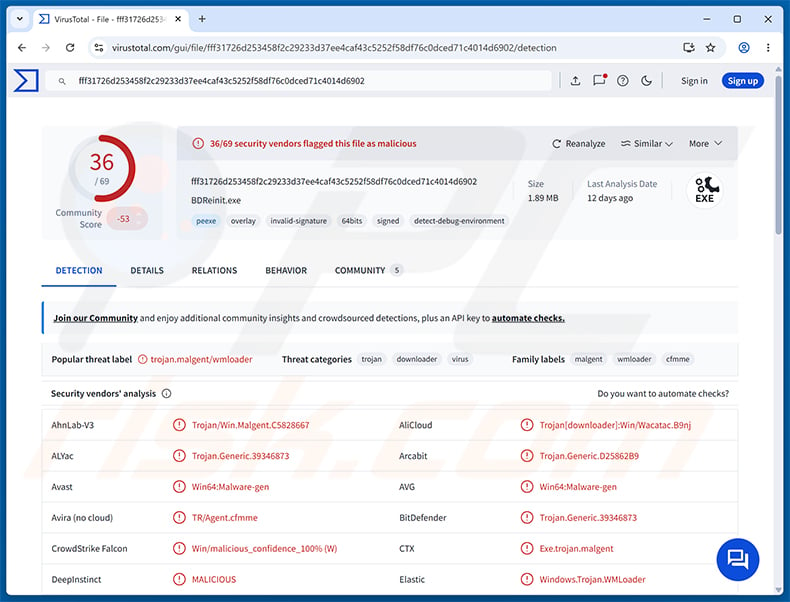
NANOREMOTE is typically deployed by a loader component called WMLOADER. WMLOADER disguises itself as a legitimate Bitdefender file named BDReinit.exe, complete with a forged digital signature. When executed, it decrypts the NANOREMOTE payload from an encrypted file named wmsetup.log before loading it into memory via embedded shellcode.
For command-and-control, NANOREMOTE communicates through the Google Drive API. It authenticates using OAuth 2.0 tokens embedded in its configuration and sends regular beacon requests to Google's servers. Because these connections go to a well-known, trusted platform, they are harder for security tools to flag as suspicious.
All traffic is compressed with Zlib and then encrypted with AES-CBC before being sent. Each request follows a structured JSON format that includes a machine identifier, a command ID, and a data payload.
NANOREMOTE's capabilities
Elastic Security Labs identified 22 command handlers built into NANOREMOTE, giving operators broad remote control over an infected system. These commands cover file management, code execution, data transfer, and system reconnaissance.
File-related commands let operators list directories, navigate the file system, and create, delete, or move files. Operators can also enumerate attached storage drives and queue file uploads and downloads, with support for pausing and resuming transfers. Each transfer is verified with an MD5 checksum.
On the execution side, NANOREMOTE includes a custom PE loader that can run programs from disk or execute binaries in memory from Base64-encoded payloads, bypassing the standard Windows loader entirely. Shell commands can also be issued and executed through spawned processes.
At startup, the malware collects basic system information - the machine's IP addresses, hostname, username, operating system version, and whether the current user has administrator rights.
Persistence and defense evasion
NANOREMOTE uses Microsoft's Detours library to intercept key system functions such as GetStdHandle and ExitProcess. This prevents a single failing thread from crashing the entire process, which helps the malware stay running even when individual components encounter errors.
The built-in custom PE loader bypasses the hooks that endpoint security products typically place on the standard Windows loader. This makes it harder for protection software to detect newly loaded executables at runtime.
NANOREMOTE also installs a process-wide crash handler that generates Windows minidump files. Elastic Security Labs noted that the malware creates a local directory named Log and writes detailed activity to a file called pe_exe_run.log, suggesting it was designed with operator-side troubleshooting in mind.
| Name | NANOREMOTE malware |
| Threat Type | Backdoor, Trojan |
| Detection Names | Avast (Win64:Malware-gen), Combo Cleaner (Trojan.Generic.39346873), ESET-NOD32 (Win64/Agent.HWR Trojan), Kaspersky (Trojan-Downloader.Win64.Agent.dur), Microsoft ( Trojan:Win32/Malgent!MSR ), Full List (VirusTotal) |
| Symptoms | Backdoors are designed to stealthily infiltrate the victim's computer and remain silent, and thus no particular symptoms are clearly visible on an infected machine. |
| Distribution methods | Trojanized software, targeted delivery via a loader (WMLOADER). |
| Damage | Remote access to the infected system, data exfiltration via Google Drive, execution of additional malware, identity theft. |
| Malware Removal (Windows) |
To eliminate possible malware infections, scan your computer with legitimate antivirus software. Our security researchers recommend using Combo Cleaner. Download Combo CleanerTo use full-featured product, you have to purchase a license for Combo Cleaner. 7 days free trial available. Combo Cleaner is owned and operated by RCS LT, the parent company of PCRisk.com. |
Conclusion
NANOREMOTE gives attackers persistent, hidden access to an infected computer and supports a wide range of remote operations - from executing commands and loading additional malware to exfiltrating files through Google Drive.
Its connection to the REF7707 campaign suggests it is part of a targeted, carefully coordinated attack effort. The malware should be removed from any affected system immediately.
More examples of backdoors are A0Backdoor, YiBackdoor, and Anubis.
How did NANOREMOTE infiltrate my computer?
According to Elastic Security Labs, NANOREMOTE is delivered by a loader called WMLOADER. WMLOADER impersonates a legitimate Bitdefender component - BDReinit.exe - but carries an invalid digital signature. When executed, it decrypts the NANOREMOTE payload from a file named wmsetup.log and loads it into memory.
Elastic Security Labs linked NANOREMOTE to the REF7707 campaign, with early samples showing activity originating from the Philippines in October 2025. The malware shares an encryption key and several code patterns with the FINALDRAFT implant, indicating both come from the same development effort and likely the same threat actor.
More broadly, trojans and backdoors are spread through many channels: phishing emails with malicious attachments, fake software download sites, malvertising, compromised websites, pirated software, and infected removable media.
How to avoid installation of malware?
Be cautious with unsolicited emails, especially those that contain attachments or links - even if the sender appears familiar. Download software only from official sources, and avoid cracks, key generators, or pirated content. Keep the operating system and all installed programs up to date, as updates frequently close the security gaps that attackers exploit.
Avoid clicking pop-up ads or browser notifications from unfamiliar sites, and use a reputable security program with real-time protection enabled. Run full system scans regularly. If you believe that your computer is already infected, we recommend running a scan with Combo Cleaner Antivirus for Windows to automatically eliminate infiltrated malware.
Instant automatic malware removal:
Manual threat removal might be a lengthy and complicated process that requires advanced IT skills. Combo Cleaner is a professional automatic malware removal tool that is recommended to get rid of malware. Download it by clicking the button below:
DOWNLOAD Combo CleanerBy downloading any software listed on this website you agree to our Privacy Policy and Terms of Use. To use full-featured product, you have to purchase a license for Combo Cleaner. 7 days free trial available. Combo Cleaner is owned and operated by RCS LT, the parent company of PCRisk.com.
Quick menu:
- What is NANOREMOTE?
- STEP 1. Manual removal of NANOREMOTE malware.
- STEP 2. Check if your computer is clean.
How to remove malware manually?
Manual malware removal is a complicated task - usually it is best to allow antivirus or anti-malware programs to do this automatically. To remove this malware we recommend using Combo Cleaner Antivirus for Windows.
If you wish to remove malware manually, the first step is to identify the name of the malware that you are trying to remove. Here is an example of a suspicious program running on a user's computer:
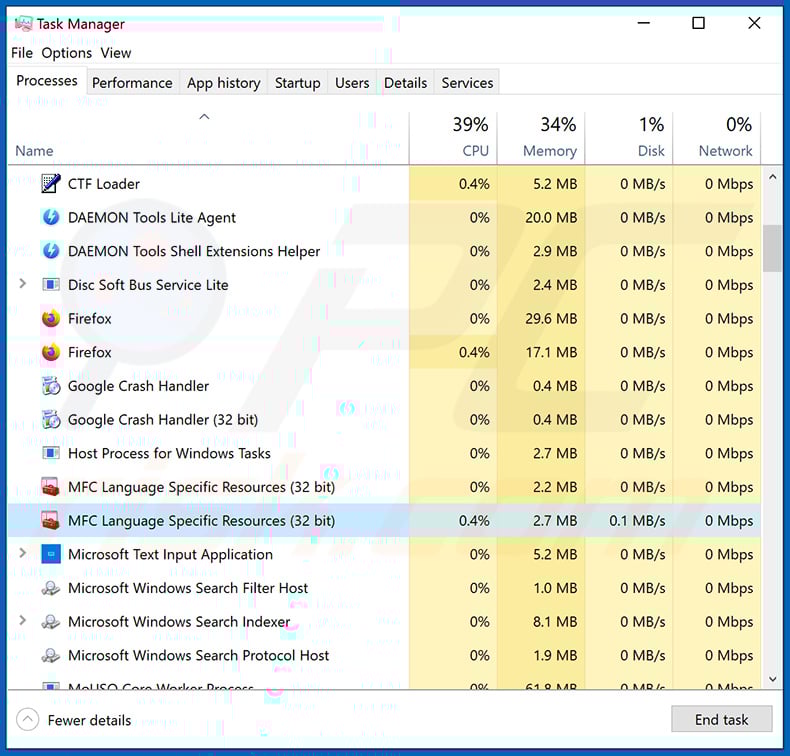
If you checked the list of programs running on your computer, for example, using task manager, and identified a program that looks suspicious, you should continue with these steps:
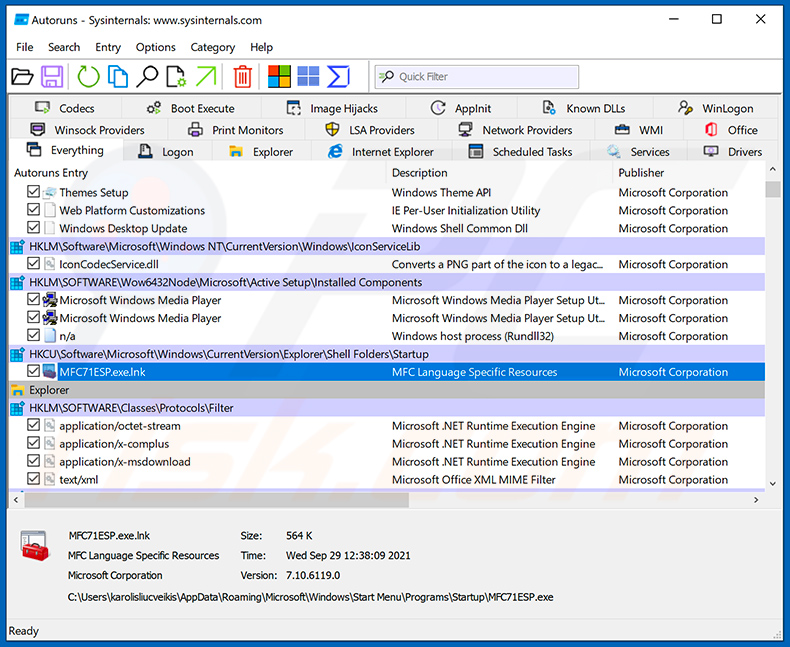
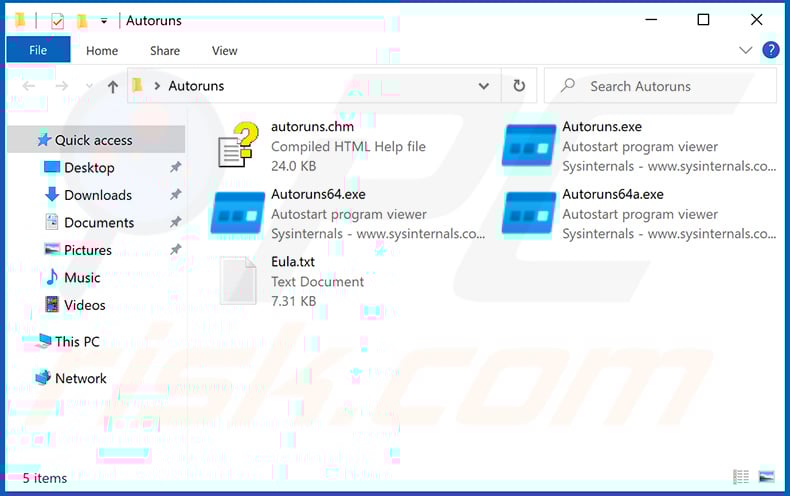
 Download a program called Autoruns. This program shows auto-start applications, Registry, and file system locations:
 Restart your computer into Safe Mode:
Windows XP and Windows 7 users: Start your computer in Safe Mode. Click Start, click Shut Down, click Restart, click OK. During your computer start process, press the F8 key on your keyboard multiple times until you see the Windows Advanced Option menu, and then select Safe Mode with Networking from the list.
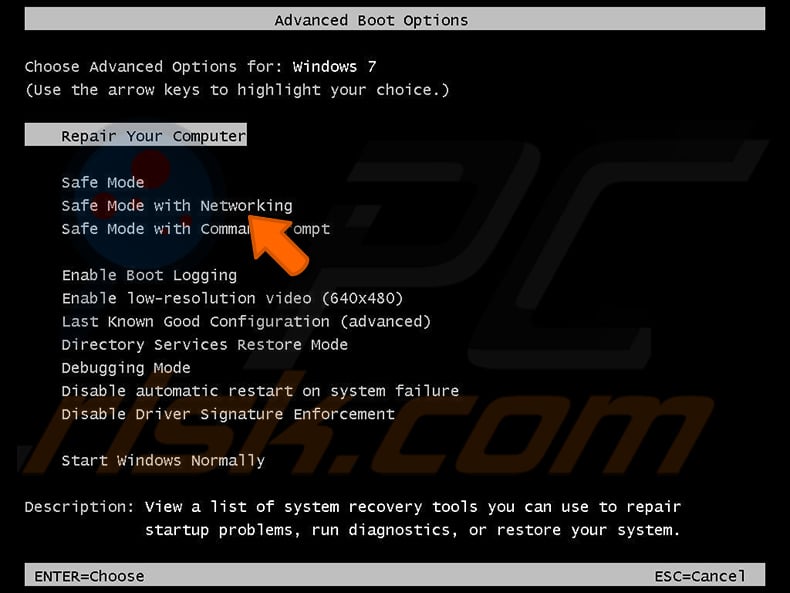
Video showing how to start Windows 7 in "Safe Mode with Networking":
Windows 8 users: Start Windows 8 is Safe Mode with Networking - Go to Windows 8 Start Screen, type Advanced, in the search results select Settings. Click Advanced startup options, in the opened "General PC Settings" window, select Advanced startup.
Click the "Restart now" button. Your computer will now restart into the "Advanced Startup options menu". Click the "Troubleshoot" button, and then click the "Advanced options" button. In the advanced option screen, click "Startup settings".
Click the "Restart" button. Your PC will restart into the Startup Settings screen. Press F5 to boot in Safe Mode with Networking.
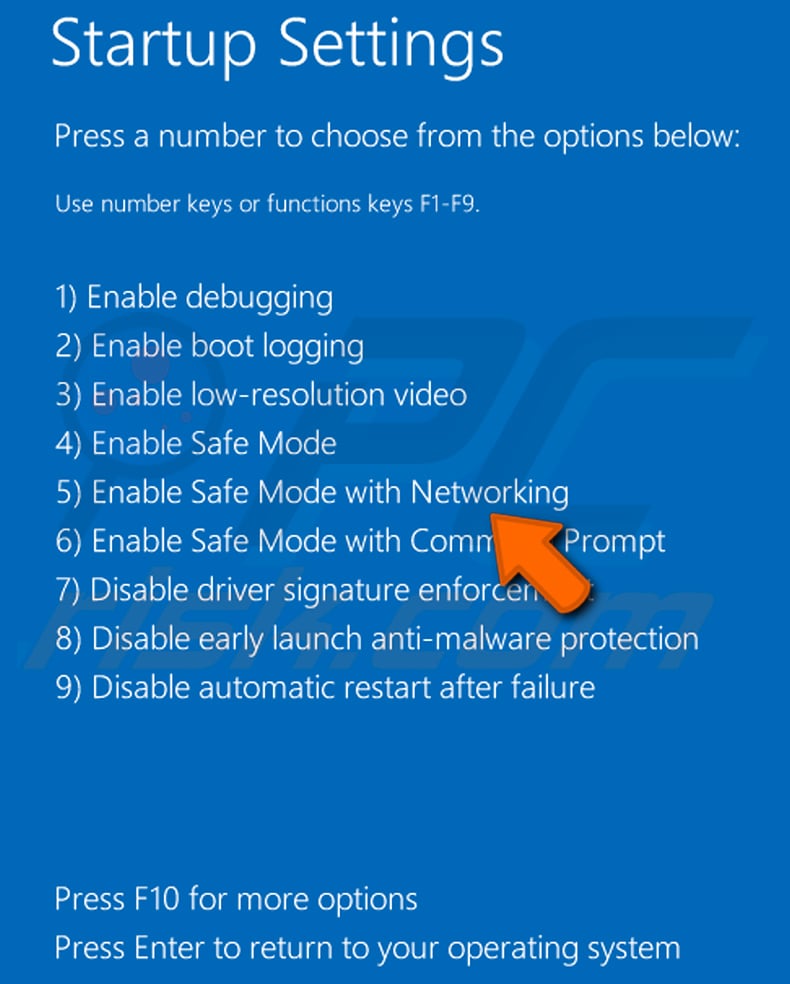
Video showing how to start Windows 8 in "Safe Mode with Networking":
Windows 10 users: Click the Windows logo and select the Power icon. In the opened menu click "Restart" while holding "Shift" button on your keyboard. In the "choose an option" window click on the "Troubleshoot", next select "Advanced options".
In the advanced options menu select "Startup Settings" and click on the "Restart" button. In the following window you should click the "F5" button on your keyboard. This will restart your operating system in safe mode with networking.
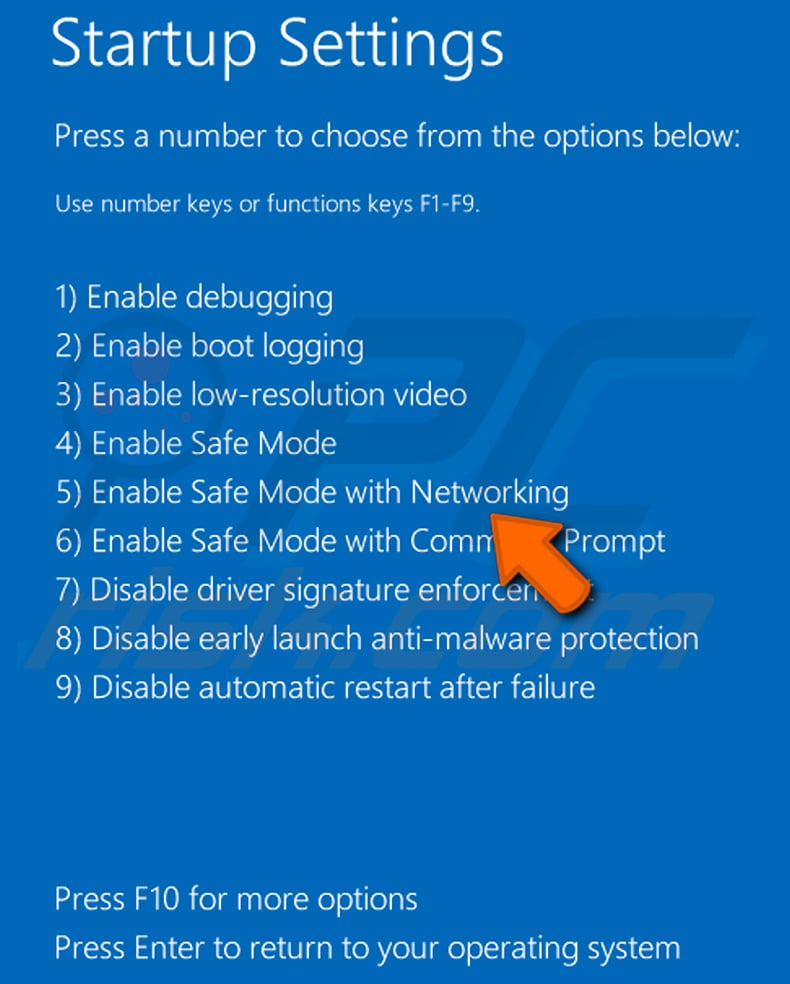
Video showing how to start Windows 10 in "Safe Mode with Networking":
 Extract the downloaded archive and run the Autoruns.exe file.
 In the Autoruns application, click "Options" at the top and uncheck "Hide Empty Locations" and "Hide Windows Entries" options. After this procedure, click the "Refresh" icon.
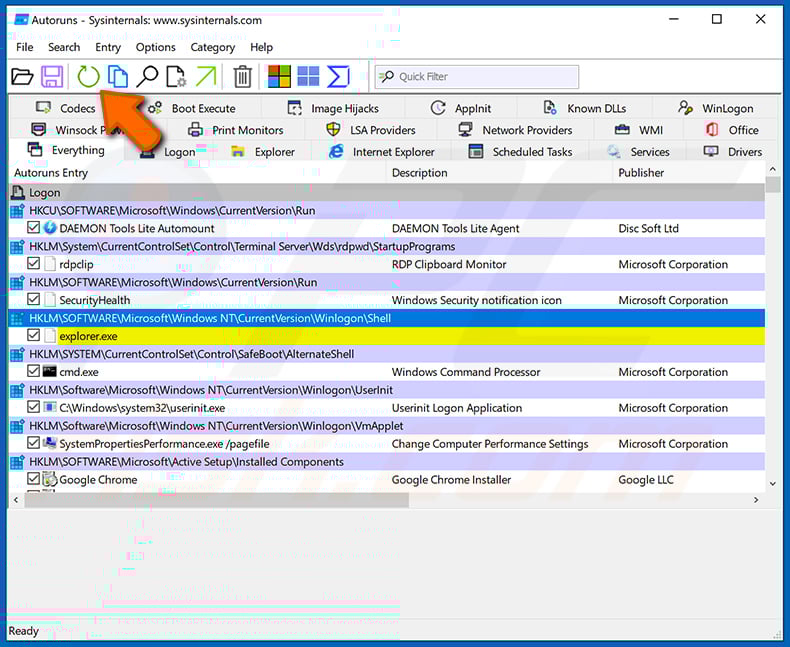
 Check the list provided by the Autoruns application and locate the malware file that you want to eliminate.
You should write down its full path and name. Note that some malware hides process names under legitimate Windows process names. At this stage, it is very important to avoid removing system files. After you locate the suspicious program you wish to remove, right click your mouse over its name and choose "Delete".
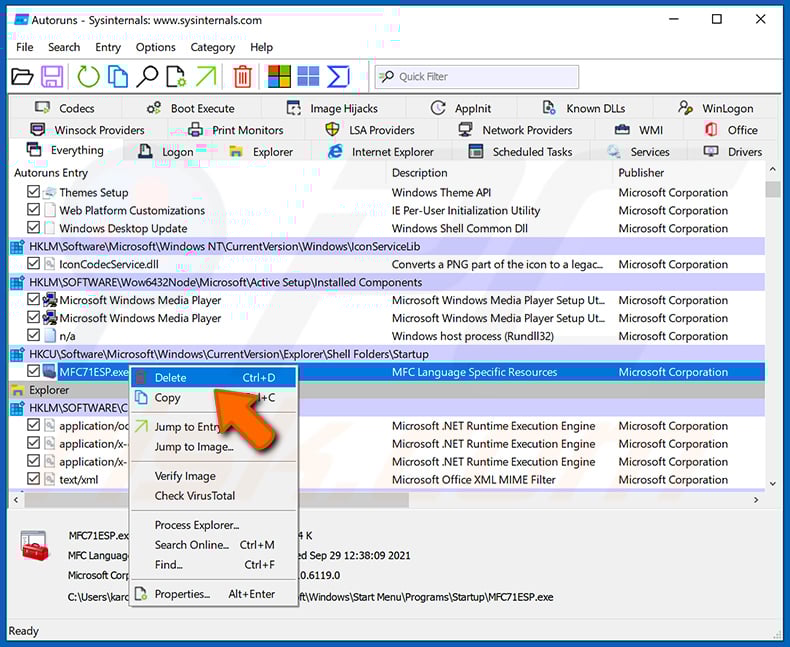
After removing the malware through the Autoruns application (this ensures that the malware will not run automatically on the next system startup), you should search for the malware name on your computer. Be sure to enable hidden files and folders before proceeding. If you find the filename of the malware, be sure to remove it.
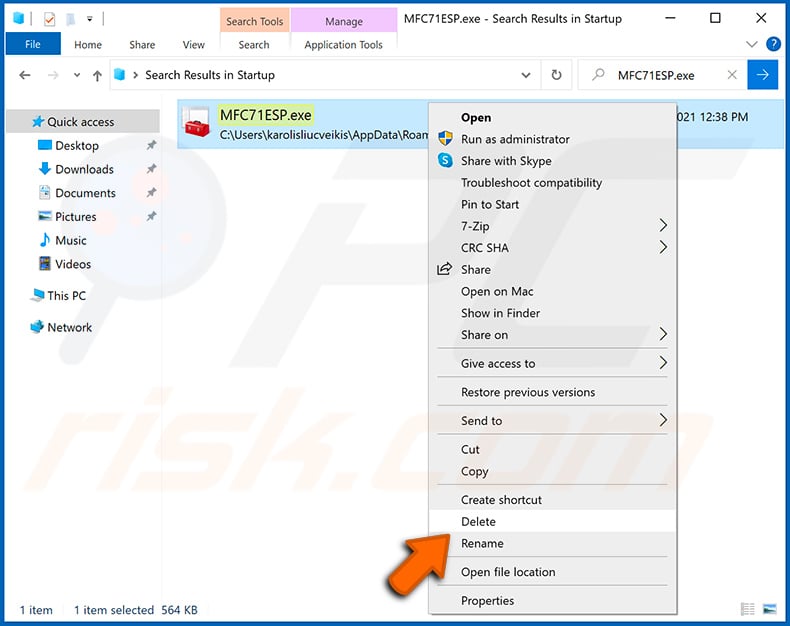
Reboot your computer in normal mode. Following these steps should remove any malware from your computer. Note that manual threat removal requires advanced computer skills. If you do not have these skills, leave malware removal to antivirus and anti-malware programs.
These steps might not work with advanced malware infections. As always it is best to prevent infection than try to remove malware later. To keep your computer safe, install the latest operating system updates and use antivirus software. To be sure your computer is free of malware infections, we recommend scanning it with Combo Cleaner Antivirus for Windows.
Frequently Asked Questions (FAQ)
My computer is infected with NANOREMOTE malware, should I format my storage device to get rid of it?
Formatting removes NANOREMOTE but also erases every file on the drive. A trusted security tool such as Combo Cleaner should be tried first, as it can remove the infection without the loss of personal data.
What are the biggest issues that NANOREMOTE malware can cause?
NANOREMOTE gives attackers full remote control of the infected system. This can lead to data theft, execution of additional malware, complete loss of control over the computer, and - over time - identity theft and financial fraud.
What is the purpose of NANOREMOTE malware?
The purpose of NANOREMOTE is to give attackers persistent, hidden access to an infected machine. Operators can run commands, manage files, load additional programs into memory, and exfiltrate data through Google Drive, all while remaining out of sight.
How did NANOREMOTE malware infiltrate my computer?
NANOREMOTE is delivered by a loader called WMLOADER, which impersonates a legitimate Bitdefender file. It has been linked to the REF7707 campaign. In general, backdoors also reach victims through phishing emails, fake software downloads, pirated content, and compromised websites.
Will Combo Cleaner protect me from malware?
Yes. Combo Cleaner can detect and remove most known malware, including backdoors and trojans. Because threats like NANOREMOTE are built to hide deeply within the system, running a full scan is important to make sure nothing is missed.
Share:
 Facebook
 X.com
X.com
 LinkedIn
 Copy Link

Tomas Meskauskas
Expert security researcher, professional malware analyst
I am passionate about computer security and technology. I have an experience of over 10 years working in various companies related to computer technical issue solving and Internet security. I have been working as an author and editor for pcrisk.com since 2010. Follow me on Twitter and LinkedIn to stay informed about the latest online security threats.
PCrisk security portal is brought by a company RCS LT.
Joined forces of security researchers help educate computer users about the latest online security threats. More information about the company RCS LT.
Our malware removal guides are free. However, if you want to support us you can send us a donation.
DonatePCrisk security portal is brought by a company RCS LT.
Joined forces of security researchers help educate computer users about the latest online security threats. More information about the company RCS LT.
Our malware removal guides are free. However, if you want to support us you can send us a donation.
Donate
▼ Show Discussion