
How to stop worthilininence.com notification spam
Notification SpamAlso Known As: Ads by worthilininence.com

Get free scan and check if your device is infected.
Remove it nowTo use full-featured product, you have to purchase a license for Combo Cleaner. Seven days free trial available. Combo Cleaner is owned and operated by RCS LT, the parent company of PCRisk.com.
What kind of page is worthilininence[.]com?
While inspecting dubious websites, our research team came across the worthilininence[.]com rogue page. After examining it, we determined that its primary purpose is to trick visitors into enabling browser notifications. Once permission is granted, the site delivers misleading security alerts and other unwanted ads that can expose users to scams and malware.
![worthilininence[.]com ads](/images/stories/screenshots202607/worthilininence-com-ads-main.jpg)
Worthilininence[.]com in detail
Worthilininence[.]com uses a fake "confirm you are not a robot" prompt to collect notification permissions. The page displays a black screen with a message telling visitors to click "Allow" to verify they are human. This mimics a standard security check, but clicking "Allow" simply grants the site permission to send notifications.
It is worth noting that sites like worthilininence[.]com are typically served through randomly generated subdomains. The content shown to any given visitor may vary depending on which subdomain or URL path they land on, so other users may encounter entirely different lures or deceptive pages on the same domain.
Notifications from worthilininence[.]com are crafted to look like real antivirus alerts. They display messages claiming a trojan has been detected on the system, with fake security status indicators warning about identity risks and a disabled firewall. These alerts are entirely fabricated - clicking the "Scan and Fix" button redirects users to harmful third-party pages.
Clicking these alerts may take users to tech support scam pages where fake agents pressure them into paying for unnecessary services. Others may be directed to phishing sites designed to steal credentials for email accounts, banking platforms, or social media profiles.
In other cases, the links can lead to sites pushing fake antivirus tools or potentially unwanted applications that degrade system performance. Scammers also exploit affiliate programs, routing users through deceptive ad chains to earn commissions even when real products appear in the notifications.
If worthilininence[.]com has been permitted to send notifications, that permission should be revoked right away. Continued exposure to these alerts risks computer infections, financial loss, or account compromise.
| Name | Ads by worthilininence.com |
| Threat Type | Push notifications ads, Unwanted ads, Pop-up ads |
| Threat Status (worthilininence[.]com) | PCrisk Website Scanner Results |
| Serving IP Address | 54.225.5.143 |
| Symptoms | Seeing advertisements not originating from the sites you are browsing. Intrusive pop-up ads. Decreased Internet browsing speed. |
| Distribution Methods | Deceptive pop-up ads, false claims within visited websites, unwanted applications (adware) |
| Damage | Decreased computer performance, browser tracking - privacy issues, possible additional malware infections. |
| Malware Removal (Windows) |
To eliminate possible malware infections, scan your computer with legitimate antivirus software. Our security researchers recommend using Combo Cleaner. Download Combo CleanerTo use full-featured product, you have to purchase a license for Combo Cleaner. 7 days free trial available. Combo Cleaner is owned and operated by RCS LT, the parent company of PCRisk.com. |
More on similar pages
Users can be redirected to pages like worthilininence[.]com through misleading buttons or pop-ups on questionable websites, rogue advertising networks associated with torrent or illegal streaming sites, or adware installed on the device. Spam notifications from other rogue sites and deceptive links in emails or social media posts can also be the cause.
Additional examples of websites similar to worthilininence[.]com are flashpushalerts[.]top, swiftpushupdates[.]top, and oppush[.]space.
How did worthilininence[.]com gain permission to deliver spam notifications?
Browsers require explicit user permission before any website can deliver notifications. If notifications from worthilininence[.]com are appearing on your device, you must have previously visited the site and clicked "Allow" or a similar option when the browser's permission prompt appeared.
How to prevent deceptive sites from delivering spam notifications?
Any page that asks you to click "Allow" to prove you are human, watch a video, or access content is using a deceptive trick. Legitimate websites do not tie notification permissions to any kind of access or verification step. If such a prompt appears, click "Block" or simply close the tab.
If unwanted notifications continue appearing, your browser settings may need to be checked for sites that have already been granted permission. Running a scan with Combo Cleaner Antivirus for Windows can automatically locate and remove these permissions.
Appearance of worthilininence[.]com website (GIF):
![worthilininence[.]com website appearance (GIF)](/images/stories/screenshots202607/worthilininence-com-ads-appearance.gif)
Notifications delivered by worthilininence[.]com:
![worthilininence[.]com notification](/images/stories/screenshots202607/worthilininence-com-ads-notification.jpg)
Instant automatic malware removal:
Manual threat removal might be a lengthy and complicated process that requires advanced IT skills. Combo Cleaner is a professional automatic malware removal tool that is recommended to get rid of malware. Download it by clicking the button below:
DOWNLOAD Combo CleanerBy downloading any software listed on this website you agree to our Privacy Policy and Terms of Use. To use full-featured product, you have to purchase a license for Combo Cleaner. 7 days free trial available. Combo Cleaner is owned and operated by RCS LT, the parent company of PCRisk.com.
Quick menu:
- What is Ads by worthilininence.com?
- STEP 1. Remove spam notifications from Google Chrome
- STEP 2. Remove spam notifications from Google Chrome (Android)
- STEP 3. Remove spam notifications from Mozilla Firefox
- STEP 4. Remove spam notifications from Microsoft Edge
- STEP 5. Remove spam notifications from Safari (macOS)
Disable unwanted browser notifications:
Video showing how to disable web browser notifications:
 Remove spam notifications from Google Chrome:
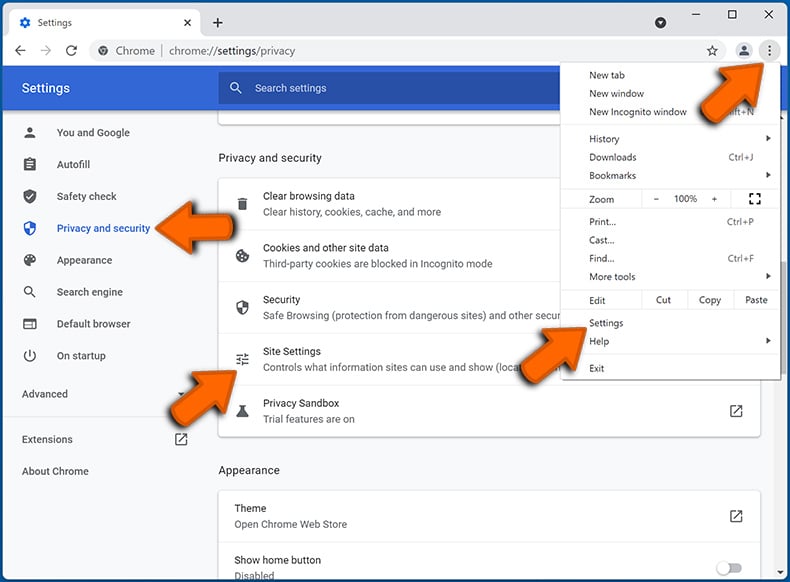
Click the Menu button (three dots) on the right upper corner of the screen and select "Settings". In the opened window select "Privacy and security", then click on "Site Settings" and choose "Notifications".
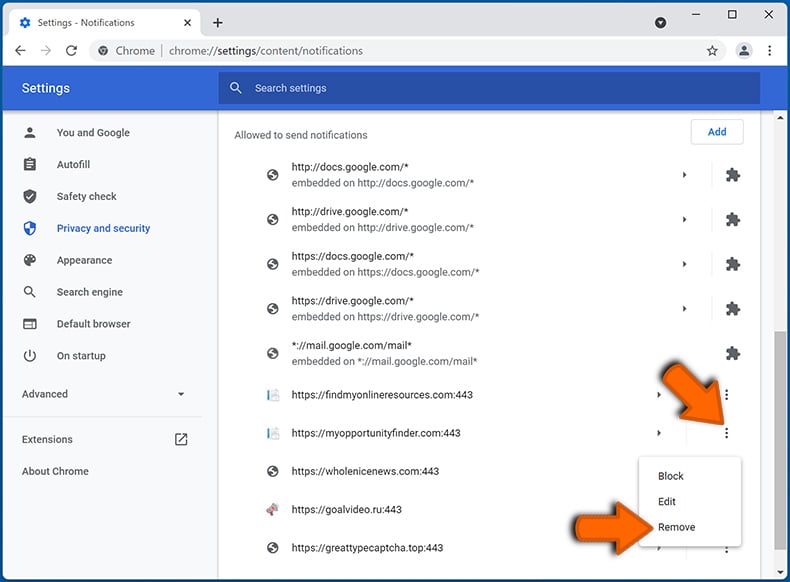
In the "Allowed to send notifications" list search for websites that you want to stop receiving notifications from. Click on the three dots icon near the website URL and click "Block" or "Remove" (if you click "Remove" and visit the malicious site once more, it will ask to enable notifications again).
 Remove spam notifications from Google Chrome (Android):
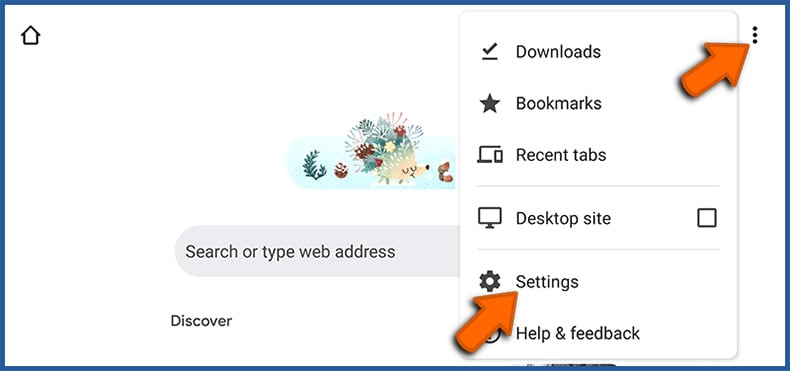
Tap the Menu button (three dots) on the right upper corner of the screen and select "Settings". Scroll down, tap on "Site settings" and then "Notifications".
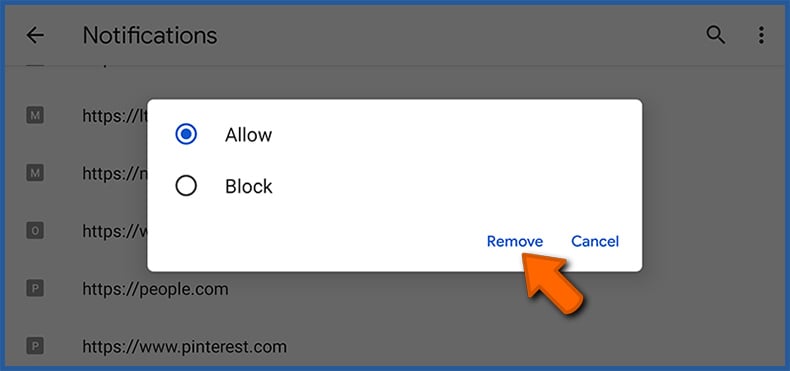
In the opened window, locate all suspicious URLs and tap on them one-by-one. Once the pop-up shows up, select either "Block" or "Remove" (if you tap "Remove" and visit the malicious site once more, it will ask to enable notifications again).
 Remove spam notifications from Mozilla Firefox:
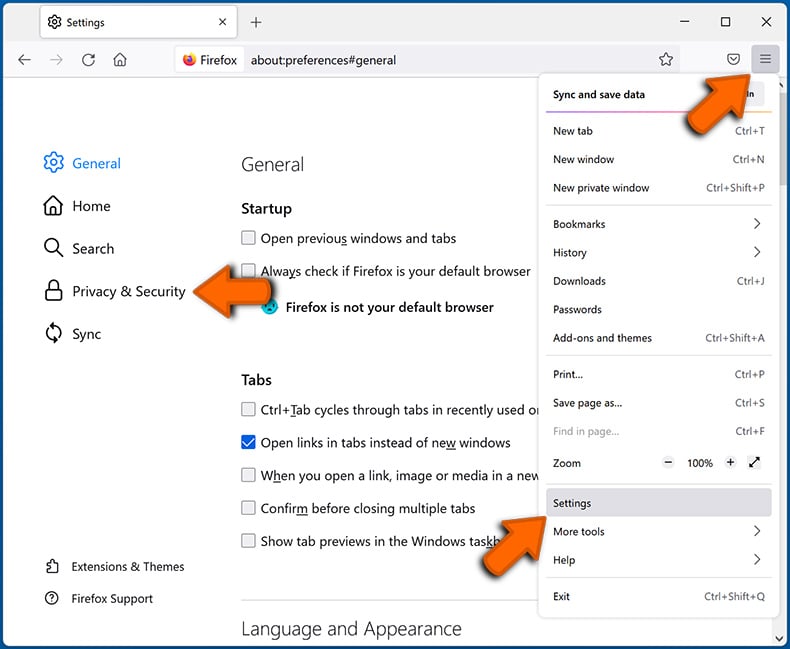
Click the Menu button (three bars) on the right upper corner of the screen. Select "Settings" and click on "Privacy & Security" in the toolbar on the left hand side of the screen. Scroll down to the "Permissions" section and click the "Settings" button next to "Notifications".
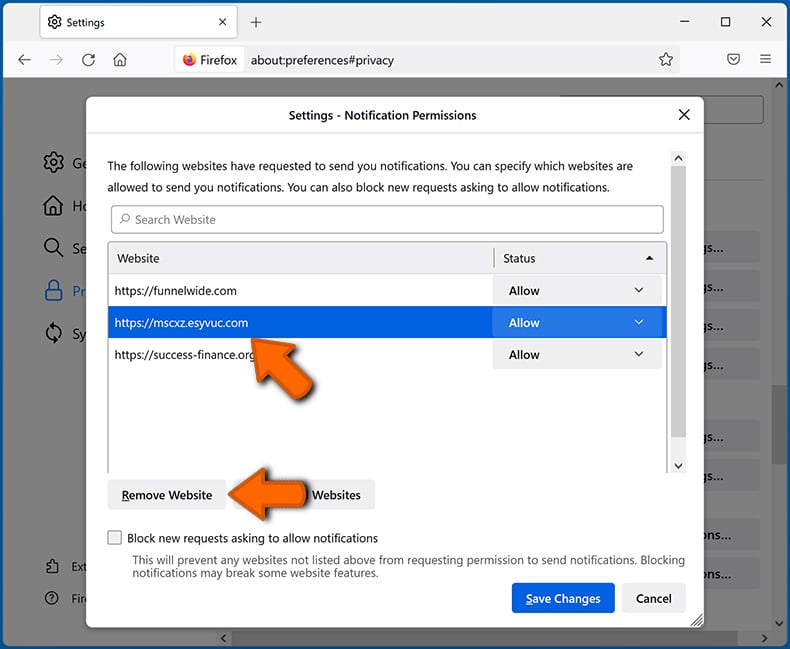
In the opened window, locate all suspicious URLs and block them using the drop-down menu or either remove them by clicking "Remove Website" at the bottom of the window (if you click "Remove Website" and visit the malicious site once more, it will ask to enable notifications again).
 Remove spam notifications from Microsoft Edge:
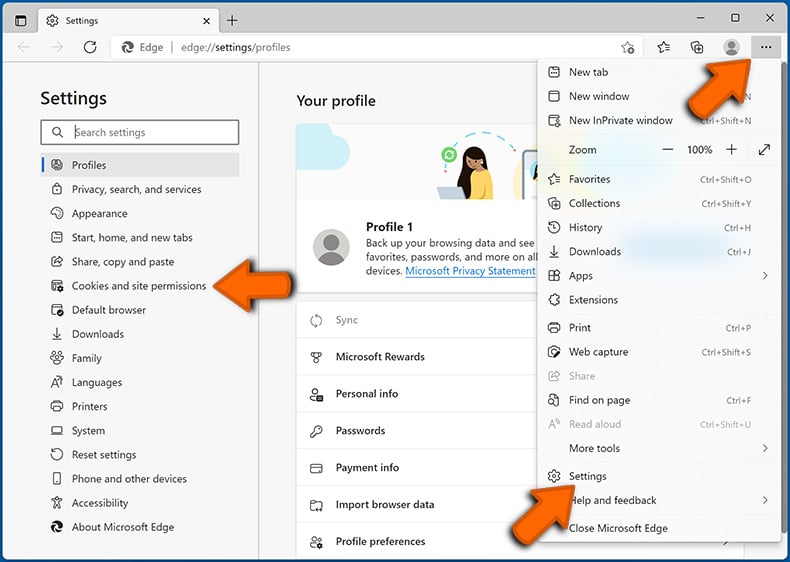
Click the menu button (three dots) on the right upper corner of the Edge window and select "Settings". Click on "Cookies and site permissions" in the toolbar on the left hand side of the screen and select "Notifications".
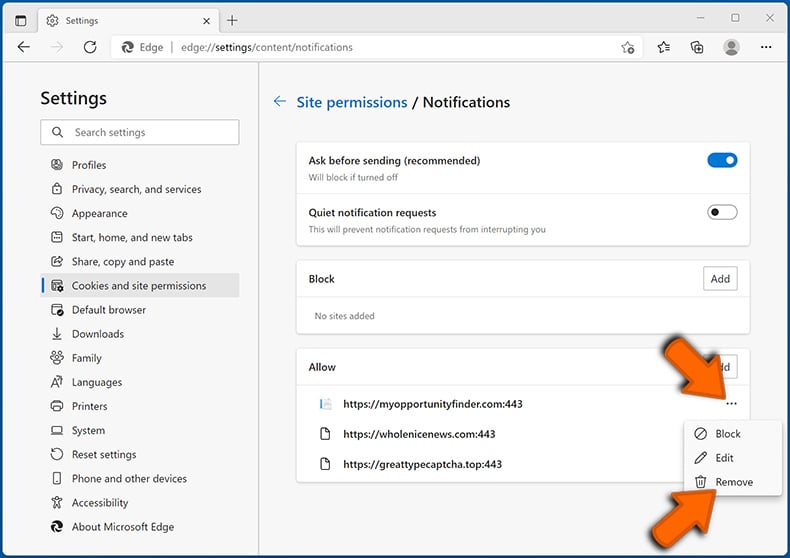
Click three dots on the right hand side of each suspicious URL under "Allow" section and click "Block" or "Remove" (if you click "Remove" and visit the malicious site once more, it will ask to enable notifications again).
 Remove spam notifications from Safari (macOS):
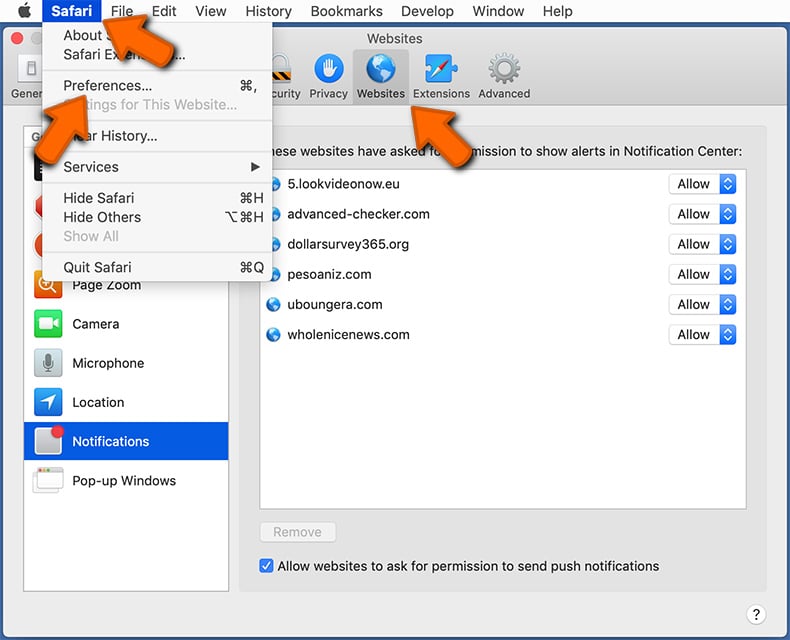
Click "Safari" button on the left upper corner of the screen and select "Preferences...". Select the "Websites" tab and then select "Notifications" section on the left pane.
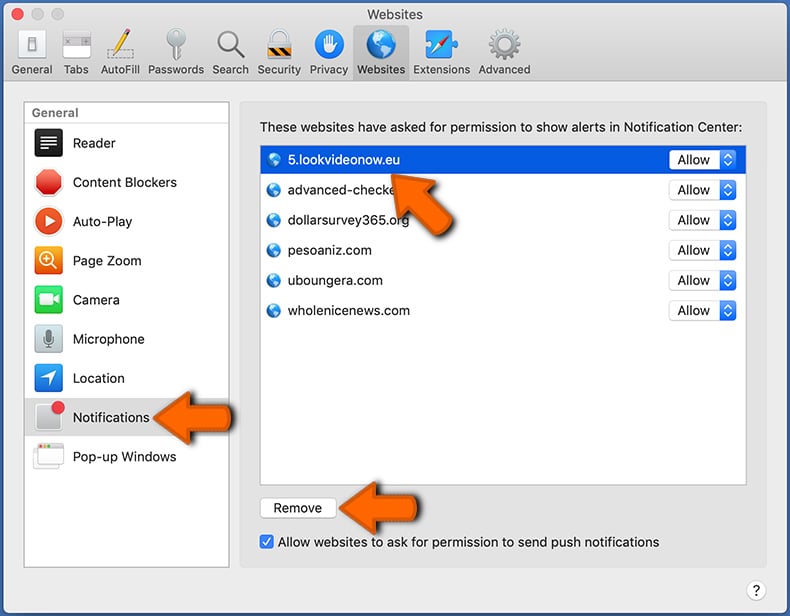
Check for suspicious URLs and apply the "Deny" option using the drop-down menu or either remove them by clicking "Remove" at the bottom of the window (if you click "Remove" and visit the malicious site once more, it will ask to enable notifications again)
How to avoid browser notification spam?
Internet users should be very skeptical when being asked to allow notifications. While this is a useful feature that allows you to receive timely news from websites you like, deceptive marketers frequently abuse it.
Only allow notifications from websites that you fully trust. For added security - use an anti-malware application with a real-time web browsing monitor to block shady websites that tries to trick you into allowing spam notifications. We recommend using Combo Cleaner Antivirus for Windows.
Frequently Asked Questions (FAQ)
Why am I seeing ads (browser notifications) delivered by worthilininence[.]com in the right lower corner of my desktop?
You must have previously visited worthilininence[.]com and clicked "Allow" (or a similar button) when the browser's notification prompt appeared. Without that click, the site cannot send notifications - browsers require explicit permission before allowing any website to deliver them.
I have clicked on notification ads, is my computer infected?
Clicking a browser notification ad is unlikely to directly infect your device. That said, the pages these notifications lead to can be harmful - they may promote scams, push unwanted software, or attempt to steal personal information. Avoid interacting with ads from untrusted sources.
Is worthilininence[.]com a virus?
Worthilininence[.]com is not classified as a virus, but it is considered a threat. Rogue notification sites promote scams, potentially unwanted programs, and other unsafe content. Interacting with their notifications can lead to real harm.
Will Combo Cleaner remove worthilininence[.]com ads automatically or manual steps are still required?
Yes. Combo Cleaner will scan your device, revoke any permissions granted to worthilininence[.]com, and block access to this page and similar rogue sites going forward. No additional manual steps will be needed.
Share:
 Facebook
 X.com
X.com
 LinkedIn
 Copy Link

Tomas Meskauskas
Expert security researcher, professional malware analyst
I am passionate about computer security and technology. I have an experience of over 10 years working in various companies related to computer technical issue solving and Internet security. I have been working as an author and editor for pcrisk.com since 2010. Follow me on Twitter and LinkedIn to stay informed about the latest online security threats.
PCrisk security portal is brought by a company RCS LT.
Joined forces of security researchers help educate computer users about the latest online security threats. More information about the company RCS LT.
Our malware removal guides are free. However, if you want to support us you can send us a donation.
DonatePCrisk security portal is brought by a company RCS LT.
Joined forces of security researchers help educate computer users about the latest online security threats. More information about the company RCS LT.
Our malware removal guides are free. However, if you want to support us you can send us a donation.
Donate
▼ Show Discussion