
What is the "Your Avast Protection Expired" pop-up scam
Phishing/ScamAlso Known As: Your Avast Protection Expired affiliate scam

Get free scan and check if your device is infected.
Remove it nowTo use full-featured product, you have to purchase a license for Combo Cleaner. Seven days free trial available. Combo Cleaner is owned and operated by RCS LT, the parent company of PCRisk.com.
What is the "Your Avast Protection Expired" pop-up scam?
We inspected this page and found that it runs a fabricated Avast alert built to frighten visitors into buying antivirus software through an affiliate link. The scan results, the virus names, and the expiry date shown on the page are all invented. Avast is a real security company and has no connection to this website.
![Your Avast Protection Expired pop-up scam (benefitspots[.]com)](/images/stories/screenshots202609/your-avast-protection-expired-pop-up-scam-main.jpg)
"Your Avast Protection Expired" scam in detail
This scheme is hosted on benefitspots[.]com. The page opens by playing an animation that imitates a system scan, and once that fake scan finishes, a window dressed up as Avast Premium Security slides into view. A red banner across the top reads "Warning! Your antivirus protection is not active!".
A sidebar labelled "Viruses found" lists threats with deliberately alarming names, among them Win32/CryptoLocker.X9Zr, Trojan.Gen.2, Win32/Mydoom.2023, and Win32/Conficker.2jf9. None of these detections are real. Nothing was scanned, and nothing was found.
The main panel states that the visitor's Avast protection expired on a specific date and that their computer is infected with seven different viruses. It even names the city the visitor supposedly lives in, which is simply guessed from their IP address. That small personal touch is there to make the warning feel targeted and genuine.
It must be emphasized that Avast is a legitimate computer security company, and neither Avast nor its products have any involvement in this scam. Genuine antivirus software reports detections inside its own interface, never through a web page opened in a browser.
The page then applies pressure. It advertises a "55% Discount" on the renewal and shows a countdown timer ticking down from roughly two minutes. The timer has no real meaning. It exists only to rush visitors into clicking before they stop and question what they are looking at.
Pressing "Renew Now" forwards the visitor to the real Avast website through a link carrying an affiliate identifier. If a purchase is made after that redirect, whoever runs benefitspots[.]com collects a commission. This is affiliate marketing abused through fear, and the software being sold is not the problem here - the fake infection story used to sell it is.
Redirects like this do not always end at a reputable vendor, however. Comparable pages send visitors to sites that push unwanted applications, harvest personal details, or run entirely separate schemes. In this case a browser notification-style alert warning about "Trojan viruses found" also appeared, and allowing such notifications results in a constant stream of fake warnings and intrusive ads.
The key point to remember is that no website can scan a computer for malware. Only software installed on the device is capable of that. Any page announcing that it has completed a scan and discovered infections is making the results up, and the safest response is to close the tab without clicking anything on it.
| Name | Your Avast Protection Expired affiliate scam |
| Threat Type | Phishing, Scam, Social Engineering, Fraud |
| Fake Claim | The visitor's Avast subscription has expired and seven viruses were detected on their computer |
| Disguise | Legitimate alert from Avast Premium Security |
| Related Domain | benefitspots[.]com |
| Threat Status (benefitspots[.]com) | PCrisk Website Scanner Results |
| Symptoms | Fake error messages, fake system warnings, pop-up errors, hoax computer scan. |
| Distribution methods | Compromised websites, rogue online pop-up ads, potentially unwanted applications. |
| Damage | Loss of sensitive private information, monetary loss, identity theft, possible malware infections. |
| Malware Removal (Windows) |
To eliminate possible malware infections, scan your computer with legitimate antivirus software. Our security researchers recommend using Combo Cleaner. Download Combo CleanerTo use full-featured product, you have to purchase a license for Combo Cleaner. 7 days free trial available. Combo Cleaner is owned and operated by RCS LT, the parent company of PCRisk.com. |
Online scams in general
Fake antivirus pages are one of the most common tricks on the web, mostly because the formula works. Borrow the branding of a trusted security vendor, announce a frightening number of infections, add a timer, and a fair share of visitors will click before they think it through.
The payoff varies. Some of these pages exist purely to earn commissions, while others collect personal data, talk visitors into installing junk software, or hand them over to phishing forms. The tactic stays the same regardless of the goal.
Some examples of similar scams are "Scan Computer To See If Antivirus Is Working", "Windows Security Certificate Expired/Invalid", and "Unusual Sign-in Attempt".
How did I open a scam website?
Almost nobody types the address of a page like this on purpose. Most visitors land there after clicking a misleading advertisement on an unrelated website, particularly on pages that host pirated films, torrents, free streaming, or adult content. The rogue ad networks used by those sites redirect traffic to scam pages with no warning at all.
Browser notifications granted to a shady site months earlier are another common route, since they keep delivering clickable fake alerts long after the original visit. Adware installed on the computer can trigger the same redirects on its own. Spam emails and mistyped web addresses also send a steady flow of visitors to these pages.
How to avoid visiting scam pages?
Refuse notification requests from websites you do not know and trust, and resist the urge to click banners, buttons, or download links on pages that look questionable. Software should be obtained from the developer's own website or an official app store, never from pop-up offers or third-party installers bundled with extras.
Treat links and attachments in unexpected emails with suspicion, especially when the sender is unfamiliar. Keeping the operating system, the browser, and installed programs updated closes off many of the routes these campaigns rely on. If unwanted apps have already made it onto your computer, we recommend running a scan with Combo Cleaner Antivirus for Windows to automatically eliminate them.
Full appearance of the "Your Avast Protection Expired" pop-up scam (GIF):
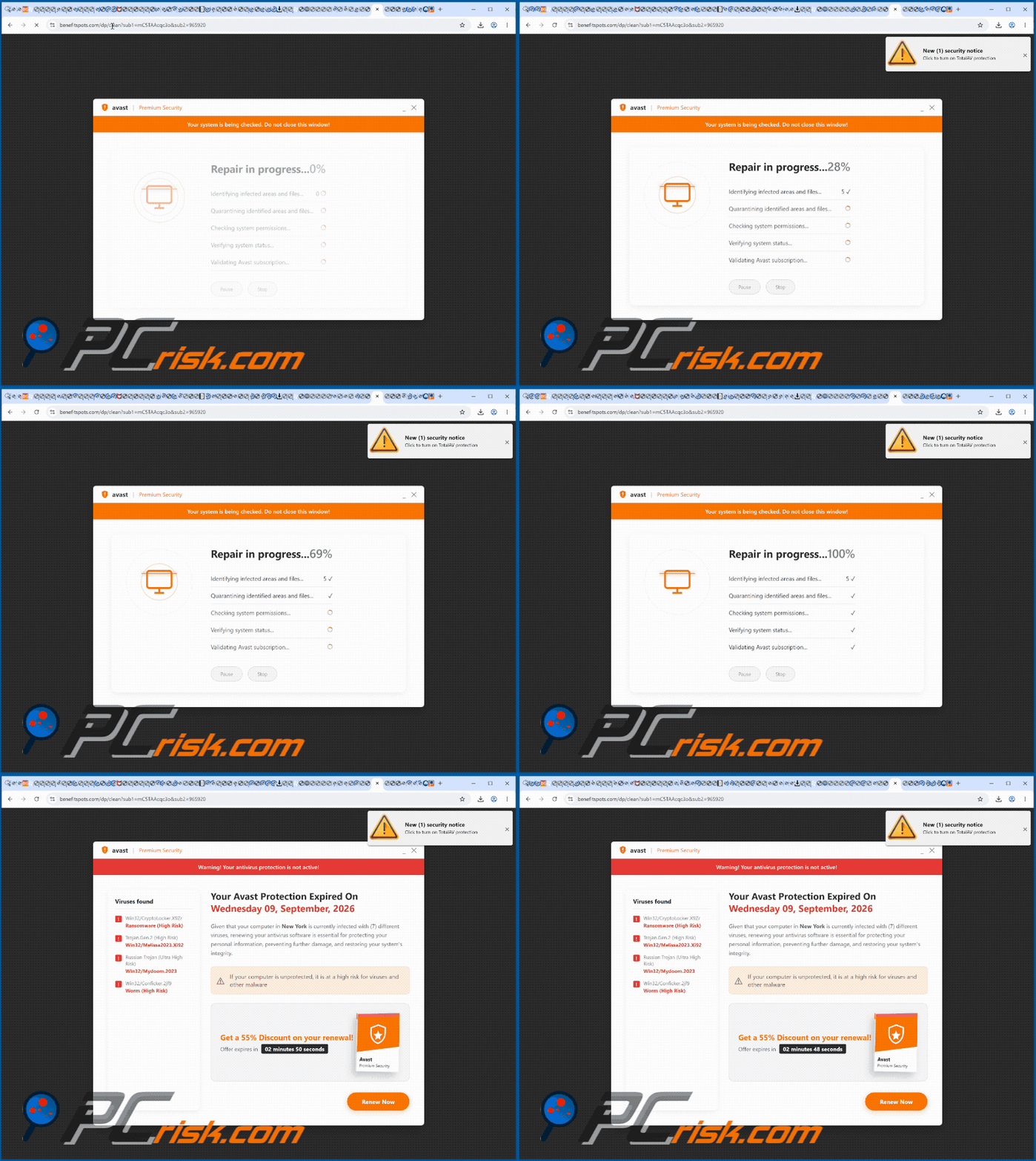
Text presented in the "Your Avast Protection Expired" pop-up:
avast Premium Security
Warning! Your antivirus protection is not active!
Viruses found
! Win32/CryptoLocker.X9Zr Ransomware (High Risk)
! Trojan.Gen.2 (High Risk) Win32/Melissa2023.Xi92
! Russian Trojan (Ultra High Risk) Win32/Mydoom.2023
! Win32/Conficker.2jf9 Worm (High Risk)
Your Avast Protection Expired On
Wednesday 09, September, 2026
Given that your computer in New York is currently infected with (7) different viruses, renewing your antivirus software is essential for protecting your personal information, preventing further damage, and restoring your system's integrity.
If your computer is unprotected, it is at a high risk for viruses and other malware
Get a 55% Discount on your renewal!
Offer expires in 02 minutes 06 seconds
Avast
Premium Security
Renew Now
Instant automatic malware removal:
Manual threat removal might be a lengthy and complicated process that requires advanced IT skills. Combo Cleaner is a professional automatic malware removal tool that is recommended to get rid of malware. Download it by clicking the button below:
DOWNLOAD Combo CleanerBy downloading any software listed on this website you agree to our Privacy Policy and Terms of Use. To use full-featured product, you have to purchase a license for Combo Cleaner. 7 days free trial available. Combo Cleaner is owned and operated by RCS LT, the parent company of PCRisk.com.
Quick menu:
- What is Your Avast Protection Expired affiliate scam?
- How to identify a pop-up scam?
- How do pop-up scams work?
- How to remove fake pop-ups?
- How to prevent fake pop-ups?
- What to do if you fell for a pop-up scam?
How to identify a pop-up scam?
Pop-up windows with various fake messages are a common type of lures cybercriminals use. They collect sensitive personal data, trick Internet users into calling fake tech support numbers, subscribe to useless online services, invest in shady cryptocurrency schemes, etc.
While in the majority of cases these pop-ups don't infect users' devices with malware, they can cause direct monetary loss or could result in identity theft.
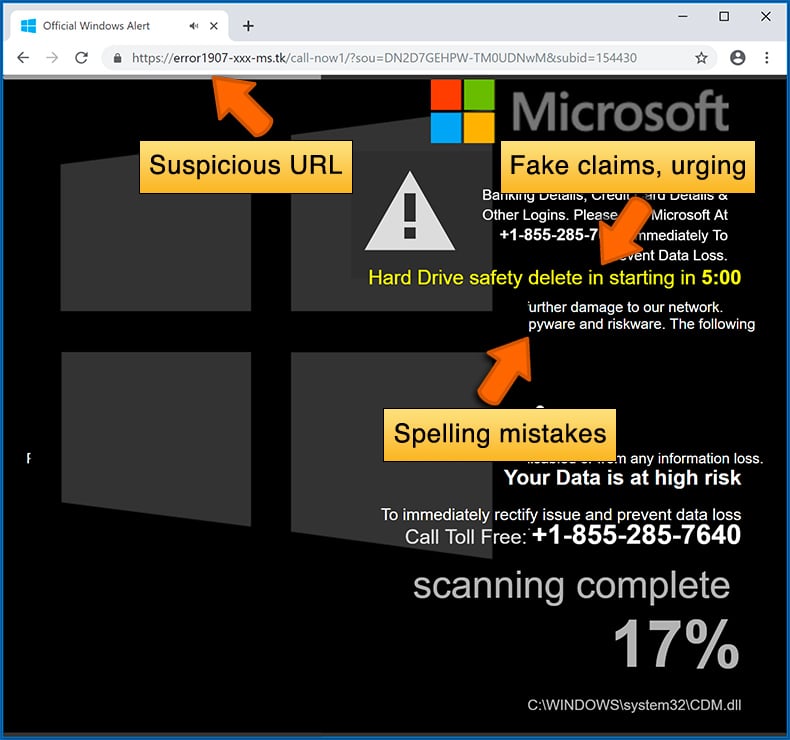
Cybercriminals strive to create their rogue pop-up windows to look trustworthy, however, scams typically have the following characteristics:
- Spelling mistakes and non-professional images - Closely inspect the information displayed in a pop-up. Spelling mistakes and unprofessional images could be a sign of a scam.
- Sense of urgency - Countdown timer with a couple of minutes on it, asking you to enter your personal information or subscribe to some online service.
- Statements that you won something - If you haven't participated in a lottery, online competition, etc., and you see a pop-up window stating that you won.
- Computer or mobile device scan - A pop-up window that scans your device and informs of detected issues - is undoubtedly a scam; webpages cannot perform such actions.
- Exclusivity - Pop-up windows stating that only you are given secret access to a financial scheme that can quickly make you rich.
Example of a pop-up scam:
How do pop-up scams work?
Cybercriminals and deceptive marketers usually use various advertising networks, search engine poisoning techniques, and shady websites to generate traffic to their pop-ups. Users land on their online lures after clicking on fake download buttons, using a torrent website, or simply clicking on an Internet search engine result.
Based on users' location and device information, they are presented with a scam pop-up. Lures presented in such pop-ups range from get-rich-quick schemes to fake virus scans.
How to remove fake pop-ups?
In most cases, pop-up scams do not infect users' devices with malware. If you encountered a scam pop-up, simply closing it should be enough. In some cases scam, pop-ups may be hard to close; in such cases - close your Internet browser and restart it.
In extremely rare cases, you might need to reset your Internet browser. For this, use our instructions explaining how to reset Internet browser settings.
How to prevent fake pop-ups?
To prevent seeing pop-up scams, you should visit only reputable websites. Torrent, Crack, free online movie streaming, YouTube video download, and other websites of similar reputation commonly redirect Internet users to pop-up scams.
To minimize the risk of encountering pop-up scams, you should keep your Internet browsers up-to-date and use reputable anti-malware application. For this purpose, we recommend Combo Cleaner Antivirus for Windows.
What to do if you fell for a pop-up scam?
This depends on the type of scam that you fell for. Most commonly, pop-up scams try to trick users into sending money, giving away personal information, or giving access to one's device.
- If you sent money to scammers: You should contact your financial institution and explain that you were scammed. If informed promptly, there's a chance to get your money back.
- If you gave away your personal information: You should change your passwords and enable two-factor authentication in all online services that you use. Visit Federal Trade Commission to report identity theft and get personalized recovery steps.
- If you let scammers connect to your device: You should scan your computer with reputable anti-malware (we recommend Combo Cleaner Antivirus for Windows) - cyber criminals could have planted trojans, keyloggers, and other malware, don't use your computer until removing possible threats.
- Help other Internet users: report Internet scams to Federal Trade Commission.
Frequently Asked Questions (FAQ)
What is a pop-up scam?
A pop-up scam is a deceptive message that shows up while browsing and tries to push the reader into a harmful decision. Depending on the variant, that could mean paying for something worthless, calling a bogus support line, typing account details into a fake form, or installing a program that does not do what it promises.
What is the purpose of a pop-up scam?
Money, in one form or another. This particular page earns its operators a commission whenever a frightened visitor buys antivirus software through the affiliate link it opens. Other variants make their money by stealing card details, selling harvested personal data, or taking over accounts that can be resold.
Why do I encounter fake pop-ups?
Usually because of something else. Rogue ad networks on unreliable websites, notification permissions handed to a shady page in the past, adware sitting on the computer, and links inside spam emails all funnel people toward these pages. Encountering one does not mean the device is infected, though it is worth checking if they keep appearing.
Will Combo Cleaner protect me from pop-up scams?
Yes. Combo Cleaner inspects the websites you open and recognizes malicious and deceptive ones, scam pages of this kind included. When it identifies such a site, it warns you and blocks the page before you have a chance to interact with anything on it.
Share:
 Facebook
 X.com
X.com
 LinkedIn
 Copy Link

Tomas Meskauskas
Expert security researcher, professional malware analyst
I am passionate about computer security and technology. I have an experience of over 10 years working in various companies related to computer technical issue solving and Internet security. I have been working as an author and editor for pcrisk.com since 2010. Follow me on Twitter and LinkedIn to stay informed about the latest online security threats.
PCrisk security portal is brought by a company RCS LT.
Joined forces of security researchers help educate computer users about the latest online security threats. More information about the company RCS LT.
Our malware removal guides are free. However, if you want to support us you can send us a donation.
DonatePCrisk security portal is brought by a company RCS LT.
Joined forces of security researchers help educate computer users about the latest online security threats. More information about the company RCS LT.
Our malware removal guides are free. However, if you want to support us you can send us a donation.
Donate
▼ Show Discussion