
ESET Antivirus Review

✓
Fact-checked by:
Tomas Meskauskas
Last updated:
November 08, 2025
Our reviews are written by Internet security experts.
Learn more.

PCRisk score:
4.4
When searching for a comprehensive security suite with additional functionality (like VPN, and password manager), we recommend shortlisting ESET.
What we liked:
✓ Runs quietly in the background without cluttering the screen or slowing down the system.
✓ Consistently solid detection rates.
✓ Customizable scans and various settings.
What we disliked:
✗ Extremely high price for top-tier plan.
✗ Advanced settings can be overwhelming for non-techies
With over 100 million users in over 200 countries, ESET has built a reputation for delivering top-notch malware protection and high performance. In our review, we'll examine ESET's home antivirus in detail. Pricing, different plans, security features, lab test results, you'll find it all in this review, so you can decide if ESET is the right choice for you.
Pricing and Plans
ESET's pricing is centred around a few main packages that offer varying degrees of features and coverage. However, all come with a 30-day fully functional free trial. Unfortunately, there isn't a free, permanent option for desktop users.
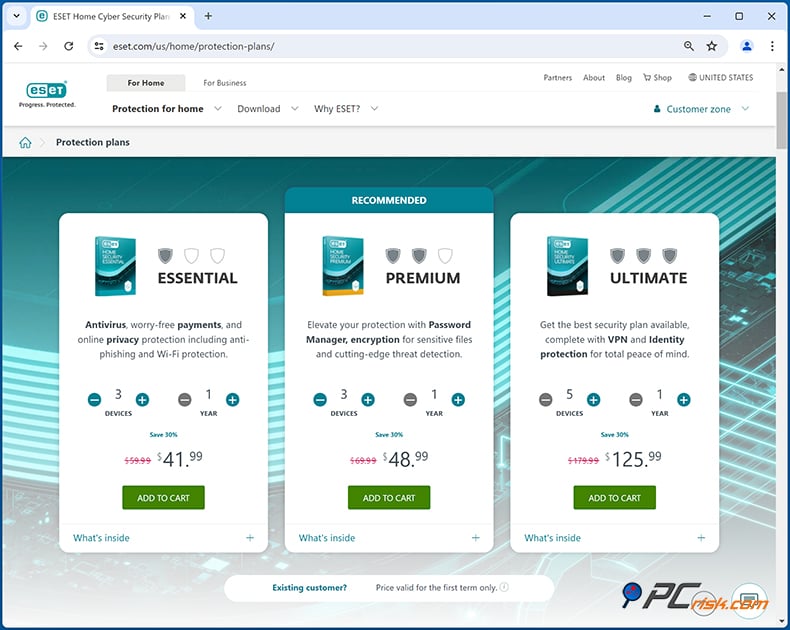
Here's an overview of ESET's plans and pricing options:
• ESET NOD32 Antivirus: This is the entry-level plan, available only for Windows, and gives the minimum antivirus and anti-spyware protection. It's $39.99 a year for a single computer and takes a no-frills approach, doesn't have a firewall or parental controls, but will cover the basics for anyone who just needs a lightweight, fundamental level of protection on one computer.
• ESET Internet Security (Home Security Essential): Often called ESET Home Security Essential, is a multi-platform suite that works for Windows, macOS, and Android devices. It throws in some serious security features such as a two-way firewall, anti-phishing, email protection, network attack prevention, and basic parental control. All for the price of a single license, covering lots of devices. The standard license, covering three devices, is $59.99 a year, with an option to add more devices at a small extra fee.
You can easily customise the number of devices and term length. For instance, the standard price for three devices for one year is $69.99 with a 30% discount sometimes available. Each additional device usually costs around $5 a year. Multi-year subscriptions, of 2 or 3 years, can be bought at a reduced rate per year and sometimes ESET runs deals, such as student discounts and seasonal sales, that reduce the price even more.
• ESET Smart Security Premium (Home Security Premium): This plan is essentially their top-tier offering. It includes everything from Internet Security/Essential, plus a Password Manager and Secure Data file encryption, making it their complete suite.
Until recently, this product was known as Smart Security Premium, but on the ESET website, it's now classified as Home Security Premium. It covers a variety of devices running Windows, Mac and Android. The annual cost is roughly $79.99 a year for a few devices, and as seen in our last check, the price for three devices was listed as $69.99, and is designed for those who want to add password management and file encryption to ESET's standard protection.
• ESET Security Ultimate: You'll be looking at ESET Security Ultimate when choosing the top-tier protection. This plan bundles all the features in Smart Security Premium and introduces two standout features, including Unlimited VPN and Identity Theft Protection.
With ESET Security Ultimate, you get a comprehensive security suite, fortified with top-notch privacy tools and identity monitoring. It comes with ESET VPN with unlimited data for completely secure and anonymous browsing, and a suite of services that monitor your identity (such as dark web monitoring, credit report monitoring, and identity restoration help).
ESET Security Ultimate is also the priciest, costing roughly double the price of the Premium tier. A one-year, multi-device subscription for ESET Security Ultimate will set you back $179.99 to $204.99, depending on the number of devices. It's basically reserved for people who want all-encompassing protection that includes online anonymity and identity theft security. It's ESET's newest offering, and so far, it's the only plan that includes VPN and identity monitoring.
Free and Mobile Versions: For mobile, ESET has a free Android app, ESET Mobile Security for Android, that offers the basics. If you want the advanced features, you can buy the Android Premium via in-app or as part of a multi-device ESET license. This includes features like anti-phishing, app lock, and scheduled scanning. At just $12.99 per year for one device or a few dollars a month, it's pretty reasonable.
Considering ESET antivirus, you'll find that they don't offer a completely free Windows antivirus beyond a 30-day trial period. From a mobile perspective, ESET doesn't have a full-fledged antivirus for iOS. Their coverage for iPhones is restricted to the ESET HOME management app and the ESET VPN, which is exclusive to Ultimate subscribers. If you're going to be using ESET on a PC or a Mac, you'll have to opt for one of their paid plans.
Subscription flexibility: All ESET plans allow you to choose the number of devices (usually 1, 3, 5, 10, etc.) and the subscription length (1 year, 2 years, or 3 years). The per-device cost decreases for longer terms or for protecting more devices. For example, protecting 5 devices for one year might cost about $20-$30 more than protecting 1 device, which is much cheaper per device than buying separate licenses.
ESET frequently provides discounts for multi-year terms (e.g., 2-year or 3-year subscriptions come with a percentage off) and has promotional deals (like student discounts up to 25% off).
It's also worth noting that ESET's pricing is in the ballpark of the top-tier antivirus providers, although it isn't the cheapest. Many users say that the multi-device packs can be a bit expensive, particularly at the highest tier, but ESET's sales and ability to customise the number of devices help balance it out.
ESET Antivirus Versions Overview
In terms of ESET's home user products, the company has undergone a few name changes recently, and their line-up can be a bit tricky to navigate. Here's a quick overview of the available versions and what each includes:
• ESET NOD32 Antivirus: This is a Windows-only antivirus solution that relies on its renowned NOD32 scanning engine to deliver comprehensive malware and antispyware protection. It includes real-time malware detection, phishing protection, and device control but doesn't have a firewall or all the web and email features of the higher-tier packages. There's no free version of NOD32, but a 30-day trial is available.
• ESET Internet Security (a.k.a. Home Security Essential): This suite is multi-platform, covering Windows, macOS, and Android. It builds upon the antivirus with an added firewall, anti-spam for email, anti-phishing to keep you safe from fraudulent websites, Network Attack Protection, and Botnet defence. It also includes ESET's Anti-Theft, which lets you track a lost laptop or device, send it a one-way message, or monitor the thief with the webcam. This package includes basic parental control on Windows.
Essentially, ESET Internet Security/Essential is a well-rounded security suite. For multi-device coverage, it's the way to go because it lets you cover your PC, Android phone, and even your Mac. On macOS, it's called ESET Cyber Security Pro and needs to be activated with an Internet Security license, while on Android, it turns ESET Mobile Security Premium into top-notch ESET Mobile Security Premium.
• ESET Smart Security Premium (Home Security Premium): This is the next tier up and builds off the Internet Security package, throwing in two big features that make it worth the upgrade: a password manager and a secure file encryption tool.
The password manager lets you securely store all your login credentials and automatically fills them in for you in the browsers you use, and is available as a browser extension that syncs across your devices.
The Secure Data feature creates encrypted virtual vaults where you can store sensitive files. Just in case you need an extra layer of protection for confidential data. Plus, it also includes an advanced UEFI scanner and a few more bells and whistles for power users.
Importantly, the core anti-malware protection is exactly the same as in the Essential tier, but Premium just adds a bunch of conveniences. If you don't already use a third-party password manager or file encryption tool, ESET Smart Security Premium is a great option because it lumps all of those features into one suite. However, if you wouldn't use them, the Essential tier is probably your best bet, or you could jump to Ultimate for the VPN.
• ESET Security Ultimate: The decision ultimately comes down to the features you need when choosing ESET's antivirus suite. Coming with 5 plans including NOD32 Antivirus, Internet Security (Essential), Premium, Smart Security Premium, and Security Ultimate, ESET's top-tier Security Ultimate offers you an all-encompassing experience, bundling everything you'd find in the Smart Security Premium, plus a rebranded, unlimited VPN and a cutting-edge identity protection service.
ESET's VPN is an unlimited VPN service that you can use on any of your devices to protect your internet activity, mask your IP address for anonymity, and is based on a well-known VPN, to which ESET has partnered, and delivers fair speeds and a considerable server pool.
The Identity Protection service, an identity theft monitoring and prevention package, is also very impressive. It's got features such as blacklisting stolen email addresses, monitoring your credit score in select areas, surveillance of your social media profiles, and insurance and recovery services of up to $1M if you do fall victim to identity theft.
ESET Security Ultimate will appeal to anyone desperate to safeguard their online privacy and identity. It can also be a great option if you don't want a separate VPN subscription.
Considering your needs, if you're only looking for basic malware protection on one PC, NOD32 Antivirus is the perfect option. If you need a top-of-the-line security suite for several devices, Internet Security (Essential) is a very good all-rounder.
Those who want the added features of password management and file encryption may find Premium is what they need. However, lots of people already have these features covered elsewhere, or find the top-tier package more attractive. Those who want the most comprehensive security including a wealth of privacy tools will gravitate towards Security Ultimate, but be aware, it is going to cost a bit more.
ESET does offer the option to simply pay the price difference if you feel you don't need the extra features now, so you're not locked into anything.
Malware Protection and In-House Test Structure
We were able to put the antivirus to the test through a combination of in-house research and daily analysis of new threats when testing ESET's malware detection capabilities. Our PCRisk team is no stranger to the field of malware and was excited to see how ESET would perform. Our evaluations went across a broad spectrum of common real-world malware attack vectors:
• Potentially Unwanted Programs (PUPs) - 5 samples: We included a set of adware and browser hijackers that, while not outright viruses, are often intrusive or unwanted. This test gauges whether ESET can identify and optionally block these borderline threats without flagging too many harmless programs.
• Trojans and Info-Stealers - 20 samples: This set consisted of classic Trojans, password stealers, and keyloggers. These malware samples operate stealthily to exfiltrate data or open backdoors. We looked at how well ESET's real-time protection can stop these threats right when they're introduced, and how it goes about rooting them out when they're just lying in wait.
• Ransomware - 20 samples: Ransomware is a critical threat today. We used 20 ransomware samples (spanning different families) to see if ESET could prevent encryption in real time and/or detect the ransomware quickly before it wreaks havoc. This test also evaluates ESET's specialized ransomware protection layers and whether any files would get encrypted during an attack simulation.
• Malicious Email Attachments - 20 samples: Many infections start with phishing emails containing malware attachments (e.g., malicious Office documents, PDFs, or script files). We opened some of these in a controlled environment, running ESET in the background, to see if it would either block the payloads or warn about them, and checked its email protection and file exploit defences.
• Mac-Specific Malware - 20 samples: Lastly, we ran ESET's protection on a 20-sample set of macOS malware, including OSX Trojans, adware, and PUPs, basically checking that it had the same level of security as it does on Windows. Our top-tier Internet Security and higher packages cover macOS as well.
For each category, we evaluated ESET in two scenarios: real-time protection (with ESET actively guarding the system as we introduced the threats) and on-demand scanning (scanning the files or system after infection scenarios).
Our in-house malware detection test results:
• Potentially Unwanted Programs (PUPs) - Real-time and quick scans both detected 4 out of 5 PUP samples, with the same result confirmed in the full scan-indicating consistent detection of borderline threats.
• Trojans & Info-Stealers - ESET detected 15 out of 20 Trojan samples in real-time and quick scans, with full scans improving the result to 19 out of 20. This shows that deeper scans are more effective against stealthier threats.
• Ransomware - ESET detected all 20 out of 20 ransomware samples in both real-time protection and quick/full scans, successfully preventing every attack before any encryption could occur.
• Malicious Email Attachments - ESET blocked 14 out of 20 malicious attachments during real-time and quick scan. In contrast, full scans increased the detection rate to 17 out of 20, suggesting that some payloads require more thorough analysis to be caught.
• Mac-Specific Malware - ESET's full scan detected 19 out of 20 malware sample on macOSs, reflecting strong protection on Apple systems nearly equivalent to its Windows coverage.
Note: Our testing methodology leverages our malware research team's extensive hands-on experience. We handle ransomware, adware, and other malware daily, which puts us in a unique position to test antivirus software against real-world threats. This ensures that our in-house test results reflect how ESET would protect in actual infection scenarios, not just synthetic benchmarks.
Independent Lab Test Results
If you're looking for antivirus software, you can check out the reviews from independent labs. ESET has some of the best ratings. In recent AV-TEST evaluations, ESET's performance was flawless, confirming that it provides top-tier security:
• AV-TEST: In the latest AV-TEST evaluations (an independent lab in Germany that rates antiviruses on Protection, Performance, and Usability), ESET earned the "Top Product" award, scoring a perfect 6 out of 6 in Protection, Performance, and Usability categories.
This is a serious endorsement because only the best products get Top Product status, and ESET Security Ultimate got full marks. It blocked all widespread and zero-day malware, ran the system at top speed, and didn't send any harmless files to the wrong place. Well-known for its mobile protection, AV-TEST also gave ESET Mobile Security a perfect score of 6/6/6 on Android devices.
• AV-Comparatives: Another respected lab, AV-Comparatives in Austria, runs tough real-world and performance tests. In late 2024, their Real-World Protection Test and Malware Protection Test awarded ESET's consumer product the highest rating of Advanced+. In fact, AV-Comparatives even tested ESET's entry-level product, Essential, and it picked up the Advanced+ rating in the Real-World Protection and Malware Protection tests and the Performance Test as well.
The Advanced+ award is given to products with excellent protection rates and few false alarms. It means that ESET not only effectively blocks threats in real-world conditions (like web-based attacks or email malware) but also does so without overloading the system. It was among the top performers in their system impact assessment. These AV-Comparatives results are as recent as Q4 2024, underscoring that ESET's detection engine keeps up with the latest threats.
• Other Certifications: ESET consistently scores high in lab tests. The software has been granted a long string of VB100 awards from Virus Bulletin, having picked up 100% of "in the wild" viruses with not a single false positive. It gets the maximum 3-star AAA rating in SE Labs tests, and its heuristic abilities have earned praise. ESET's engine is used by cybersecurity experts and is featured in multi-scanner tools such as VirusTotal, signifying that the industry trusts in its detection technology.
In summary, the lab results clearly show that ESET provides top-notch protection. Scoring full marks in AV-TEST and top-tier ratings in AV-Comparatives is no small feat. This gives assurance that ESET can confidently compete with the best of the best in the antivirus market, squaring up against both mundane malware and brand-new, zero-day threats.
Security Features
As for malware detection, ESET is not just reactive, as it has several layers of protection to stop infections before they can get started. Combining traditional signature-based detection with more sophisticated heuristics, machine learning, and cloud reputation analysis, the ESET armoury includes features that can be considered among the best in the business. Here are some of the standout security features:
• Real-Time and On-Demand Scanning: At the heart of ESET lies its ability to scan files and running processes in real time, so threats are caught before they can spread, and thanks to its award-winning NOD32 engine, the false positive rate is practically non-existent.
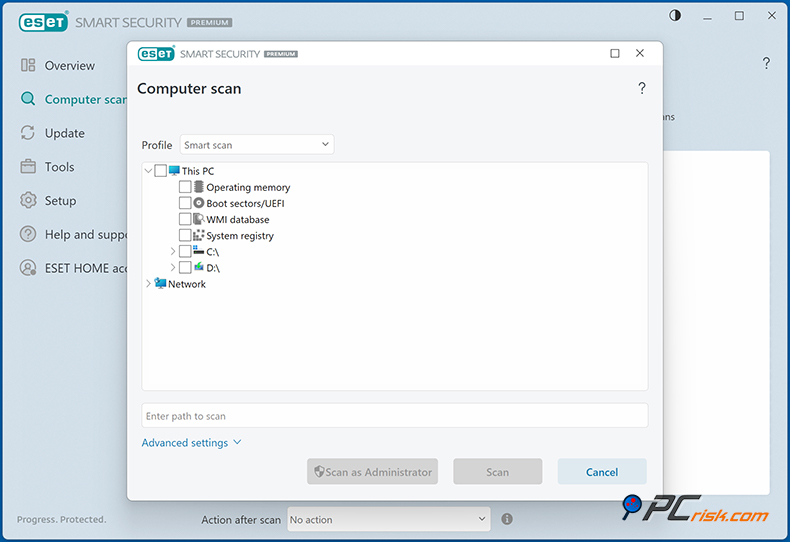
The software includes multiple scan functions, quick, full, and custom options, and lets you schedule them for more convenient times. Thanks to ESET's fine-tuning, these scans are usually lightning fast and won't weigh down your system. It can neutralise many known threats, viruses, trojans, worms, spyware, and more, and quarantines or blocks them so they don't get out of hand. When it detects a threat, ESET will send you a barely noticeable warning.
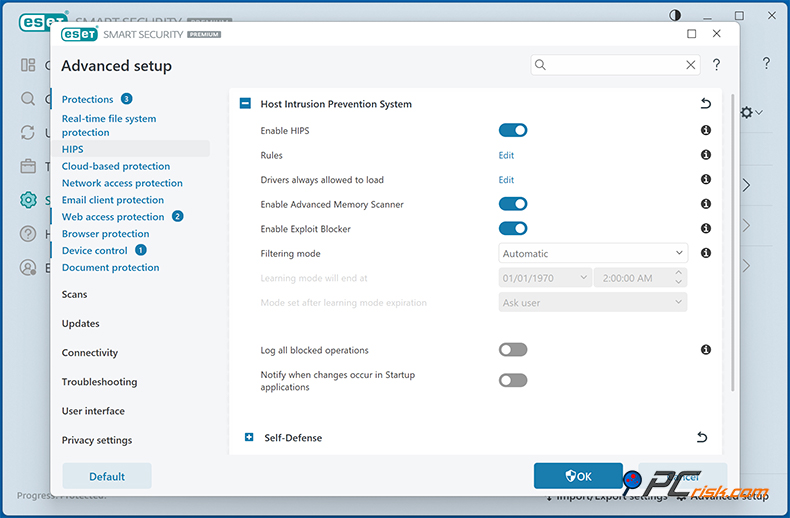
• Behavior Monitoring (HIPS): The Host-based Intrusion Prevention System (HIPS) that ESET contains looks at how much each running process is up to, and if it notices something that doesn't seem right, such as a program trying to sneak into another one, or alter key system files, it can block it, even if it doesn't know the specific programme.
Advanced users can tinker with the settings and sensitivity. When an unknown piece of malware or a zero-day threat appears, traditional signature-based detection won't be able to catch it, as it is brand-new. ESET, however, is here to cover this gap with its behaviour-based detection.
• Ransomware Shield: Modern ESET versions have dedicated ransomware protection. It can pick up ransomware attacks that start to modify multiple files at once, and stop any applications that don't belong from changing your personal files.
With Secure Data encryption (found in the higher-tiered versions) and regular backups, ESET's ransomware shield will provide you with the strongest defense against file-encrypting attacks. When a brand-new ransomware strain tries to encrypt your documents, ESET should be able to see the pattern and shut down the process, lessening the impact of the attack.
• Advanced Memory Scanner & Exploit Blocker: ESET's Advanced Memory Scanner helps detect deeply embedded malware and fileless threats (which might only exist in memory). The Exploit Blocker shields commonly used applications such as web browsers, PDF readers, office suites, and so on from exploits, like those that come through malicious documents or web plugin vulnerabilities. In the background, this combo effectively pre-empts many of the hackers' attack techniques, stopping the bad guys in their tracks.
• Web and Email Protection: ESET Internet Security and above includes robust web protection and a very effective anti-phishing filter that will block known phishing sites and dodgy URLs, and can stop the loading of malicious web pages. If you click on a bad link or get a phishing email, ESET will likely intervene and save you from any damage. The software also scans your incoming email (POP3/IMAP) for malware, which is a must-have if you use a desktop email client.
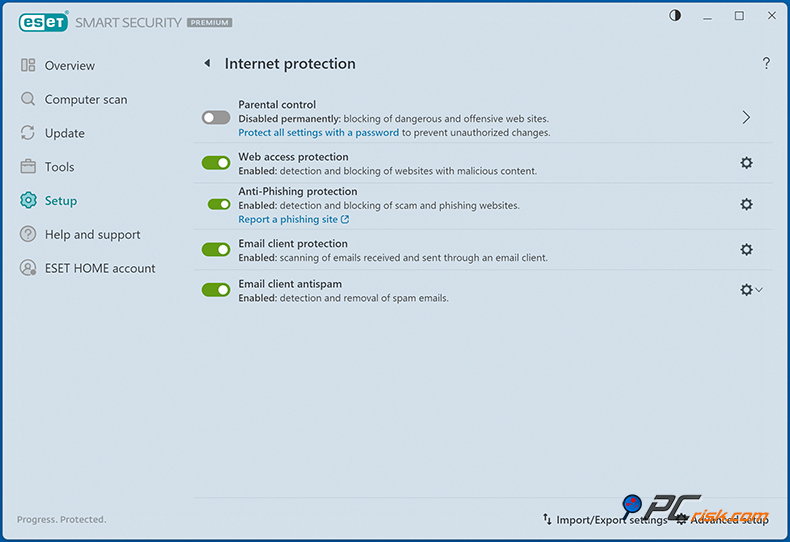
ESET gives you peace of mind regarding email attachments and the ability to tag suspicious emails in Microsoft Outlook. During our usage, ESET demonstrated the ability to block malicious downloads and intercept phishing pages before any credentials were entered, which is reassuring for safe browsing.
• Firewall and Network Security: ESET in the Internet Security and above editions feature a fully-fledged two-way firewall that completely replaces the standard Windows Firewall, with some serious smarts. It can run automatically or be put into interactive mode for more advanced users who want to be in charge.
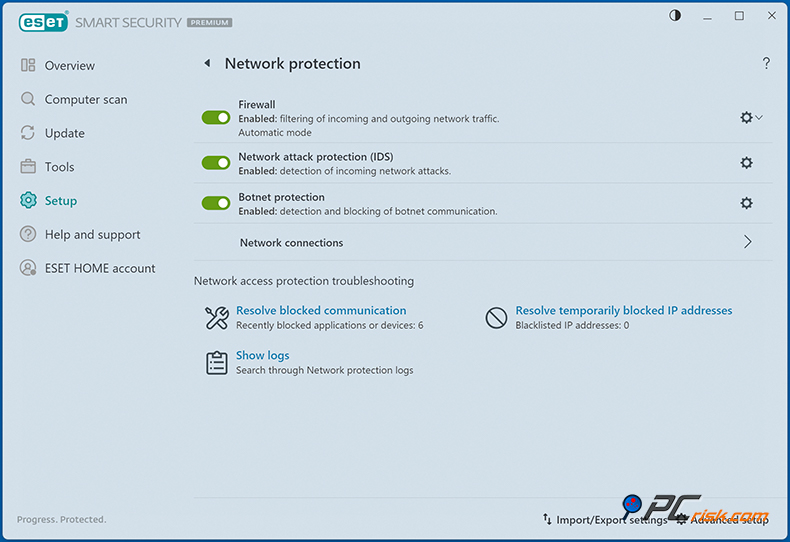
The firewall also gets Network Attack Protection, adding a bit more deflection power to stop specific exploits and port scans. Additionally, ESET's Connected Home Monitor (network scanner) lets you see devices connected to your Wi-Fi network and check them for vulnerabilities - a useful feature to spot any unfamiliar device on your network or insecure router settings.
• Anti-Phishing and Secure Browser: ESET's anti-phishing database is constantly being updated to defend against phishing sites. ESET has a feature to shield you from any cyber threats, when you go online for financial activities.
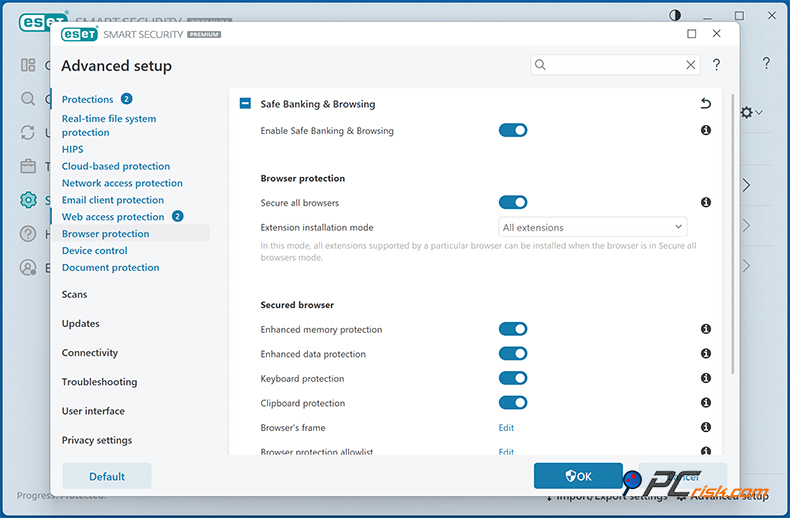
Its Secure Banking & Payment Protection kicks in when you visit a financial website, sending your browser session to a hardened, isolated session to protect your transactions from keyloggers and man-in-the-browser malware. This feature blocks extensions, boosts security settings, and is basically a necessity for anyone who regularly does their online banking or makes purchases on their PC.
• Device Control: ESET's Device Control is a somewhat lesser-known feature, but it lets you manage how your computer responds to external devices, such as USB flash drives, external hard drives, CDs, and even phones that hook up via USB.
You can set rules to block unauthorised removable media or make USB sticks read-only by default, which is an excellent way to prevent malware that spreads via thumb drives. Like the one that automatically runs files when a drive is inserted. This feature is primarily of interest to advanced users or businesses, but it's nice that ESET includes it in consumer products as well.
When discussing modern threats, ESET's security features cover them all. Combining signature detection, behaviour analysis, exploit blocking, and network protection, its multi-layered defense is the perfect way to keep you safe. It can provide a smooth, no-frills experience on default settings and fine-tunable settings for those who need them.
Overall, ESET's extensive array of features, from the capability to control the depth of the scan, to customisable firewall rules and HIPS options, makes it appealing to those relatively new to internet security and those more tech-savvy. No matter if you're on your PC, phone, tablet, or server, ESET ensures you're shielded from web-borne threats, even if it's malware that tries to disable your security, and that, I'm sure, will bring great peace of mind.
Additional Features
ESET's feature suite comes with some extra features that are not necessarily about virus detection, but offer significant value and convenience. Let's look at some of the notable extras ESET provides:
• Password Manager: ESET's Password Manager (included in the Premium and Ultimate editions) allows you to store and generate passwords and fill in login forms in your web browser. In our test, we found the ESET password manager to be easy to use. However, as a password manager, it was a bit basic.
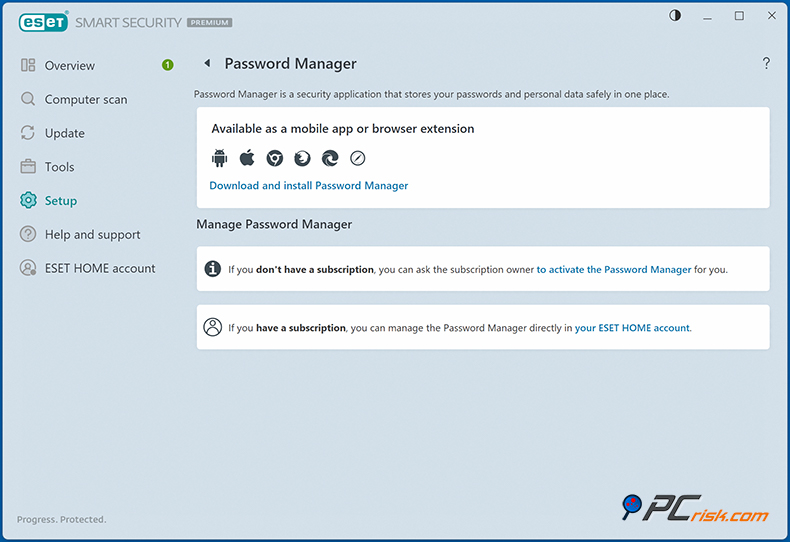
ESET's password manager may not have the same depth of features as dedicated password manager apps. However, it still covers the essentials in a pleasingly friendly interface, making it an excellent option for people who don't have a dedicated password manager.
• Secure Data (File Encryption): Secure Data is another feature exclusive to the Premium/Ultimate tier. It is a data encryption feature that allows you to create encrypted virtual drives that can be filled with sensitive files. You can think of it as a secure folder, accessible to you alone. The encryption utilizes the robust AES-256 encryption standard, and getting started is made easy with a wizard.
One of the options is to create a secure vault that's essentially an encrypted drive when using ESET Internet Security. Accessing this vault requires the correct password, and when you lock it, it turns into a completely unreadable file on your disk.
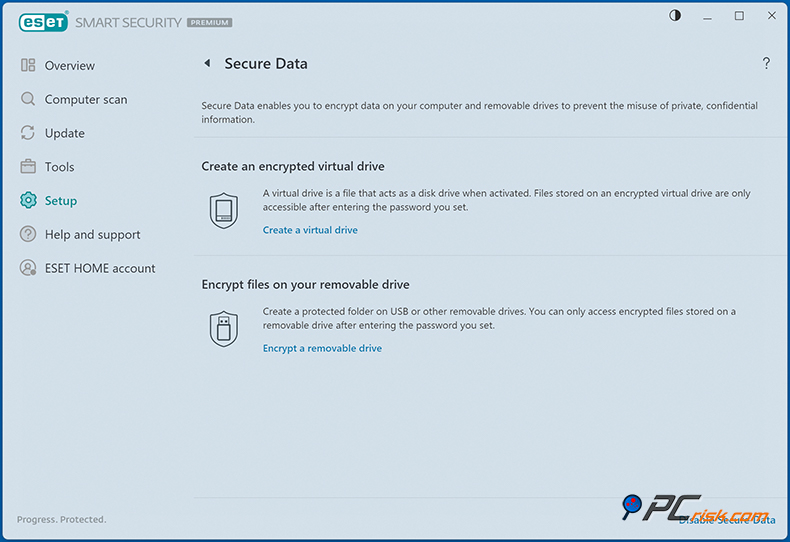
The vault makes it virtually impossible for thieves to access the contents, even if they steal your laptop. Secure Data is a particularly nice feature for people who work on portable computers, and also takes advantage of ESET's anti-theft. ESET lets you mark a device as missing, and will trigger encryption on your files, or activate other defensive measures.
One thing to note: the default setting for ESET's secure drives is to automatically decrypt for the current user when you're logged in, to make things more convenient, but we recommend disabling this to get maximum security. We want your vaults to require a password each time they're opened.
• Anti-Theft: ESET's Anti-Theft feature is included in ESET Internet Security and above. It's one of those features you hope you never need, but it can be a lifesaver if you do. Logging into the ESET Anti-Theft web portal lets you manage a device that's gone missing. You can even track its approximate location (using IP address/Wi-Fi networks), view screenshots, or surveil through the webcam to catch the thief.
ESET will start silently gathering information the next time it goes online, so you can try to recover it when you mark a device as missing. You can also send a one-way message to the device to aid in its recovery. The remote lock function in Anti-Theft is also available, stopping any unauthorised access to the device.
Based on our tests, ESET's anti-theft function works exactly as it's supposed to. It's basically the same as Windows' 'Find My Device' but with many more forensic capabilities. Trusted to recover lost laptops and mobile phones, this feature could be a lifesaver.
• Parental Control: ESET Internet Security includes basic parental controls that let you set up profiles for children, categorise web content, block specific websites, or limit internet time. Although its interface isn't as polished as dedicated parental control software, it's still enough for many parents to put a safety net around their children's online activities.
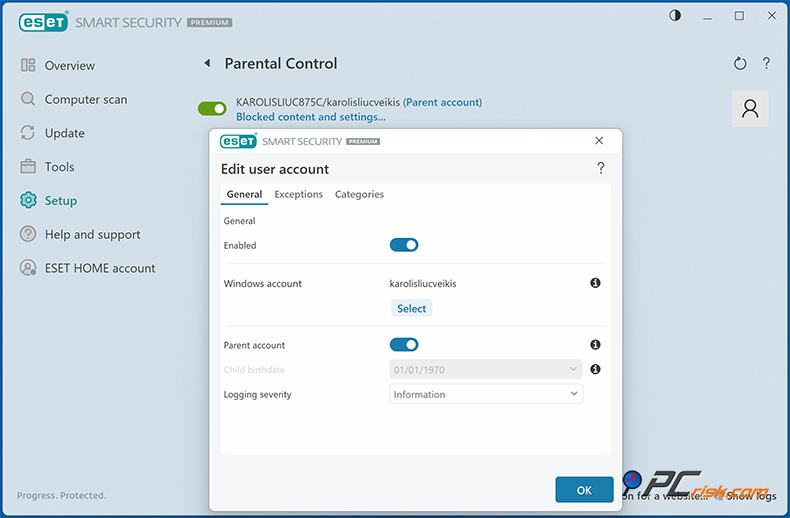
If you want more control, the ESET Parental Control app on Android is well worth mentioning. ESET's parental controls are found through the main interface, although ESET's own review said they're somewhat hidden under the Setup & Internet Protection section and aren't enabled by default when you're on the Windows platform. Content filtering is on the basic side, but better than having no control at all.
• Secure Browser & Online Payments Protection: As mentioned earlier, ESET offers a secure browser environment for sensitive transactions. This feature might also be listed as "Banking & Payment Protection." When you navigate to banking sites or want to do online shopping, you can launch a secure session that isolates the browser from the rest of the system. In this mode, ESET ensures that keystrokes are protected and other processes can't snoop on the browser. It adds peace of mind when managing finances online.
• ESET LiveGuard (Advanced Threat Defense): This is a cloud-based feature, which is now available in recent versions for more expensive plans, basically a sandbox for analyzing suspect files.
If ESET can't tell what a file is, they can upload it to their cloud lab with your consent and detonate it, then see what happens. If the file is malicious, ESET kicks in to take care of it, catching brand-new, unknown malware that has managed to slip past regular defences. This feature is very discreet but knocks out zero-day threats thanks to cloud-based intelligence.
• System Optimization Tools: In relation to system optimization tools, ESET antivirus doesn't go overboard on cleanup and tune-up features, but does have some useful utilities. There's ESET SysInspector, a detailed diagnostic tool that can produce logs of running processes, drivers, etc., and is often used by the support and advanced users to troubleshoot.
A built-in Scheduler is there to let you schedule tasks such as scans or signature updates, and there's a Process Monitor in the Tools section that helps you see the reputation and activity of every single running process.
ESET has a Browser Extensions section to help you manage your add-ons, and a License Manager to track what devices are using your license. These aren't necessarily additional features that face the user, but they're the missing pieces in the jigsaw that give ESET its well-rounded capabilities.
• Identity Theft Monitoring: In its Ultimate plan, ESET teams up with a third-party to provide full identity theft protection. This isn't confined to device security, but digs deeper and monitors the owner's personal data. You can enter your email addresses, credit card numbers, or any other personal details, and the service will search the dark web and breach databases to see if that information has been leaked. You'll get alerts if your data is found in a new breach (so you can change passwords or take action).
Looking at the features in ESET's security suite, one of the most compelling additions is identity protection. This includes monitoring your credit report in supported countries, as well as insurance coverage up to $1 million to cover the cost of identity restoration.
Included in the Ultimate plan, this is an attractive feature that is normally offered by identity protection companies, so it's a real bonus in ESET's suite. Unluckily, these identity monitoring features aren't included in the Essential and Premium plans, and neither of those tiers has identity protection, only the Ultimate does.
• VPN (Virtual Private Network): Also exclusive to the Ultimate tier, the ESET VPN offers secure, encrypted internet access that is basically a VPN rebranded by ESET, coming from NordVPN's infrastructure. You can use it with limitless bandwidth, so you won't have to worry about being cut off.
The VPN is technically a separate application that can be activated through the ESET interface, which means that if you already have a VPN or don't see the need for one, this feature might not be crucial to you.
In summary, ESET's additional features make it more than just an antivirus. It's a comprehensive security suite that includes a password manager, encryption tool, anti-theft, and a secure browser. Scrolling through the feature list, you won't find any unnecessary tune-up tools that other providers throw in to pad out their offerings.
ESET has zeroed in on the things that really matter to security and privacy, and if you put them to use, they will take the value of the product to the next level. If, however, you don't require a few of these features, you can opt for a lower tier and still get good protection, just without the extra tools.
Impact on Performance
In the case of the performance of ESET, the company's lightweight design and efficient algorithms mean that running ESET won't slow down your computer. Based on our experience and testing, we've found that ESET doesn't put much strain on your system's resources. Here are some observations on ESET's performance impact:
• System Requirements and Resource Usage: The ESET program itself has a tiny footprint, the installer is compact, and when in idle mode, the program consumes a small amount of memory, roughly 100 to 200 MB, which is practically negligible for a full antivirus suite. When the scanning process starts, the CPU and disk usage will pick up, but ESET takes care to avoid getting in the way of your work. We were able to work normally on a PC even as a full system scan ran in the background, with just a minor slowdown.
• Performance Test Results: AV-Comparatives, a reputable testing lab, has also supported our observations, awarding ESET an Advanced+ rating in their Performance Test, which basically puts ESET in the top league for system speed. Their test looks at everyday tasks such as copying files, launching applications, browsing the web, and installing software while the antivirus is running, and the result is that ESET has little impact on system performance.
• Gaming and Multimedia: ESET is a sound choice for those who want a virus protection that won't weigh down their computer. It automatically enables its "Gamer Mode", pausing non-essential background activities such as scheduled scans and updates so that it doesn't interfere with your gaming when ESET detects a full-screen application or game. This mode also has a very small footprint, so it won't hog system resources away from your games or video editing software.
Users love ESET because it's described as 'light', and is often suggested to those who want a virus scanner they can "set and forget" without it affecting the performance of their system.
• Boot Time and Background Tasks: In our test, we found that it doesn't add much to system boot times, and does indeed start up quickly. Background updates and new signature database downloads happen fairly regularly, about every hour, but are minuscule and don't increase network or CPU usage. Once applied, these updates are quick and virtually never require any action from the user, nor does ESET pester you all over the place, which in itself can affect performance by taking up too much of your time.
• Comparison to Windows Defender: ESET is a lot more efficient than Windows Defender when it comes to running on Windows 10 and 11, too. When both are installed, Defender will actually be disabled. People often say that ESET gives their system a much-needed boost in terms of speed and efficiency. Coming in second place, Defender is still improved, but it does tend to use more CPU during scans and updates than ESET does.
• Old Hardware: It can still perform well when running ESET on old hardware. ESET's system requirements are quite low. Just a 1 GHz processor and 2 GB RAM can run it just fine on Windows. If you have an older laptop, ESET's light footprint will be beneficial. It's also got an adjustable performance feature that lets you tell it to only scan when your computer is idle and to stop scanning when you don't want any background activity. You can also control the depth of the scans and priority.
During our internal testing, ESET stood up to a barrage of malware, blocked the threats, and didn't slow the system down. There were no crashes or freezes, and the user interface loads and is responsive very quickly. Coming in with the lowest system footprint in its class, ESET hits a great balance between a rock-solid defense and being low-key on your system.
Ease of Use
ESET's user interface and overall usability can be described as clean, professional, and mostly intuitive, with a few quirks. As an antivirus designed by a company with a long history in cybersecurity, ESET's approach tends to cater to both novices (simple on the surface) and advanced users (many settings under the hood). Here's what to expect in terms of ease of use:
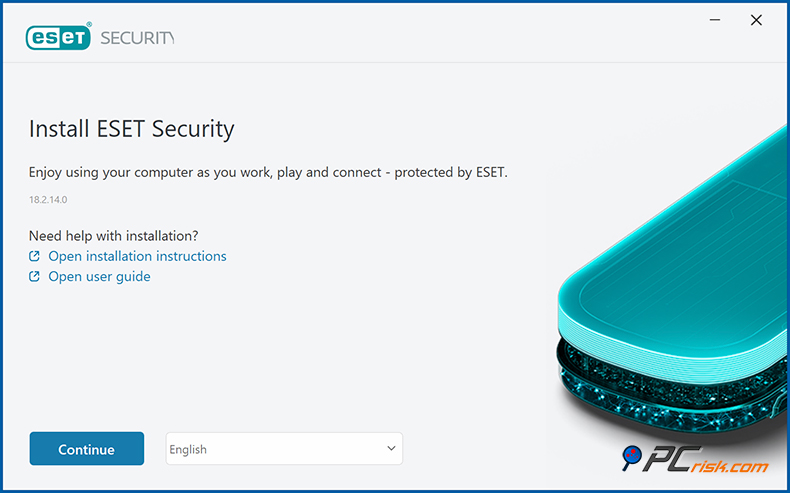
• Installation: ESET's installation process is about as smooth as it gets. The download is lightning fast, and the setup wizard walks you through with only a few questions. It also automatically asks if you want to activate the recommended settings, and if you don't, you'll be able to set up the software yourself quickly.
New users will be fully functional in just a couple of minutes, and during the installation, you'll create or sign in to an ESET account to manage your license and Anti-Theft, and that's done without a hitch. Our tests showed that ESET installed on our test systems was faster than many other antivirus programs.
• Interface Design: The main ESET window has an Overview tab, which uses a modern and tasteful dark gray background and green accents when everything is secure. The dark mode is lovely on the eyes and can be flipped to light mode if that's your preference. The general organization of the interface is spotless.
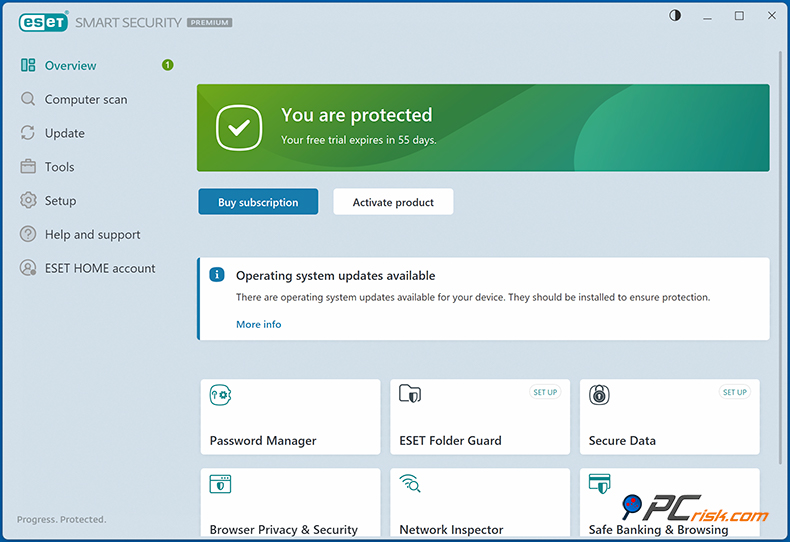
You'll notice a vertical menu on the left-hand side that contains seven main sections when you navigate the ESET interface: Overview, Computer Scan, Update, Tools, Setup, Help and Support, and, in some versions, integration with your ESET Home account. These seven sections cover most of what you'll need, with the Overview page giving you a quick glance at your current status. It'll say "You're protected" with a nice green tick, or show you any areas that need attention.
• Navigation: In the left-hand menu, you'll find Computer Scan, which is the place to start or schedule a scan, and Update, where you manually check for the latest virus definitions. Although ESET will usually do this for you, so this isn't something you'll need to do very often.
Tools is where things get really interesting, here you can find the Quarantine (to manage quarantined files), Log files (detailed reports of detections/events), Running Processes (with security insight), Network connections, Scheduler, and other advanced features.
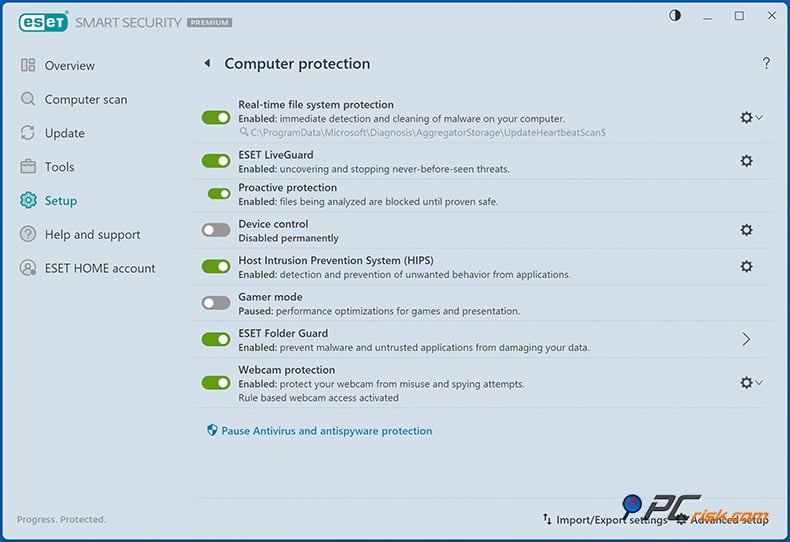
This section is gold for advanced users who want to see what's happening under the hood. "Setup is where you configure different protection modules. It is broken down into sections for Computer, Internet, Network, etc., where you can drill down into more detailed settings. Features like Parental Control can be turned on from here, and you start with default settings.
• User Experience: Regarding the average user experience, the ESET software is basically set to go right out of the box, and for the most part, you won't need to fiddle much with the Overview or Computer Scan tabs. Recognized problems, such as an expired license or a disabled module, will be immediately apparent on the Overview screen, and clear instructions on how to fix them will be presented.
Daily use is very much hands-off, and ESET will sit quietly in the system tray unless it has a message to send to you. Such as it's blocked a threat, or requires a reboot after a major update.
We're also pleased that ESET doesn't pester you with annoying ads or upsell notifications. You won't be bombarded with requests to upgrade to a higher plan or to buy add-ons.
• Settings and Customization: ESET does provide granular settings for those who want them. By switching "Advanced Mode" on or going into the Advanced setup, you can find settings for each component. These settings, for example, allow you to edit real-time protection settings, exclude certain file types, turn up or down how aggressive the heuristics are, and hand-configure the firewall rules.
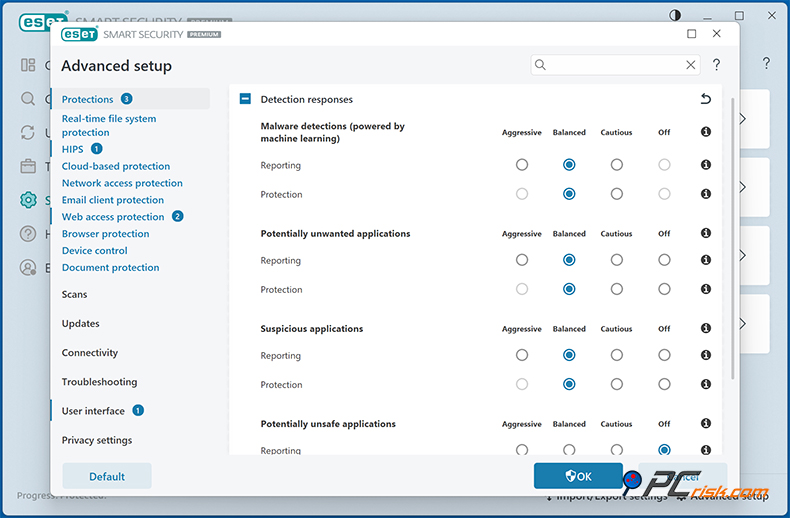
The settings are organized in a tree view and might overwhelm new users, but the default settings are generally optimal. Advanced users will enjoy the level of control (for instance, you can create complex firewall rules or HIPS rules, which not many consumer AVs allow). One can easily become immersed in the settings, but unless you need specific customizations, it's not necessary.
• Quirks: ESET has a clean UI but has a couple of eccentricities. Coming from other AVs, users may expect a one-click scan option on the main screen, but here it's a two-stage process: from the main Overview screen, one has to select the Computer Scan section to initiate a scan.
Another quirk, as noted, is the placement of some features like Parental Control under multiple sub-menus (Setup → Security Tools → Parental Control), which could be more upfront. These don't detract much from usability but indicate that ESET's UI is designed more for clarity of status rather than as a "control panel" with all actions on the front page.
• Updates and Maintenance: The company's commitment to ongoing updates is very impressive. Virus signature updates run in the background and are frequent (usually several times a day). Program updates are handled smoothly as well, users are sometimes presented with a message that a new version is available, and may be asked if they want to install it, taking only a couple of clicks to do so.
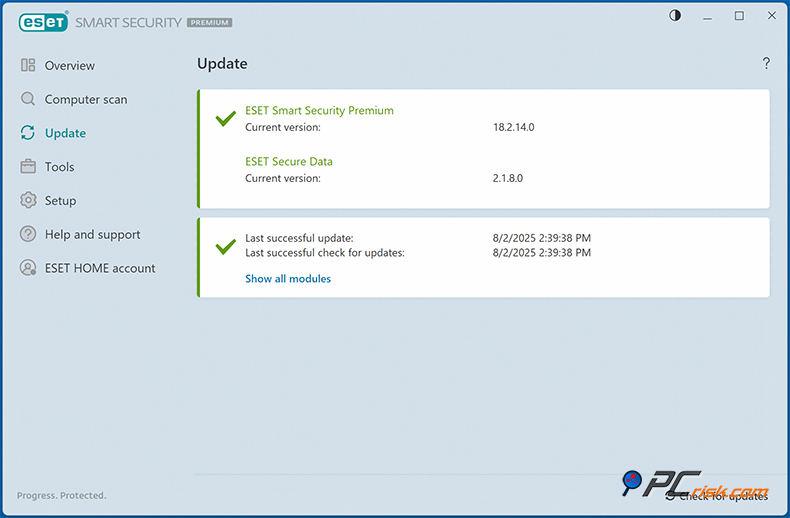
During our review, the installation was completely seamless, requiring nothing more than a restart after we recently updated ESET. License renewal or upgrade is also integrated: the program will warn you as your license expiration approaches, and you can enter a new key or follow a link to renew. This is the standard process, but it doesn't get on your nerves.
• Help and Support: The help section is well-stocked, offering a user manual and sending you to the ESET website if you're stuck. The interface also has tooltips that explain any settings you're not familiar with.
• Mobile and Cross-Platform Sync: If you're using ESET on multiple devices, the ESET HOME portal (and the mobile app) acts as a control centre for those devices, basically letting you see the security status of your Android phone from your PC or vice versa. Although not part of the antivirus UI, this feature does contribute to the convenience of life in a household with lots of different devices.
In summary, ESET is intuitive for both beginners, who can install it and let it go to town with default settings, and experts who want to delve deeper into the settings, will be able to do so. ESET's interface is uncluttered, without the eye-catching but confusing gimmicks that some competitors are guilty of. There is a sense of a mature, no-nonsense design philosophy.
Daily usage of ESET has been smooth and hassle-free. The application gets its job done quietly and presents the options in a logical way, so a new user would feel at home with ESET after a short time. Overall, ESET scores high on usability, with just a couple of very small areas that could be more intuitive.
Mobile Apps Overview
ESET's mobile security offering is led by the ESET Mobile Security app for Android, which can be activated with a multi-device license of Internet Security or higher when securing your mobile device. Here's an overview of ESET's mobile security offerings:
• ESET Mobile Security for Android: ESET's Android app is basically a comprehensive antivirus and security suite for your phone, and in its free version, comes equipped with on-demand scanning, auto-scanning of brand-new apps, and very basic security check features.
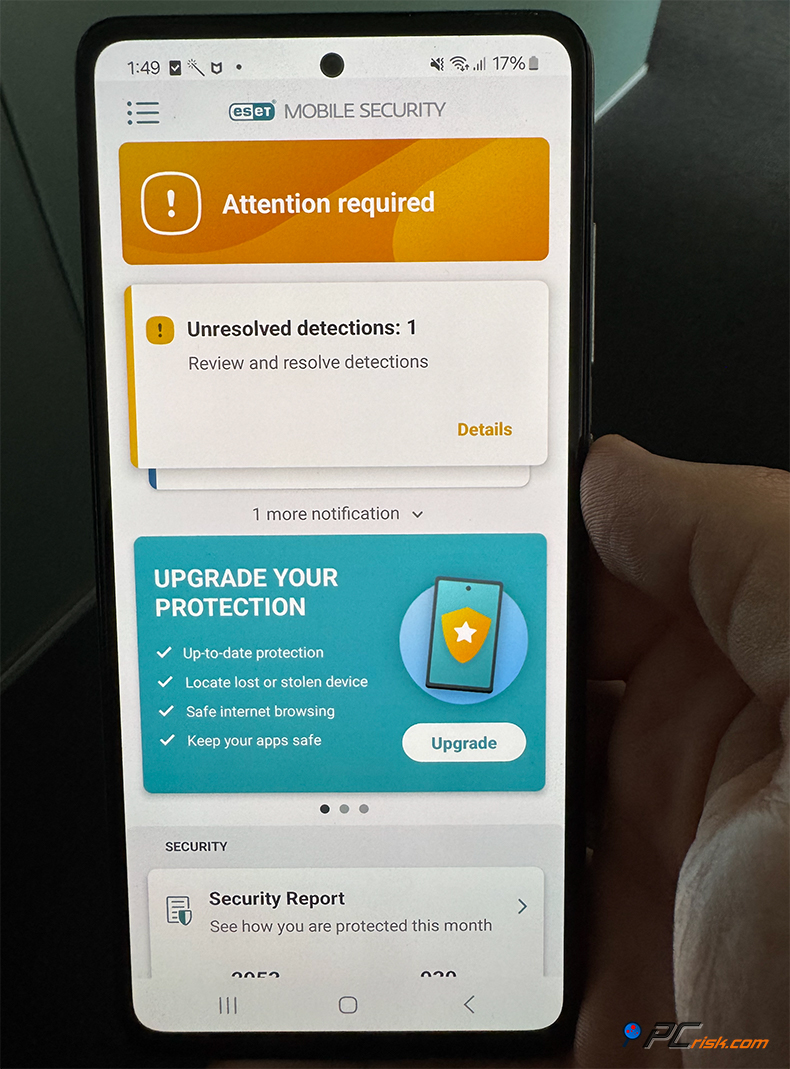
When you activate the Premium features either by subscribing to it through the Google Play store or by using your ESET multi-device license, you're granted access to a wide array of cutting-edge features :
• Malware scanning: At the heart of ESET's mobile security is the high-performance malware scanner, which scans apps and files on your phone for viruses, trojans, spyware, and more. Using the same threat database as ESET's desktop solutions, its NOD32 engine is ARM-optimized. It's light on phone resources and can be set to update via Wi-Fi only to save on data.
• Real-time protection: It monitors new app installs and files in real time, similar to on a PC, to catch threats immediately.
• Anti-Phishing: It also has an anti-phishing feature that guards your web browsing and blocks malicious or phishing sites. It works with different browsers, meaning that if you click on a phishing link in an email, ESET will block it if it's a known problem site.
• Anti-Theft: The mobile app has anti-theft features, too. ESET Anti-Theft allows you to log in to the web interface, send a remote alarm signal to help find your phone, lock the device, or wipe its contents when your phone goes missing. It can even capture a photo with the front camera after a wrong password attempt and send it to you.
• SMS & Call Filter: Coming in handy to cut down on spam, SMS & Call Filter lets you block unwanted calls and messages.
• App Lock: This feature lets you lock down sensitive apps like messaging, banking, and so forth, requiring a PIN or fingerprint to open, adding an extra layer of security to your life.
• Security Audit: ESET provides a security audit feature that runs a check on your phone to expose any potential security weaknesses, like enabled Unknown Sources or an out-of-date operating system, and gives you practical advice on plugging such security holes.
• Usability: The Android app is well-regarded for being user-friendly. It has a clean interface and color scheme similar to the PC client (white/dark options with green highlights). It runs efficiently - in fact, on the Google Play Store, ESET Mobile Security has a very high rating (around 4.8★ from millions of users), often with praise for its light impact and effective protection.
• ESET Parental Control (Android): This is a completely separate app, which you will find on the Play Store. It's not part of the main Mobile Security package, but available for subscribers. It gives you an absolutely superior level of control over your child's Android device, including detailed app reports, time limits, and web content filtering. It also links up with your ESET account, allowing you to manage all your settings.
If you're looking for a top-notch mobile antivirus solution, ESET Mobile Security Premium is definitely one of the best in the market, according to AV-TEST's consistent full scores for its Android malware protection. Based on our limited experience with Android malware samples, ESET's effectiveness in neutralizing threats is undeniable.
If you're already a PC user with ESET, you'll be glad to know that ESET Mobile Security Premium covers both your phone and computer under the same license, and is therefore, an affordable value.
• ESET on iOS: Things are slightly different with ESET on iOS. Due to Apple's strict policies, there isn't a way to have a traditional antivirus scan on your iPhone or iPad. Therefore, ESET doesn't have a conventional antivirus app for these devices.
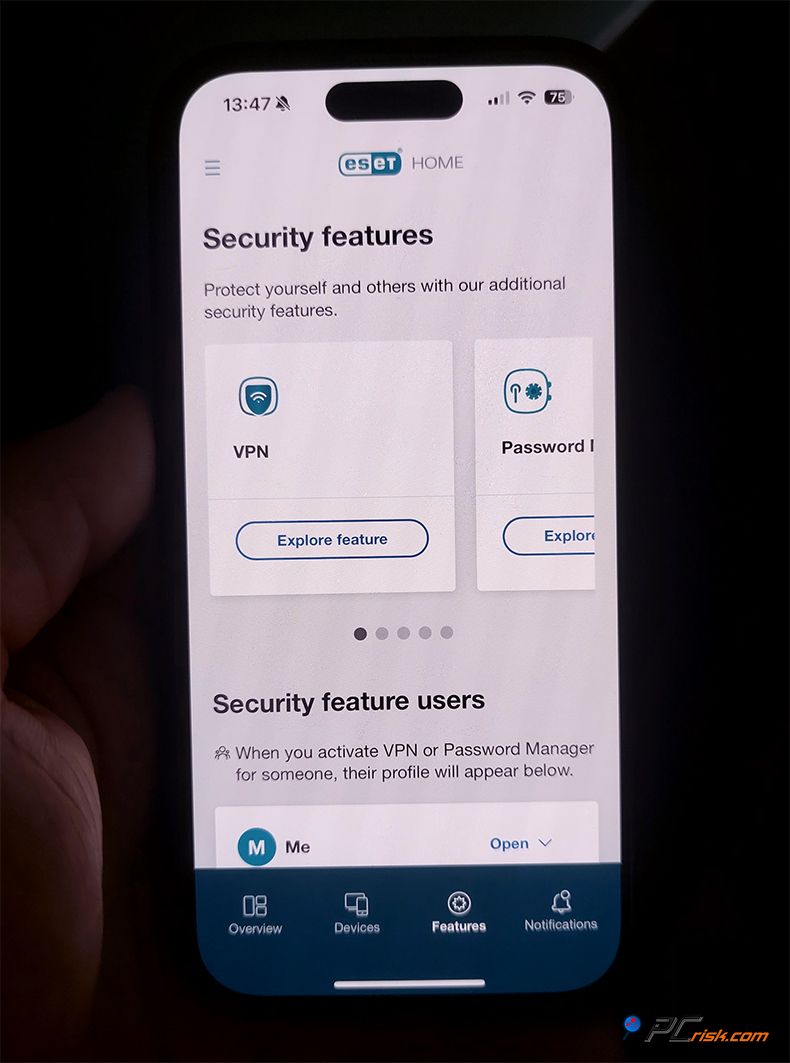
When using ESET, you'll find the ESET HOME app for iOS is mainly used for managing your license and seeing the status of all your other devices. For Ultimate plan users, there is also an ESET VPN app for iOS (since the VPN is part of that plan).
Concerning iPhone protection, ESET has a password manager app for iOS that you'll need if you use the ESET password manager. This app allows you to manage your passwords right on your iPhone, which is really handy. Now, ESET's iOS protection is restricted to VPN and password management. It doesn't include anti-malware scanning or anti-theft functionality, as the built-in Apple ecosystem covers some of this ground. ESET can't scan an iPhone for viruses because the iPhone's sandbox doesn't let it.
Setting up ESET is very straightforward. On Android, you download the free app from the Google Play Store, sign in with your ESET license details to turn on the premium features, or purchase them directly in the app. The app then walks you through asking for the necessary permissions, including device admin for anti-theft and accessibility for web protection. When using ESET on iOS, you'll need to install the password manager and VPN from the App Store and log in.
Cross-Platform Integration: From a holistic approach, one of the things that ESET does well is integrate your devices, be it through the web portal or the mobile app, and show you the status of both your PC and phone. If your phone picks up some malware, it's reflected on the portal. You can initiate an on-demand scan on your phone right from the portal, and more. It's convenient for households with lots of devices or individuals who manage many gadgets.
In conclusion, ESET's mobile apps, particularly the Android one, have made the leap to shielding smartphones and tablets. Considering how much sensitive information we store on our phones, the anti-malware and anti-phishing capabilities of ESET's Android app are a godsend. With its high user ratings and based on our experience, it seems to be quite effective and doesn't get in the way.
Since traditional AVs can't run fully on iOS, the fact that ESET doesn't have a full-fledged app for iPhones isn't a failure on ESET's part, but you should be aware of it if you're an iPhone-only user. In that case, the value ESET brings to you will probably be in protecting your PC/Mac and using the identity protection and VPN on your iPhone. For Android users, ESET provides one of the best mobile security apps out there.
User Reviews and Reputation
Reading the real-life feedback from users is a great way to see how the software performs in the real world, when checking out ESET. Coming from various platforms, ESET generally has a great reputation, being light on system resources and rock-solid in its protection. Here's a summary of what users are saying on different platforms:
• Trustpilot: According to thousands of Trustpilot reviews, ESET scores an impressive 4.0 to 4.2 out of 5 stars. Users rave about its stealthy performance, speed, and reliability, even after years of people claiming to be completely infection-free. However, the rare negative reviews mainly concern customer service or billing problems.
In the case of the few, albeit vocal, critical reviews, the problems were more to do with the payment and renewal process. Automatic subscription and cancellation have been causing some headaches, and people have gotten their wires crossed with license keys. A handful of these problems are, however, a tiny minority. ESET's support team has usually sorted out the problems, but could perhaps be clearer about the renewal policies.
In summary, ESET's reputation as a reliable, well-known security suite provider is confirmed and solid, according to the people who've put it to the test.
• Reddit and Tech Forums: Regarding antivirus software, Reddit and tech forums are great places to hear from users and IT experts about the different options out there. On the r/antivirus and r/technology subreddits, ESET is often mentioned positively, with numerous users praising it as "the best AV they've used". Sometimes even in the top 3, on a par with Kaspersky and Bitdefender. The users appreciate the high level of configurability that ESET is known for, and rare occurrences of false positives.
A discussion on the marketing front, or lack thereof, in the United States can be found with one user mentioning it's not so prominent. Well-known competitors are more aggressive about marketing and are better recognized in America, whereas people who find ESET tend to stick with it. Comparing antivirus software, there have been times when ESET detected threats that others did not. But the consensus is that it will not miss anything, and will not be outperformed by the very best, if at all. Kaspersky and Bitdefender are a couple of the well-known examples in that bracket.
As far as ESET's reputation and privacy policies are concerned, it has a clean history. For instance, unlike some others, ESET has never been involved in scandals and publicised personal data mishaps, so it's not surprising that its users trust it and give their vote of approval in many reviews.
There have been comments about the interface's dated look, and a couple of users mentioned that the advanced settings are difficult to access. But this didn't seem to be the main point of criticism. We couldn't find anything more serious. Solutions for business like ESET Endpoint, which share the same engine as household products, get very good reviews from experts.
• Google Play Store (Android app reviews): The ESET Mobile Security app has been downloaded millions of times from the Google Play Store and averages a 4.8 out of 5 rating. The feedback from the users is that the app is reliable and able to catch any threat without putting a strain on battery life. Plus, they like the anti-theft feature. Many Android users keep returning to ESET year after year, which is a clear sign of customer satisfaction.
Lower ratings come from people who used the free version and thought they didn't get enough features. This isn't necessarily a criticism of the app's performance, but rather a complaint about the freemium model.
• Professional Reviews and Awards: While not exactly "user" reviews, it's worth noting that ESET often gets praise from professionals. PCMag's experts often give ESET high marks for its strong protection and low system load. ESET has also won the PCMag Readers' Choice Award multiple times because the people who use it love it and vote it as the top security product for their needs.
Well-known for its top-notch support, ESET offers users the option of email and phone support. People who have contacted the company have said they got fast, helpful responses. From the user's perspective, the interface is user-friendly and doesn't push ads or upsells.
They can be sure that they've got their security well-covered and won't be bogged down by frequent updates and slowdowns when people choose ESET. The high number of positive recommendations that ESET receives is a testament to its faithfulness to quality and real value. ESET has built an impressive reputation with 5, 10, and even 15-year-long-standing users who can attest to its continued value, which gives people confidence and builds a real bond.
Since ESET is based in the EU, Slovakia, and adheres to stringent privacy policies, some users choose it over more questionable alternatives. Well-known as being free of major infrastructure breaches and any dubious sales of user data, it's clear ESET knows the ropes, too. In the eyes of the tech community, clean history, security and privacy and respect, what's not to love?
In summary, positive reviews for ESET cover its ability to protect and not slow down your computer, and offer lots of extra features, and those that were critical (mainly regarding price and renewal plans) weren't really significant. We always encourage users to try the 30-day trial to form their own opinion, but the existing user base's feedback is a reassuring indicator that ESET delivers on its promises.
Is It Worth Buying ESET Antivirus?
A question that comes to mind is whether it's a worthwhile investment when weighing the costs and features of ESET antivirus. In our analysis, the answer is yes, especially for certain types of users, but let's break down the considerations:
• Strengths of ESET: Recognized for its top-notch malware protection, verified by us and independent lab tests, ESET is the rare antivirus that walks the tightrope between high security and low system impact. It seems to excel in doing so, and its added extras, such as a firewall, anti-theft, and secure browser, make a significant difference in various aspects of computer security and don't add any bulk to the software.
ESET is also highly configurable; power users will love tweaking the settings, and those who don't will be able to just install it and go. The company is also completely trustworthy, with a spotless reputation for not misusing customer information or employing fear-mongering sales techniques, so you can rest assured your data will be safe.
• Scenarios where ESET excels: If you use your Windows PC for day-to-day activities, gaming, or work, ESET's exceptional malware and ransomware protection won't disappoint you. It's also the way to go if you want to cover your Android phone, with one license providing you peace of mind that doesn't come at an additional price.
Those of you who are fed up with Windows Defender's basic protection but can't afford the heavy-handedness of older Norton/McAfee versions might really appreciate ESET's lighter touch. If money is on the tight side, the difference in terms of user experience is clear.
• Cost vs. Value: When it comes to price, ESET is right in the middle of the pack. It's not the cheapest but also far from the most expensive. The Essential/Internet Security tier gives you basically everything you need for top-notch protection. If you want the password manager and encryption that the Premium tier offers, it's definitely worth it, but if you won't use them, there's no need to go for the Premium.
The Ultimate tier is pricier but if you're looking for a VPN and/or identity protection, ESET Ultimate may actually save you money by bundling those services with the AV, but if you won't be using them, you can stick to the lower tiers. The modular system ESET uses is also a definite plus. They don't push the Ultimate tier on you, it's up to you.
• Competitors: ESET is holding its own when pitted against other well-known brands. It's in the same protection league and even outperformed some of the bigger names in recent independent tests. Looking at the competition, some companies may come with more flashy features, such as unlimited VPNs in all plans or system tune-up tools, but these features can sometimes bloat the software. ESET takes a streamlined approach, focusing on the security essentials and executing them to the best of its capabilities.
For example, Norton 360 includes features such as cloud backup and a VPN in its mid-tier plans; however, Norton's system usage is rather high, and its performance has been problematic. Bitdefender is another player in the game. Bitdefender delivers top-notch protection, but its interface is rather puzzling, and it also tends to set up many additional tools. On the other hand, ESET often gets by without fanfare, yet its user base is incredibly loyal, testifying to the product's value.
• Longevity and updates: Buying ESET is not a one-off, it's more a regular commitment to a security service that evolves and improves over time. ESET has shown that it is up-to-date in addressing new threats. Having a virus protector that is able to adapt is basically a must-have in today's rapidly changing world of malware and viruses.
At over thirty years old, ESET's experience shows in its rock-solid stability and efficiency. You're not just buying ESET, you're getting access to top-notch customer support and expert advice. Their researchers often release in-depth analysis of new malware threats which is a huge relief for users.
When evaluating the purchase of antivirus software, it's worth the investment. ESET is definitely one of the top-rated antivirus solutions that will provide a clear conscience by shielding your devices from malware, system crashes, and annoying pop-ups.
When viewed as a price for the peace of mind you'll get, the relatively modest yearly fee is a sound investment. Think about the financial and time tolls of recovering from a malware or ransomware attack if you hadn't been protected.
We recommend starting with ESET Internet Security (Essential) for all-around home user protection. If you need more features, go for the Premium or Ultimate.
In a few cases, ESET might not be necessary, for example, if you only use the internet on a single machine or are an expert who relies on manual security practices and backups. Even in such cases, ESET acts as a safety net, protecting against threats such as phishing, ransomware, and locking up family photos. Since ransomware would destroy all your family photos, if you weren't prepared, the top-notch features offered by ESET are certainly a sensible choice. ESET offers top value for what it delivers.
Frequently Asked Questions (FAQ)
Is ESET a good antivirus?
Yes, ESET is widely regarded as an excellent antivirus solution. ESET stands out, with its top scores in independent malware protection tests, and a history of catching threats with very few false positives. In our experience, ESET's high detection rates for viruses, trojans, ransomware, and all other types of malware are nothing short of impressive.
It doesn't slow down your computer, and many security experts and people who have been using it for years swear by its reliability and performance, and consider it one of the best available.
Is ESET Antivirus safe to use and trust?
Absolutely. Founded in 1992 in Slovakia, EU, ESET's software is free of bloatware and spyware, and the company has never been involved in any scandal involving user data. They don't sell anything about their users, nor do they do anything fishy. They're completely open about what data they collect, which is mostly anonymised security information to help improve threat detection, and you can opt out.
They've never been hacked, had a problem with their update servers or their supply chain, and can, therefore, assure you that the software updates you get are genuine. When installing ESET on your devices, you'll be able to rest assured that you're getting a secure piece of software.
How much does ESET cost, and are there free versions?
ESET's cost will depend on the number of devices you need to cover, the type of plan and the length of the subscription. So for one device, their NOD32 Antivirus starts at $39.99 a year, Internet Security at $39.99 a year, and Smart Security Premium at $59.99 a year, but these prices might fluctuate with promotional offers.
The top-tier ESET Ultimate package that includes a VPN and identity protection might cost around $179.99 a year for a multi-device license, and ESET frequently offers discounts, for example, a two-year sign-up or student discount that can knock off some of the price.
ESET doesn't offer a completely free antivirus for PC or Mac, but a 30-day trial is available to new users after which you'll have to pay. ESET Mobile Security does have a free version of its Android app with some basic features, however, you'll need to go premium to get full protection, anti-phishing, anti-theft and so on, either by separate subscription or through your main license.
Which ESET version should I get - Essential, Premium, or Ultimate?
Think about what you're planning to do with it, and how many devices you want to cover, when choosing an ESET version:
- If you're looking for a basic suite to cover the necessities. ESET Internet Security is your go-to for web surfing, homework, shopping, and covering multiple devices. It also includes a firewall, anti-phishing, ransomware shield, etc., without the extra features that you might not use.
Users who want to add a Password Manager or encrypt files will appreciate ESET Smart Security Premium, which adds those two features to the Essential plan.
- If you want anonymity and total identity theft protection, that includes VPN for anonymous browsing and dark web monitoring, then ESET Security Ultimate is worth the investment, this is essentially the full monty. Coming from someone who uses public Wi-Fi, travels a lot, or has a lot of very personal information they don't want falling into the wrong hands, this is probably your best bet.
- Lastly, if you're looking for an antivirus for one device, Windows only, and don't need anything else, ESET NOD32 Antivirus will be sufficient and save you some cash. ESET's Essential plan is suitable for most users, Premium is for those who want password management and encryption, and Ultimate is a complete security and privacy suite when choosing an antivirus. Starting from a lower tier is also an option. You can begin with the basics and add more features as needed.
Will ESET slow down my computer?
ESET won't slow your computer. In fact, one of its main strengths is being light on the system. Under normal conditions, browsing, word processing, and other similar activities, you'll hardly notice it's there. When it does perform a full system scan, it might use up a bit more CPU and disk space, but it's very efficient, and you can still use your computer without any problems.
Independent testing has shown that ESET doesn't hinder application launch times, file copying, web browsing, etc. - some users have even found their computers run faster after installing ESET. ESET's Game Mode is also present to reduce the impact on your gaming experience. Since it's a pretty lightweight program, ESET won't slow down your system unless it's severely underpowered.
How does ESET compare to other antivirus software like Norton or Kaspersky?
Compared to Kaspersky and other big-name antiviruses, ESET is right on par with the best of them. When compared to Norton, ESET often detects just as much or even more malware, with Norton, Kaspersky, McAfee, etc.
However, Norton 360 offers features not found in ESET, such as cloud backup and a VPN in some editions. ESET zeroes in on the bare essentials of security, although ESET Ultimate does include a VPN.
Kaspersky and ESET are basically neck-and-neck, but ESET has a slight edge in terms of fewer false positives and snappier performance, plus one of the things that sets it apart is its lighter resource usage, and it comes in under Norton.
ESET offers heaps of advanced features but won't try to sell you anything, whereas Norton might push add-ons and alert you to things you don't need. The user interface on ESET is cleaner and simpler, too, and doesn't have the same flashy displays as some other brands. It is great if you're looking for a very lightweight, quietly competent antivirus, and it's pretty much covered all the bases with its different plans.
If you want top-shelf parental controls or a VPN in a lower-tier plan, you may prefer another product, but ESET will do the trick. With no major scandals, ESET is also a lot more trustworthy than some of its competitors. When discussing ESET, it often gains users through word-of-mouth, and once they've tried it, they tend to stick with it.
Does ESET protect against ransomware and phishing?
Yes. ESET has built-in modules to tackle these threats. Ransomware is effectively stopped by ESET's multi-layered approach, which includes a behaviour monitoring component. It will catch ransomware-like behaviour, such as one process rapidly encrypting multiple files.
It also features a setting that allows only trustworthy applications to change protected files. It has a 100% success rate in our ransomware tests, with the added capability to provide decryption tools for specific ransomware families.
When it comes to phishing, ESET's anti-phishing feature will block fraudulent websites that try to steal passwords and credit card information. It will not let a phishing site load, usually instead displaying a warning page. ESET's anti-phishing database is gargantuan and updated daily.
Independent anti-phishing tests put ESET to the test and found it catching the majority of phishing attempts and performing better than built-in browser filters.
What happens if ESET finds a virus on my PC?
When ESET detects a virus on your PC, it takes immediate action based on its default settings, which can be customised if desired. When it encounters a malicious file or suspicious activity, ESET sends the file to a secure quarantine where it can't cause any harm and alerts you that a threat was found and quarantined.
You can then check the "Quarantine" section under the ESET client's tools and review the details of the threat, and if you're happy, you can delete the threat permanently. If it was an active malware process, ESET will kill it, sometimes even prompting you to restart.
ESET's detection logs show what it found and when. If ESET is uncertain about a file, it might ask for your help, but otherwise, it makes its best guess, erring on the side of caution.
If it detects a system file infected with something, ESET will do everything in its power to clean rather than delete it, to avoid paralyzing your system, and has methods to clean up the problem, you will rarely have to take any additional manual steps, and if it was a false positive it's easy to restore and exclude the file from future scans.
As for protecting your home computer, ESET is a top-rated antivirus software. Coming across a problem it can't fix is unlikely for regular users, but if you do, 24/7 support is available to help.
Can ESET protect my mobile phone?
Yes, ESET offers Android Mobile Security, a comprehensive antivirus, anti-phishing, and anti-theft protection for Android smartphones and tablets. With an ESET multi-device license, one of those seats can be allocated for your Android device.
When you activate ESET Mobile Security Premium on it, it'll start to proactively scan your device for malware, block any dodgy websites or texts, and let you track down your phone or wipe its memory remotely if it's been stolen. It's essentially a top-of-the-line mobile security app.
However, due to Apple's restrictions, ESET doesn't have a traditional antivirus for iOS, so you won't be able to scan your iPhone for malware. You'll still be able to download the ESET app to access some of your subscription's features, like password management and VPN, if you have the Ultimate plan.
Share:
 Facebook
 X.com
X.com
 LinkedIn
 Copy Link

Karolis Liucveikis
Experienced software engineer, passionate about behavioral analysis of malicious apps
Author and general operator of PCrisk's News and Removal Guides section. Co-researcher working alongside Tomas to discover the latest threats and global trends in the cyber security world. Karolis has experience of over 8 years working in this branch. He attended Kaunas University of Technology and graduated with a degree in Software Development in 2017. Extremely passionate about technical aspects and behavior of various malicious applications.
▼ Show Discussion