
ExpressVPN Review

✓
Fact-checked by:
Tomas Meskauskas
Last updated:
November 19, 2025
Our reviews are written by Internet security experts.
Learn more.

PCRisk score:
4.1
When searching for a comprehensive VPN suite with additional functionality, we recommend shortlisting ExpressVPN.
What we liked:
✓ Strong security and privacy: Uses advanced encryption, a verified no-logs policy, and RAM-only servers for maximum protection.
✓ Fast and reliable connections: Delivers high speeds and stable performance, great for streaming, downloads, and calls.
✓ User-friendly on all devices: Simple apps with one-click connect, smart location features, support for 8 devices, and 24/7 help.
What we disliked:
✗ Pricey: More expensive than many VPNs, which may not fit tight budgets.
✗ Missing extras: Lacks advanced features like multi-hop or malware scanning.
✗ Shorter plans: Max term is 2 years, unlike some rivals offering 3-year deals.
ExpressVPN is a well-known premium VPN service with a strong reputation for security, speed, and reliability. Founded in 2009 and headquartered in the British Virgin Islands, it has long been a top choice for users seeking online privacy and the ability to bypass internet restrictions.
Pricing and Subscription Options
ExpressVPN is a premium VPN, and its pricing reflects that. It's got three main plans, and they vary in how long you sign up for:
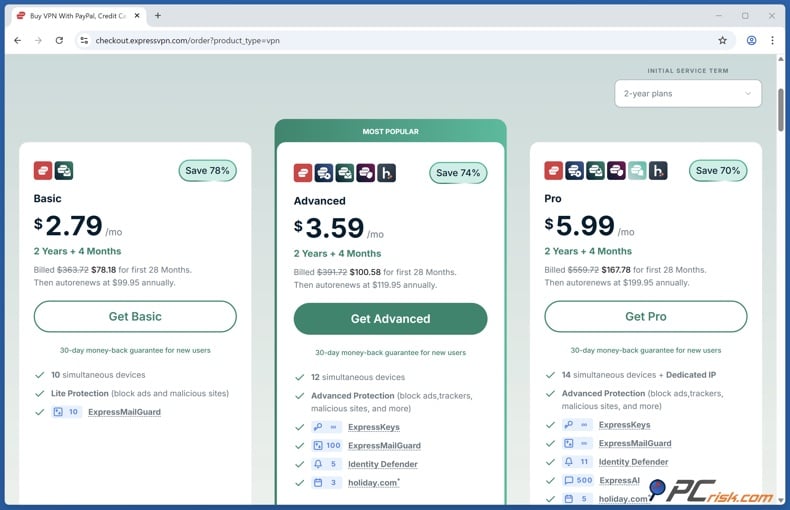
• Basic Plan: The Basic plan has everything you need to get started with ExpressVPN. It covers unlimited high-speed VPN service, access to servers in 105 countries, and protection for up to 10 devices at once. It also includes Lite Protection, which blocks ads and malicious websites. On the long-term deal (2 years + 4 months), it works out to around $2.79 per month ($78.18 total), with renewals priced at $99.95 annually. This is a solid option if you want reliable VPN security with essential protections.
• Advanced Plan: The Advanced tier takes things a step further. Along with everything in the Basic plan, you also get Advanced Protection, which blocks ads, trackers, and harmful sites for a stronger layer of privacy. The device limit is raised to 12 simultaneous connections, making it a good choice for families or heavy multi-device users. Priced at $3.59 per month on the 2 years + 4 months offer ($100.58 billed upfront), it renews at $119.95 annually.
• Pro Plan: The Pro plan is ExpressVPN's most comprehensive option. It includes everything from the Advanced plan, plus full Identity Defender tools, such as a credit scanner, data broker removal service, and regular credit reports to help protect against identity theft. You can also add a Dedicated IP as an extra.
It supports 14 devices simultaneously and is priced at $5.99 per month with the long-term promotional deal ($167.78 for the first 28 months), renewing at $199.95 annually. This plan is designed for those who want maximum privacy, security, and peace of mind.
Additionally, ExpressVPN offers a 7-day free trial exclusively for mobile users. If you download the ExpressVPN app from the Google Play Store or Apple App Store, new users can activate a 7-day free trial within the app.
Our In-House VPN Test Results
When putting ExpressVPN through a rigorous in-house test, we measured its performance in terms of streaming capabilities, leaks, security, and the functionality of its features on several different platforms. Below, we outline the structure of our tests and summarize the results we observed.
Speed and Performance Tests
With speed and performance being key aspects of any VPN, we examined how ExpressVPN affected our internet speed by connecting to their servers in various locations and measuring download, upload speeds, and latency. We compared these results against our baseline speed to see what a difference the VPN was making.
• Local Server Speed: First, we tested a server geographically close to our location. As expected, ExpressVPN performed excellently on nearby servers. The download speeds were very high, with only a minimal drop from our non-VPN speeds. Upload speeds were similarly strong.
Latency increased only slightly, so browsing and video calls remained smooth. In short, for local connections, ExpressVPN was extremely fast, which was likely aided by their proprietary Lightway protocol, which is optimized for speed.
• Long-Distance Server Speed: Far-flung servers, like those from Europe to the US and Asia, showed that, as expected, ping times grew longer, and we did see a more pronounced reduction in speeds. But even here, we could stream HD video and navigate the internet with few buffering issues.
Coming from anywhere, ExpressVPN's servers were among the fastest VPNs we've seen. Since they've recently upgraded lots of their servers to 10 Gbps bandwidth, we have no complaints about the quality of their network.
• Consistency: We ran multiple tests throughout the day to check consistency, and ExpressVPN consistently delivered. During peak usage times, there was a slight speed reduction, but nothing out of the ordinary, and the speed of server switching and establishing a new connection is lightning quick.
Streaming and Unblocking Tests
ExpressVPN markets itself as a great VPN for streaming, so we tested it on popular streaming platforms and region-locked content.
• Netflix: When testing ExpressVPN's ability to stream Netflix and other region-locked content, we found that they deliver what they promise, and were able to unblock Netflix in the US, UK, Japan, and other regions with just about any server we tried.
We could watch UK Netflix shows without issues by switching from a US to a UK server. The playback was silky smooth and in HD. There was no buffering when the stream started, and it only took a few seconds to load initially.
• Other Streaming Services: We tested BBC iPlayer (UK), Disney+, Amazon Prime Video, Hulu, and HBO Max. ExpressVPN was able to access all of these. For BBC iPlayer, the UK-London server we used worked flawlessly to stream BBC content from abroad.
Disney+ and Amazon Prime Video also streamed without recognizing the VPN. Hulu, which is US-only, worked when we connected to a US server. This broad unblocking capability is a strong suit of ExpressVPN.
One feature of ExpressVPN is MediaStreamer DNS, a Smart DNS service included with your subscription. This service can sort out streaming for devices like smart TVs and games consoles that don't have VPN apps; all you need to do is change the DNS settings.
• Streaming Quality: The streaming quality is always HD or the highest available once the connection settles down, and we didn't experience any buffering in the middle of a stream, even when watching some 4K UHD content on Netflix and YouTube via a nearby VPN server. Initial buffering may be longer when using far-away servers, but HD is always smooth.
• Censorship Circumvention: ExpressVPN is one of the VPNs that historically works in high-censorship regions, using obfuscated servers. According to both users and the company itself, it is a great option for countries such as China, the UAE, and Turkey.
Bottom line: ExpressVPN passed our streaming tests with flying colors. It's an excellent choice if you want to access Netflix libraries from various countries or other streaming platforms. The combination of fast speeds and consistent ability to evade VPN blocks makes it one of the best VPNs for streaming in our experience.
Security and Privacy Tests
The core purpose of a VPN is to improve your online security and privacy. We ran a series of tests to verify ExpressVPN's security claims:
• Encryption and Protocols: ExpressVPN uses strong encryption (AES-256 cipher with 4096-bit RSA key and SHA-256 authentication by default), which is considered military-grade. In our test, we had no way to "measure" encryption strength directly (that would require attempting to break it, which is infeasible), but we relied on the known standards.
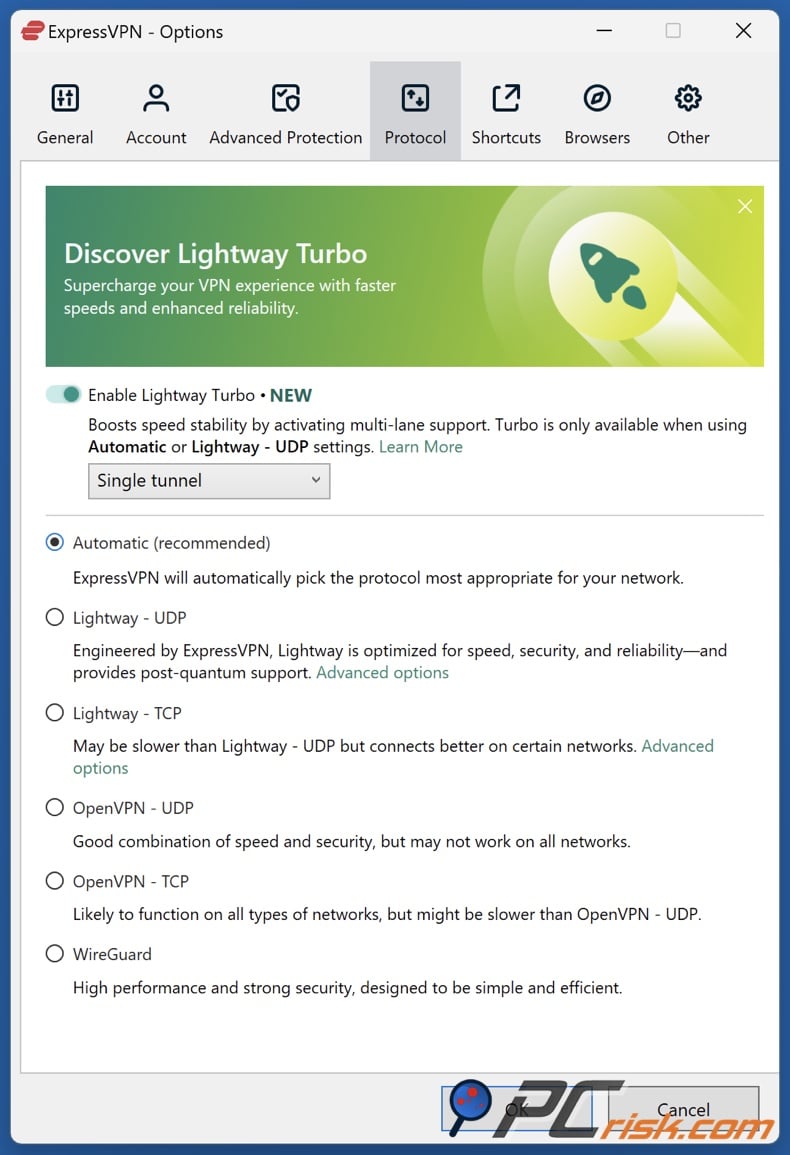
We also examined the app's available VPN protocols. ExpressVPN offers several protocols: OpenVPN (UDP/TCP), IKEv2, and its proprietary Lightway protocol, available in both UDP and TCP forms. By default, the app set to "Automatic" picked Lightway for us, which is what we used for most testing.
• IP and DNS Leak Tests: Our tests showed that ExpressVPN successfully concealed our real IP address and that the only IP address exposed was the one on the VPN server.
DNS leak test results showed that we were using ExpressVPN's private DNS servers (which run on each VPN server) rather than our ISP's DNS, which is good. We detected no DNS leaks - the VPN tunnel safely handled all queries.
We also checked for WebRTC leaks in the browser (which can sometimes reveal your local IP to websites) and found no issues - ExpressVPN's browser extension can help block WebRTC leaks, and even without it, our IP stayed hidden.
• Kill Switch (Network Lock): ExpressVPN's kill switch is known as Network Lock, and it's turned on by default on Windows, Mac, and Linux. We tested this feature by manually dropping the VPN connection and checking the app's response.
With Network Lock enabled, our internet traffic was halted entirely as soon as the VPN dropped. We couldn't ping any site or browse the internet until the VPN reconnected, which shows that the kill switch is doing its job and won't let any data leak out.
• No-Logs Policy and Privacy: While we cannot independently audit a no-logs policy in-house, we reviewed ExpressVPN's privacy policy and the third-party audit reports. ExpressVPN is headquartered in the British Virgin Islands, a jurisdiction with strong privacy laws (no mandatory data retention) and outside the reach of surveillance alliances like the 5/9/14-Eyes. The company claims to keep no activity or connection logs that could identify users.
This means ExpressVPN does not log what you do online (sites visited, data transferred) or your originating IP. ExpressVPN has undergone multiple audits by reputable firms (such as PwC, Cure53, and others) examining their servers, code, and policies.
It's worth mentioning that their VPN servers run solely in RAM, using a system called TrustedServer. This means that any data is gone if the server reboots, which isn't something we could test in our evaluation.
• Ownership and Security Background: We note that in 2021, ExpressVPN was acquired by Kape Technologies, a company that also owns other VPNs (CyberGhost, PIA, etc.). Kape had a history in the ad tech industry, which caused some concern in the privacy community.
However, since the acquisition, ExpressVPN has worked relatively independently and hasn't let anything change the way they've been performing. Our tests and research showed no change in ExpressVPN's behavior or performance post-acquisition. It's a secure and privacy-focused provider that is audited regularly, and its built-in strength lies in its privacy policies.
• Additional Security Tools: ExpressVPN gives you a password generator in its browser extensions and a very effective Threat Manager to kill off trackers, plus sends out invitations for you to come and find and fix any bugs in its product. All indicators show that this company takes its security pretty seriously.
Other Functionality Tests (Torrenting, Gaming, etc.)
• Torrenting and P2P: ExpressVPN didn't disappoint, with great torrenting, gaming and streaming speeds. When we tested ExpressVPN, we wanted to see how it handled torrenting and P2P file sharing, and were glad to find that ExpressVPN does not restrict P2P to specific servers, you're free to hook up to any one and run your torrent client, coming hotfooting back to a server to check in on your download.
Acclaimed for its fast speeds, ExpressVPN didn't disappoint us in our test. A 4.4 GB Linux ISO download went by quickly and without any interruptions, and remarkably, the speeds we saw were among the fastest we've encountered, hinting at no speed capping.
• Reliability and Server Switches: ExpressVPN was also highly reliable and didn't drop us in the middle of a session. We could run our test sessions for hours without disconnection, and switching servers was snappy, didn't freeze the app, or cause any issues. Their claim of being able to connect up to eight devices at the same time is now a reality.
• Platform Compatibility: ExpressVPN's Windows 11 PC, macOS, Android phone, and iPhone apps all performed well. The ExpressVPN app for routers is customisable and works with many router brands. Moreover, they're now producing a router called the Aircove with their VPN built in.
Main VPN Features of ExpressVPN
ExpressVPN offers rich features catering to average users and advanced privacy enthusiasts.
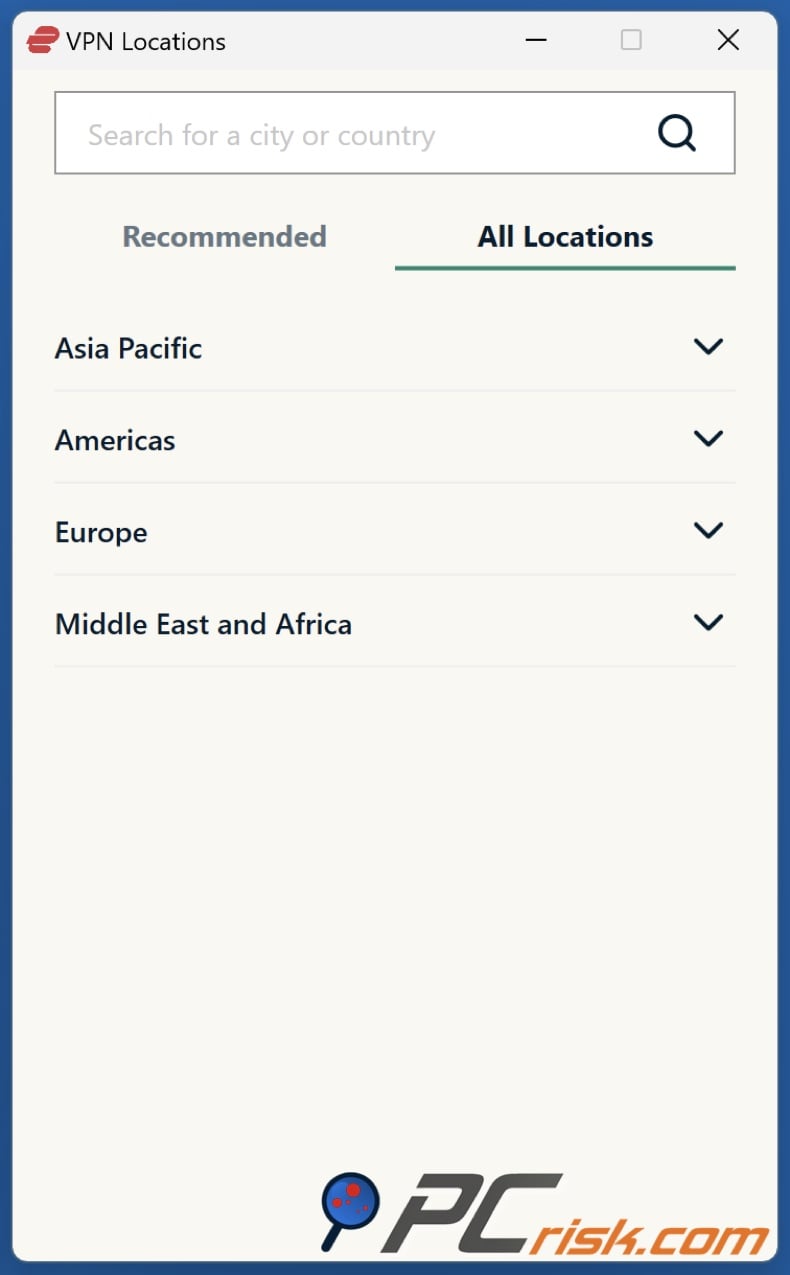
• Global Server Network: With over 105 countries and 3,000+ servers worldwide, covering the Americas, Europe, Asia Pacific, Africa, and the Middle East.
• Fast Connection Protocol (Lightway): This VPN uses a proprietary Lightway protocol designed to deliver top speeds and quicker reconnections. It is a great fit for regular users and privacy aficionados alike.
• Strong Encryption & Security: Under the hood, ExpressVPN secures data with AES-256 encryption and includes a kill switch (Network Lock) that won't let any data escape if the VPN drops out, as well as DNS leak protection using zero-knowledge DNS on every single server. Unusually, all servers run from volatile memory (RAM) rather than hard drives (TrustedServer technology), meaning data is wiped on every reboot and cannot be persistently stored.
• No-Logs Policy (Independently Audited): Its strict no-logs policy underscores its commitment to its users' privacy. This has been backed up by third-party audits by PwC and a notorious 2017 case in Turkey in which Turkish authorities seized an ExpressVPN server and found no logs on it.
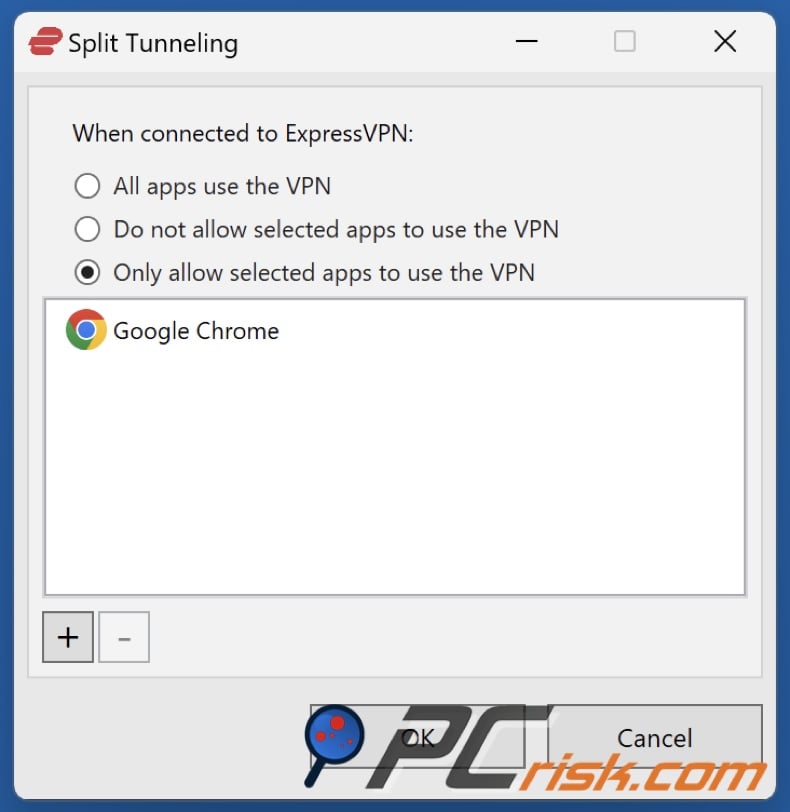
• Split tunneling: Another feature available on ExpressVPN's Windows, Android, and older Mac apps is split tunnelling, which lets users choose which apps go through the VPN and which don't, furthering its appeal for regular users.
Overall, ExpressVPN's main features cover all the essentials one would expect from a top-tier VPN: a vast and fast network, robust security, genuine no-logs privacy, and ease of use across devices.
Additional Features (Beyond the VPN Basics)
In addition to its core VPN functionality, ExpressVPN provides several extra features and services that enhance its value, some of which go beyond what a typical VPN offers:
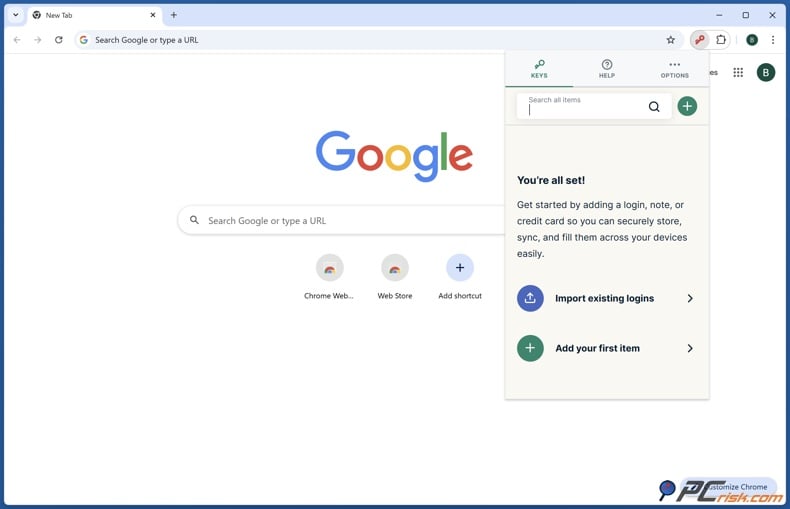
• ExpressVPN Keys / Password Manager: ExpressVPN Keys is a well-known password manager that's included for free. It uses end-to-end encryption to secure your login details and syncs them across all your devices. It also encourages you to use much stronger, more unique passwords.
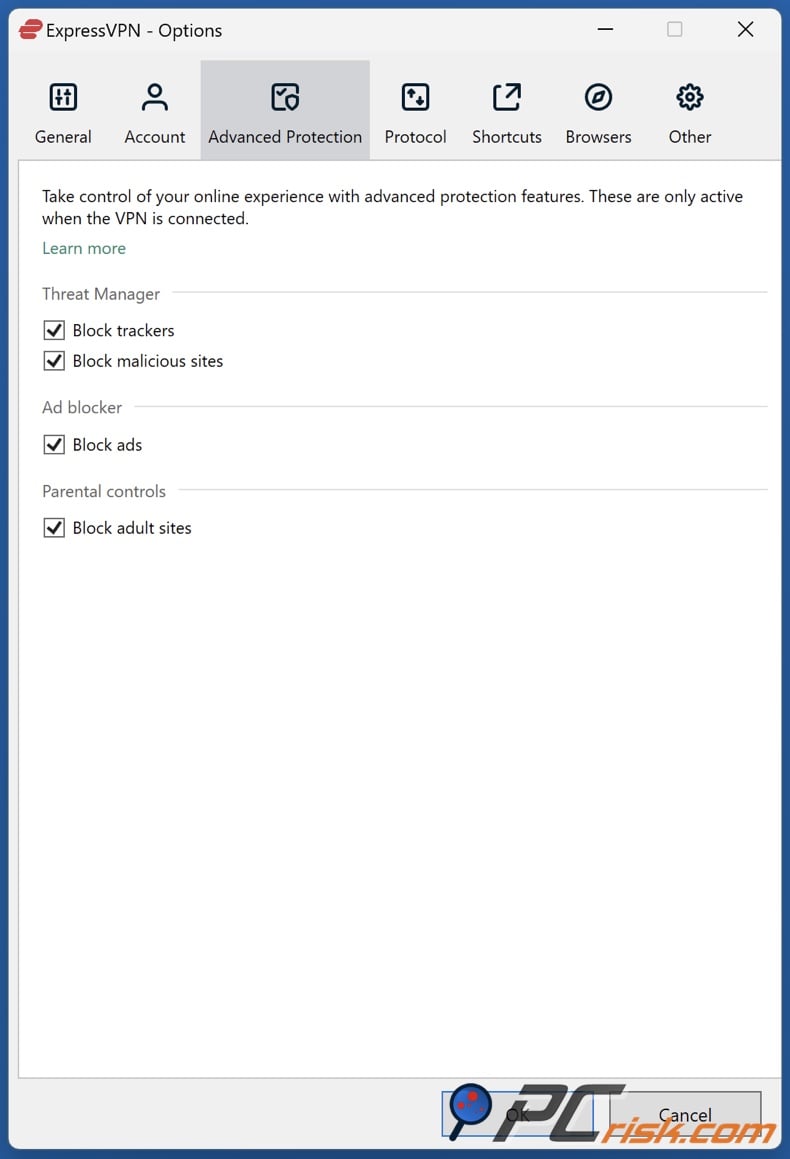
• Threat Manager / Built-in Ad Blocker: Another feature that sets ExpressVPN apart from the pack is Threat Manager, or as it's often referred to, the built-in tracker blocker. This list of known trackers, malicious domains, and ad servers that your device won't communicate with when you're connected to the VPN brings peace of mind to your web browsing.
• Parental Controls: A relatively recent addition to the Advanced Protection suite, parental controls block websites with adult content and possibly other unsuitable material when you're connected to the VPN, acting essentially like a filter.
• Mediastreamer DNS: This is an additional feature where ExpressVPN provides Smart DNS servers that you can use on devices that don't support VPN apps (like certain smart TVs, gaming consoles, Apple TV, etc.) to unblock streaming content.
By configuring your device's DNS to MediaStreamer, you can make it appear like it's in another country for streaming services. MediaStreamer doesn't encrypt data (it's not a VPN), but it's a handy add-on included with ExpressVPN for broader device compatibility in accessing geo-blocked media.
• Identity Theft Protection Tools: If you choose a Pro or Advanced plan when you sign up for ExpressVPN in the United States, you'll receive identity protection services.
ID Monitoring (Data Breach Alerts): This includes ID Monitoring, which sends you an alert if your email address is found in a known data breach.
Identity Theft Insurance: As noted earlier, US subscribers with Pro and Advanced plans get Identity Theft Insurance up to $1 million. This insurance can cover costs related to restoring your identity if you become a victim of identity theft.
Privacy Counselor Tools: ExpressVPN now offers features like data removal and credit monitoring if you go for the Pro plan.
• ExpressVPN Aircove (VPN Router): While not a feature of the VPN software itself, it's worth mentioning that ExpressVPN now sells its own hardware VPN router called Aircove. Aircove comes pre-configured with ExpressVPN.
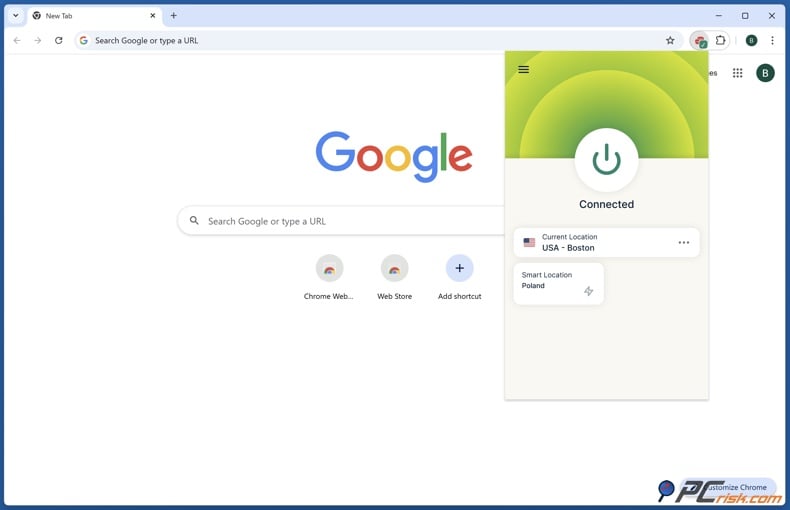
• Browser Extensions: Its browser extensions for Chrome and Firefox aren't standalone. Instead, they act as a remote control for the ExpressVPN app on your computer, making it easy to switch your VPN on/off and spoof your geolocation by comparing your location to the VPN's. This is pretty useful for websites that try to figure out where you are.
In summary, ExpressVPN goes beyond just basic VPN tunneling. It bundles a password manager, offers threat blocking and content filtering, provides identity theft safeguards, and has solutions for devices of all kinds (even routers). These additional features round out the service as a comprehensive privacy and security suite.
Ease of Use
When using ExpressVPN, you'll find it's designed with the average user in mind. Installation, daily usage, and all of the processes in between are streamlined to perfection, even for those who don't know much about VPNs.
• Installation and Setup: Getting started with ExpressVPN is easy. Once you sign up, you can download the app for your device, either from the ExpressVPN website or your device's app store, and the installation is lightning-fast. On a Windows PC, for instance, it takes only a few minutes.
• Interface: The ExpressVPN app has a clear-cut, minimalist design. The main screen boasts a massive power button that connects/disconnects the VPN with just one click, and can automatically pick a server for you, usually the nearest or the fastest one if you don't have a preference.
• Settings and Options: ExpressVPN's settings menu is more geared towards power users, but it's not overwhelming. You'll still be able to change the VPN protocol, toggle the Network Lock kill switch, activate split tunneling, and control startup settings, plus launch the app on startup. However, as default settings are pre-configured for maximum security, novice users won't need to alter a thing.
In conclusion, ExpressVPN's ease of use is top-notch. It's an ideal VPN for someone who "just wants it to work" without hassle. From our perspective, ExpressVPN has clearly invested effort in UX design: connecting to a VPN and protecting your connection is as painless as possible.
ExpressVPN Mobile Apps (Android & iOS)
Regarding mobile VPNs, ExpressVPN has developed top-of-the-line Android and iOS apps that can go head-to-head with the best of the industry. We thoroughly tested the mobile experience on both platforms:
Android App: The ExpressVPN app for Android has a sleek design, mirroring the desktop interface with its big on/off button. Installation from the Google Play Store is easy, and as mentioned earlier, new users can get a 7-day free trial through the app. The Android app is very feature-rich, as it offers almost all the same features as the desktop version.
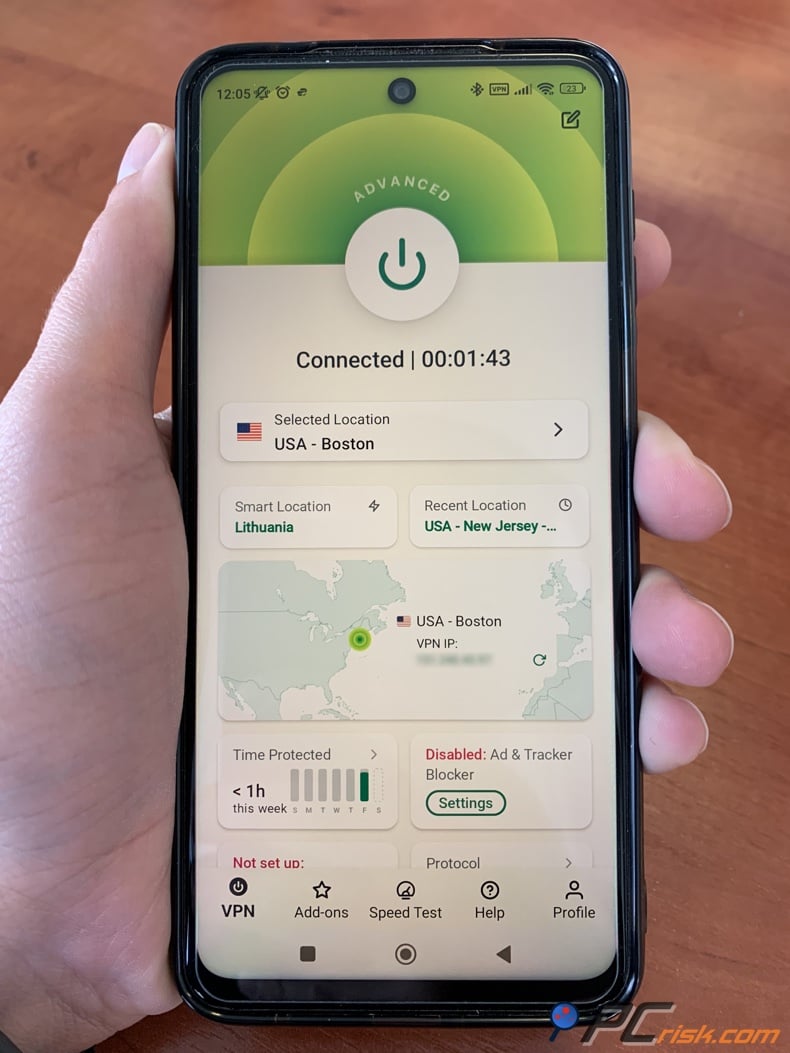
You have the same choice of protocols (including Lightway) and the same server list, and Android supports Network Protection, which is the kill switch. In Android settings, you can enable the kill switch to block the internet if the VPN disconnects, and you can also enable split tunneling (allowing specific apps to bypass the VPN). We tested ExpressVPN on several Android phones, and it performed flawlessly - quick connect times and stable connections.
iOS App (iPhone/iPad): The ExpressVPN iOS app is slightly more streamlined due to Apple's restrictions, but it's still powerful. Installing from the App Store is quick. The interface again has the one-tap connect button and location chooser. On iOS, ExpressVPN supports the Lightway protocol (using the IPsec backend since Apple doesn't allow kernel-level protocols like on other OS).
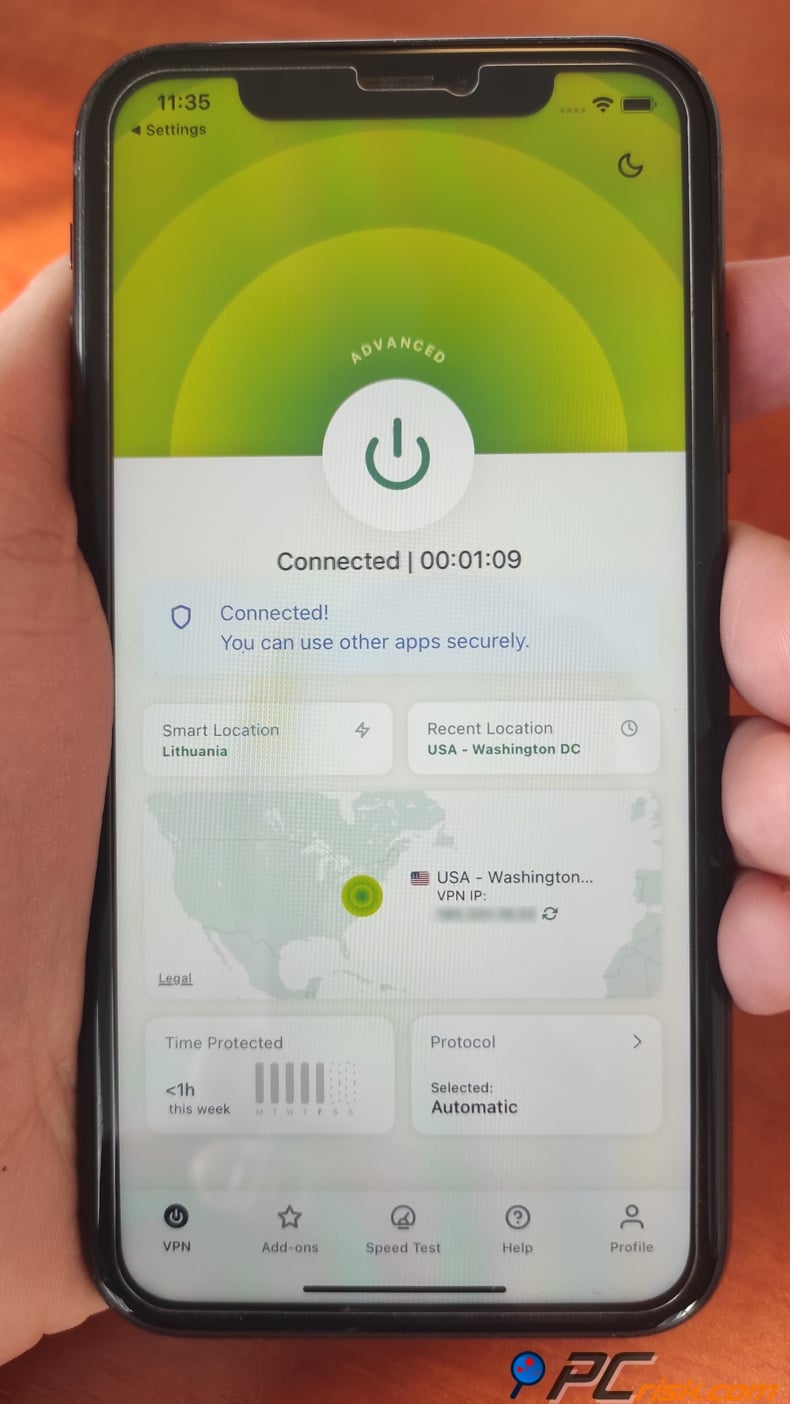
It also offers IKEv2 as an alternative. One difference: iOS does not have a system-wide kill switch feature (this is true for basically all iOS VPNs; Apple doesn't provide an API for a true kill switch).
However, ExpressVPN mitigates this by using the iOS capability "Connect on Demand" and Lightway's inherent quick reconnection, so if your connection drops, it should reconnect quickly and automatically. The iOS app also includes Threat Manager, the tracker blocking feature.
Performance on Mobile: Both Android and iOS apps delivered excellent speeds in our use, comparable to desktop. This is partly due to Lightway's efficiency on mobile hardware. We could stream video and video calls on mobile with the VPN on without problems. Lightway's ability to handle network changes (like moving from Wi-Fi to cellular) seamlessly is a big plus if you're on the go.
App Ratings: ExpressVPN's mobile apps are highly rated on their respective stores. Their Google Play rating is over four million downloads and 4.2 stars with hundreds of thousands of reviews, showing that their Android users are pretty happy. On the Apple App Store, their rating is roughly 4.7 out of 5.
Mobile App Trial and Subscription: As mentioned, the mobile apps offer a 7-day free trial, and once that's up, you'd need to purchase a subscription. Buying from the website rather than through the app stores is generally cheaper for long-term plans and avoids the surcharge you get when buying through Apple or Google.
In summary, ExpressVPN's mobile apps are polished and robust. They make it easy to secure your smartphone or tablet with one tap and don't skimp on features.
User Reviews and Reputation
ExpressVPN enjoys a strong reputation, but like any service, it has its share of both praise and criticism from users.
Trustpilot Reviews: As for its reputation, ExpressVPN has a very high volume of reviews on Trustpilot, with an average rating since the mid-2025 is 4.2 out of 5, out of over twenty thousand reviews. Around 80% of these people absolutely loved ExpressVPN, awarding it the top mark of five stars. Common themes from positive Trustpilot reviews include:
• Praise for Customer Support: Many users highlight ExpressVPN's 24/7 live chat support as extremely helpful and responsive. Multiple mentions of issues being resolved promptly by support agents leave a great impression.
• User-Friendly and Reliable: People often note that ExpressVPN "just works" and is easy to use, even for those who are not tech-savvy. The reliability (it rarely disconnects or fails) is frequently commended.
• Speed and Performance: Many reviewers are impressed with the connection speeds, saying that streaming and browsing are fast with ExpressVPN, sometimes even forgetting they have it on.
Some less satisfied users on Trustpilot mention:
• Price and Renewal Practices: A number of complaints revolve around ExpressVPN's higher price than that of competitors. Some users felt the renewal was pricey, especially if they missed a discounted deal for the first term. A handful of reviews complained about the automatic renewal and the trouble getting a refund.
• Connection Issues in Specific Regions: Some reviewers also found that ExpressVPN didn't function as well as they had been told it would in countries where the internet is heavily restricted, such as the UAE or particular areas of China.
• Customer Service Hiccups: While the feedback on ExpressVPN is primarily positive, there are some cases where users feel that their problems were not solved or that a refund took time. However, the company usually responds to negative reviews on Trustpilot, showing that it monitors customer satisfaction.
Reddit Discussions: Coming from the Reddit community, people who post in r/VPN or r/Express_VPN know their stuff and speak their minds about ExpressVPN, as they're a pretty tech-savvy and candid bunch. Generally speaking, the sentiment towards ExpressVPN is respectful, acknowledging it as one of the top VPNs, but still, people debate:
• One of the things that gets compliments is ExpressVPN's Lightway protocol, which has revolutionised the VPN experience, speeding things up and making it more stable.
• Some Redditors feel that ExpressVPN is overpriced for what it offers, saying that other VPNs like ProtonVPN, Surfshark, or NordVPN might offer similar speeds or more features for a lower price.
• The acquisition by Kape Technologies was also brought up on Reddit, mainly due to Kape's history in adware, owning lots of VPN brands, and one of them being ExpressVPN. There were discussions about whether ExpressVPN could still be trusted after the acquisition.
• On the ExpressVPN subreddit specifically, users sometimes report issues (like "why is my speed slow on X server?" or "ExpressVPN not working on FireStick – any fix?"). The community and sometimes ExpressVPN reps answer these.
In summary, user reviews across platforms show that ExpressVPN is largely living up to its promises:
• Pros according to users: Fast and stable connections, great for streaming, top-notch support, easy to use on all devices, and a trusted no-logs policy.
• Cons according to users: Higher cost than many competitors, region-specific performance issues, occasional refund hiccups.
Is ExpressVPN Worth Buying?
Considering everything we've covered - the features, performance, security, and user feedback - is ExpressVPN worth the investment? In our view, the answer is yes, if you value a top-tier VPN experience and are looking for a reliable long-term privacy solution.
It's worth buying it if:
• You handle sensitive information, travel frequently, or simply refuse to compromise on privacy and performance.
• You need a VPN for streaming. ExpressVPN is among the best choices.
• If you plan to cover a lot of devices (up to 14 now) and perhaps share with family, the cost per device becomes reasonable when spread out.
It's not worth buying it if:
• If you only occasionally need a VPN to unblock a single website or you're on a very tight budget, you might find ExpressVPN pricey.
Longevity and Updates: These are two things that we take into account when deciding if a VPN is worth it and in the case of ExpressVPN we can see that it has proven to be serious about staying current, and has introduced features such as Lightway, increased device limits and something called Threat Manager, so, when buying the Pro or Advanced plan you can basically count on getting lots of improvements and fantastic support.
In conclusion, ExpressVPN is worth buying for users who want a premium VPN experience and are willing to pay extra for top-notch service and trust. It's not the cheapest option, but it arguably provides some of the best overall VPN quality out there..
FAQ
Is ExpressVPN really private? Does it keep any logs of my activity?
ExpressVPN is considered one of the best because it's dead serious about its no-logs policy. It won't record your browsing activities or personal data and doesn't store traffic content, DNS queries, or IP addresses. They keep minimal operational data, like the date you connected and which server you used, but without any user-identifying information.
Can ExpressVPN unblock Netflix and other streaming services?
Yes. ExpressVPN is the way to go if you want to unblock Netflix and other streaming services. It's one of the best VPNs out there for streaming and reliably knocks down geo-restrictions on Netflix, Amazon Prime Video, Disney+, Hulu, BBC iPlayer, HBO Max, and many more.
How many devices can I use with one ExpressVPN subscription?
As of 2026, ExpressVPN allows up to 14 devices to be connected simultaneously on one subscription. This means you can have, for example, your laptop, phone, tablet, and several other devices all protected at the same time with one account (as long as it's no more than 14 active connections).
Is there a free version or free trial of ExpressVPN?
ExpressVPN is a paid service, and there isn't a free desktop version. However, desktop users can take advantage of a thirty-day money-back guarantee. Nevertheless, a 7-day free trial is available for Android and iOS devices.
Where is ExpressVPN based, and does that matter?
As for where ExpressVPN is based, it's in the British Virgin Islands, a small Caribbean jurisdiction with tight privacy laws that is not part of any international surveillance alliances (like the 5 Eyes/14 Eyes). This location means ExpressVPN isn't legally required to retain data or cooperate with foreign governments' data requests (beyond particular, case-by-case mutual assistance treaties, and even then, there would likely be no data to hand over due to no logs).
What is the Lightway protocol?
Lightway is ExpressVPN's custom-built VPN protocol, designed to be lightweight, fast, and secure. It was introduced to offer a better alternative to older protocols like OpenVPN or IKEv2. Lightway uses modern cryptography (based on wolfSSL) and is optimized for performance.
Can I use ExpressVPN for torrenting?
Yes. ExpressVPN will allow P2P downloads on any server; no special servers are required, and it won't throttle your speeds either. Your IP address will be completely masked, and your ISP won't know what you're doing.
Does ExpressVPN offer other services (like antivirus, etc.) as part of the subscription?
ExpressVPN itself is focused on VPN and privacy tools. They don't bundle an antivirus or standalone anti-malware software with the VPN subscription.
Share:
 Facebook
 X.com
X.com
 LinkedIn
 Copy Link

Karolis Liucveikis
Experienced software engineer, passionate about behavioral analysis of malicious apps
Author and general operator of PCrisk's News and Removal Guides section. Co-researcher working alongside Tomas to discover the latest threats and global trends in the cyber security world. Karolis has experience of over 8 years working in this branch. He attended Kaunas University of Technology and graduated with a degree in Software Development in 2017. Extremely passionate about technical aspects and behavior of various malicious applications.
▼ Show Discussion