

Get free scan and check if your device is infected.
Remove it nowTo use full-featured product, you have to purchase a license for Combo Cleaner. Seven days free trial available. Combo Cleaner is owned and operated by RCS LT, the parent company of PCRisk.com.
What kind of malware is AvisLoader?
AvisLoader is a Windows malware loader - a program whose main job is to get a foothold on a computer and then download and run other malicious software on it. It was described by Varonis Threat Labs after researchers came across an exposed staging server holding the loader, its helper tools, a fake verification page, and the web panel used to control infected machines.
What makes AvisLoader stand out is how it talks to its operators. Instead of connecting to a regular website or server, it uses the encrypted Tox messaging network, which makes it much harder to shut down. The loader has been spread using a fake DocuSign page that tricks visitors into running a command themselves.
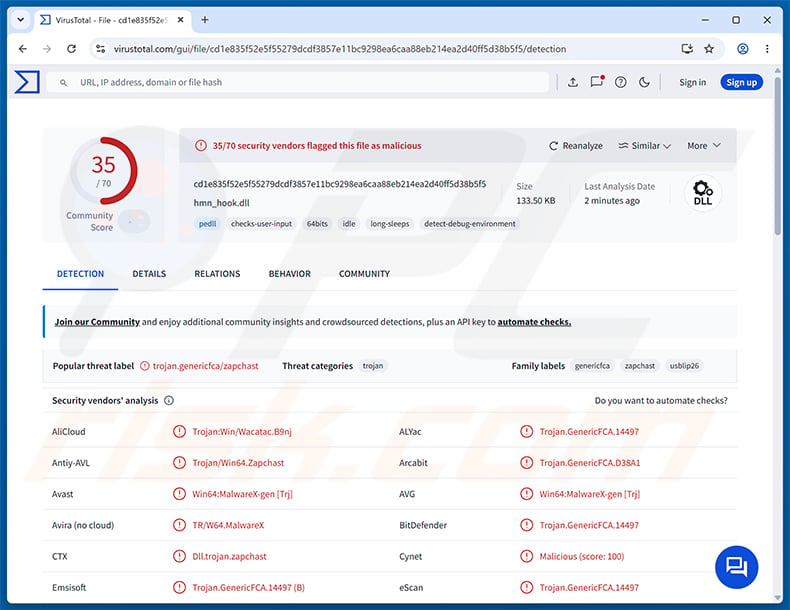
AvisLoader overview
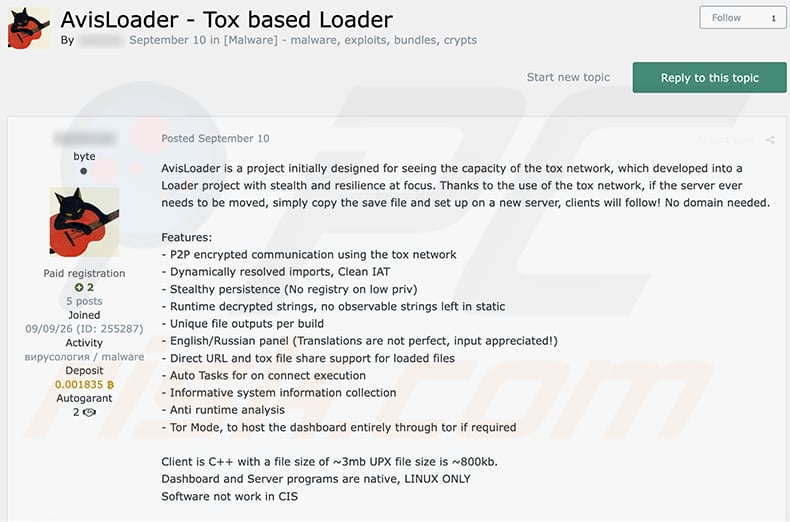
AvisLoader is sold to other cybercriminals on an underground forum, where it was advertised as a "Tox based Loader" in September. According to the seller, the project started as an experiment with the Tox network and grew into a loader focused on stealth and resilience. The client is written in C++, while the operator's dashboard and server run only on Linux.
Tox is a peer-to-peer network, meaning infected computers do not need a fixed domain or IP address to reach the attacker. Normally, security companies and hosting providers can cut off malware by taking down its Command and Control (C2) server. With AvisLoader, the operator can simply copy a save file to a new server, and infected machines follow automatically.
The seller also lists an optional mode that hosts the dashboard entirely through Tor, which hides the operator's infrastructure even further. Notably, the listing states that the software does not work in CIS countries - a restriction commonly seen in malware developed by Russian-speaking actors.
What AvisLoader can do
Once running, AvisLoader collects basic information about the infected computer, such as its hostname, country, processor, graphics card, installed antivirus, and whether the user has administrator rights. All of this is shown to the operator in a table, so they can decide which victims are worth targeting further.
The operator can then run shell commands on selected machines and push files to them, either over Tox or through a direct download link. Tasks can be filtered by hardware, country, region, or admin status, and queued to run automatically the moment a matching computer comes online. In practice, this means an infected PC can be loaded with stealers, ransomware, cryptocurrency miners, or any other malware the attacker chooses.
Persistence and defense evasion
AvisLoader tries to stay on the system by tampering with desktop and taskbar-pinned shortcuts. Varonis found backup copies of shortcuts and a script launcher tied to the name VLCAssistant. The likely idea is that when the victim clicks a familiar shortcut, the malware starts first and then opens the real application, so nothing looks out of place.
The loader was found alongside two helper tools. One, named auto.exe, references a publicly known method for bypassing User Account Control (UAC) to gain administrator rights without showing a consent prompt. The other, hmn_hook.dll, works like a small rootkit that can hide a chosen process from Task Manager. The researchers did not confirm that either tool was actually used in an attack.
To confuse analysts, the main file (78324.exe in the analyzed case) contains 17 decoy sections named after well-known packers such as Themida, VMProtect, and UPX, even though none of them hold packed code. The seller also advertises encrypted strings, unique files for every build, and protection against runtime analysis.
| Name | AvisLoader malware loader |
| Threat Type | Trojan, loader. |
| Detection Names | Avast (Win64:MalwareX-gen [Trj]), Combo Cleaner (Trojan.GenericFCA.14497), ESET-NOD32 (Win64/Agent.LCH Trojan), Kaspersky (Trojan.Win64.Zapchast.fin), Microsoft (Trojan:Win32/Qwexlafiba!rfn), Full List (VirusTotal) |
| Symptoms | Trojans are designed to stealthily infiltrate the victim's computer and remain silent, and thus no particular symptoms are clearly visible on an infected machine. |
| Distribution methods | Fake DocuSign pages, deceptive emails, social engineering, ClickFix. |
| Damage | Multiple additional infections, stolen passwords and banking information, identity theft, the victim's computer added to a botnet. |
| Malware Removal (Windows) |
To eliminate possible malware infections, scan your computer with legitimate antivirus software. Our security researchers recommend using Combo Cleaner. Download Combo CleanerTo use full-featured product, you have to purchase a license for Combo Cleaner. 7 days free trial available. Combo Cleaner is owned and operated by RCS LT, the parent company of PCRisk.com. |
Conclusion
AvisLoader gives cybercriminals a quiet, hard-to-disrupt way to control infected computers and deliver whatever malware they want next. Because it communicates over Tox instead of a fixed server, taking down its infrastructure is difficult, and one infection can quickly lead to data theft, financial loss, or ransomware. It should be removed from the system immediately.
More examples of loaders are SynkLoader, GachiLoader, and CastleLoader.
How did AvisLoader infiltrate my computer?
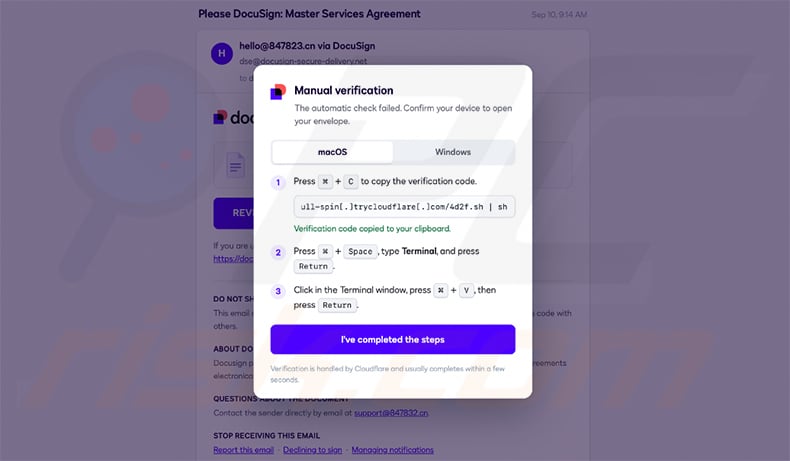
The campaign documented by Varonis used a DocuSign-themed page hosted on Cloudflare Workers. It looked like a request to sign a "Master Services Agreement" and displayed a fake "Manual verification" window claiming the automatic check had failed. Visitors were told to copy a so-called verification code and paste it into a terminal to open the document.
This is a ClickFix trick - the "code" is really a command that downloads and runs malware from a Cloudflare Quick Tunnel address, skipping the browser's normal download warnings. The lure offered both macOS and Windows instructions, but only the Windows loader was recovered from the attacker's server.
Beyond this campaign, loaders are commonly spread through phishing emails with malicious attachments or links, fake download sites, pirated software and cracks, malicious ads, and fake software updates. They often arrive as executables, archives, scripts, or documents that only infect the system once the victim opens them.
How to avoid installation of malware?
Be wary of unexpected emails and messages, especially ones asking you to sign, review, or verify a document. No legitimate website will ever ask you to paste a command into the Run dialog, PowerShell, or Terminal to prove you are human or to open a file. If a page asks you to do that, close it.
Download software only from official websites and app stores, and avoid cracks, key generators, and pirated programs. Keep Windows and your applications updated, ignore suspicious ads and pop-ups, and use reputable security software with regular scans. If you believe that your computer is already infected, we recommend running a scan with Combo Cleaner Antivirus for Windows to automatically eliminate infiltrated malware.
AvisLoader advertised on a cybercrime forum (source: varonis.com):
Fake DocuSign verification page used to deliver AvisLoader (source: varonis.com):
How to remove malware manually?
Most trojan infections can be removed by running a full system scan with Combo Cleaner. The full manual procedure below is for cases where automatic removal failed, where you want to verify a scan caught everything, or where the threat has multiple persistence points.
Disconnect from the network
Unplug your Ethernet cable and turn off Wi-Fi. If you're on a laptop, the airplane-mode key works fastest.
Many trojans exfiltrate data - saved browser passwords, banking sessions, screenshots - and accept remote commands. Cutting the network stops both immediately. Keep it disconnected until Phase 4.
Boot into Safe Mode with Networking
Safe Mode loads a minimal set of drivers and stops most malware from auto-running. "With Networking" lets you download tools - re-enable Wi-Fi only after you've booted in.
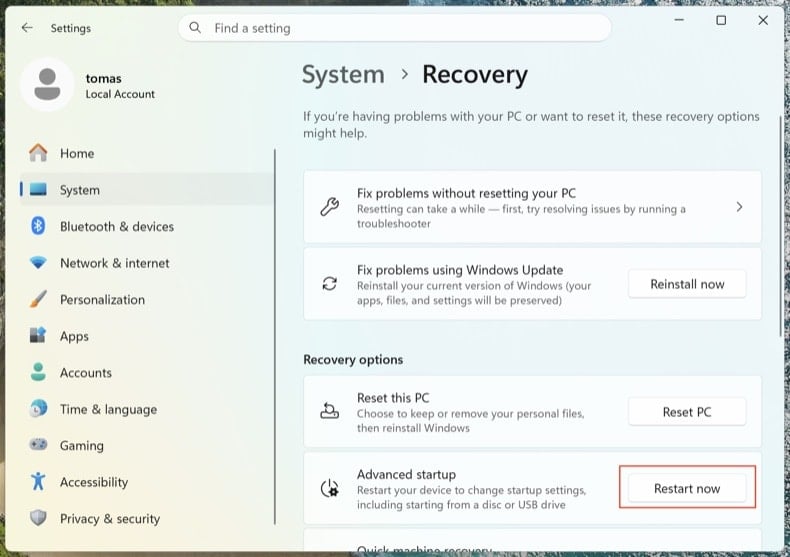
Open . Click Restart now next to Advanced startup.
Your computer will restart into the "Choose an option" menu. Click . After the second reboot, press 5 or F5.
Click the Windows logo, hold Shift, click the Power icon and choose Restart. In the Choose an option screen, click . Press F5.
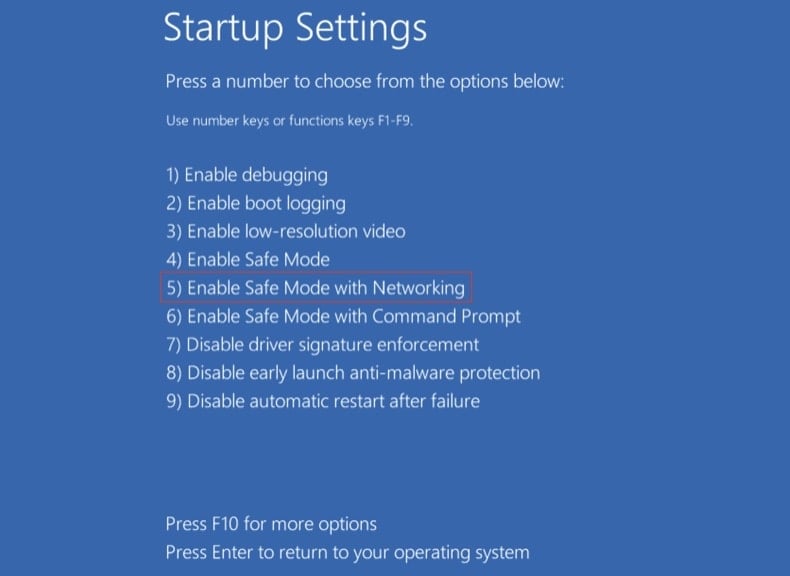
Windows 8
Go to the Start Screen, type Advanced, select Settings → Advanced startup options → Restart now → Troubleshoot → Advanced options → Startup settings → Restart → F5.
Note: Windows 8 reached end-of-life in January 2023 - running on it puts you at much higher risk of reinfection.
Windows 7
Click Start → Shut Down → Restart → OK. As the system boots, press F8 repeatedly until the Windows Advanced Options menu appears, then choose Safe Mode with Networking.
Note: Windows 7 reached end-of-life in January 2020 - running on it puts you at much higher risk of reinfection.
Inspect running processes with Process Explorer
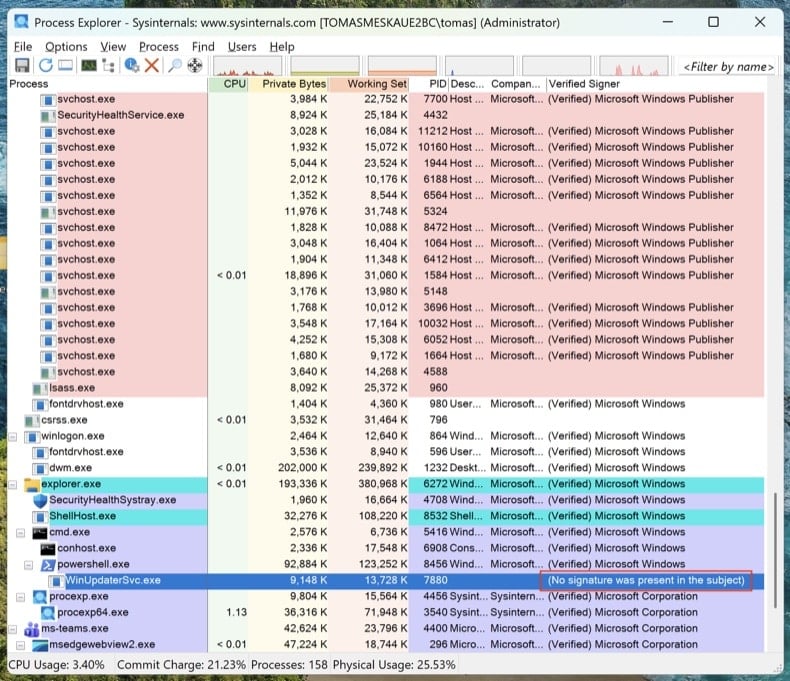
Download Process Explorer from Microsoft Sysinternals. Run it as Administrator. Click and .
Sort by "Verified Signer." Anything unsigned running from %AppData%, %LocalAppData%, %Temp%, or %ProgramData% is suspicious. Right-click → Properties to see the full image path. Right-click → "Search Online" to look up unfamiliar process names.
Task Manager hides full file paths, doesn't show digital signatures, and groups processes in ways that make malware easy to miss. Process Explorer is the same tool Microsoft engineers use.
Map every persistence point with Autoruns
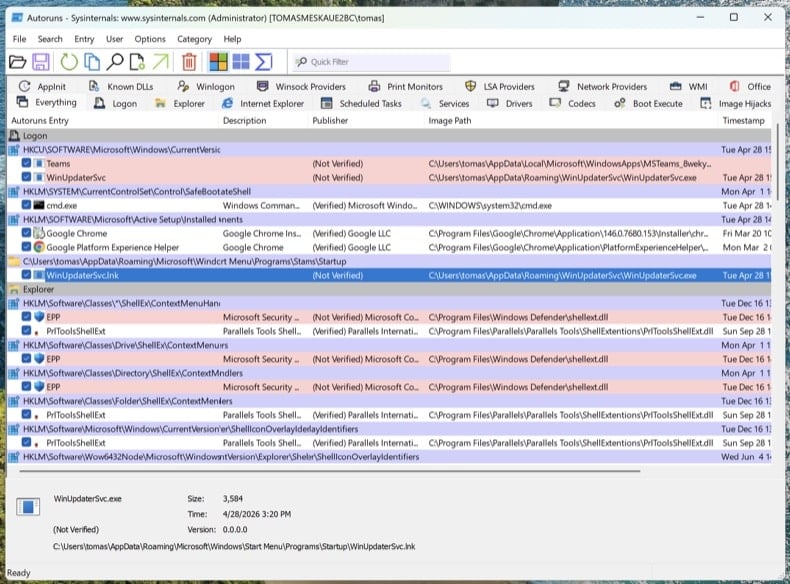
Download Autoruns. Right-click Autoruns.exe and choose Run as administrator - without elevation, Autoruns can't inspect protected registry hives.
In the menu, open and , then click Refresh.
Modern trojans don't just live in startup. Walk through these tabs and look for unsigned or unfamiliar entries:
- Logon - classic Run/RunOnce keys
- Scheduled Tasks - frequent hiding spot, especially tasks with PowerShell, MSHTA, or rundll32 actions
- Services - unsigned services in non-Microsoft folders
- WMI - Event Subscriptions are a stealthy persistence mechanism (MITRE T1546.003)
- Image Hijacks - Image File Execution Options "Debugger" abuse
- AppInit - DLLs loaded into every GUI process
- Browser plug-ins - unsigned add-ons across all installed browsers
Right-click any suspicious entry → "Jump to Image" to see the actual file. Right-click → "Search Online" opens VirusTotal for the file hash. Don't delete yet - just write down the file paths and entry names. We'll remove them after the scans.
Check the hosts file and DNS settings
Trojans often redirect bank, antivirus, and update domains to attacker-controlled servers by editing the hosts file or DNS settings.
Hosts file: Open Notepad as Administrator and open C:\Windows\System32\drivers\etc\hosts. Legitimate entries are commented with #. Any uncommented IP-to-domain mapping is suspicious - especially redirects for microsoft.com, windowsupdate, or your bank.
DNS settings: Open Command Prompt as Administrator and run ipconfig /all. Confirm your DNS servers point to your ISP, your router, or a known public resolver (Cloudflare 1.1.1.1, Google 8.8.8.8). Then open and verify both DNS and DNS over HTTPS (DoH) settings haven't been hijacked.
A clean PC with hijacked DNS is still a compromised PC. You'll think you're at chase.com and you'll be at the attacker's clone.
No single antivirus catches everything. The order below is intentional: offline scan first (catches rootkits before Windows fully loads), then on-demand scanners on the running system, then manual cleanup of anything they missed.
Run Microsoft Defender Offline
Reboot to normal Windows. Open . Select Microsoft Defender Antivirus (offline scan) and click Scan now. Your computer will restart into a stripped-down environment and scan before the full operating system loads.
Rootkits and bootkits hide from any scanner running on the same Windows session that's already infected. A pre-boot offline scan sees the disk before the malware can hide itself.
VB100 certified. Includes anti-trojan, registry/persistence scanning, anti-spyware in one pass. The 7-day free trial is available.
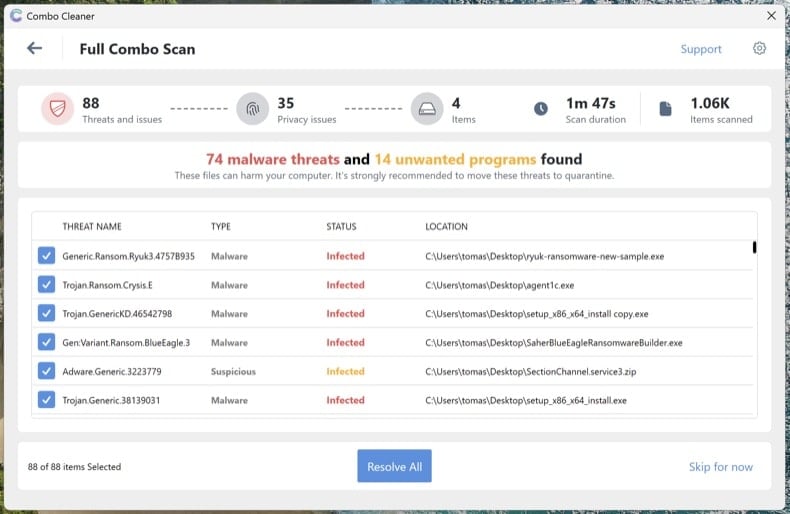
Download Combo CleanerRun Combo Cleaner full system scan
Install Combo Cleaner and run a full system scan (not the quick scan). Let it complete fully, review the detected threats, and apply the recommended actions. Combo Cleaner will quarantine known trojans and registry persistence.
Run Microsoft Safety Scanner as a second-opinion scan
Download Microsoft Safety Scanner (MSERT.exe), Microsoft's free on-demand tool. The binary expires every 10 days, which means every download has the latest signatures. Run a full scan after Combo Cleaner to catch anything one engine alone might miss.
Different scanning engines catch different threats. Running an additional Microsoft scan after Combo Cleaner is the single most underused verification step in malware removal.
Manually remove anything still listed in Autoruns
Reopen Autoruns. Anything you flagged in Step 4 that's still present hasn't been caught by the automated scans. For each remaining suspicious entry: right-click → Delete in Autoruns (this removes the persistence registration), then navigate to the file path and delete the actual file. Empty the Recycle Bin.
Some malware files reappear after deletion because something else on the system recreates them. If you delete a file and it returns within minutes, you have a remaining persistence point that Autoruns didn't show - usually a service or scheduled task running under SYSTEM. Re-run the scans from Steps 6-8 or proceed to a clean install (see end of guide).
Reset browsers and clear notification permissions
Trojans and adware frequently hijack browsers - change the default search engine, install rogue extensions, or grant themselves notification permissions to keep displaying scam pop-ups even after the malware is gone.
- Chrome: visit
chrome://settings/resetand click "Restore settings to their original defaults." Then visitchrome://settings/content/notificationsand remove any unfamiliar sites. - Edge: visit
edge://settings/reset. Then checkedge://settings/content/notifications. - Firefox: open
about:supportand click Refresh Firefox (Firefox uses "Refresh," not "Reset"). Then check Settings → Privacy & Security → Permissions → Notifications.
Review installed extensions in each browser and remove anything you don't recognize, especially extensions you didn't install yourself.
Re-enable Defender, Tamper Protection, and update everything
Many trojans disable security software. Open and confirm Real-time protection, Cloud-delivered protection, and Tamper Protection are all turned on. Tamper Protection prevents malware from disabling Defender silently.
Then run Windows Update () and update your browsers and applications. The infection vector that let the trojan in originally usually involves outdated software.
Change passwords from a clean device
If the trojan was an info-stealer (Lumma, RedLine, Vidar, and similar are extremely common), assume every password saved in your browser is compromised. Change them from a different, known-clean device - your phone is fine if it's not infected.
Recommended order:
- Primary email first - it's the recovery hub for everything else
- Banking and financial accounts
- Password manager master password (if you use one)
- Social media, shopping, and remaining accounts
Where available, enable phishing-resistant multi-factor authentication (passkeys / FIDO2 hardware keys / authenticator apps) - SMS-based MFA is bypassable by sophisticated attackers.
Verify the clean and monitor for 7 days
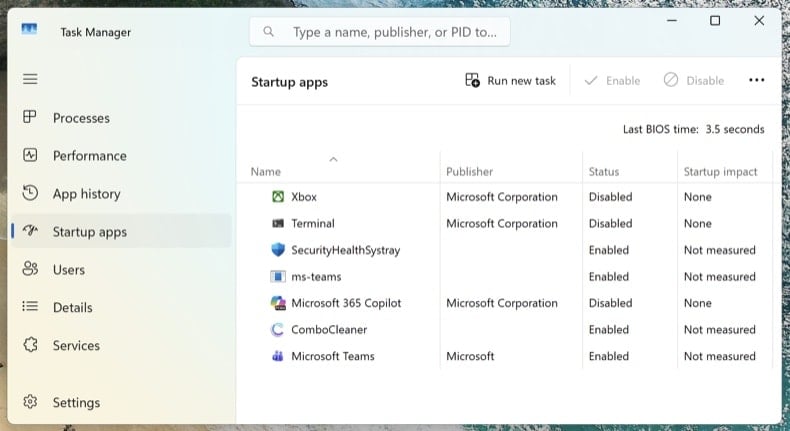
Reconnect to the network and run one final full scan with Combo Cleaner. Open Task Manager (Ctrl + Shift + Esc) and switch to the Startup apps tab - confirm nothing suspicious has reappeared.
Over the next 7 days, watch for symptom recurrence: unexpected high CPU usage, unknown processes returning, browser redirects, or pop-ups. If anything returns, you missed a persistence point and the procedure needs to be repeated - or you may have a deeper compromise that requires a clean install.
When to clean install Windows instead
Manual removal isn't always the right answer. Reinstalling Windows from scratch is the only way to be 100% certain when:
- The malware reappears after every removal attempt
- A bootkit or UEFI rootkit was detected (this class of threat sits below the operating system and survives a normal Windows reinstall)
- A confirmed credential-theft trojan ran with administrator privileges (Lumma, RedLine, Vidar) - the system likely has multiple unknown payloads
- The PC is used for online banking, business email, or anything where partial doubt isn't acceptable
A clean install is a 30-60 minute process: Windows 11 reinstall via . Back up documents to external storage first, scan the backup with Combo Cleaner before restoring it, and reinstall applications fresh - never restore them from a backup of the infected system.
Important: Manual removal requires advanced computer skills. If you're not confident identifying system files from malicious files, run an automated scan with Combo Cleaner and Windows Defender and stop there - that path catches the vast majority of consumer trojans without the risk of breaking Windows by deleting the wrong file.
Frequently Asked Questions (FAQ)
My computer is infected with AvisLoader malware, should I format my storage device to get rid of it?
Formatting will remove AvisLoader, but it also wipes every file on the drive. It is better to start with a reputable security tool such as Combo Cleaner and keep formatting as a last resort.
What are the biggest issues that AvisLoader malware can cause?
The biggest danger is what AvisLoader brings in next. Operators can push stealers, ransomware, miners, or other malware to the infected computer, which can lead to stolen accounts, identity theft, financial loss, and locked or destroyed files.
What is the purpose of AvisLoader malware?
AvisLoader is a first-stage loader. It profiles the infected computer, reports it to the operator over the Tox network, and then runs commands or delivers additional malware chosen by the attacker.
How did AvisLoader malware infiltrate my computer?
AvisLoader has been spread through a fake DocuSign page that used the ClickFix technique, tricking visitors into pasting a malicious command into a terminal. Malware of this type also spreads through phishing emails, fake download sites, pirated software, and malicious ads.
Will Combo Cleaner protect me from malware?
Yes. Combo Cleaner can detect and remove most known malware, including loaders. Since advanced threats can hide deep in the system, running a full system scan is recommended.
Share:
 Facebook
 X.com
X.com
 LinkedIn
 Copy Link

Tomas Meskauskas
Expert security researcher, professional malware analyst
I am passionate about computer security and technology. I have an experience of over 10 years working in various companies related to computer technical issue solving and Internet security. I have been working as an author and editor for pcrisk.com since 2010. Follow me on Twitter and LinkedIn to stay informed about the latest online security threats.
PCrisk security portal is brought by a company RCS LT.
Joined forces of security researchers help educate computer users about the latest online security threats. More information about the company RCS LT.
Our malware removal guides are free. However, if you want to support us you can send us a donation.
DonatePCrisk security portal is brought by a company RCS LT.
Joined forces of security researchers help educate computer users about the latest online security threats. More information about the company RCS LT.
Our malware removal guides are free. However, if you want to support us you can send us a donation.
Donate
▼ Show Discussion