
We may earn commissions from products we recommend. Learn more.
How to opt out of FastBackgroundCheck | Easy guide

How to opt out of FastBackgroundCheck
FastBackgroundCheck is a people-search website that collects personal information and lets anyone look up names, phone numbers, addresses, relatives, and other details. The site says it provides free public records and offers tools like people search, reverse phone lookup, and address search. It also makes clear that it is not a Consumer Reporting Agency under the Fair Credit Reporting Act, so it cannot be used for employment, credit, or tenant screening.
Even though FastBackgroundCheck is not a Consumer Reporting Agency, your information can still be exposed in important ways. The Federal Trade Commission warns that people-search sites can show your current and past addresses, other names you have used, family details, property history, and more. This can put people at risk, especially survivors of domestic violence or stalking, if their information is easy to find. California's privacy agency also says that limiting data broker sales can help reduce unwanted calls, texts, emails, and lower the risk of identity theft, fraud, and impersonation.
At PCrisk, we think you should act if your personal information is on FastBackgroundCheck and you want it removed. This guide explains what FastBackgroundCheck is, how to use its opt-out process, what problems you might face, and how to automate removal with Incogni if you do not want to handle each data broker yourself. We also explain what personal data removal services do and why removing just one FastBackgroundCheck listing is only part of protecting your privacy.
Opt out of FastBackgroundCheck with Incogni
Table of Contents:
- Introduction
- What is FastBackgroundCheck?
- How to manually remove your information from FastBackgroundCheck
- Common issues with removing information from FastBackgroundCheck manually
- How to remove your information from FastBackgroundCheck automatically
- What are personal data removal services?
- What information is collected on FastBackgroundCheck, and why you should remove it
- In closing
- Frequently asked questions (FAQs)
What is FastBackgroundCheck?
FastBackgroundCheck is a people-search and public-records website. Its pages advertise people search, reverse phone lookup, and address search. The "About" section says searches can return details like address, phone number, age, email, and more. Independent opt-out guides from 2025 and 2026 describe the same features and note that you can search by name, phone number, or address.
The site is widely considered a data broker. California's Data Broker Registry says that businesses meeting the state's definition of "data broker" must register every year, and the registry lists "FastBackgroundCheck.com" as a registered broker. This does not tell you everything about the company, but it does mean FastBackgroundCheck is officially listed as a data broker in California.
FastBackgroundCheck clearly states on its website that it is not a Consumer Reporting Agency under the FCRA, so its information cannot be used for employment, credit, or tenant screening. This disclaimer shows the company intends its service for informational lookups, not screening. Still, the details it shares can create privacy, safety, and scam risks.
FastBackgroundCheck's removal process seems simple, but it can be inconsistent. To remove your data, start at the site's privacy or "Do Not Sell My Personal Information" section, find the opt-out form, identify your listing, and complete email verification. However, may need to enter your name and email first, get a verification link, and then see the opt-out form. Previously, users were shown email verification after finding their record. This means the site's process has changed over time, so users may see different versions.
This difference explains why some removal guides online do not match each other. Still, the main advice is the same: you will need an email address, a CAPTCHA, details to find your profile, and at least one confirmation click. The site's interface may change. If the steps on your screen differ from those in an older guide, just follow the same logic: verify your email, find your listing, and submit the opt-out request for your record.
How to manually remove your information from FastBackgroundCheck
Before you start, be aware that FastBackgroundCheck's opt-out process has changed over time. According to recent information and an April 2026 walkthrough, you begin at the footer, go to the "Do Not Sell My Personal Information" page, then to the "Opt-Out Form," enter your name and email, get a verification link, and finally see the removal form. If your screen looks different, don't worry. The process still uses the same main steps: email verification, identity matching, record selection, and final submission.
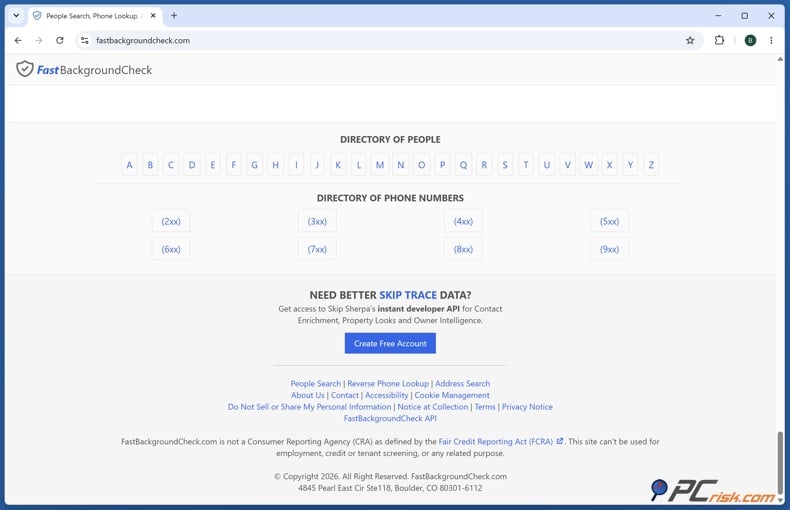
Open the FastBackgroundCheck privacy link. Start at FastBackgroundCheck's homepage and scroll to the footer. Look for the link labeled "Do Not Sell or Share My Personal Information."
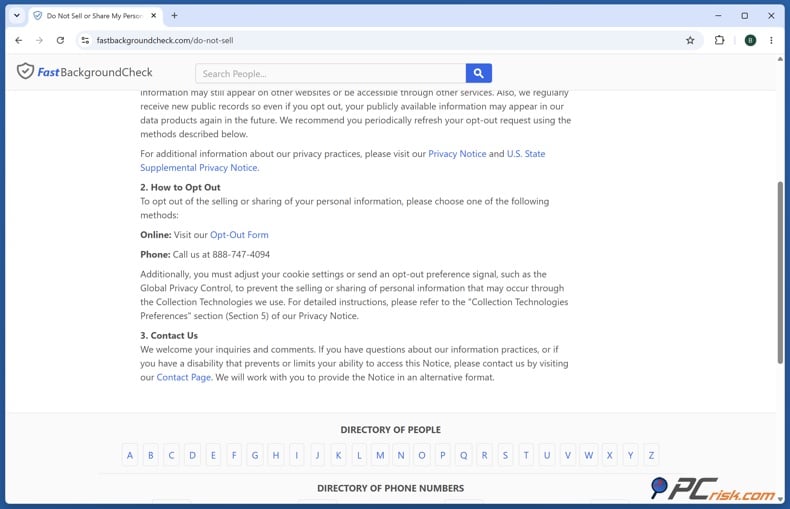
Access the opt-out form itself. Once you are on the do-not-sell page, look for the section explaining how to opt out and click the "Opt-Out Form" link. If you do not see a large removal button immediately, keep scrolling and look for inline text links or explanatory copy rather than a giant call-to-action.
If you can, use a dedicated email address. We suggest using a throwaway, masked, or separate email for data broker removals. Opt-out requests often mean contacting sites that handle personal information, and using a special email helps keep your main address out of new profiles. If you use a temporary email, make sure it stays active long enough to get and click the verification message.
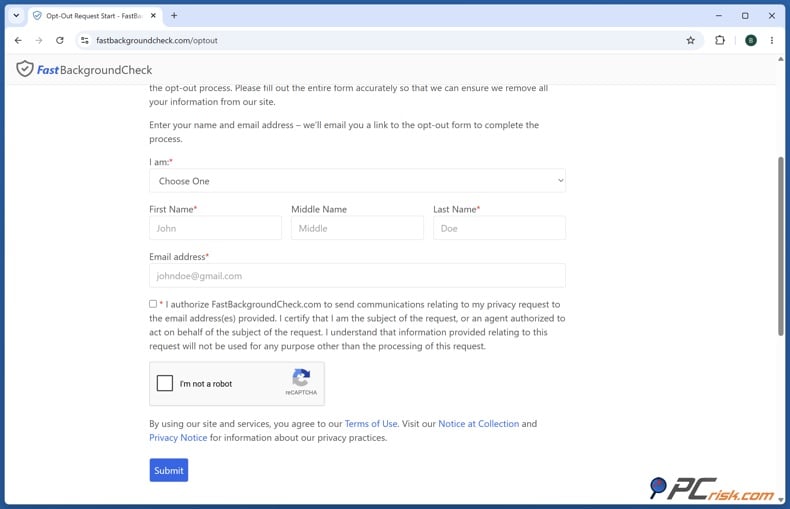
Complete the initial request form. In the current 2026 version of the process, recent testing indicates that FastBackgroundCheck asks you to submit your full name and email address, authorize communications for the opt-out, complete a CAPTCHA, and then click "Submit." An official search snippet for the FastBackgroundCheck opt-out flow says the process begins by entering your email address and name, then completing the CAPTCHA, after which you click a link sent to your email and enter your information on the form. This newer sequence is the best indication of what current users should expect.
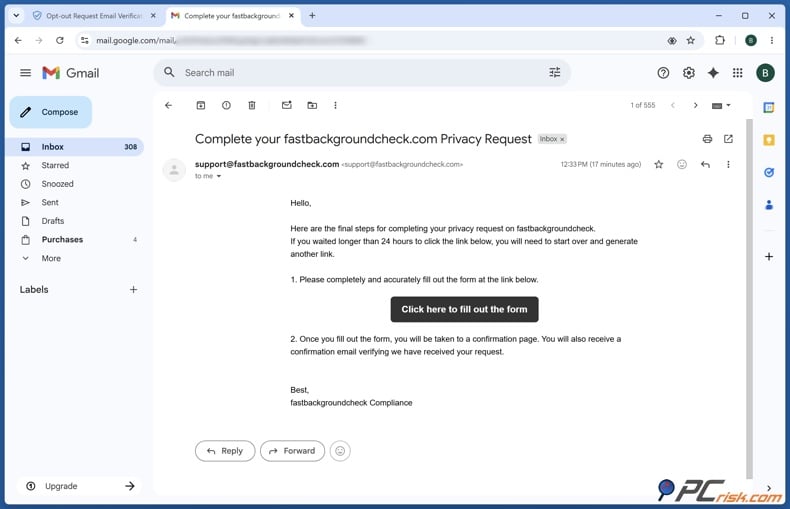
Verify the email promptly. After the first form submission, FastBackgroundCheck should send a verification email. You must click that link before the site will let you complete the actual removal form, and you should click the record-removal confirmation link quickly because it may expire within 24 hours. If you do not see the message, check spam, junk, promotions, and any filtered folders before restarting the request.
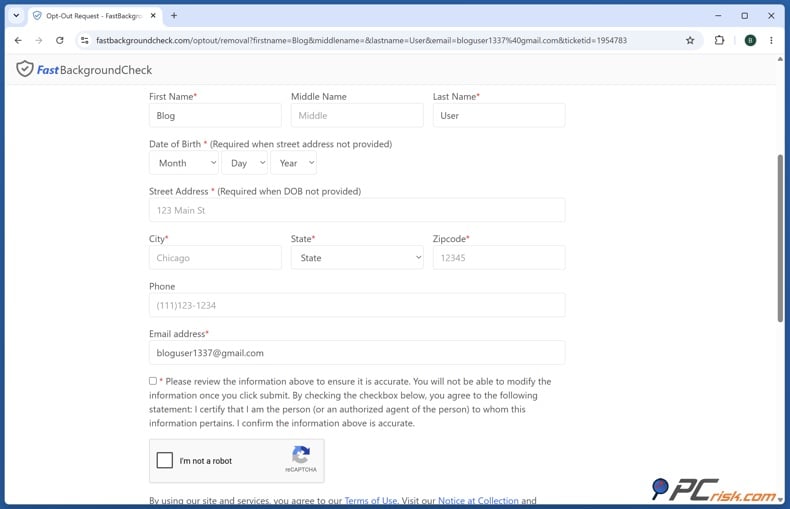
Fill in the opt-out form using only matching details. Once you are past email verification, FastBackgroundCheck should present the actual form or record-search interface. We recommend entering only the personal details that already appear in the listing, which is sensible advice if you want to avoid giving the data broker fresh information. In older versions of the workflow, this stage involves entering your full name, city, state, and sometimes your ZIP code to search for the exact listing the site holds on you.
Locate the exact record that belongs to you. If FastBackgroundCheck gives you multiple matches, do not click blindly. Compare the entries against publicly available details, such as age range, current or former address, relatives, or phone numbers. Some result pages include sponsored buttons, such as "View Details," for different people-search sites, while the correct FastBackgroundCheck record is typically opened through the "Free Public Records" or your actual name link. If you click a sponsored result, you may land on another broker site and wind up starting over.
Submit the removal request for the correct profile. In the older workflow, the right FastBackgroundCheck profile page includes a "Remove my record" button. In the newer 2026 flow, you complete a structured opt-out form after email verification, confirm that the information entered is correct, then solve another CAPTCHA and submit it. If you land on a profile page that clearly belongs to you and see a removal button, use it. If you are instead on a form-driven page with identity fields and a confirmation checkbox, follow the current form sequence. Either way, the goal is the same: remove the exact record tied to your identity.
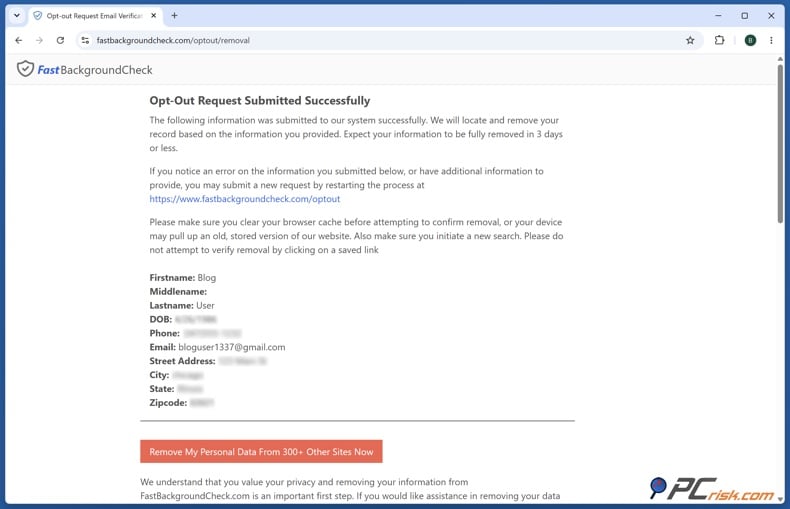
After you submit your request, wait and then check if your listing is gone. FastBackgroundCheck processes opt-outs in about 72 hours; however, some removals can happen within 24 hours. It's safest to wait three days before checking again. Search for your full name, address, and phone number, since listings may appear under different search types or name variations. If your record is gone from FastBackgroundCheck but still appears in Google results, that's usually a search-index issue, not a sign that your opt-out failed.
Use the alternative phone channel if the form fails. FastBackgroundCheck's official do-not-sell page search snippet lists a phone option at 888-747-4094. If you use it, be prepared to provide enough information for customer support to identify the exact listing. That generally means your full name and the specific address or contact details that appear in the public record. Phone-based opt-outs are not ideal, but they can be useful when the web form is broken.
Common issues with removing information from FastBackgroundCheck manually
One of the biggest problems with FastBackgroundCheck opt-outs is that the process is not consistently presented. Newer 2026 documentation shows one sequence, while older 2025 guides show another. If your experience does not match a screenshot from a blog post, assume the layout changed rather than assuming you are on the wrong site. What matters is that you are on the correct FastBackgroundCheck privacy path, that your email gets verified, and that you complete the request for your exact listing.
A frequent complaint is that the web form will not submit or throws errors. Form-submission issues are common during manual FastBackgroundCheck removals. When that happens, the first fixes are basic but effective: turn off content blockers for that page, retry in another browser, complete the CAPTCHA carefully, and make sure any required consent or authorization checkbox is ticked. Skipping the CAPTCHA or agreement box prevents submission entirely. If the form still does not work, use the phone alternative.
Another common issue is a missing or delayed verification email. The solution is to check spam and promotions folders, wait a few minutes, and then restart the request if nothing arrives. The confirmation link should be clicked quickly because it may expire, and your throwaway email must remain active long enough to complete the process. If you use a masked or temporary mailbox, this is where many people trip themselves up.
Some users cannot find the right listing, or they discover that several near-duplicate listings exist. The FTC recommends searching people-search sites using multiple identifiers, such as a phone number or address, not just a name, and checking them periodically for new or duplicate reports. We also recommend searching for name variants, such as maiden names or middle initials, because incomplete opt-outs can leave behind stray profiles. In practice, you should run searches for your name, former names, phone number, and address to ensure you did not remove only one instance of the same profile.
Sometimes the listing remains visible for a while after you submit the request. This is not unusual. FastBackgroundCheck may take up to 72 hours to process a removal, and some sites take even longer for full database and cache updates. Give it at least three days, then search again. If the listing still appears after that, use the phone number or contact path and reference the request you already submitted.
A different but related issue is when FastBackgroundCheck removes the record, yet Google still shows the old result or cached snippet. Google explains that its "Refresh outdated content" tool can be used when a page has been deleted or no longer exists, and it also offers "Results about you" to remove certain search results containing personal contact information, such as your address, phone number, or email. If the FastBackgroundCheck page is gone but Google still shows the old snippet, use Google's outdated content refresh tool. If the listing still exists and includes your personal contact details, consider using Google's personal information removal path as well.
Re-listing is one of the most frustrating parts of people-search-site removal. FastBackgroundCheck's own privacy notice snippet states that it "regularly receives new public records" and that, even after you opt out, publicly available information may reappear in its data products. The FTC makes the same point at the industry level. Opting out stops the sale of existing information, but it does not erase public records at the source, and your information may still appear in relatives' or associates' reports or return when new records are ingested. That is why one successful opt-out is not the same as permanent deletion.
A more serious issue is denial or non-response linked to state privacy rights. FastBackgroundCheck's official do-not-sell notice states it applies to residents of U.S. states with comprehensive privacy legislation, and BBB complaint snippets show consumers alleging the company refused to remove their information because their state lacked applicable privacy law coverage. That means some users may run into legal-jurisdiction barriers rather than technical ones. If that happens and you are a California resident, the best escalation path is California's official DROP platform, which lets residents send a single deletion and opt-out request to more than 500 registered data brokers. Starting August 1, 2026, the state says data brokers must delete the relevant data within 90 days after a valid DROP request.
How to remove your information from FastBackgroundCheck automatically
If you do not want to deal with FastBackgroundCheck's changing interface, email checks, repeated follow-ups, and the possibility of re-listing, an automated personal data removal service is the simpler route. PCrisk's Incogni review concludes that Incogni offers an automated, ongoing effort to keep personal data off hundreds of data broker lists and is especially useful for people who do not want to spend hours manually opting out. PCrisk's broader review of personal data removal services likewise explains that the point of these services is repeated scanning and removal across many broker sites, not just one.
Opt out of FastBackgroundCheck with Incogni
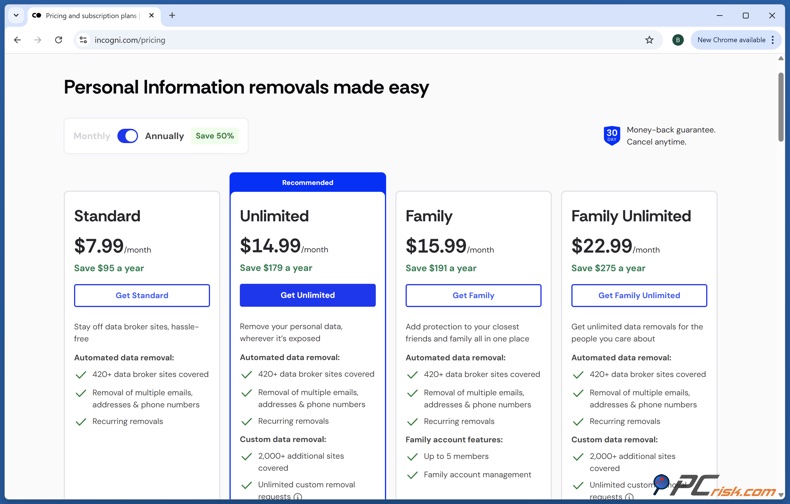
The first step is to create an Incogni account and purchase a plan. Incogni's official getting-started guide says the company offers Standard, Family, and Unlimited plans and requires email verification immediately after purchase. Once you receive the email, click the verification link, set your password, and continue to profile setup. This part takes only a few minutes, but it is necessary because Incogni cannot start acting on your behalf until the account is verified.
Next, provide the personal information that will let Incogni match your records across data broker databases. Incogni's official setup guide says you will need to enter your full name, date of birth, and your most recent home address, and that U.S. users must also provide a phone number when entering a U.S. address. The company's public site adds that you can include multiple current and past addresses and phone numbers to broaden the search, which is useful if your FastBackgroundCheck profile includes historical address data or older contact details.
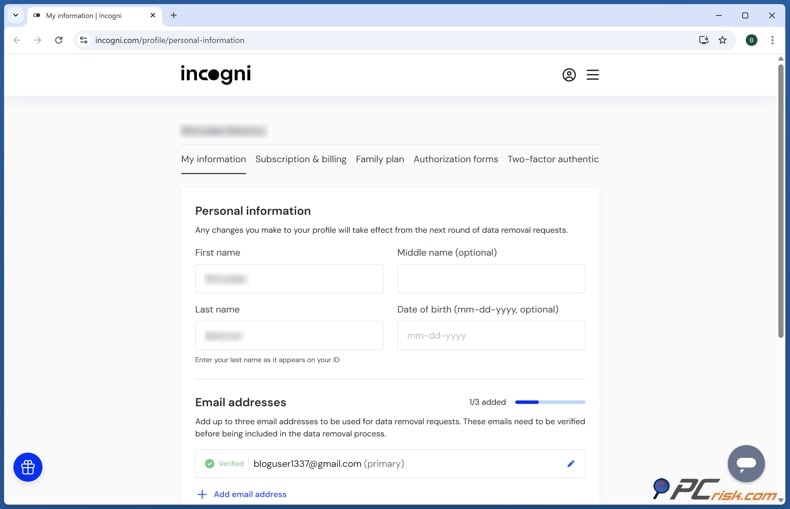
After that, sign the authorization form. This is the legal consent that allows Incogni to contact brokers and demand the removal of your content on your behalf. Incogni's materials are explicit on this point. You are not just creating an account. You are authorizing the service to represent you in data deletion requests. Without the signed authorization form, the automated removals do not begin.
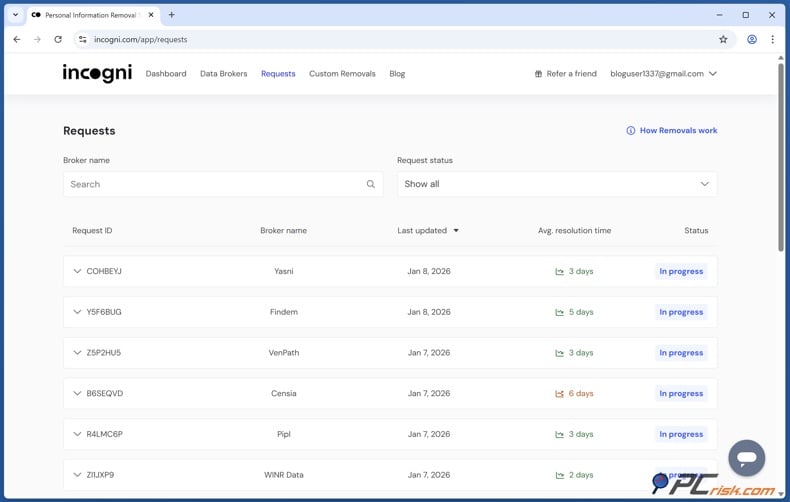
Once your profile and authorization are in place, start the removal process and let Incogni handle the legwork. According to Incogni's help center, the service contacts data brokers for you, requests deletion of your personal data, and automates the process across a growing list of 420-plus data brokers. Incogni also maintains a FastBackgroundCheck opt-out guide in its broker-guide library, and its support materials state that the platform makes recurring requests because many brokers relist data after an initial removal. That recurring element is important if your concern is not only deleting today's FastBackgroundCheck profile, but also reducing the likelihood that it will return later.
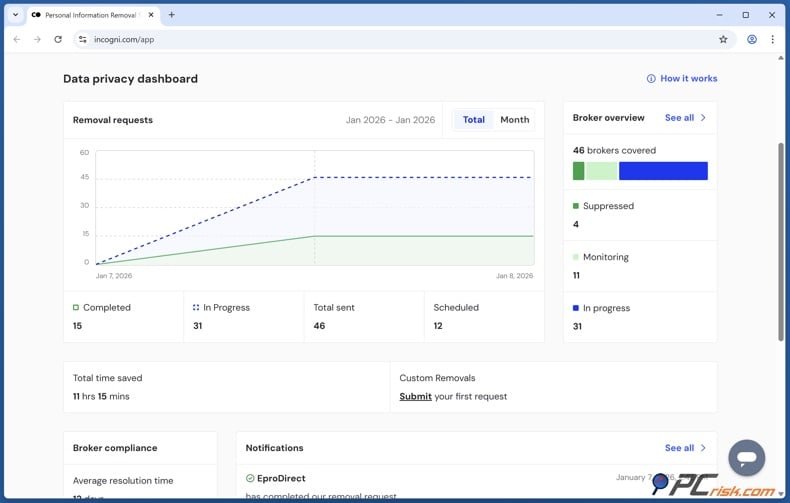
From there, monitor progress in the dashboard and the periodic reports. PCrisk's review says Incogni neatly labels removal states in the dashboard and lets you track whether requests are in progress, have been removed, or are awaiting a response. Incogni's own support article also explains its status labels, including "In progress," "Scheduled," "Suppressed," and "Monitoring," and notes that recurring requests continue while your subscription is active. In other words, the service is designed not just to send a one-time request to FastBackgroundCheck, but also to monitor regrowth across the data broker ecosystem.
This is why automated removal works well for many people. Manually deleting your FastBackgroundCheck listing is doable, but repeating this across dozens or hundreds of similar sites, and checking again when your data comes back, is not. PCrisk's review points out that Incogni's value lies not just in the initial cleanup but also in ongoing background maintenance, clear progress updates, and the time you save by not doing these tasks yourself.
What are personal data removal services?
A personal data removal service is a privacy tool that identifies your exposed information on data brokers and people-search sites, then submits opt-out or deletion requests on your behalf. PCrisk describes these services as repeatedly scouring data broker sites and having your details taken down to reduce exposure. Incogni's own support material summarizes the same idea more directly, stating that the service contacts data brokers on your behalf and requests the deletion of any personal data they hold.
Check our top personal data removal services
The biggest benefit is scale. The FTC explains that opting out manually usually means searching site by site and repeating the process on every broker that has your information. That is free, but it takes time, and it must be repeated periodically because data can reappear. A removal service consolidates that chore into a single account, a single authorization process, and a single dashboard. Instead of hand-filing requests at one site after another, you centralize the work.
The second benefit is persistence. PCrisk notes that these services do not remove 100 percent of your data from the internet because they generally cannot erase news articles, court records, government pages, or social media content that you or others posted. What they are good at is attacking the broker layer, the sites that republish your name, address, phone number, family links, and similar records at scale. That is an important distinction. A good removal service reduces broad exposure, but it is not a magic eraser for the entire web.
The third benefit is reduced maintenance after the first cleanup. Incogni says it re-scans and sends fresh waves of requests regularly, so brokers and people-search sites do not get easy opportunities to start selling your information again. Its dashboard documentation likewise states that recurring requests are scheduled for brokers who previously removed your data, as those brokers may re-list it later. This ongoing monitoring is exactly what most people cannot realistically maintain on their own.
At PCrisk, we view personal data removal services as convenience tools with real security value, not miracle products. They are most useful for people whose address, phone number, and family-member links are exposed across multiple broker sites, for people who are tired of repeated opt-outs, and for users who want a single place to track progress. They are less useful if you need to erase data from original public-record sources, from independent websites that are not brokers, or from content you posted yourself.
What information is collected on FastBackgroundCheck, and why you should remove it
FastBackgroundCheck's own privacy notice states that the types of information it collects include identifiers such as real name, alias, current and former postal addresses, and telephone numbers. The same privacy materials also refer to "Internet or Other Electronic Network Activity Information," indicating that the company's data handling is broader than a simple phone-book-style listing. Independent walkthroughs and the site's public search features show that profiles may also expose age, date of birth, email addresses, relatives, neighbors, property details, and marital-status-related information.
The FTC's guide to people-search sites helps put those categories in context. It says reports sold by these sites can include age, date of birth, gender, other names used, current and previous addresses, properties bought or sold, marital status, education and employment history, criminal and civil records, and the names and addresses of family members. FastBackgroundCheck does not necessarily show every category for every person, but it operates in the same people-search ecosystem, and recent guides focused specifically on FastBackgroundCheck describe many of those same data points.
There are several good reasons to remove your information from FastBackgroundCheck. The first is simple privacy. People-search sites make it easier for strangers to connect your name to your address, phone number, and relatives, all from a single search. Incogni's public site spells out the potential consequences starkly, naming stalking, doxxing, swatting, discrimination, and physical harm as possible outcomes when personal information is easy to access online. NNEDV's materials make a similar point from a survivor-safety perspective, warning that public records and searchable databases can allow victims to be tracked.
The second reason is to reduce fraud and scams. California's DROP program says that reducing broker sales can mean fewer unwanted calls, texts, and emails and can decrease the risk of identity theft, fraud, AI impersonations, and data leaks. Incogni likewise argues that exposure through data brokers can feed scams, hacking, and identity theft by supplying the personal details criminals need for better targeted attacks. You do not have to believe every marketing claim to accept the basic logic. The less publicly packaged personal data that is available about you, the harder it is for someone to weaponize it.
The third reason is inaccuracy. People-search reports often merge data from multiple sources, and the result is not always correct. Profile reappearance with updated or merged data is a common FastBackgroundCheck problem, and BBB complaints show users reporting unwanted exposure of addresses, phone numbers, past addresses, spouses, and email details. Inaccurate or mixed records can still put you at risk, because a stranger does not need a perfect dossier to cause harm. They just need enough to find you, contact you, or build a believable phishing attempt.
The fourth reason is that opting out once does not fix the whole ecosystem. FastBackgroundCheck is one site among many. The FTC explicitly says opting out of one people-search site does not clear public records at the source and does not stop your details from appearing in reports about relatives, neighbors, or associates. PCrisk's review of data removal services makes the same broader point from the consumer side. If your information is on one broker, it is often on many. Removing a FastBackgroundCheck listing is worth doing, but it should be part of a broader cleanup strategy, not the end of it.
In closing
FastBackgroundCheck is just one of many sites like this, but it shows how real online privacy issues can be when you search your own name and see what is exposed. Its tools make it easy to link someone to addresses, phone numbers, relatives, and more. The privacy notice also says that even if you opt out, new public records may be added later. The main thing to remember is that opting out is worth doing, but it is not a permanent fix.
If you are comfortable handling it yourself, you can still use the manual method. Follow the current opt-out steps, verify your email, find your listing, submit the request, and check again after a few days. If the form does not work, try the phone option. If Google still shows your listing after removal, use Google's privacy and outdated-content tools to update search results.
If you want convenience or know your information is on several people-search sites, using a removal service is often the better choice. PCrisk's reviews explain why these services are helpful. The challenge is not just one listing, but the ongoing task of finding and removing new ones as your data is copied and shared across the broker market. Incogni's automation, recurring requests, and dashboard tracking are made for this kind of ongoing work.
Check our top personal data removal services
PCrisk's practical advice is to remove your FastBackgroundCheck record, but remember, your privacy work is not finished. Search for your name, past addresses, and phone numbers on other major broker sites, and check again from time to time. If you live in California, consider using DROP as another official way to reach registered data brokers. If you want to avoid repeating this process, use a trusted automated service to monitor for you.
Frequently asked questions (FAQs)
How do I start the FastBackgroundCheck opt-out process?
Start on FastBackgroundCheck's homepage and click the footer link labeled "Do Not Sell My Personal Information." From there, open the "Opt-Out Form" and follow the prompts. Recent 2026 documentation indicates that the current version asks for name and email first, then email verification, then the actual removal form.
How long does FastBackgroundCheck take to remove data?
Recent walkthroughs commonly state that processing can take up to 72 hours, though some removals may appear within 24 hours. The safest expectation is to wait about three days before escalating.
Do I have to use my real email address?
No. You can use a masked, throwaway, or dedicated opt-out email address. Just keep that mailbox alive long enough to receive and click the verification link.
What if I cannot find my listing?
Search with more than one identifier. The FTC recommends checking for yourself using phone numbers or addresses, not just your name, and we recommend searching for name variations, such as maiden names or middle initials.
What if my profile is gone from the site but still shows on Google?
Use Google's privacy tools. Google's "Refresh outdated content" tool helps update stale search results when a page has changed or been removed, and "Results about you" can help with some search results that expose contact details like your address, phone number, or email.
Can FastBackgroundCheck add my information back after I opt out?
Yes. FastBackgroundCheck's own privacy notice says it regularly receives new public records, and the FTC warns that information can reappear on people-search sites when public records change or when your details show up again in related reports.
Can I remove my information without using the website form?
Possibly. FastBackgroundCheck's do-not-sell notice snippet lists a phone option at 888-747-4094. If you call, be ready to provide enough details to help locate the exact record.
Will removing my FastBackgroundCheck listing remove me from the whole internet?
No. The FTC and PCrisk both make this clear in different ways. Opting out removes a broker listing, not the underlying public records, not information on government sites, and not every mention of you elsewhere on the web. It is an important step, but only one step.
Is Incogni a good way to handle FastBackgroundCheck and similar sites?
For users who want a hands-off option, yes. PCrisk's Incogni review concludes that the service is a legitimate time-saver for people who do not want to opt out manually at scale, and that Incogni automates removals across more than 420 data brokers while sending recurring requests to sites that may re-list your data later.
Share:
 Facebook
 X.com
X.com
 LinkedIn
 Copy Link

Rimvydas Iliavicius
Researcher, author
Rimvydas is a researcher with over four years of experience in the cybersecurity industry. He attended Kaunas University of Technology and graduated with a Master's degree in Translation and Localization of Technical texts. His interests in computers and technology led him to become a versatile author in the IT industry. At PCrisk, he's responsible for writing in-depth how-to articles for Microsoft Windows.
▼ Show Discussion