
We may earn commissions from products we recommend. Learn more.
How to opt out of Radaris in 2026 | Easy guide

How to opt out of Radaris in 2026
Radaris is a US people-search website that gathers personal information into searchable profiles. It collects data from public records, social media, online directories, and other sources, then makes some of that information public. This means your name, phone numbers, address history, household connections, and other details can all appear together and be easily found by strangers.
The real issue is how all this information gets combined. One scattered record might not seem like a big deal, but people-search sites pull together bits of data into a full profile. These sites act as data brokers, creating and sharing personal profiles without permission. These profiles can include addresses, phone numbers, family members, and legal records, which puts your privacy and safety at risk. The US Federal Trade Commission points out that people-search sites gather information from many places, put it into reports, and sell those reports to anyone who pays.
The main point for PCrisk readers is clear: removing yourself from Radaris is worth it, but it is not a permanent fix. Privacy protections have improved in 2026, especially for Californians using the new DROP platform or people using automated data removal services. Still, the FTC warns that opting out does not erase your information from public records, and your data can show up again later. So, the best approach is not just to remove your profile once, but to remove it, check that it is gone, and keep an eye out for it coming back.
Opt out of Radaris with Incogni
Table of Contents:
- Introduction
- Why you should remove your data from Radaris
- How to manually remove your information from Radaris
- Common issues with removing information from Radaris manually
- How to remove your information from Radaris automatically
- Alternative methods to opt out of Radaris and keep your information off people search sites like Radaris
- In closing
- Frequently asked questions (FAQs)
Why you should remove your data from Radaris
The first reason to opt out is to limit your exposure. When a site puts your address history, phone numbers, and relatives all in one place, it makes it easier for someone to harass you, dox you, or run scams. Incogni’s official site puts it plainly: people-search sites give strangers access to your address, work, email, phone number, family members, routines, and more, which raises the risk of stalking, doxxing, swatting, blackmail, and identity theft. This is not just marketing talk. Research on people-search websites shows that harassers and scammers often use this kind of public data.
The second reason is cybersecurity. Even without your Social Security number, a Radaris profile can give attackers useful details. Names, old addresses, family connections, contact info, and job clues are just what scammers need to make phishing emails, fake calls, or impersonation attempts more believable. Imperva says social engineering is when someone tricks you into making security mistakes or giving away sensitive information. The more personal details a criminal has, the easier it is for them to fool you.
The third reason is personal safety. The National Network to End Domestic Violence warns that data collection sites can help abusers and stalkers quickly find a victim’s private information, like phone numbers, addresses, and family members’ names. Their Safety Net resources also say that data shared with businesses often ends up with third parties and later appears on people-search sites. For people who have experienced stalking, abuse, or harassment, a Radaris listing is not just annoying - it can be dangerous.
The fourth reason is that Radaris often shows more information than people expect. Radaris listings can include names, aliases, current and past addresses, phone numbers, email addresses, relatives, property records, court or criminal records, social links, and job details. Even if one piece of information seems harmless, the combination can still create a real privacy risk.
The fifth reason is that US privacy laws still have big gaps. Privacy Rights Clearinghouse says that in the US, businesses usually do not need your permission to collect or sell your information unless state law lets you opt out. That is why data brokers are so common. The FTC also explains that people-search sites gather and sell information from many sources, and it is often up to you to remove your data, either by doing it yourself or paying for a service. So, while it is frustrating to see your data on Radaris, it is not unusual - which is why it is important to take action.
What information is collected on Radaris? Radaris profiles can include your full name, aliases, age range, current and previous addresses, mobile and landline phone numbers, email addresses, relatives, household members, social media or online mentions, property-related information, and in some cases court or criminal record references and professional or educational details. Radaris is also described as a search service for people, properties, businesses, and professionals, which helps explain why its records often merge personal and public record data into the same profile.
One last reason to opt out: manual removal is usually free. It costs your time, not your money. The FTC says you can opt out of people-search sites one by one for free, while paid services are there to automate the process and keep checking for your data. If you want to lower your digital exposure, removing your Radaris listing is a good first step.
How to manually remove your information from Radaris
In 2026, the manual process has three main steps: find your exact profile, submit it using Radaris' privacy or control form, and confirm your request by email. The steps may differ since Radaris' interface changes, but the basic process remains the same.
Before you begin, try to use a separate email address. We suggest having a dedicated inbox for broker opt-outs so your main email stays private.
Check our top personal data removal services
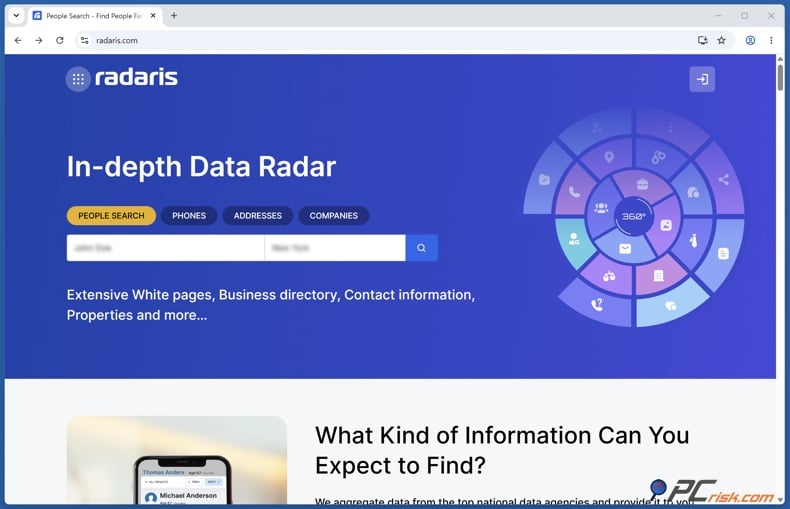
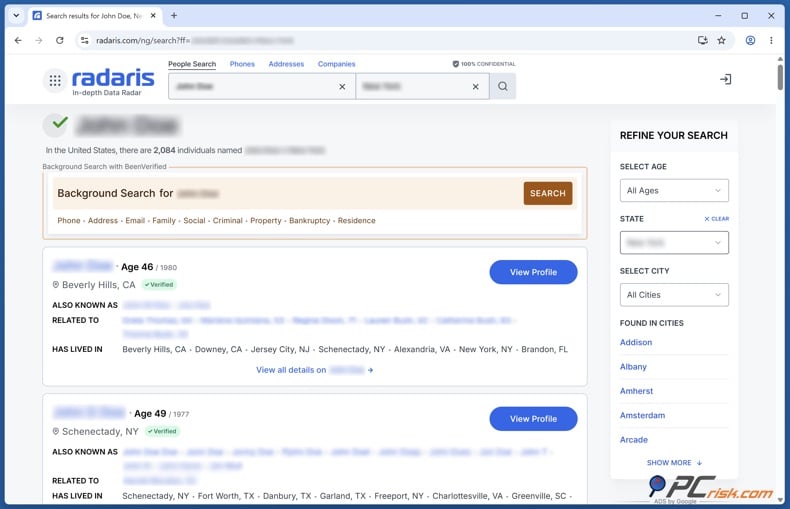
Step 1: Search for your record on Radaris. Enter your first and last name, plus your city and state, then look through the results until you find the profile that matches you. You need the exact listing, not just the search results page. If you have moved a lot or have a common name, go slowly and check each possible match one by one.
Step 2: Open your profile and copy the exact page URL. This step is very important. Copy the profile URL from the browser address bar, as the removal request depends on that URL. If Radaris has more than one listing for you, save each URL, as each may require a separate removal request.
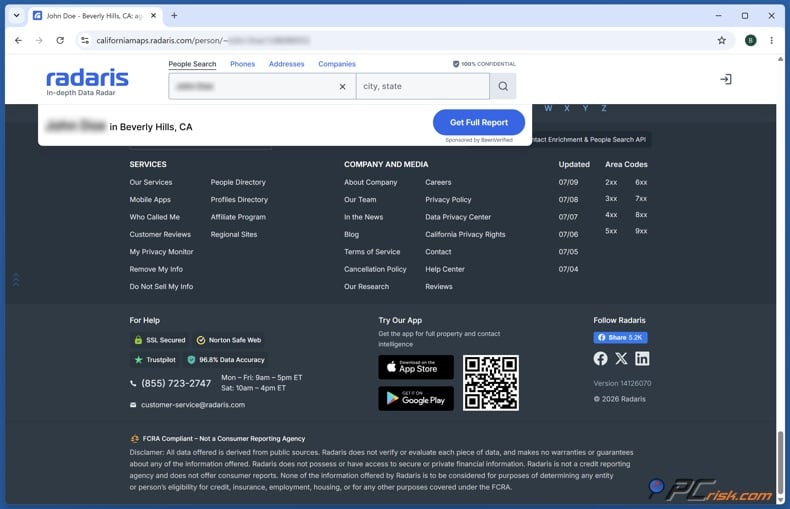
Step 3: Start the Radaris privacy or control-removal process. You can go straight to the official Radaris control-privacy page, or open your profile, scroll to the bottom, and click "Remove My Info" in the page footer. Both ways lead to the same removal process.
Step 4: Enter the requested information. Radaris lets you enter your full name, city, state, or the profile URL. The safest way is to use the exact record URL whenever possible, since it reduces the risk of selecting the wrong person.
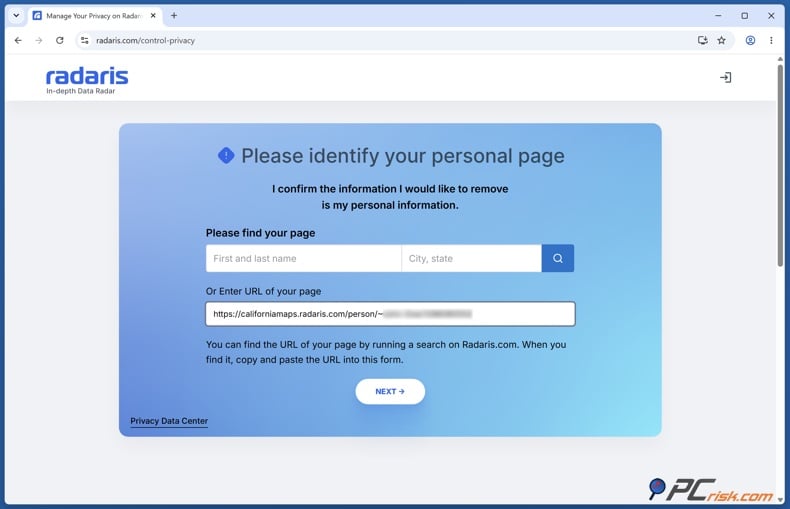
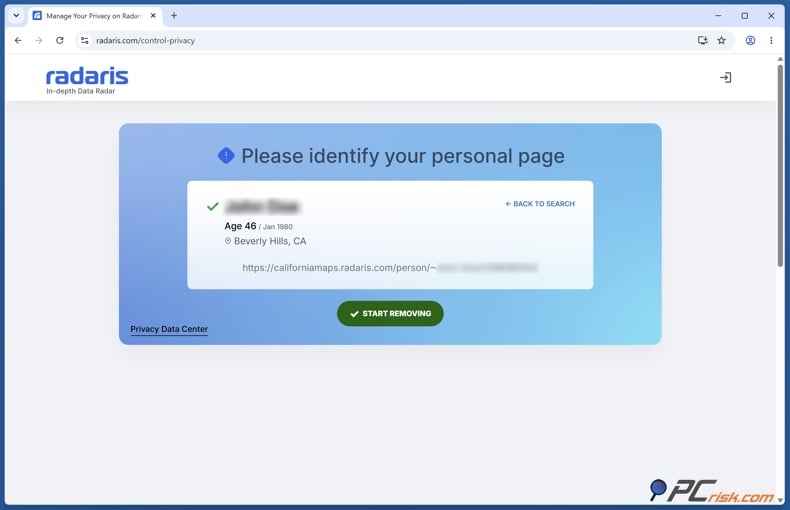
Step 5: Select your listing and start the removal process. You might need to click "Start Removing" and go through several screens before Radaris asks for your email address. This is important because many users think the form is stuck or broken, but it just has several confirmation steps. If you are still in the removal process, keep going until you get to the email verification step.
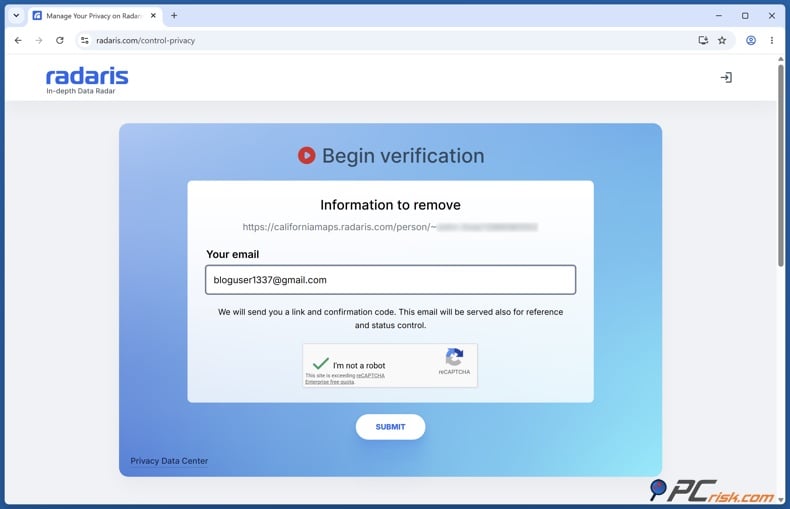
Step 6: Enter your email address and complete any CAPTCHA or anti-bot check. Email verification is part of the process. This matches the FTC's advice that people-search sites often need some information to confirm your identity when you opt out.
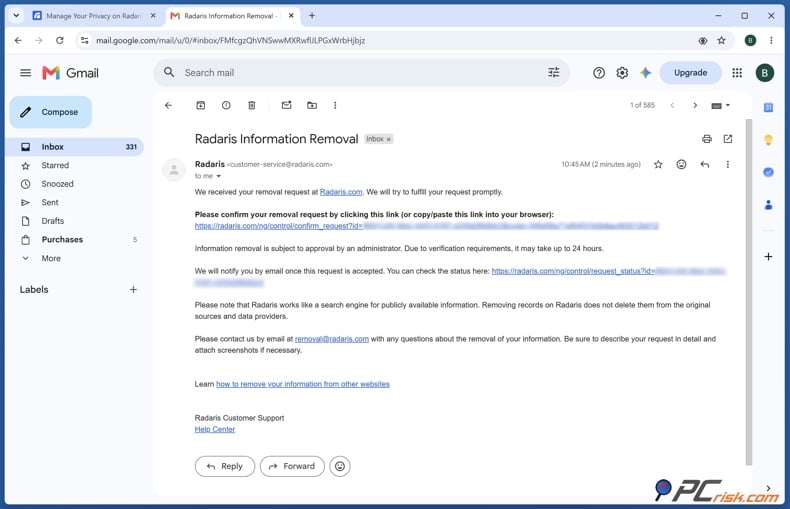
Step 7: Check your inbox and confirm the removal request. You need to click the link in the confirmation email to finish the process. The email can take over 30 minutes to arrive, so do not assume it failed if it is delayed. Check your spam and promotions folders before starting over.
Step 8: Complete the confirmation steps on the linked page. Radaris may ask for another CAPTCHA after you click the verification link, and then your listing should be removed within 24 hours. The follow-up can take up to 48 hours. Usually, submitting the request takes 10 to 20 minutes, but removal can take several hours to a few days, or longer if there are delays.
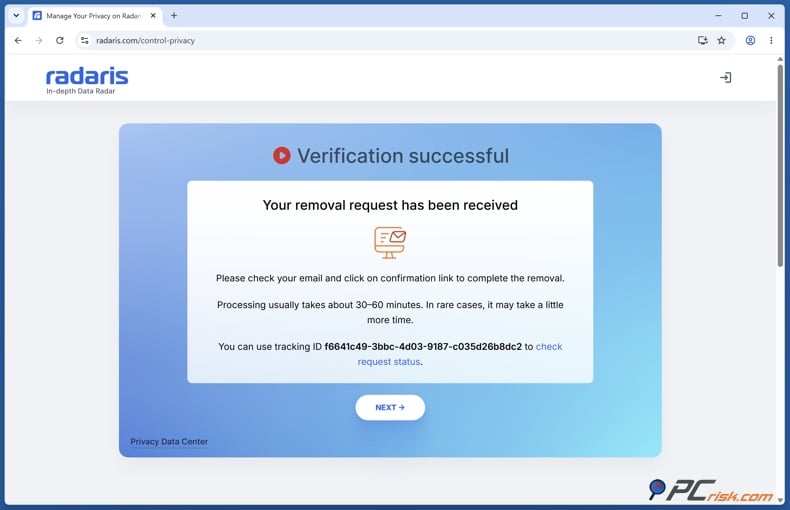
Step 9: Repeat these steps for every Radaris record that belongs to you. This is easy to miss. If your name shows up under an old address, a different spelling, or in several cities, one request might not remove them all. Each record has its own URL and needs its own removal request.
Step 10: Search for yourself again after the removal period. We suggest checking people-search sites regularly, as new or previously removed information can resurface. Removal should be ongoing, not just a one-time task.
If your information is in Radaris' "Mentions" section rather than just the main profile, the process may differ. Radaris has two sections: the main profile and a "Mentions" area linked to third-party sources like social media and job sites. Personal data removal services cannot remove the "Mentions" part for you, since only you can verify and access it. In these cases, you may need to contact Radaris directly.
For tough cases or "Mentions" removals, we recommend using the customer service email and support phone number as the main contact points. Since support details can change, check the live site for the latest contact info before reaching out.
Common issues with removing information from Radaris manually
A common problem is that the removal process can feel inconsistent. Some users find a footer link like "Control Your Info," while others use the privacy-control page or start from the profile URL. This kind of inconsistency is not just a Radaris issue. A 2026 arXiv study on California privacy law found that 43% of audited broker request processes made it impossible for consumers to exercise all privacy rights, and 64% added at least one design feature that created real obstacles. So, friction is built into the industry, not just a rare mistake.
Another frequent issue is slow or missing verification emails. The confirmation email might take more than 30 minutes to arrive, and a main-profile removal can take up to 48 hours. The best approach is to wait, check your spam folder, and avoid sending duplicate requests too soon. If you still do not get a response after waiting, try again with the same profile URL and, if needed, use a different dedicated email address.
A third problem is having multiple profiles. If you have lived at different addresses, used other names, or share your name with others, Radaris might list several possible matches. Each profile URL usually needs its own removal request. The solution takes some effort: gather all the matching URLs first, then handle them one at a time, and keep track of which ones you have already submitted.
A fourth issue is that removal can be incomplete. The academic PETS paper found that Radaris sometimes requires registration, a phone number, and an email for removal, but the information you see after creating an account is often the same as what was visible before. Radaris may have both a main profile and a separate "Mentions" section linked to third-party sources. So, removing the main profile does not always clear everything about you from Radaris. If your name still shows up after opting out, check related pages, snippets, and the "Mentions" section as well.
A fifth issue is that your information can be relisted. The FTC warns that if your public records change, your details might show up again on people-search sites. Therefore, treat deletion as ongoing maintenance, since your information can return. For Radaris, keep a copy of your confirmation email and set reminders to check back periodically. If your record comes back under a new URL, submit a new removal request for that page instead of relying on your previous request.
A sixth issue is the identity verification step. The FTC says you may need to provide some information to prove your identity when opting out. However, this step can make removal more difficult and may involve privacy trade-offs. The best approach is to provide only the minimum necessary information and use a dedicated email address for these requests.
A seventh issue is that old search engine results can linger after the source page is removed. Even if your Radaris profile is gone, Google might still display an outdated snippet or cached result for a while. According to Google's help pages, if the website no longer shows your information, you can use the Refresh Outdated Content tool to update search results. Google also has a "Results about you" feature that can monitor search results for your address, phone number, and email, and lets you request removal of qualifying results.
How to remove your information from Radaris automatically
For most people, Radaris is just one of many data brokers to worry about. Automated data-removal services help with this wider problem. Based on our personal data removal services reviews, Incogni is our top choice because it automates removals across over 420 data broker and people-search sites, supports multiple email addresses, phone numbers, and addresses, repeats scans and requests over time, and provides a dashboard to track what has been sent and removed. Its system scans for your data, sends requests to brokers it covers, repeats those requests regularly, and provides progress updates.
Opt out of Radaris with Incogni
If you plan to use Incogni to deal with Radaris in 2026, here is a practical workflow to follow:
Step 1: Start by creating an Incogni account and carefully filling out your identity profile. You can add several personal details, like multiple email addresses, phone numbers, and physical addresses. It uses your name, email, and home address, along with any current or past addresses and phone numbers you provide, to match records more accurately. The more complete and accurate your profile, the better your chances of matching and removing your data.
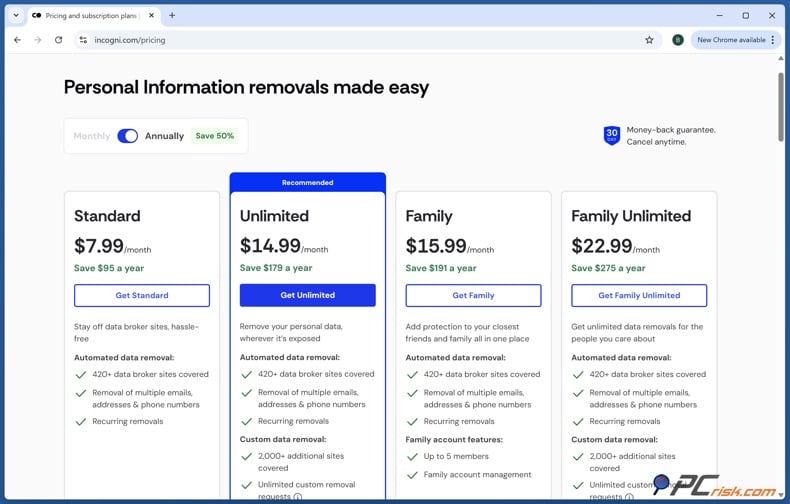
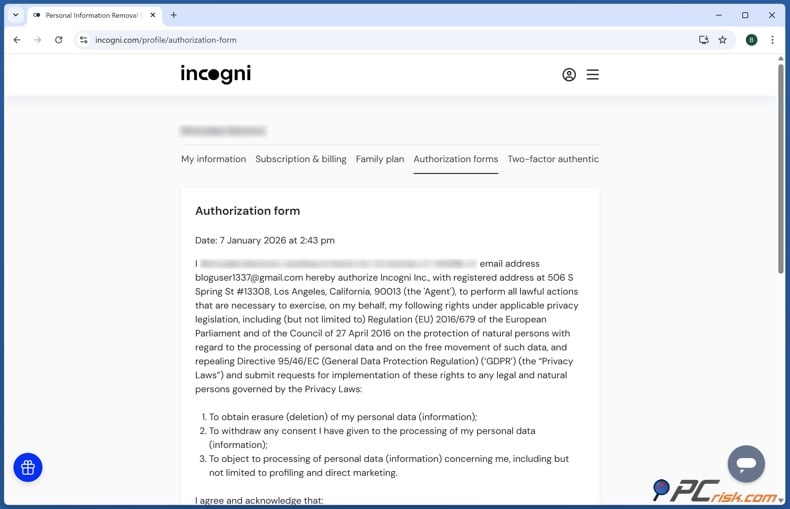
Step 2: Sign the authorization form so Incogni can act for you. This step is important because most brokers need a verified request from you or someone you authorize. Incogni's process makes this clear.
Step 3: Let Incogni run its first scan and send out the initial removal requests. The process begins by scanning people-search sites, then sending automated requests to the brokers it covers. It is a set-it-and-forget-it process that only needs your initial setup and consent.
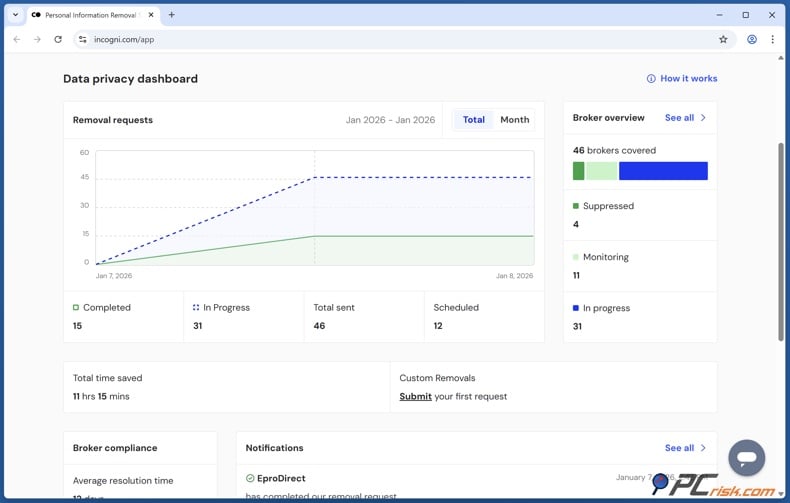
Step 4: Check the dashboard instead of guessing. Incogni marks each broker's status with labels like "Removal in progress," "Removed," or "Awaiting response." You also get monthly progress reports. This helps because removals finish at different times. Some brokers respond quickly, while others take longer.
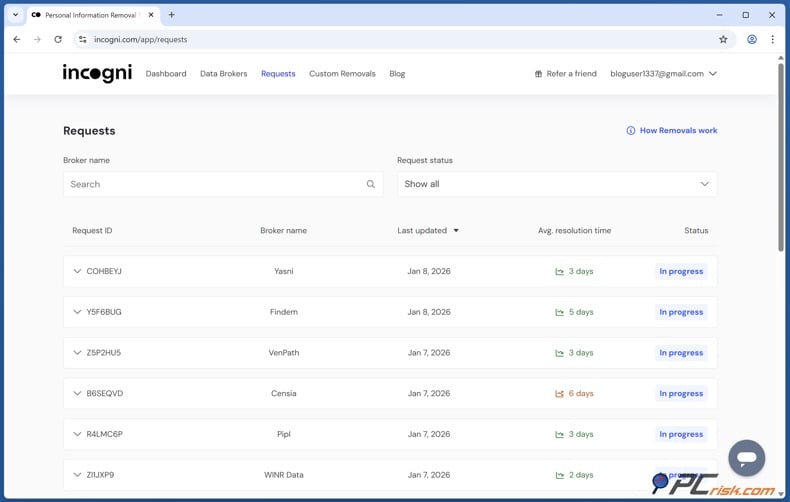
Step 5: Make sure recurring coverage stays on. This is a major advantage over one-time manual requests. Incogni re-scans and sends new requests regularly - about every 60 days for people-search sites and every 90 days for private brokers. This matters because your data can reappear, which is a common frustration with data brokers.
Step 6: Try custom removals if you need to reach more sites. Incogni's Unlimited tier lets you request removals beyond the usual broker network. You can submit URLs for extra sites not on the standard list. So, even if a site is not covered by default, the custom option can help as you expand your privacy efforts.
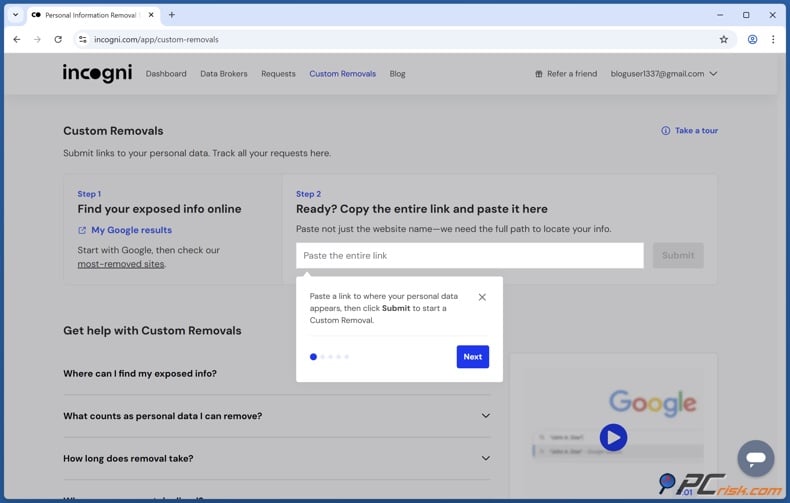
Step 7: Keep checking Radaris and other major people-search sites from time to time. Automated services save you time, but you still need to stay aware. Improvements usually happen gradually, with bigger changes showing up after one or two months, not right away. Think of automation as a steady process, not an instant fix.
Alternative methods to opt out of Radaris and keep your information off people search sites like Radaris
If you are looking for more options besides the standard Radaris form and Incogni, there are a few good alternatives in 2026. The best new one for California residents is the state’s Delete Request and Opt-out Platform, or DROP. According to California’s official privacy site, DROP lets eligible residents send a single request to over 600 registered data brokers, and brokers must start processing these requests on August 1, 2026, then keep deleting data every 45 days. The California Data Broker Registry also confirms that Californians can use DROP to send one request to all active registered brokers.
However, it is important not to expect too much from DROP. It is a strong tool, but not a complete solution. DROP applies only to California residents and covers only registered data brokers. Privacy Rights Clearinghouse says if you submit now, your request is put in a queue, and brokers must start processing in August 2026. There are still some brokers not covered and some limits under state law. So, DROP is a great extra strategy, but you should still check your data manually.
Another option is to contact Radaris support directly if the standard form does not work or if your information is in a "Mentions" section. Some users have had success reaching out to Radaris by phone or customer service email in these situations. This is especially helpful if your public profile is gone, but related information is still showing.
A third option is to clean up your information at the source. The FTC says that opting out of people-search sites does not remove your data from public records, so Radaris and similar sites can get your information again if the original sources remain public or are updated. If you control public social profiles, business directory pages, or personal websites, removing or limiting your information there can help prevent future listings. Google’s help pages also say that asking the website owner to remove your personal information at the source is the best way to get it out of Google search results.
A fourth option is to clean up search engine results after you have removed your information at the source. If Radaris has already taken down the page but Google still shows cached versions, you can use Google’s Refresh Outdated Content tool to update the results. If the search result still shows your personal contact information, "Results about you" can help you find and request removal of results with your home address, phone number, or email address. This will not delete the original source, but it can make old results harder to find in search.
Finally, there is the simple but effective "manual sweep" method: search for yourself regularly on different broker sites, not just Radaris. The FTC recommends searching for your information, finding opt-out links, repeating the process on other sites, and checking again from time to time for new listings. This method only costs your time and is still the basic privacy habit behind every good do-it-yourself removal plan.
In closing
Removing yourself from Radaris in 2026 is still a good idea. Most people find the process straightforward and free: find your record, submit the profile URL using the privacy form, confirm by email, and check back later. Still, the main takeaway from the FTC, California’s new DROP system, academic research, and our reviews is that opting out once does not guarantee lasting privacy. To really protect yourself, keep checking, clean up other sources, update search results, and consider a data removal service if needed.
To put it simply: if you only need to remove one record and do not mind spending some time, the manual Radaris process is a good place to start. But if your information appears on many broker sites, keeps coming back, or your privacy is at risk from stalking, harassment, or public exposure, a service like Incogni is more practical. It works with hundreds of brokers and keeps monitoring after the first removals.
Privacy protections are improving, especially in California, but there is still work to do. Data brokers often make things hard with confusing forms and inconsistent compliance. In 2026, research showed that only 9% of 522 registered California data brokers fully met transparency rules after the Delete Act began. This means consumers still need to be persistent, organized, and realistic. The system is getting better, but it is not simple yet.
Check our top personal data removal services
Frequently asked questions (FAQs)
How long does it take to opt out of Radaris?
Filling out the form usually takes 10 to 20 minutes. Waiting for the confirmation email can make the process last 30 minutes or more, and removal may take 24 to 48 hours after you confirm. Check again later, since your information could reappear.
How does Radaris get data?
Radaris collects data from public records, social media, online directories, and other data brokers or commercial sources, then combines it into searchable profiles. This is typical for people-search services.
Does Radaris have the legal right to use my data?
In many cases, yes. US people-search sites often use public or publicly available information, and there is no broad federal law stopping them from publishing this data online. Still, you do have some rights. State privacy laws may let you access, delete, or opt out, and California residents now have DROP for registered data brokers. This is general information, not legal advice.
Is manual Radaris removal free?
Yes. The FTC says you can manually opt out of people-search sites for free, one site at a time. The tradeoff is that it takes time and you may need to repeat the process.
Will opting out of Radaris delete my information from public records?
No. The FTC explicitly says opting out of people-search sites does not delete your information from public records. It only stops that particular site from selling or displaying the information it currently has.
Can my information come back after I remove it?
Yes. The FTC says if your public records change, your information may show up for sale again on people-search sites. Treat people-search removal as a regular maintenance task for this reason.
Do I need to remove every matching Radaris profile separately?
Usually, yes. Current opt-out guides and removal instructions use record-specific URLs, so if you have several matching profiles, you may need to submit each one separately.
What if Radaris still shows my data after the main profile is removed?
Check if your information is still in the "Mentions" section or on related pages. Radaris can split information between the main profile and "Mentions," and you may need to handle these separately or contact support directly.
Can I remove Radaris results from Google too?
Often, yes, but only after the original page is removed or if the result meets Google's privacy rules. Google says you can use Refresh Outdated Content if the page no longer shows your information, and "Results about you" can help you monitor and request removal of results with your home address, phone number, or email address.
Should I use a separate email address for privacy removals?
That is a smart precaution. We recommend using a separate email for broker opt-outs so you do not have to share your main inbox more than needed.
Is Incogni a replacement for manual Radaris removal, or an add-on?
It is better to think of Incogni as a broader privacy service, not just a shortcut for one site. We found that Incogni automates removals across more than 420 brokers and keeps monitoring for reappearance. This makes it helpful if your issue goes beyond Radaris or if you want to do less manual work over time.
Share:
 Facebook
 X.com
X.com
 LinkedIn
 Copy Link

Rimvydas Iliavicius
Researcher, author
Rimvydas is a researcher with over four years of experience in the cybersecurity industry. He attended Kaunas University of Technology and graduated with a Master's degree in Translation and Localization of Technical texts. His interests in computers and technology led him to become a versatile author in the IT industry. At PCrisk, he's responsible for writing in-depth how-to articles for Microsoft Windows.
▼ Show Discussion