
We may earn commissions from products we recommend. Learn more.
How to opt out of Instant Checkmate in 2026

How to opt out of Instant Checkmate in 2026?
Instant Checkmate is a people-search website that compiles public and commercial data into searchable profiles. These listings often reveal more than expected - identifiers that can make it easier for strangers to contact or target you. Opting out is recommended, even though it will not remove every copy of your information online. The aim is not complete invisibility, but to reduce your exposure and make your data more difficult to access.
This article outlines what Instant Checkmate is, how the personal data removal process works, common issues with manual opt-outs, and how a wider service-based approach can provide better coverage with less effort.
Opt out of Instant Checkmate with Incogni
Table of Contents:
- Introduction
- What is Instant Checkmate?
- How to manually remove your information from Instant Checkmate?
- Common issues with manual removal and alternative opt-out routes
- How to automatically remove your information from Instant Checkmate?
- Why should you remove your information from Instant Checkmate?
- How to prevent data brokers from collecting more of your data?
- In closing
- Frequently Asked Questions (FAQ)
What is Instant Checkmate?
Instant Checkmate is a people-search service and data broker that is part of the PeopleConnect family of people-search websites. California Privacy Protection Agency's (CPPA) Data Broker Registry lists Instant Checkmate LLC, and provides an official opt-out process and contact details for privacy requests. The PeopleConnect connection is important because PeopleConnect's suppression tool states that it can manage the display of background reports across PeopleConnect sites, including InstantCheckmate.com, TruthFinder.com, Intelius.com, and USSearch.com. Instant Checkmate markets itself as a public-records search tool, not a consumer reporting agency, and states its reports are not intended for employment, housing, credit, insurance, or other uses that require Fair Credit Reporting Act (FCRA) compliance.
Instant Checkmate, like other people-search websites, collects information from multiple sources and compiles it into an accessible dossier. Sites of this kind may purchase data from other brokers, obtain details from public social media profiles, and aggregate federal, state, and local public records. Gathered information may include property data, driving records, voter registration, criminal and civil records, birth and marriage records, and professional licenses. Therefore, someone with only your name or phone number can potentially access your current and previous addresses, family members' names, employment details, and more.
This convenience increases the risks associated with data broker exposure as well. The main concern is not just the existence of records elsewhere, but their concentration into one profile. Broker profiles make it much easier to access sensitive information about individuals. The Consumer Financial Protection Bureau (CFPB) has issued warnings that data brokers can facilitate scamming, stalking, and spying. The Federal Trade Commission (FTC) also notes that survivors of domestic violence or stalking may have strong reasons to keep their location or relatives private.
Accuracy is another concern. In 2023, the FTC announced that TruthFinder and Instant Checkmate agreed to pay $5.8 million to settle charges of deceiving users about criminal-record accuracy and violating the FCRA by operating as consumer reporting agencies without ensuring maximum possible accuracy. Even if privacy is not your primary concern, this history shows that aggregated people-search data should not be considered inherently reliable or harmless. Inaccurate or outdated information can still impact your reputation, safety, and how others perceive you.
How to manually remove your information from Instant Checkmate?
Manually removing your information is valuable because it eliminates one of the most visible sources of your data. If someone searches your name on a major people-search website and finds details about your current and past addresses or connections, your risk increases. Removing an Instant Checkmate listing from public view makes it less convenient for strangers, marketers, scrapers, and scammers to access your information, even though the underlying public records remain available.
To manually remove your information from Instant Checkmate, follow these steps (note that page layouts and wording can change):
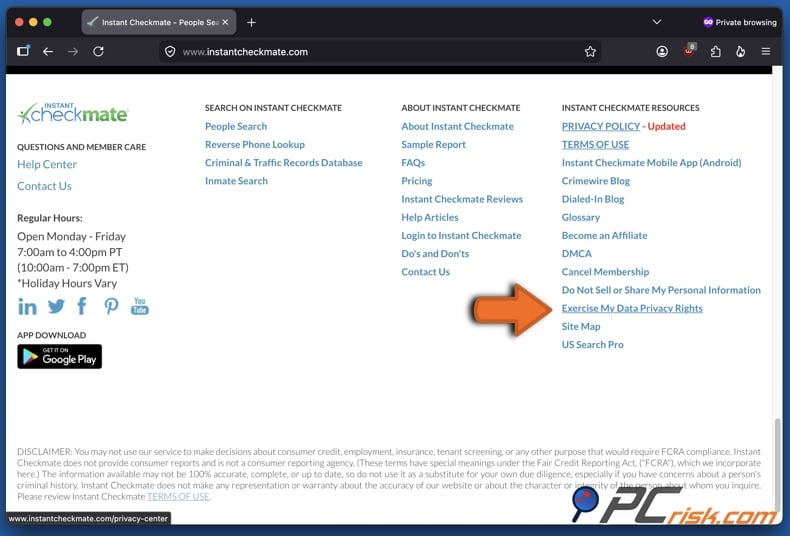
1. Open Instant Checkmate's Data Privacy Center. Navigate to the footer of Instant Checkmate's homepage, locate the "Instant Checkmate Resources" section, and click "Exercise My Data Privacy Rights". As mentioned above, removal step details may change - including webpage layout and exact wording - and this is applicable to the entire process. Generally, opting-out on people-search and data broker sites can be initiated through their "privacy centers", often located at the header or footer of the page.
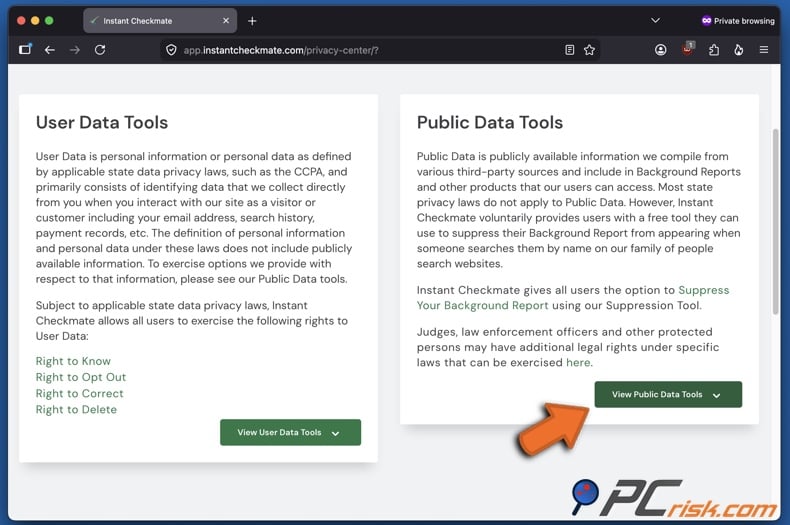
2. Select the "Public Data Tools". In the Data Privacy Center, select tools for information collected from public or third-party sources, as they control the report that others can search for. Not all privacy center options remove your public profile, so this distinction is important. Click "View Public Data Tools" to expand.
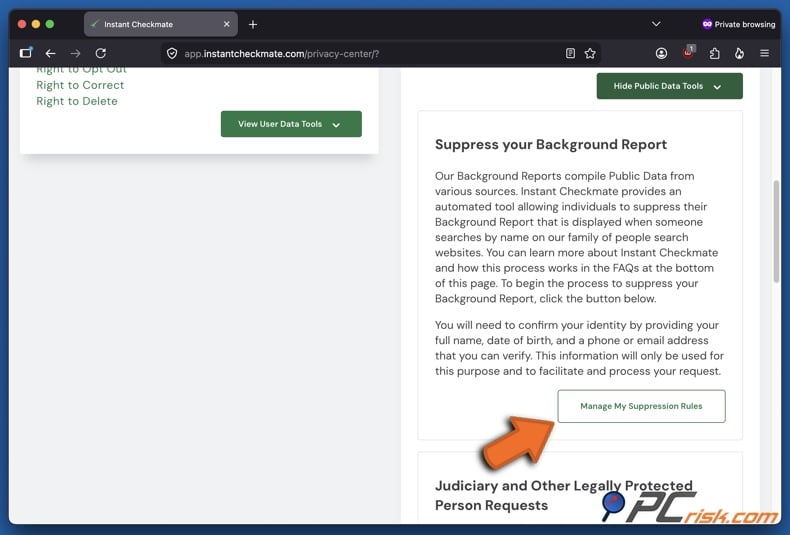
3. Click "Manage My Suppression Rules". This will redirect you to PeopleConnect's Suppression Center, which manages your background report across all PeopleConnect people-search websites.
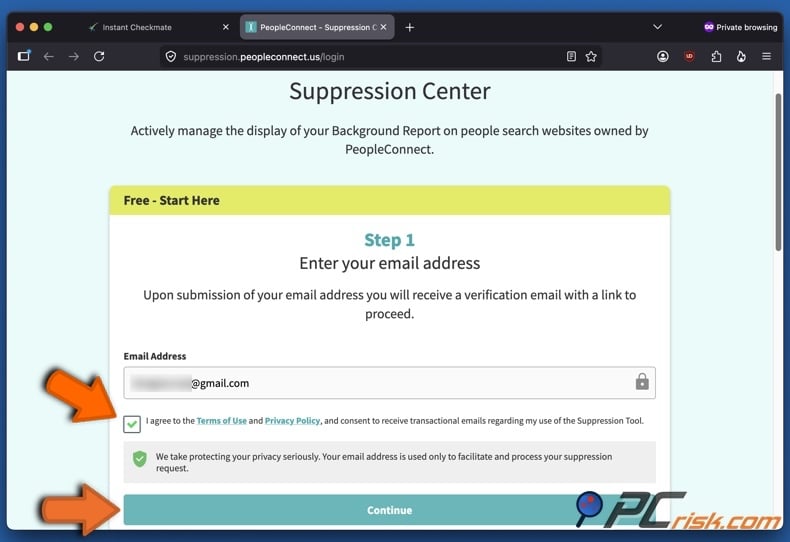
4. Enter your email address and verify it without delay. The Suppression Center will request your email address to send a verification message, and your agreement to the Terms of Use and Privacy Policy. The link in the email is valid for 15 minutes only, so complete this step promptly. If you do not receive the email, check your "Junk" or "Spam" folders and request a new link if needed.
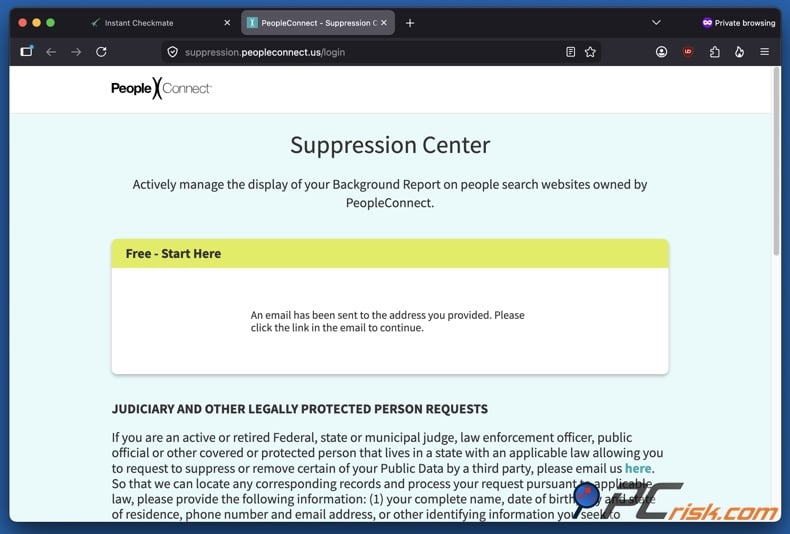
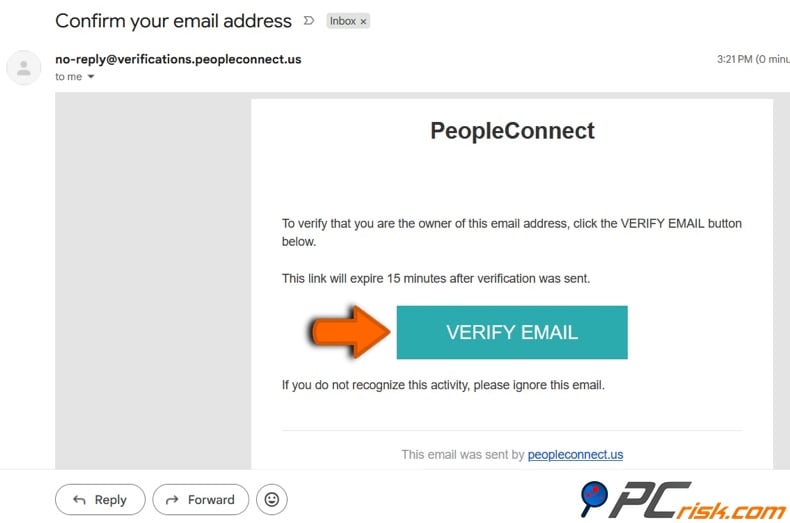
5. Click "VERIFY EMAIL" in the email sent by PeopleConnect. As mentioned in the previous step, the link will only be valid for 15 minutes. If you cannot find the message in your inbox, try "Spam" and similar folders. Clicking the link will redirect you to PeopleConnect's Suppression Center.
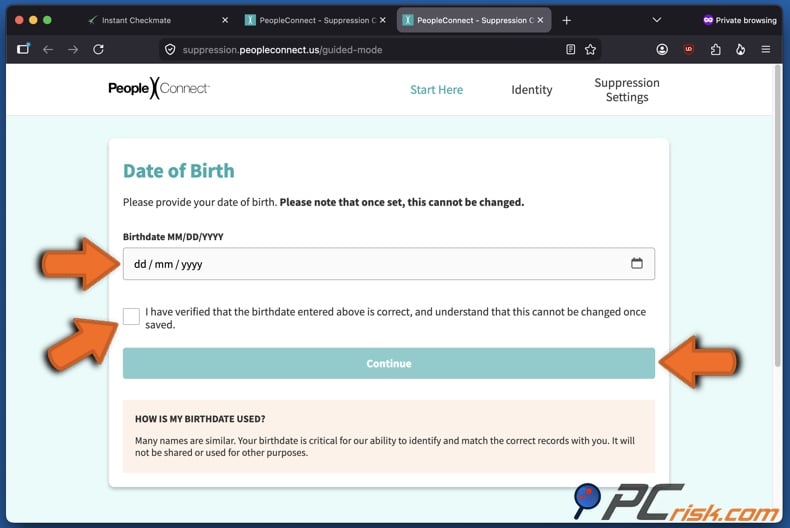
6. Enter your date of birth. On the PeopleConnect's Suppression Center page opened through the verification email, enter your birthdate, click the checkbox to verify that it is correct (you will be unable to change it afterward), and press "Continue".
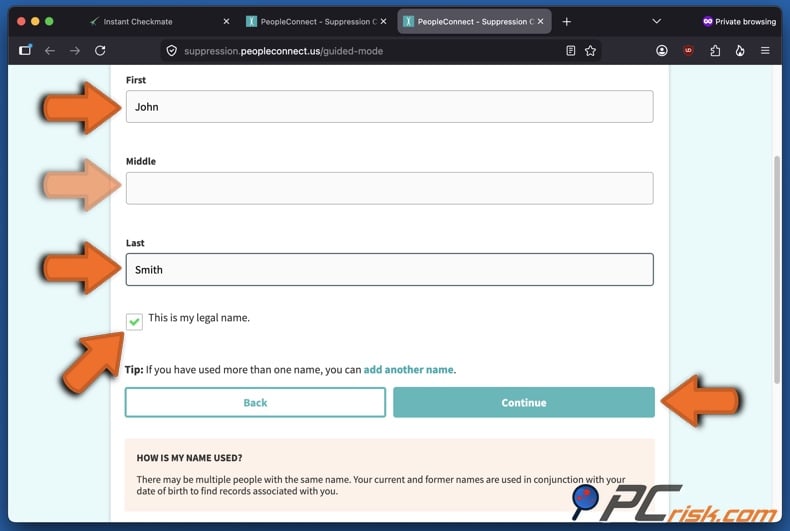
7. Enter your full legal name. On the next page, carefully enter your first, middle (if applicable), and last name. Confirm that it is your legal name by clicking the checkbox, and click "Continue". Add another name through the option on the page if you have previously had a different one(s).
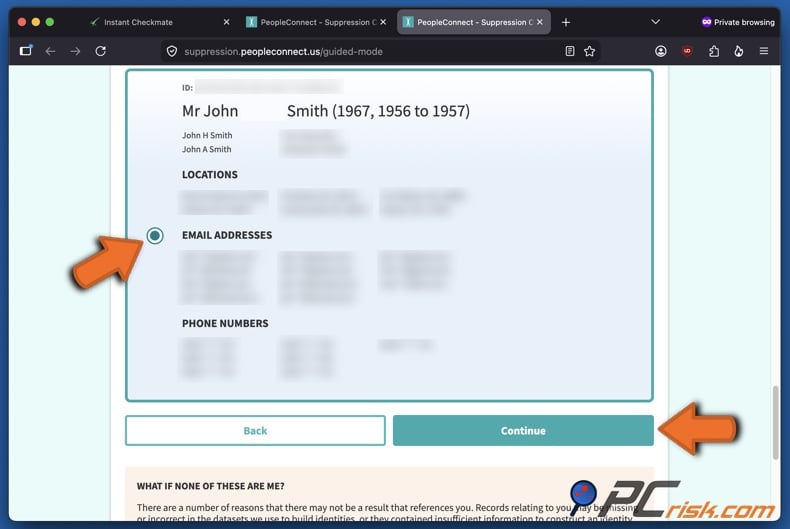
8. Locate the profile(s) matching you. In the following page, carefully review the found profiles, select the correct records, and click "Continue".
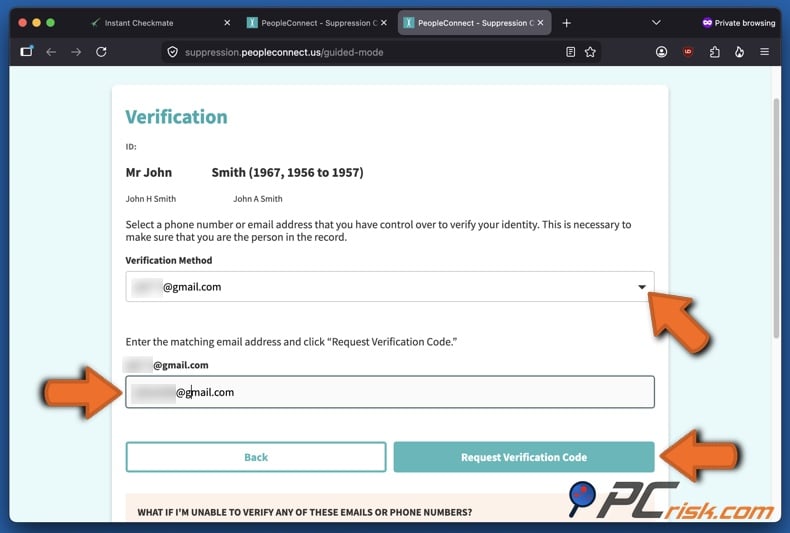
9. Complete contact verification. Select your preferred verification method - email or phone. From the list of available email addresses or phone numbers attributed to you, choose one that you still have control over, type it out in the appropriate field, and click "Request Verification Code". Note that you may need to verify both your email and phone by entering the codes sent to each.
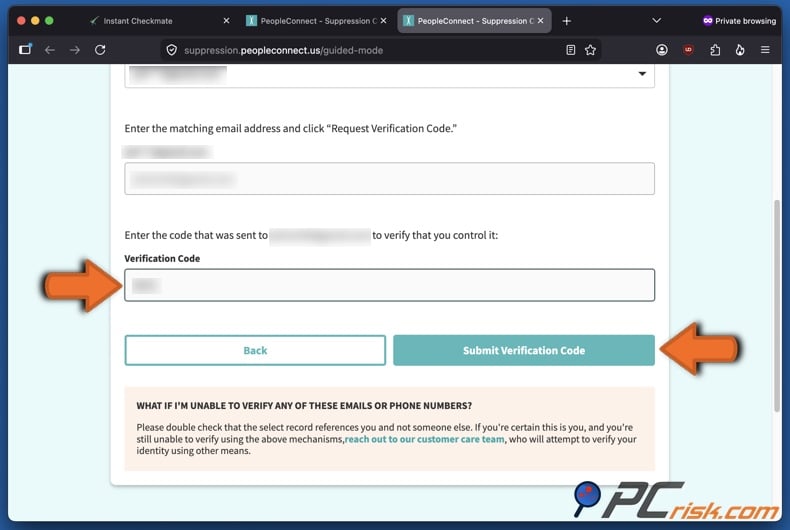
10. Submit the verification code. Enter the verification code sent via email or SMS and click "Submit Verification Code". Once verified, proceed to the suppression settings.
11. Find your matching record and change its visibility to suppressed. On the final review page, review all matching records carefully, especially if you have a common name or multiple contact details. Select the correct record, set its visibility to "Suppressed", and "Save" the change. This action hides the record from public view.
12. Recheck the website after the processing window and search again later. Do not assume removal is immediate. Some reports indicate changes within 48 hours, while others recommend waiting several days. Remember that people-search data can reappear when public records are updated. Recheck your name after the initial processing window and set reminders to review periodically, especially if your address is publicly available.
Common issues with manual removal and alternative opt-out routes
The primary issue with manually removing your information from people-search and data broker websites is that it is not a one-off task. Opting out of each site individually is time-consuming, and your data may still appear in reports about relatives, neighbors, or associates. The information can also reappear when public records are updated. A successful opt-out provides only temporary privacy and requires ongoing monitoring.
One more challenge is the complexity of the workflow. Instant Checkmate's current suppression process is more complicated than older opt-out guides indicate. You may encounter expired email-verification windows, requirements for a full street address, or the need to verify both email and phone before accessing suppression settings. Duplicate or similar profiles can also leave some records visible after others are suppressed. These common issues often cause users to abandon the process before completion.
Suppression does not remove the original source material, as opting out of such a website does not delete your information from public records. PeopleConnect also states that suppression does not affect the availability of your information from other sources, including third-parties. As a result, court records, property records, or government databases may still exist, and other websites may continue to display related information even after Instant Checkmate hides your profile.
If the standard route does not work, official alternatives do exist. California Privacy Protection Agency's (CPPA) Data Broker Registration entry for Instant Checkmate states that consumers may opt out or submit requests by using the site's opt-out page, emailing support, or calling during business hours. The same registry entry says protected individuals making certain statutory deletion demands can send a written request by email or mail. Separately, PeopleConnect's privacy center snippet states that users with a suppression already on record can contact support.
California residents now have a more extensive option. As of January 1, 2026, the CPPA's Delete Request and Opt-out Platform (DROP) allows residents to submit a request to all active registered data brokers. Data brokers must begin processing DROP deletion requests on August 1, 2026. Californians can already file through DROP, but brokers are not yet required to process these requests, as of the time of writing. Nonetheless, DROP is a valuable tool for eligible residents, especially as part of a larger data cleanup, but it does not address broker exposure outside of California.
Do not confuse source removal with search-result cleanup. If your Instant Checkmate page is hidden or deleted, Google may still display outdated results. Google's "Results about you" feature can help you find and request the removal of search results containing your contact information. For pages that have changed or been removed but still appear in Google Search, use the "Refresh Outdated Content" tool. Keep in mind that these are continuing steps and do not replace removing the source listing itself (such as one on a people-search website).
How to automatically remove your information from Instant Checkmate?
A service-based approach is more effective when you need broader coverage than a single-site opt-out. There are two options for opting out of people-search websites - dealing with each site individually or using a paid service. We have evaluated personal data removal services and narrowed down our top five picks for 2026 (read our dedicated article for an in-depth comparison). Our top choice is Incogni, and we recommend using this service for its efficiency - you authorize it once, and it manages, tracks, and repeats removal requests across multiple websites on your behalf.
Opt out of Instant Checkmate with Incogni
To automatically remove your information from Instant Checkmate with Incogni, follow these steps:
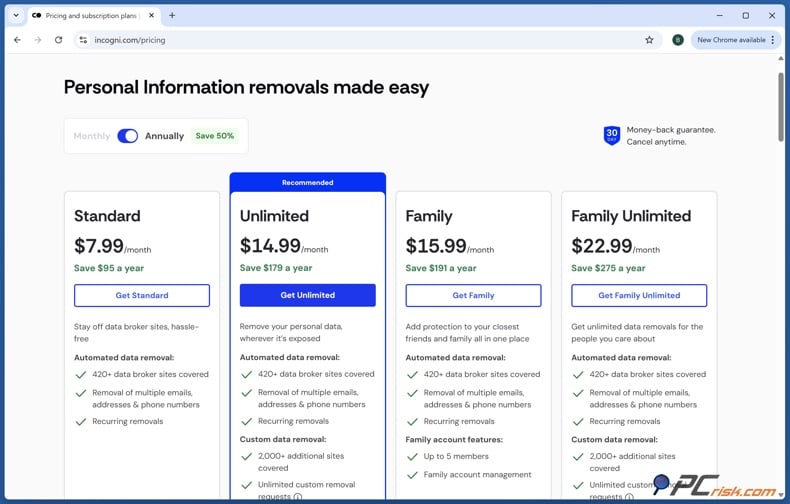
1. Create your Incogni account and choose a plan.
Incogni covers over 420 data brokers and continues expanding its coverage. If your goal is to reduce overall exposure rather than address a single people-search profile, start by creating an account. Higher-tier plans offer additional features, but the core benefit remains broad, ongoing broker removal rather than individual manual submissions.
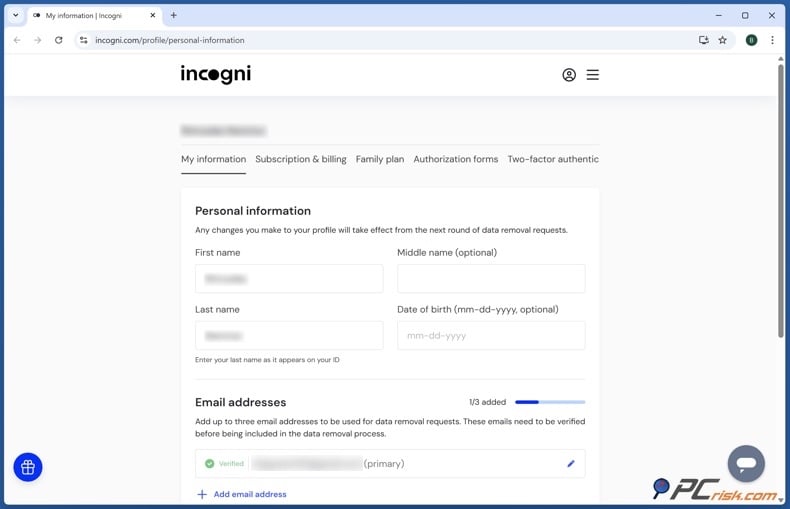
2. Enter the personal data required for matching.
Incogni requires identifying information such as your name, addresses, phone numbers, and email addresses to match you with broker records and send targeted requests. This is a necessary tradeoff for all automated data-removal services - the service needs sufficient information to locate and remove your data.
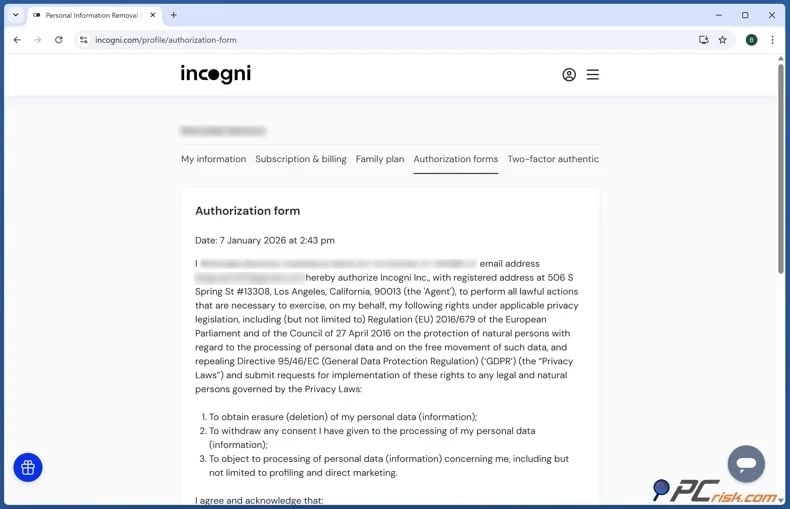
3. Sign the authorization form.
Incogni requires your authorization to act on your behalf. Unlike manual removals, a third-party service needs permission to lawfully submit deletion or suppression requests in your name. This authorization allows Incogni to contact data brokers directly and follow up as necessary.
4. Permit Incogni to send requests.
According to Incogni, requests are sent repeatedly, with regular re-scans and new removal waves to prevent brokers and people-search websites from recollecting and reselling your data. While a one-time opt-out reduces immediate risk, repeated removals help maintain long-term protection.
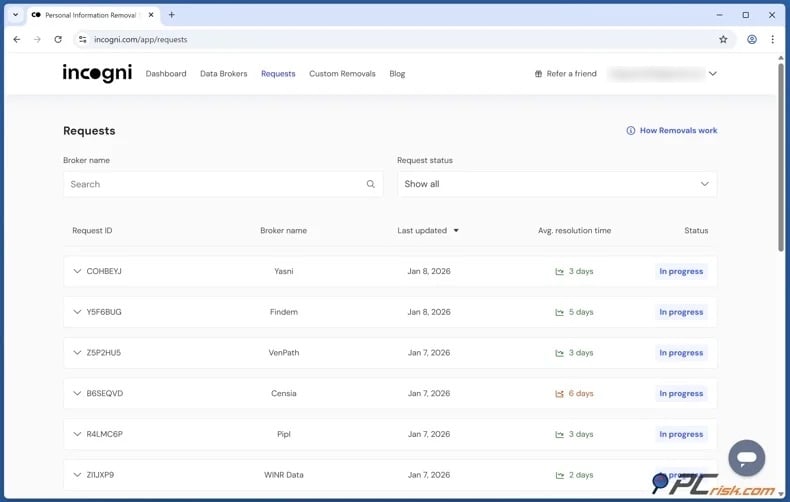
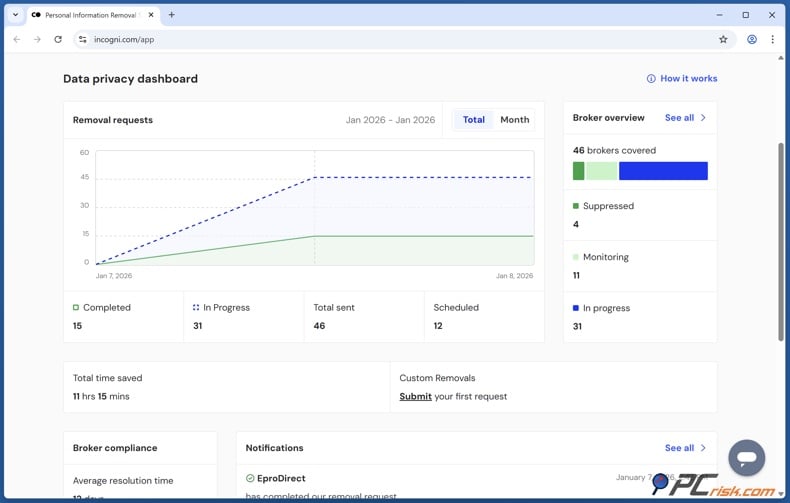
5. Monitor progress in your dashboard and keep protection active.
Once your account is active, you can monitor progress through the dashboard instead of checking each broker individually. It is noteworthy that you may be asked to confirm whether discovered profiles match you if they share similarities but lack detail or if the information is not exactly the same.
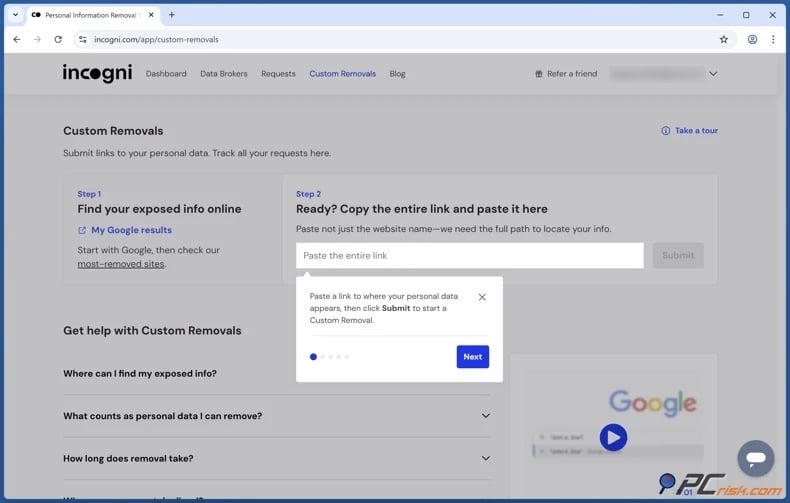
For broader cleanup beyond the standard broker list, Incogni's higher tiers include Custom Removals and coverage for additional websites. Thus, Incogni can be used to remove or suppress your data from sites that are not included by pasting the links to your profile pages. Remember that not all information can be removed from online sources, such as public records or government documents.
Why should you remove your information from Instant Checkmate?
The primary concern is not just privacy, but the increased attack surface. People-search profiles give strangers quick access to personal context that can be misused. Someone can purchase a report disclosing age, addresses, family members, and other vulnerable information - only by knowing your name or phone number. When scammers know your previous addresses, former phone numbers, or relatives' names - their fraudulent attempts become more convincing.
Personal safety is also a serious concern. The FTC highlights that survivors of domestic violence or stalking may not want their location or family members' information to be accessible. However, this issue extends to teachers, healthcare workers, journalists, executives, business owners, online creators, and basically anyone in sensitive situations. People-search websites make it easier to find individuals, while opting out makes this process more difficult.
Reputational control is another important factor. Data brokers often combine current and outdated information, which can lead to various misunderstandings. For example, someone might see an old address, an outdated phone number, or a legal record without context and form an incorrect impression. The FTC's 2023 case against Instant Checkmate illustrates this risk, as the agency alleged deceptive claims about criminal-record accuracy and FCRA violations. Even without direct fraud, inaccurate profiles can cause embarrassment, distrust, or social stigma.
Removal is valuable because it is one of the few immediate, practical steps individuals can take. While you cannot erase every public record or prevent all future data collection, you can eliminate a prominent access point. Privacy improvements are incremental. Removing one profile, then others, cleaning outdated search results, and limiting public sharing can notably reduce how easily you can be targeted. These steps often deter casual searchers and impede bad actors' efforts.
How to prevent data brokers from collecting more of your data?
There is no single solution to prevent all future data collection, so a layered approach is best. Assume that any public, easily accessible information may be reused. People-search sites can collect data from public social media profiles, public records, and other brokers. Your first line of defense is to limit what is publicly visible. Review your social media privacy settings, remove or hide home addresses and phone numbers, avoid posting your full birthdate, and limit public family-relationship details. Each restriction you apply removes another possible data source.
Limit the marketing data you generate. The FTC's privacy guidance explains how websites and apps collect and use data, and Google's advertising documentation notes that Android users can reset or delete their advertising ID in device settings. While these steps do not stop public-record collection, they reduce tracking and ad-tech signals that support the wider broker industry. When signing up for discounts, newsletters, sweepstakes, or low-trust applications - use an alias or secondary email account to keep your primary contact information private.
Monitor your search visibility as well as the sources themselves. Google's "Results about you" can identify search results containing your contact details and allows you to request removal if they meet policy requirements. The "Refresh Outdated Content" tool can update or clear search results for pages that no longer exist or have removed key information. This is particularly helpful after a successful broker opt-out, since search engines may not immediately reflect changes at the source.
Repetition is essential. Regularly check people-search websites and submit new opt-out requests if your information appears. This is essential because broker records can reappear after public records change or data feeds are updated. If you manage removals manually, set recurring reminders to review your name, previous addresses, phone numbers, and common misspellings every few months. California residents should also consider using DROP as part of their routine, especially after August 1, 2026, when registered data brokers must process consumer deletion requests submitted through the state platform.
Alternatively, you can use a paid personal data removal service to automate this process. These services scan numerous people-search sites and data broker databases, submit removal requests for you, and monitor for reappearing records. Using such a service can save you a significant amount of time, especially if your information appears on many websites.
Check our top personal data removal services
However, personal removal services are not permanent solutions and cannot guarantee the complete deletion of your records. Coverage differs by provider, some brokers can require direct identity verification, and information may reappear after your subscription ends. Before subscribing, review which brokers are covered, how often rescans occur, whether follow-up requests are included, and what personal information is required. Even with an automated service, periodically search for yourself to confirm that key listings have been removed.
To summarize, treat prevention as an ongoing exposure-management habit, not a one-off task. Remove current listings, review Google results, minimize public sharing, reduce ad-tech identifiers where possible, and routinely check for reappearance. Manual privacy work can be tedious, but consistency is more important than perfection. The less data you leave publicly available, the less material brokers can use in the future.
In closing
Opting out of Instant Checkmate is worthwhile because it eliminates a common way for strangers to access your personal information. While it does not remove courthouse files, property records, or all online copies of your data, it significantly diminishes the ease with which your information can be found. For many, this is a valuable privacy improvement. It helps limit casual snooping, reduces the risk of social engineering, and makes harassment or unwelcome contact less likely.
Check our top personal data removal services
The current removal process uses Instant Checkmate's privacy tools and PeopleConnect's suppression system, so patience and careful verification are essential. If the manual process is too time-consuming, a service like Incogni may be more effective for broader data broker cleanup, especially if your information appears on multiple sites and you need ongoing follow-up. Regardless of the method, the most effective approach is continuous: remove visible listings, monitor for reappearances, clean up related Google results, and limit the public details you share. Online privacy is managed in layers, so the sooner you reduce your exposure, the sooner you regain control.
Frequently Asked Questions (FAQ)
Is Instant Checkmate legal?
Yes, Instant Checkmate operates as a legal people-search and public-records website. However, Instant Checkmate states it is not a consumer reporting agency, so its information cannot be used for employment, housing, credit, insurance, or other decisions governed by the FCRA.
Is it dangerous to have my data on Instant Checkmate?
Yes, there are risks. Instant Checkmate aggregates information into easily searchable profiles. The FTC and CFPB warn that such brokered data can facilitate stalking, harassment, and scams.
Will opting out of Instant Checkmate remove me from Google search?
No, not automatically. After your listing is removed, you may still need to use "Results about you" or the "Refresh Outdated Content" tool if outdated results remain visible.
Does removing myself from Instant Checkmate remove the original public record?
No. Opting out of a people-search website does not delete your information from public records. It only removes or suppresses the broker's version of that data from public display on its own service.
How do I remove my data from Instant Checkmate?
Go to Instant Checkmate's Data Privacy Center, access the public-data tools, proceed to the PeopleConnect Suppression Center, verify your email, enter your information, and set the matching record to "Suppressed". You can also use a personal data removal service like Incogni to automatically send removal requests across multiple brokers.
How long does it take Instant Checkmate to remove my data?
Removal times vary. In general, data removal from such sites can take anywhere from 24 hours to 5 business days. It is best to check periodically to ensure that your information does not reappear.
How is using Incogni different from manually removing my data from Instant Checkmate?
Manual removal addresses one broker at a time and requires you to complete each website's verification process. Incogni automates this across over 420 brokers, repeats requests regularly, and offers custom removal options on higher-tier plans.
Will my data come back to Instant Checkmate after I opt out?
Yes, your data can reappear. Information may return to people-search sites when public records change. Regular checks or ongoing automated monitoring are important after opting out.
Share:
 Facebook
 X.com
X.com
 LinkedIn
 Copy Link

Karolis Liucveikis
Experienced software engineer, passionate about behavioral analysis of malicious apps
Author and general operator of PCrisk's News and Removal Guides section. Co-researcher working alongside Tomas to discover the latest threats and global trends in the cyber security world. Karolis has experience of over 8 years working in this branch. He attended Kaunas University of Technology and graduated with a degree in Software Development in 2017. Extremely passionate about technical aspects and behavior of various malicious applications.
▼ Show Discussion