
Roblox age verification: how the face scan works and what it unlocks

Roblox age verification: how the face scan works and what it unlocks
Roblox has moved away from relying primarily on the birth date users type into their accounts. Since January 2026, the platform has required an age check for access to chat wherever chat is available, and it increasingly uses verified or estimated age to decide which communication features, content categories, and social tools an account can access. The most visible part of this system is Facial Age Estimation, which asks the user to capture their face using the device's camera. Roblox says the image or video is processed by its age-verification provider, Persona, to estimate the user's age and place the account into an appropriate age group.
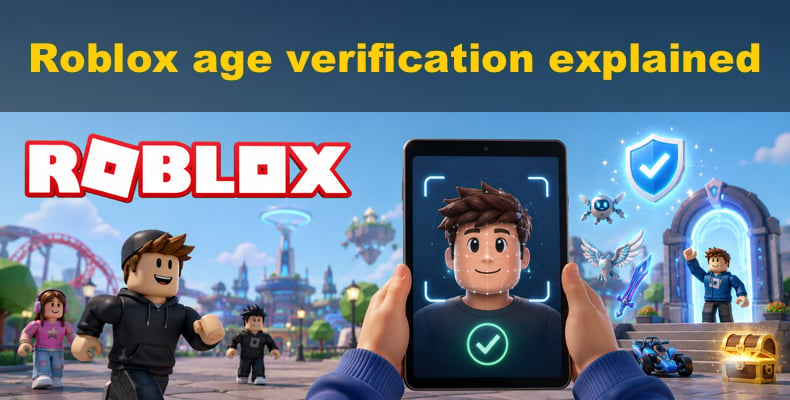
The change has an obvious child-safety purpose, but it also raises reasonable privacy questions. A selfie can feel substantially more sensitive than entering a date of birth, particularly when a third-party verification company is involved. In this article, we explain how Roblox's face scan actually works, what it unlocks, what data Roblox and Persona say they retain, and what privacy-conscious users can legitimately do instead of trying to defeat the system. We also look at the issue of personal information appearing on people-search and data-broker websites, including how automated removal services such as Incogni work.
Disclaimer: PCrisk.com does not support or encourage bypassing Roblox's age-verification protections, breaking the law, providing false information, or violating Roblox's Terms of Use.
Protect your personal information with Incogni
Table of Contents:
- Introduction
- Roblox age verification explained
- Where does Roblox require age verification, and what are legitimate alternatives?
- Privacy risks with age verification
- Opt out of data broker sites automatically
- Common issues with removing personal information from data brokers manually
- Final recommendations
- Frequently asked questions (FAQs)
Roblox age verification explained
Roblox's age-verification system is really an age assurance process, not just a single face scan. Facial Age Estimation is one way Roblox checks age, but there are others. Depending on the account, Roblox might use government ID verification, allow a parent to help correct a child's age, or review other account details to determine whether the age makes sense.
The reason for this change is simple: it's easy to enter the wrong birthday, either by mistake or on purpose. In November 2025, Roblox said that anyone who wanted to use chat or other communication features would need to pass an age check. They started this in some countries first, then made it global in January 2026. Roblox explained that this helps limit chats between minors and adults and ensures users get features that match their real age, rather than relying on the birthday they entered when signing up.
Roblox would ask users who wanted to use chat to complete Facial Age Estimation. Users could also use government ID verification if needed. Their November 2025 article explains how Roblox introduced the system, but some terms and age rules have changed since then. For the latest chat rules, it's best to check Roblox's current safety documentation.
What happens during the Roblox face scan
For Facial Age Estimation, Roblox guides users through a camera-based process. In account settings, you can find this under Account Info and Age Group controls. You choose the age-estimation option, allow camera access, and follow the instructions to take a photo of your face. Roblox says this is the quickest way to finish an age check.
Persona handles the age estimation. Their privacy policy says that selfie-only age estimation looks at facial features from the selfie you submit. Persona calls this "Age Estimation Scan Data" and says it does not uniquely identify you - it is only used to guess your age, not to match you to a specific person. Persona also says this scan data is deleted right after your age is estimated.
Roblox also makes an important privacy promise on its age-estimation page: photos and videos used for Facial Age Estimation are deleted after secure processing. Roblox says it does not and will not sell users' image data.
The face scan is meant to figure out your age range, not to prove your exact identity. After the scan, Roblox puts your account into an age group. This group helps decide who you can chat with and other features. Roblox says its age-estimation technology is built to prevent cheating and has been tested by outside experts. For minors under 18, Roblox reports an average error of about 1.4 years, but this is just an average - not a guarantee for every scan.
This difference is important near age cutoffs. For example, if a 15-year-old is estimated as 16, or the other way around, they might get different chat permissions. Roblox admits that age estimates can be wrong and offers ways to fix mistakes, rather than saying the system is perfect.
See the best personal data removal services
Face estimation is not the same as ID verification
Facial Age Estimation and government ID verification are not the same when it comes to privacy.
A face-only age estimate uses a photo or video of your face to guess your age. Government ID verification, which is for users 13 and older, asks you to scan a government-issued photo ID and take a selfie. Persona then checks if the face on the ID matches your selfie to confirm your identity.
According to Roblox's Facial Media Capture Privacy Notice, Roblox does not get a copy of the biometric data that Persona processes for identity checks. Persona deletes this data within 30 days unless the law requires it to be kept longer. Persona also says that any stored scan data is encrypted and may follow specific instructions from customers about how long to keep it.
This is why saying "Roblox deletes your photo immediately" can be misleading. For selfie-only Facial Age Estimation, both Roblox and Persona say they delete photos, videos, and scan data after processing. ID-based verification is a separate process that uses different data and may keep it for a different amount of time.
Your Roblox age group and what it allows
As of September 3, 2026, Roblox's Safety FAQ lists general rules for who can chat with whom. By default, chat is filtered. Younger users have extra parental controls and content limits, and some features depend on where you live.
| Your age group | Who you can normally chat with after an age check | Other important access rules |
| 5-8 | Users under 13 | Roblox Kids account in most applicable regions. Chat is off by default, and a parent must enable permitted communication. Access is generally limited to Minimal and Mild content. |
| 9-12 | Users under 16 | Roblox Select protections apply. Users can access content up to a Moderate maturity level. Voice chat is not available to this age range. |
| 13-15 | Ages 9-17 | Roblox Select protections apply. Some voice features are available depending on region and parental settings. Users 13+ can use additional Trusted Friends communication features. |
| 16-17 | Ages 13-20 | Wider age-appropriate communication is available. Eligible users can use voice features where supported, as well as additional Trusted Friends features. Some Roblox social features, including Moments in most supported regions, require that users be at least 16. |
| 18-20 | Users aged 16+ | Age-verified adults can access Restricted experiences intended for users 18+. Adult communication remains age-banded rather than opening unrestricted contact with every younger user. |
| 21+ | Users aged 18+ | Age-verified adults can access Restricted 18+ experiences and adult-oriented communication ranges. |
There are some exceptions for Trusted Friends. If users have passed an age check and set up this relationship, they can sometimes chat with people outside their usual age group. For users 13 and older, Party Chat with Trusted Friends may skip the usual text filters, but Roblox still monitors chats for serious safety issues like child endangerment.
Parents should know that passing an age check does not automatically enable all chat features. Roblox adds parental controls on top of the age result. For example, chat is off by default for the youngest Kids accounts and only a parent can turn it on if Roblox allows it.
Roblox also added a new system after the first age check. As of August 2026, Roblox uses machine learning to see if an account's activity matches its age group. This can include things like who you interact with, what you do on the platform, and how you use your account. Roblox said it has collected 338 million age checks and processes nearly two billion account records daily. So, while the selfie is important, Roblox's age-safety system continues to work even after the photo is taken.
Where does Roblox require age verification, and what are legitimate alternatives?
The main place Roblox requires age verification is for chat. According to Roblox's Safety FAQ, users need to complete an age check to use chat. Starting in January 2026, Roblox made this rule apply everywhere chat is offered.
Age verification also affects what content you can access. Roblox says you can still play without an age check, but you will lose chat and may not be able to join games with higher maturity ratings. Only users who are age-verified and 18 or older can access restricted content.
Other features that depend on age verification include Trusted Friends, some voice chat, Moments, and collaboration tools. Roblox lists Trusted Friends and Team Create as features that require age checks. Moments is only available to users aged 16 or older who have completed age verification, depending on your region and when the feature is released.
Protect your personal information with Incogni
Legitimate ways to bypass Roblox age verification
Before looking at alternatives, it's important to know that there is no official way to unlock Roblox chat without completing the required age check. Privacy-focused users can skip or change parts of the process, but you cannot make Roblox treat an unverified account as verified.
The legitimate options are limited:
1. Continue using Roblox without chat. Roblox says users who do not complete an age check can continue playing. The trade-off is losing chat and access to content or features that require a confirmed age group. This is the cleanest choice for someone who does not want to submit a face capture at all.
2. Use government ID verification when eligible. Users aged 13 or older who qualify can use a government-issued photo ID as an alternative method, particularly when Facial Age Estimation produces an incorrect result. This is not a no-camera option, because Roblox's ID process also requires a selfie so Persona can compare the face against the ID photograph. It may therefore be preferable for accuracy, but not necessarily for data minimization.
3. Use Roblox's official age-correction procedure. If a child's account is incorrectly estimated as under 13, a linked parent can use Roblox's parental process to update the child's birthday when Roblox permits. Roblox says a parent can make this birthday correction once. Users aged 13 or older can instead use ID verification to correct an age-estimation problem.
4. Do not enable optional age-gated social features. A user may choose to keep an account focused on gameplay and avoid features such as chat, Trusted Friends, or other communication tools that trigger age-assurance requirements. That is opting out of the feature rather than bypassing the control.
Do not use someone else's face or ID, fake documents, alter camera input, try to trick the system, or lie about your identity. These are not legitimate privacy solutions, and we do not recommend them.
Privacy risks with age verification
When thinking about privacy and Roblox's age checks, it's important to look at how your data is really handled.
Roblox makes it clear that it does not sell users' image data. For selfie-based Facial Age Estimation, Roblox says it deletes images and videos after secure processing. Persona, the company handling the scans, says it deletes Age Estimation Scan Data right after the result is determined. Persona also says it does not use this data for advertising or AI training.
Deleting images quickly helps reduce the risk of long-term storage, but it does not remove all risk. Your face still has to be captured, sent, and processed to check your age. Persona's policy says age checks can also collect technical details like your device information, IP address, general location, account details, usage data, and fraud-prevention signals, depending on the method used.
ID verification collects more data. It can include a government document, details from that document, a selfie, and facial geometry for comparison. Roblox's biometric notice says Persona may keep identity-verification biometric data for up to 30 days unless the law requires it to be kept longer. This differs from the immediate deletion used in selfie-only Facial Age Estimation.
Another thing to consider is that Persona may use companies like Amazon Web Services, Google Cloud, and MongoDB to process biometric data. This does not mean these companies can use Roblox users' selfies however they want. It just means that service providers are involved in the technical process and must comply with privacy agreements.
Roblox's Privacy and Cookie Policy also states that personal information may be shared with service providers for specific tasks, but those providers are not permitted to sell the information they handle on Roblox's behalf. Roblox also admits that, like with any online service, security measures cannot guarantee that information will never be lost, misused, changed, or accessed without permission.
This means there is a privacy trade-off. Deleting a selfie quickly is much better than maintaining a permanent database of facial images, but even a short storage period cannot prevent every possible security issue during data capture or processing.
See the best personal data removal services
Can Roblox age-verification information end up on people-search sites or with data brokers?
From the policies we reviewed, we found no evidence that Roblox or Persona intentionally gives Facial Age Estimation selfies to people-search websites or data brokers for resale. Roblox says it does not sell image data, and Persona clearly states it does not sell or share age-assurance personal data with third parties for unrelated reasons.
Persona works with third-party information sources for certain types of age or identity checks. Depending on the method and location, these sources can include public databases, government ID registries, credit bureaus, utility companies, mobile networks, and address databases. Persona says it does not disclose the reason for the check to these sources and does not sell your information to them.
There is always some risk of a data breach when sensitive information is handled online, but that does not mean the information is being sold to data brokers. I have not found any evidence that Roblox's face scans are ending up in people-search profiles.
However, you might already have a lot of information about yourself on data-broker and people-search sites from other sources. Names, old addresses, phone numbers, emails, relatives, and other details can be gathered from public records, commercial databases, and other places. Removing these profiles can reduce the amount of personal information available to strangers, but it does not affect Roblox's age-verification records.
It's important to note that a data-removal service like Incogni does not remove Roblox age-verification data. Its job is to request deletion or suppression from data brokers and people-search sites.
Opt out of data broker sites automatically
You can manually remove yourself from people-search and data-broker sites, but it can be repetitive. Each company has its own opt-out forms, verification steps, response times, and cycles where your data might reappear. In our Incogni review, we found that Incogni automates much of this work by identifying covered brokers, sending removal requests, tracking responses, and resubmitting requests as needed.
Incogni says its automated plan covers over 420 data brokers and people-search sites. Its higher-tier service offers even more custom removal options. Our PCrisk review also points out that ongoing monitoring is a significant advantage over one-time manual removal.
Protect your personal information with Incogni
Here is the basic process.
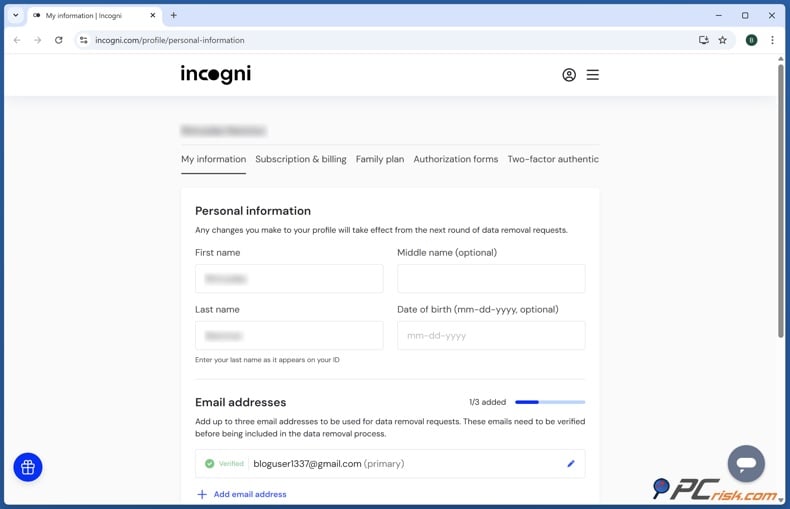
Step 1: Sign up for an Incogni account. You’ll need to give enough information for Incogni to find your records. This usually means your name, email, and home address, but you can also add old addresses or phone numbers to help with matching.
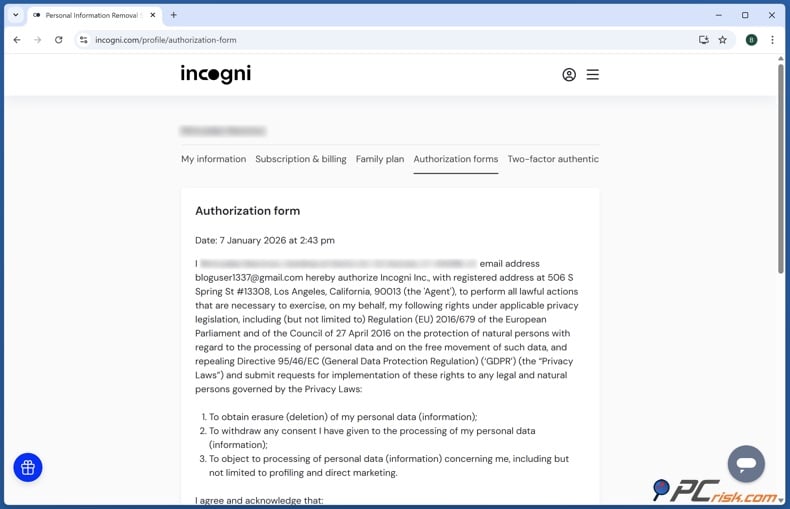
Step 2: Fill out the authorization form. Incogni needs your permission to send privacy and deletion requests for you. During sign-up, you’ll complete an electronic form that lets Incogni act as your representative. Our PCrisk review also covers this step.
Step 3: Let Incogni find which data brokers have your information. Incogni checks for possible matches and figures out which companies might have your data. You don’t need to fill out a separate opt-out form for each broker.
Step 4: Incogni will send removal requests for you. The service automatically reaches out to the right data brokers and people-search sites, using the privacy rules that apply to you. Some removals happen fast, but others might take a few weeks.
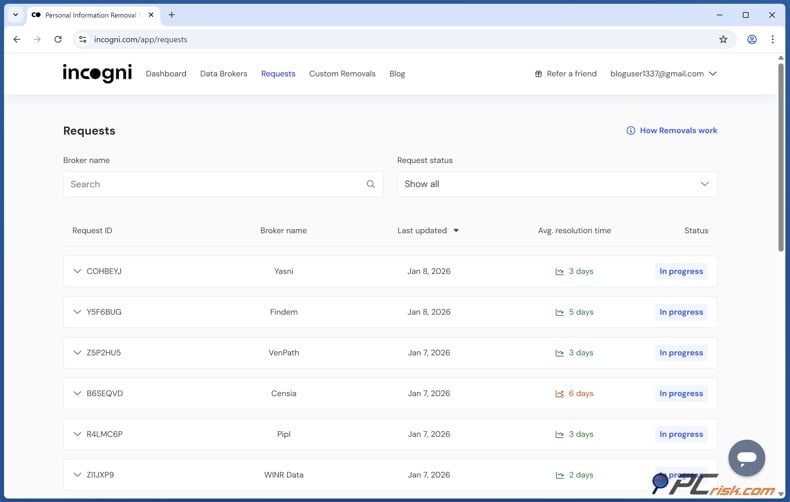
Step 5: Check your dashboard. Incogni’s dashboard lets you track which companies have been contacted and how your removal requests are going. This way, you don’t have to keep your own spreadsheet of opt-outs.
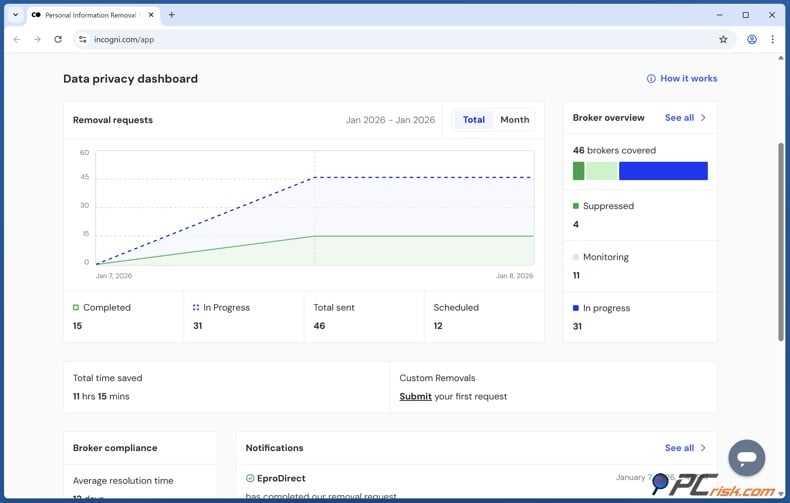
Step 6: Leave recurring monitoring on. Deleting your profile once doesn’t mean it won’t show up again. Incogni keeps checking the companies it covers and can send new requests if your data comes back. This ongoing process is a major reason automated removal is easier than doing it yourself.
Still, it’s important to have realistic expectations. No data-removal company can erase every mention of you online. Our research shows these services usually can’t remove news stories, regular social media posts, court records, government documents, or content from every independent website.
Common issues with removing personal information from data brokers manually
The first challenge is finding all your records. A broker might list you under an old last name, a previous address, an old phone number, or a name spelled a bit differently. If you have a common name, you might see several similar profiles. Before you ask for a profile to be deleted, make sure it’s really yours. Try searching with old addresses and contact details, not just your name.
The second issue is that each company has its own opt-out process. One might use a simple online form, another might ask for email confirmation, and another might require additional details to verify your identity. Only give the information that’s really needed, and don’t share extra sensitive details.
The third problem is missing verification messages. Some companies won’t finish deleting your data until you click a confirmation link. Check your spam and junk folders, and consider using a separate email address just for privacy requests. Keep track of when you send each request and whether you confirmed it.
The fourth is slow or incomplete responses. Keep copies of requests and confirmations. Where a company is subject to privacy legislation granting deletion or objection rights, unresolved requests may be escalated to the appropriate regulator. The exact rights and deadlines depend on where you live and which organization holds the data.
The fifth problem is that your data can come back. A company might delete your record but later obtain similar information elsewhere. That’s why you need to search for your data from time to time and send new opt-out requests if needed. Automated services help by checking regularly and sending repeat requests.
Finally, some people think that deleting a people-search listing also removes the original source, but that’s not the case. A broker might have copied your information from a public record or another public database. Deleting the broker’s version doesn’t change the original source. No real service can promise to remove all your information from the Internet.
Final recommendations
The face scan on Roblox goes beyond being just a cosmetic feature that gives users an "age verified" badge; it has in fact become a key element in the way Roblox decides who can access chat and other age-restricted functions. The system works by estimating the user's age from a live facial image, assigning the user to an age group, and then imposing communication restrictions according to that group. Roblox states that these checks were introduced to go beyond relying on self-reported birthdays and to reduce inappropriate communication between minors and adults.
From a privacy perspective, the most significant finding is also fairly straightforward. Roblox states that photos and videos are deleted after secure processing, and Persona states that its facial scan data used for age estimation is deleted as soon as a result is produced. Roblox says that it does not sell image data, whereas Persona says that it does not sell its age-assurance personal data or use it for training artificial intelligence.
Roblox's biometric notice states that Persona may retain biometric information obtained during identity verification for up to 30 days, unless longer retention is required by law. Moreover, Roblox's age assurance system now takes into account behavioral signals after the initial check, meaning the initial selfie is only one part of its current safety system.
If a person is uncomfortable about facial age estimation, the most privacy-preserving and legitimate course of action is to refuse the check and then accept that chat and some age-gated features will not be available. While ID verification can correct inaccurate estimates for eligible users, it is not a privacy-free alternative, as it requires providing an ID and a selfie.
There are also no grounds to assert that the images produced by Roblox's Facial Age Estimation are regularly sold to data brokers or people-search websites, since Roblox and Persona say otherwise; however, a general cybersecurity risk remains when the information is being processed.
To improve privacy protection, we at PCrisk advise that you minimize the personal information you make public, regularly check for exposed profiles, and submit opt-out requests whenever people-search or data-broker listings appear. An automated service like Incogni can greatly reduce the amount of work involved by dealing with the removal requests it supports and carrying them out again when needed.
Protect your personal information with Incogni
Frequently asked questions (FAQs)
Does Roblox need a face scan to play?
Certainly. Roblox states that users can continue playing without going through an age check. However, an unverified account cannot use the chat function and might not be granted access to experiences that have a higher content maturity level. Since this face scan can be declined, it is in effect optional; but age verification becomes functionally necessary if you want to use features that require a defined age group.
Is it possible to use the Roblox chat function without verifying your age?
According to Roblox's present rules, no. An age check will be required to access the chat when this feature is available. After an account is assigned an age group, Roblox restricts regular chat to certain age groups, with different rules applying to Trusted Friends.
Does Roblox retain the photo taken during the age-verification face scan?
Roblox states that the photos and videos submitted for Facial Age Estimation are deleted after being securely processed. Persona claims that the Age Estimation Scan Data obtained from a selfie is deleted as soon as it reaches a conclusion. These remarks refer to age estimation based on a selfie and must not be confused with the separate government ID verification process.
Does the face scan used by Roblox identify me exactly?
The Facial Age Estimation method that uses only selfies is designed to estimate age, not to prove a specific civil identity. Persona explains that this method looks at the facial geometry, which is not uniquely identifiable. The process differs for government ID verification, as Persona compares the facial geometry from an ID document with that from a selfie to verify that the ID belongs to the person presenting it.
What should I do if Roblox gets my age wrong?
Roblox offers official procedures for making corrections. Users who are 13 years of age or older can confirm their details using a photo ID issued by a government authority. In some cases, a parent linked to a child's account can change the child's birthday via Roblox's parent-related process, provided that Roblox's rules and limitations are followed.
Is the process of verifying government-issued IDs more private than facial age estimation?
Not necessarily; although it offers a more robust age and identity verification when Facial Age Estimation is inaccurate, it does so by requiring more sensitive data since the process entails using a government-issued ID and a selfie, and Persona then compares the facial geometry of the two.
Can age-verification information from Roblox end up on data-broker websites?
Since any form of online data processing carries some level of security risk, Roblox itself admits that no security measures can offer absolute protection against loss, misuse, or unauthorized access. Roblox states that it does not sell its users' image data, and Persona says that it does not sell or use age-assurance personal data for marketing purposes. It therefore seems more likely that a data-broker profile containing your name, address, phone number, or other personal details has come from other public or commercial sources rather than from the Roblox face scan, on the basis of the policies currently available.
Share:
 Facebook
 X.com
X.com
 LinkedIn
 Copy Link

Rimvydas Iliavicius
Researcher, author
Rimvydas is a researcher with over four years of experience in the cybersecurity industry. He attended Kaunas University of Technology and graduated with a Master's degree in Translation and Localization of Technical texts. His interests in computers and technology led him to become a versatile author in the IT industry. At PCrisk, he's responsible for writing in-depth how-to articles for Microsoft Windows.
▼ Show Discussion