
We may earn commissions from products we recommend. Learn more.
Discord age verification: what it scans, who sees it, and privacy tips

Discord age verification: what it scans, who sees it, and privacy tips
Discord’s recent age-verification changes sparked strong privacy concerns, mainly because proving your age often requires sharing highly sensitive information. Government IDs include details like your legal name, photo, date of birth, document number, nationality, and more. Even a selfie used solely for age estimation is still close to biometric data. These worries grew after a 2025 security incident, when about 70,000 users had their government ID photos exposed due to a breach at a third-party customer service provider. Discord says this provider is not one of its current age verification vendors and that it no longer works with them.
After looking at Discord’s latest documentation, its February 2026 policy updates, and the privacy policies for verification, we found that it’s not true that “Discord requires everyone to upload an ID.” Most users won’t need to submit an ID or selfie. Still, privacy concerns are valid, especially for the smaller group who do face an age check. In this article, we’ll break down what Discord actually analyzes, which companies might get your information, what happened with the original global rollout, and how cutting down on personal data with data brokers can help protect your privacy. It’s important to note that removing yourself from data brokers doesn’t delete an ID from Discord’s verification partners - these are separate privacy matters.
Protect your personal information with Incogni
Table of Contents:
- Introduction
- Discord age verification rollout explained
- Opt out of data broker sites automatically
- Common issues with removing information from data brokers manually
- What are personal data removal services?
- How to keep your information off people search sites and data brokers
- Final recommendations
- Frequently asked questions (FAQs)
Discord age verification rollout explained
Discord first introduced its 2026 changes as a global shift to a “teen-by-default” experience. On February 9, 2026, the company said that all users, new and existing, would receive stronger default safety settings and that age checks would begin expanding worldwide in early March. The plan was for adults to retain access to age-restricted content and to change some safety settings once Discord was confident they were adults.
The announcement led to enough backlash that Discord changed its plan just over two weeks later. On February 24, Discord said it would delay the wider global age checks until the second half of 2026. The March global launch was canceled, and Discord faced criticism over ID checks, facial age estimation, vendor transparency, and concerns about the earlier third-party data breach.
As of September 1, 2026, Discord’s Help Center still says that global expansion is planned for the second half of 2026, but there’s no exact worldwide launch date yet. An August 10 update also mentions that Discord is adding more verification options and testing new methods in Australia and Brazil from June to August. So, the situation is still changing, and users in different countries might see different verification steps.
What changed and when
Since this story has changed a few times, here are the dates we think are most important for readers to remember:
- July 21, 2025: Discord introduced new age assurance requirements for UK users in response to the UK Online Safety Act. Adults seeking access to certain restricted content or settings could use facial age estimation or an ID check.
- October 2025: Discord disclosed that a compromised customer service provider, 5CA, had exposed information belonging to some users who contacted support. Discord later said approximately 70,000 affected accounts may have had government ID photos exposed. Those IDs had been used for age-related appeals. Discord says this provider is no longer used.
- December 9, 2025: Discord introduced its teen-by-default experience and age assurance changes in Australia.
- January 2026: Discord ran a limited UK test with verification company Persona. Discord later decided not to proceed with Persona and said the information involved in the test was deleted after verification. Discord also established a requirement that facial age estimation partners perform the process on the user's device.
- February 9, 2026: Discord announced plans for a phased worldwide rollout beginning in early March, with stronger default safety settings and age assurance for users who wanted to access certain restricted features.
- February 24, 2026: Discord reversed the timing after the backlash, delaying broader worldwide age assurance until the second half of 2026. The company promised more verification choices, better disclosure of vendors, technical documentation, and greater transparency in future reports.
- March 2026: Discord proceeded with age assurance changes in Brazil because of local regulatory requirements. Discord's Brazilian Help Center says the rollout began March 9, with the country's Digital Statute for Children and Adolescents taking effect March 17.
- June through August 2026: Discord tested additional methods, including Google Wallet and credit card checks in some regulated regions. Its August 10 documentation continued to say that broader worldwide expansion was delayed until the second half of the year.
- September 1, 2026: Discord's current public support materials still do not provide a single confirmed date by which every user worldwide will be moved into the expanded age assurance system. The Help Center says a global rollout is planned for the second half of 2026 and that expansion may also occur where local regulations require it.
This difference is important. The UK, Australia, and Brazil already have age assurance in place, but current documentation does not say that "Discord is making everybody upload an ID globally."
Discord says that over 90% of users will not need to provide an ID or face verification. Instead, it uses account-level signals to figure out if an account belongs to an adult. Examples include how long the account has been active, whether there is a payment method, and general activity patterns. Server participation can be a factor. Discord makes it clear that this age inference system does not read messages, analyze conversations, or look at what users post.
This means Discord uses different types of scanning in its safety system, and it is important not to mix them up.
Discord’s age inference model looks at account and behavior signals to guess a user’s age group. According to its current documentation, it does not use message content for this.
Discord also uses Sensitive Content Filters, but these have a different job. They look for sexual or graphic images and videos so Discord can blur or block them. Discord says these filters do not scan text messages, voice chats, or calls.
If Discord cannot be sure a user is an adult, or if local laws require it, more direct age checks are used. These include or are being tested with video selfies, government ID checks, Google Wallet, and credit card verification.
See the best personal data removal services
The most important privacy difference to keep in mind is this:
| Method | What is processed | Who receives the sensitive input? | What Discord says it receives |
| Video selfie | A short video of your face for facial age estimation | Discord says processing occurs on your device, so the video does not leave it | Estimated age |
| Government ID | Government ID plus a selfie used to match you to the ID | Discord's current flow uses k-ID and document verification partner Veratad | Age |
| Google Wallet | An existing Passport ID credential stored in Google Wallet | The underlying passport information remains in Google Wallet | Age group and country |
| Credit card check | Credit card details used to establish that the user holds a valid credit card | Details pass to k-ID and then Stripe | Confirmation that the user is or is not an adult |
Discord’s Help Center explains these differences. For facial age checks, the video stays on your device and is deleted right away. If you scan your ID, it and your selfie go to k-ID and Veratad for verification, not to Discord. Discord says both are deleted once your age is confirmed.
With Google Wallet, Discord only gets your age group and country. Your passport details stay in Google Wallet. The latest documentation still lists Google Wallet verification as a test.
For the credit card test, Discord says your card details go to k-ID, which then sends them to Stripe. Discord and k-ID do not keep your card details, and Discord only gets the result showing if you are an adult. However, Stripe may handle your information according to its own policies, since Discord’s documentation does not say Stripe deletes it.
So, who has my ID now?
In the current k-ID ID verification process, Discord says it does not get your actual ID image. Your ID and selfie are handled by k-ID and Veratad, and both are deleted right after your age is confirmed. Discord only keeps the age information needed for your account.
Discord also says that no other user can see if you completed age verification or what age group you have. This information is private to you.
There is one important exception from the past. In 2025, about 70,000 users had their ID photos exposed when 5CA, Discord’s old customer service provider, was compromised. These IDs came from older support appeals. Discord says this was not a breach of its own systems, 5CA was not an age verification vendor, and Discord no longer works with them.
Another issue is the Persona controversy. Persona was tested in the UK in January 2026, but Discord decided not to use it. Discord says the test data was deleted after verification, and Persona did not meet Discord’s new rule that facial age checks must happen only on the user’s device.
So, we think it helps to break this down into three questions:
Does Discord currently receive the photograph of an ID submitted through its k-ID flow? According to Discord, no.
Does another company process it? Yes. The current ID flow involves k-ID and Veratad.
Can you use a service like Incogni to delete your ID from Discord’s verification partner? No, that’s not what Incogni does. Incogni focuses on data brokers and people-search sites. Discord says its verification vendors delete your documents after checking your age. Using a data broker removal service helps reduce the amount of your information available elsewhere online, not in Discord’s verification process.
This matters because privacy risks add up. Your Discord age group alone does not reveal much. But a people-search site with your name, address, phone number, age, past addresses, and relatives can give away a lot more. These sites collect and sell personal data, and you may need to opt out again if your information changes or reappears.
Opt out of data broker sites automatically
Age assurance has led many people to consider where their personal information is already stored. We think this is the next important privacy question to ask. Even if Discord’s verification works as intended, your home address, phone numbers, age, relatives, and other details can still be found on people-search and data broker sites. The FTC says data brokers are companies that collect personal information from various sources and share it for purposes such as marketing, identity checks, and fraud prevention.
PeopleFinders is one example. PCrisk recently published a guide on removing your information from PeopleFinders, and Incogni’s August 2026 documentation indicates that PeopleFinders is included in its automated service. Incogni says it currently covers more than 420 data brokers and people-search sites.
In our PCrisk review of Incogni, we found that automation is its biggest benefit. Instead of filling out each opt-out form yourself, Incogni sends removal requests to all supported brokers and displays the status on a dashboard. Results are not instant, though. Each broker processes requests at its own speed, so that full removal can take weeks.
To automatically address a data broker or people-search site listing with Incogni, use the following process:
1. Start by creating an Incogni account and choosing a plan. After you buy a plan, confirm your signup email and set your password. According to Incogni, your email is verified before your privacy profile is set up.
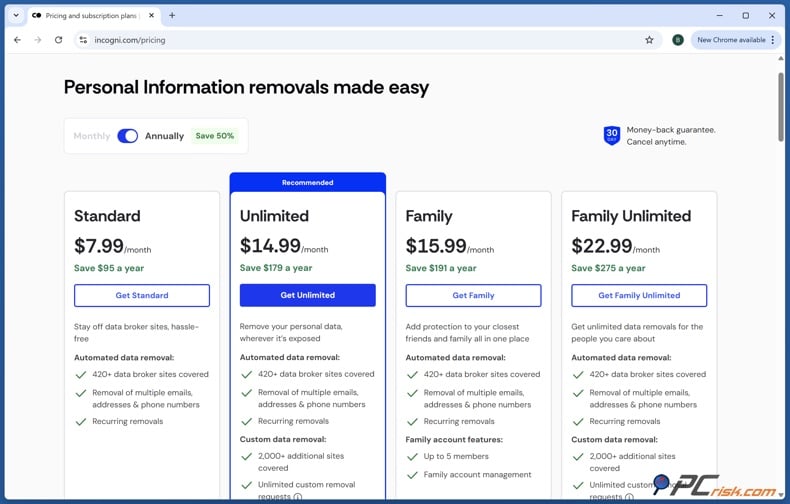
2. Next, enter your personal details. Incogni will ask for your first name, middle name if you have one, last name, and date of birth. This information helps match your identity with records that data brokers hold.
3. Add your address details, including your current home address, city, ZIP or postal code, country, and state if needed. If you are in the US, Incogni also asks for a phone number. We suggest adding any past addresses or phone numbers you have, as broker records may be linked to outdated information.
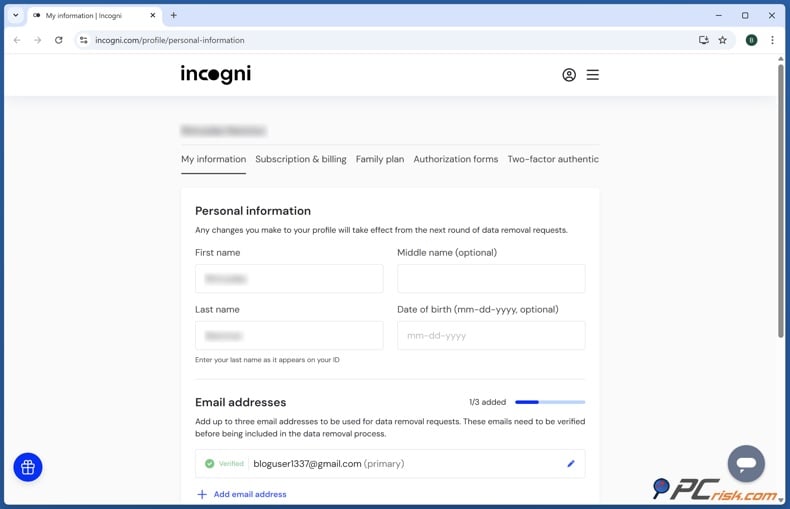
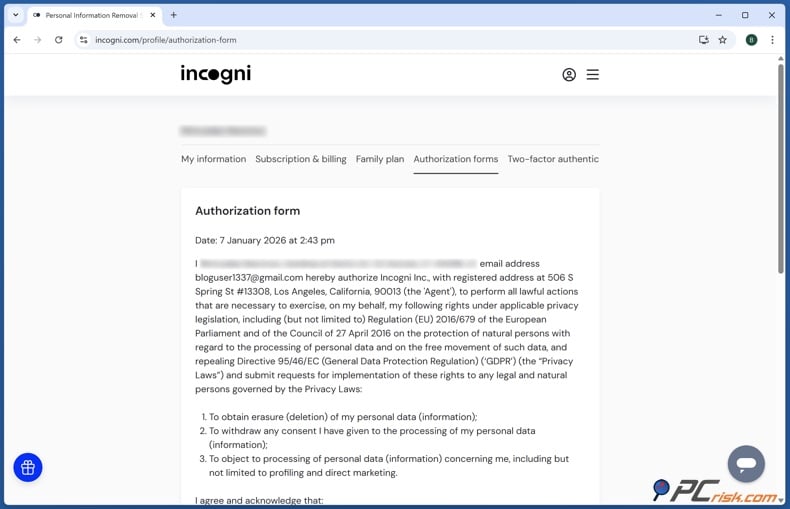
4. Sign the authorization form so Incogni can act on your behalf when sending privacy and data deletion requests. Without this, data brokers may not know if a removal request is really from you.
5. Before you begin, review your profile. Make sure your name, birth date, addresses, and contact details are spelled correctly. Mistakes can make it harder to match your records. When everything looks right, click "Start data removal."
6. Let Incogni handle the request for you. Incogni handles the opt-out process once you have given authorization.
7. Monitor the dashboard rather than assuming the listing disappeared immediately. In our PCrisk testing, the dashboard displayed request statuses and enabled us to distinguish pending from completed requests. Processing time depends on the individual broker.
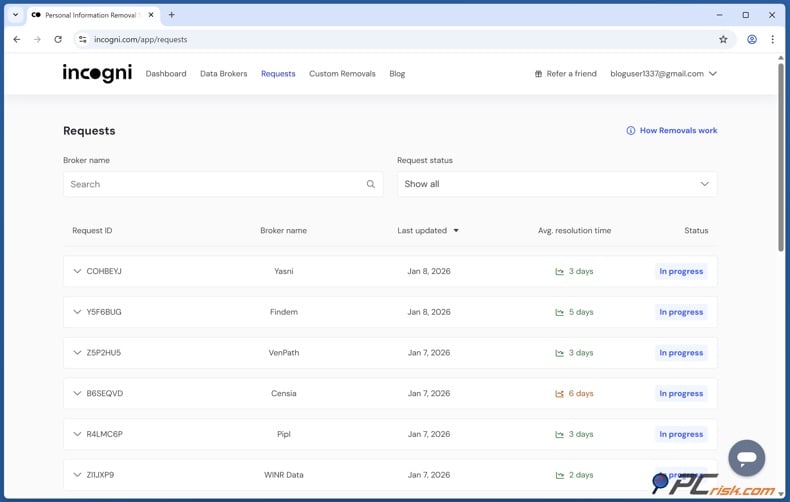
8. Keep Incogni active if you want it to keep monitoring your information. Unlike a one-time data broker opt-out, Incogni keeps sending new removal requests and adds more brokers over time. This is important because your information can show up again even after it was removed before.
It is important to know what you are paying for. You can remove yourself from data brokers and people-search sites for free. The FTC says you can usually opt out of people-search sites on your own, or you can pay a service to do it for you. Incogni’s main benefits are handling multiple requests at once, repeating them as needed, tracking progress, and saving you from managing many opt-out forms yourself.
Incogni is not a tool that can "erase your identity from the internet." Our PCrisk review points out its limits. It cannot delete government records, news articles, regular social media posts, or every website with your information. Its main job is to remove your data from brokers and people-search sites.
Common issues with removing information from data brokers manually
You can remove your information manually, and if you only care about one or two sites, that might be enough. The problem is when your data is on many sites, each with its own forms, steps, delays, and the chance that your info will show up again. Opting out of one site at a time takes a lot of effort, and your information may come back later.
| Common problem | What we recommend |
| The verification email never arrives. | Check spam and promotional folders and make sure the submitted address was typed correctly. Incogni's current guide says the verification link can expire after 24 hours, in which case you need to restart the request. |
| The broker asks for an email address to remove an existing profile. | Use a dedicated privacy or opt-out email address rather than the inbox you use for banking, work, and important accounts. Data brokers can require identifying information to verify an opt-out, so disclose only what is necessary for the process. |
| The site cannot find the correct record. | Search current and previous names, addresses, phone numbers, and locations. Save the exact listing URL before submitting a request so that you can check it later. Records can be associated with current and historical details. |
| The page still appears after the removal request. | Allow the stated processing time and then check again in a private browsing window or after clearing the browser cache. Incogni says data brokers ask users to allow 3 days and recommends waiting up to a week before escalating a stuck request. |
| The listing returns weeks or months later. | Submit another opt-out and continue monitoring. Data can reappear when public-record information changes, while Incogni recommends regular repeated removal because broker databases are continually refreshed. |
| The broker changes its removal interface. | Find the current privacy, "Do Not Sell," "Do Not Share," or opt-out section. We have observed broker workflows change over time, so the underlying process is more reliable than the exact position of a button. |
| You remove one listing but discover many more. | Keep an inventory of brokers and check them periodically, or use an automated removal service. The FTC specifically recommends repeating the process across other people-search sites and periodically checking whether new information has appeared. |
Starting in 2026, California residents will have another choice. The state's Delete Request and Opt-Out Platform (DROP) is now available. From August 1, 2026, data brokers must check DROP at least every 45 days and handle valid deletion requests. DROP lets eligible consumers send a single verified request to cover all registered data brokers, so you do not have to contact each broker individually.
This does not mean commercial removal services are unnecessary for everyone. Factors like coverage, jurisdiction, sites not listed in a registry, ongoing monitoring, custom removals, and convenience still matter. Californians should just be aware that a government-run deletion tool is now available in addition to manual and commercial options.
What are personal data removal services?
Personal data removal services are companies that help you request deletion, suppression, or opt-out of records held by data brokers and people-search sites. Instead of finding and filling out many privacy forms yourself, you give the service enough information to match your records and let them contact the companies for you.
See the best personal data removal services
At PCrisk, we tested the main services with this in mind. Their main benefit is not having a secret way to erase information that you cannot remove yourself. Instead, they are useful because cleaning up data broker records is repetitive and hard to keep up with on your own. Paid services can automate requests, track responses, check if information comes back, and repeat removals as needed.
In our 2026 comparison, Incogni ranked highest among the services we tested. We liked its wide broker coverage, easy setup, automated requests, and dashboard. Our full review gave it a 4.5 out of 5. However, there is no permanent free version, broker responses can be slow, and the service cannot remove every type of information from the internet.
For Discord users, this difference is important. A personal data removal service does not handle age verification cleanup. It cannot go back and change a Discord verification session, change how k-ID works, or obtain a copy of an ID leaked in a separate breach. According to Discord's current documentation, ID files used by its age assurance vendor are deleted after verification.
A service like Incogni can help reduce the amount of your personal information available in commercial databases. This might include listings with your name, addresses, phone numbers, date of birth or age, family connections, and similar details, depending on the broker. The FTC points out that data brokers can create profiles using public records and information bought from other companies, often without ever dealing with you directly.
This is why we view data removal as just one part of protecting your privacy, not a complete fix. Taking down public broker profiles can make it harder for people to find your information easily. But things like account security, phishing protection, device security, privacy settings, and credit protection are still important and do different jobs. The FTC also points out that reducing public exposure is different from using strong passwords, two-factor authentication, and credit freezes to protect your accounts or prevent fraud.
How to keep your information off people search sites and data brokers
The biggest privacy challenge isn’t just deleting old records. It’s making sure less new information is available for someone to piece those records back together.
Be careful about what you share online. Protect details like your phone number, home address, full date of birth, personal email, and family connections. Check your social media profiles and remove anything that doesn’t need to be public. Since data brokers collect information from many sources, sharing less helps limit what they can gather.
Whenever possible, use different contact details for different activities. For example, keep your main email address private and use separate ones for things like sign-ups, promotions, public profiles, or broker opt-outs. Using different email addresses makes it harder for someone to link all your online activity and helps keep spam out of your main inbox. If you’re removing your information from data brokers yourself, consider creating a special email just for opt-outs so you don’t have to share your main address.
Turn off advertising IDs and limit tracking where you can. CISA suggests disabling advertising identifiers and changing your browser’s privacy settings to help shrink your digital footprint. The FTC also recommends checking your cookie settings and limiting personalized ads. While these steps won’t erase existing broker profiles, they can help cut down on future tracking.
Check people-search sites regularly. Opting out isn’t always permanent, since new public records can make your information show up again. Every so often, search for your name, address, email, and phone number. Automated removal services can help with this, but it’s still a good idea to do your own checks in case something slips through.
Take advantage of privacy tools and laws where you live. For example, Californians can use DROP to make requests, and other places have their own ways to delete, object, or opt out. Your rights depend on where you are, so it’s best to use both legal options and commercial removal services together, since no single service covers everything.
Make sure to secure any accounts that hold sensitive information. Deleting your public profile won’t help if someone steals the password to your email, Discord, cloud storage, bank, or data-removal accounts. We highly recommend using strong, unique passwords and turning on two-factor authentication.
If you’re worried about identity theft, think about placing a credit freeze. While it doesn’t remove your data from brokers, the FTC says it can help stop identity thieves from opening new credit accounts in your name. Credit freezes are free to set up and remove, and you can use them even if you haven’t been a victim yet.
Be careful with unexpected messages about "Discord age verification." According to Discord’s August 2026 article, age checks only happen inside the Discord app when you try to access restricted content or change certain settings. Discord says it never sends emails or texts about age verification. So, if you get a message asking you to urgently upload your ID through a link in an email or text, it’s probably a scam.
Final recommendations
Based on our research, Discord’s current system isn’t a universal government ID collection program. Discord says over 90% of users won’t need to go through a special verification process. Its age inference model tries to determine whether someone is an adult using account-level details rather than message content.
If you’re asked to verify your age, pick the method that shares the least information and that you feel comfortable with. Right now, a video selfie offers a privacy benefit because Discord says the age check happens only on your device, and the video isn’t sent anywhere. You can use Google Wallet to keep your passport data from being sent to Discord. Scanning a government ID reveals more personal details, even though Discord says the ID is sent to its verification partners and is deleted immediately after your age is confirmed.
Before you continue with verification, check the vendor name and how your data will be handled in the interface. This is especially important since Discord is still testing new methods and adding more vendors. After feedback in February, Discord promised to make it clearer who the verification vendors are and how they use your information.
If you’re worried about who has your ID, remember that different systems are separate. The current Discord ID process, the old 5CA support breach, and commercial data brokers are all different issues. Discord says it doesn’t get your raw government ID in the current k-ID process. The 2025 incident involved a former support company and IDs used for age-related support. Data brokers keep their own profiles using public and commercial data.
Still, this controversy is a good reminder to review your privacy. Look yourself up on major people-finder sites and remove any listings you find. Check back from time to time. Avoid sharing unnecessary personal details in public profiles. Turn on two-factor authentication, and if you’re worried about identity theft, think about freezing your credit.
If you don’t want to handle many opt-out requests yourself, our PCrisk testing found Incogni to be a solid automated option. It works with many data brokers, sending removal requests on your behalf and following up as needed. Remember, though, Incogni helps reduce your exposure through data brokers, but it won’t erase every trace of you online or replace good account security and Discord’s privacy settings.
Protect your personal information with Incogni
Most importantly, this article is based on Discord’s public documentation as of September 1, 2026. The rollout has already changed once, and Discord tested new verification methods over the summer. The company still plans to expand globally later in 2026. If you see a different verification screen, check which vendor and method are shown in Discord, since older screenshots or instructions may no longer match the current process.
Frequently asked questions (FAQs)
Does everyone have to upload an ID to use Discord?
No. Discord says over 90% of users can continue using the service without uploading an ID or undergoing face verification. Their system can often figure out your age from your account details. Extra verification usually only happens if you want to access age-restricted content or change certain settings, and Discord can’t confirm you’re an adult. Some regions may have extra rules.
Does Discord scan my private messages to determine my age?
Discord says it does not. According to its Help Center, age inference relies on account signals and behavior patterns, not the content of your messages.
Discord’s Sensitive Content Filters work separately from age inference. These filters check images and videos for mature or graphic content. Discord says they do not scan your text messages, voice chats, or calls.
Does Discord see my government ID when I verify?
According to Discord’s current documentation, no. When you use the k-ID government ID process, your ID and selfie are handled by k-ID and their partner Veratad. Discord says it only gets your age, not your actual ID, and the ID is never linked to your Discord account.
Who processes my ID if Discord does not?
Discord currently uses k-ID as its age assurance vendor and Veratad as the document verification partner for ID scans. Discord says your ID and selfie are deleted right after your age is confirmed.
Does Discord store my face scan?
Discord says the current k-ID video selfie method checks your age right on your device. The video and face data never leave your device and are deleted right after processing. Discord only gets your estimated age, not the video itself.
What was the Discord ID data breach people are talking about?
In October 2025, Discord reported a security incident with its former customer service provider, 5CA. About 70,000 users worldwide may have had their government ID photos exposed. These IDs were linked to age-related support requests. Discord says 5CA is not one of its current age assurance vendors and that it no longer works with them.
What happens if I refuse Discord age verification?
If you refuse age verification under Discord's current system, you usually won't lose your account. Discord says you can still use your account, servers, friends list, direct messages, and voice chat. However, you might not be able to access age-restricted content or change some safety settings that require proof of age. If Discord finds out someone is under the minimum age, different rules apply.
Why should I remove myself from data brokers if Discord says it deletes my ID?
These are different ways your information can be exposed. Even if Discord and its partners delete your data as promised, people-search websites might still show details like your name, address, phone number, age, past locations, and relationships, which they collect from public and commercial records. Information on these sites can come back after you opt out, so it’s a good idea to check them regularly.
Removing your information from data brokers is an extra step you can take for privacy. It won’t affect what Discord knows about your account, but it can make it harder for strangers, marketers, or others to find your personal details elsewhere. In our tests, we found that automated services like Incogni are much easier to use than handling lots of broker opt-outs one by one.
Share:
 Facebook
 X.com
X.com
 LinkedIn
 Copy Link

Rimvydas Iliavicius
Researcher, author
Rimvydas is a researcher with over four years of experience in the cybersecurity industry. He attended Kaunas University of Technology and graduated with a Master's degree in Translation and Localization of Technical texts. His interests in computers and technology led him to become a versatile author in the IT industry. At PCrisk, he's responsible for writing in-depth how-to articles for Microsoft Windows.
▼ Show Discussion