
We may earn commissions from products we recommend. Learn more.
Are unblocked game websites safe? How to play safely online with a VPN in 2026

Are unblocked game websites safe? How to play safely online with a VPN in 2026?
"Unblocked games" websites are popular among users searching for browser games on networks where gaming sites are restricted, such as schools, colleges, workplaces, and libraries. However, "unblocked" refers only to accessibility, not security. These websites may still feature aggressive advertising, deceptive redirects, browser notification traps, phishing pages, or unsafe downloads.
Reputable VPNs add privacy by encrypting users' Internet traffic and masking their IP addresses. While these tools may help bypass some network restrictions, they cannot override all school or device management policies. This article outlines the risks associated with unblocked game sites, explains how VPN protection works, and recommends further precautions.
PCrisk does not promote, encourage, or endorse bypassing network restrictions, violating establishment rules, or breaking local laws. Always follow an institution's acceptable-use policies and local regulations. Use any methods described at your own risk.
Play unblocked games with NordVPNSpecial deal30-day money-back guarantee→
Table of Contents:
- Introduction
- Are unblocked game websites safe?
- Common unblocked game website security risks
- How can a VPN secure unblocked game websites?
- Play unblocked games safely with a VPN
- Best VPNs for securing unblocked game websites
- Can you use a free VPN to secure unblocked game websites?
- Common issues and solutions when playing unblocked games with a VPN
- Alternatives for unblocked game websites
- In closing
- Frequently Asked Questions (FAQ)
Are unblocked game websites safe?
An "unblocked game website" is a site that hosts or embeds browser games and promotes itself as accessible from environments where gaming websites are restricted. The term is a marketing description, not a reference to any particular technology or security standard. It suggests the site may be reachable from school, work, or other filtered networks.
Websites like Unblocked Games 76, Unblocked Games 66, and Unblocked Games Premium are examples of these platforms. They differ from established browser gaming sites, such as Coolmath Games, Poki, Armor Games, and educational game services. Many "unblocked" websites primarily offer collections of embedded HTML5 games, while others use smaller domains that may change frequently. Our research indicates that smaller game portals can disappear, change domains, be copied, or aggregate games from other sources.
Schools and other institutions block games for several reasons. Productivity is a primary concern, as gaming and similar entertainment can distract students or employees. Bandwidth is another factor, especially when games load large assets, advertisements, or multiplayer features. Security is also critical, since unrestricted access to unknown sites increases the risk of phishing, malware, unwanted downloads, deceptive ads, and other threats.
There are various types of Internet filters, and restrictions can be enforced at multiple levels. Networks may use DNS filtering, firewalls, secure web gateways, proxies, or category-based filters to block websites labeled as "Games". Schools can also block specific domains. Additionally, institution-owned devices can be managed so that URL restrictions, application controls, and browser extension policies apply regardless of the network connection; you can read more on this topic in our "How to unblock websites on school Chromebook" article.
This is why a website may be accessible at one school but blocked at another. There is no universal "unblocked" status. Sometimes a site's domain has not yet been categorized or added to a filter. In other cases, one network allows access while another blocks it. A website may also become inaccessible later if filtering databases or administrator rules change.
Importantly, no site can override a school's firewall or device management system. "Unblocked" simply means that a specific blocking system is not currently preventing access. It does not indicate that the site can universally bypass Internet filtering.
It must be emphasized that unblocked game websites are not necessarily safe, as the "unblocked" label only refers to accessibility and does not guarantee security. The following risks are worth consideration:
Unknown operators - temporary or anonymous game portals may provide little information about who maintains them or their intentions.
Malicious advertising - aggressive ads can redirect users to phishing pages, scams, fake downloads, or other harmful webpages.
Fake download buttons - deceptive prompts may encourage users to install unwanted or malicious software.
Browser notification abuse - some sites request notification permissions and later use them to deliver misleading advertisements or scam alerts.
Poor moderation - user-submitted or embedded games may not always be thoroughly reviewed for inappropriate or unsafe content.
Tracking and privacy - gaming websites may use advertising networks, cookies, and other technologies that collect browsing or device information.
Security vulnerabilities - poorly maintained sites may use outdated components that generate additional risks.
Reputable websites are generally preferable - established educational and gaming platforms tend to provide better moderation and maintenance, although even legitimate webpages can display third-party ads or experience security issues.
Common unblocked game website security risks
Playing browser games does not intrinsically expose your device to malware. The principal risks are related to adverts, redirects, fake buttons, notification requests, embedded third-party content, questionable downloads, and links to unrelated websites. Deceptive sites accessed through misleading ads, fake download buttons, pop-ups, and rogue advertising networks are commonly analyzed by us here at PCrisk.
The following are some of the most common security risks linked to unblocked game websites:
Malvertising and malicious redirects - advertising is a significant risk. Free gaming sites typically rely on advertising for revenue, but poorly managed networks can display deceptive ads or redirect users to webpages they had not intended to visit. Advertisement-heavy game pages can make it difficult to distinguish game controls from ads. Large "PLAY", "START", or "DOWNLOAD" buttons may be adverts and not part of the game. Clicking these can open new tabs, trigger redirects, or send your browser through multiple third-party domains. Based on our research, redirect chains often lead to scams, unwanted software, suspicious pages, and potentially malicious content. Hence, even if the gaming website does not distribute malware directly, it could be proliferated through the advertising network.
Fake download buttons and software installers - browser games should not require you to download a special video player, codec, browser "fix", system optimizer, or unrelated extension. Fake download prompts are a common social engineering tactic. We have previously documented malware campaigns, such as "Chrome Update Center", where compromised sites imitate legitimate browser update messages to trick users into installing malicious software. Therefore, avoid executable files and unsolicited browser extensions from unknown and low-trust sites. Always obtain applications, browser updates, and gaming clients from official publishers or trusted app stores.
Browser notification abuse - some pages display messages like "Click 'Allow' to play", "Press 'Allow' to verify you are not a robot", or "Allow notifications to continue". The browser's notification dialog is not a CAPTCHA and is not needed to prove you are human. We have found countless rogue pages using fake verification prompts to convince visitors to enable notifications, including best2019-games-web1[.]com, free3dadultgames[.]com, and so on. Once permission is granted, the website can send advertisements and deceptive alerts directly through the browser. These notifications may advertise fake antivirus warnings, scams, phishing sites, unwanted applications, or malware. Deny notification permissions on unknown gaming websites unless you have a valid reason to allow them.
Technical support scams and scareware - redirects may claim that Windows, Android, Chrome, or another product has detected viruses on your device. Web pages cannot perform the antivirus scans these messages suggest. Such warnings are intended to force a sense of urgency, thus prompting software downloads, subscription, calling a number, or taking other actions. Hence, never install software because an unexpected game-site pop-up claims your device is infected. Close the page and use your installed security software if you are concerned.
Phishing scams - a questionable gaming website may redirect visitors to fake log-in pages or display a sign-in prompt designed to resemble a legitimate service. We have documented sophisticated gaming-related phishing techniques, including browser-in-the-browser attacks designed to imitate Steam and other authentic log-in windows. Therefore, do not enter important account passwords into a log-in form just because a game site requests it. Always verify websites, use unique and strong passwords, and enable Multi-Factor Authentication (MFA) whenever possible.
Tracking and privacy exposure - free websites often use advertising, analytics, and other third-party services. Cookies, account log-ins, browser identifiers, and information you provide can be used to identify or profile you. Hence, use the appropriate privacy protections, such as a reputable ad blocker to reduce third-party advertising and tracking, and a VPN to encrypt your connection and mask your public IP address.
Unstable mirrors and changing domains - accountability is another concern. Established gaming platforms usually have a recognizable operator, a stable domain, support resources, and a reputation to protect. Smaller "unblocked" game collections are often more transient and may change domains, disappear, be copied, or aggregate gaming content from other sources. However, this does not automatically make a site malicious, but it does make reputation harder to assess. A domain that was safe last month can change ownership or content. As stated in our Online Website Scanner FAQ section, a clean scan is only a point-in-time result, not a guarantee of ongoing safety.
How can a VPN secure unblocked game websites?
VPNs (Virtual Private Networks) create encrypted tunnels between users' devices and the provider's servers. Rather than exposing your destination traffic to the local network, your Internet requests travel through this tunnel. Therefore, websites see the VPN server's public IP address instead of your own. VPNs are incredibly valuable on shared or public networks, such as those in schools, offices, hotels, or airports. These services limit the information local observers can access about your browsing activity. While your Internet Service Provider (ISP) or local network may know you are using a VPN, the encrypted tunnel prevents them from viewing the specific websites you visit.
For unblocked game websites, the privacy provided by VPNs is important because these sites may be untrustworthy or contain suspicious advertisements. Concealing your IP address limits the information available to websites and third-party advertisers.
Furthermore, VPNs can help access gaming websites blocked at the network level. If a school Wi-Fi network restricts a game's domain through DNS or browser traffic filters, using a VPN may bypass these controls by hiding the intended destination. For more information, you can read our "How to unblock games at school with a VPN" article.
Our top recommendation for streaming and privacy. NordVPN consistently leads our tests with fast speeds, reliable geo-unblocking, and a strict no-logs policy.
- ✔ Unblocks geo-restricted streaming services reliably
- ✔ 202+ locations across 111 countries
- ✔ 30-day money-back guarantee · Special deal available
However, a VPN cannot bypass administrator controls set directly on a managed device or account. For example, a managed Chromebook may have URL restrictions, app policies, or browser extension controls that remain active regardless of network changes. If a school-owned device indicates that access to a website, application, VPN, or extension is disabled by the administrator - users should request authorization instead of attempting to circumvent device management.
Networks may also block VPN connections by restricting protocols, ports, server addresses, extensions, or applications. Leading VPN services offer multiple protocols and features for restricted networks, but no VPN can guarantee connectivity on every managed network. Additionally, using a VPN may violate a school's acceptable-use policy, even if the software works. Consequences vary by institution, so students should respect administrator controls as intentional restrictions.
Outside of schools, a VPN offers additional benefits. Changing your apparent IP location can help you access region-specific services, such as streaming platforms. Geo-unblocking is a key feature, and the top VPN services in our 2026 review can access major streaming services from supported regions.
Consider using an ad blocker as an additional layer of protection. Ad blockers are particularly helpful on free game portals, reducing banners, overlays, pop-ups, tracking scripts, and advertising-driven redirects. This improves website usability and lowers the risk of exposure to malicious ads. While an ad blocker does not make an unsafe site trustworthy, it removes a common channel for suspicious content. You can check out our top 2026 ad blocker choices for further reading.
It must be stressed that a VPN does not replace dedicated security software. Encryption cannot stop malware if you download and run an infected file, nor can it prevent you from entering credentials on a phishing page. A VPN also cannot revoke browser notification permissions you have granted. Read our top 2026 antivirus software review for more details on dedicated security. We recommend Combo Cleaner as an additional security layer for detecting malware, potentially unwanted applications, and unsafe websites.
A VPN encrypts your traffic — but your device still needs protection against malware and ransomware. Combo Cleaner adds the missing layer of defense.
Download Combo CleanerAntivirusDetect & remove malware threats→Play unblocked games safely with a VPN
Configuring a VPN on a personal device takes only a few minutes. When selecting a VPN service for browser gaming - look for speed, low latency, leak protection, intuitive applications, and a reliable kill switch. NordVPN is our top recommendation for 2026.
1. Choose a reputable VPN provider.
Avoid unknown apps and browser extensions marketed as "free school VPNs". Select a service with modern protocols, DNS/IP leak protection, a kill switch, transparent privacy policies, and applications for your operating system. NordVPN is our top VPN choice.
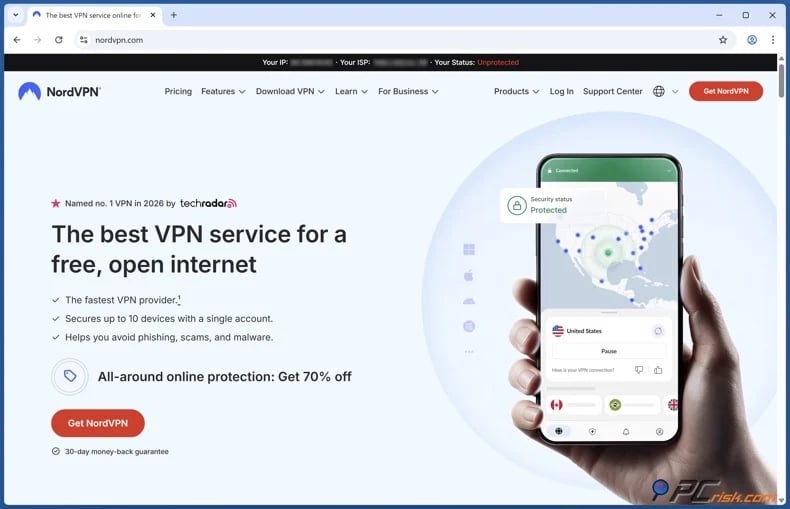
2. Download the official VPN app from a legitimate source, install it, and sign in.
Do not use cracked clients, repackaged installers, or software promoted through game-site ads. Unofficial installers may contain unwanted or malicious components.
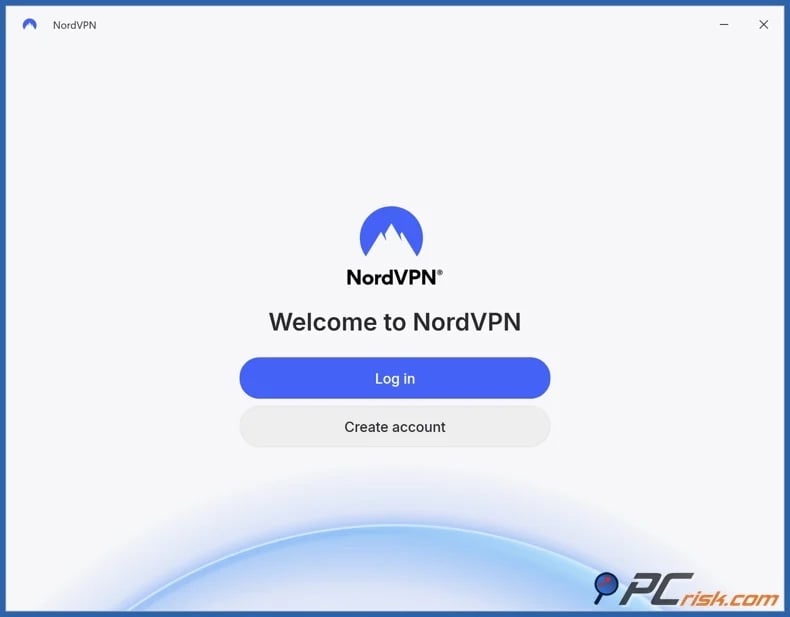
3. Connect to an appropriate server and enable protections before accessing the game website.
For browser gaming, choose a geographically close VPN server to diminish latency. If performance is poor, switch to another nearby server. If available, enable the kill switch. It stops Internet traffic if the VPN connection fails, decreasing the risk of your connection reverting to the regular network without your knowledge. If offered, keep ad and threat-blocking features enabled. These features are helpful for ad-heavy browser games, but a dedicated ad blocker and security application grant broader protection.
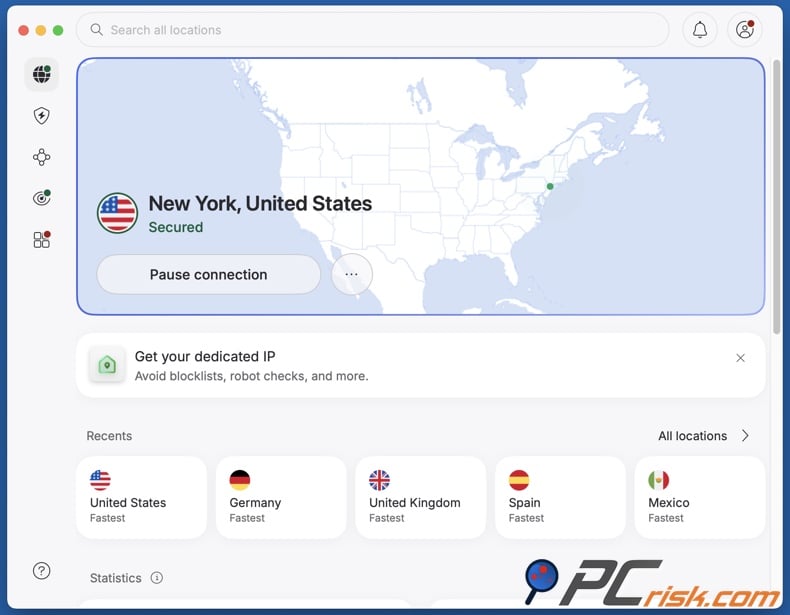
4. Open the game website and start playing.
If you experience a problem with the VPN, check out the "Common issues and solutions when playing unblocked games with a VPN" section of this article.
Finally, remember the limitations of a VPN. It does not guarantee that an "unblocked" website is safe, cannot ensure access to every game site, and cannot override administrator restrictions on managed computers. It also will not protect you if you install malware, share credentials with phishing sites, or approve unsafe browser permissions.
Best VPNs for securing unblocked game websites
For browser gaming, the priorities include high connection speeds, low latency, reliable leak protection, intuitive applications, broad platform support, and stability on restricted networks. Below are our top five VPN choices for 2026:
1. NordVPN - the top choice
NordVPN is our top recommendation for most users. It offers fast NordLynx connections, strong privacy features, DNS and IP leak protection, a kill switch, Threat Protection, and broad device support. Its restrictive-network functionality is especially effective when standard VPN traffic is blocked. For browser gaming, NordVPN's speed and security matter more than any "gaming VPN" label. This VPN is also well-suited for streaming and privacy, making it the most flexible option here.
2. Surfshark - best value for many devices
Surfshark's main advantage is unlimited simultaneous connections, allowing one subscription to cover all compatible devices without managing connection limits. Its WireGuard performance and features like MultiHop, CleanWeb ad blocking, split tunneling, and connection recovery are worth highlighting. CleanWeb is especially useful on game portals, as it reduces advertising and tracking. Surfshark is also a strong general-purpose option for streaming and travel.
3. Mullvad VPN - best privacy-focused choice
Mullvad VPN collects minimal personal data and does not even require an email address to create an account. Its applications support WireGuard and OpenVPN, as well as a kill switch and leak protection. Its anti-censorship and obfuscation features are a highlight. The primary limitation is entertainment compatibility. Mullvad VPN has a smaller server network than some competitors. Therefore, it is recommended mainly for privacy-prioritizing users rather than for those wanting to bypass geoblocks.
4. Proton VPN - best free and paid combination
Proton VPN offers open-source applications, a kill switch, leak protection, NetShield, and robust paid plans. Its outstanding feature is a free VPN tier that offers unlimited data without advertising. The paid plans add more features and location options, including streaming support and enhanced performance control. Proton VPN is a great choice for those who want to test VPN protection for browser games without purchasing a subscription.
5. ExpressVPN - best for simplicity
ExpressVPN focuses on straightforward applications, stable performance, the Lightway protocol, leak protection, and broad device support. Currently, the service can enable access to major streaming platforms, making it useful beyond gaming. ExpressVPN generally costs more than budget competitors, but its ease of use appeals to those who prefer a simpler experience over advanced configuration.
Can you use a free VPN to secure unblocked game websites?
Free VPNs may be able to grant access to game sites on restricted networks, and these tools might improve privacy, but there are significant trade-offs and risks involved. Unknown "free VPN" apps and extensions are especially risky because VPN providers have privileged access to your Internet traffic. Providers with unclear ownership or poor privacy practices may bring additional privacy risks instead of resolving them. We recommend reputable, high-quality services rather than relying on anonymous software marketed for bypassing school filters.
Top VPN ReviewsExclusive dealsExpert-tested · hands-on reviews→
Some examples of common free VPN limitations and risks include:
Slow speeds and congestion - free VPNs typically have limited resources and many users sharing servers. This congestion can increase latency and cause browser games to load slowly or disconnect.
Limited servers - a small selection of locations provides fewer alternatives if a server is overloaded, blocked, or far away.
Data limits - many free services set daily or monthly data caps. Browser games with large assets, multiplayer traffic, or video ads can quickly use up these limits.
Missing features - free plans may lack obfuscation, specialized protocols, unrestricted location selections, split tunneling, or priority support.
Overused IP addresses - when thousands of users share a few IP addresses, this can trigger CAPTCHAs, rate limits, or website blocks.
Privacy risks - questionable free providers may depend on advertising, excessive data collection, or other monetization methods. Because the VPN manages your connection, unclear logging and ownership policies are a serious concern.
For users looking to use a permanently free option, we recommend Proton VPN's free tier. It provides unlimited data and does not use advertising, though its location selection and features are more limited than paid plans.
Common issues and solutions when playing unblocked games with a VPN
VPN performance is contingent on multiple factors, including the network, device, browser, VPN protocol, server, and game website. Furthermore, a failure does not necessarily indicate a problem with the VPN itself. The following are some of the most common issues and their potential solutions:
The VPN application cannot be installed - the computer may be administrator-managed, with application or browser extension installations disabled.
Solutions:
- Check whether the device, browser, or account is managed.
- Ask the administrator whether VPN software is allowed.
- Use a personal device to install the VPN.
The VPN does not connect to Wi-Fi - the network may block the selected protocol, server, port, or VPN address. You may also need to complete a captive portal first.
Solutions:
- Confirm that websites in general work before starting the VPN.
- Complete the Wi-Fi sign-in or captive portal first.
- Connect to another nearby VPN server.
- If available with your VPN, switch to another protocol (some work better on certain networks).
- If available with your VPN, use the restrictive-network or obfuscation option.
- Restart the VPN and reconnect to the network.
The VPN connects, but the game website is still blocked - this may indicate that the restriction is enforced by the device, browser, account, endpoint security software, or another policy rather than only by the network.
Solutions:
- Confirm that the VPN is transferring general Internet traffic.
- Close and reopen the browser after connecting.
- Clear cached site data if an old block page remains visible.
- Connect to another nearby VPN server.
- Check whether the device, browser, or account is managed.
- Request access from the administrator if the restriction is device-managed.
The game website detects the VPN - some sites identify shared VPN IP addresses and may display an error, CAPTCHA, or additional verification.
Solutions:
- Connect to another server in the same region.
- Close and reopen the browser after changing servers.
- Clear cookies and cached site data if an old session is retained.
- Avoid repeatedly switching between distant server locations.
Browser games are slow or laggy - VPN encryption and routing may add latency. Distant servers, congested Wi-Fi, overloaded VPN servers, packet loss, or the game server itself can also affect performance.
Solutions:
- Connect to the geographically closest server.
- Test several nearby servers.
- If available with your VPN, use a modern, performance-oriented protocol.
- If applicable, pause or end bandwidth-intensive activities (e.g., large downloads, streaming, cloud backups, etc.).
- Compare the game's performance with and without the VPN.
The game loads but multiplayer features fail - browser games may use WebSockets, real-time connections, separate game servers, or ports that are handled differently from the main website.
Solutions:
- Connect to another nearby VPN server.
- If available with your VPN, switch to another protocol.
- Restart the game after establishing the VPN connection.
- Check whether the same multiplayer feature works without the VPN.
- Temporarily deactivate unnecessary browser extensions that may interfere with scripts or network connections.
- If the game itself is experiencing an outage, wait until its service is restored.
The VPN repeatedly disconnects - unstable Wi-Fi, protocol compatibility, overloaded servers, power-saving settings, or movement between networks can interrupt the VPN tunnel.
Solutions:
- Connect to another nearby server.
- If available with your VPN, switch to another protocol.
- Restart the VPN application and network connection.
- If applicable, update the VPN app and operating system.
- Check whether battery-saving or background-app restrictions are terminating the VPN.
Internet access disappears when the VPN disconnects - check whether the kill switch is enabled. A kill switch intentionally blocks traffic when the VPN tunnel fails, so this behavior may indicate that the privacy feature is operating properly.
Solutions:
- Reconnect to the VPN.
- If the connection repeatedly fails, connect to another nearby server.
- If the connection repeatedly fails, and it is available with your VPN, switch to another protocol.
- Restart the VPN application.
- Temporarily deactivate the kill switch only for troubleshooting if you understand the privacy implications.
- Re-enable the kill switch afterward if continuous protection is important.
Websites show repeated CAPTCHAs - VPN servers use shared IP addresses, and large numbers of users may appear to originate from the same address. Search engines and websites may consequently treat the traffic as unusual or suspicious.
Solutions:
- If this data is available with your VPN, use a less congested server.
- Connect to another nearby server.
- Avoid repeatedly switching between distant multiple server locations.
- Clear cookies if the issue continues after changing servers.
The wrong location appears after connecting - websites may use cached data, cookies, browser permissions, DNS information, or account settings in addition to the visible IP address.
Solutions:
- Confirm that the VPN reports the expected server location.
- Close and reopen the browser after connecting.
- Clear cookies and cached site data.
- Review location permissions on your personal device.
- Check the public IP address to verify that the VPN connection is active.
DNS or IP information leaks outside the VPN - incorrect configuration or compatibility problems may allow some network requests to use the normal connection.
Solutions:
- If available with your VPN, enable DNS and leak-protection features.
- Restore default VPN networking settings if they were manually changed.
- Test for IP, DNS, and IPv6 leaks after connecting.
- Avoid combining unnecessary custom DNS, proxy, and VPN configurations.
- Contact the VPN provider if leaks persist with its recommended configuration.
The browser behaves differently from other applications - browser extensions, secure DNS settings, cached proxy configurations, privacy tools, or other networking features may interfere with the VPN.
Solutions:
- Test another reputable browser.
- Temporarily deactivate unnecessary extensions to identify conflicts.
- Restore custom proxy or DNS settings to their defaults if appropriate.
- Restart the browser after changing VPN servers or protocols.
It is pertinent to mention that reputable VPNs typically provide troubleshooting documentation and customer support. If basic troubleshooting does not resolve the issue on an authorized device and network, contact the provider for assistance with protocols, authentication, application settings, or server-specific problems.
Alternatives for unblocked game websites
It is generally safer to avoid anonymous websites under the "unblocked" label. Established browser gaming and educational platforms generally offer more stable domains and recognizable operators, though schools may still block them, and no site is entirely risk-free.
Some game website alternatives worth considering are:
Hooda Math - features a wide selection of math, logic, physics, board, puzzle, and escape games, with content designed for browsers and Chromebooks.
Coolmath Games - is a well-established platform featuring a broad range of logic, puzzle, skill, and other browser games.
Math Playground - specializes in math games, puzzles, logic exercises, sports games, and other educational activities.
ABCya - offers educational browser games predominantly for younger students, covering mathematics, reading, typing, logic, and related subjects.
PBS KIDS Games - provides browser games linked to PBS children's programming and is fundamentally different from anonymous "unblocked games" mirror websites.
Poki - a leading general-purpose browser gaming platform featuring games across many genres, with no need to install most titles.
Armor Games - a long-standing site known for strategy, platform, puzzle, and tower-defense games.
It must be mentioned that these sites may include advertising, third-party content, account features, or external links, and their security status can change over time. Therefore, exercise caution even with reputable websites. Keep your browser updated, use an ad blocker and security software, decline suspicious permissions, and do not assume that a familiar brand guarantees the safety of all advertisements displayed.
In closing
Unblocked game websites are not inherently malicious, but "unblocked" does not mean "safe". This term typically indicates that a gaming portal aims to circumvent certain network filters. However, accessibility depends on the school's or institution's DNS filtering, firewall, web gateway, device policies, and administrator settings.
Reputable VPNs improve privacy by encrypting Internet traffic, masking your public IP address, and sometimes bypassing network restrictions. However, these services do not override managed device controls or protect against all malicious ads, phishing websites, unsafe downloads, or deceptive browser prompts.
For optimal security, use a high-quality VPN, such as NordVPN, along with an ad blocker, secure browser settings, updated software, and reliable security tools like Combo Cleaner. And remember to always use these tools in accordance with the rules for your network and device.
Frequently Asked Questions (FAQ)
Are unblocked game websites safe?
Not necessarily; "unblocked" means accessible, not secure. Some sites are legitimate game collections, but others may contain excessive ads or redirects, fake download buttons, notification spam, phishing, or unwanted/malicious software. Established platforms are generally safer than temporary or anonymous websites, but caution is critical.
Why is an unblocked website still blocked?
There is no universal "unblocked" status. A website may be accessible on one network but blocked on another due to different domain lists, DNS filters, firewalls, web gateways, category filters, or device policies. Managed devices or browsers may enforce URL restrictions directly, so using a VPN might not bypass these blocks.
How to secure unblocked game websites?
Use a reputable VPN before visiting unblocked game sites. A VPN encrypts your connection and hides your public IP address, improving privacy on shared networks. Also, use an ad blocker, keep your browser updated, review browser permissions, and install reliable antivirus software. Never download unexpected updates, extensions, or executables from unknown websites.
What should I look for in a VPN for securing unblocked game websites?
Look for fast, stable connections, low latency, modern protocols, a kill switch, DNS and IP leak protection, reliable apps, strong privacy policies, and responsive support. Compatibility with restricted networks is important if standard protocols are filtered. A broad server network offers more options if a location is slow or unavailable.
Share:
 Facebook
 X.com
X.com
 LinkedIn
 Copy Link

Karolis Liucveikis
Experienced software engineer, passionate about behavioral analysis of malicious apps
Author and general operator of PCrisk's News and Removal Guides section. Co-researcher working alongside Tomas to discover the latest threats and global trends in the cyber security world. Karolis has experience of over 8 years working in this branch. He attended Kaunas University of Technology and graduated with a degree in Software Development in 2017. Extremely passionate about technical aspects and behavior of various malicious applications.
▼ Show Discussion