
We may earn commissions from products we recommend. Learn more.
How to opt out of SageStream in 2026

How to opt out of SageStream in 2026?
SageStream is a consumer reporting agency that supplies reports and scores to businesses for credit and risk decisions. Now part of LexisNexis Risk Solutions, many SageStream consumer requests are handled through the LexisNexis Risk Solutions Consumer Center. Unlike typical people-search websites, SageStream is not designed for public searches. Its data is primarily used by businesses, such as credit card issuers, retailers, wireless providers, and auto lenders.
Limiting the distribution of personal information is important. SageStream allows consumers to opt out of prescreened credit and insurance offers, while LexisNexis offers additional options for direct marketing, public-safety suppression, state privacy rights, and security freezes. However, opting out does not remove all information SageStream holds about you. This article explains the distinction, details the current manual opt-out process, covers common issues, and instructs how to use a personal data removal service like Incogni.
Opt out of SageStream with Incogni
Table of Contents:
- Introduction
- What is SageStream?
- How to manually remove your information from SageStream?
- Common issues with manual removal and alternative opt-out routes
- How to automatically remove your information from SageStream?
- Why should you remove your information from SageStream?
- How to prevent data brokers from collecting more of your data?
- In closing
- Frequently Asked Questions (FAQ)
What is SageStream?
SageStream, LLC is a consumer reporting agency regulated by the Fair Credit Reporting Act (FCRA). The company is now part of LexisNexis Risk Solutions. SageStream states that its consumer reports and scores lend insight into consumers' creditworthiness as well as supplement traditional credit decision-making. Companies that can use its services include credit card issuers, retailers, wireless telephone providers, and auto lenders.
SageStream differs from typical people-search services. While people-search websites allow users to find profiles using basic identifiers, SageStream operates within consumer reporting and risk assessment. Its data supports business decisions related to creditworthiness, identity, fraud risk, and service eligibility. LexisNexis Risk Solutions notes that its information products use public records, publicly available sources, proprietary data, and third-party information.
SageStream provides consumers with several options to manage their files. You can request your consumer report, place a security freeze, opt out of prescreened credit and insurance offers, block information related to identity theft, and dispute inaccuracies. As SageStream is now part of LexisNexis Risk Solutions, some processes are handled through the LexisNexis Consumer Center.
The terminology can be confusing. A SageStream "opt-out" does not grant the right to delete your entire consumer-reporting file. The LexisNexis opt-out system offers several options. The FCRA prescreen opt-out, most relevant to SageStream, removes your information from lists used for firm offers of credit or insurance. LexisNexis also provides separate opt-outs for direct marketing and public-safety information suppression. Additional state privacy rights may apply depending on your location.
A security freeze is a separate tool. When applied through the LexisNexis portal, it prevents LexisNexis Risk Solutions and SageStream from releasing your consumer report or score without authorization in covered situations. This freeze does not affect Experian, Equifax, TransUnion, Innovis, or other agencies.
Reducing exposure to data brokers is important because the risk often lies in the aggregation of information. Data from multiple sources can create a detailed profile of your identity, relationships, finances, and history. The Consumer Financial Protection Bureau (CFPB) warns that brokered personal information can enable scams, stalking, spying, and other abuse. Detailed data also helps cyber criminals craft convincing phishing messages, impersonation attempts, and social-engineering calls.
Accuracy is another concern in consumer reporting. If your SageStream report contains errors, you should obtain the report and dispute the incorrect information rather than only opting out of marketing. SageStream states that disputed information will be reinvestigated and modified or deleted if found inaccurate or unverifiable.
Manage SageStream privacy through several steps: reduce unnecessary marketing and prescreen distribution, verify your consumer report's accuracy, consider a security freeze when needed, and use broader data-removal methods for other data brokers and people-search sites.
How to manually remove your information from SageStream?
Reducing your SageStream exposure helps limit unnecessary distribution of your personal information. The process is an opt-out and suppression system, not a simple "delete my SageStream profile" option. Your choices depend on what you wish to remove or restrict and, in some cases, whether you meet specific eligibility requirements.
To complete the online process below, have the following information at the ready:
- Your legal name, birthdate, current address, and ZIP code.
- An email address or phone number that you can access.
- Your Social Security Number (SSN) or driver's license information, if required for accurate identity matching.
- Supporting documentation if you are requesting public-safety suppression or acting as an authorized representative for another person (depending on your request, this may include a protective order, police report, supervisor's letter, or similar evidence).
Note that you must be at least 16 years old to submit the online form yourself. For those under 16, a parent, guardian, or other legally authorized person must submit the request.
How to manually opt out of SageStream in 2026 (note that page layouts and exact wording may change):
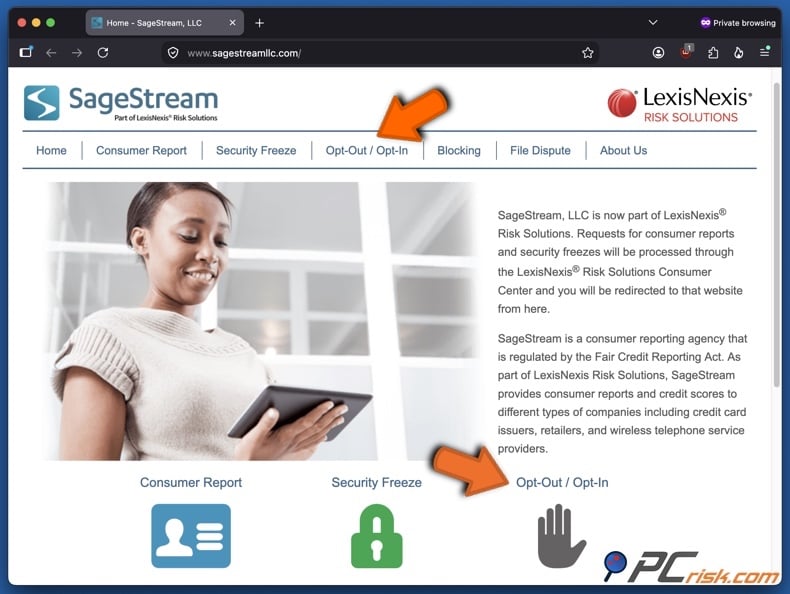
1. Open SageStream and select "Opt-Out / Opt-In". On the SageStream homepage, select "Opt-Out / Opt-In" from the main navigation bar or in the body of the page. SageStream is part of LexisNexis Risk Solutions, and consumer requests are redirected to the LexisNexis Risk Solutions Consumer Center.
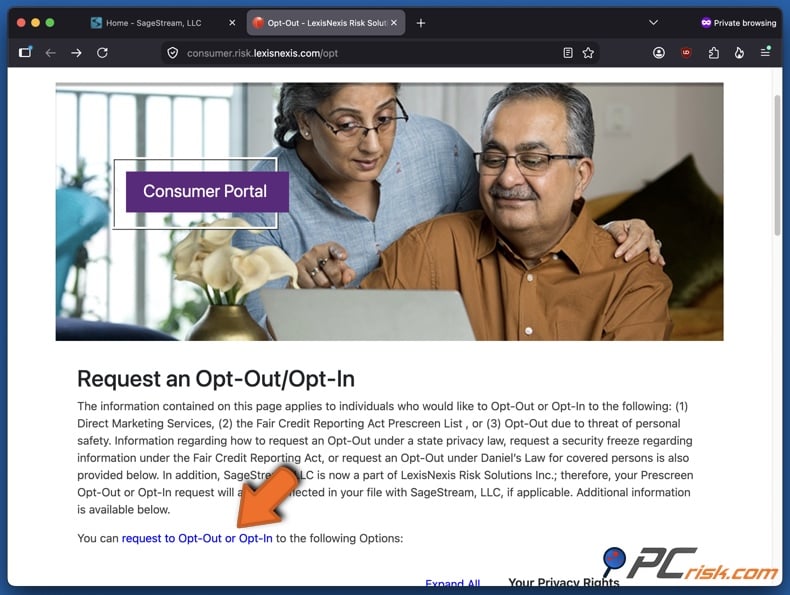
2. Review the available opt-out categories and request Opt-Out/Opt-In. The Consumer Portal page outlines available processes, including the FCRA prescreen list, direct marketing services, and information suppression for personal safety. It also provides information on state privacy rights and security-freeze procedures. You can click the "request to Opt-Out or Opt-In" link in the body of the page.
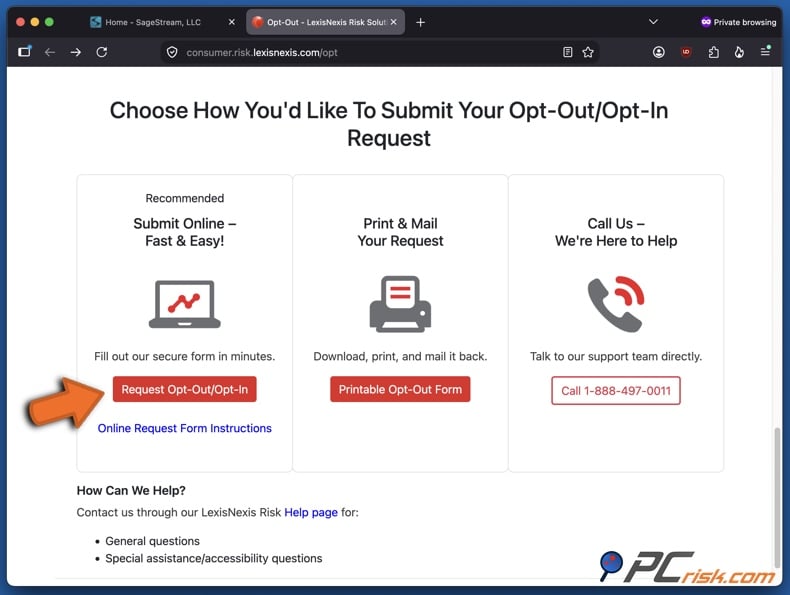
Alternatively, you can scroll down the page and in the "Choose How You'd Like To Submit Your Opt-Out/Opt-In Request" section select the online option by clicking "Request Opt-Out/Opt-In". SageStream and LexisNexis also support mail and telephone submissions.
3. Complete the LexisNexis Risk Solutions Opt-Out/Opt-In Request form.
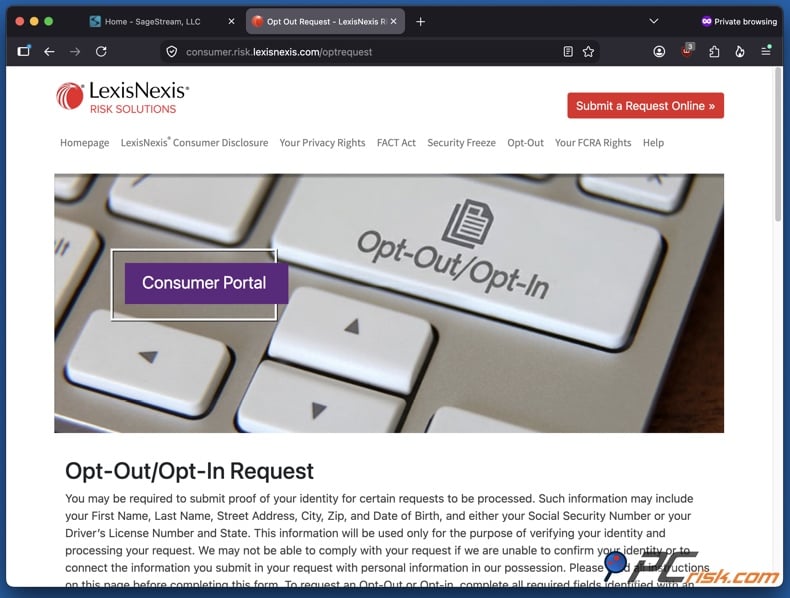
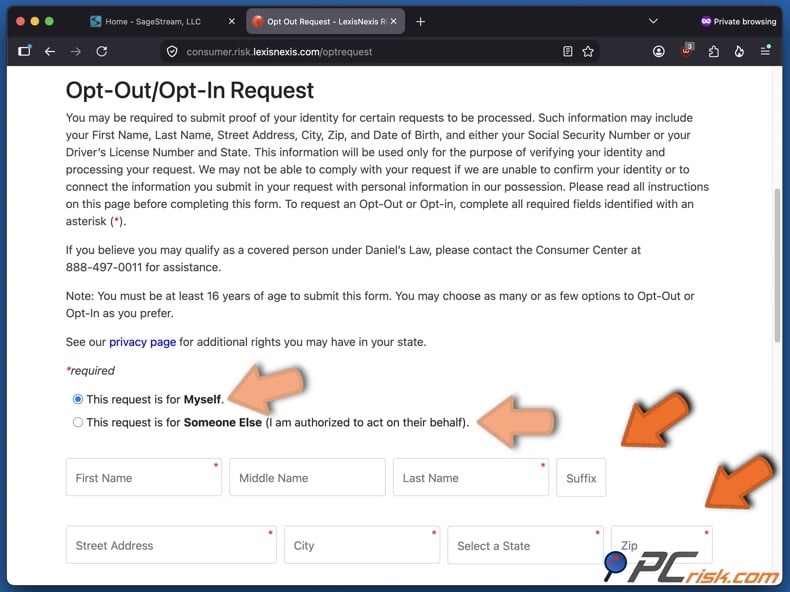
The online form first asks if you are submitting the request for yourself or someone else. Select "This request is for Myself." for your own information. Authorized representatives may submit requests for others, but supporting documents are required to verify their authority.
Enter your identifying information carefully. The form requests your full name, address, city, state, ZIP code, and date of birth. Providing your Social Security Number (SSN) is optional, but it will aid with the accuracy of identification. Avoid submitting unnecessary sensitive information. Entering your driver's license details and contact information is also optional. However, providing your email will enable SageStream/LexisNexis to communicate with you regarding the opt-out. We advise using a secondary email or one specifically created for opt-out requests.
4. Continue through the form, review and select the appropriate opt-out options. You can select all, but certain options require supplementary documentation as proof.
For SageStream, "Opt-Out of Firm Offers of Credit and Insurance (Prescreen)" is most relevant. This option permanently removes your information from prescreen lists used by LexisNexis Risk Solutions and SageStream for firm credit and insurance offers. It does not prevent you from applying for credit or insurance, nor does it opt you out of prescreen lists from other third-parties.
You may also select "Opt-Out of Direct Marketing Services". This prevents your data from being used in LexisNexis Risk Solutions FL Inc. direct-marketing products, but does not stop unrelated companies from sending advertisements or marketing calls.
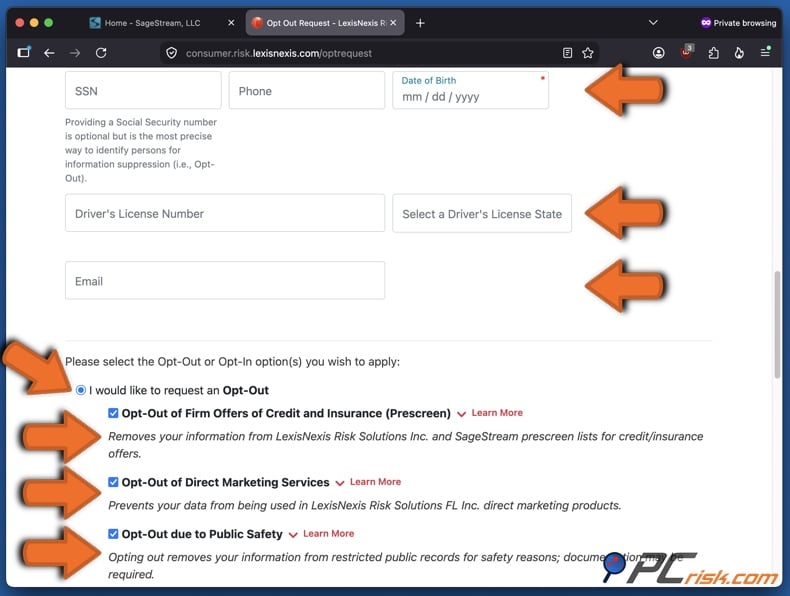
The "Opt-Out due to Public Safety" option is more restrictive and applies only to certain LexisNexis public-record products. Public/Elected officials, law enforcement personnel, and individuals whose physical safety is at risk may request suppression. Supporting documentation is usually required unless a specific law states otherwise. Select the public-safety reason that accurately reflects your situation. Do not choose an inapplicable category for wider removal. Public officials and law enforcement or judicial personnel may need to identify their agency or court and provide supporting evidence.
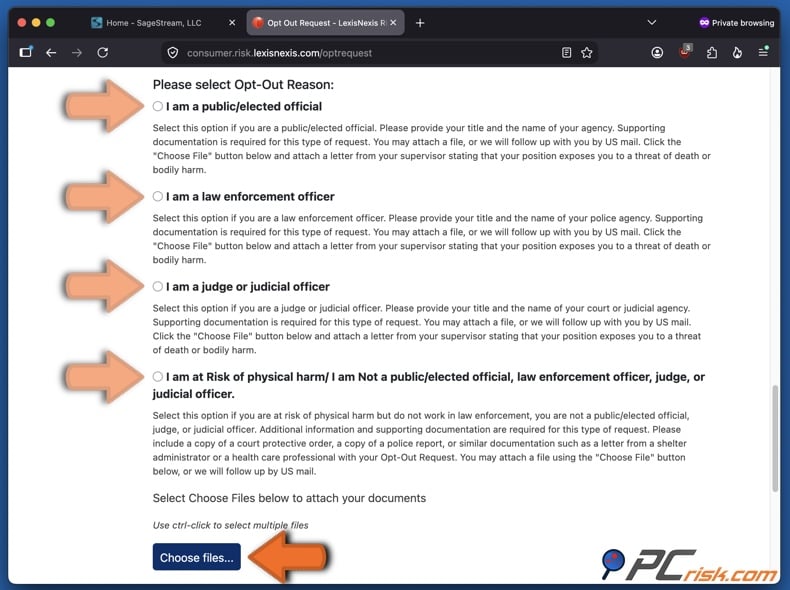
Private individuals at risk of physical harm may need documentation, such as a court order, police report, or a letter from a shelter administrator or healthcare professional.
If supporting files are required, upload them through the form. The portal accepts common document and image formats, with limits on file count and size. Alternatively, you can mail the required documents. Do not mail originals, as submitted documents are not returned.
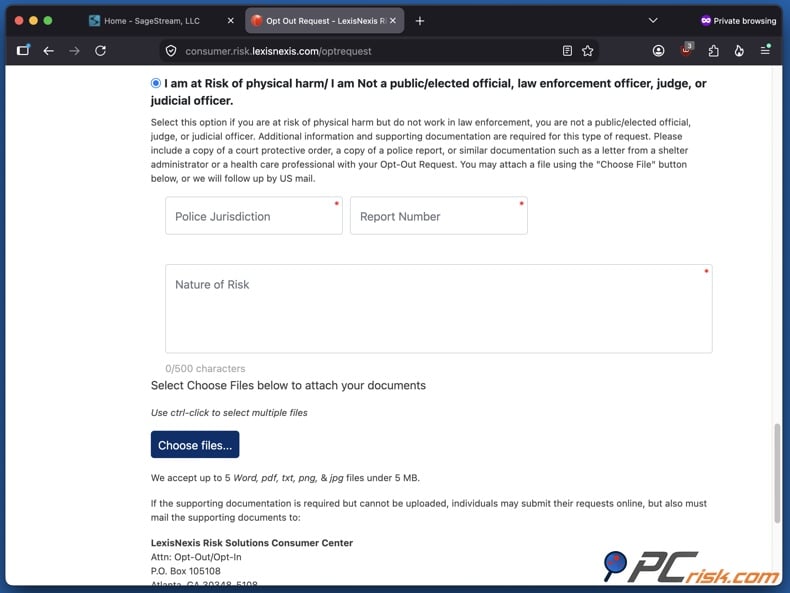
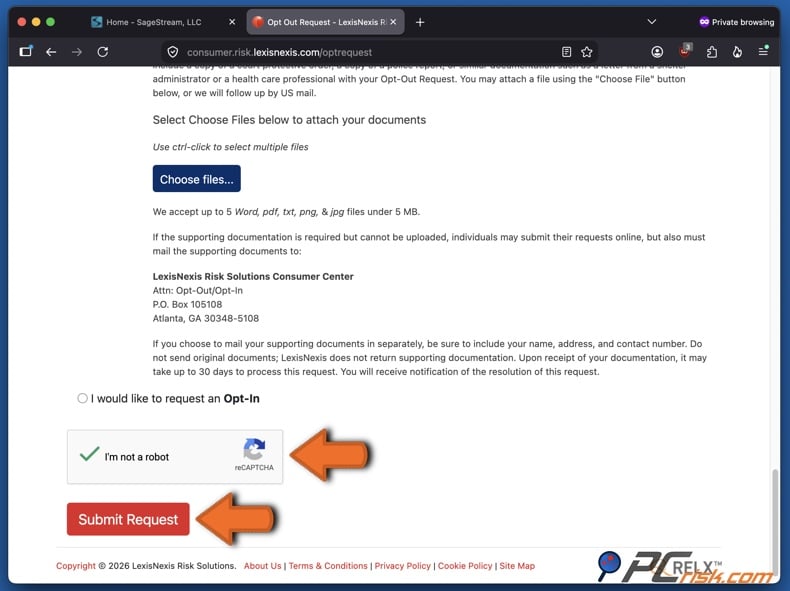
5. Complete the CAPTCHA, review your selections, and click "Submit Request".
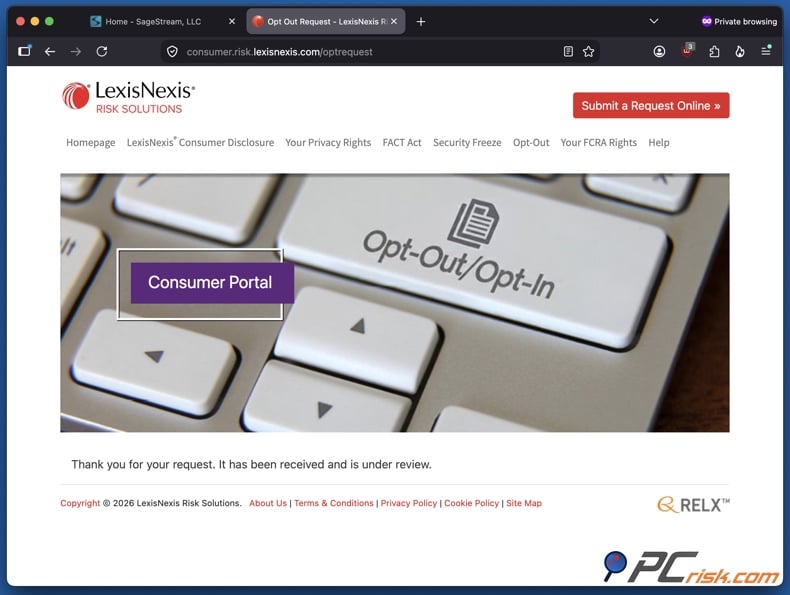
The website will display a confirmation that your request was received and is under review. Save proof of submission, especially if your request includes supporting records or a safety-related suppression.
6. Verify your email and retain the confirmation. If you provided an email address and received a LexisNexis Risk Solutions Consumer Disclosure confirmation, open the message and follow the confirmation link. This links your email address to your consumer request.
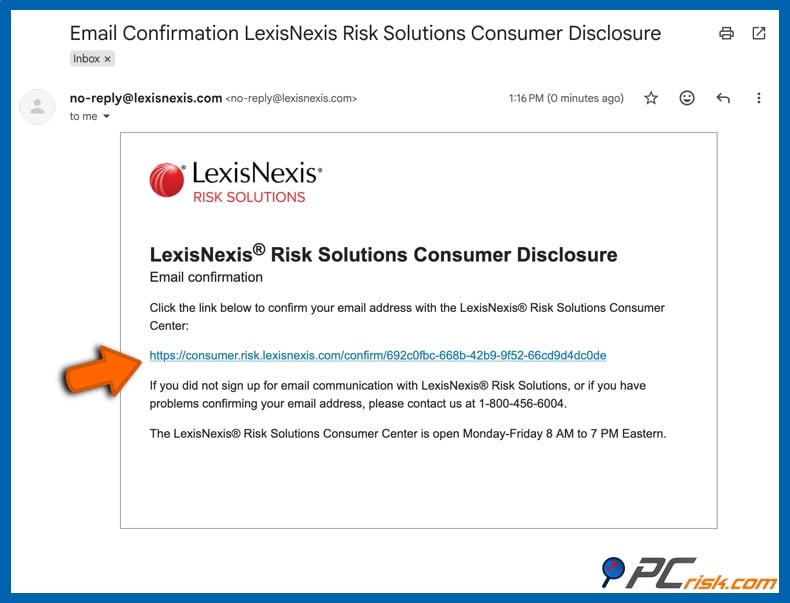
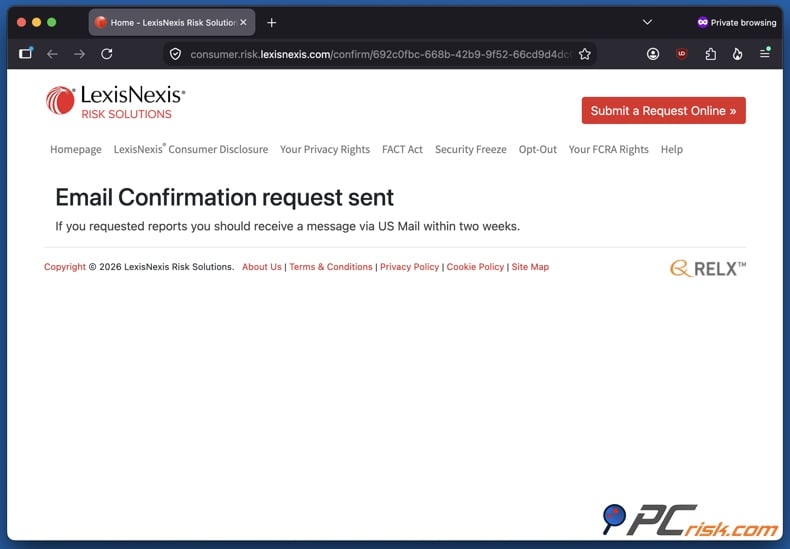
After confirmation, the portal may display "Email Confirmation request sent". If reports were requested, correspondence may be sent by US Mail within two weeks. Processing times vary by request type. Public-safety suppression requests requiring documentation can take up to 30 days after the Consumer Center receives the documents.
It must be reiterated that a successful opt-out does not delete the original records used to create consumer information. LexisNexis states that suppression applies only to its own databases and does not prevent other companies or public-record agencies from collecting or distributing the same information.
This distinction also applies to Google Search. Opting out of SageStream does not prompt Google to remove search results about you. SageStream consumer-reporting information is not the same as a public people-search profile, so there may be no SageStream page about you indexed by Google. If there is a Google search result displaying your personal information, the "Results about you" system can help you find and request removal of qualifying results. If the source page has removed your information but Google still shows an outdated version, use the "Refresh outdated content" process to request an index update. However, removing a Google result does not delete the source page - hence, prioritize source removal.
Common issues with manual removal and alternative opt-out routes
SageStream's privacy process is more complex than standard people-search websites because it uses several distinct tools for different data types. Prescreen opt-out, public-record suppression, state privacy requests, disputes, consumer-report freezes, and identity-theft blocks each serve unique purposes and are not interchangeable.
The following are some key considerations and issues:
The opt-out does not delete your entire SageStream consumer file: the FCRA prescreen option only removes your information from lists used for firm offers of credit and insurance; it does not erase the underlying consumer-reporting data. If you want to restrict report access, consider a security freeze.
You do not qualify for public-safety suppression: this suppression type has eligibility and documentation criteria. A general desire for greater privacy does not necessarily qualify someone for this type of suppression. You can still use prescreen, direct-marketing, state privacy, report-access, dispute, and security-freeze options as appropriate.
The Consumer Center cannot verify your identity: requests can fail when the supplied information cannot be connected to a record. Check spelling, current address information, birthdate, and other identifiers carefully. The current form notes that an SSN is optional for opt-out purposes but can improve identity matching.
Supporting documentation is missing: safety-related requests may remain pending until the documentation is received. When submitting documents separately, include sufficient identifying and contact information so the Consumer Center can match them to your original request. Do not send original documents, as they will not be returned.
Your concern is inaccurate information rather than privacy: request your SageStream consumer report and dispute any errors. SageStream will reinvestigate disputes at no cost and will modify or delete inaccurate or unverifiable information. Results are typically provided within 30 days, though investigations may take longer if supplementary information is needed.
The information still appears elsewhere: opting out of SageStream does not remove your data from independent brokers, government records, court databases, other consumer reporting agencies, or websites that obtained your information elsewhere. You must address data removal with each relevant source.
There are several alternative routes if the online process is unsuitable. SageStream directs consumers to the LexisNexis Risk Solutions Consumer Center, which allows you to submit a printable request by mail or seek telephone assistance.
A security freeze is effective if you want to prevent unauthorized release of your SageStream consumer report rather than limit marketing. LexisNexis offers online, mail, and telephone freeze procedures, which apply to both LexisNexis and SageStream reports. Keep in mind that separate freezes are required for other consumer reporting agencies.
Consumers in states with extensive privacy laws may have additional rights regarding the sale, sharing, deletion, correction, or access to personal information. However, exemptions for information regulated by laws, such as the FCRA, mean that a state privacy deletion request does not guarantee complete erasure of a consumer-reporting file.
How to automatically remove your information from SageStream?
Manually managing SageStream may be practical if it is your sole concern. However, personal information is often spread across many unrelated data brokers, marketing databases, and people-search websites. Removing each listing individually involves locating the correct privacy page, matching your record, verifying requests, tracking deadlines, and regularly checking for reappearance of your information.
For large-scale data-broker cleanup, we recommend Incogni - our top 2026 choice for personal data removal services. In our testing, Incogni provided extensive automated removal coverage, easy setup, recurring removals, and Custom Removals for sites outside its standard list. The standard service covers over 420 brokers, including SageStream, while higher-tier plans include Custom Removals for thousands more.
SageStream requires additional consideration. As part of LexisNexis Risk Solutions and a regulated consumer reporting agency, SageStream is subject to FCRA obligations, public-record exemptions, and identity-verification requirements. Third-party removal services cannot override these restrictions. Incogni is able to manage eligible SageStream removal requests and address other brokers holding related information. For LexisNexis-type cases not covered by Incogni's standard list, a plan with Custom Removals is recommended.
Opt out of SageStream with Incogni
How to use Incogni for SageStream and wider automated data removal:
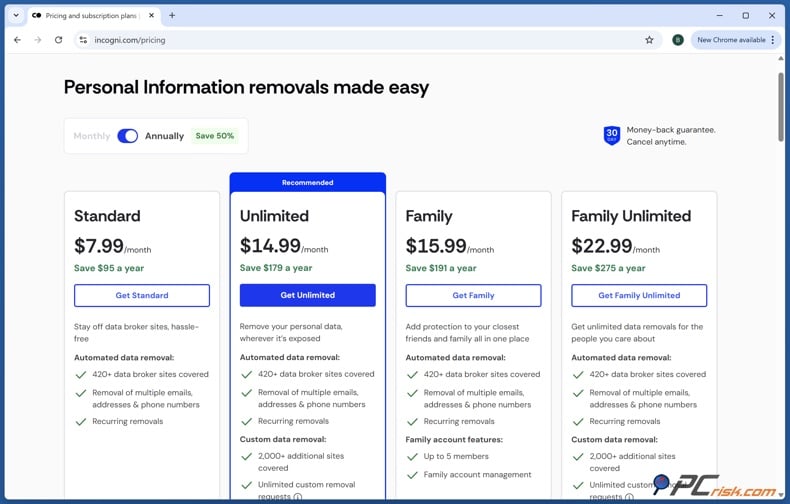
1. Create an Incogni account and choose an appropriate plan. Incogni offers Standard, Unlimited, Family, and Family Unlimited plans. Higher-tiered plans include Custom Removals that allow customers to request data removal, suppression, or opt-out from services and websites not included in Incogni's extensive list. SageStream is included, but certain LexisNexis requests require Custom Removals.
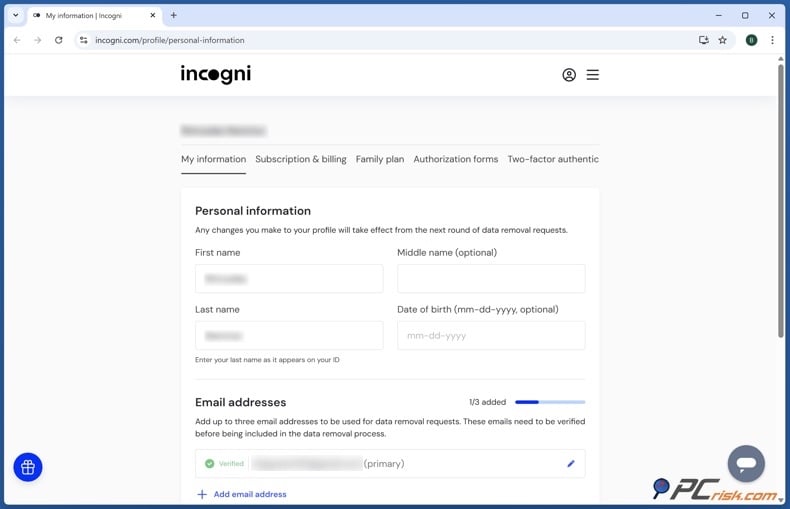
2. Enter the personal information Incogni needs for matching. Provide accurate identifying details, including your name, addresses, email addresses, and phone numbers. This information helps automated removal services match your records and submit valid privacy requests.
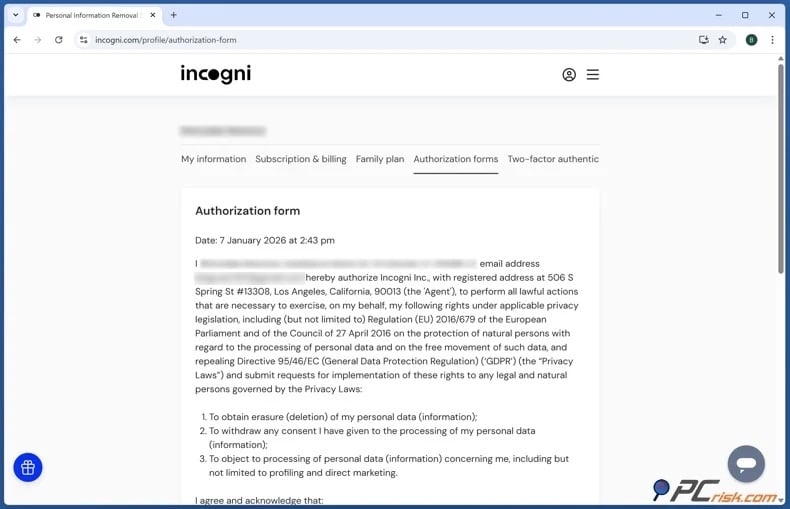
3. Sign the authorization form. Read and sign Incogni's authorization document to allow the service to contact data brokers and submit privacy requests for you. Verify your personal information before authorizing, as incorrect details may affect matching accuracy.
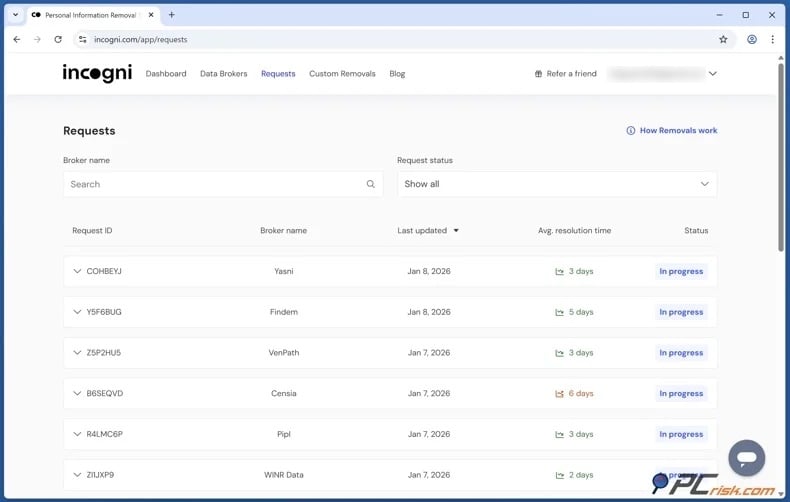
4. Review removal requests. After your account is set up, Incogni will send requests to supported brokers. The Removal Requests section displays which companies are being contacted and the status of each request. Processing times can vary for each.
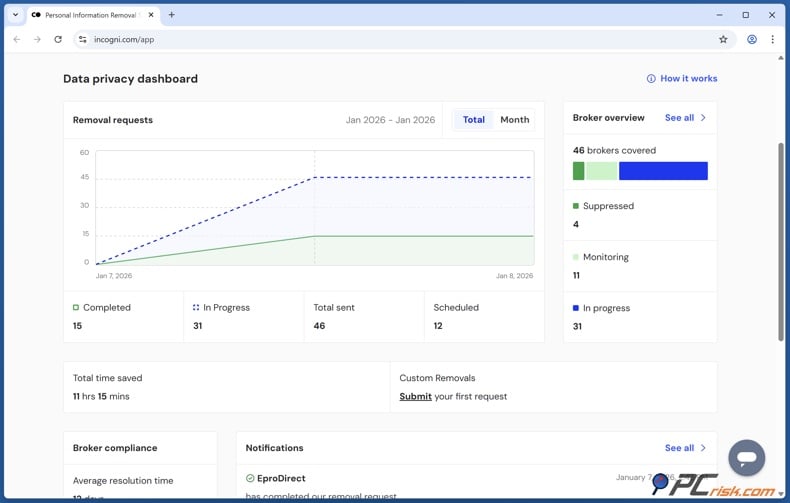
5. Monitor the Data Privacy Dashboard. Use Incogni's dashboard to track the number and status of your requests. Automated services provide ongoing monitoring, but data may reappear as broker records are updated. Treat each cleanup as temporary.
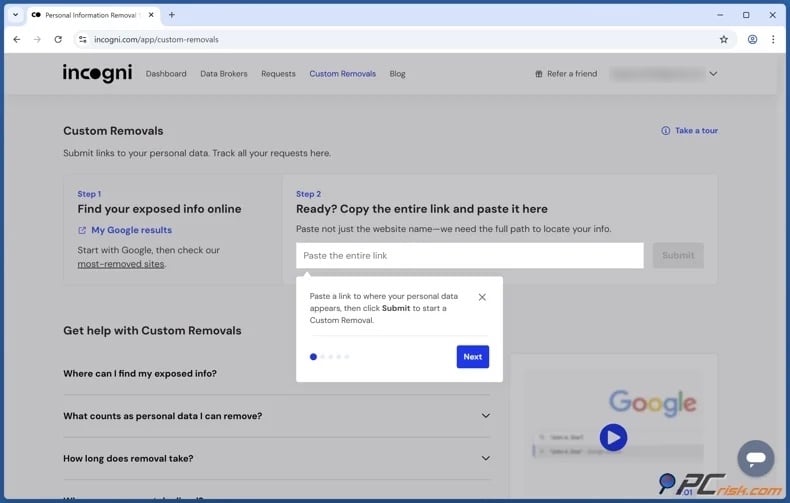
For unsupported services and sites, use Incogni's Custom Removals. While SageStream is included, certain requests might not be. Furthermore, SageStream is part of LexisNexis, which is not part of Incogni's standard list. When using Custom Removals for SageStream or LexisNexis, results depend on the policies of these companies.
It must be mentioned that Incogni cannot remove data that must legally remain in consumer-reporting products or erase government records. The main advantage of a personal data removal service is scale - while handling your SageStream request, Incogni can also reduce your exposure with many other data brokers.
Why should you remove your information from SageStream?
The primary reason to manage your SageStream data is to maintain control. Limiting unnecessary copies and distribution channels makes your personal information harder to misuse. Opting out of prescreen lists limits certain commercial uses, while a security freeze offers stronger protection by restricting access to your SageStream report when you are not seeking new credit or services.
Privacy risks increase when information from multiple sources is combined. An attacker may know your name, obtain an old address from one source, relatives from another, and employment or financial details from elsewhere. These fragments make fraudulent calls and phishing scams more convincing. Vulnerable brokered information can aid scammers, cyber criminals, and stalkers. For victims of stalking, domestic abuse, harassment, or targeted threats, the consequences are more severe. LexisNexis offers a public-safety suppression procedure for qualifying consumers, including officials and private individuals at documented risk of physical harm.
Accuracy is another reason to monitor your SageStream data, even if marketing is not a concern. Consumer reports affect business decisions, so incorrect information should be disputed. SageStream offers a formal dispute process and states that inaccurate or unverifiable information will be corrected or removed.
Remember that reducing SageStream exposure is just one part of your privacy strategy. Your personal details may also appear in public-record aggregators and people-search services. Removing multiple easily accessible copies increases the effort needed to compile a comprehensive profile about you.
How to prevent data brokers from collecting more of your data?
Completely preventing data-broker collection is not feasible. Information may come from public records, commercial transactions, websites, proprietary databases, and other third-parties. However, you can seriously reduce unnecessary exposure and make future aggregation more difficult. LexisNexis identifies public records, publicly available data, proprietary information, and third-party data as sources for its information products, which include SageStream.
The following are some actions you can take to limit your data exposure:
Reduce what you publish publicly - review your social media accounts and remove unnecessary visibility of your home address, phone number, full birthdate, relatives, workplace, and personal email addresses. Check both old posts and current profile settings, as information published years ago can still be valuable for profiling.
Separate high-trust and low-trust contact information - use a secondary email address for shopping, newsletters, competitions, loyalty programs, and services that do not require your primary address. When possible, keep public business contact information separate from personal details to reduce cross-database matching.
Delete accounts you no longer use - old online stores, forums, applications, social networks, newsletters, and subscription services may retain your personal information. Closing unnecessary accounts reduces the number of organizations holding your data.
Review application and browser privacy settings - restrict location, contact, microphone, photo, advertising, and tracking permissions when not needed. Adjust browser privacy settings and use opt-out preference signals to reduce some commercial tracking. Note that these measures cannot remove public records or data already held by consumer reporting agencies.
Opt out of marketing and prescreening where possible - use SageStream and LexisNexis prescreen and direct-marketing controls as needed. Note that the SageStream prescreen request only affects SageStream and LexisNexis lists, not those of other consumer reporting agencies.
Consider placing security freezes - a SageStream or LexisNexis security freeze restricts access to your report and score without your authorization. Freeze the major credit bureaus separately, as the LexisNexis freeze does not cover them.
Check your consumer reports and dispute inaccuracies - privacy management involves more than deletion; incorrect information can be more harmful than accurate records, especially in consumer reporting. SageStream offers both report access and dispute procedures.
Monitor search engines regularly - search for combinations of your full name, address, phone number, and email address. Google's "Results about you" feature can track qualifying contact information and accept removal requests. If information is gone from the source but still appears in Google, request an update using the "Refresh Outdated Content" tool. Keep in mind that Google removal only affects Search, not the original websites.
Use state privacy and data-removal services where available - some states offer tools that assist with sending requests to data brokers or provide residents with additional rights over personal information. For example, California residents can use the Delete Request and Opt-out Platform (DROP) to submit a single deletion request to registered data brokers. Since August 1, 2026, participating brokers must retrieve and process DROP requests regularly, subject to legal exemptions. These tools may not cover all consumer reporting data or records that companies are legally required to retain.
Consider using an automated personal data removal service - paid services, like Incogni, can search supported data brokers for your information, submit opt-out requests, track responses, and repeat removals if records reappear. Before subscribing, compare broker coverage, rescan frequency, custom removal options, reporting features, verification requirements, and cancellation terms. Automated services can greatly reduce your workload, but they cannot guarantee permanent deletion or remove information that must remain available under applicable law.
Check our top personal data removal services
To summarize, data broker privacy calls for continual effort, as information can reappear when databases are updated, addresses change, new public records are created, or new brokers obtain data. Automated personal data removal services can help by sending and tracking removal requests, but no service can guarantee complete removal from the Internet.
In closing
SageStream is an FCRA-regulated consumer reporting agency, now part of LexisNexis Risk Solutions. Its reports and scores help businesses assess creditworthiness and related risks. As a result, opting out is more complex than simply deleting a public profile.
The primary SageStream opt-out removes your information from prescreen lists used for credit and insurance offers. Other options, such as direct-marketing opt-outs, public-safety suppression, consumer-report disputes, state privacy rights, and security freezes, address separate concerns and should be used as needed.
Check our top personal data removal services
To improve your overall privacy, address your larger digital footprint. Remove personal information from people-search websites, review your online accounts, limit unnecessary public details, and regularly monitor search results. A data removal service like Incogni can automate much of this process, but SageStream-specific requests must follow LexisNexis procedures and relevant consumer-reporting laws.
Frequently Asked Questions (FAQ)
Is SageStream legal?
Yes, SageStream is a legitimate consumer reporting agency regulated under the Fair Credit Reporting Act (FCRA). It is now part of LexisNexis Risk Solutions.
Is it dangerous to have my data on SageStream?
Having information in a legitimate consumer reporting database does not automatically put you at risk. However, the collection and distribution of personal data can create privacy and security concerns. If unauthorized parties access brokered information from multiple sources, it may facilitate scams, impersonation, stalking, social engineering, or other misuse. SageStream data can affect important consumer decisions, so accuracy is essential.
How do I remove my data from SageStream?
There is no single method that guarantees the deletion of all SageStream records. Most consumers can opt out of firm credit and insurance prescreen lists through the LexisNexis Risk Solutions Consumer Portal. Depending on your circumstances, you may also qualify for direct marketing opt-out, state privacy rights, public safety suppression, or a security freeze.
How long does it take SageStream to remove my data?
The timeframe depends on your request. Public safety requests that require documentation may take up to 30 days after documentation is received. Other requests may follow different processing or legal timelines. Some report-related correspondence may arrive by US Mail within two weeks. Do not assume every SageStream opt-out will be completed within a set number of days.
Does removing myself from SageStream remove the original public record?
No, opting out or suppressing data at SageStream or LexisNexis does not remove records held by courts, government agencies, other consumer reporting agencies, or third-parties.
Will opting out of SageStream remove me from Google search?
No, SageStream and Google Search are separate services. SageStream is not a public people-search directory, so your consumer report is not publicly indexed by Google. If your personal information appears on other websites in Google results, remove the source page first if possible. Use Google's "Results about you" feature to request removal of qualifying personal information from Search. Use "Refresh Outdated Content" if the source has already changed or been removed.
How is using Incogni different from manually removing my data from SageStream?
Manual removal requires identifying the correct SageStream or LexisNexis privacy process, submitting your information, choosing the appropriate opt-out, providing appropriate documentation, and monitoring the outcome yourself. This approach deals with SageStream specifically and does not affect unrelated data brokers. Incogni automates removal requests with over 420 supported brokers and offers ongoing monitoring. For SageStream or LexisNexis cases not covered by automation, Custom Removals, which is part of Incogni's higher-tiered plans, is more relevant. However, Incogni cannot override legal retention requirements or guarantee complete deletion.
Will my data come back to SageStream after I opt out?
It depends. A permanent prescreen opt-out is designed to keep relevant information off SageStream and LexisNexis prescreen lists unless you opt back in. However, this does not delete your underlying SageStream consumer report or prevent your information from appearing in products not affected by the opt-out. Similarly, information removed from other data brokers may reappear when databases are updated or new data is collected. Routinely review your SageStream consumer report, look for public exposures elsewhere, and repeat broader data-removal checks as needed.
Share:
 Facebook
 X.com
X.com
 LinkedIn
 Copy Link

Karolis Liucveikis
Experienced software engineer, passionate about behavioral analysis of malicious apps
Author and general operator of PCrisk's News and Removal Guides section. Co-researcher working alongside Tomas to discover the latest threats and global trends in the cyber security world. Karolis has experience of over 8 years working in this branch. He attended Kaunas University of Technology and graduated with a degree in Software Development in 2017. Extremely passionate about technical aspects and behavior of various malicious applications.
▼ Show Discussion