
We may earn commissions from products we recommend. Learn more.
How to opt out of CheckPeople | Easy guide

How to opt out of CheckPeople
People-search websites gather information that used to be spread out across public records, directories, and databases, making it much easier to find. CheckPeople is one of these services. When you search for someone, you might see their current and past addresses, phone numbers, email addresses, relatives, and other details. CheckPeople says it offers background checks and reverse phone lookups, but independent tests show it primarily operates as a people-search site that compiles information into searchable profiles.
If you do not want your information collected in one place, CheckPeople lets you opt out for free. Sending a removal request takes only a few minutes, but processing may take several business days. However, removal is not always permanent. CheckPeople can update its databases from public records and other sources, so your profile might show up again later.
This guide will show you how to remove your information from CheckPeople by hand, how to handle common issues, and how to use Incogni (our top-rated personal data removal service at PCrisk) to automate the process across many data brokers.
Opt out of CheckPeople with Incogni
Table of Contents:
- Introduction
- What is CheckPeople and why you should remove your personal information
- Opt out of CheckPeople automatically
- Opt out of CheckPeople manually
- Common issues with removing information from CheckPeople manually
- Alternative ways to opt out of CheckPeople
- Final recommendations
- Frequently asked questions (FAQs)
What is CheckPeople and why you should remove your personal information
CheckPeople is a people-search site where you can look up information linked to a person or phone number. According to the company, its reports may include address history, phone numbers, email addresses, and more. These services usually build profiles by combining details from public records and other sources.
This collection matters because a single address or phone number in one database might not reveal much on its own. But when these details are compiled into a single profile, it becomes much easier to find information about someone.
CheckPeople's removal guides explain that your information can come from sources such as court filings, property records, voter lists, marriage and divorce records, and commercial databases. Opting out of CheckPeople does not delete these original records. It only removes or hides your CheckPeople listing, which collects and shows this information.
We recommend limiting this exposure for several practical reasons.
First, sharing your contact and location details online makes it easier for strangers to link your name to other personal information. Security.org lists privacy risks, stalking, unwanted calls and messages, and identity theft as reasons to remove your information from people-search sites. While removing a listing does not fully protect you from these risks, it does take away one easy place for someone to find your details.
Second, people-search profiles often have information that is outdated, incomplete, or wrong. Even if the data is public, combining different records under a single name can lead to confusion or errors. This is another reason we suggest limiting how much of your information is publicly searchable.
Third, CheckPeople is just one part of a larger network of data brokers. Removing your record from CheckPeople does not delete the same information from other sites, nor does it erase public records at their source. PCrisk's research shows that no data-removal service can completely erase your online presence, since government records, social media, news articles, and other websites are beyond their reach.
This is why opting out should be seen as an ongoing privacy step, not just a one-time fix. CheckPeople can rebuild your profile when it updates its sources, and other data brokers may have similar information. Incogni's June 2026 guide warns that removed listings can come back after a few weeks or months, so it's a good idea to check regularly. Security.org also suggests checking the site again after removal to make sure your profile has not returned.
Opt out of CheckPeople automatically
Removing a single CheckPeople listing by hand is doable. But if your information is on many people search sites, the process can take a long time. For broader coverage, we suggest using Incogni, which automates the process.
Check our top personal data removal services
At PCrisk, we give Incogni a 4.5 out of 5 and rank it as our top personal data removal service for 2026. In our review, Incogni automated removal requests for over 420 data brokers and people-search sites. The Unlimited plan also lets you request removals from sites not already covered.
We tested Incogni by providing it with a staff member’s details, such as name, addresses, emails, phone numbers, and birth date. Incogni identified many data holders and automatically sent removal requests. Some removals occurred in the first week, but a few took longer or required additional verification.
Incogni’s website has a specific guide for opting out of CheckPeople and lists it as one of the services they help remove information from.
Here’s how we suggest using the automated method.
1. Create an Incogni account. Pick the Incogni subscription that fits your needs and sign up. Incogni is a paid service and doesn’t offer a free plan. Every plan includes automated removals from data brokers, and the Unlimited plan lets you request removals from sites not on the usual list.
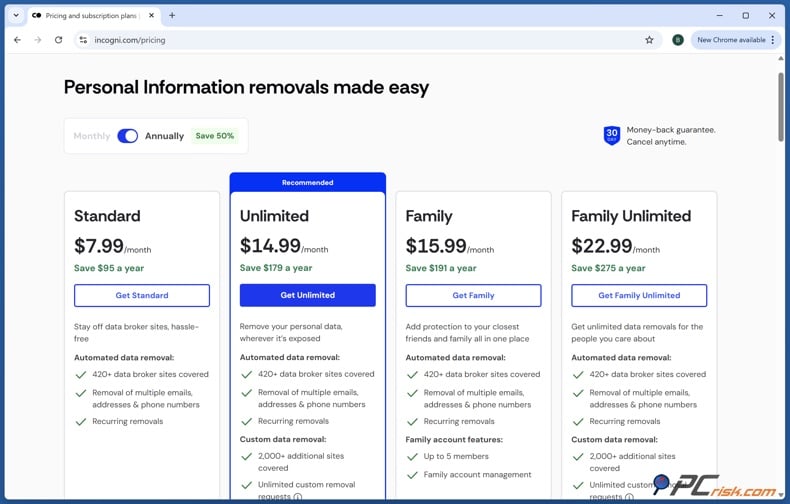
Since prices and promotions can change, check the current cost when you sign up instead of relying on old prices.
2. Complete your personal profile. Give Incogni the details it needs to tell your records apart from others. This usually means your full name, any other names you’ve used, current and past addresses, phone numbers, email addresses, and your date of birth.
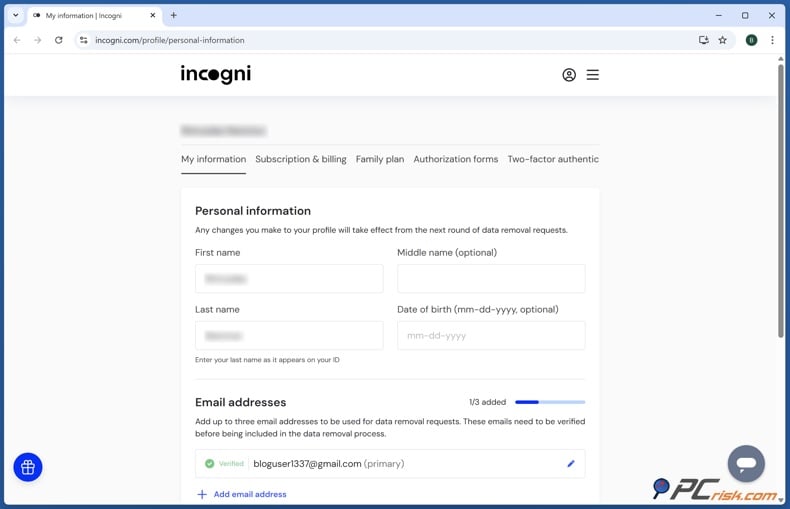
It might feel odd to share personal details when you want more privacy, but the service needs this information to locate and remove your records.
3. Authorize Incogni to act for you. Fill out Incogni’s online authorization form. This lets them send privacy and removal requests on your behalf. Incogni says this step allows them to act as your representative with data brokers.
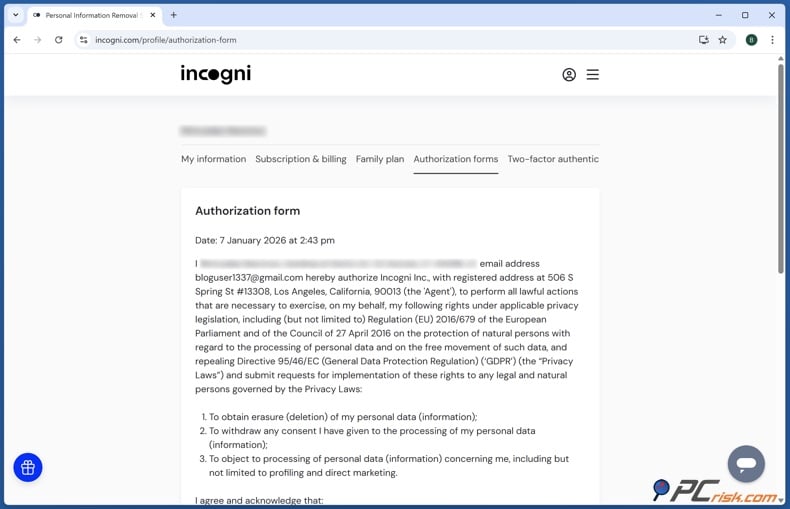
4. Let Incogni submit requests. Once you’re set up, Incogni handles most of the work automatically. It sends requests to data brokers and people-search sites and tracks their responses. The Standard plan covers over 420 sources.
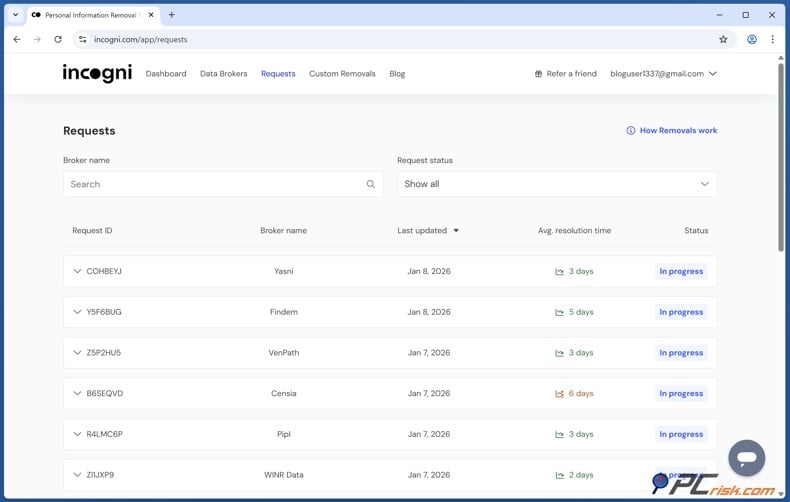
5. Monitor the dashboard. You can check the Incogni dashboard to see which requests have started and which are finished. In our test, the dashboard showed which records were in progress or completed, so we could track removals without having to reach out to each company ourselves.
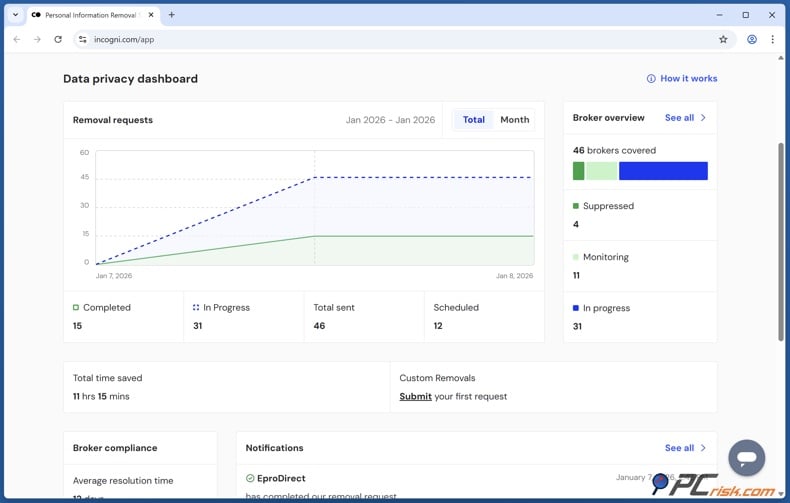
6. Use custom removal if necessary. If a CheckPeople page is still showing and Incogni’s standard process isn’t handling it, users with Custom Removals can give the site or page details for extra help. PCrisk found this feature to be a big plus for the Unlimited plan.
7. Keep monitoring after the initial cleanup. One big advantage of automation is that Incogni keeps watching for your information. Data brokers can get your details again after they’ve been removed, but Incogni keeps monitoring and can send new requests if your info comes back.
Keep in mind that Incogni can’t remove public records, social media posts, news articles, or everything online. Its goal is to limit your exposure on data broker and people-search sites, not to change original public records.
Opt out of CheckPeople manually
You can opt out of CheckPeople for free. There’s no need to buy a report or give any payment details to remove your information. The latest instructions consist of an email-based process using CheckPeople’s opt-out page.
Opt out of CheckPeople with Incogni
Keep in mind that CheckPeople’s privacy page can look a bit different depending on when you visit. So, the steps or wording you see on the site might be a little different from what’s described below.
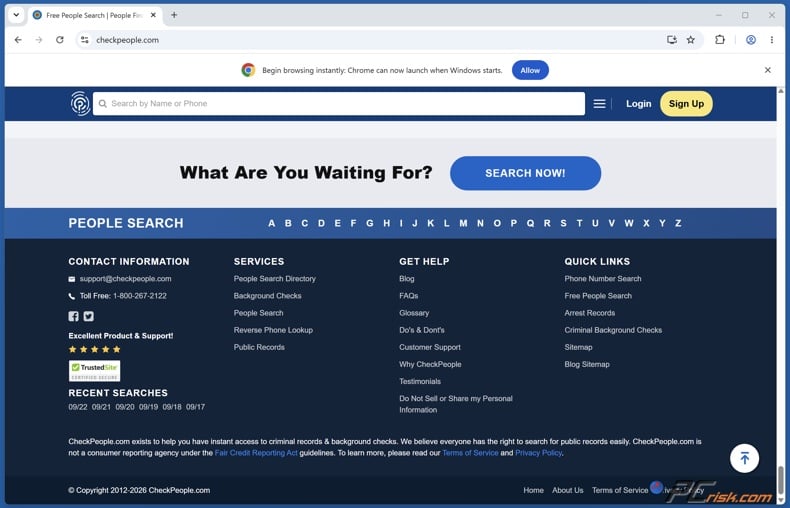
1. Open CheckPeople's privacy opt-out page. Go to the CheckPeople website and scroll down to find the link labeled “Do Not Sell or Share my Personal Information.”
Don’t buy a report or use the regular search to start this process. The privacy opt-out is separate from paid searches and doesn’t need a credit card.
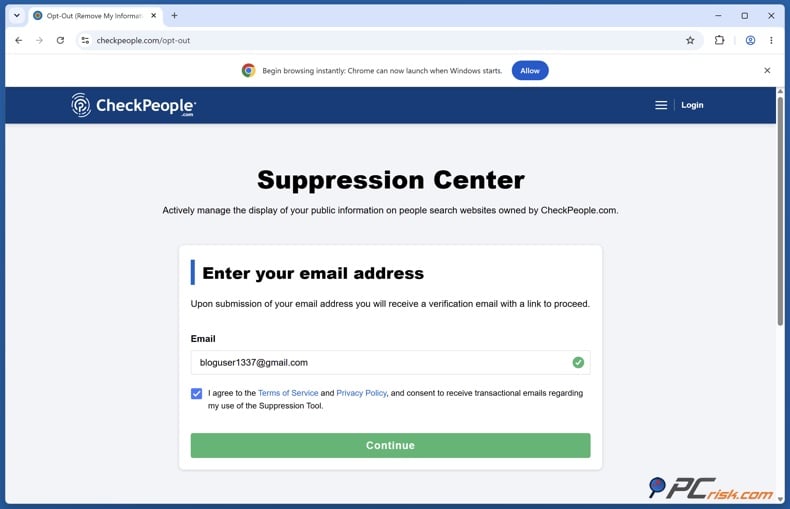
2. Enter your email address. In the current opt-out process, enter your email, agree to the terms, and submit the form. CheckPeople will send you a verification link by email.
If you see a different privacy page, you might need to search for your record by name and location before entering your email. Complete the CAPTCHA if asked.
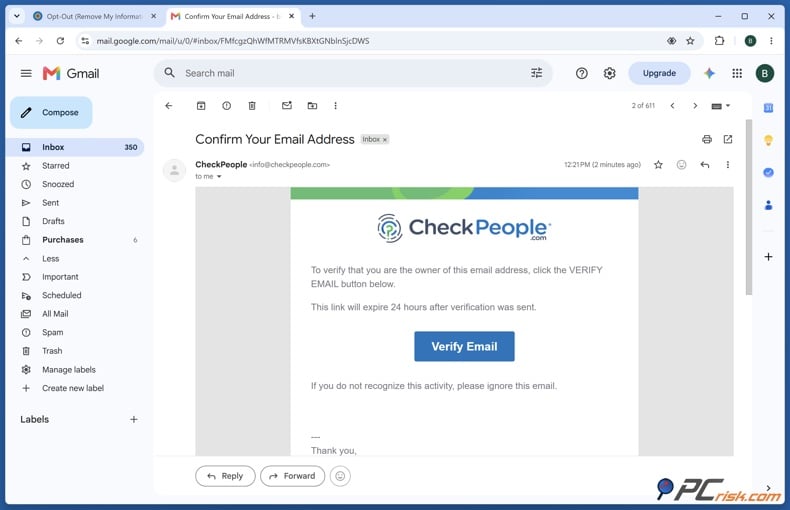
3. Verify your email address. Open the email from CheckPeople and click the verification link. This will take you to the next step in the removal process.
Don’t skip this step. Just entering your email isn’t enough to finish the opt-out. If you don’t see the email, check your spam or junk folder before trying again.
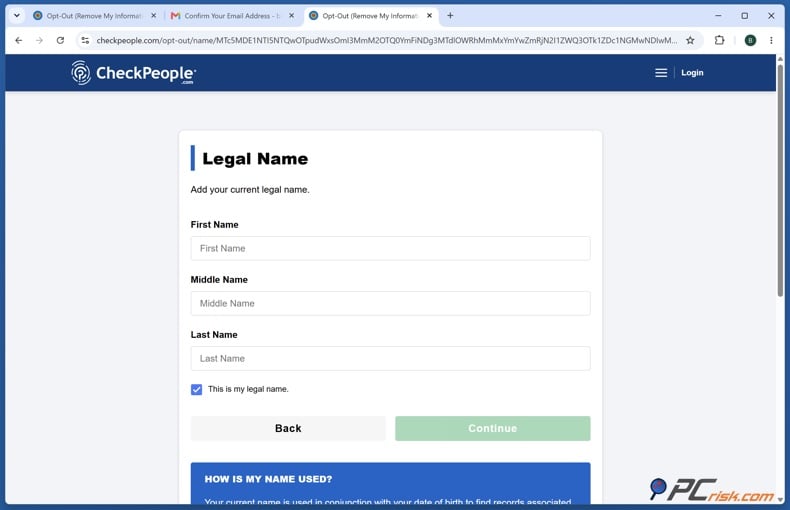
4. Search for your personal information. The current opt-out process asks for your date of birth, then your first and last name. CheckPeople will then search its database for matches.
Check each result carefully. Look at current and past cities, addresses, name variations, aliases, and any other details that help you spot your own record.
Don’t assume a profile isn’t yours just because one detail is wrong. These databases can have old or mixed-up information, so check several details when comparing records.
5. Select every listing that belongs to you. Pick the record you want to remove. If there’s more than one listing that’s yours, submit a removal request for each one.
Check for duplicate profiles. One might use an old address or name, while another has your current details.
6. Complete the CAPTCHA and submit the request. Finish the CAPTCHA or any other verification, then submit your removal request. CheckPeople will show a confirmation on the screen.
Be sure to save that confirmation. Take a screenshot or write down the date, the name you used, your email, and the listing you asked to remove.
This information will help if your profile stays online, comes back later, or you need to contact CheckPeople support.
7. Complete any final email confirmation. CheckPeople might send another confirmation or ask you to click a verification link before finishing the removal. Clicking the link in the email may be needed to complete the request.
So after you submit the form, check your inbox and spam folder again, and follow any last steps CheckPeople asks for.
8. Wait for processing. The latest instructions say it usually takes 5 to 7 business days for your listing to be removed after confirmation. Filling out the form usually takes just 5 to 15 minutes.
9. Search CheckPeople again after one week. After the waiting period, go back to CheckPeople and search for your information again.
Check your current name and location, but also look for old cities, states, aliases, maiden names, or other name versions. There might be another listing separate from the one you removed.
10. Distinguish a live CheckPeople page from an old search-engine result. Even after CheckPeople removes your record, search engines might still show old results for a while because their indexes haven’t updated yet. The key is whether your profile is still on CheckPeople itself.
If you still see a search result but your record is gone from CheckPeople’s site, your opt-out probably worked.
11. Recheck periodically. Don’t assume your removal is permanent. CheckPeople can get new public records and create a new listing later. If your information reappears, just submit another removal request.
Common issues with removing information from CheckPeople manually
The process is pretty simple, but there are a few common issues you should be ready for.
You reach a paid report or subscription screen
This usually happens if you started with CheckPeople’s regular search instead of the privacy opt-out.
Don’t enter payment info just to remove your record. Go back to the bottom of the page and click “Do Not Sell or Share my Personal Information,” or use the /opt-out link. The manual request is free.
Check our top personal data removal services
The verification email never arrives
Check your spam, junk, promotions, and filtered folders. We suggest waiting about 10 minutes, and if you still don’t get the email, try again with a different email provider.
Make sure you typed your email address correctly. Keep access to that email account until you receive confirmation that your information has been removed.
CheckPeople says it cannot find your record
Try searching with different versions of your name - like adding or removing a middle initial, using a previous surname, maiden name, or nickname. Also search old cities and states, since older profiles might be linked to past addresses.
If you can, find your live record before starting the opt-out, and save enough details to refer to later if needed.
There are several profiles for the same person
Treat every listing you see as a separate profile. Check the details closely and send a removal request for each one that’s yours.
Your goal isn’t just to remove the first result you see. Make sure no other CheckPeople record still shows your information under a different address, spelling, or location.
The profile is still visible after a few days
Don’t assume your request failed right away. CheckPeople says it takes 5 to 7 business days to remove a record. Wait a full week before taking further action.
If your profile is still online after that, send CheckPeople your original confirmation and details about the profile.
Google still displays the result
Check whether your record is still on the CheckPeople site. Search engines might keep showing old results even after your listing is gone, so a Google result doesn’t always mean CheckPeople ignored your request.
Your information comes back later
This is a key limitation of manual opt-outs. CheckPeople can update its data from public records and create a new profile. If your info comes back, it doesn’t mean your first request failed.
Submit another opt-out request and keep your original confirmation. If your info keeps coming back, you might want to try automated monitoring with Incogni.
Alternative ways to opt out of CheckPeople
Start with the online privacy form because it offers a straightforward way to opt out. If the form does not work, your record keeps showing up, or you have trouble finding a profile, you can also reach out by email or phone.
CheckPeople lists support@checkpeople.com and 1-800-267-2122 as contact options. The Better Business Bureau also shows the same phone number. For privacy questions, you can use privacy@checkpeople.com.
Opt out of CheckPeople with Incogni
If you choose to email, keep your message simple:
Subject: Privacy opt-out and record removal request for [Full Name]
"Hello,
Please remove or suppress the CheckPeople records associated with my personal information.
Name: [Full name]
Date of birth or approximate age: [Information needed to identify the record]
Current or previous city and state: [Location]
Profile or record details: [Include if available]
Please confirm in writing when the associated records have been removed from public search results.
Thank you."
Only share the information needed to identify your profile. You usually do not need to send any payment card details when making a privacy opt-out request.
If you call 1-800-267-2122, make it clear you want to remove a public CheckPeople listing, not just cancel a paid account. These are different actions. Canceling a subscription does not automatically remove your public profile.
Write down the date you called, what information you gave, any case or confirmation number, and when the representative says your request should be finished.
Final recommendations
Removing one CheckPeople listing by hand is free and usually quick. It takes about 5 minutes to submit the request, and the removal process typically takes 5 to 7 business days.
There are limits to this process. Removing your profile from CheckPeople does not erase the public records it used, remove copies held by other data brokers, or guarantee that CheckPeople will not get your information again in the future.
That is why PCrisk suggests checking that your profile is gone about a week after your request, and then checking again from time to time. Save your confirmation in case the record comes back.
If your information appears on many people-search sites, using an automated data removal service is much easier than filling out forms for each one. Of the services we have tested, Incogni is our top choice for 2026. It covers over 420 sources and offers custom removal options on certain plans.
However, no removal service can make you disappear from the Internet completely. The real goal is to reduce your exposure. Removing people-search profiles, checking whether they return, and avoiding the sharing of personal information elsewhere is a more practical long-term privacy plan.
Check our top personal data removal services
Frequently asked questions (FAQs)
Is CheckPeople legal?
Operating a people-search service that gathers information from public and legal sources is generally permitted in the United States. Still, just because information is public does not mean you can use it for anything you want. Privacy laws, consumer protection rules, and other federal and state requirements may apply depending on the type of information, where you are, and how you use it. CheckPeople mainly uses publicly available information.
It is important to know the difference between a general people-search site and a background report used for official decisions. For example, the Federal Trade Commission says that employers who use consumer reports for hiring must follow the Fair Credit Reporting Act, which includes rules about disclosure and getting permission.
So, opting out of CheckPeople is mainly a way to protect your privacy. It does not change court, credit, employment, tenant-screening, or other official records.
How long does it take to complete the CheckPeople opt-out?
Filling out the form is quick. Incogni's June 2026 test found the opt-out took about 5 minutes.
The removal does not happen right away. CheckPeople says it takes about 5 to 7 business days after they verify your request.
Is the CheckPeople opt-out free?
Yes, manual removal using CheckPeople's privacy opt-out is free. You do not need to buy a report, sign up for a paid subscription, or give your credit card just to make a privacy request.
Incogni is a different paid service for people who want automated removal and ongoing monitoring with many data brokers.
Can CheckPeople get my personal information again?
Yes. Even if you opt out, CheckPeople might get your information again later. Their data sources are updated, so a new profile could be created from new or updated records.
We recommend checking every few months. If your profile comes back, repeat the opt-out process or use a service like Incogni for ongoing monitoring.
Can I remove my relatives' information from CheckPeople?
The safest way is for your adult relative to submit their own removal request, especially if CheckPeople requests an email address or identity verification.
If you are helping someone, you can find their profile and explain what to do, but they may need to complete the verification themselves or grant you permission to act on their behalf. This helps prevent anyone from making changes to another adult's information without permission.
CheckPeople has sometimes responded to requests about multiple family records, as shown in some Better Business Bureau cases. However, this does not mean every third-party request will be accepted without extra verification.
Do I need a CheckPeople subscription to opt out?
No, you do not need a CheckPeople subscription to use the privacy opt-out. The removal process is separate from the paid reports and should be done through the opt-out page or the "Do Not Sell or Share my Personal Information" link.
Be careful not to mix up canceling your account with removing your records. Canceling a paid CheckPeople membership only ends your subscription. It does not automatically remove your public people-search profile.
What should I do if CheckPeople has several profiles for me?
Check every matching record and ask to remove any profiles that are yours. Some records might be linked to an old address, a previous last name, a middle initial, a nickname, or a former city.
Keep the confirmation details for every request. This way, you can tell which record was removed if another one still shows up.
Does opting out of CheckPeople remove my information from Google and the rest of the Internet?
No. CheckPeople can only remove its own listing. It cannot delete court records, property records, voter information, government databases, or other original sources. Other people-search sites may also keep their own copies.
A search engine might still show an old CheckPeople result for a while after the page is gone because its index has not updated yet.
The best way to check is to go back to the CheckPeople result and see if the profile is still there.
How often should I check whether my CheckPeople profile has returned?
There is no set time that guarantees your listing will not come back. Incogni suggests checking every few months.
At PCrisk, we think it is worth searching every so often, especially after you move, change your phone number, buy property, change your name, or create new records that could end up in people-search databases. If you do not want to check yourself each time, automated monitoring with Incogni offers a more hands-off way to keep track across many data sources.
Share:
 Facebook
 X.com
X.com
 LinkedIn
 Copy Link

Rimvydas Iliavicius
Researcher, author
Rimvydas is a researcher with over four years of experience in the cybersecurity industry. He attended Kaunas University of Technology and graduated with a Master's degree in Translation and Localization of Technical texts. His interests in computers and technology led him to become a versatile author in the IT industry. At PCrisk, he's responsible for writing in-depth how-to articles for Microsoft Windows.
▼ Show Discussion