
How to remove BambooToken malware from the operating system
TrojanAlso Known As: BambooToken backdoor

Get free scan and check if your device is infected.
Remove it nowTo use full-featured product, you have to purchase a license for Combo Cleaner. Seven days free trial available. Combo Cleaner is owned and operated by RCS LT, the parent company of PCRisk.com.
What kind of malware is BambooToken?
BambooToken is a backdoor-type malware that gives attackers covert, remote access to infected Windows and Linux systems. It was uncovered by Black Lotus Labs, the threat research division at Lumen, and has likely been active since at least February 2023.
The malware is used in targeted attacks, mostly against organizations and servers in Asia and, to a lesser extent, South America. What makes it unusual is the way it talks to its operators - instead of standard web traffic, it relies on MQTT, a messaging protocol normally used by smart devices and other Internet of Things hardware.
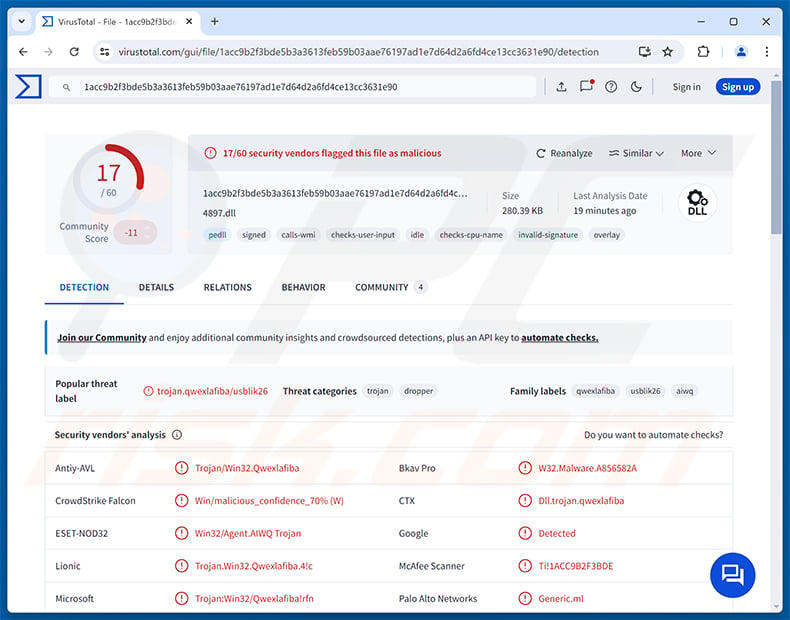
BambooToken overview
On Windows, BambooToken is loaded through a legitimate program called OnKey, made by Tendyron. OnKey works with USB security tokens used to confirm a person's identity, and it is popular in Chinese banking and government networks. The attackers place a malicious file named OnKeyToken_KEB.dll next to the genuine OnKey program, which then loads it without question.
This trick is known as DLL side-loading. Because the program doing the loading is legitimate and properly signed, the infection is harder to spot. Lumen notes that Tendyron's code-signing certificate does not appear to have been compromised - the attackers simply abuse a file that is vulnerable to this technique. One variant also posed as software from Zhuhai Kingsoft Office, a Chinese office suite developer.
Earlier versions of BambooToken (2023) communicated with the attacker's server over ordinary web traffic. Versions from 2024 and 2025 switched to MQTT. With this setup, the infected computer never talks to the attacker's real server directly - messages pass through a middleman "broker", which hides the rest of the attacker's infrastructure and makes the traffic harder to trace.
BambooToken's capabilities
Once running, BambooToken collects information about the infected system and sends it to the attacker. This includes details about the operating system, processor, memory, MAC address, public IP address, serial number, and even the original Windows product key, gathered through Windows Management Instrumentation.
After that, the malware waits for commands. Attackers can open a command shell on the device, which essentially lets them run whatever they want. They can also download files from the victim, upload new files onto the system, and delete files. The malware regularly checks in with its operators so they know which machines are online.
BambooToken is built to be extended with plugins. So far, only one plugin has been identified - it checks every five seconds which antivirus products are running on the computer and reports this to the attackers. Researchers believe it was likely deployed first to help the operators avoid exposing their other tools to security software.
Planned features and Linux version
Leftover code in one sample hints at features the developers may add later. These include a keylogger (to record keystrokes), clipboard access, audio recording, and capturing images from the webcam and screen. These functions were not active in the analyzed samples, but they show the direction the project may take.
A Linux version of BambooToken was first observed in December 2025. It offers the same core features as the Windows version (command shell, file operations, and system information collection) and appeared to still be under development at the time.
It is worth noting that the developers took care to cover their tracks. Samples contain fake build details suggesting they were compiled on very old software, and some values were deliberately varied so that the files would not share an easy-to-detect fingerprint.
| Name | BambooToken backdoor |
| Threat Type | Backdoor, Trojan |
| Detection Names | ESET-NOD32 (Win32/Agent.AIWQ Trojan), Kaspersky (), McAfee Scanner (Ti!1ACC9B2F3BDE), Microsoft (Trojan:Win32/Qwexlafiba!rfn), Full List (VirusTotal) |
| Symptoms | Backdoors are designed to stealthily infiltrate the victim's computer and remain silent, and thus no particular symptoms are clearly visible on an infected machine. |
| Distribution methods | DLL side-loading through legitimate software, compromised servers and network devices, targeted attacks. |
| Damage | Stolen data, remote control of the infected system, additional infections, compromise of servers and connected networks. |
| Malware Removal (Windows) |
To eliminate possible malware infections, scan your computer with legitimate antivirus software. Our security researchers recommend using Combo Cleaner. Download Combo CleanerTo use full-featured product, you have to purchase a license for Combo Cleaner. 7 days free trial available. Combo Cleaner is owned and operated by RCS LT, the parent company of PCRisk.com. |
Conclusion
BambooToken lets attackers quietly control infected machines, run commands, move files in and out, and keep track of the security software in place. Since victims include software developers and servers behind mobile apps, a single infection can also put the customers and users of those organizations at risk. If BambooToken is found on a system, it should be removed immediately. More examples of backdoors are SparroWocky, Mistic, and Beagle.
How did BambooToken infiltrate my computer?
BambooToken is not spread through mass spam campaigns. It is used in targeted attacks, and on Windows it is launched by side-loading the malicious OnKeyToken_KEB.dll file into Tendyron's OnKey program. Researchers suspect the attackers chose OnKey because it is likely to already be present in the networks they target. Earlier samples started with a file named update.log, which loaded the malware directly into memory.
Lumen's telemetry showed around a dozen compromised organizations, including mobile app backend servers, a GitLab server in Hong Kong, a smartwatch-related software company in Vietnam, a hotel, a legal firm, a financial organization, and a cryptocurrency website. Researchers also observed routers in Singapore, Cambodia, and Vietnam communicating with the attackers' servers, following internet-wide scanning that likely aimed to exploit router management services.
In general, attackers behind this kind of malware gain initial access by exploiting vulnerabilities in exposed servers and network devices, using stolen credentials, or sending phishing emails to employees. Once inside, they plant the malware next to trusted software so it blends in with normal activity.
How to avoid installation of malware?
Keep your operating system, applications, and network devices (especially routers) up to date, and change default passwords on any device exposed to the internet. Be careful with unexpected emails, attachments, and links, even when they appear to come from colleagues or known companies. Download software only from official websites and trusted app stores.
Use a reputable security tool and scan your system regularly. Organizations should also watch for unusual network traffic, such as unexpected MQTT connections from workstations and servers. If you believe that your computer is already infected, we recommend running a scan with Combo Cleaner Antivirus for Windows to automatically eliminate infiltrated malware.
Instant automatic malware removal:
Manual threat removal might be a lengthy and complicated process that requires advanced IT skills. Combo Cleaner is a professional automatic malware removal tool that is recommended to get rid of malware. Download it by clicking the button below:
DOWNLOAD Combo CleanerBy downloading any software listed on this website you agree to our Privacy Policy and Terms of Use. To use full-featured product, you have to purchase a license for Combo Cleaner. 7 days free trial available. Combo Cleaner is owned and operated by RCS LT, the parent company of PCRisk.com.
Quick menu:
- What is BambooToken?
- STEP 1. Manual removal of BambooToken malware.
- STEP 2. Check if your computer is clean.
How to remove malware manually?
Manual malware removal is a complicated task - usually it is best to allow antivirus or anti-malware programs to do this automatically. To remove this malware we recommend using Combo Cleaner Antivirus for Windows.
If you wish to remove malware manually, the first step is to identify the name of the malware that you are trying to remove. Here is an example of a suspicious program running on a user's computer:
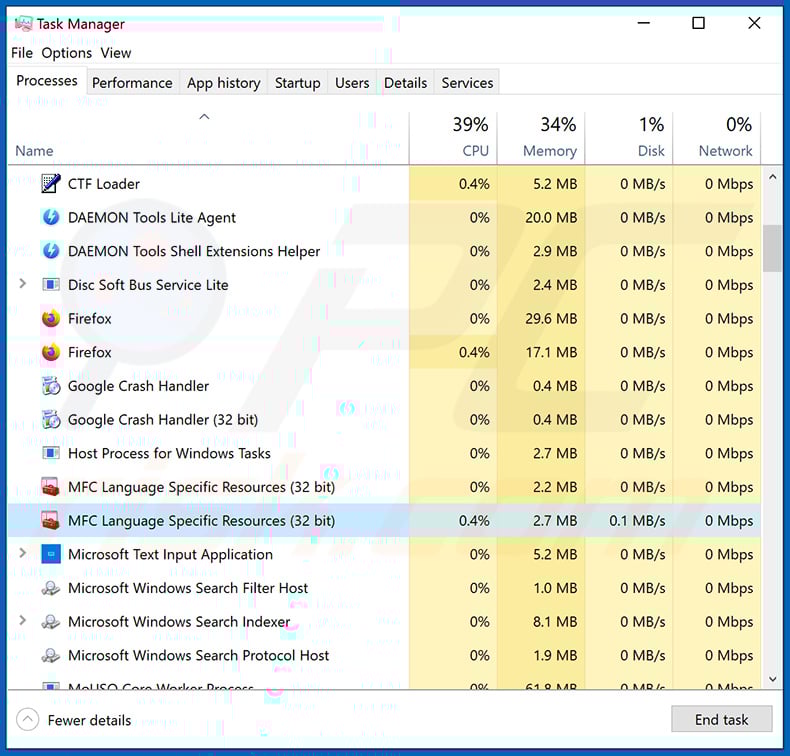
If you checked the list of programs running on your computer, for example, using task manager, and identified a program that looks suspicious, you should continue with these steps:
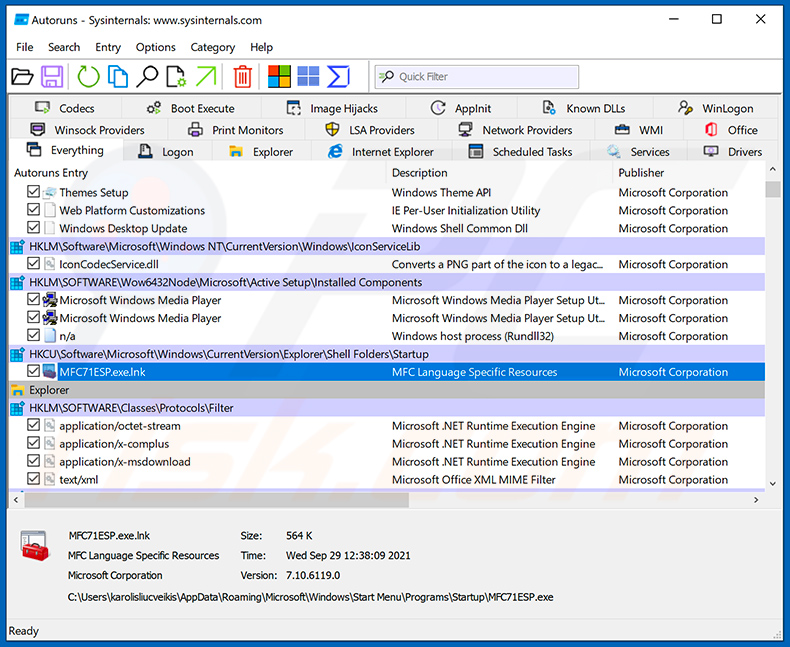
 Download a program called Autoruns. This program shows auto-start applications, Registry, and file system locations:
 Restart your computer into Safe Mode:
Windows XP and Windows 7 users: Start your computer in Safe Mode. Click Start, click Shut Down, click Restart, click OK. During your computer start process, press the F8 key on your keyboard multiple times until you see the Windows Advanced Option menu, and then select Safe Mode with Networking from the list.
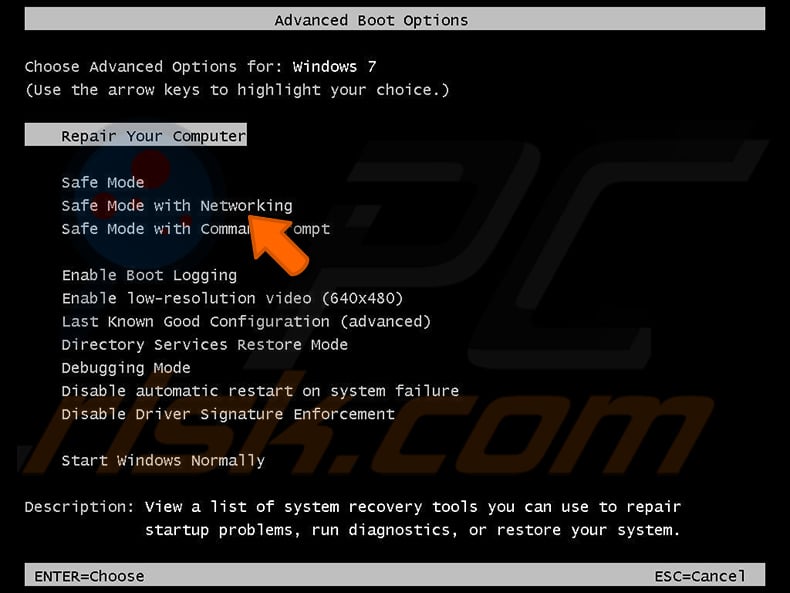
Video showing how to start Windows 7 in "Safe Mode with Networking":
Windows 8 users: Start Windows 8 is Safe Mode with Networking - Go to Windows 8 Start Screen, type Advanced, in the search results select Settings. Click Advanced startup options, in the opened "General PC Settings" window, select Advanced startup.
Click the "Restart now" button. Your computer will now restart into the "Advanced Startup options menu". Click the "Troubleshoot" button, and then click the "Advanced options" button. In the advanced option screen, click "Startup settings".
Click the "Restart" button. Your PC will restart into the Startup Settings screen. Press F5 to boot in Safe Mode with Networking.
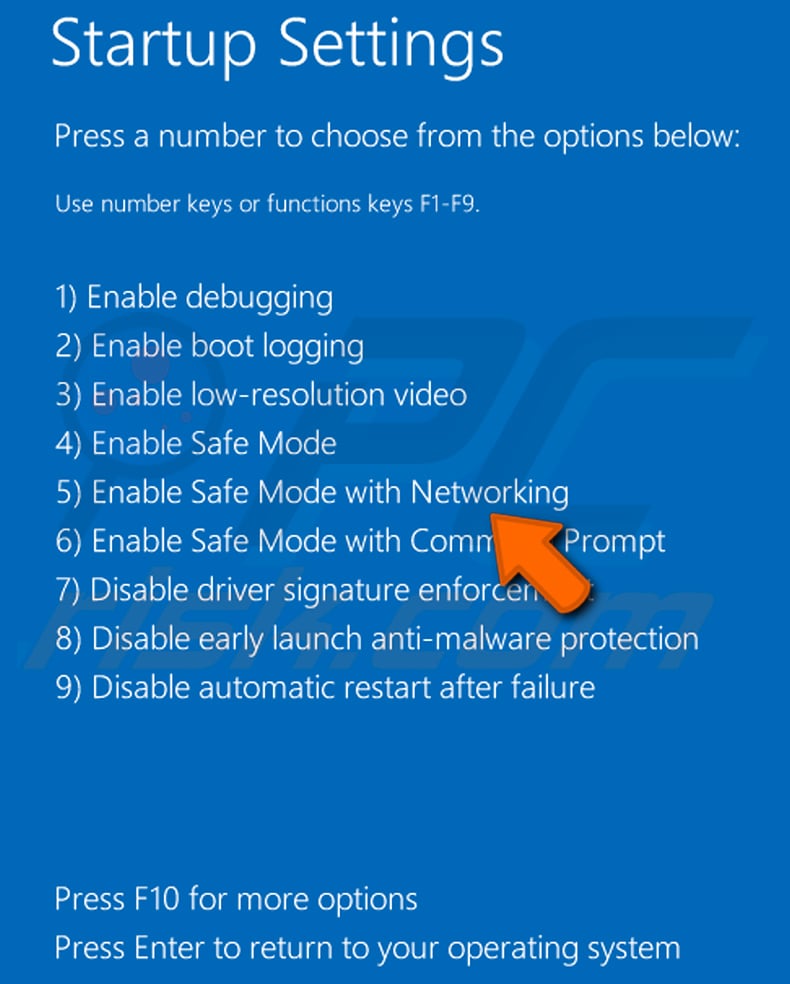
Video showing how to start Windows 8 in "Safe Mode with Networking":
Windows 10 users: Click the Windows logo and select the Power icon. In the opened menu click "Restart" while holding "Shift" button on your keyboard. In the "choose an option" window click on the "Troubleshoot", next select "Advanced options".
In the advanced options menu select "Startup Settings" and click on the "Restart" button. In the following window you should click the "F5" button on your keyboard. This will restart your operating system in safe mode with networking.
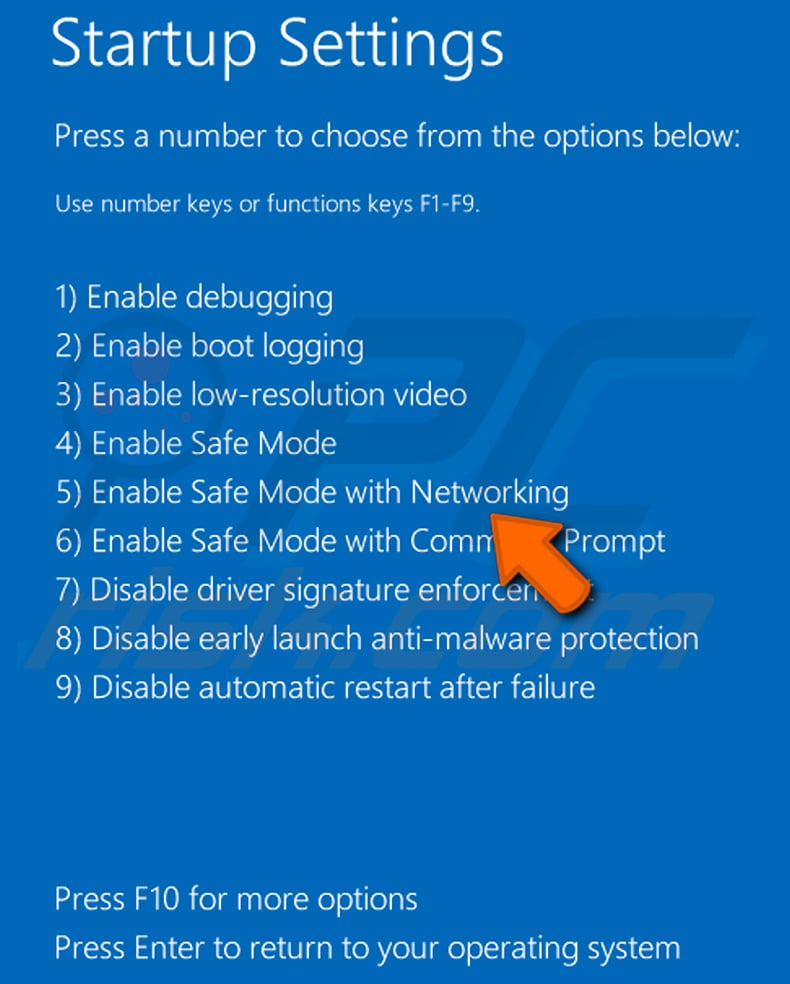
Video showing how to start Windows 10 in "Safe Mode with Networking":
 Extract the downloaded archive and run the Autoruns.exe file.
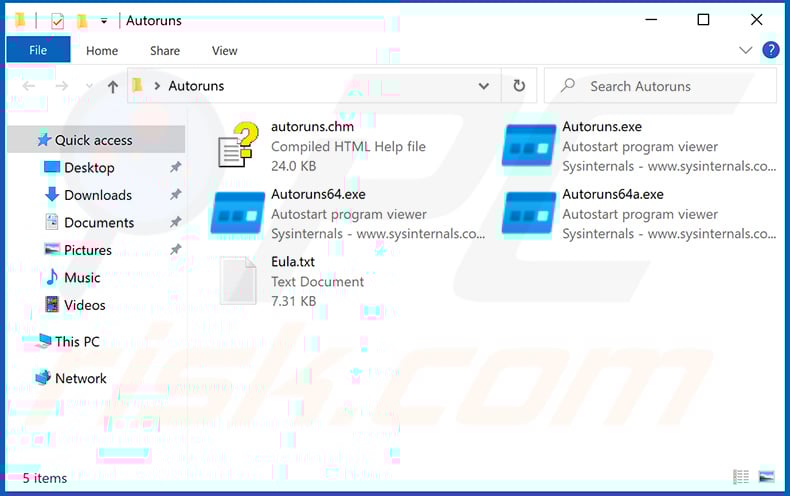
 In the Autoruns application, click "Options" at the top and uncheck "Hide Empty Locations" and "Hide Windows Entries" options. After this procedure, click the "Refresh" icon.
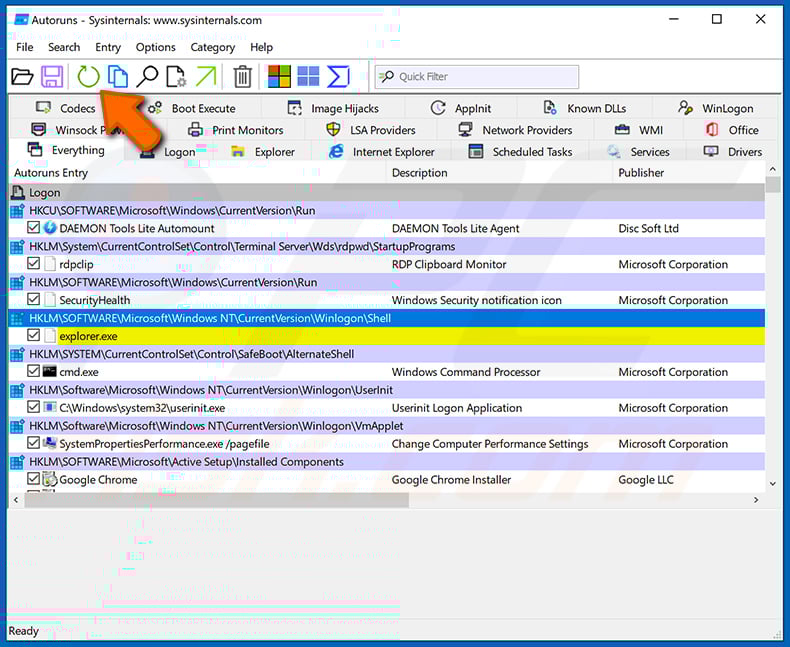
 Check the list provided by the Autoruns application and locate the malware file that you want to eliminate.
You should write down its full path and name. Note that some malware hides process names under legitimate Windows process names. At this stage, it is very important to avoid removing system files. After you locate the suspicious program you wish to remove, right click your mouse over its name and choose "Delete".
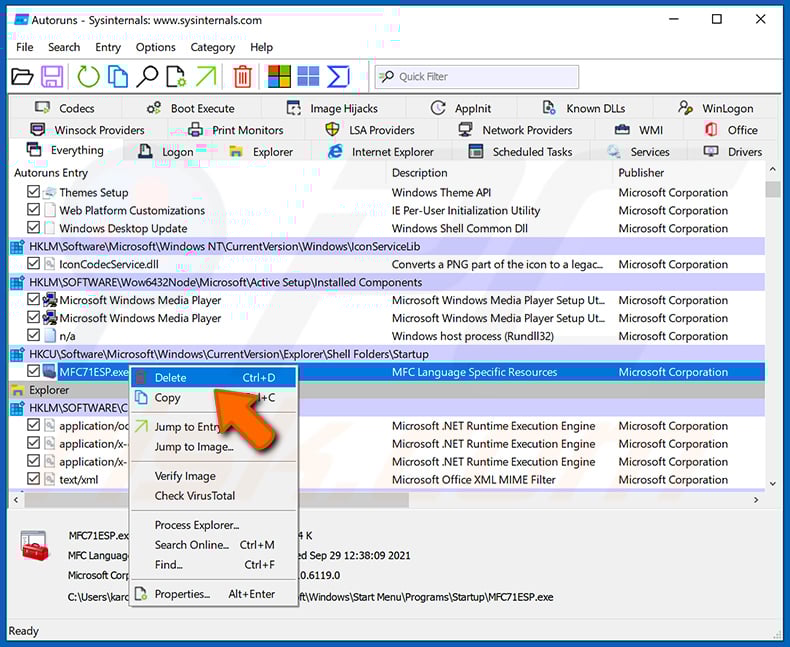
After removing the malware through the Autoruns application (this ensures that the malware will not run automatically on the next system startup), you should search for the malware name on your computer. Be sure to enable hidden files and folders before proceeding. If you find the filename of the malware, be sure to remove it.
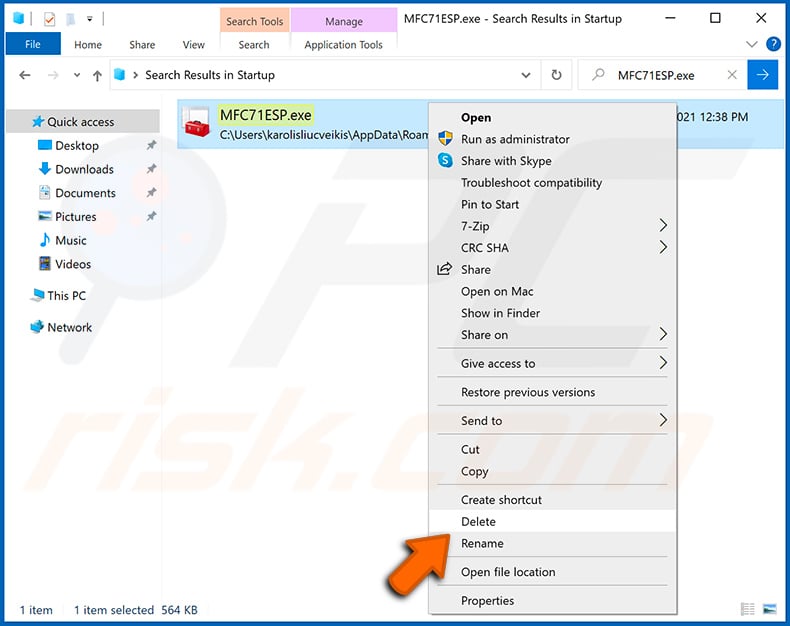
Reboot your computer in normal mode. Following these steps should remove any malware from your computer. Note that manual threat removal requires advanced computer skills. If you do not have these skills, leave malware removal to antivirus and anti-malware programs.
These steps might not work with advanced malware infections. As always it is best to prevent infection than try to remove malware later. To keep your computer safe, install the latest operating system updates and use antivirus software. To be sure your computer is free of malware infections, we recommend scanning it with Combo Cleaner Antivirus for Windows.
Frequently Asked Questions (FAQ)
My computer is infected with BambooToken malware, should I format my storage device to get rid of it?
Formatting will get rid of BambooToken, but it also erases every file on the drive. It is better to first run a scan with a reputable security tool such as Combo Cleaner. In business environments, the incident should also be reported to the IT or security team, since other systems on the network may be affected.
What are the biggest issues that BambooToken malware can cause?
BambooToken gives attackers remote access to the infected device, allowing them to run commands, steal files, and plant additional malware. On servers and development systems, this can lead to data breaches and attacks on the organization's customers and users.
What is the purpose of BambooToken malware?
The purpose of BambooToken is to keep a hidden channel open to infected machines so attackers can collect information, move files, and run commands whenever they want. Its plugin system allows operators to add new features, possibly including keylogging and webcam or screen capture.
How did BambooToken malware infiltrate my computer?
On Windows, BambooToken is loaded by side-loading a malicious DLL file into Tendyron's legitimate OnKey program. It is used in targeted attacks on organizations and servers, mainly in Asia, rather than spread to home users through spam or fake downloads.
Will Combo Cleaner protect me from malware?
Yes. Combo Cleaner can detect and remove most known malware infections. Since stealthy threats like BambooToken can hide inside legitimate software, running a full system scan is recommended to make sure nothing is left behind.
Share:
 Facebook
 X.com
X.com
 LinkedIn
 Copy Link

Tomas Meskauskas
Expert security researcher, professional malware analyst
I am passionate about computer security and technology. I have an experience of over 10 years working in various companies related to computer technical issue solving and Internet security. I have been working as an author and editor for pcrisk.com since 2010. Follow me on Twitter and LinkedIn to stay informed about the latest online security threats.
PCrisk security portal is brought by a company RCS LT.
Joined forces of security researchers help educate computer users about the latest online security threats. More information about the company RCS LT.
Our malware removal guides are free. However, if you want to support us you can send us a donation.
DonatePCrisk security portal is brought by a company RCS LT.
Joined forces of security researchers help educate computer users about the latest online security threats. More information about the company RCS LT.
Our malware removal guides are free. However, if you want to support us you can send us a donation.
Donate
▼ Show Discussion