
We may earn commissions from products we recommend. Learn more.
How to access TikTok at school or work with a VPN in 2026

How to access TikTok at school or work with a VPN in 2026?
TikTok is one of the world's largest video-focused social platforms, offering short-form videos, live broadcasts, creator content, shopping features, and individualized recommendations. Its size and emphasis on video often lead to restrictions on school, university, and workplace networks.
If TikTok does not load on institutional Wi-Fi, the issue may not be related to your account or device. Network administrators often block social media to manage bandwidth, productivity, security, or comply with policies. VPNs (Virtual Private Networks) may help with certain restrictions placed on managed networks.
Disclaimer: PCrisk does not promote, encourage, or endorse bypassing network restrictions, violating school or workplace rules, or breaking local laws. Always follow an institution's acceptable-use policies and local regulations. Use any methods described at your own risk.
Access TikTok with NordVPNSpecial deal30-day money-back guarantee→
Table of Contents:
- Introduction
- Why can't I access TikTok at school or work?
- Can TikTok be inaccessible for other reasons?
- How to access TikTok?
- Accessing TikTok with a VPN in 2026
- Best VPNs to access TikTok
- Can you use a free VPN to access TikTok?
- Common issues and solutions when accessing TikTok with a VPN
- How to access TikTok without a VPN?
- Is using a VPN to access TikTok legal?
- In closing
- Frequently Asked Questions (FAQ)
TikTok is a video-focused social media platform where users watch and share short videos, follow creators, communicate via comments and messages, join live streams, and browse personalized content feeds. The platform serves over a billion users worldwide and describes itself as a global video discovery platform.
Although it is popular, TikTok is not accessible on all networks. Schools, universities, workplaces, libraries, and similar organizations often use managed networks. Administrators control which services users can access, applying restrictions to categories such as gaming websites, streaming platforms, file-sharing services, adult sites, and social networks.
Various methods are used to block access, including DNS and web filtering, firewall rules, proxy policies, and device-level controls. Hence, TikTok may function on your home Wi-Fi or mobile connection but fail to load on a campus or workplace network.
There are several common reasons for these restrictions:
Bandwidth management: TikTok's continuous video streaming generates significantly more network traffic than typical web browsing, email, or document editing. On shared networks, unrestricted video use can reduce capacity for essential activities such as classes, meetings, cloud applications, and VoIP calls. For this reason, institutions often restrict video-heavy platforms, including other streaming services.
Productivity and concentration: schools may block TikTok in order to minimize distractions during study, exams, or computer lab use. Employers may also restrict social media if it conflicts with workplace policies or job responsibilities.
Security and privacy threats: while TikTok is not malware, social platforms can put users at risk of phishing and scams, impersonation, malicious ads, and other social engineering threats. Organizations may restrict social media as a component of a wider security policy.
Content and age-related policies: educational institutions may be required to block content considered unsuitable for students. Blocking an entire platform is simpler than evaluating each individual video.
Device management: network blocks and device-level restrictions are distinct. Schools or companies may use device management software to block applications, prevent VPN installation, enforce web filtering, or restrict account settings. In these cases, switching networks may not remove the restriction.
Therefore, before assuming TikTok is down, disconnect from the institutional Wi-Fi and try another trusted network. If TikTok works, the restriction likely comes from the original network.
Can TikTok be inaccessible for other reasons?
Aside from the reasons discussed in the previous section, TikTok may not work due to temporary service issues, app malfunctions, unsupported software, corrupted cache, DNS problems, parental controls, account restrictions, or regional limitations. Geographic restrictions are significant, as TikTok has faced government bans in several countries.
The following are some examples of countries that have introduced TikTok bans:
India: TikTok and other Chinese-developed applications were banned in June 2020 due to national security, sovereignty, public order, and data security concerns. In August 2025, reports of a possible return were followed by a government statement confirming that no unblocking order had been issued, and the app remained inaccessible.
Afghanistan: Taliban authorities have restricted TikTok, noting concerns with its influence on youth. Wider Internet restrictions, including fiber Internet shutdowns in 2025, mean TikTok's availability must be viewed within the wider context of government control over Internet access.
Kyrgyzstan: TikTok was blocked in April 2024 due to concerns regarding impact on children. Officials proposed reconsidering the restriction in February 2026, although the block had not been formally lifted by mid-2026, and authorities said restoration would depend on new content-filtering capabilities.
Albania: a year-long TikTok ban was imposed over child-safety concerns following the death of a teenager. The restriction expired in February 2026, and TikTok returned after the government cited strengthened safety measures. In March 2026, Albania's Constitutional Court subsequently ruled that the ban had been unconstitutional.
Nepal: TikTok was banned for over nine months due to concerns about its impact on "social harmony and goodwill". The ban was lifted in August 2024 after TikTok agreed to cooperate with authorities on content moderation and cybercrime.
The situation differs considerably by country and can change over time. In the United States, despite legal uncertainty, by July 2026, about 200 million Americans were using TikTok. Federal employees could again install the app on government devices at their agencies' discretion after the creation of TikTok USDS.
How to access TikTok?
The best solution to TikTok access issues depends on why it is unavailable. If the restriction is limited to a school or workplace Wi-Fi network, switching networks is the simplest way to test access. You can disconnect from institutional Wi-Fi and use your phone's mobile data. If permitted by your carrier plan and institutional policies, a laptop can connect through a personal hotspot.
Mobile data bypasses the organization's Wi-Fi infrastructure because the connection is handled by your cellular provider rather than the local school or workplace network. However, it does not remove restrictions applied directly to a managed device. Note that TikTok's video content can quickly use significant mobile data. Continuous playback, live broadcasts, and high-quality video may exceed your monthly allowance. We recommend setting up data-usage warnings on your phone or carrier account. Using TikTok's data-saving features and lowering video quality can help with usage as well.
VPNs (Virtual Private Networks) are typically a more convenient tool for privacy and access, especially for frequent use. A VPN establishes a secure connection between your device and the provider's server. Your traffic is routed through this server in an encrypted tunnel. This prevents the local Wi-Fi operator from monitoring your browsing as easily, and websites see the VPN server's public IP address instead of your own.
Our top recommendation for streaming and privacy. NordVPN consistently leads our tests with fast speeds, reliable geo-unblocking, and a strict no-logs policy.
- ✔ Unblocks geo-restricted streaming services reliably
- ✔ 202+ locations across 111 countries
- ✔ 30-day money-back guarantee · Special deal available
This architecture provides several benefits. VPNs can improve privacy on shared or public Wi-Fi. These tools can block basic local DNS or IP-based filtering from revealing which sites you visit. They also make your Internet location appear as the VPN server's, which may help bypass IP-based geoblocking. These benefits go beyond TikTok. VPNs are commonly used for remote work, securing public network traffic, reducing Internet Service Provider (ISP) visibility, connecting safely while traveling, and accessing services blocked by network-level filtering.
However, a VPN is not a universal solution. Schools can block known VPN servers or protocols. Company-managed devices may prevent VPN installation. Some countries' ISPs are capable of disrupting VPN traffic. TikTok may also use information beyond your IP address to determine availability or regional settings.
To summarize, a VPN may help if restrictions are based on your network or IP address location. However, it cannot bypass all government restrictions, account controls, device management policies, or regulatory prohibitions.
It must also be stressed that while a VPN improves privacy by encrypting your Internet traffic and masking your public IP address, it does not replace dedicated security software. These services cannot remove malware, scan downloads, or block every phishing page and malicious website. For comprehensive protection, we recommend using Combo Cleaner with a reputable VPN. Combo Cleaner offers real-time protection, blocks harmful sites, scans suspicious files and applications, and removes unwanted software and known malware.
A VPN encrypts your traffic — but your device still needs protection against malware and ransomware. Combo Cleaner adds the missing layer of defense.
Download Combo CleanerAntivirusDetect & remove malware threats→Accessing TikTok with a VPN in 2026
In 2026, setting up a VPN is typically a relatively simple process:
1. Choose a reputable VPN. Speed is important for TikTok's continuous video loading, but also check privacy policies, server locations, application quality, connection consistency, and customer support. We recommend NordVPN - our Top Pick for 2026.
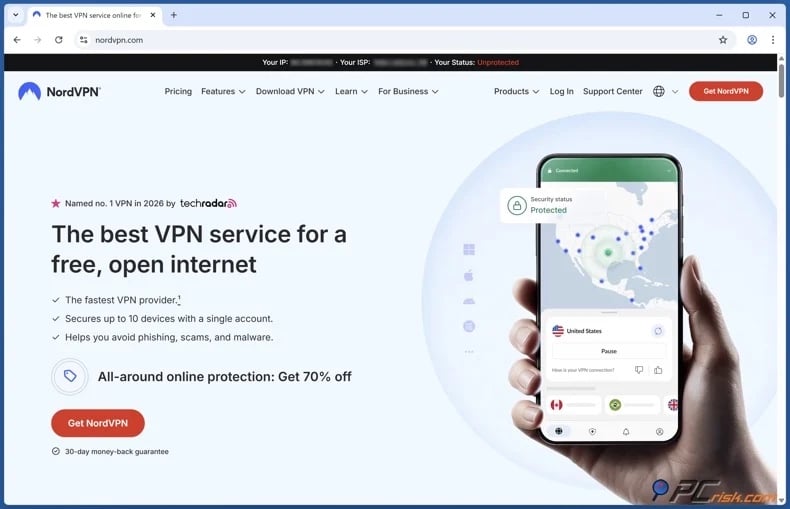
2. Install the VPN's official application and sign in. Do not use modified installers, cracked apps, or unofficial APKs. Applications from major providers usually support various platforms, including Windows, macOS, iOS, Android, Linux, and streaming hardware. Likewise, a single subscription from a mainstream provider usually covers multiple devices.
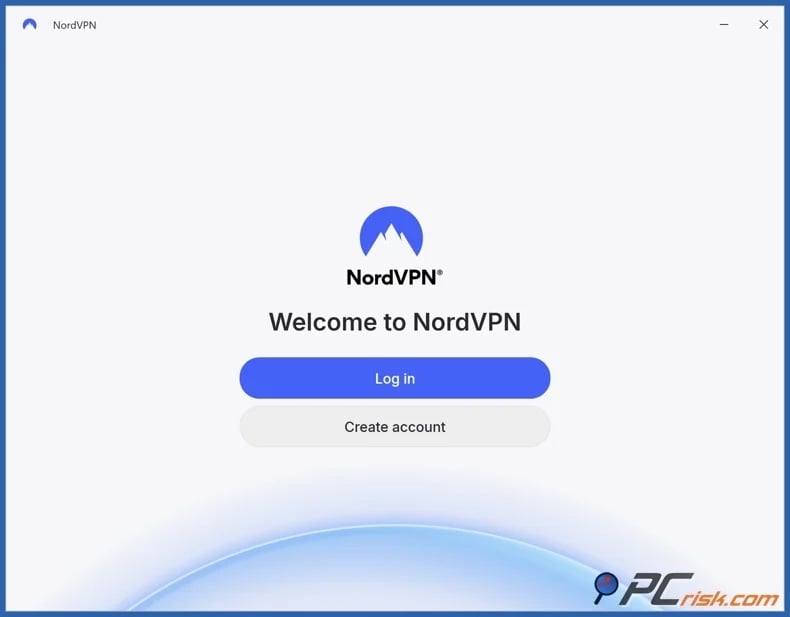
3. Connect to an appropriate server. If TikTok is blocked only on school or workplace Wi-Fi, a nearby VPN server typically offers better performance than a distant one. Use a server in another region only if TikTok is unavailable in your current location.
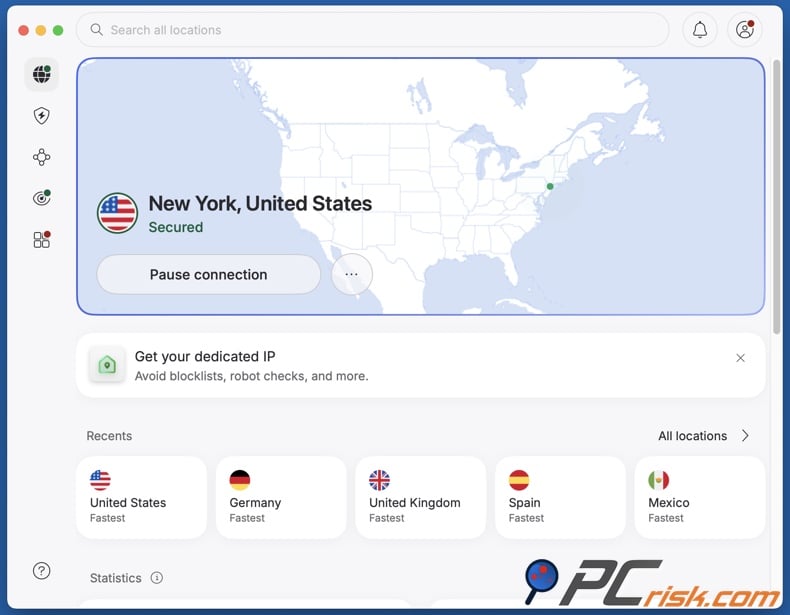
4. Open TikTok after establishing the VPN connection. If the app was already open, restart it. If needed, close and reopen your browser or clear outdated website data.
It must be stressed that no provider can guarantee TikTok access on all school, university, workplace, hotel, public, or national networks. Managed networks may detect and block VPN traffic, and device-level restrictions can still apply after connecting to a VPN.
Best VPNs to access TikTok
If you aim to use a VPN for TikTok, the key factors include speed, stability, privacy, device compatibility, and user-friendly applications. The following are our top five choices for 2026 (read our dedicated article for an in-depth comparison):
1. NordVPN
NordVPN is our top choice for 2026. This service is in the lead due to its fast connections, reliable applications, security features, extensive server network, and tools that ensure stable VPN connectivity. Our testing also confirmed strong performance for bandwidth-intensive activities, such as streaming. This is important for TikTok, as a slow VPN can make the service difficult to use. Videos may pause, drop in quality, or fail to preload smoothly. NordVPN offers features in cases where standard VPN connections face interference. Its options include obfuscated servers, a kill switch, and protections against DNS or IP leaks.
2. Surfshark
Surfshark is our second choice and is especially suitable for users with multiple personal devices. Its main advantage is support for unlimited simultaneous device connections - hence, it is ideal for households that want one subscription for all devices. For TikTok, Surfshark provides the performance characteristics that matter most - quick connections, modern protocols, broad platform support, and an application that does not require extensive networking knowledge.
3. Mullvad VPN
Mullvad VPN is the most privacy-focused option among our top five. It minimizes the information needed to create and maintain an account. Its applications are open-source, and the service has passed independent audits. Mullvad supports WireGuard and offers leak protection, a kill switch, split tunneling, and multi-hop features. However, it may not suit users who favor ease of access over privacy. Mullvad's server network is smaller than some competitors, and its entertainment platform performance is less robust than the top two providers.
4. Proton VPN
Proton VPN stands out as a TikTok pick due to its reputable free plan. The VPN service emphasizes privacy and transparency. Its apps are open-source, offer a kill switch and always-on functionality, and the paid plans provide a wider server selection and advanced routing features. The free tier is useful for testing whether a VPN may bypass school or workplace restrictions before committing to a subscription. Unlike many free VPNs, Proton's free plan does not have a standard monthly data cap, though free users have fewer server options and features than paid customers.
5. ExpressVPN
ExpressVPN ranks fifth, but it is an excellent choice for its simplicity. This VPN's main strength is a polished, straightforward experience across major operating systems. The service emphasizes quick connection management and uses the Lightway protocol for efficient VPN connectivity. This simplicity is helpful when switching between home Wi-Fi, mobile hotspots, public networks, and other connections. Those who prefer not to adjust advanced settings will appreciate the streamlined applications. ExpressVPN is positioned as a premium product, so its higher price may be difficult to justify compared to lower-cost competitors.
Can you use a free VPN to access TikTok?
A free VPN may occasionally bypass a basic network-level TikTok block. However, we recommend caution, as free VPNs commonly introduce privacy and security risks, which undermine their intended benefits.
Top VPN ReviewsExclusive dealsExpert-tested · hands-on reviews→
Below are some of the key limitations and threats associated with free VPNs:
Limited performance: free servers typically have many users sharing limited resources. Hence, TikTok videos may load slowly, buffer, or play in lower quality.
Data or speed restrictions: many free providers set daily, weekly, or monthly data limits, usage caps, or restrict speeds. Video streaming can quickly exhaust these allowances.
Limited server options: fewer available locations reduce your alternatives if a server is congested, offline, or blocked.
Missing privacy features: some free VPNs lack essential protections such as a kill switch, modern protocols, or DNS-leak prevention, which are standard in reputable paid services.
Questionable business models: operating VPN servers incurs costs. Some unknown "free forever" providers may rely on aggressive advertising, user tracking, or data monetization. In some cases, fake or malicious VPN applications can present security threats.
For those who need a free option, we recommend Proton VPN's free tier. While this plan is more limited than the paid tiers, it is offered by an established provider and does not impose a standard data cap, and it is not ad-supported. We strongly advise against installing unverified applications or "modified" versions, as doing so can lead to system infections and a variety of severe issues.
Common issues and solutions when accessing TikTok with a VPN
Even reliable VPNs can face issues on managed networks. Schools and workplaces may block TikTok and VPN connections. Application caches, device settings, server congestion, and location data can also cause problems. These complications are similar when using VPNs with other video services. Below are some of the most common issues and their solutions:
TikTok remains blocked after connecting to the VPN: the current VPN server may be filtered, the network may be blocking the VPN protocol itself, or TikTok may have cached information from your previous connection.
Potential solutions:
- Connect to a different server.
- Try another protocol, if available with your VPN.
- Use obfuscation or stealth mode, if available with your VPN.
- Close and reopen TikTok.
- Clear TikTok app or browser cache data, if appropriate.
- Test the VPN on mobile data to determine whether institutional Wi-Fi is blocking VPN connectivity.
The VPN will not connect on school or workplace Wi-Fi: some managed networks deliberately block known VPN servers, ports, or traffic patterns. An organization-managed device may also prevent VPN configuration entirely.
Potential solutions:
- Try another protocol, if available with your VPN.
- Connect to a different server.
- Check whether the VPN works on another network.
- Use mobile data, if available.
- If you are on a managed device, ask the administration whether VPN installation is permitted.
TikTok loads but videos buffer or repeatedly stop: VPN encryption and routing introduce some overhead, while a distant or overloaded server can increase latency and reduce throughput.
Potential solutions:
- Connect to a less congested server, if congestion data is available with your VPN.
- Connect to a geographically closer server.
- Reduce video quality where possible.
- Avoid multi-hop routing when video performance is a priority.
- Check your base Internet connection without the VPN.
- Use a wired connection or stronger Wi-Fi, if available.
TikTok detects the wrong country: your public IP address is but one location signal. Cached application data, account settings, device configuration, SIM information, and other factors can produce conflicting regional information.
Potential solutions:
- Connect to a different server in the intended region.
- Close and reopen TikTok after changing servers.
- Clear TikTok app and browser cache.
- Note that a new IP does not guarantee the availability of every account or regional feature.
The TikTok website works, but the app does not: browsers and native mobile applications do not always use identical networking behavior. The app could also be outdated or affected by a device-level restriction.
Potential solutions:
- Update the TikTok app, if updates are available.
- Close and reopen TikTok.
- Restart the device.
- Test TikTok's site in a modern browser.
- Clear the TikTok app cache, if permitted by the system.
- Avoid downloading unofficial or modified TikTok installers.
TikTok stops working whenever the VPN disconnects: this may simply mean the original network still blocks TikTok, and the VPN was temporarily unavailable.
Potential solutions:
- Enable the kill switch, if available with your VPN.
- Enable an always-on option, if available with your VPN.
- Connect to a geographically closer server.
- Update the VPN app, if updates are available.
- Try another protocol, if available with your VPN.
It is pertinent to mention that reputable commercial VPNs offer customer support, which is helpful if your connection works elsewhere but fails on a specific network. Support staff can recommend the best server type or protocol. However, they cannot authorize VPN use where your school or employer prohibits it.
How to access TikTok without a VPN?
A VPN is not the only technology that can route traffic through another server. Web-based proxies and the Tor Browser can sometimes provide alternative access, but both have major drawbacks for a video-heavy service such as TikTok.
Web-based proxies
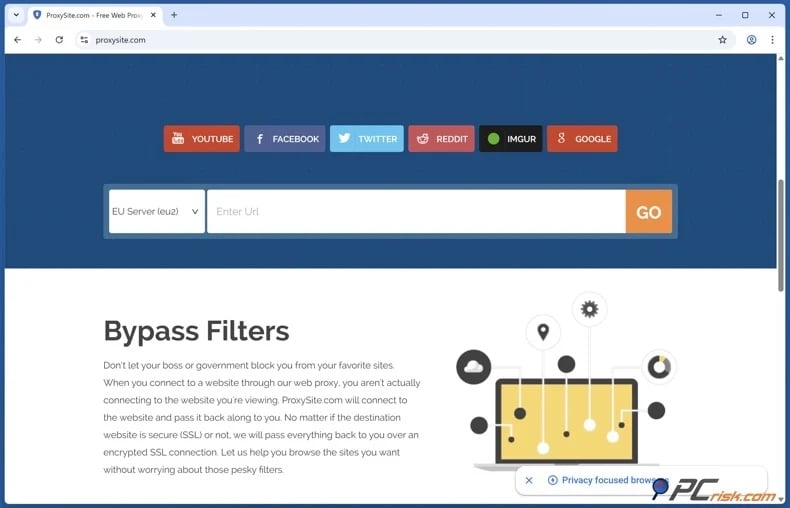
A web proxy acts as an intermediary. Instead of your browser connecting to a website directly, you access the proxy service, which retrieves the destination for you. Hence, the destination communicates with the proxy server, not your public IP address.
This method can bypass basic domain or network blocks, provided the proxy website is accessible. A key advantage is that web proxies often require no installation, making them easy to use on systems where adding software is not permitted.
However, the disadvantages are significant. Most public proxies do not offer system-wide encrypted tunnels like reputable VPNs. They usually affect only browser activity through the proxy webpage, so the TikTok app will not use them by default. Public proxy servers may log requests, inject ads, modify content, or lack adequate security. Free proxy IP addresses are often abused and may be blocked by websites. Additionally, modern TikTok pages are more complex than static sites. Video delivery, scripts, authentication, cookies, and interactive features may not function properly when accessed through a basic browser proxy. For these reasons, we do not recommend using unknown public proxies to access sensitive accounts.
Tor Browser
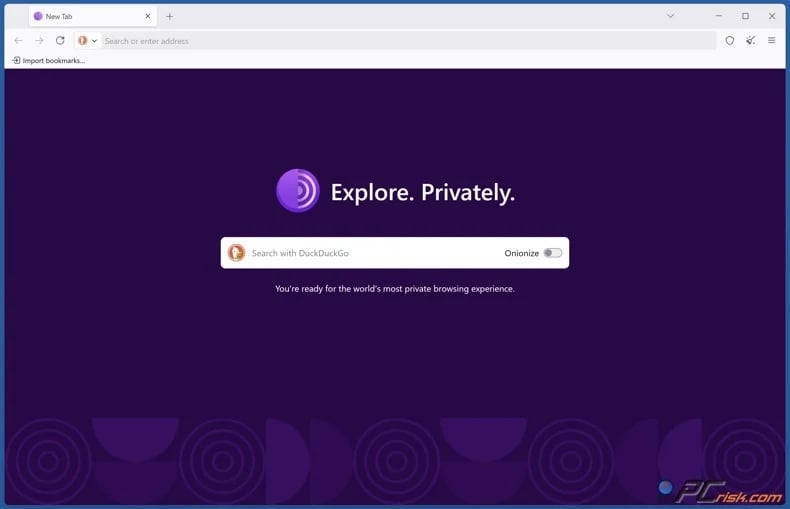
Tor uses a different approach. Rather than forwarding traffic through a single VPN server or web proxy, Tor Browser routes traffic through multiple relays in the Tor network. This structure stops any single relay from knowing both the origin and the final destination of the connection.
Tor is primarily an anonymity and anti-censorship technology rather than a high-performance video service. This distinction makes Tor unsuitable for TikTok. Routing traffic through multiple relays increases latency and reduces speed, which can cause video playback to buffer or fail. Services may also detect Tor exit addresses, trigger repeated CAPTCHA challenges, require extra authentication, or block certain connections. Furthermore, Tor Browser mainly protects browser traffic and does not automatically route the TikTok mobile app through Tor.
To summarize, the Tor Browser is a valuable privacy tool, but a reputable VPN is generally more practical for regular video streaming. Web-based proxies may be convenient but offer much weaker security. Therefore, neither is a complete substitute for a trusted VPN.
Is using a VPN to access TikTok legal?
VPN services are legal in many countries and commonly used for business, privacy, and cybersecurity. Companies rely on VPNs for secure remote access, travelers use them on public Wi-Fi, and individuals use them to protect their online activity.
VPN laws and enforcement vary widely worldwide. The following are some examples of countries with significant restrictions:
China: unauthorized VPN services are heavily restricted, and commercial VPN operations are subject to government control and approval.
Iran: authorities restrict circumvention technologies and unauthorized VPN services, particularly in connection with the country's wider Internet filtering system.
Russia: authorities have increasingly blocked VPN services and sought to reduce their use. By January 2026, over 400 VPNs had reportedly been blocked, and the government announced further measures to restrict access.
Belarus: Internet censorship and restrictions on circumvention tools make VPN use more difficult than in countries with open Internet access.
Turkmenistan: extensive Internet filtering means attempts to use VPNs or circumvention services meet major restrictions.
North Korea: ordinary citizens have extremely limited Internet access, so VPN availability and use have fundamental differences compared to most countries.
United Arab Emirates: VPN technology is not universally illegal, but using IP-masking technology for unlawful activities can result in serious legal consequences.
It is important to remember that laws change, and the presence of a VPN application in an app store does not guarantee that all VPN use is legal in your location. Always check current local laws if you are unsure.
However, even where VPN usage is permitted by law, it can violate an organization's acceptable-use policy. In other words, the network managed by a school, university, or employer can restrict this technology. Network restrictions are often intentional, and bypassing them may violate student codes, employment policies, or IT security rules. Potential consequences may include loss of network access, disciplinary action, account suspension, or workplace sanctions. Disabling management software or security controls on organization-owned devices can lead to further issues.
Most importantly, a VPN does not provide legal immunity. Encryption and IP masking do not make prohibited actions lawful. Laws, employment obligations, copyright rules, and institutional policies still apply when using a VPN.
In closing
TikTok may be inaccessible at school or work because administrators filter social media to preserve bandwidth, improve productivity, enforce content policies, or reduce security risks. Access may also be restricted by device controls, technical issues, account limitations, or country-level blocks.
Switching to mobile data gives a quick alternative to restrictive Wi-Fi, though extended TikTok use may consume significant data. For regular access on a permitted personal device, a reputable VPN is typically the most practical solution, providing encrypted traffic and flexible server routing. However, no VPN can guarantee access on all networks, and using one does not override school rules, workplace policies, or local laws.
Frequently Asked Questions (FAQ)
Why can't I access TikTok at school or work?
Schools and employers often block TikTok using DNS filtering, firewalls, web filters, proxy controls, or device management. Typical reasons include conserving bandwidth, curbing distractions, complying with content policies, and reducing security risks.
Can I access TikTok with a VPN?
Yes, in some cases. A VPN routes your Internet connection through a server and encrypts your traffic, which can circumvent certain network or IP-based restrictions. However, schools and workplaces may block VPN traffic, and device-level restrictions can still apply.
Can I access TikTok without a VPN?
You may be able to access TikTok by switching to a personal network or mobile data. Web proxies and Tor Browser are alternatives, but public proxies pose privacy risks, and Tor is generally too slow for smooth video playback.
Is it legal to access TikTok with a VPN?
VPNs are legal in many countries, though some jurisdictions restrict or regulate their use. Even where VPNs are permitted, bypassing school or workplace restrictions may violate policy and result in disciplinary action. Furthermore, VPNs do not eliminate legal responsibility for your actions online.
Share:
 Facebook
 X.com
X.com
 LinkedIn
 Copy Link

Karolis Liucveikis
Experienced software engineer, passionate about behavioral analysis of malicious apps
Author and general operator of PCrisk's News and Removal Guides section. Co-researcher working alongside Tomas to discover the latest threats and global trends in the cyber security world. Karolis has experience of over 8 years working in this branch. He attended Kaunas University of Technology and graduated with a degree in Software Development in 2017. Extremely passionate about technical aspects and behavior of various malicious applications.
▼ Show Discussion