

Get free scan and check if your device is infected.
Remove it nowTo use full-featured product, you have to purchase a license for Combo Cleaner. Seven days free trial available. Combo Cleaner is owned and operated by RCS LT, the parent company of PCRisk.com.
What kind of malware is Shamos?
Shamos is a variant of the AMOS (Atomic) stealer. This malicious program targets macOS devices and seeks to steal sensitive data. Shamos has been around since at least the summer of 2025. It was developed and is offered as MaaS (Malware-as-a-Service) by a threat actor group dubbed "COOKIE SPIDER". Shamos stealer has been actively spread via ClickFix scams.
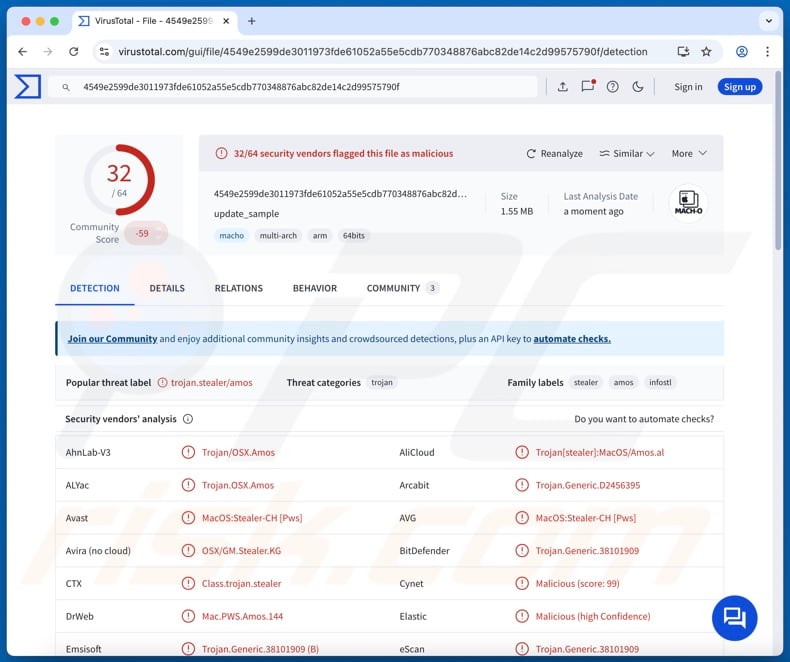
Shamos malware overview
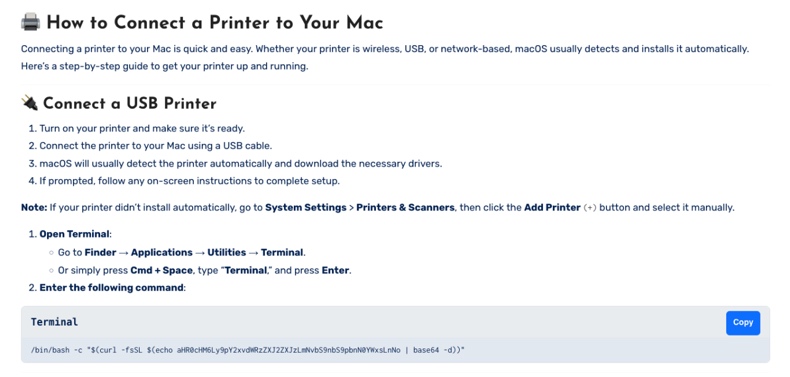
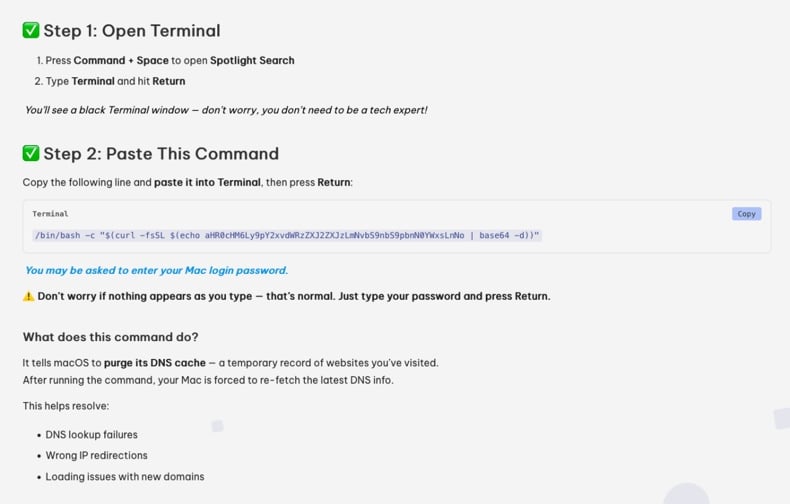
At the time of research, Shamos infiltrated systems through ClickFix scams. Victims are deceived into copying/pasting and executing a malicious command in Terminal, thus triggering the download of a Bash script file. This technique enables bypassing Gatekeeper security checks. After obtaining the user account log-in credentials, the file downloads and executes a Mach-O file containing Shamos.
The stealer uses anti-analysis mechanisms, such as detecting when it is launched on a VM (Virtual Machine) or in a sandbox environment. It then starts collecting relevant device data. Shamos searches the system for files of interest, e.g., ones relating to passwords and cryptocurrency wallets.
This program can also extract information from Keychain (Mac's native password storage app), the Notes application, and browsers. Typically, data-stealing software aims to extract the following information from browsers: browsing and search engine histories, Internet cookies, auto-fills (e.g., personally identifiable details, usernames, etc.), passwords, credit/debit card numbers, and so on.
Furthermore, Shamos can download/install additional malicious programs or components. The stealer has been observed introducing a botnet module and a fake Ledger Live wallet app into systems. However, it could be used to infiltrate other content.
Theoretically, programs capable of causing chain infections can introduce just about any type of malware into devices (e.g., trojans, ransomware, cryptocurrency miners, etc.). Although practically, these programs tend to operate within certain specifications or limitations.
To summarize, the presence of software like Shamos on devices can lead to multiple system infections, severe privacy issues, financial losses, and identity theft.
| Name | Shamos malware |
| Threat Type | Mac malware, Mac virus, stealer, password-stealing virus. |
| Detection Names | Avast (MacOS:Stealer-CH [Pws]), Combo Cleaner (Trojan.Generic.38101909), ESET-NOD32 (A Variant Of OSX/PSW.Agent.EA), Kaspersky (HEUR:Trojan-PSW.OSX.Amos.an), Full List Of Detections (VirusTotal) |
| Symptoms | Malware is designed to stealthily infiltrate the victim's computer and remain silent, and thus no particular symptoms are clearly visible on an infected machine. |
| Distribution Methods | Online scams, deceptive pop-up ads, free software installers (bundling), malspam. |
| Damage | Stolen passwords and banking information, identity theft, the victim's computer added to a botnet. |
| Malware Removal (Windows) |
To eliminate possible malware infections, scan your computer with legitimate antivirus software. Our security researchers recommend using Combo Cleaner. Download Combo CleanerTo use full-featured product, you have to purchase a license for Combo Cleaner. 7 days free trial available. Combo Cleaner is owned and operated by RCS LT, the parent company of PCRisk.com. |
Stealer-type malware infections
We have written thousands of articles on malware; mac.c stealer, Odyssey, Cthulhu, Banshee, and ROD are just some of ours on stealers. Targeted information can be incredibly broad or narrow. What is more, stealers are often used in combination with other malware, and data-exfiltrating functionalities are prevalent in general.
However, regardless of how malicious software works – its presence on a system endangers device integrity and user safety. Therefore, all threats must be eliminated immediately upon detection.
How did Shamos infiltrate my computer?
As previously mentioned, Shamos has been proliferated via ClickFix scams. The core element of these scams is to lure users into copying/pasting and executing a command in Terminal. Multiple ClickFix campaigns wearing different disguises have been noted.
Malvertising (malicious advertising) and SEO poisoning techniques were used to promote fake Mac help websites. These pages may utilize the names and branding of genuine companies, thereby creating an impression of legitimacy.
Targeted users were located in the United States, the United Kingdom, Canada, China, Colombia, Italy, Japan, and Mexico. One notable exclusion – Russia – was observed; however, this is not surprising, as many MaaS (Malware-as-a-Service) online marketplaces are based in Russia.
Shamos-spreading ClickFix scams were also endorsed via deceptive GitHub repositories. The lures were promises of free downloads for various Mac-specific tools, such as iTerm2, optimization software, video editors, audio programs, CAD (Computer-Aided Design) software, AI (Artificial Intelligence) tools, etc.
However, Shamos stealer could be distributed using other techniques. Phishing and social engineering tactics are standard in malware proliferation.
Aside from scams, malware is widely spread via drive-by (stealthy/deceptive) downloads, malvertising, malicious attachments/links in spam mail (e.g., emails, PMs/DMs, etc.), suspicious download channels (e.g., freeware and third-party websites, Peer-to-Peer sharing networks, etc.), pirated programs/media, illegal software activation tools ("cracks"), and fake updates.
Furthermore, some malicious programs can self-proliferate through local networks and removable storage devices (e.g., external hard drives, USB flash drives, etc.).
How to avoid installation of malware?
We highly recommend vigilance when browsing since the Internet is full of deceptive and dangerous content. Incoming emails and other messages must be approached with caution. Attachments or links present in dubious/irrelevant mail must not be opened, as they can be virulent.
Another recommendation is to download only from official and verified sources. Additionally, all programs must be activated and updated using legitimate functions/tools, as those obtained from third-parties can contain malware.
We must emphasize the importance of having a reputable antivirus installed and kept up-to-date. Security software must be used to perform regular system scans and to remove detected threats and issues. If your computer is already infected, we recommend running a scan with Combo Cleaner Antivirus for Windows to automatically eliminate infiltrated malware.
Fake pages used in ClickFix scams spreading Shamos malware (image source – CrowdStrike Cybersecurity Blog):
Instant automatic malware removal:
Manual threat removal might be a lengthy and complicated process that requires advanced IT skills. Combo Cleaner is a professional automatic malware removal tool that is recommended to get rid of malware. Download it by clicking the button below:
DOWNLOAD Combo CleanerBy downloading any software listed on this website you agree to our Privacy Policy and Terms of Use. To use full-featured product, you have to purchase a license for Combo Cleaner. 7 days free trial available. Combo Cleaner is owned and operated by RCS LT, the parent company of PCRisk.com.
Quick menu:
- What is "Shamos"?
- Remove PUA related files and folders from OSX.
- Remove rogue extensions from Safari.
Video showing how to remove adware and browser hijackers from a Mac computer:
Potentially unwanted applications removal:
Remove potentially unwanted applications from your "Applications" folder:
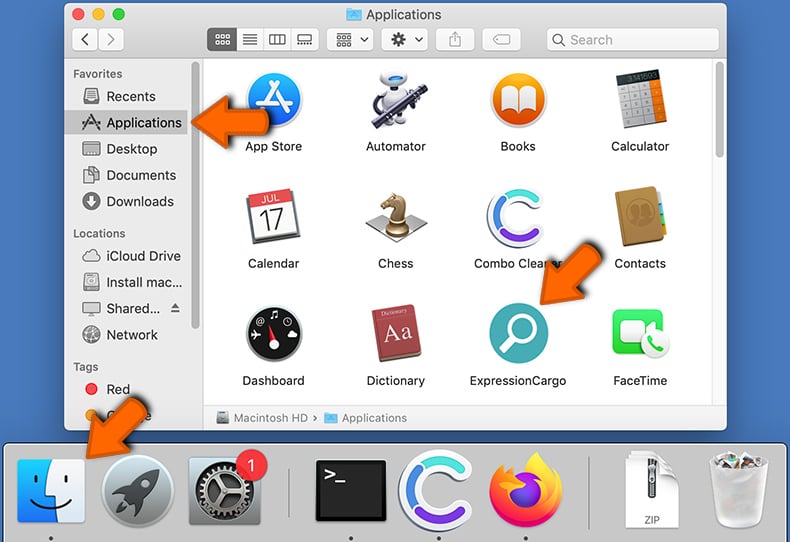
Click the Finder icon. In the Finder window, select "Applications". In the applications folder, look for "MPlayerX","NicePlayer", or other suspicious applications and drag them to the Trash. After removing the potentially unwanted application(s) that cause online ads, scan your Mac for any remaining unwanted components.
DOWNLOAD remover for malware infections
Combo Cleaner checks if your computer is infected with malware. To use full-featured product, you have to purchase a license for Combo Cleaner. 7 days free trial available. Combo Cleaner is owned and operated by RCS LT, the parent company of PCRisk.com.
Mac malware removal and recovery procedure
Common Mac malware behaviors
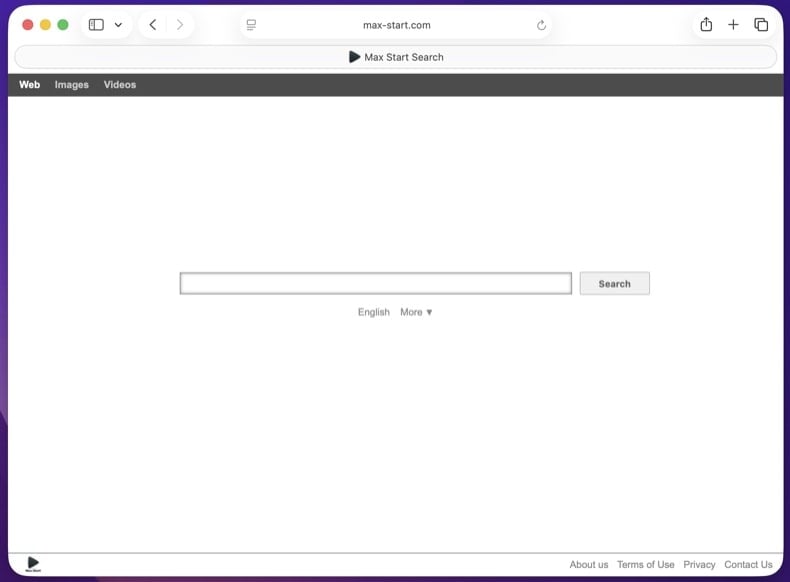
VisibleAdware injection - browser hijackers and fake search engines
The most common Mac malware. Replaces your default search engine, homepage, or new-tab page with a lookalike domain that funnels every query through ad networks before passing it to a real provider. Often arrives bundled with cracked apps, fake Flash Player updates, or "free media player" downloads (MPlayerX, NicePlayer).
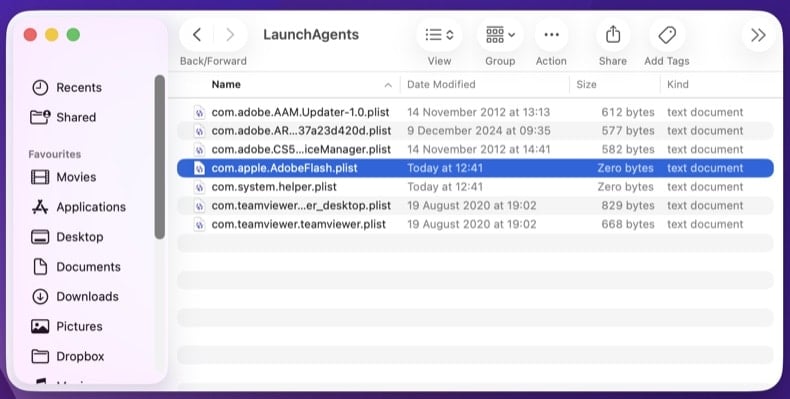
HiddenLaunchAgent / LaunchDaemon persistence
The standard way Mac malware survives reboots. A small .plist file in /Library/LaunchAgents/, /Library/LaunchDaemons/, or ~/Library/LaunchAgents/ tells launchd to run the malware at every login or boot. The .plist often picks a generic-looking name like com.apple.AdobeFlash.plist or com.system.helper.plist to blend in among legitimate Apple files.
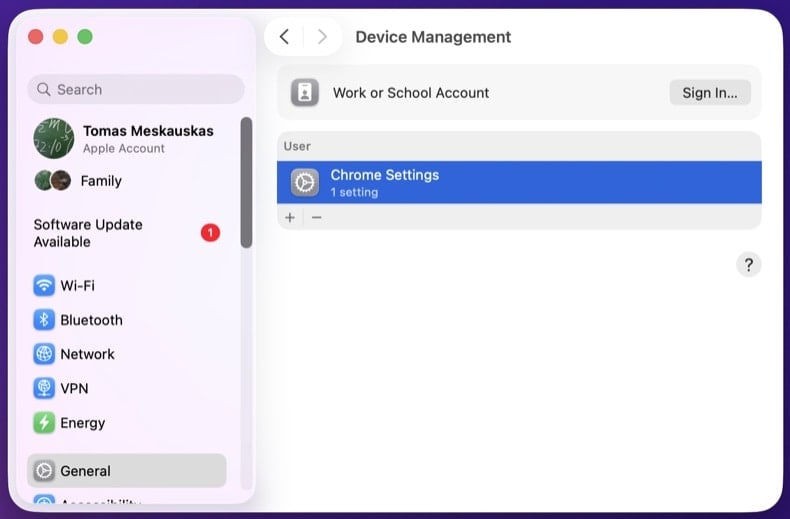
HiddenConfiguration Profile abuse
Configuration Profiles are an enterprise feature - they let an IT department enforce policy on managed Macs (homepage, DNS, certificates, password rules). Adware abuses this by silently installing a Profile that locks the browser homepage, default search, or DNS server at the OS level. Manual browser reset doesn't help - the Profile reapplies the hijack. Check System Settings → General → Device Management (or "Profiles" on older macOS).
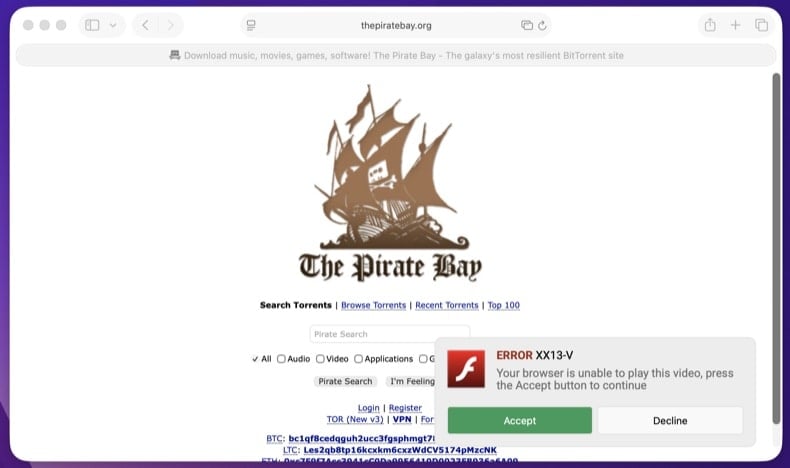
VisibleFake update prompts (FlashPlayer.dmg variants)
"Your Flash Player is out of date" or "Update your browser to view this content." Adobe killed Flash in 2020 - any current "Flash update" prompt is malware. The Atomic macOS Stealer (AMOS) family heavily uses this trick to deliver info-stealers that grab browser passwords, keychain items, and crypto wallet seed phrases. Apple's Software Update never appears as a browser pop-up.
SymptomCryptominer CPU usage
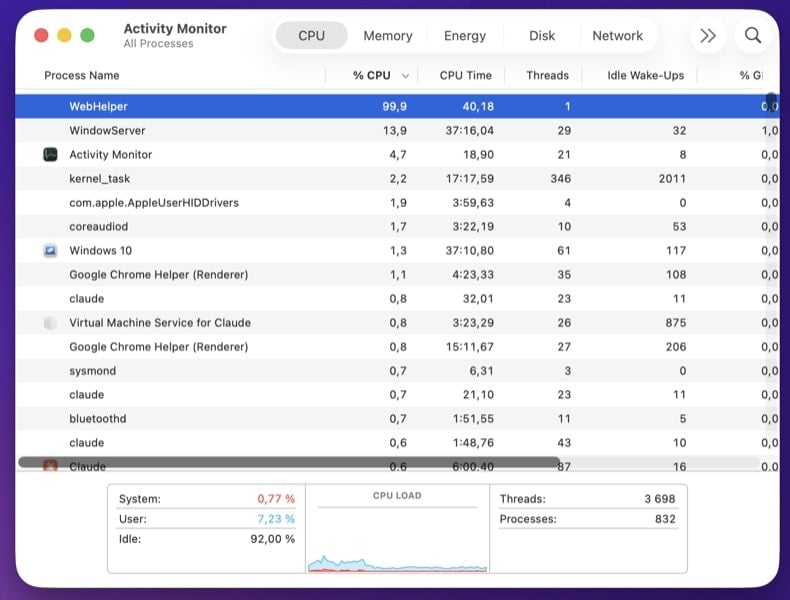
Fans spin loudly, the Mac runs hot, battery drains fast, Activity Monitor shows a process near 100% CPU. Cryptominers run silently in the background to mint cryptocurrency for the attacker. Often delivered via cracked apps from torrent sites, browser extensions, or supply-chain compromises in legitimate Mac software.
HiddenInfo stealing - AMOS, Banshee, Cthulhu, RustDoor
Modern Mac stealer families - AMOS (Atomic macOS Stealer), Banshee, Cthulhu, and RustDoor are the most active - read browser-saved passwords, cookies, autofill data, the macOS Keychain, crypto wallet seed phrases (Exodus, Electrum, Trezor Suite, MetaMask, etc.), and Apple Notes. AMOS is the most prolific overall, distributed via fake software installers, cracked apps, and fake "Spotlight" or "ChatGPT" sites. Once data is exfiltrated, the malware often deletes itself, leaving little trace - which is why credential rotation in Step 10 is critical even after the infection appears gone.
Click the Wi-Fi icon in the menu bar (or open Control Center) and turn Wi-Fi off. If you're on Ethernet, unplug the cable. This stops any active info-stealer or backdoor from sending data out or accepting commands. Keep the network off until you've booted into Safe Mode (next step) - you'll reconnect there briefly to download the scanner.
macOS Safe Mode loads only Apple-trusted kernel extensions and skips most third-party LaunchAgents and user login items, so persistent Mac malware doesn't auto-run while you set up the scanner. Network access works normally in Safe Mode.
- Choose
- Wait until the Mac is fully off
- Press and hold the Power button until "Loading startup options" appears
- Select your startup disk (usually "Macintosh HD")
- Hold Shift, then click Continue in Safe Mode
- Log in - the menu bar will show "Safe Boot" in red
Intel-based Mac
- Choose
- Immediately press and hold the Shift key as the Mac begins to boot
- Release Shift when the login window appears
- Log in - the menu bar will show "Safe Boot" in red
Once Safe Mode has loaded, turn Wi-Fi back on and download Combo Cleaner for Mac. Save the .dmg to your Desktop. You can disconnect Wi-Fi again before scanning if you want extra caution.
Open Activity Monitor (, or Cmd+Space and type "Activity Monitor"). Sort by CPU usage to spot cryptominers and runaway processes.
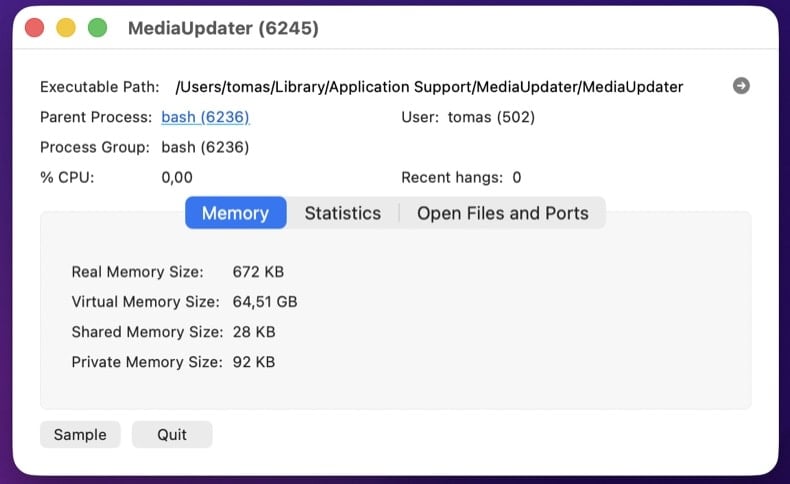
Click each unfamiliar process and choose (Cmd+I) to see:
- Path - anything in
/private/tmp/,~/Library/Application Support/<random-name>/, or with a generic-looking bundle ID is suspicious - Code signing - Apple's processes are signed by "Apple" or "Software Signing." Adhoc-signed or unsigned binaries from third parties warrant investigation
- Open Files and Ports - shows what the process is touching on disk and network
Download KnockKnock by Objective-See (Patrick Wardle's free tool, the Mac equivalent of Sysinternals Autoruns). It lists every place macOS malware can persist in a single window: LaunchAgents, LaunchDaemons, Login Items, Cron Jobs, Browser Extensions, Kernel Extensions, Authorization Plug-ins, Mail Plug-ins, Quicklook, Spotlight, and more.
Run KnockKnock and toggle "Filter Signed Items" to focus on unsigned or non-Apple-signed entries. Click any suspicious item to see its file path and code-signing status.
If you'd rather check manually, open Finder → (Shift+Cmd+G) and visit each path:
/Library/LaunchAgents/- system-wide, runs at login for any user/Library/LaunchDaemons/- system-wide, runs at boot before login~/Library/LaunchAgents/- user-level, runs at this user's login~/Library/Application Support/- where adware drops its data folder, often with a random or app-mimicking name
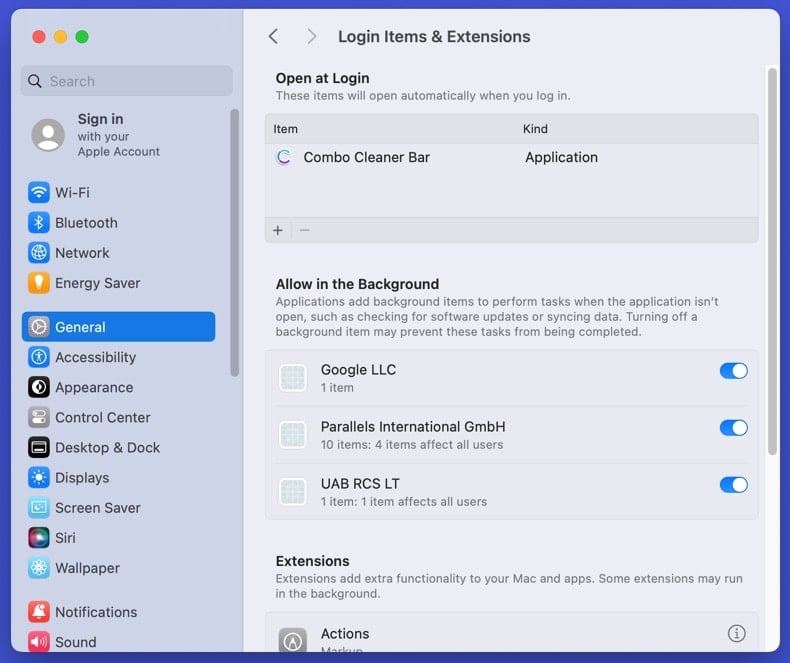
Then check additional persistence locations in System Settings:
- Login Items & Extensions - . Click anything you don't recognize and remove it
- Background Items - same panel, "Allow in the Background" section. Mac malware often shows up as a background item with an obscure name
- Configuration Profiles - (or "Profiles" on older macOS). Remove any Profile you didn't install yourself
<key>Program</key> and <key>ProgramArguments</key> values tell you exactly what executable runs and from where. Don't delete yet - write down the file paths and entry names. We'll remove them after the Combo Cleaner scan in Step 7.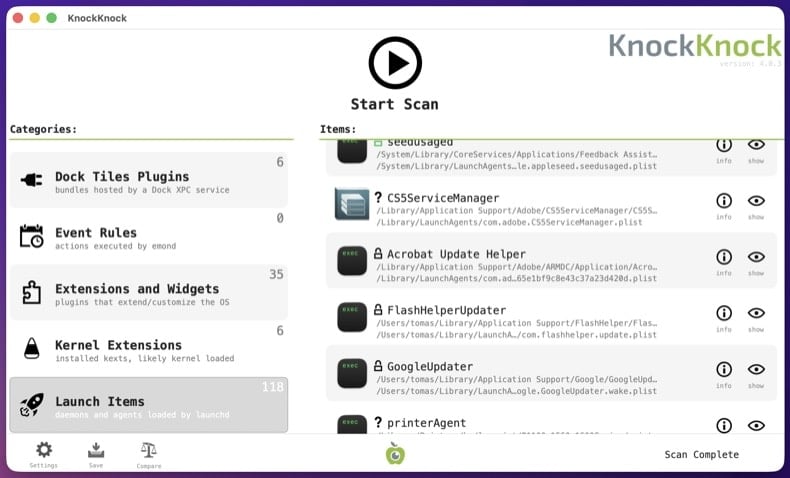
Mac malware sometimes redirects bank, Apple, antivirus, and update domains to attacker-controlled servers via the hosts file or DNS settings.
Hosts file: Open Terminal () and run:
sudo nano /etc/hosts
Legitimate entries are commented with #. Any uncommented IP-to-domain mapping is suspicious - especially redirects for apple.com, icloud.com, your bank, or your password manager. Press Ctrl+X to exit nano without saving.
DNS settings: → click your active connection (Wi-Fi or Ethernet) → Details → DNS. Confirm DNS servers point to your ISP, your router, or a known public resolver (Cloudflare 1.1.1.1, Google 8.8.8.8). Anything else has been hijacked.
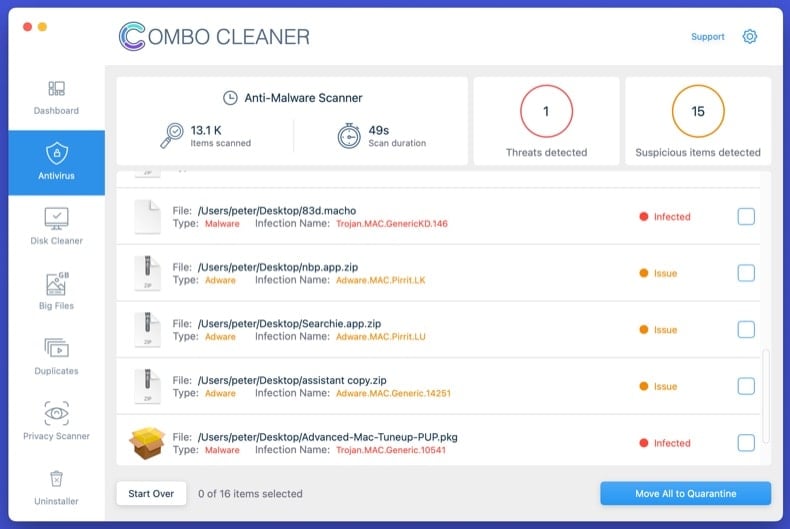
chase.com and you'll be at the attacker's clone.Open the .dmg you downloaded in Step 2. Drag the Combo Cleaner icon to the Applications folder. Open it from Launchpad (or Applications), allow it to update its threat database, then click Start Combo Scan and let it complete fully. Review what it found and apply the recommended actions.
Reopen KnockKnock (or revisit the Finder paths from Step 4). Anything you flagged that's still present hasn't been caught by the automated scan. For each remaining suspicious entry:
- Note the executable path the .plist references (right-click the .plist → Open With → TextEdit, look at
<key>Program</key>) - Move the .plist to Trash
- Move the executable file at the referenced path to Trash
- Empty the Trash
Then go to /Applications and remove any unwanted apps the malware installed. Common adware-installed app names: MPlayerX, NicePlayer, MyShopcoupon, Advanced Mac Cleaner, Mac Cleanup Pro. Drag them to Trash, then check ~/Library/Application Support/ for any folder with the same name and delete it too.
Mac adware persists in browser extensions, search engine settings, homepage, and notification permissions. Reset each browser you use:
- Safari: - uninstall anything you don't recognize. Then - restore your preferred default search engine. Then - remove all unfamiliar sites. For a deep reset: → "all history."
- Chrome: visit
chrome://settings/reset→ "Restore settings to their original defaults." Thenchrome://settings/content/notificationsand remove unfamiliar sites. - Firefox: open
about:support→ Refresh Firefox. Then check .
Review installed extensions in each browser and remove anything you don't recognize, especially extensions you didn't install yourself.
Some Mac malware tries to weaken built-in security to make persistence easier. Verify each is on:
- Gatekeeper (blocks unsigned apps): → scroll to Allow applications downloaded from → confirm "App Store and identified developers" is selected (not "Anywhere"). If the malware added itself to the allow-list, the entry appears in the same panel - remove it.
- FileVault (full-disk encryption): → confirm "FileVault is on for this disk." If it was disabled by malware, turn it back on.
- System Integrity Protection (SIP): open Terminal and run
csrutil status. Output should be "System Integrity Protection status: enabled." If disabled, you'll need to reboot into Recovery Mode and runcsrutil enablefrom there.
Then run macOS Software Update () to apply the latest security patches.
If the malware was an info-stealer (AMOS, Banshee, Cthulhu, or RustDoor families are extremely common on Mac), assume every password saved in your browser is compromised. So is your iCloud Keychain if it was unlocked while the malware ran. Change passwords from a different, known-clean device - your iPhone is fine if it's not infected.
Recommended order:
- Apple ID first - it controls iCloud, Find My, Apple Pay, and the App Store
- Primary email - the recovery hub for everything else
- Banking and financial accounts
- Password manager master password (if you use one)
- Crypto wallet seed phrases - if you store any seed phrase or private key on the Mac, AMOS specifically targets these. Move funds to a fresh wallet from a clean device immediately, before changing other passwords
- Social media, shopping, and remaining accounts
Where available, enable phishing-resistant multi-factor authentication (passkeys / hardware keys / authenticator apps) - SMS-based MFA is bypassable.
Reconnect to the network and run one final full scan with Combo Cleaner. Open and confirm nothing suspicious has reappeared. Open Activity Monitor and verify no unfamiliar process is using significant CPU.
Over the next 7 days, watch for symptom recurrence: high CPU when the Mac is idle, browser redirects returning, fake update prompts, or unfamiliar Login Items reappearing. If anything returns, you missed a persistence point and the procedure needs to be repeated - or you may have a deeper compromise that requires a clean macOS reinstall.
When to reinstall macOS instead
Manual removal isn't always the right answer. Reinstalling macOS from scratch is the only way to be 100% certain when:
- The malware reappears after every removal attempt
- A kernel extension or system-level component was modified
- Confirmed credential-theft malware ran with admin rights - the system likely has multiple unknown payloads
- The Mac is used for online banking, crypto wallets, business email, or anything where partial doubt isn't acceptable
macOS reinstall is straightforward: shut down → boot to Recovery (Apple Silicon: hold the Power button → Options; Intel: Cmd+R during boot) → Erase Mac → Reinstall macOS. Back up documents to external storage first, scan the backup with Combo Cleaner before restoring it, and reinstall apps fresh - never restore them from a backup of the infected system.
Important: Manual removal of Mac malware requires care - deleting the wrong .plist or system app can prevent macOS from booting normally. If you're not confident identifying system files from malicious files, run an automated scan with Combo Cleaner for Mac and stop there - that path catches the vast majority of consumer Mac malware without the risk of breaking macOS.
Frequently Asked Questions (FAQ)
My computer is infected with Shamos malware, should I format my storage device to get rid of it?
No, Shamos stealer's removal does not require formatting.
What are the biggest issues that Shamos malware can cause?
The dangers associated with an infection depend on the malware's abilities and the attackers' modus operandi. Shamos is a stealer that targets vulnerable data and can cause chain infections. Hence, the presence of this software can lead to system infections, severe privacy issues, financial losses, and identity theft.
What is the purpose of Shamos malware?
The most prevalent motivation behind malware attacks is financial gain. Other possible reasons include: attackers seeking amusement or realization of personal grudges, process disruption (e.g., websites, services, companies, organizations, etc.), hacktivism, and political/geopolitical motivations.
How did Shamos malware infiltrate my computer?
Shamos has been distributed through multiple ClickFix scam campaigns. Other distribution techniques are not unlikely. Generally, malware is proliferated via drive-by downloads, spam emails/messages, malvertising, dubious download channels (e.g., freeware and free file-hosting websites, P2P sharing networks, etc.), illegal software activation tools ("cracks"), pirated content, and fake updates. Some malicious programs can self-spread through local networks and removable storage devices.
Will Combo Cleaner protect me from malware?
Yes, Combo Cleaner is capable of detecting and removing practically all known malware infections. Remember that performing a complete system scan is essential since sophisticated malicious programs tend to hide deep within systems.
Share:
 Facebook
 X.com
X.com
 LinkedIn
 Copy Link

Tomas Meskauskas
Expert security researcher, professional malware analyst
I am passionate about computer security and technology. I have an experience of over 10 years working in various companies related to computer technical issue solving and Internet security. I have been working as an author and editor for pcrisk.com since 2010. Follow me on Twitter and LinkedIn to stay informed about the latest online security threats.
PCrisk security portal is brought by a company RCS LT.
Joined forces of security researchers help educate computer users about the latest online security threats. More information about the company RCS LT.
Our malware removal guides are free. However, if you want to support us you can send us a donation.
DonatePCrisk security portal is brought by a company RCS LT.
Joined forces of security researchers help educate computer users about the latest online security threats. More information about the company RCS LT.
Our malware removal guides are free. However, if you want to support us you can send us a donation.
Donate
▼ Show Discussion