
How to spot scams like "Federal Equity Trust Bank Compensation"
Phishing/ScamAlso Known As: Federal Equity Trust Bank Compensation advance-fee scam

Get free scan and check if your device is infected.
Remove it nowTo use full-featured product, you have to purchase a license for Combo Cleaner. Seven days free trial available. Combo Cleaner is owned and operated by RCS LT, the parent company of PCRisk.com.
What kind of scam is "Federal Equity Trust Bank Compensation"?
Our analysis shows that this email is a scam, specifically an advance-fee fraud. It is disguised as a message from the Federal Equity Trust Bank and states that the recipient can get money in exchange for cooperation. Typically, fraudsters use such messages to trick recipients into sending money or revealing sensitive information.
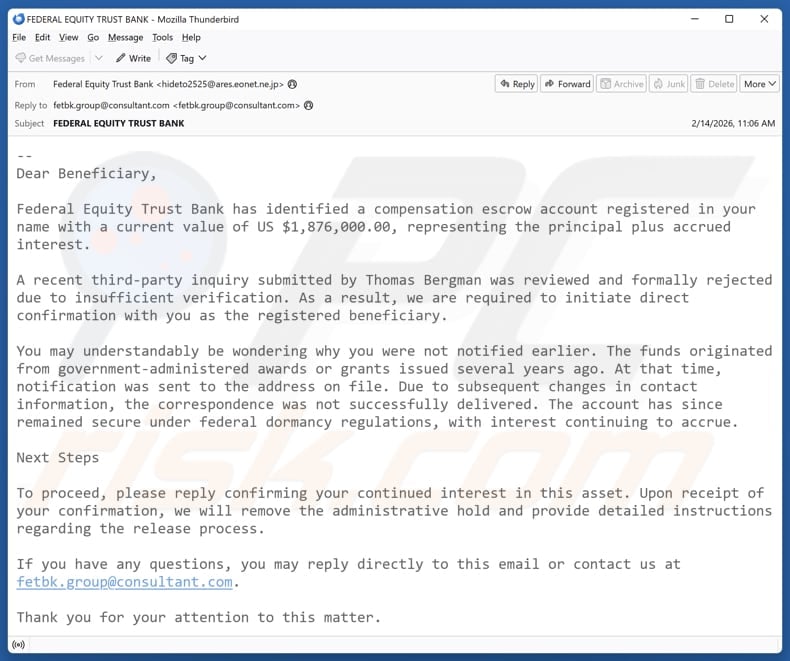
More about the "Federal Equity Trust Bank Compensation" scam email
The email claims that the recipient is a beneficiary of a compensation escrow account held by a bank, with a balance of US $1,876,000, including principal and accrued interest. It asserts that a recent third-party inquiry was rejected and that the recipient must confirm their interest to release the funds.
The message explains that the funds originated from government awards or grants from several years ago and were not delivered because the contact information was outdated. It instructs the recipient to reply to the email to remove an administrative hold and receive further instructions for accessing the money.
The email is presented as a message from Jonathan Reeves, a Private Client Relationship Manager at Federal Equity Trust Bank. Its goal is to trick the recipient into contacting scammers. The fraudsters behind it may attempt to extract details like full name, address, phone number, or banking information.
They may also try to trick the recipient into paying "fees" to get a certain amount of money. However, no money is ever transferred to victims, and all claims in such scam emails are not true.
| Name | Federal Equity Trust Bank Compensation Email Scam |
| Threat Type | Phishing, Scam, Social Engineering, Fraud |
| Fake Claim | The recipient can access money that has been held |
| Disguise | Message from Federal Equity Trust Bank |
| Symptoms | Unauthorized online purchases, changed online account passwords, identity theft, illegal access of the computer. |
| Distribution methods | Deceptive emails, rogue online pop-up ads, search engine poisoning techniques, misspelled domains. |
| Damage | Loss of sensitive private information, monetary loss, identity theft. |
| Malware Removal (Windows) |
To eliminate possible malware infections, scan your computer with legitimate antivirus software. Our security researchers recommend using Combo Cleaner. Download Combo CleanerTo use full-featured product, you have to purchase a license for Combo Cleaner. 7 days free trial available. Combo Cleaner is owned and operated by RCS LT, the parent company of PCRisk.com. |
Conclusion
This email is a scam designed to deceive recipients with false claims of unclaimed funds. Its purpose is to steal personal information or trick victims into paying fees, but they never receive anything in return. Falling for such scams can lead to identity theft, monetary loss, or other issues.
Sometimes, scam emails can be used to distribute malware. Examples of similar scams are "Santander Bank - Unclaimed Balance Email Scam", "Donation From My Company Email Scam", and "Cooperation To Receive Estate Email Scam".
How do spam campaigns infect computers?
Cybercriminals spread malware through email by using infected attachments or links. Attachments tend to be executable files, Word or Excel documents, PDFs, compressed files such as ZIP or RAR, scripts, or ISO files. A device typically becomes infected when the recipient opens these attachments or takes additional steps after opening them.
Malicious links can direct users to fake or compromised websites, where malware may download automatically or encourage the user to download and execute it, leading to infection.
How to avoid installation of malware?
Be careful with irrelevant, unexpected, or similar emails or messages from unknown senders - do not open attachments or click on links unless they are legitimate. Avoid downloading software, files, or applications from unofficial sources, and never use pirated programs, cracks, or key generators.
Keep your operating system and all applications up to date, and perform regular scans with reliable security tools. Additionally, avoid interacting with ads, pop-ups, or other clickable elements on unsafe websites, and do not allow these sites to send notifications.
Text presented in the "Federal Equity Trust Bank Compensation" email letter:
Subject: FEDERAL EQUITY TRUST BANK
--
Dear Beneficiary,Federal Equity Trust Bank has identified a compensation escrow account registered in your name with a current value of US $1,876,000.00, representing the principal plus accrued interest.
A recent third-party inquiry submitted by Thomas Bergman was reviewed and formally rejected due to insufficient verification. As a result, we are required to initiate direct confirmation with you as the registered beneficiary.
You may understandably be wondering why you were not notified earlier. The funds originated from government-administered awards or grants issued several years ago. At that time, notification was sent to the address on file. Due to subsequent changes in contact information, the correspondence was not successfully delivered. The account has since remained secure under federal dormancy regulations, with interest continuing to accrue.
Next Steps
To proceed, please reply confirming your continued interest in this asset. Upon receipt of your confirmation, we will remove the administrative hold and provide detailed instructions regarding the release process.
If you have any questions, you may reply directly to this email or contact us at fetbk.group@consultant.com.
Thank you for your attention to this matter.
Sincerely,
Jonathan Reeves.
Senior Private Client Relationship Manager
Federal Equity Trust Bank
Instant automatic malware removal:
Manual threat removal might be a lengthy and complicated process that requires advanced IT skills. Combo Cleaner is a professional automatic malware removal tool that is recommended to get rid of malware. Download it by clicking the button below:
DOWNLOAD Combo CleanerBy downloading any software listed on this website you agree to our Privacy Policy and Terms of Use. To use full-featured product, you have to purchase a license for Combo Cleaner. 7 days free trial available. Combo Cleaner is owned and operated by RCS LT, the parent company of PCRisk.com.
Quick menu:
- What is Federal Equity Trust Bank Compensation advance-fee scam?
- Types of malicious emails.
- How to spot a malicious email?
- What to do if you fell for an email scam?
Types of malicious emails:
 Phishing Emails
Most commonly, cybercriminals use deceptive emails to trick Internet users into giving away their sensitive private information, for example, login information for various online services, email accounts, or online banking information.
Such attacks are called phishing. In a phishing attack, cybercriminals usually send an email message with some popular service logo (for example, Microsoft, DHL, Amazon, Netflix), create urgency (wrong shipping address, expired password, etc.), and place a link which they hope their potential victims will click on.
After clicking the link presented in such email message, victims are redirected to a fake website that looks identical or extremely similar to the original one. Victims are then asked to enter their password, credit card details, or some other information that gets stolen by cybercriminals.
 Emails with Malicious Attachments
Another popular attack vector is email spam with malicious attachments that infect users' computers with malware. Malicious attachments usually carry trojans that are capable of stealing passwords, banking information, and other sensitive information.
In such attacks, cybercriminals' main goal is to trick their potential victims into opening an infected email attachment. To achieve this goal, email messages usually talk about recently received invoices, faxes, or voice messages.
If a potential victim falls for the lure and opens the attachment, their computers get infected, and cybercriminals can collect a lot of sensitive information.
While it's a more complicated method to steal personal information (spam filters and antivirus programs usually detect such attempts), if successful, cybercriminals can get a much wider array of data and can collect information for a long period of time.
 Sextortion Emails
This is a type of phishing. In this case, users receive an email claiming that a cybercriminal could access the webcam of the potential victim and has a video recording of one's masturbation.
To get rid of the video, victims are asked to pay a ransom (usually using Bitcoin or another cryptocurrency). Nevertheless, all of these claims are false - users who receive such emails should ignore and delete them.
How to spot a malicious email?
While cyber criminals try to make their lure emails look trustworthy, here are some things that you should look for when trying to spot a phishing email:
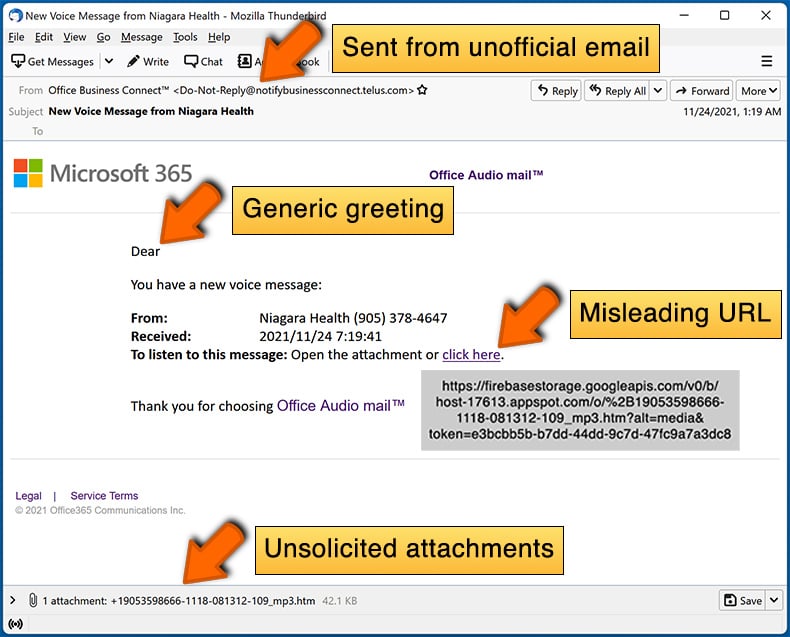
- Check the sender's ("from") email address: Hover your mouse over the "from" address and check if it's legitimate. For example, if you received an email from Microsoft, be sure to check if the email address is @microsoft.com and not something suspicious like @m1crosoft.com, @microsfot.com, @account-security-noreply.com, etc.
- Check for generic greetings: If the greeting in the email is "Dear user", "Dear @youremail.com", "Dear valued customer", this should raise suspiciousness. Most commonly, companies call you by your name. Lack of this information could signal a phishing attempt.
- Check the links in the email: Hover your mouse over the link presented in the email, if the link that appears seems suspicious, don't click it. For example, if you received an email from Microsoft and the link in the email shows that it will go to firebasestorage.googleapis.com/v0... you shouldn't trust it. It's best not to click any links in the emails but to visit the company website that sent you the email in the first place.
- Don't blindly trust email attachments: Most commonly, legitimate companies will ask you to log in to their website and to view any documents there; if you received an email with an attachment, it's a good idea to scan it with an antivirus application. Infected email attachments are a common attack vector used by cybercriminals.
To minimise the risk of opening phishing and malicious emails we recommend using Combo Cleaner Antivirus for Windows.
Example of a spam email:
What to do if you fell for an email scam?
- If you clicked on a link in a phishing email and entered your password - be sure to change your password as soon as possible. Usually, cybercriminals collect stolen credentials and then sell them to other groups that use them for malicious purposes. If you change your password in a timely manner, there's a chance that criminals won't have enough time to do any damage.
- If you entered your credit card information - contact your bank as soon as possible and explain the situation. There's a good chance that you will need to cancel your compromised credit card and get a new one.
- If you see any signs of identity theft - you should immediately contact the Federal Trade Commission. This institution will collect information about your situation and create a personal recovery plan.
- If you opened a malicious attachment - your computer is probably infected, you should scan it with a reputable antivirus application. For this purpose, we recommend using Combo Cleaner Antivirus for Windows.
- Help other Internet users - report phishing emails to Anti-Phishing Working Group, FBI’s Internet Crime Complaint Center, National Fraud Information Center and U.S. Department of Justice.
Frequently Asked Questions (FAQ)
Why did I receive this email?
Such emails are commonly sent to mailing lists compiled from leaked records or fraudulent platforms, rather than targeting specific individuals.
I have provided my personal information when tricked by a scam email, what should I do?
If there is a possibility that an account has been compromised, the password should be changed immediately. If any personal or financial information may have been exposed, the relevant authorities or service providers should be contacted.
I have downloaded and opened a malicious file attached to an email, is my computer infected?
Certain file types, such as executables, can run malicious code immediately after being opened. Others, including Word or Excel documents, usually require additional user actions, like enabling macros, before the threat is activated. The likelihood of infection depends on the type of file involved.
I have read the email but did not open the attachment, is my computer infected?
Simply opening an email does not compromise a device, even if the email includes a malicious attachment or link.
Will Combo Cleaner remove malware infections that were present in email attachment?
Combo Cleaner can detect and remove most known malware, but running a full system scan is recommended to identify more advanced or hidden malware.
Share:
 Facebook
 X.com
X.com
 LinkedIn
 Copy Link

Tomas Meskauskas
Expert security researcher, professional malware analyst
I am passionate about computer security and technology. I have an experience of over 10 years working in various companies related to computer technical issue solving and Internet security. I have been working as an author and editor for pcrisk.com since 2010. Follow me on Twitter and LinkedIn to stay informed about the latest online security threats.
PCrisk security portal is brought by a company RCS LT.
Joined forces of security researchers help educate computer users about the latest online security threats. More information about the company RCS LT.
Our malware removal guides are free. However, if you want to support us you can send us a donation.
DonatePCrisk security portal is brought by a company RCS LT.
Joined forces of security researchers help educate computer users about the latest online security threats. More information about the company RCS LT.
Our malware removal guides are free. However, if you want to support us you can send us a donation.
Donate
▼ Show Discussion