
How to revoke permissions given to beringlousnet.com
Notification SpamAlso Known As: Ads by beringlousnet.com

Get free scan and check if your device is infected.
Remove it nowTo use full-featured product, you have to purchase a license for Combo Cleaner. Seven days free trial available. Combo Cleaner is owned and operated by RCS LT, the parent company of PCRisk.com.
What kind of page is beringlousnet[.]com?
We have inspected beringlousnet[.]com and determined that it is designed to deceive visitors into allowing notifications. The site relies on clickbait tactics to gain permission to send these notifications. Once allowed, pages like beringlousnet[.]com typically flood users with intrusive ads, fake alerts, and other misleading messages.
![beringlousnet[.]com ads](/images/stories/screenshots202602/beringlousnet-com-ads-main.jpg)
Beringlousnet[.]com in detail
The clickbait method used by beringlousnet[.]com involves a deceptive message claiming that visitors have to click "Allow" to confirm that they are not robots. Trustworthy websites never instruct visitors to click "Allow" for verification or similar reasons. Taking this step while visiting beringlousnet[.]com allows the site to send notifications.
Our inspection has revealed that notifications from beringlousnet[.]com can contain fake messages. These notifications are presented as alerts from McAfee Total Protection (this tool is legitimate, and its developer is not associated with fraudulent notifications). They claim that the system is at high risk due to corrupted or modified files.
They also warn that personal data could be exposed and urge the user to run a full scan to fix the problem. Additionally, these notifications suggest that virus protection has been disabled and that immediate action is required, offering options to either start a scan or ignore the risk.
The purpose of these fake alerts is to trick users into interacting with them. Doing so can take users to untrustworthy sites. Opened pages can be designed to trick visitors into transferring money to scammers or disclosing sensitive information, such as login details, credit card information, or other personal details.
Also, those sites can distribute unwanted and even malicious applications. Thus, agreeing to get notifications from beringlousnet[.]com can lead to various issues.
| Name | Ads by beringlousnet.com |
| Threat Type | Push notifications ads, Unwanted ads, Pop-up ads |
| Detection Names | N/A (VirusTotal) |
| Serving IP Address | 44.218.245.125 |
| Symptoms | Seeing advertisements not originating from the sites you are browsing. Intrusive pop-up ads. Decreased Internet browsing speed. |
| Distribution Methods | Deceptive pop-up ads, false claims within visited websites, unwanted applications (adware) |
| Damage | Decreased computer performance, browser tracking - privacy issues, possible additional malware infections. |
| Malware Removal (Windows) |
To eliminate possible malware infections, scan your computer with legitimate antivirus software. Our security researchers recommend using Combo Cleaner. Download Combo CleanerTo use full-featured product, you have to purchase a license for Combo Cleaner. 7 days free trial available. Combo Cleaner is owned and operated by RCS LT, the parent company of PCRisk.com. |
More on similar pages
Users are often redirected to sites like beringlousnet[.]com after clicking buttons, pop-ups, or links on untrustworthy websites. They may also land on these pages through deceptive emails, intrusive ads generated by adware, or unreliable advertising networks. Such networks are commonly linked to torrent sites, adult content pages, and illegal streaming platforms.
Additional examples of sites like beringlousnet[.]com are foricarm[.]com, stratochainedge[.]com, and zravonira[.]com.
How did beringlousnet[.]com gain permission to deliver spam notifications?
A website can send notifications only after a user grants permission, typically by clicking an "Allow" button or a similar option. If you are receiving notifications from beringlousnet[.]com, it means that permission was granted while visiting the site.
How to prevent deceptive sites from delivering spam notifications?
Websites that urge visitors to click "Allow" to verify they are human, watch a video, confirm their age, or complete similar actions are using deceptive tactics. These sites are misleading and are meant to trick users into enabling notifications. Instead of clicking "Allow", users should close the page or choose "Block" to avoid receiving unwanted notifications.
If you are receiving unwanted notifications, we recommend running a scan with Combo Cleaner Antivirus for Windows to automatically eliminate them.
Appearance of beringlousnet[.]com website (GIF):
![beringlousnet[.]com website appearance (GIF)](/images/stories/screenshots202602/beringlousnet-com-ads-appearance.gif)
Notification from beringlousnet[.]com:
![beringlousnet[.]com notification](/images/stories/screenshots202602/beringlousnet-com-ads-notification.jpg)
Instant automatic malware removal:
Manual threat removal might be a lengthy and complicated process that requires advanced IT skills. Combo Cleaner is a professional automatic malware removal tool that is recommended to get rid of malware. Download it by clicking the button below:
DOWNLOAD Combo CleanerBy downloading any software listed on this website you agree to our Privacy Policy and Terms of Use. To use full-featured product, you have to purchase a license for Combo Cleaner. 7 days free trial available. Combo Cleaner is owned and operated by RCS LT, the parent company of PCRisk.com.
Quick menu:
- What is Ads by beringlousnet.com?
- STEP 1. Remove spam notifications from Google Chrome
- STEP 2. Remove spam notifications from Google Chrome (Android)
- STEP 3. Remove spam notifications from Mozilla Firefox
- STEP 4. Remove spam notifications from Microsoft Edge
- STEP 5. Remove spam notifications from Safari (macOS)
Disable unwanted browser notifications:
Video showing how to disable web browser notifications:
 Remove spam notifications from Google Chrome:
Click the Menu button (three dots) on the right upper corner of the screen and select "Settings". In the opened window select "Privacy and security", then click on "Site Settings" and choose "Notifications".
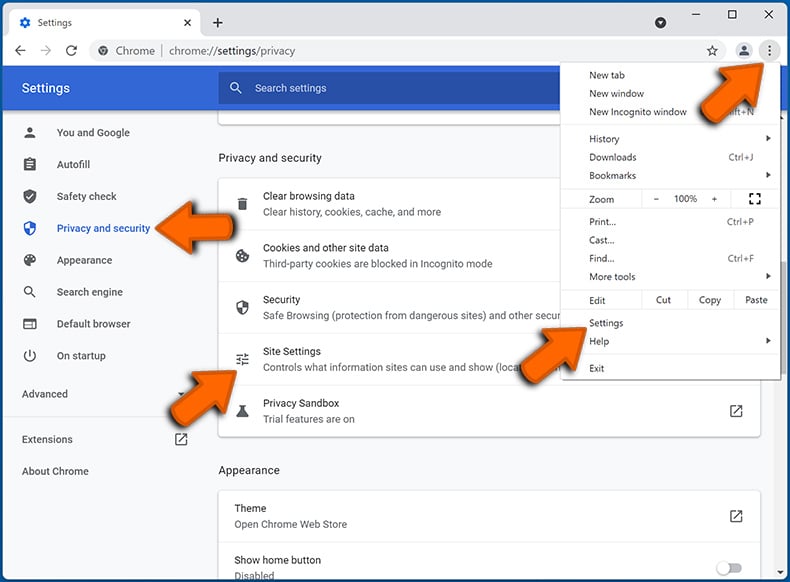
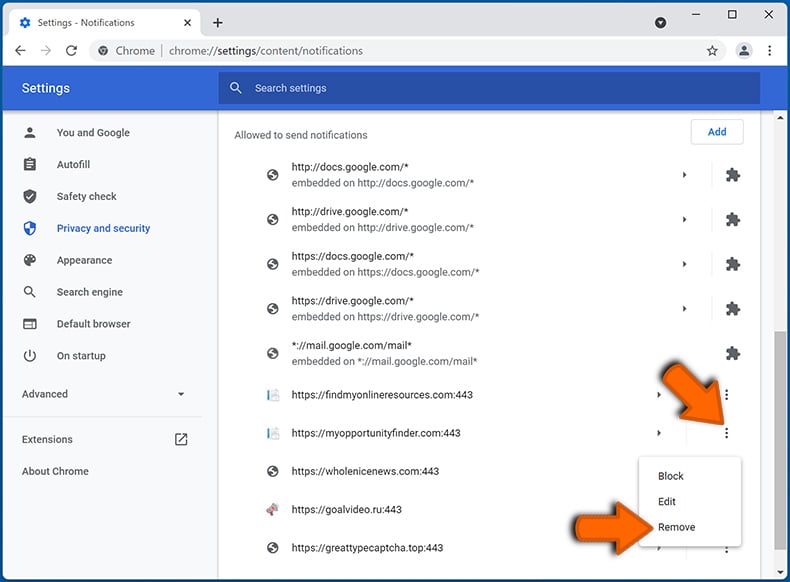
In the "Allowed to send notifications" list search for websites that you want to stop receiving notifications from. Click on the three dots icon near the website URL and click "Block" or "Remove" (if you click "Remove" and visit the malicious site once more, it will ask to enable notifications again).
 Remove spam notifications from Google Chrome (Android):
Tap the Menu button (three dots) on the right upper corner of the screen and select "Settings". Scroll down, tap on "Site settings" and then "Notifications".
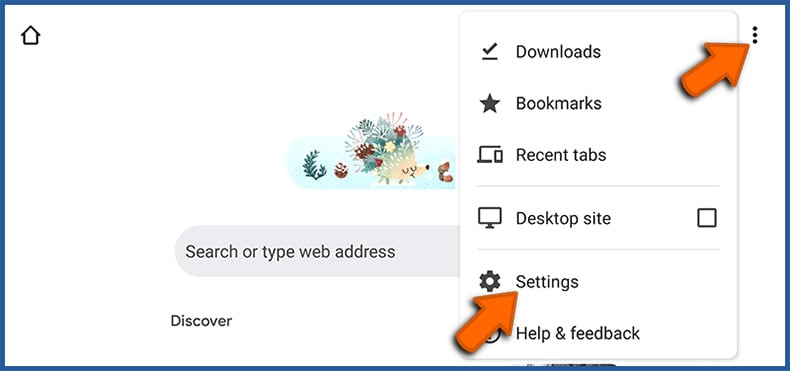
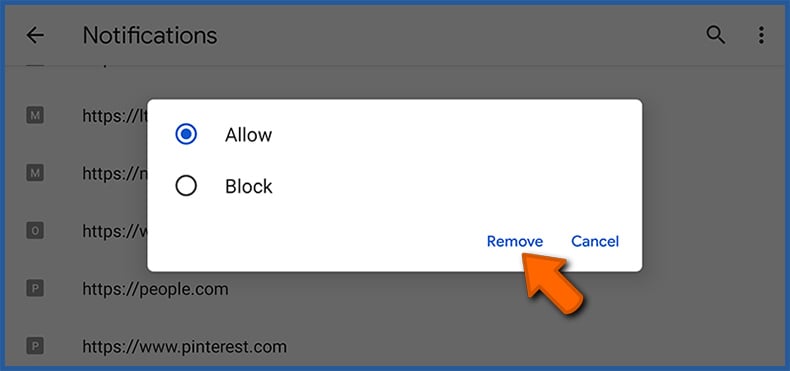
In the opened window, locate all suspicious URLs and tap on them one-by-one. Once the pop-up shows up, select either "Block" or "Remove" (if you tap "Remove" and visit the malicious site once more, it will ask to enable notifications again).
 Remove spam notifications from Mozilla Firefox:
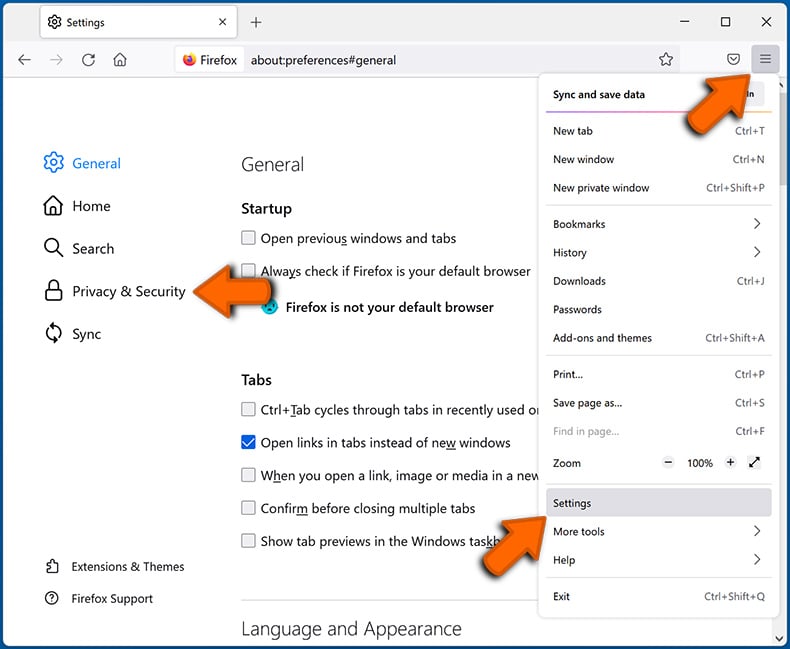
Click the Menu button (three bars) on the right upper corner of the screen. Select "Settings" and click on "Privacy & Security" in the toolbar on the left hand side of the screen. Scroll down to the "Permissions" section and click the "Settings" button next to "Notifications".
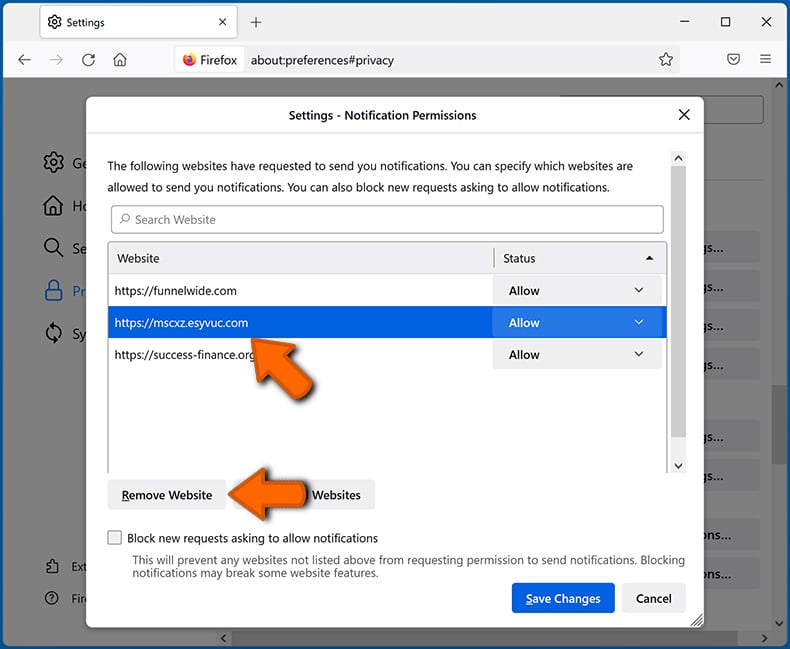
In the opened window, locate all suspicious URLs and block them using the drop-down menu or either remove them by clicking "Remove Website" at the bottom of the window (if you click "Remove Website" and visit the malicious site once more, it will ask to enable notifications again).
 Remove spam notifications from Microsoft Edge:
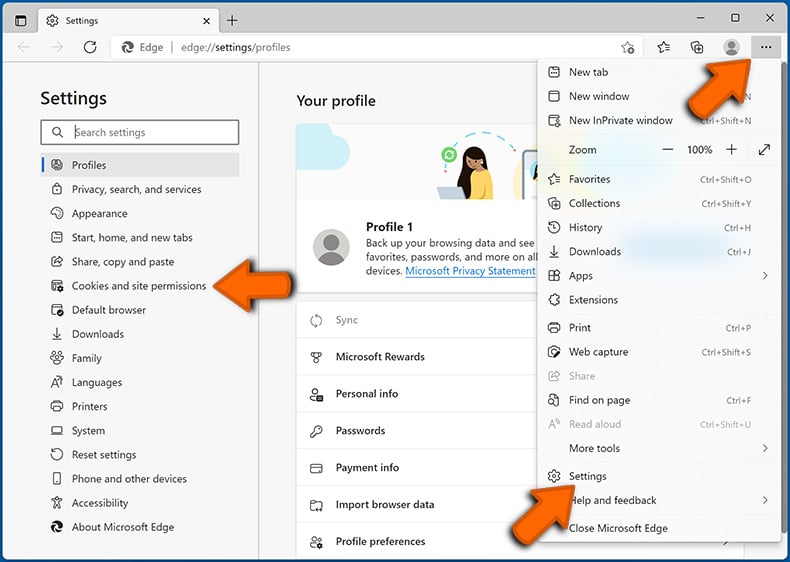
Click the menu button (three dots) on the right upper corner of the Edge window and select "Settings". Click on "Cookies and site permissions" in the toolbar on the left hand side of the screen and select "Notifications".
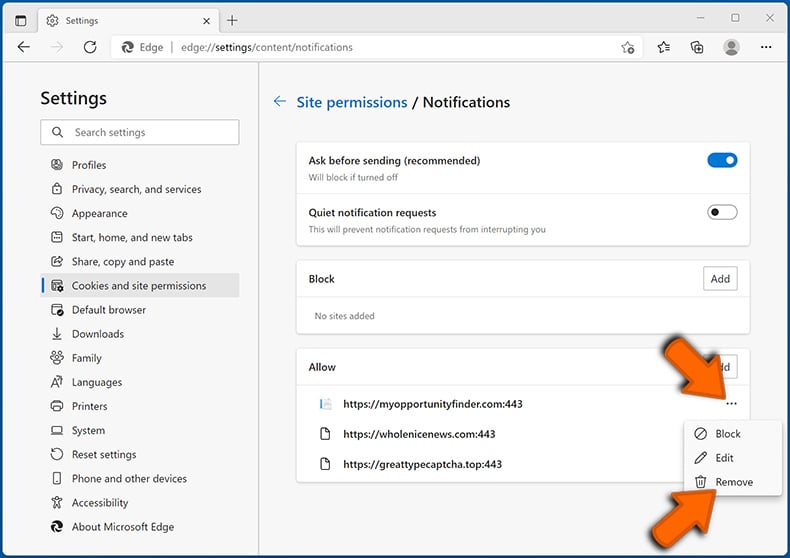
Click three dots on the right hand side of each suspicious URL under "Allow" section and click "Block" or "Remove" (if you click "Remove" and visit the malicious site once more, it will ask to enable notifications again).
 Remove spam notifications from Safari (macOS):
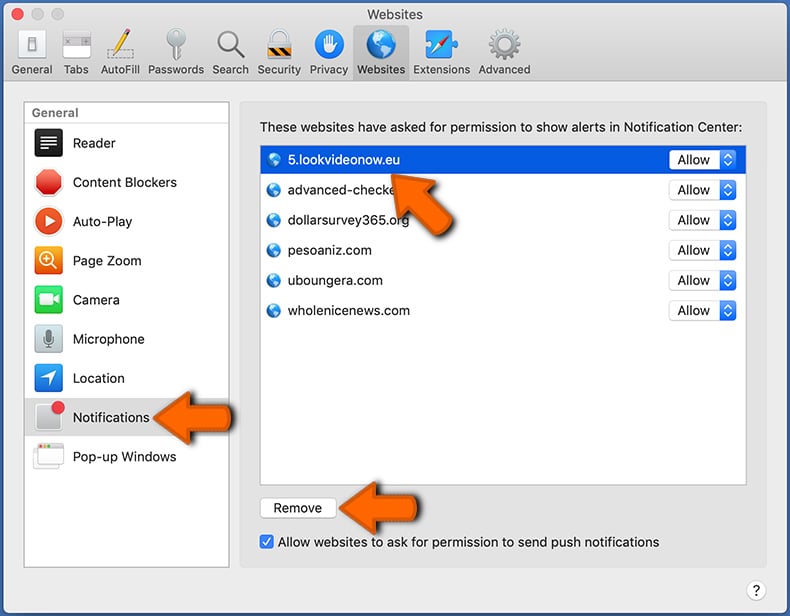
Click "Safari" button on the left upper corner of the screen and select "Preferences...". Select the "Websites" tab and then select "Notifications" section on the left pane.
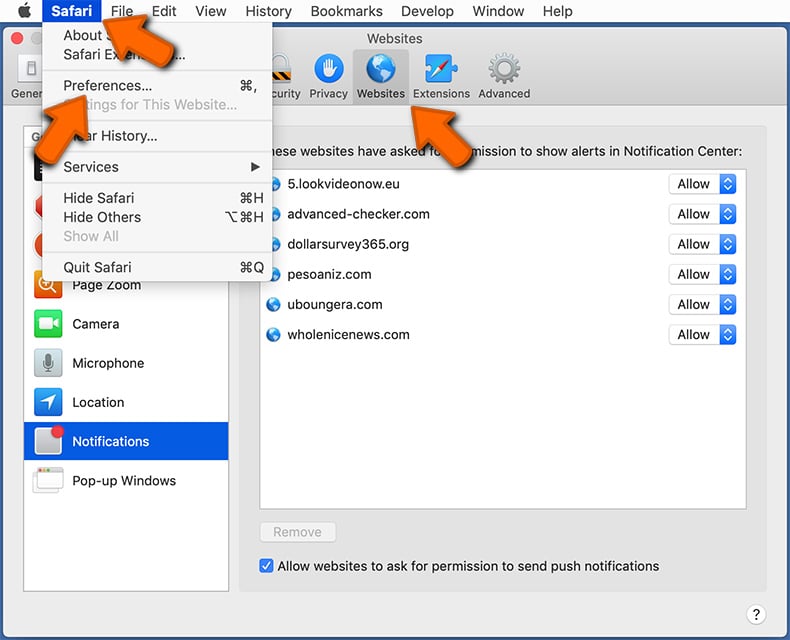
Check for suspicious URLs and apply the "Deny" option using the drop-down menu or either remove them by clicking "Remove" at the bottom of the window (if you click "Remove" and visit the malicious site once more, it will ask to enable notifications again)
How to avoid browser notification spam?
Internet users should be very skeptical when being asked to allow notifications. While this is a useful feature that allows you to receive timely news from websites you like, deceptive marketers frequently abuse it.
Only allow notifications from websites that you fully trust. For added security - use an anti-malware application with a real-time web browsing monitor to block shady websites that tries to trick you into allowing spam notifications. We recommend using Combo Cleaner Antivirus for Windows.
Frequently Asked Questions (FAQ)
Why am I seeing ads (browser notifications) delivered by beringlousnet[.]com in the right lower corner of my desktop?
Beringlousnet[.]com cannot send notifications without permission. Usually, browsers provide options like "Allow" when websites want to show notifications. Thus, if notifications from beringlousnet[.]com are appearing, it means that the site has been permitted to send them.
I have clicked on notification ads, is my computer infected?
Notifications from shady websites can direct users to malicious sites. However, notifications cannot directly infect systems.
Is beringlousnet[.]com a virus?
Websites like beringlousnet[.]com are not viruses. They are commonly used to promote other dubious pages, shady applications, scams, etc.
Will Combo Cleaner remove beringlousnet[.]com ads automatically or manual steps are still required?
Combo Cleaner will scan your computer, revoke all permissions previously granted to beringlousnet[.]com, and block any future access to the page. No further action will be needed.
Share:
 Facebook
 X.com
X.com
 LinkedIn
 Copy Link

Tomas Meskauskas
Expert security researcher, professional malware analyst
I am passionate about computer security and technology. I have an experience of over 10 years working in various companies related to computer technical issue solving and Internet security. I have been working as an author and editor for pcrisk.com since 2010. Follow me on Twitter and LinkedIn to stay informed about the latest online security threats.
PCrisk security portal is brought by a company RCS LT.
Joined forces of security researchers help educate computer users about the latest online security threats. More information about the company RCS LT.
Our malware removal guides are free. However, if you want to support us you can send us a donation.
DonatePCrisk security portal is brought by a company RCS LT.
Joined forces of security researchers help educate computer users about the latest online security threats. More information about the company RCS LT.
Our malware removal guides are free. However, if you want to support us you can send us a donation.
Donate
▼ Show Discussion