
What is the "Chrome Web Store Copyright Removal Request" scam
Phishing/ScamAlso Known As: Chrome Web Store Copyright Removal Request phishing scam

Get free scan and check if your device is infected.
Remove it nowTo use full-featured product, you have to purchase a license for Combo Cleaner. Seven days free trial available. Combo Cleaner is owned and operated by RCS LT, the parent company of PCRisk.com.
What is the "Chrome Web Store Copyright Removal Request" scam?
Malwarebytes researcher Stefan Dasic analyzed a phishing campaign targeting Chrome browser extension developers. The site at dmca-chrome-extensions[.]click impersonates the Chrome Web Store Developer Policy Center and uses a fake Google sign-in overlay to steal the victim's account credentials. Google and the Chrome Web Store have no connection to this scheme.
![Chrome Web Store Copyright Removal Request scam page at dmca-chrome-extensions[.]click](/images/stories/screenshots202606/chrome-web-store-copyright-removal-request-scam-main.jpg)
"Chrome Web Store Copyright Removal Request" scam in detail
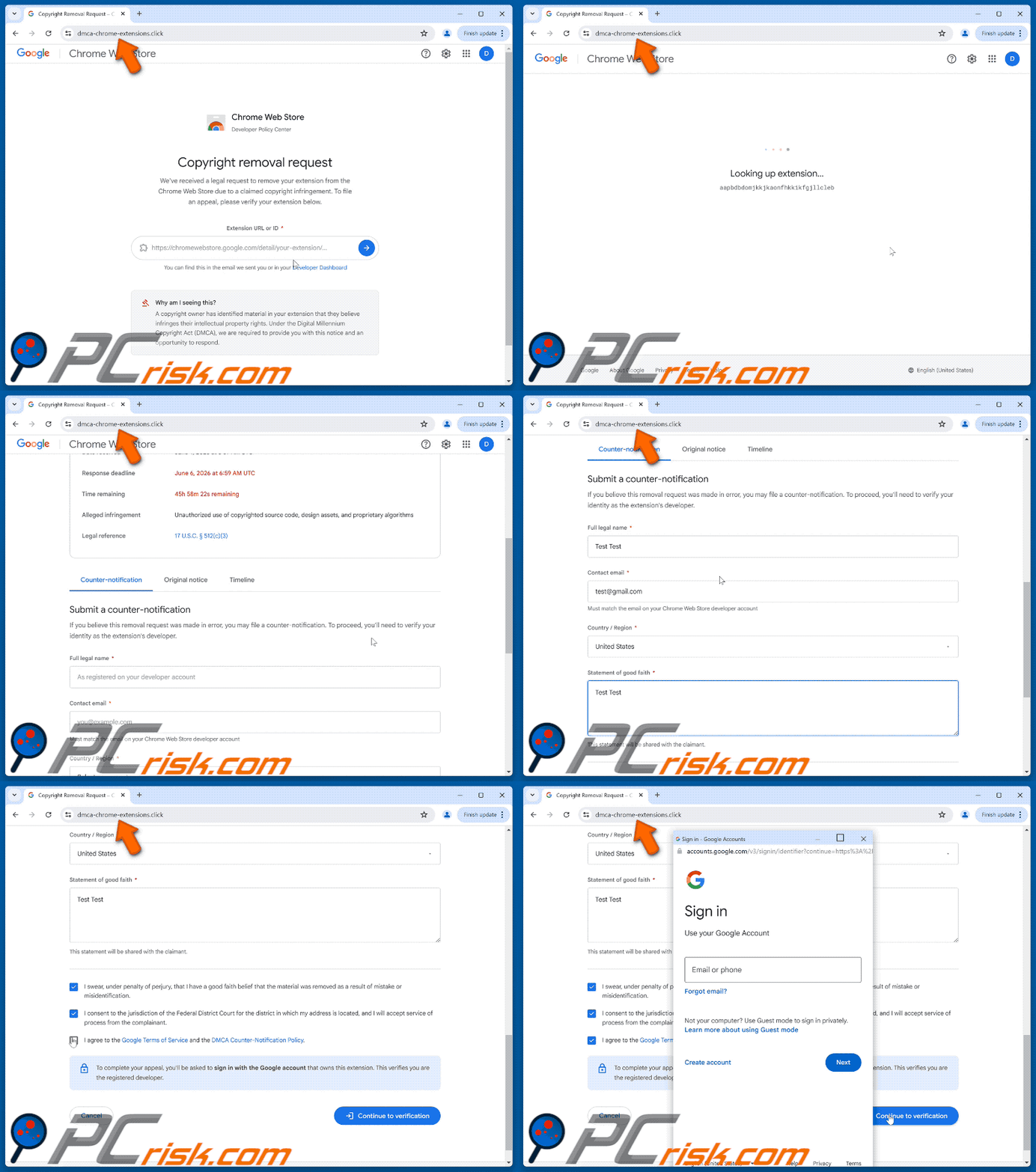
The fake site closely replicates the look of the Chrome Web Store Developer Policy Center. When a developer enters their extension's ID or URL into the landing page, the site silently fetches the real extension name and icon from the public Chrome Web Store. This data is then displayed in the fake complaint, making the notice appear specific and personally targeted at the victim.
The complaint page presents a fabricated summary: a formatted complaint ID, a claimant listed as "Copyright Agent, via Google Legal Investigations Support", specific dates, and a description of the alleged infringement. A live countdown timer showing roughly 48 hours creates pressure to act before the extension is "permanently removed". All of this information is entirely invented.
To file the supposed counter-notification, visitors fill out a form requesting their full legal name, contact email address, and country. The form includes pre-checked legal disclaimers in authentic DMCA language, including statements about perjury and Federal Court jurisdiction. A note at the bottom warns that developers must sign in with their Google account to verify ownership of the extension.
Clicking "Continue to verification" triggers a pop-up that appears to be a Google account sign-in window, complete with a fake address bar showing accounts.google.com. This window is a fabricated overlay rendered inside the page itself. The real browser address bar still shows the scam domain, and unlike genuine browser pop-ups, the fake window cannot be dragged off-screen and disappears when the browser is minimized.
Any Google credentials entered into this overlay go directly to the attackers. A stolen Google account gives access to Gmail, Google Drive, and every other service linked to that address. For extension developers, account compromise can allow criminals to modify or take over published Chrome extensions, potentially pushing malicious updates to all users who have those extensions installed.
| Name | Chrome Web Store Copyright Removal Request phishing scam |
| Threat Type | Phishing, Scam, Social Engineering, Fraud |
| Fake Claim | The visitor's Chrome extension has received a DMCA copyright removal request and must be appealed within 48 hours |
| Disguise | Legitimate Chrome Web Store DMCA counter-notification portal |
| Related Domain | dmca-chrome-extensions[.]click |
| Threat Status (dmca-chrome-extensions[.]click) | PCrisk Website Scanner Results |
| Symptoms | Fake error messages, fake system warnings, pop-up errors, hoax computer scan. |
| Distribution methods | Compromised websites, rogue online pop-up ads, potentially unwanted applications. |
| Damage | Loss of sensitive private information, monetary loss, identity theft, possible malware infections. |
| Malware Removal (Windows) |
To eliminate possible malware infections, scan your computer with legitimate antivirus software. Our security researchers recommend using Combo Cleaner. Download Combo CleanerTo use full-featured product, you have to purchase a license for Combo Cleaner. 7 days free trial available. Combo Cleaner is owned and operated by RCS LT, the parent company of PCRisk.com. |
Online scams in general
Phishing campaigns aimed at software developers are less common than consumer-facing scams, but they are often more carefully crafted. Developers manage accounts with elevated access to published software, meaning a single compromised credential can affect not just the developer but every user of their product. Some examples of similar scams are "Facebook Page Has Infringed Copyright Information" and "Instagram Copyright Infringement".
How did I open a scam website?
Most people who land on this page receive a phishing email first. These messages are crafted to look like official Chrome Web Store notifications, using Google branding, formatted complaint IDs, and policy language that appears genuine. Following the link in such an email leads directly to the scam page.
Links to phishing pages like this can also appear on compromised websites, in deceptive ads, or through messages in developer forums and communities. Occasionally, adware installed on the device may redirect users to similar credential-stealing pages without any prior action.
How to avoid visiting scam pages?
Always verify copyright or policy notices by logging in directly to the official Chrome Web Store Developer Dashboard, rather than following links in emails. Legitimate notifications from Google about extensions appear inside the Dashboard itself, never through third-party domains like dmca-chrome-extensions[.]click.
Do not allow untrustworthy websites to send browser notifications, and avoid clicking links in unexpected emails, especially those creating urgency around legal deadlines. Download software only from official sources and keep all installed applications updated. If your device shows signs of unwanted redirects or behavior, run a scan with Combo Cleaner Antivirus for Windows to remove any threats automatically.
Text presented in the "Chrome Web Store Copyright Removal Request" scam page:
Chrome Web Store
Developer Policy Center
Copyright removal request
We've received a legal request to remove your extension from the Chrome Web Store due to a claimed copyright infringement. To file an appeal, please verify your extension below.
Extension URL or ID *
-
You can find this in the email we sent you or in your Developer Dashboard
Why am I seeing this?
A copyright owner has identified material in your extension that they believe infringes their intellectual property rights. Under the Digital Millennium Copyright Act (DMCA), we are required to provide you with this notice and an opportunity to respond.
The complaint details page, showing a fabricated complaint summary and a 48-hour countdown timer (legitimate Google Translate extension used as an example):
![Chrome Web Store Copyright Removal Request scam complaint details page at dmca-chrome-extensions[.]click](/images/stories/screenshots202606/chrome-web-store-copyright-removal-request-scam-second-page.jpg)
Text presented in the complaint details section:
Your extension has received a copyright removal request
If you believe this request was made in error, you can submit a counter-notification below. You have 48 hours to respond before the extension is permanently removed.45h 34m 10s remaining
check
Notice received Verify identity Counter-notification Resolution
-Extension ID:
-
Removal pending — Appeal required View on Chrome Web StoreComplaint details
Complaint ID DMCA-CWS-2026-0604-2527
Claimant Copyright Agent, via Google Legal Investigations Support
Date received June 4, 2026 at 6:59 AM UTC
Response deadline June 6, 2026 at 6:59 AM UTC
Time remaining 45h 34m 10s remaining
Alleged infringement Unauthorized use of copyrighted source code, design assets, and proprietary algorithms
Legal reference 17 U.S.C. § 512(c)(3)
Full appearance of "Chrome Web Store Copyright Removal Request" scam website (GIF):
Instant automatic malware removal:
Manual threat removal might be a lengthy and complicated process that requires advanced IT skills. Combo Cleaner is a professional automatic malware removal tool that is recommended to get rid of malware. Download it by clicking the button below:
DOWNLOAD Combo CleanerBy downloading any software listed on this website you agree to our Privacy Policy and Terms of Use. To use full-featured product, you have to purchase a license for Combo Cleaner. 7 days free trial available. Combo Cleaner is owned and operated by RCS LT, the parent company of PCRisk.com.
Quick menu:
- What is Chrome Web Store Copyright Removal Request phishing scam?
- How to identify a pop-up scam?
- How do pop-up scams work?
- How to remove fake pop-ups?
- How to prevent fake pop-ups?
- What to do if you fell for a pop-up scam?
How to identify a pop-up scam?
Pop-up windows with various fake messages are a common type of lures cybercriminals use. They collect sensitive personal data, trick Internet users into calling fake tech support numbers, subscribe to useless online services, invest in shady cryptocurrency schemes, etc.
While in the majority of cases these pop-ups don't infect users' devices with malware, they can cause direct monetary loss or could result in identity theft.
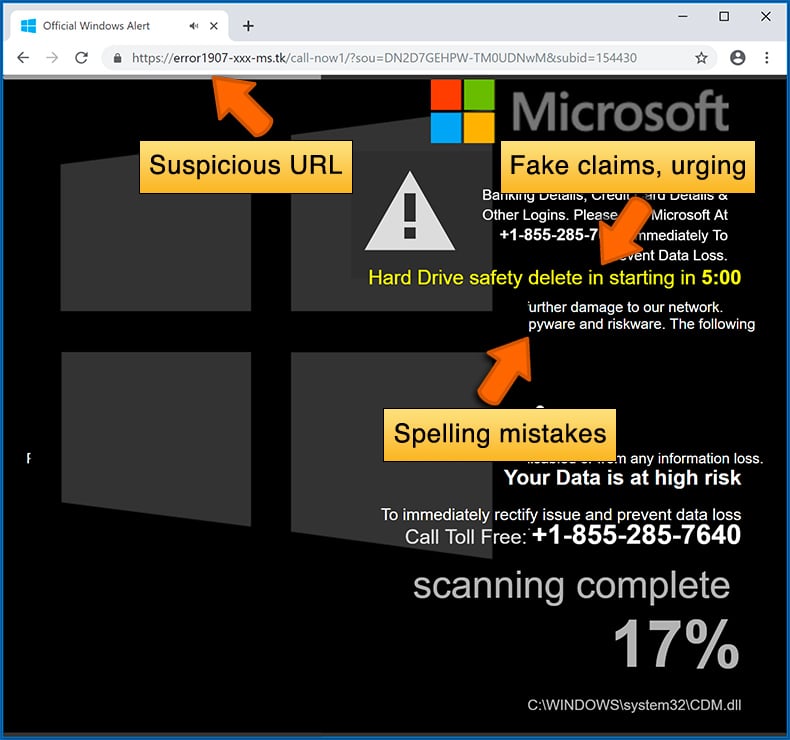
Cybercriminals strive to create their rogue pop-up windows to look trustworthy, however, scams typically have the following characteristics:
- Spelling mistakes and non-professional images - Closely inspect the information displayed in a pop-up. Spelling mistakes and unprofessional images could be a sign of a scam.
- Sense of urgency - Countdown timer with a couple of minutes on it, asking you to enter your personal information or subscribe to some online service.
- Statements that you won something - If you haven't participated in a lottery, online competition, etc., and you see a pop-up window stating that you won.
- Computer or mobile device scan - A pop-up window that scans your device and informs of detected issues - is undoubtedly a scam; webpages cannot perform such actions.
- Exclusivity - Pop-up windows stating that only you are given secret access to a financial scheme that can quickly make you rich.
Example of a pop-up scam:
How do pop-up scams work?
Cybercriminals and deceptive marketers usually use various advertising networks, search engine poisoning techniques, and shady websites to generate traffic to their pop-ups. Users land on their online lures after clicking on fake download buttons, using a torrent website, or simply clicking on an Internet search engine result.
Based on users' location and device information, they are presented with a scam pop-up. Lures presented in such pop-ups range from get-rich-quick schemes to fake virus scans.
How to remove fake pop-ups?
In most cases, pop-up scams do not infect users' devices with malware. If you encountered a scam pop-up, simply closing it should be enough. In some cases scam, pop-ups may be hard to close; in such cases - close your Internet browser and restart it.
In extremely rare cases, you might need to reset your Internet browser. For this, use our instructions explaining how to reset Internet browser settings.
How to prevent fake pop-ups?
To prevent seeing pop-up scams, you should visit only reputable websites. Torrent, Crack, free online movie streaming, YouTube video download, and other websites of similar reputation commonly redirect Internet users to pop-up scams.
To minimize the risk of encountering pop-up scams, you should keep your Internet browsers up-to-date and use reputable anti-malware application. For this purpose, we recommend Combo Cleaner Antivirus for Windows.
What to do if you fell for a pop-up scam?
This depends on the type of scam that you fell for. Most commonly, pop-up scams try to trick users into sending money, giving away personal information, or giving access to one's device.
- If you sent money to scammers: You should contact your financial institution and explain that you were scammed. If informed promptly, there's a chance to get your money back.
- If you gave away your personal information: You should change your passwords and enable two-factor authentication in all online services that you use. Visit Federal Trade Commission to report identity theft and get personalized recovery steps.
- If you let scammers connect to your device: You should scan your computer with reputable anti-malware (we recommend Combo Cleaner Antivirus for Windows) - cyber criminals could have planted trojans, keyloggers, and other malware, don't use your computer until removing possible threats.
- Help other Internet users: report Internet scams to Federal Trade Commission.
Frequently Asked Questions (FAQ)
What is a pop-up scam?
Pop-up scams are deceptive pages or overlays that appear while browsing the web. They use impersonation, fabricated urgency, or fake threats to trick visitors into handing over account credentials, personal information, or money.
What is the purpose of a pop-up scam?
This scam is designed to steal Google account credentials from Chrome extension developers. Attackers who gain access can modify published extensions and push malicious updates to every user who has those extensions installed.
Why do I encounter fake pop-ups?
Developers most often encounter this scam after receiving a phishing email designed to look like an official Chrome Web Store notification. Clicking the link leads directly to the scam page. Similar pages also spread through compromised websites and developer community channels.
Will Combo Cleaner protect me from pop-up scams?
Yes. Combo Cleaner scans visited websites and blocks access to known phishing and scam pages. When a harmful site is detected, it warns the user and prevents the page from loading before any credentials can be entered.
Share:
 Facebook
 X.com
X.com
 LinkedIn
 Copy Link

Tomas Meskauskas
Expert security researcher, professional malware analyst
I am passionate about computer security and technology. I have an experience of over 10 years working in various companies related to computer technical issue solving and Internet security. I have been working as an author and editor for pcrisk.com since 2010. Follow me on Twitter and LinkedIn to stay informed about the latest online security threats.
PCrisk security portal is brought by a company RCS LT.
Joined forces of security researchers help educate computer users about the latest online security threats. More information about the company RCS LT.
Our malware removal guides are free. However, if you want to support us you can send us a donation.
DonatePCrisk security portal is brought by a company RCS LT.
Joined forces of security researchers help educate computer users about the latest online security threats. More information about the company RCS LT.
Our malware removal guides are free. However, if you want to support us you can send us a donation.
Donate
▼ Show Discussion