
How to stop newspulsenow.net redirects
Browser HijackerAlso Known As: newspulsenow.net browser hijacker

Get free scan and check if your device is infected.
Remove it nowTo use full-featured product, you have to purchase a license for Combo Cleaner. Seven days free trial available. Combo Cleaner is owned and operated by RCS LT, the parent company of PCRisk.com.
What is newspulsenow.net?
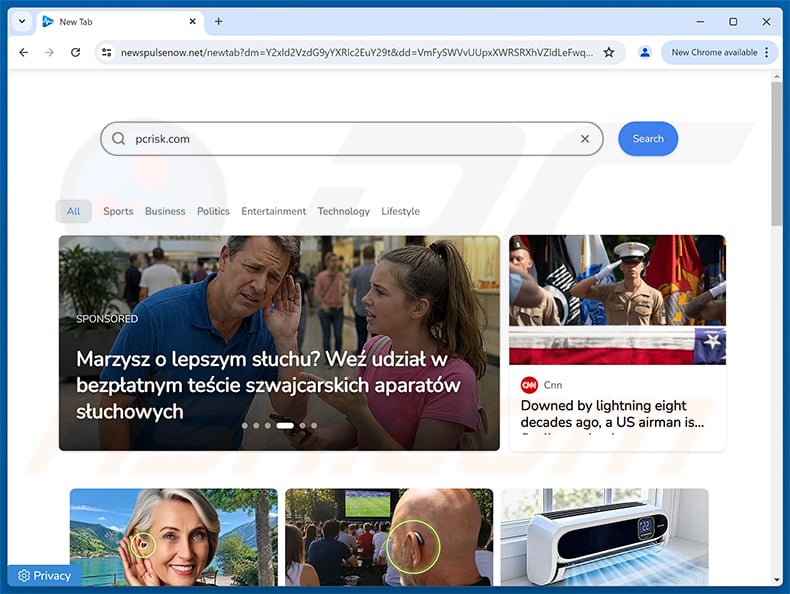
Newspulsenow.net is a fake search engine promoted by browser hijackers. Our team analyzed this website and found that it is distributed through browser-hijacking software that modifies browser settings to force users to visit it.
Newspulsenow.net cannot generate its own search results and instead routes users through a chain of redirect domains before landing them on another search engine. Due to the privacy risks tied to browser-hijacking software, users should remove any related applications and avoid using newspulsenow.net.
How do browser hijackers promote newspulsenow.net?
Browser-hijacking software typically reassigns browsers' default search engines, homepages, and new tab/window URLs to the addresses of promoted pages. Once installed, these programs force users to visit newspulsenow.net whenever they open a new tab or type a query into the address bar.
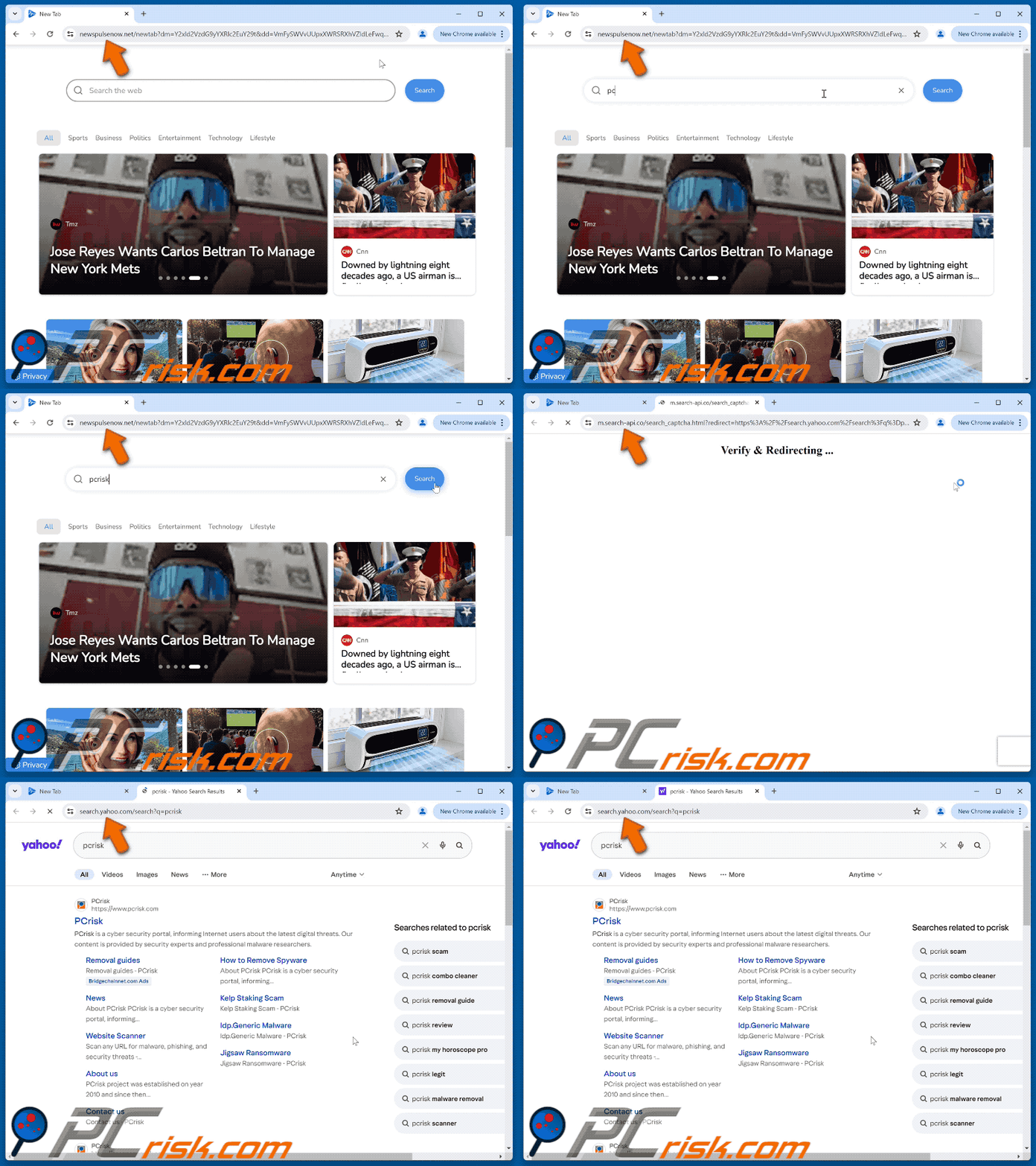
Newspulsenow.net does not generate search results of its own. When a query is submitted, it redirects through skwhatlaybeyo.org and m.search-api.co before ultimately landing on search.yahoo.com. This multi-hop redirect chain is common among browser hijackers and helps obscure the flow of user traffic.
The final destination may vary based on user geolocation or other factors, so some users may end up on a different search engine or website altogether.
Browser hijackers often use persistence mechanisms - such as restricting access to browser settings or undoing changes the user makes - to resist removal and keep the promoted page in place.
Software in this category typically has data-tracking functionality. Newspulsenow.net and the browser hijackers promoting it may collect visited URLs, browsing history, search queries, cookies, IP addresses, and similar data.
Collected information can be sold to third parties, potentially including cybercriminals. In serious cases, browser hijacker infections contribute to financial losses and identity theft. Removing any associated software is strongly recommended.
| Name | newspulsenow.net browser hijacker |
| Threat Type | Browser Hijacker, Redirect, Search Hijacker, Toolbar, Unwanted New Tab |
| Promoted URL | newspulsenow.net |
| Threat Status (newspulsenow.net) | PCrisk Website Scanner Results |
| Affected Browser Settings | Homepage, new tab URL, default search engine |
| Symptoms | Manipulated Internet browser settings (homepage, default Internet search engine, new tab settings). Users are forced to visit the hijacker's website and search the Internet using their search engines. |
| Distribution methods | Deceptive pop-up ads, free software installers (bundling), dubious websites, and similar channels. |
| Damage | Internet browser tracking (potential privacy issues), display of unwanted ads, redirects to dubious websites. |
| Malware Removal (Windows) |
To eliminate possible malware infections, scan your computer with legitimate antivirus software. Our security researchers recommend using Combo Cleaner. Download Combo CleanerTo use full-featured product, you have to purchase a license for Combo Cleaner. 7 days free trial available. Combo Cleaner is owned and operated by RCS LT, the parent company of PCRisk.com. |
Browser hijacker examples
We have examined numerous browser hijackers; Video Search Extension, Nautilus Notes, and PerfecTab are merely a few of our newest articles.
Typically, browser-hijacking software is designed to look harmless or useful. Users may be drawn in by a polished new-tab design or promises of better search results - but such features rarely work as advertised, and the software carries real privacy risks regardless.
How did newspulsenow.net promoting software install on my computer?
Browser hijackers are commonly spread through bundled software installers. When users download free programs from freeware sites, file-hosting platforms, or peer-to-peer networks, those installers may silently include extra unwanted software.
Rushing through setup by choosing "Quick" or "Express" installation options - without reading the terms - is the main reason bundled hijackers end up installed. Selecting "Custom" or "Advanced" settings instead lets users review and opt out of unwanted additions before they are applied.
Browser hijackers can also have their own promotional webpages, and users often reach them via redirects from rogue advertising networks and spam browser notifications.
Misspelled URLs, deceptive websites, and installed adware are also common delivery paths for browser-hijacking software.
How to avoid installation of browser hijackers?
Research software before downloading and use only official or verified sources. During installation, read all terms and conditions, explore the available settings, and use "Custom" or "Advanced" options to deselect any extras that were not intentionally requested.
Be cautious while browsing, as deceptive ads often appear harmless but redirect to questionable pages. If an unfamiliar site requests permission to show browser notifications, deny it. Keeping browsers and security software up to date also helps reduce risk.
If your computer is already affected by software promoting newspulsenow.net, we recommend running a scan with Combo Cleaner Antivirus for Windows to automatically eliminate this browser hijacker.
Appearance of newspulsenow.net redirecting to the Yahoo search engine (GIF):
Instant automatic malware removal:
Manual threat removal might be a lengthy and complicated process that requires advanced IT skills. Combo Cleaner is a professional automatic malware removal tool that is recommended to get rid of malware. Download it by clicking the button below:
DOWNLOAD Combo CleanerBy downloading any software listed on this website you agree to our Privacy Policy and Terms of Use. To use full-featured product, you have to purchase a license for Combo Cleaner. 7 days free trial available. Combo Cleaner is owned and operated by RCS LT, the parent company of PCRisk.com.
Quick menu:
- What is newspulsenow.net?
- STEP 1. Uninstall unwanted applications using Control Panel.
- STEP 2. Remove newspulsenow.net browser hijacker from Google Chrome.
- STEP 3. Remove newspulsenow.net homepage and default search engine from Mozilla Firefox.
- STEP 4. Remove newspulsenow.net redirect from Safari.
- STEP 5. Remove rogue plug-ins from Microsoft Edge.
Newspulsenow.net redirect removal:
Windows 11 users:
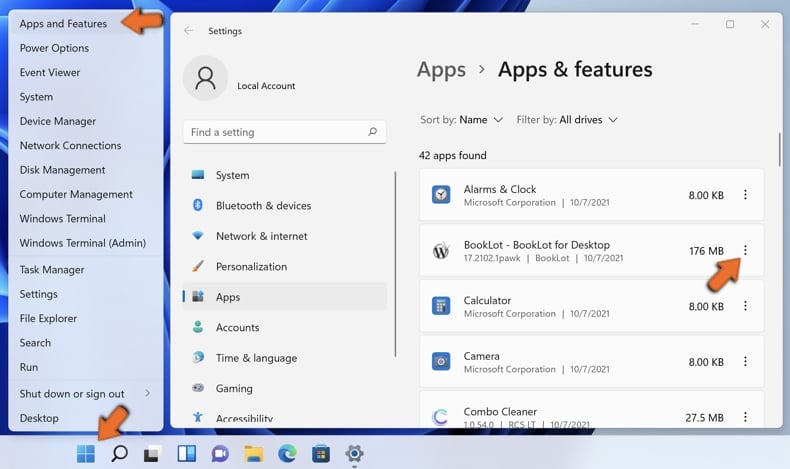
Right-click on the Start icon, select Apps and Features. In the opened window search for the application you want to uninstall, after locating it, click on the three vertical dots and select Uninstall.
Windows 10 users:
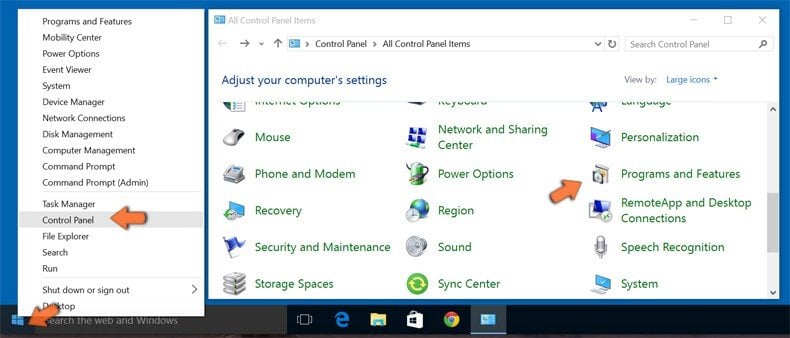
Right-click in the lower left corner of the screen, in the Quick Access Menu select Control Panel. In the opened window choose Programs and Features.
Windows 7 users:
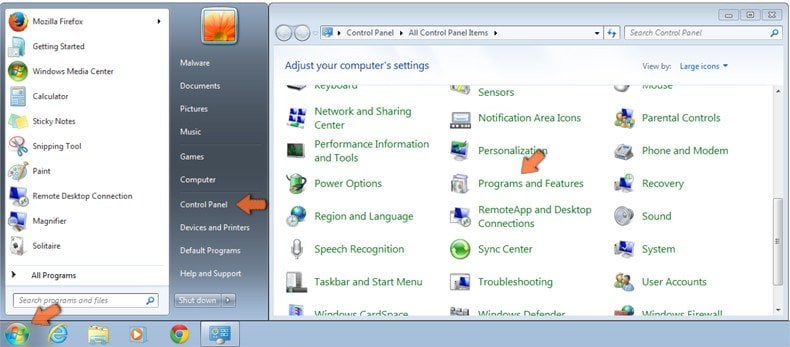
Click Start (Windows Logo at the bottom left corner of your desktop), choose Control Panel. Locate Programs and click Uninstall a program.
macOS (OSX) users:
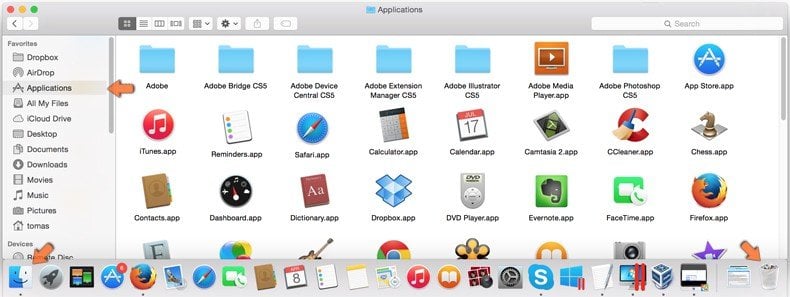
Click Finder, in the opened screen select Applications. Drag the app from the Applications folder to the Trash (located in your Dock), then right click the Trash icon and select Empty Trash.
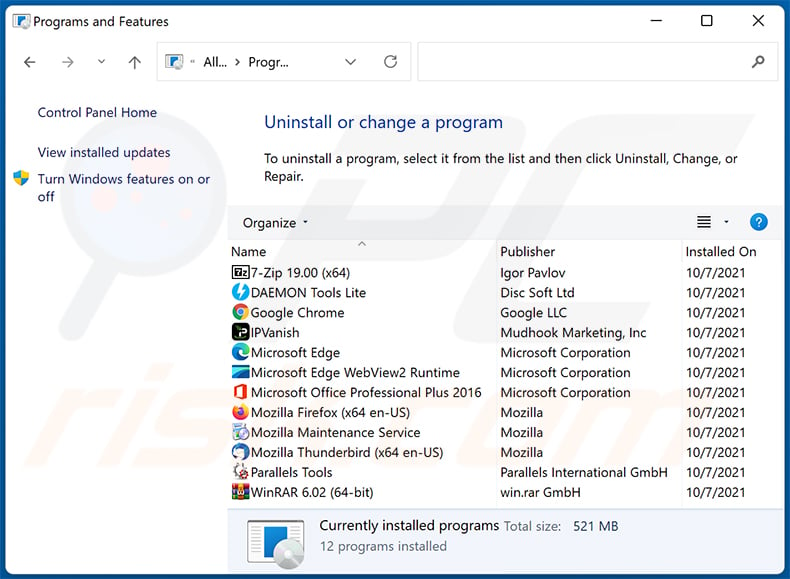
In the uninstall programs window: look for any recently installed suspicious applications, select these entries and click "Uninstall" or "Remove".
After uninstalling the potentially unwanted applications, scan your computer for any remaining unwanted components. To scan your computer, use recommended malware removal software.
DOWNLOAD remover for malware infections
Combo Cleaner checks if your computer is infected with malware. To use full-featured product, you have to purchase a license for Combo Cleaner. 7 days free trial available. Combo Cleaner is owned and operated by RCS LT, the parent company of PCRisk.com.
Newspulsenow.net redirect removal from Internet browsers:
Video showing how to remove browser redirects:
 Remove malicious extensions from Google Chrome:
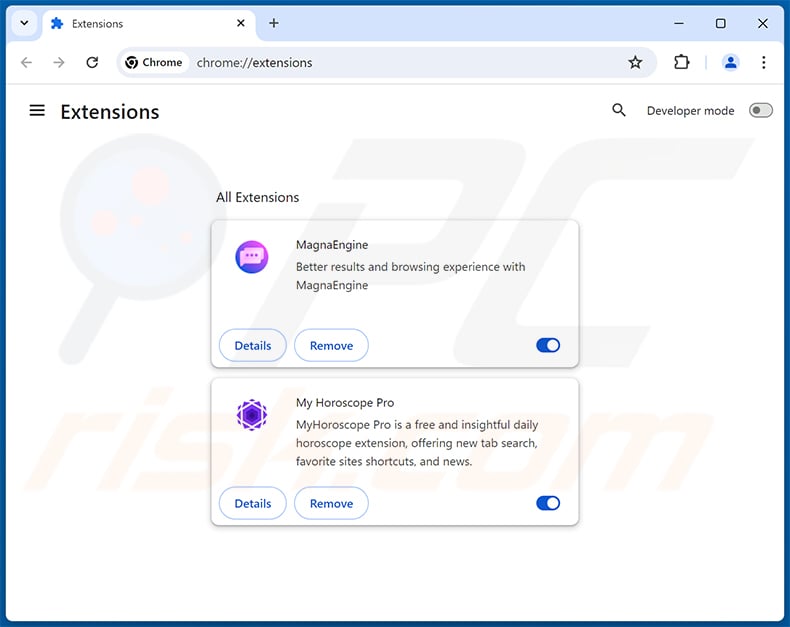
Click the Chrome menu icon  (at the top right corner of Google Chrome), select "Extensions" and click "Manage Extensions". Locate all recently-installed suspicious extensions, select these entries and click "Remove".
Change your homepage:
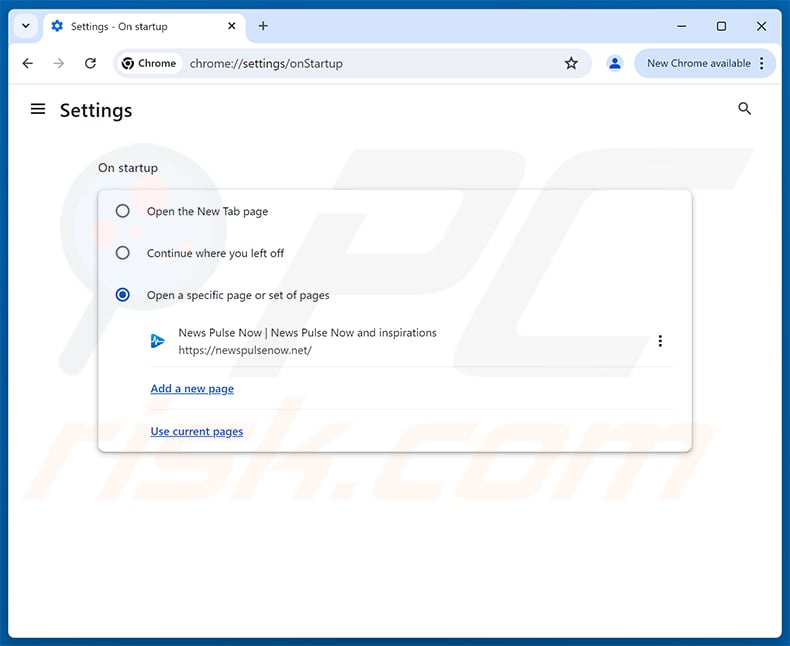
Click the Chrome menu icon (at the top right corner of Google Chrome), select "Settings". In the "On startup" section, disable the malicious extension (if present), look for a browser hijacker URL (hxxp://www.newspulsenow.net) below the "Open a specific or set of pages" option. If present click on the three vertical dots icon and select "Remove".
Change your default search engine:
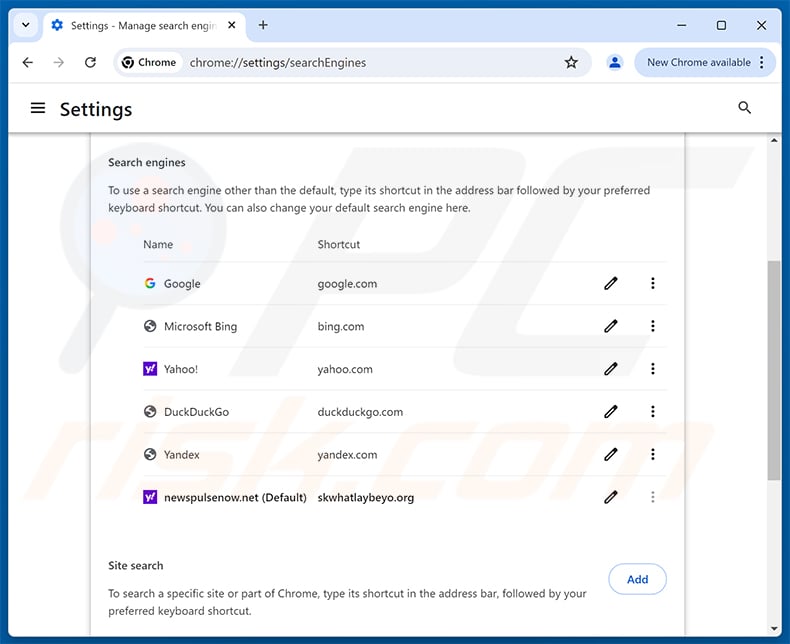
To change your default search engine in Google Chrome: Click the Chrome menu icon (at the top right corner of Google Chrome), select "Settings", in the "Search engine" section, click "Manage search engines...", in the opened list look for "newspulsenow.net", when located click the three vertical dots near this URL and select "Delete".
- If you continue to have problems with browser redirects and unwanted advertisements - Reset Google Chrome.
Optional method:
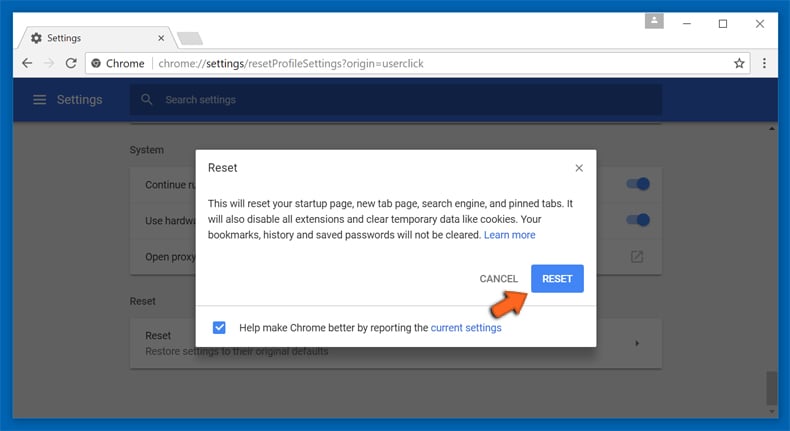
If you continue to have problems with removal of the newspulsenow.net browser hijacker, reset your Google Chrome browser settings. Click the Chrome menu icon (at the top right corner of Google Chrome) and select Settings. Scroll down to the bottom of the screen. Click the Advanced… link.
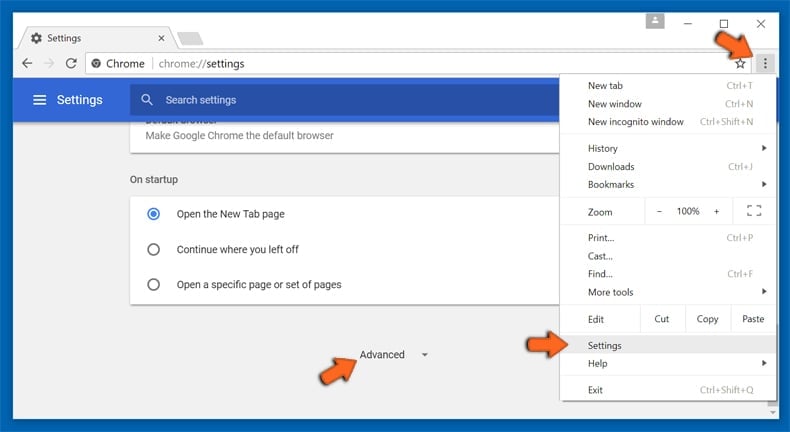
After scrolling to the bottom of the screen, click the Reset (Restore settings to their original defaults) button.
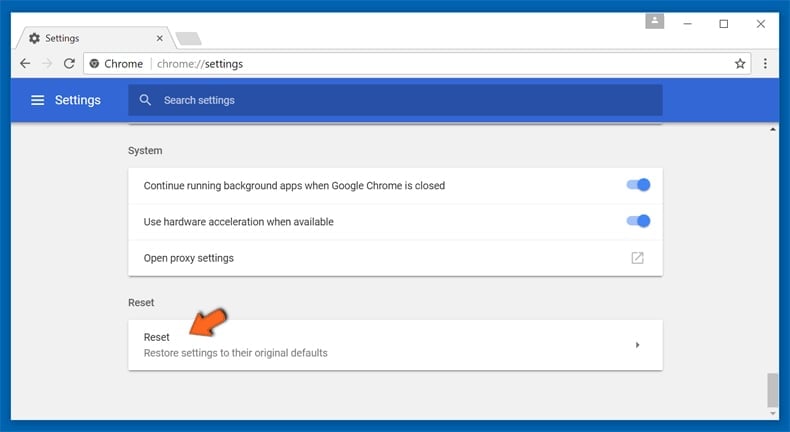
In the opened window, confirm that you wish to reset Google Chrome settings to default by clicking the Reset button.
 Remove malicious extensions from Mozilla Firefox:
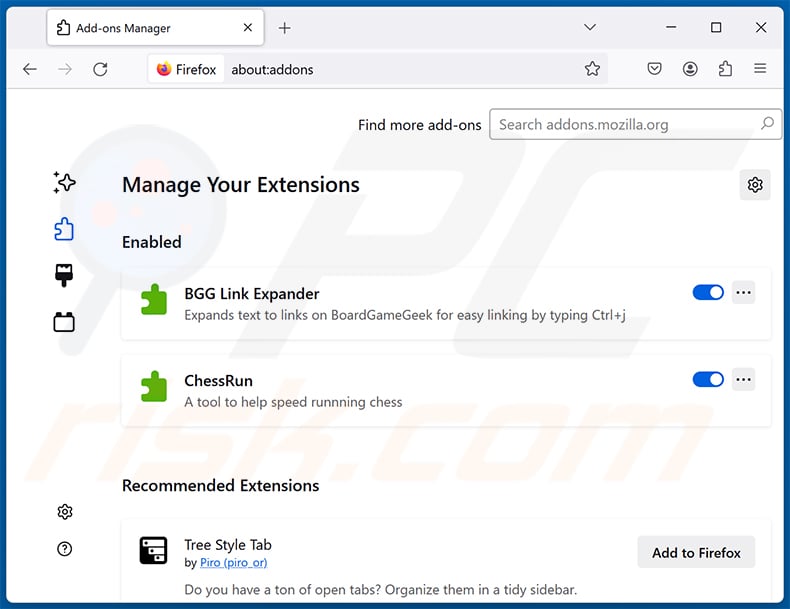
Click the Firefox menu  (at the top right corner of the main window), select "Add-ons and themes". Click "Extensions", in the opened window locate all recently-installed suspicious extensions, click on the three dots and then click "Remove".
Change your homepage:
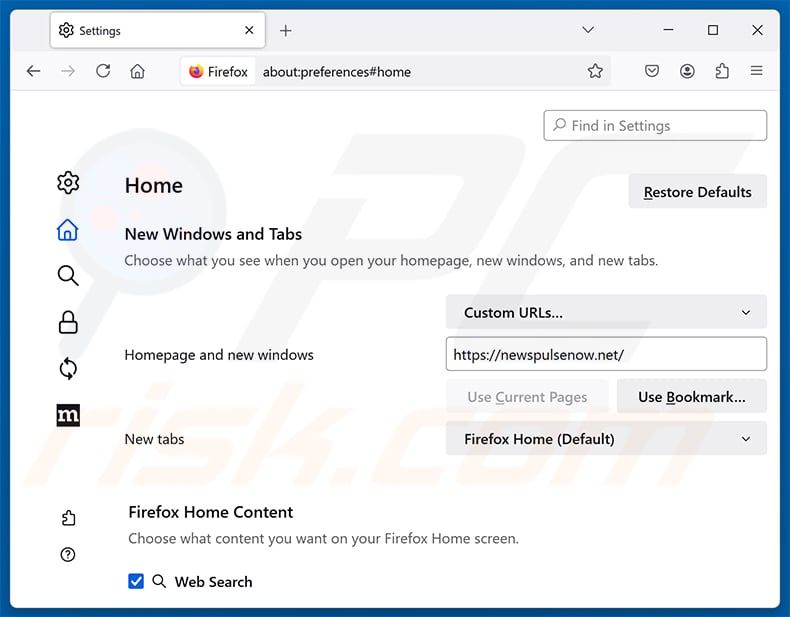
To reset your homepage, click the Firefox menu (at the top right corner of the main window), then select "Settings", in the opened window disable malicious extension (if present), remove hxxp://newspulsenow.net and enter your preferred domain, which will open each time you start Mozilla Firefox.
Change your default search engine:
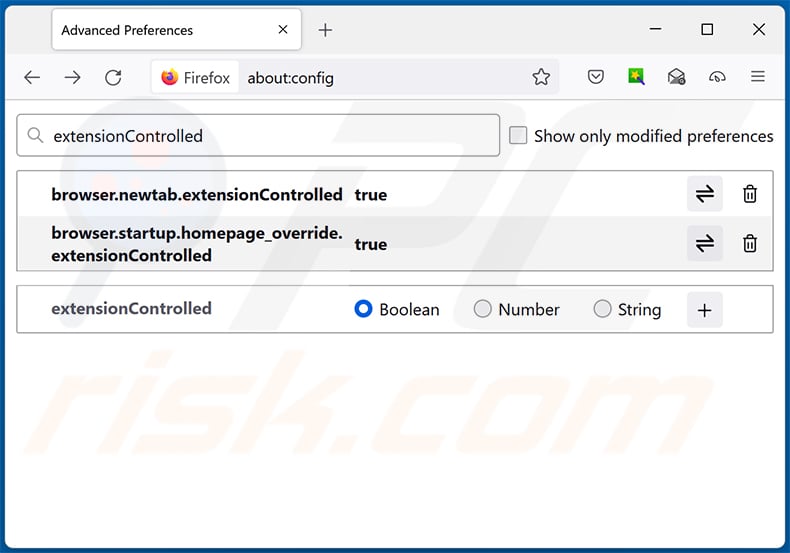
In the URL address bar, type "about:config" and press Enter. Click "Accept the Risk and Continue".
In the search filter at the top, type: "extensionControlled". Set both results to "false" by either double-clicking each entry or clicking the  button.
Optional method:
Computer users who have problems with newspulsenow.net browser hijacker removal can reset their Mozilla Firefox settings.
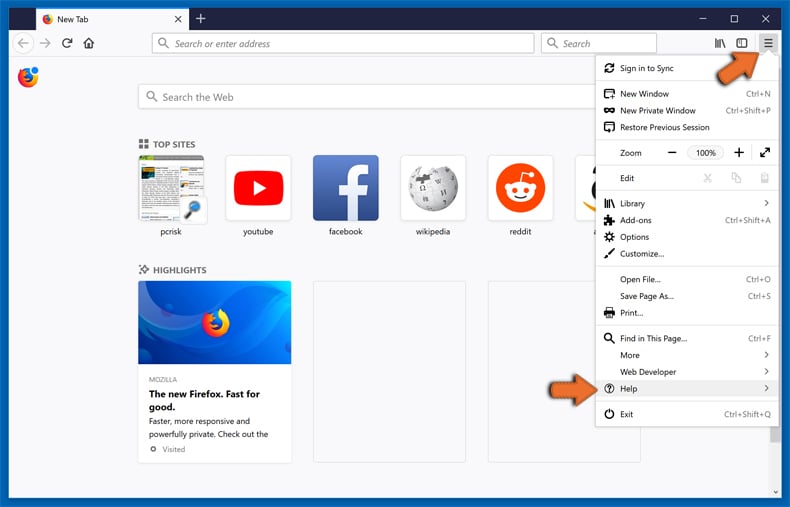
Open Mozilla Firefox, at the top right corner of the main window, click the Firefox menu, in the opened menu, click Help.
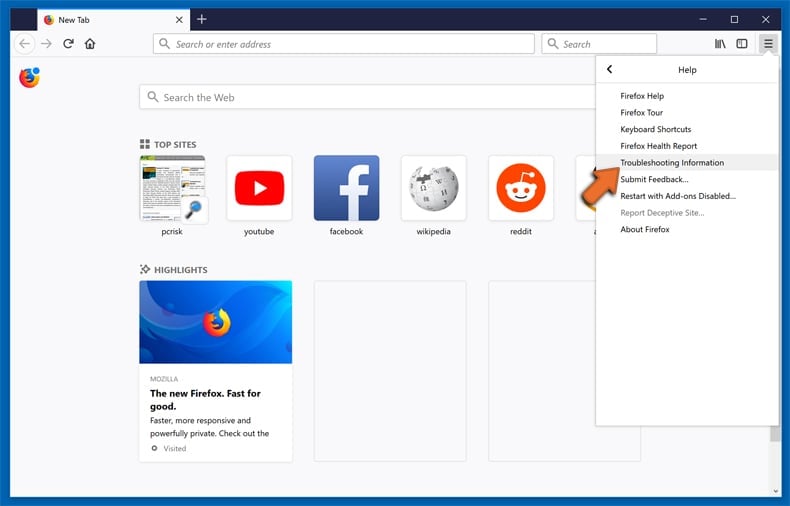
Select Troubleshooting Information.
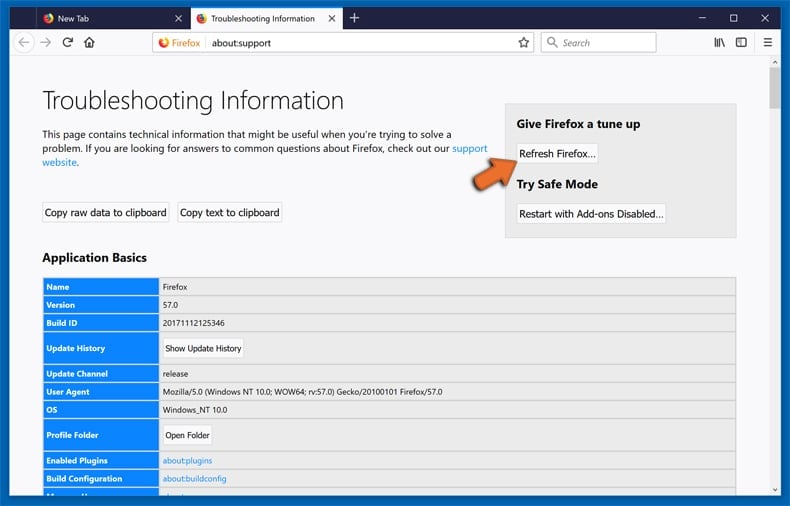
In the opened window, click the Refresh Firefox button.
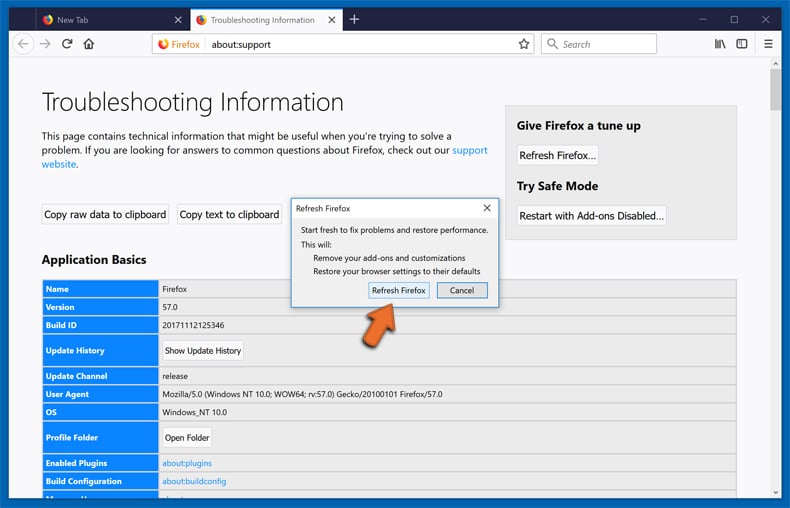
In the opened window, confirm that you wish to reset Mozilla Firefox settings to default by clicking the Refresh Firefox button.
 Remove malicious extensions from Safari:
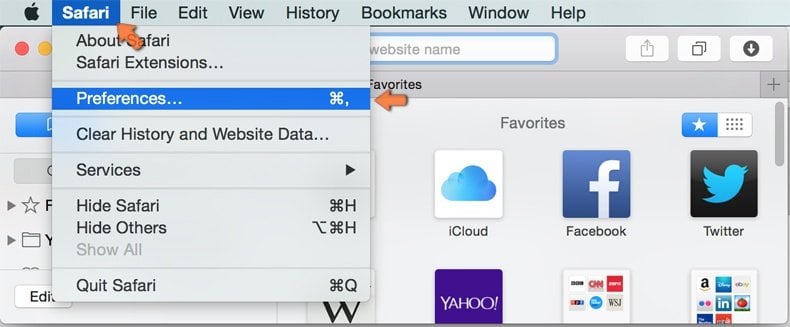
Make sure your Safari browser is active and click Safari menu, then select Preferences...
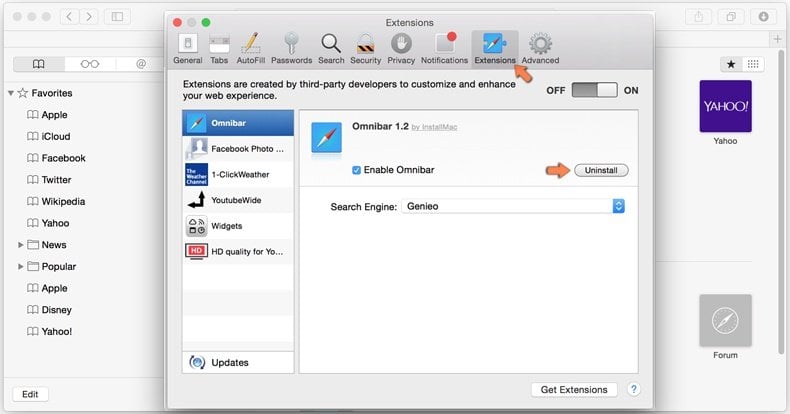
In the preferences window select the Extensions tab. Look for any recently installed suspicious extensions and uninstall them.
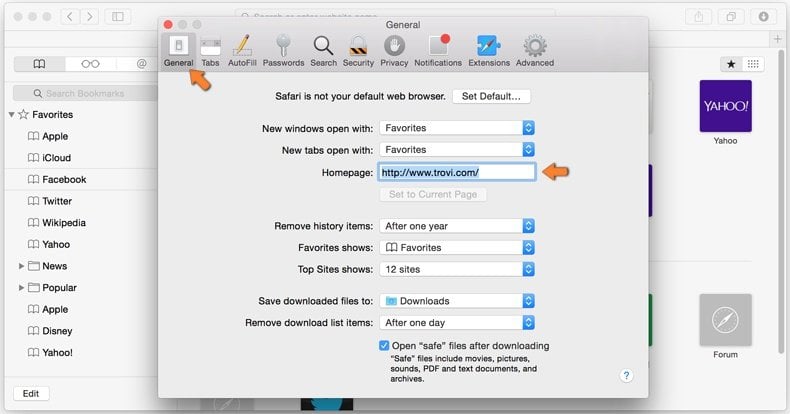
In the preferences window select General tab and make sure that your homepage is set to a preferred URL, if its altered by a browser hijacker - change it.
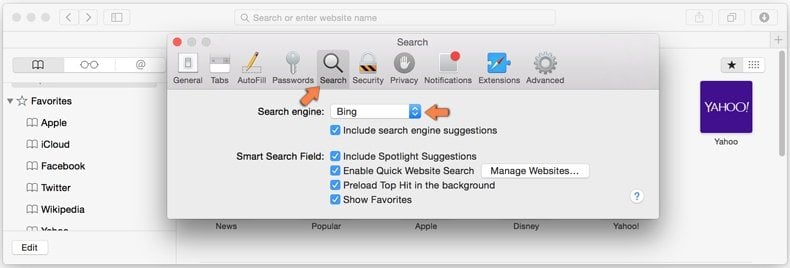
In the preferences window select Search tab and make sure that your preferred Internet search engine is selected.
Optional method:
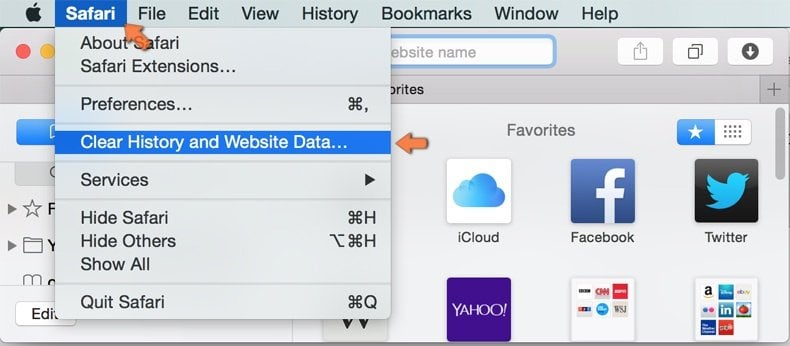
Make sure your Safari browser is active and click on Safari menu. From the drop down menu select Clear History and Website Data...
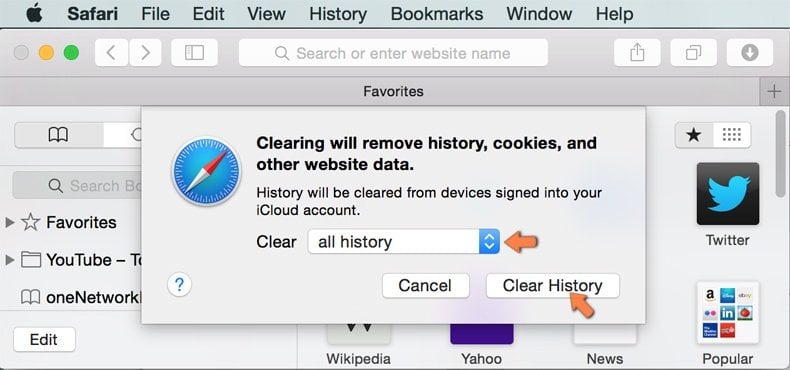
In the opened window select all history and click the Clear History button.
If you continue having problems with browser redirects and unwanted advertisements - Reset Safari.
 Remove malicious extensions from Microsoft Edge:
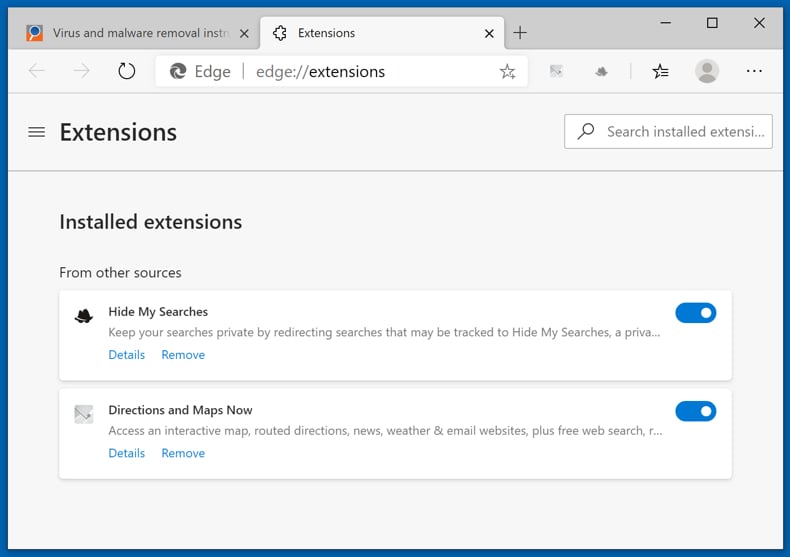
Click the Edge menu icon  (at the top right corner of Microsoft Edge), select "Extensions". Locate any recently-installed suspicious browser add-ons, and remove them.
Change your homepage and new tab settings:
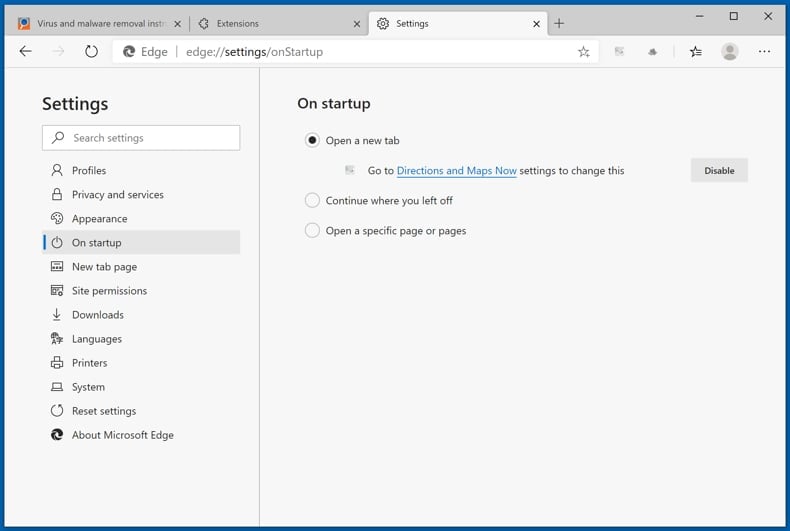
Click the Edge menu icon (at the top right corner of Microsoft Edge), select "Settings". In the "On startup" section look for the name of the browser hijacker and click "Disable".
Change your default Internet search engine:
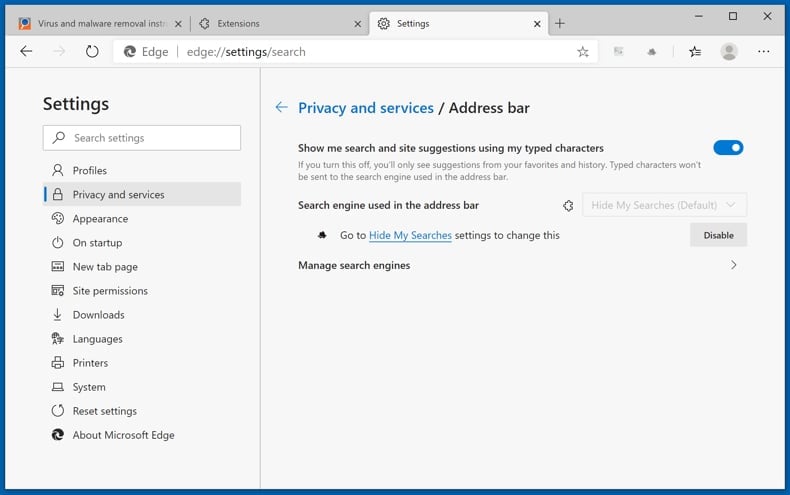
To change your default search engine in Microsoft Edge: Click the Edge menu icon (at the top right corner of Microsoft Edge), select "Privacy and services", scroll to bottom of the page and select "Address bar". In the "Search engines used in address bar" section look for the name of the unwanted Internet search engine, when located click the "Disable" button near it. Alternatively you can click on "Manage search engines", in the opened menu look for unwanted Internet search engine. Click on the puzzle icon  near it and select "Disable".
Optional method:
If you continue to have problems with removal of the newspulsenow.net browser hijacker, reset your Microsoft Edge browser settings. Click the Edge menu icon (at the top right corner of Microsoft Edge) and select Settings.
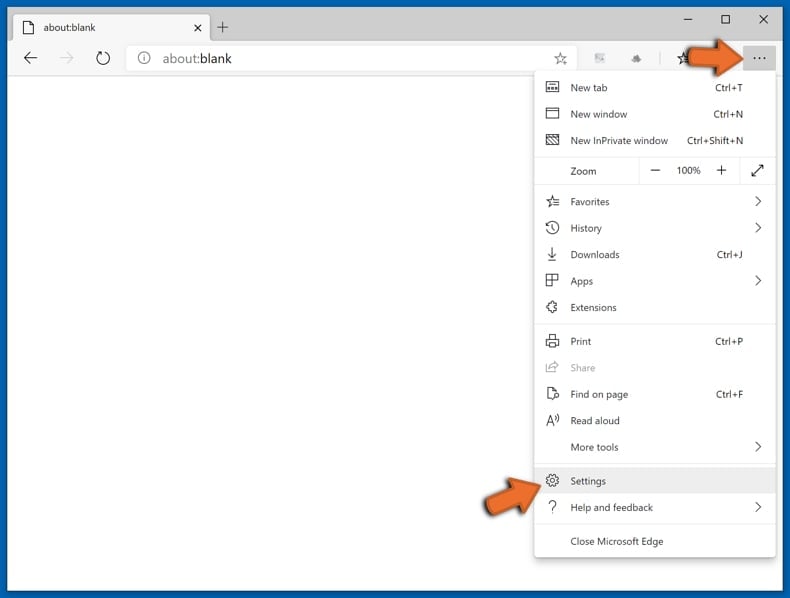
In the opened settings menu select Reset settings.
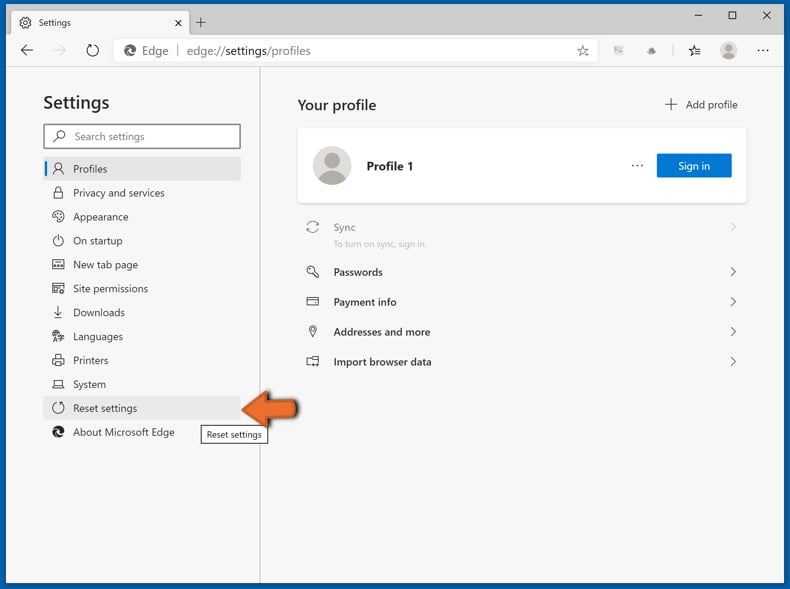
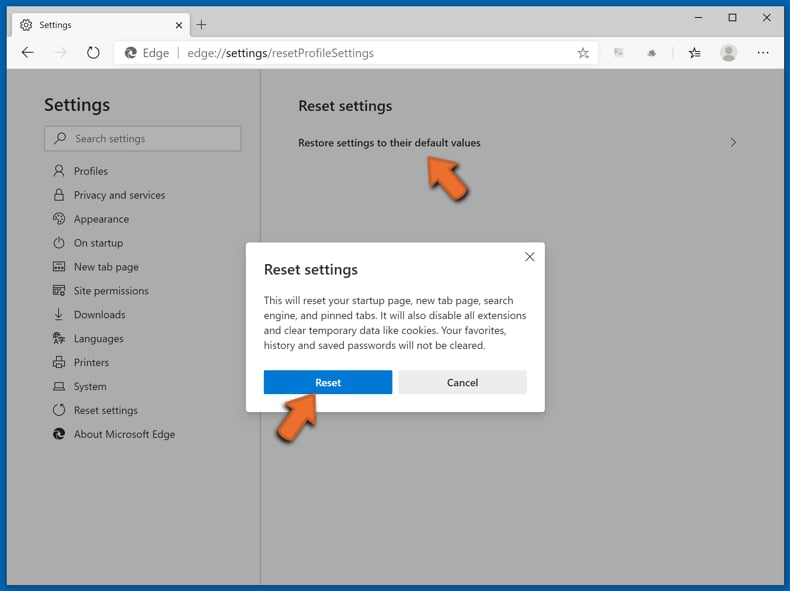
Select Restore settings to their default values. In the opened window, confirm that you wish to reset Microsoft Edge settings to default by clicking the Reset button.
- If this did not help, follow these alternative instructions explaining how to reset the Microsoft Edge browser.
Summary:
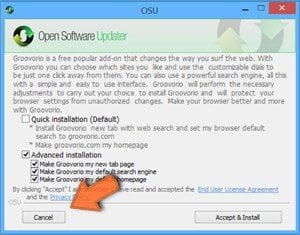 A browser hijacker is a type of adware infection that modifies Internet browser settings by assigning the homepage and default Internet search engine settings to some other (unwanted) website URL. Commonly, this type of adware infiltrates operating systems through free software downloads. If your download is managed by a download client, ensure that you decline offers to install advertised toolbars or applications that seek to change your homepage and default Internet search engine settings.
Post a comment:
If you have additional information on newspulsenow.net browser hijacker or it's removal please share your knowledge in the comments section below.
Frequently Asked Questions (FAQ)
What is the purpose of forcing users to visit websites like newspulsenow.net?
Browser hijackers generate revenue by redirecting user traffic to specific pages. Operators of newspulsenow.net benefit from forced visits and from routing search queries through affiliate redirect chains before they reach a search engine like Yahoo.
Is visiting newspulsenow.net a threat to my privacy?
Yes, to some extent. Fake search engines like newspulsenow.net typically collect data about visitors, including search queries and browsing habits, which may then be sold to third parties.
Additionally, the redirect chain passes through multiple intermediary domains, each of which may log user activity. This makes newspulsenow.net a meaningful privacy concern beyond the final landing page.
How did a browser hijacker infiltrate my computer?
Browser-hijacking software is most often distributed through bundled installers, deceptive promotional pages, online scams, freeware and free file-hosting sites, peer-to-peer sharing networks, spam browser notifications, and intrusive advertisements.
Will Combo Cleaner help me remove a browser hijacker?
Yes, Combo Cleaner can scan computers and remove installed browser-hijacking software. Manual removal may not be ideal when multiple hijackers are present, since they can reinstall each other after one is removed.
Removal-related browser settings may also be locked while such software is active. Using Combo Cleaner to eliminate all threats at once is therefore the safer and more thorough approach.
Share:
 Facebook
 X.com
X.com
 LinkedIn
 Copy Link

Tomas Meskauskas
Expert security researcher, professional malware analyst
I am passionate about computer security and technology. I have an experience of over 10 years working in various companies related to computer technical issue solving and Internet security. I have been working as an author and editor for pcrisk.com since 2010. Follow me on Twitter and LinkedIn to stay informed about the latest online security threats.
PCrisk security portal is brought by a company RCS LT.
Joined forces of security researchers help educate computer users about the latest online security threats. More information about the company RCS LT.
Our malware removal guides are free. However, if you want to support us you can send us a donation.
DonatePCrisk security portal is brought by a company RCS LT.
Joined forces of security researchers help educate computer users about the latest online security threats. More information about the company RCS LT.
Our malware removal guides are free. However, if you want to support us you can send us a donation.
Donate
▼ Show Discussion