
How to uninstall KuinaExtractor Stealer from the operating system
TrojanAlso Known As: KuinaExtractor data stealer

Get free scan and check if your device is infected.
Remove it nowTo use full-featured product, you have to purchase a license for Combo Cleaner. Seven days free trial available. Combo Cleaner is owned and operated by RCS LT, the parent company of PCRisk.com.
What kind of malware is KuinaExtractor Stealer?
KuinaExtractor (also tracked under the alias k0to) is an information stealer written in Rust and first observed in December 2025. According to research by Threatray, the malware has been in active development for at least six months, gaining new capabilities with each update.
KuinaExtractor targets a wide range of sensitive data including saved passwords and cookies from about 40 web browsers, cryptocurrency wallet files, gaming platform sessions, and messaging app tokens. It is suspected to be the work of a Vietnamese developer, based on Vietnamese-language comments in the code and the inclusion of CocCoc, a Vietnamese browser, in its target list.
In June 2026, the project was rebranded under the alias k0to, though the underlying code and functionality remain closely related to the earlier KuinaExtractor builds.
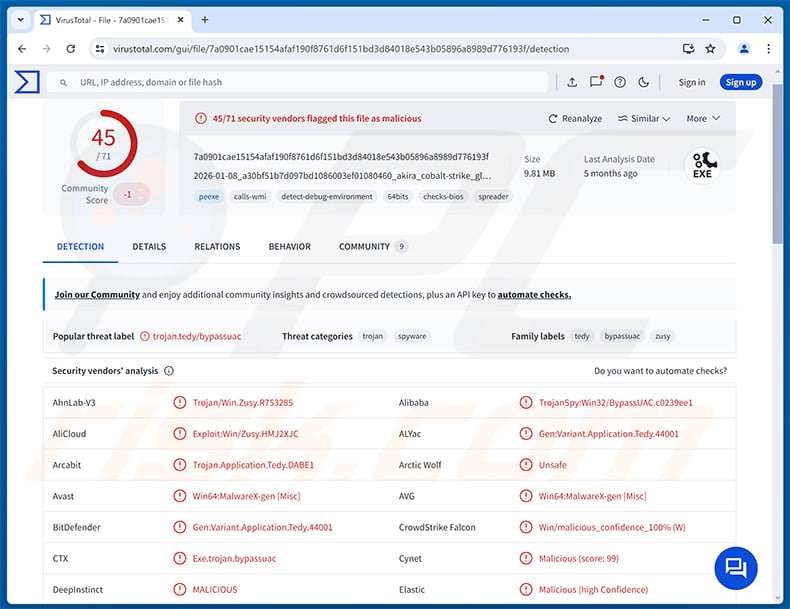
KuinaExtractor Stealer overview
KuinaExtractor's primary function is to harvest data from infected devices and send it to the attacker's server. Early versions used a Discord webhook for exfiltration, but by January 2026 that changed to a Telegram bot. Later builds shifted to a one-way file upload channel, with an HTTP-based control panel tested in April 2026.
The stealer collects saved passwords, cookies, and session data from roughly 40 web browsers, including the Vietnamese browser CocCoc. Beyond browsers, it also grabs session tokens from Discord, Steam, and Roblox, reads Telegram's tdata folder, and copies cryptocurrency wallet files.
The stealer also dumps credentials stored in the Windows Credential Manager and logs saved WiFi network passwords, giving attackers access to a broad set of account data beyond the browser.
Capabilities
The stealer profiles the infected system through eight WMIC queries and gathers the victim's IP address for geolocation. This reconnaissance data likely helps the operator profile victims or filter logs by country.
KuinaExtractor also targets FileZilla, a popular FTP client, to steal saved server credentials. This makes it a threat to website administrators and developers who store login details in the application.
To access browser data cleanly, the stealer terminates up to 17 browser processes before extraction. This lets it reach files that would otherwise be locked by a running browser.
Defense evasion and anti-analysis
KuinaExtractor bypasses Chrome's App-Bound Encryption by impersonating the LSASS process to recover encryption master keys. It uses ChaCha20-Poly1305 decryption to access passwords protected by newer Chrome builds.
To avoid detection, the stealer checks for virtual machines and sandboxes before running its main routines. It also scans PowerShell window titles to identify analyst tools and abort execution if any are found.
The June 2026 variant added 28-byte XOR string encryption to its code. A custom TLS stack with embedded certificate roots replaces the default Windows certificate store for its network communications.
UAC bypass and system changes
KuinaExtractor includes multiple methods for bypassing User Account Control (UAC). Early builds used a single technique; later versions expanded to seven different bypass options, with a further update adding the SilentCleanup method.
Once it gains elevated privileges, the stealer disables Microsoft Defender. This reduces the chance that subsequent malicious activity will be flagged or blocked.
Development history and rebrand to k0to
Threatray's research tracked KuinaExtractor across four development stages. The initial December 2025 build already included App-Bound Encryption bypass and Discord-based exfiltration. January 2026 brought a significant rewrite with expanded reconnaissance and a switch to Telegram for command-and-control communications.
March 2026 focused on production hardening, with expanded browser support and stronger detection evasion. The June 2026 update rebranded the project as k0to, emphasizing stealth improvements over new features.
Two related experimental projects ran alongside KuinaExtractor: KuinaCookieExtractor, a lighter variant abandoned after about two weeks, and Zenith, a short-lived C2 panel hosted on Vietnamese infrastructure.
| Name | KuinaExtractor data stealer |
| Threat Type | Information Stealer, Trojan, Password-stealing virus |
| Detection Names | Avast (Win64:MalwareX-gen [Misc]), Combo Cleaner (Gen:Variant.Application.Tedy.44001), ESET-NOD32 (Win64/Spy.Agent.YV Trojan), Kaspersky (HEUR:Exploit.Win32.BypassUAC.b), Microsoft (Trojan:Win32/Zusy.HAK!MTB), Full List (VirusTotal) |
| Symptoms | Stealers are designed to stealthily infiltrate the victim's computer and remain silent, and thus no particular symptoms are clearly visible on an infected machine. |
| Distribution methods | Infected email attachments, malicious online advertisements, social engineering, software 'cracks'. |
| Damage | Stolen passwords and banking information, identity theft, the victim's computer added to a botnet, additional infections, monetary loss, account hijacking. |
| Malware Removal (Windows) |
To eliminate possible malware infections, scan your computer with legitimate antivirus software. Our security researchers recommend using Combo Cleaner. Download Combo CleanerTo use full-featured product, you have to purchase a license for Combo Cleaner. 7 days free trial available. Combo Cleaner is owned and operated by RCS LT, the parent company of PCRisk.com. |
Conclusion
KuinaExtractor is a well-developed information stealer that has evolved steadily since its December 2025 debut. Its App-Bound Encryption bypass, multiple UAC bypass methods, sandbox detection, and Defender-disabling routine make it a capable and persistent threat.
Victims risk losing browser-saved passwords and session cookies, cryptocurrency holdings, and gaming or messaging account access. Identity theft and further malware installations are also possible. The malware should be removed from infected systems immediately.
More examples of stealers are CastleStealer, DebugElevator, and Evolution.
How did KuinaExtractor Stealer infiltrate my computer?
According to Threatray's research, KuinaExtractor is linked to a suspected Vietnamese developer and was tested on Vietnamese-hosted infrastructure. The specific distribution channels used to deliver the malware to victims are not fully documented in the available research.
Stealers like this most commonly reach victims through phishing emails carrying malicious attachments or links, fake or typosquatted download websites, and cracked and pirated software.
Malicious files can arrive as archives such as ZIP or RAR, standalone executable installers, or documents. Users should be cautious whenever they download software from unofficial sources or receive unexpected files by email or through messaging applications.
How to avoid installation of malware?
The safest approach is to download software only from official developer websites or trusted app stores. Avoid pirated software, key generators, and game cracks, as these are among the most common carriers for stealers. Be cautious with email attachments and links, especially from unknown senders.
Keep your operating system and all applications updated, since many attacks exploit outdated software. Use a reputable security program and run regular scans. If you believe that your computer is already infected, we recommend running a scan with Combo Cleaner Antivirus for Windows to automatically eliminate infiltrated malware.
Instant automatic malware removal:
Manual threat removal might be a lengthy and complicated process that requires advanced IT skills. Combo Cleaner is a professional automatic malware removal tool that is recommended to get rid of malware. Download it by clicking the button below:
DOWNLOAD Combo CleanerBy downloading any software listed on this website you agree to our Privacy Policy and Terms of Use. To use full-featured product, you have to purchase a license for Combo Cleaner. 7 days free trial available. Combo Cleaner is owned and operated by RCS LT, the parent company of PCRisk.com.
Quick menu:
- What is KuinaExtractor Stealer?
- STEP 1. Manual removal of KuinaExtractor Stealer malware.
- STEP 2. Check if your computer is clean.
How to remove malware manually?
Manual malware removal is a complicated task - usually it is best to allow antivirus or anti-malware programs to do this automatically. To remove this malware we recommend using Combo Cleaner Antivirus for Windows.
If you wish to remove malware manually, the first step is to identify the name of the malware that you are trying to remove. Here is an example of a suspicious program running on a user's computer:
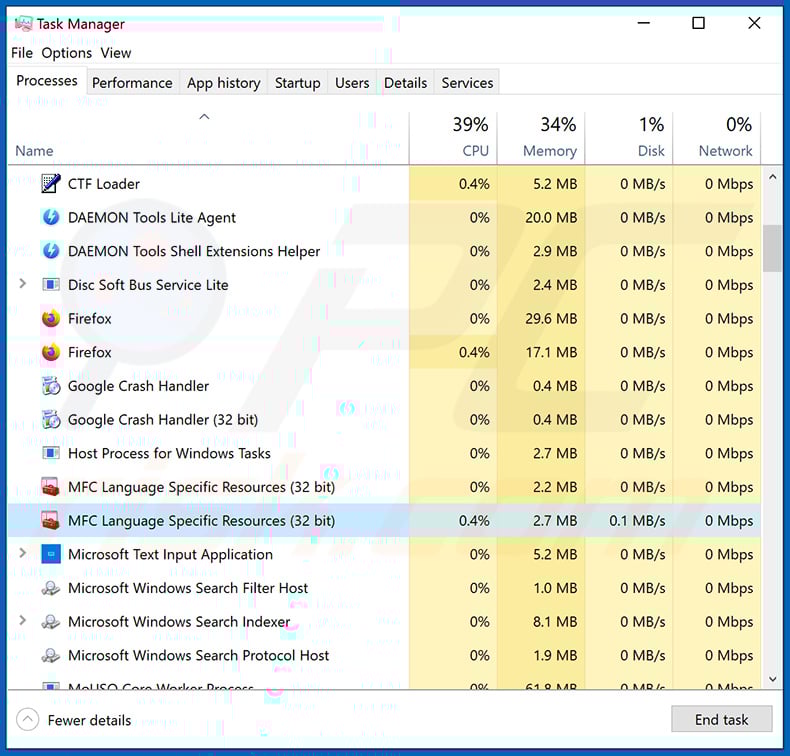
If you checked the list of programs running on your computer, for example, using task manager, and identified a program that looks suspicious, you should continue with these steps:
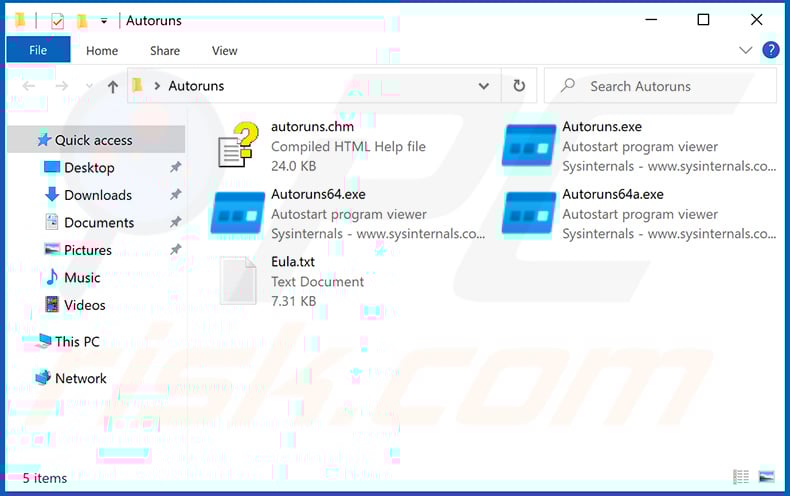
 Download a program called Autoruns. This program shows auto-start applications, Registry, and file system locations:
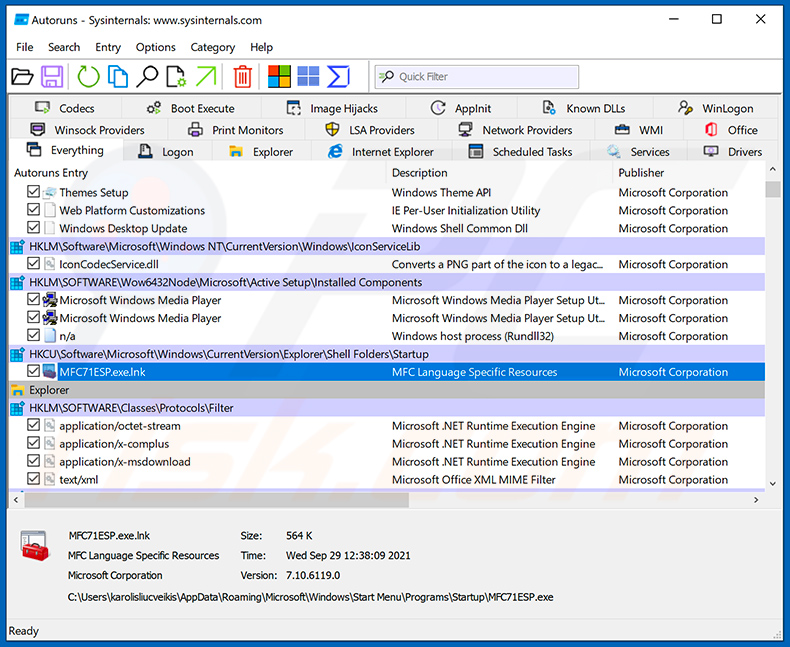
 Restart your computer into Safe Mode:
Windows XP and Windows 7 users: Start your computer in Safe Mode. Click Start, click Shut Down, click Restart, click OK. During your computer start process, press the F8 key on your keyboard multiple times until you see the Windows Advanced Option menu, and then select Safe Mode with Networking from the list.
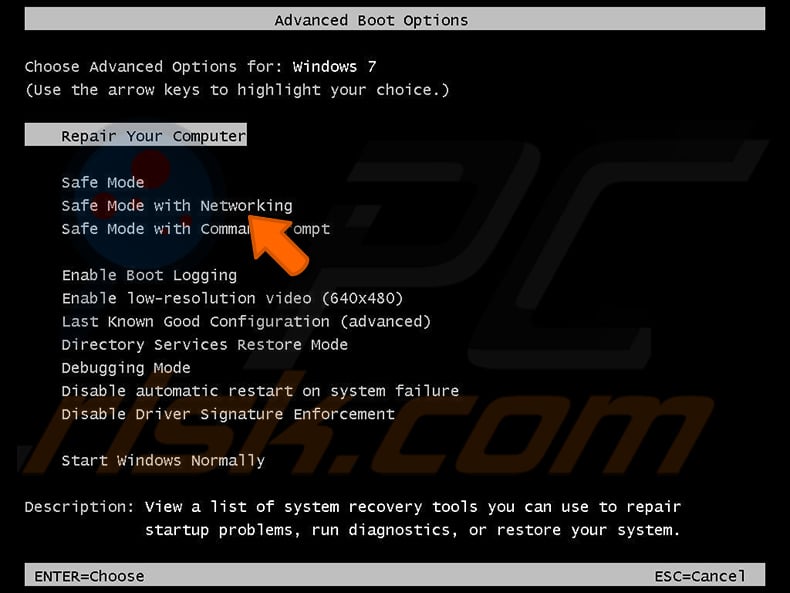
Video showing how to start Windows 7 in "Safe Mode with Networking":
Windows 8 users: Start Windows 8 is Safe Mode with Networking - Go to Windows 8 Start Screen, type Advanced, in the search results select Settings. Click Advanced startup options, in the opened "General PC Settings" window, select Advanced startup.
Click the "Restart now" button. Your computer will now restart into the "Advanced Startup options menu". Click the "Troubleshoot" button, and then click the "Advanced options" button. In the advanced option screen, click "Startup settings".
Click the "Restart" button. Your PC will restart into the Startup Settings screen. Press F5 to boot in Safe Mode with Networking.
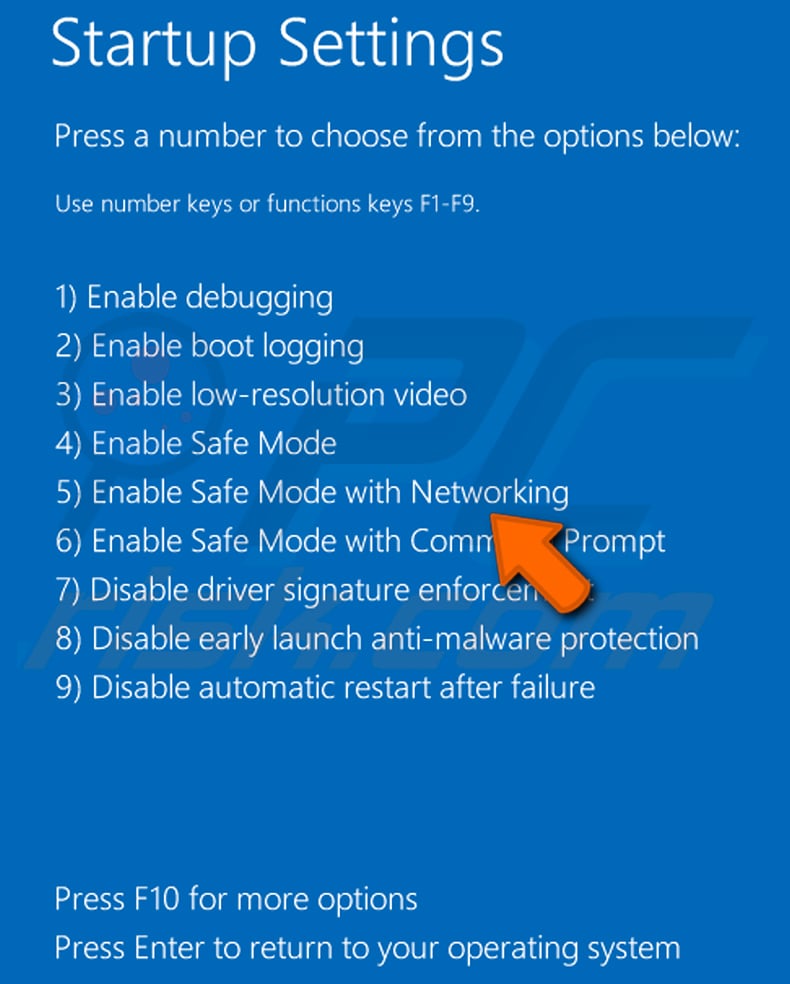
Video showing how to start Windows 8 in "Safe Mode with Networking":
Windows 10 users: Click the Windows logo and select the Power icon. In the opened menu click "Restart" while holding "Shift" button on your keyboard. In the "choose an option" window click on the "Troubleshoot", next select "Advanced options".
In the advanced options menu select "Startup Settings" and click on the "Restart" button. In the following window you should click the "F5" button on your keyboard. This will restart your operating system in safe mode with networking.
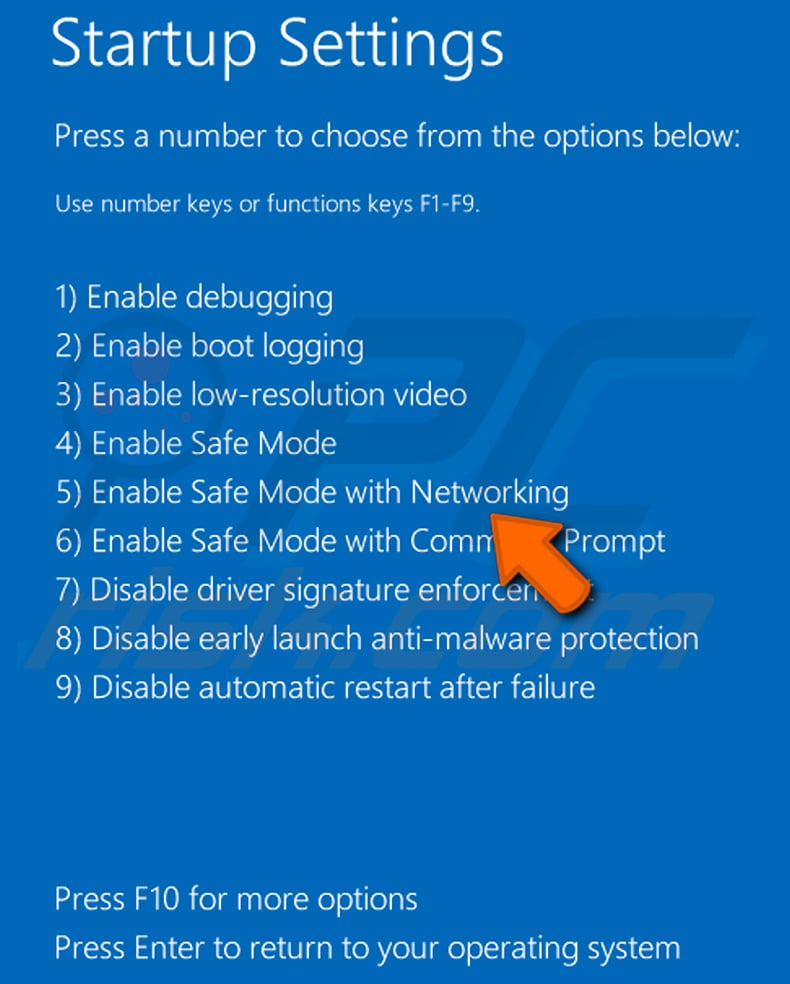
Video showing how to start Windows 10 in "Safe Mode with Networking":
 Extract the downloaded archive and run the Autoruns.exe file.
 In the Autoruns application, click "Options" at the top and uncheck "Hide Empty Locations" and "Hide Windows Entries" options. After this procedure, click the "Refresh" icon.
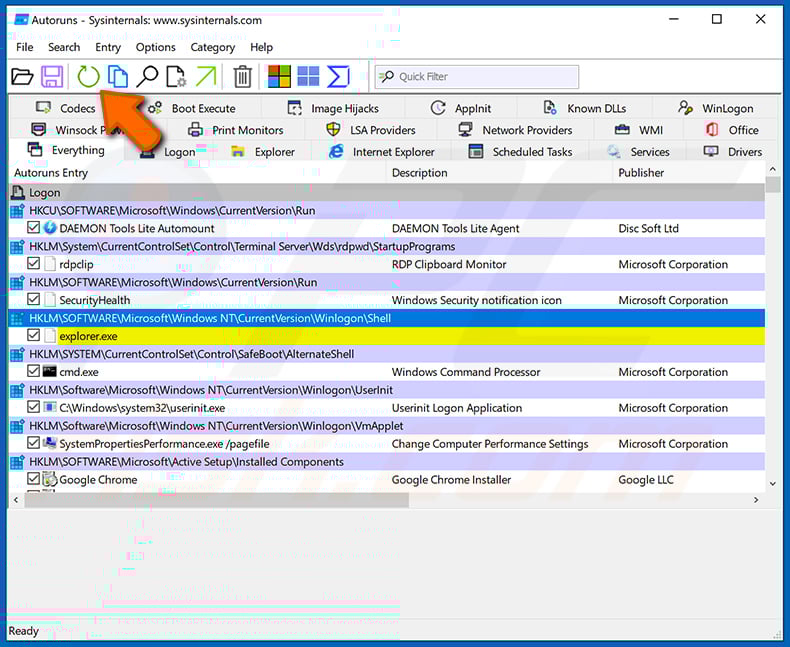
 Check the list provided by the Autoruns application and locate the malware file that you want to eliminate.
You should write down its full path and name. Note that some malware hides process names under legitimate Windows process names. At this stage, it is very important to avoid removing system files. After you locate the suspicious program you wish to remove, right click your mouse over its name and choose "Delete".
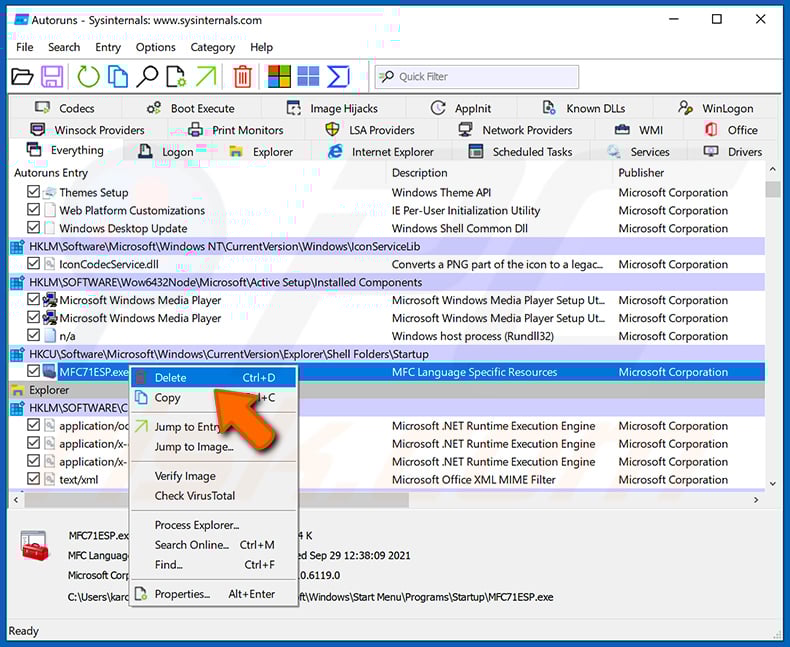
After removing the malware through the Autoruns application (this ensures that the malware will not run automatically on the next system startup), you should search for the malware name on your computer. Be sure to enable hidden files and folders before proceeding. If you find the filename of the malware, be sure to remove it.
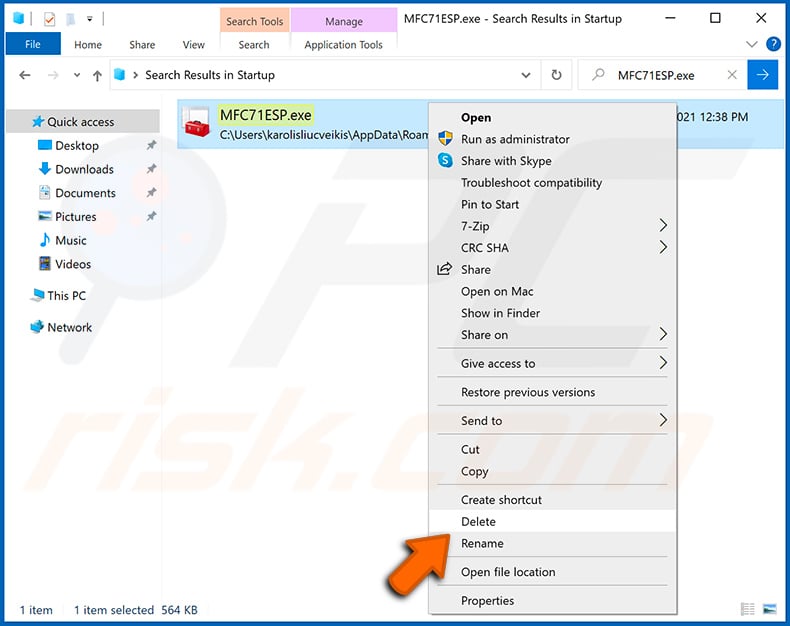
Reboot your computer in normal mode. Following these steps should remove any malware from your computer. Note that manual threat removal requires advanced computer skills. If you do not have these skills, leave malware removal to antivirus and anti-malware programs.
These steps might not work with advanced malware infections. As always it is best to prevent infection than try to remove malware later. To keep your computer safe, install the latest operating system updates and use antivirus software. To be sure your computer is free of malware infections, we recommend scanning it with Combo Cleaner Antivirus for Windows.
Frequently Asked Questions (FAQ)
My computer is infected with KuinaExtractor Stealer malware, should I format my storage device to get rid of it?
Formatting your storage device will remove KuinaExtractor but will also erase all files stored on it. A reputable security tool such as Combo Cleaner is normally the better first step. Formatting should only be considered when other removal methods have failed.
What are the biggest issues that KuinaExtractor Stealer malware can cause?
The main risks include loss of browser-saved passwords, theft of cryptocurrency, hijacking of Steam, Discord, and Roblox accounts, and identity theft. Because the stealer disables Microsoft Defender, other malware may also be installed on the system without being detected.
What is the purpose of KuinaExtractor Stealer malware?
The purpose of KuinaExtractor is to steal sensitive information from infected devices: browser credentials and cookies, cryptocurrency wallet files, gaming and messaging session tokens, FTP credentials from FileZilla, and Windows Credential Manager data.
How did KuinaExtractor Stealer malware infiltrate my computer?
KuinaExtractor is linked to a suspected Vietnamese developer and was tested on Vietnamese-hosted infrastructure. Stealers of this kind typically spread through phishing emails, fake download sites, pirated software, and malicious archives shared via social media.
Will Combo Cleaner protect me from malware?
Yes. Combo Cleaner is effective at detecting and removing most known malware, including stealers like KuinaExtractor. A full system scan is recommended to ensure no components remain hidden on the system.
Share:
 Facebook
 X.com
X.com
 LinkedIn
 Copy Link

Tomas Meskauskas
Expert security researcher, professional malware analyst
I am passionate about computer security and technology. I have an experience of over 10 years working in various companies related to computer technical issue solving and Internet security. I have been working as an author and editor for pcrisk.com since 2010. Follow me on Twitter and LinkedIn to stay informed about the latest online security threats.
PCrisk security portal is brought by a company RCS LT.
Joined forces of security researchers help educate computer users about the latest online security threats. More information about the company RCS LT.
Our malware removal guides are free. However, if you want to support us you can send us a donation.
DonatePCrisk security portal is brought by a company RCS LT.
Joined forces of security researchers help educate computer users about the latest online security threats. More information about the company RCS LT.
Our malware removal guides are free. However, if you want to support us you can send us a donation.
Donate
▼ Show Discussion