
How to remove fake Xeno RAT from the operating system
TrojanAlso Known As: Fake Xeno script executor

Get free scan and check if your device is infected.
Remove it nowTo use full-featured product, you have to purchase a license for Combo Cleaner. Seven days free trial available. Combo Cleaner is owned and operated by RCS LT, the parent company of PCRisk.com.
What kind of malware is fake Xeno script executor?
Fake Xeno is a multi-stage trojan that delivers a combined information stealer and Remote Access Trojan (RAT). It is disguised as a "Xeno" Roblox script executor - a cheat tool promoted through gaming forums and Discord servers.
As documented by Bitdefender, the malware (also identified as "Powercat" in security reports) silently steals browser credentials, Discord tokens, cryptocurrency wallets, and gaming account sessions while giving the attacker live remote access to the infected machine.
Because the lure is a gaming cheat tool, it primarily targets younger players who may not suspect the download is harmful. Once installed, the malware runs in the background with no visible signs of infection.
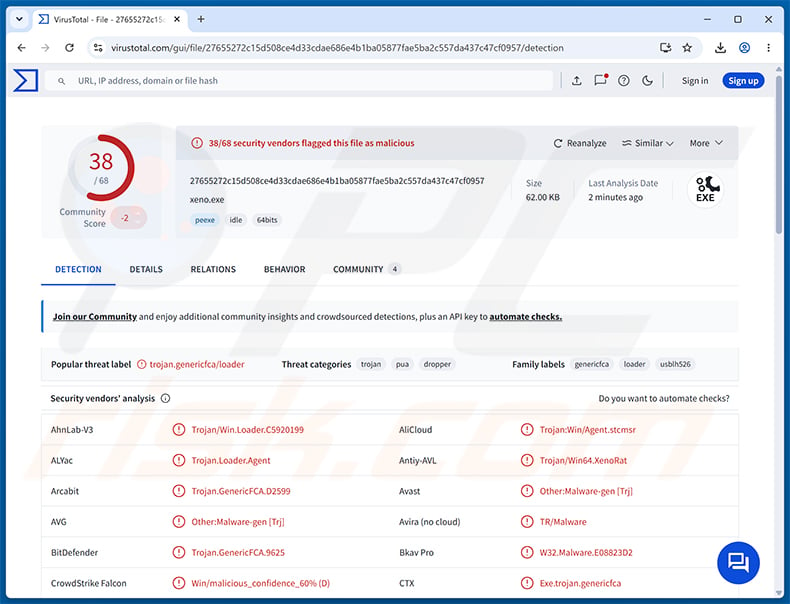
Fake Xeno malware overview
The infection unfolds in three stages. The first is an executable named xeno.exe that extracts a bundled Java Runtime Environment and launches the second stage. That second stage is a heavily obfuscated Java archive with anti-analysis checks. The third stage is the main payload - stored inside a folder mimicking the Xbox Game Bar's GameDVR directory and disguised as a Windows DLL file.
The malware connects to its operator's server over an encrypted WebSocket channel. The server address is computed dynamically at runtime, making the infrastructure harder to block or take down.
Surveillance and remote control
Once active, fake Xeno gives the attacker considerable visibility into the victim's machine. It logs keystrokes and mouse activity, takes screenshots roughly every half second, and streams the desktop in near real-time. Webcam access is also supported.
The attacker can open an interactive PowerShell shell or standard command prompt, run arbitrary commands, and browse, upload, or download files from the victim's system. A privilege escalation routine is also built in, allowing the operator to request elevated permissions when needed.
Information theft
Fake Xeno targets a wide range of saved data. It extracts cookies from Brave, Chrome, Edge, Opera, Opera GX, and Vivaldi. Discord tokens are stolen both from the browser database and via Discord's API. Roblox and Minecraft session credentials are collected, along with tokens from several third-party Minecraft launcher clients.
On the financial side, the stealer targets cryptocurrency wallets including Exodus, Atomic, Cake Wallet, SafePal, TronWallet, and Monero Wallet. Gaming platform launchers (Steam, Epic Games, Battle.net, Riot Client, Rockstar Games Launcher), several VPN clients, and developer tools are also in scope. Microsoft Store payment tokens stored in local cache files can expose payment methods tied to the victim's Microsoft account.
Persistence and defense evasion
Fake Xeno survives reboots by adding a Windows Registry Run key named "Display Calibration" - chosen specifically to blend in and avoid suspicion. The malware files are placed in user-writable directories designed to resemble legitimate Windows and Xbox Game Bar paths.
To hinder analysis, the payload checks for attached debuggers, known developer IDEs, and common virtualization indicators. Disk size and MAC address checks help it detect sandbox environments. The core Java payload is obfuscated using the Allatori commercial tool, making reverse engineering substantially more difficult.
| Name | Fake Xeno script executor |
| Threat Type | Remote Access Trojan (RAT), Information Stealer, Trojan |
| Detection Names | Avast (Other:Malware-gen [Trj]), Combo Cleaner (Trojan.GenericFCA.9625), Emsisoft (Trojan.GenericFCA.9625 (B)), Kaspersky (Trojan.Win64.Agent.smgxuk), Microsoft (Trojan:Win32/Znyonm!rfn), Full List (VirusTotal) |
| Symptoms | Remote Access Trojans are designed to stealthily infiltrate the victim's computer and remain silent, and thus no particular symptoms are clearly visible on an infected machine. |
| Distribution methods | Gaming forums, Discord communities, fake software installers. |
| Damage | Stolen passwords and banking information, stolen cryptocurrency, identity theft, account hijacking, additional infections, monetary loss. |
| Malware Removal (Windows) |
To eliminate possible malware infections, scan your computer with legitimate antivirus software. Our security researchers recommend using Combo Cleaner. Download Combo CleanerTo use full-featured product, you have to purchase a license for Combo Cleaner. 7 days free trial available. Combo Cleaner is owned and operated by RCS LT, the parent company of PCRisk.com. |
Conclusion
Fake Xeno is a serious threat combining credential theft with full remote access to the infected machine. It can expose passwords, gaming accounts, Discord sessions, cryptocurrency wallets, and payment details while allowing the attacker to watch the screen, record keystrokes, and execute commands.
Its convincing disguise as a cheat tool makes it easy to overlook. Anyone who may have run a fake Xeno installer or a "Xeno executor" from an unofficial source should remove the malware from their system immediately.
More examples of malware classified as a RAT are Vanta, WARDEN, and KuinaExtractor.
How did fake Xeno infiltrate my computer?
According to Bitdefender, fake Xeno has been circulating through gaming forums and Discord communities since at least early 2026, with a noticeable spike in activity beginning in March. It is promoted as an "undetected" Roblox script executor - packaged as a self-extracting archive designed to look like a legitimate Xeno installer.
Download links are shared directly in Discord servers and gaming forum threads, where they appear credible within the community. Gamers searching for cheat tools or anti-cheat bypasses are the primary targets.
More broadly, threats of this kind also reach victims through phishing emails, fake software download sites, pirated content, malicious advertising, and cracks or key generators for paid software.
How to avoid installation of malware?
Be cautious about downloading software from unofficial sources, particularly cheat tools, game mods, or executors shared through Discord and gaming forums. Only download applications from official developer websites or verified distribution platforms. Treat any free "premium" tool with skepticism.
Keep your operating system and all installed applications up to date. Use a reputable security program and run regular full scans. Avoid clicking on suspicious links or ads, and decline notification requests from unfamiliar websites. If you believe that your computer is already infected, we recommend running a scan with Combo Cleaner Antivirus for Windows to automatically eliminate infiltrated malware.
Deceptive site (loudexsecutor[.]com) promoting the fake Xeno app:
![Deceptive site spreading fake Xeno (loudexsecutor[.]com)](/images/stories/screenshots202608/fake-xeno-malware-update-2026-08-24-distribution-website.jpg)
Instant automatic malware removal:
Manual threat removal might be a lengthy and complicated process that requires advanced IT skills. Combo Cleaner is a professional automatic malware removal tool that is recommended to get rid of malware. Download it by clicking the button below:
DOWNLOAD Combo CleanerBy downloading any software listed on this website you agree to our Privacy Policy and Terms of Use. To use full-featured product, you have to purchase a license for Combo Cleaner. 7 days free trial available. Combo Cleaner is owned and operated by RCS LT, the parent company of PCRisk.com.
Quick menu:
- What is fake Xeno?
- STEP 1. Manual removal of fake Xeno malware.
- STEP 2. Check if your computer is clean.
How to remove malware manually?
Manual malware removal is a complicated task - usually it is best to allow antivirus or anti-malware programs to do this automatically. To remove this malware we recommend using Combo Cleaner Antivirus for Windows.
If you wish to remove malware manually, the first step is to identify the name of the malware that you are trying to remove. Here is an example of a suspicious program running on a user's computer:
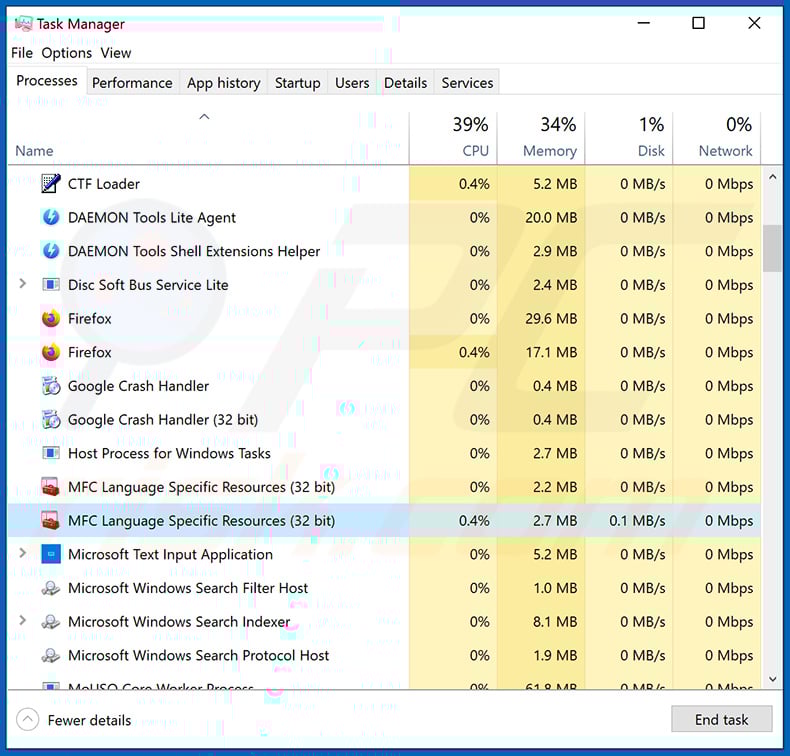
If you checked the list of programs running on your computer, for example, using task manager, and identified a program that looks suspicious, you should continue with these steps:
 Download a program called Autoruns. This program shows auto-start applications, Registry, and file system locations:
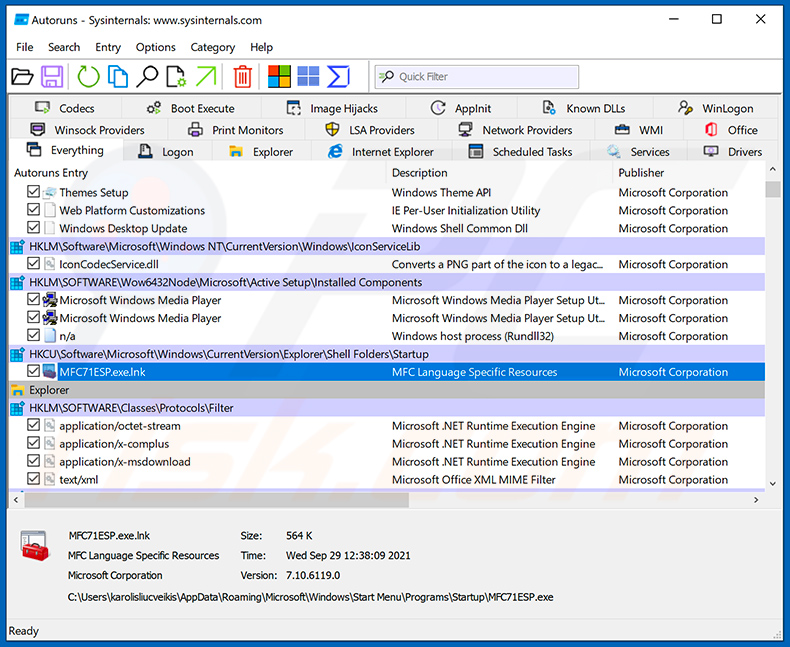
 Restart your computer into Safe Mode:
Windows XP and Windows 7 users: Start your computer in Safe Mode. Click Start, click Shut Down, click Restart, click OK. During your computer start process, press the F8 key on your keyboard multiple times until you see the Windows Advanced Option menu, and then select Safe Mode with Networking from the list.
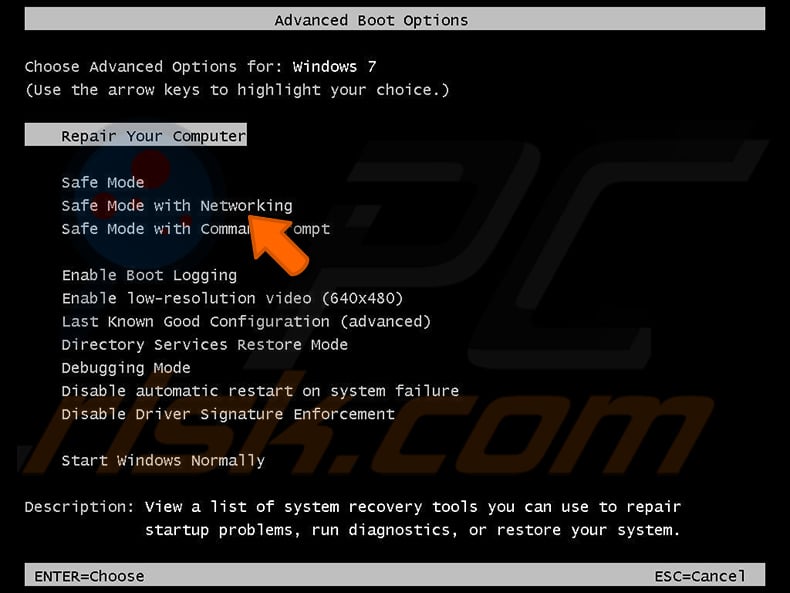
Video showing how to start Windows 7 in "Safe Mode with Networking":
Windows 8 users: Start Windows 8 is Safe Mode with Networking - Go to Windows 8 Start Screen, type Advanced, in the search results select Settings. Click Advanced startup options, in the opened "General PC Settings" window, select Advanced startup.
Click the "Restart now" button. Your computer will now restart into the "Advanced Startup options menu". Click the "Troubleshoot" button, and then click the "Advanced options" button. In the advanced option screen, click "Startup settings".
Click the "Restart" button. Your PC will restart into the Startup Settings screen. Press F5 to boot in Safe Mode with Networking.
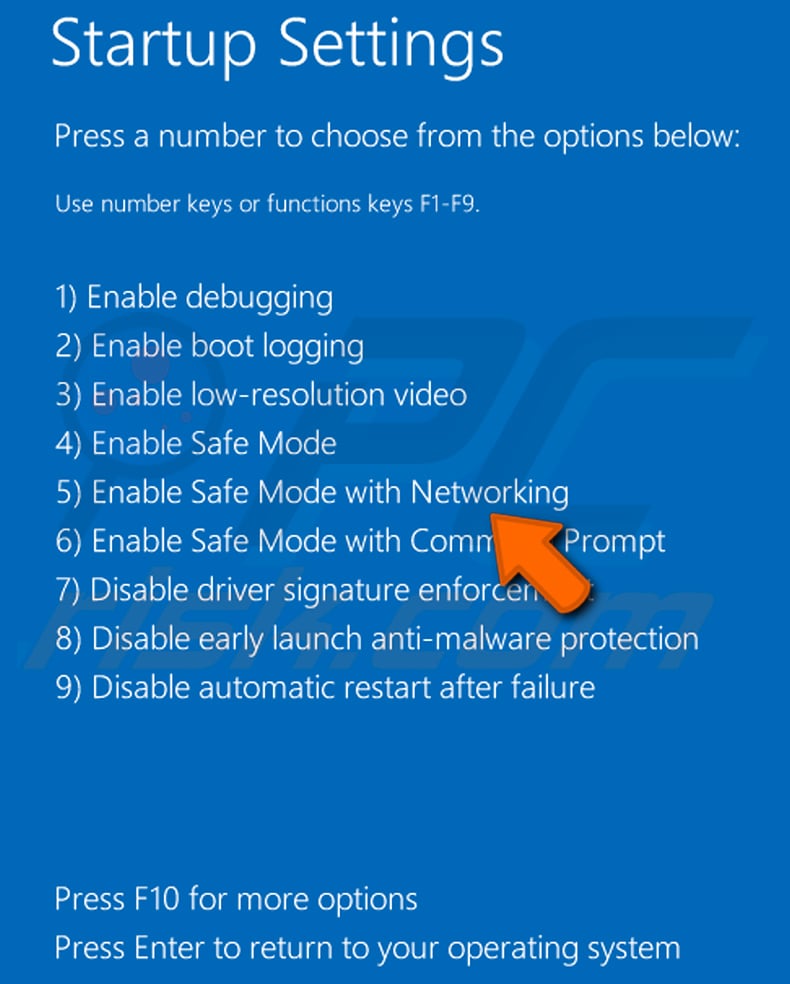
Video showing how to start Windows 8 in "Safe Mode with Networking":
Windows 10 users: Click the Windows logo and select the Power icon. In the opened menu click "Restart" while holding "Shift" button on your keyboard. In the "choose an option" window click on the "Troubleshoot", next select "Advanced options".
In the advanced options menu select "Startup Settings" and click on the "Restart" button. In the following window you should click the "F5" button on your keyboard. This will restart your operating system in safe mode with networking.
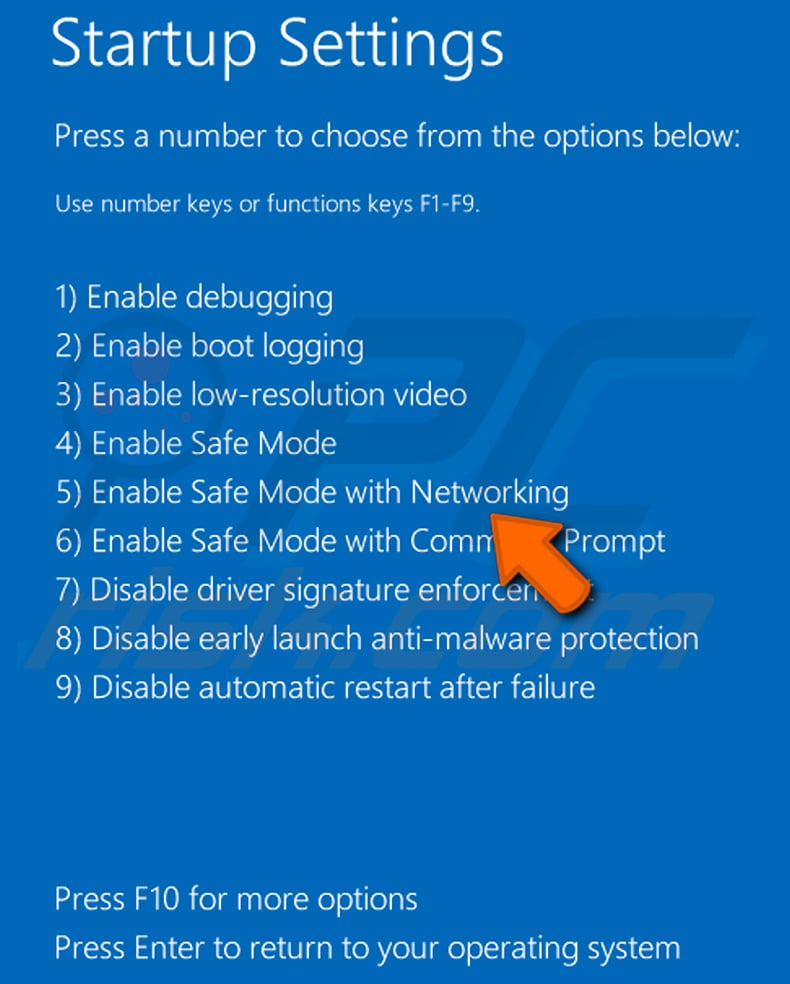
Video showing how to start Windows 10 in "Safe Mode with Networking":
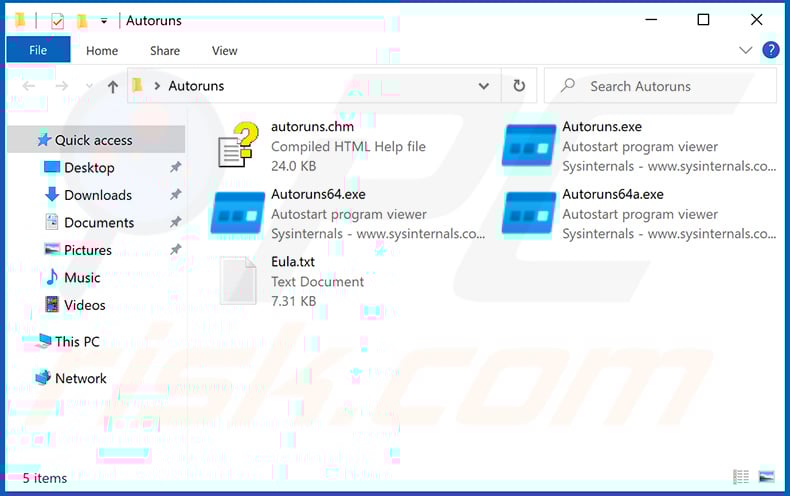
 Extract the downloaded archive and run the Autoruns.exe file.
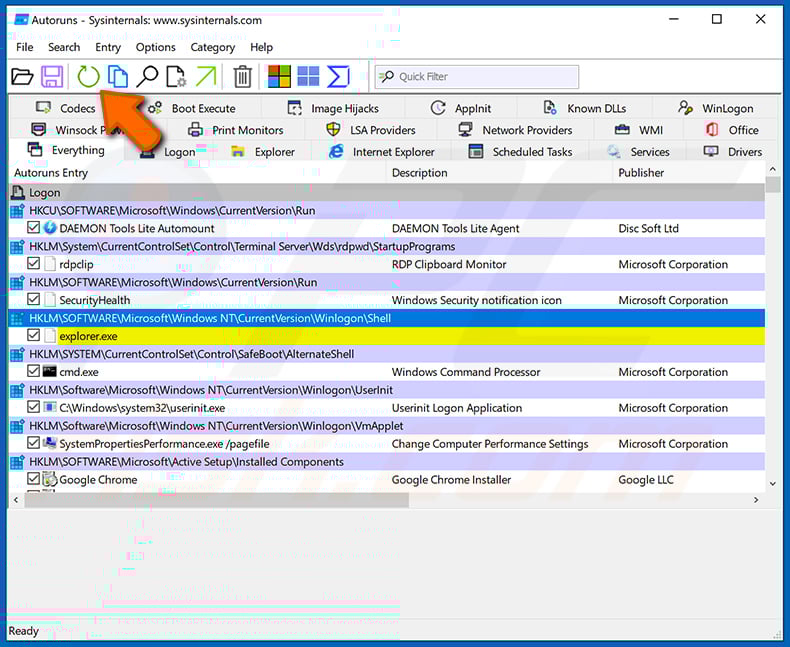
 In the Autoruns application, click "Options" at the top and uncheck "Hide Empty Locations" and "Hide Windows Entries" options. After this procedure, click the "Refresh" icon.
 Check the list provided by the Autoruns application and locate the malware file that you want to eliminate.
You should write down its full path and name. Note that some malware hides process names under legitimate Windows process names. At this stage, it is very important to avoid removing system files. After you locate the suspicious program you wish to remove, right click your mouse over its name and choose "Delete".
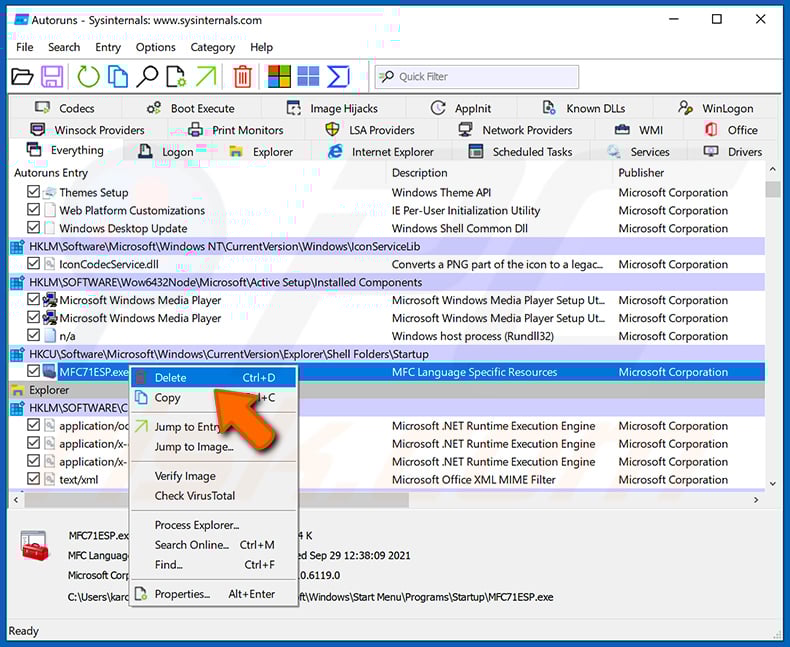
After removing the malware through the Autoruns application (this ensures that the malware will not run automatically on the next system startup), you should search for the malware name on your computer. Be sure to enable hidden files and folders before proceeding. If you find the filename of the malware, be sure to remove it.
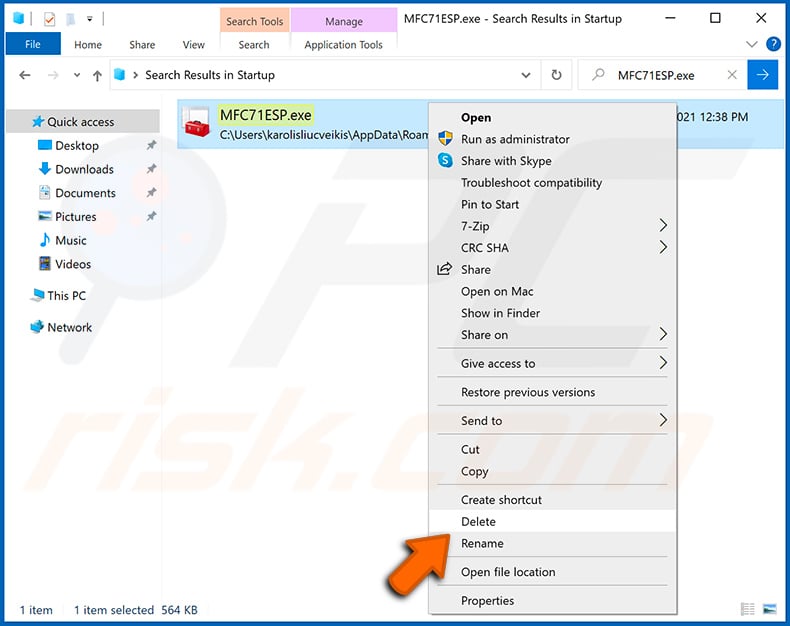
Reboot your computer in normal mode. Following these steps should remove any malware from your computer. Note that manual threat removal requires advanced computer skills. If you do not have these skills, leave malware removal to antivirus and anti-malware programs.
These steps might not work with advanced malware infections. As always it is best to prevent infection than try to remove malware later. To keep your computer safe, install the latest operating system updates and use antivirus software. To be sure your computer is free of malware infections, we recommend scanning it with Combo Cleaner Antivirus for Windows.
Frequently Asked Questions (FAQ)
My computer is infected with fake Xeno malware, should I format my storage device to get rid of it?
Formatting will remove fake Xeno, but it will also erase all files on the drive. A security solution like Combo Cleaner should be tried first - it can remove the malware without destroying your data.
What are the biggest issues that fake Xeno malware can cause?
Fake Xeno can steal browser credentials, Discord tokens, gaming account sessions, cryptocurrency wallet files, and Microsoft payment tokens. It also gives the attacker remote control over the machine, which can lead to identity theft, account hijacking, and financial loss.
What is the purpose of fake Xeno malware?
Fake Xeno serves two purposes: stealing sensitive data from the infected device and giving the attacker live remote access. This lets the operator spy on the victim, steal accounts and funds, and run commands on the machine without the victim's knowledge.
How did fake Xeno malware infiltrate my computer?
Fake Xeno spreads through gaming forums and Discord servers, where it is promoted as a free "undetected" Roblox script executor. Gamers who download and run the fake installer trigger the multi-stage infection chain. The campaign has been active since at least early 2026.
Will Combo Cleaner protect me from malware?
Yes. Combo Cleaner can detect and remove most known malware, including threats like fake Xeno. Running a full system scan is recommended, since advanced threats can sometimes leave traces deep within the system.
Share:
 Facebook
 X.com
X.com
 LinkedIn
 Copy Link

Tomas Meskauskas
Expert security researcher, professional malware analyst
I am passionate about computer security and technology. I have an experience of over 10 years working in various companies related to computer technical issue solving and Internet security. I have been working as an author and editor for pcrisk.com since 2010. Follow me on Twitter and LinkedIn to stay informed about the latest online security threats.
PCrisk security portal is brought by a company RCS LT.
Joined forces of security researchers help educate computer users about the latest online security threats. More information about the company RCS LT.
Our malware removal guides are free. However, if you want to support us you can send us a donation.
DonatePCrisk security portal is brought by a company RCS LT.
Joined forces of security researchers help educate computer users about the latest online security threats. More information about the company RCS LT.
Our malware removal guides are free. However, if you want to support us you can send us a donation.
Donate
▼ Show Discussion