
We may earn commissions from products we recommend. Learn more.
How to opt out of BeenVerified in 2026 | Easy guide

How to opt out of BeenVerified in 2026
BeenVerified is a people-search and public records website where anyone can look up someone by name, address, phone number, or email address. Searches can show contact details, relatives, locations, property info, bankruptcies, photos, and other public records. The app also lists features like social networks, deed and mortgage details, arrest and criminal records, vehicle history, and more. California's privacy regulator calls these companies "data brokers" because they collect and sell personal information about people they do not know. BeenVerified appears in California's data broker registry as "BeenVerified, LLC and its subsidiaries and affiliates."
If you want to make it harder for strangers, marketers, scammers, or abusers to find your personal information online, BeenVerified is a good place to start. This guide explains what BeenVerified is, what information it can provide, how to remove your listing manually, what to do if you have problems, and how to use Incogni to automate the process. It also covers what California's new Delete Request and Opt-out Platform (DROP) can and cannot do for you in 2026, plus tips to help limit future data collection.
Opt out of BeenVerified with Incogni
Table of Contents:
- Introduction
- What is BeenVerified?
- How to manually remove your information from BeenVerified
- Common issues with manual removal and alternative opt-out routes
- How to remove your information automatically
- Why you should remove your information from BeenVerified
- How to prevent data brokers from collecting more of your data
- In closing
- Frequently asked questions (FAQs)
What is BeenVerified?
BeenVerified says it offers easy and affordable access to public records. Its Android and iOS apps let you search for people, look up phone numbers, check property records, search by email, and look up vehicles by VIN. Searches can show contact details, relatives, locations, possible arrest or criminal records, property records, social media linked to an email, vehicle history, and user comments on phone numbers. So, it is much more than a basic phone lookup as it collects a wide range of personal data.
This is important because the real privacy risk comes from combining different pieces of information. Your street address might be public in one place, your phone number in another, and a relative's name somewhere else. When a people-search site puts all these details together, it becomes much easier for someone to find and use your personal data. Regulators and privacy advocates have warned about this for years. The FTC says data brokers collect information from many online and offline sources, often without people knowing, including purchase history, social media activity, warranty registrations, magazine subscriptions, religious and political affiliations, and other everyday details.
BeenVerified says it is not a consumer reporting agency under the Fair Credit Reporting Act (FCRA), and its information is not meant for consumer reports. So, it should not be used for decisions about jobs, renting, insurance, credit, or other things covered by the FCRA. This is an important difference, but it does not make the exposure less serious for people whose information is listed. It just means BeenVerified works more like a people-search tool than a formal background-check service for hiring or housing.
What information can appear on BeenVerified
According to BeenVerified's current app descriptions, a listing or report may include names, phone numbers, addresses, relatives, social media details, property information, email-linked contacts, vehicle data, and possible arrest or criminal records. The Android app says phone lookups can show owner location, spam scores, and user comments, while property searches may display deed, mortgage, and property value details. The iOS app adds features like social media search, dark web scan, and identity monitoring, highlighting how much the company's data products now cover.
California's privacy site warns that data brokers can collect and sell many types of personal and sensitive data, such as Social Security numbers, precise locations, browsing history, email addresses, phone numbers, interests, health information, and shopping habits. Not every BeenVerified profile will show all these details, but this highlights the larger broker ecosystem that BeenVerified is part of. If you want to clean up your digital footprint, remember that BeenVerified is just one part of a much bigger market.
Where the data tends to come from
Data brokers usually do not clearly list every source of their information, making it hard for most people to track. The FTC has criticized the industry's lack of transparency and pointed out that many consumers do not know brokers exist or how their data is collected and used. The FTC also reports that personal information often moves through several companies that share or resell it. This is why a record can seem very detailed, even if you never gave that company your information directly.
In reality, a BeenVerified listing can be built from public records, commercial data, online activity, account details, and other sources. Even if each bit of information is public somewhere, collecting it all in one place makes your details much easier for anyone to find. That is why opting out matters, even if your information is still available in other places.
How to manually remove your information from BeenVerified
The good news is that BeenVerified's opt-out flow is relatively straightforward compared with some harder-to-deal-with brokers. Multiple recent guides that tested the public process in 2026 describe the same sequence: go to BeenVerified's website, open the footer link labeled "Do Not Sell or Share My Personal Information," search for your record, choose the correct listing, provide an email address, complete verification, and click the confirmation link sent to your inbox. Recent guides also note that you do not need a paid BeenVerified account to submit the request.
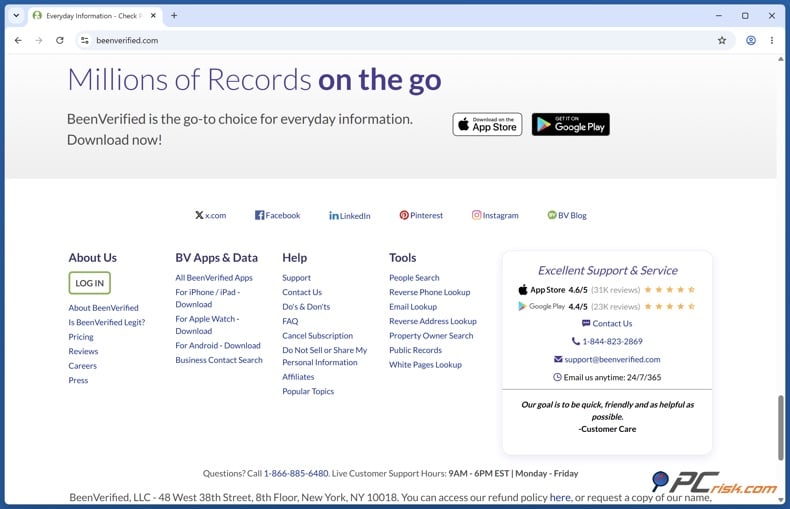
1. Open the privacy link - Start at the main BeenVerified website. Scroll to the footer and look for the privacy link labeled "Do Not Sell or Share My Personal Information." This is the normal entry point into BeenVerified's opt-out search tool in 2026. If you are on mobile, you may need to expand the footer or legal links section before you see it.
This first step is more important than it looks. People-search sites often hide their privacy tools in the footer or policy pages, not on the main page, which makes them harder to find. BeenVerified's process is easier than some, but you still need to start with the privacy link, not the regular search.
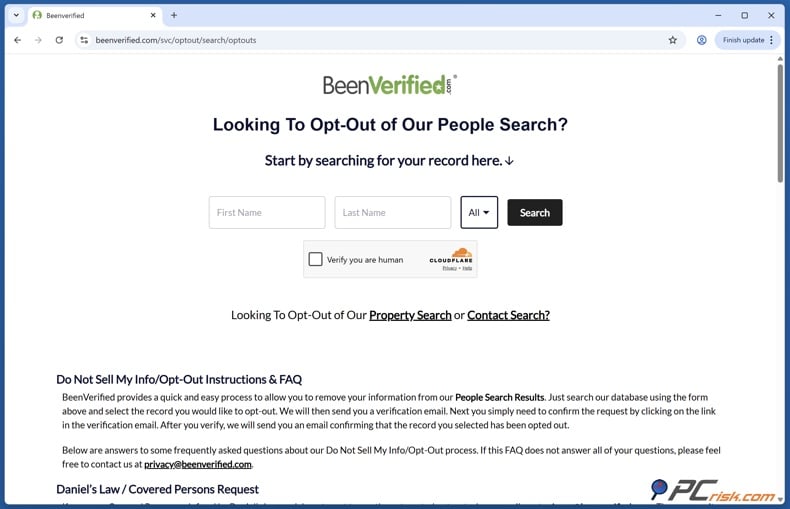
2. Search for your record carefully - When you get to the opt-out search page, enter your first and last name and the state linked to your record. BeenVerified's search results usually show details like age ranges, locations, aliases, and known relatives. Take your time with these details. If you have a common name, do not rush. Picking the wrong profile can waste time and leave your real listing in place.
If your name shows up in several similar records, compare all the clues you see. Check current and past cities, age, family names, or how your name is spelled. BeenVerified's search tools connect different pieces of information, so one person can end up with more than one profile, especially after moving, changing names, or using old phone numbers and addresses.
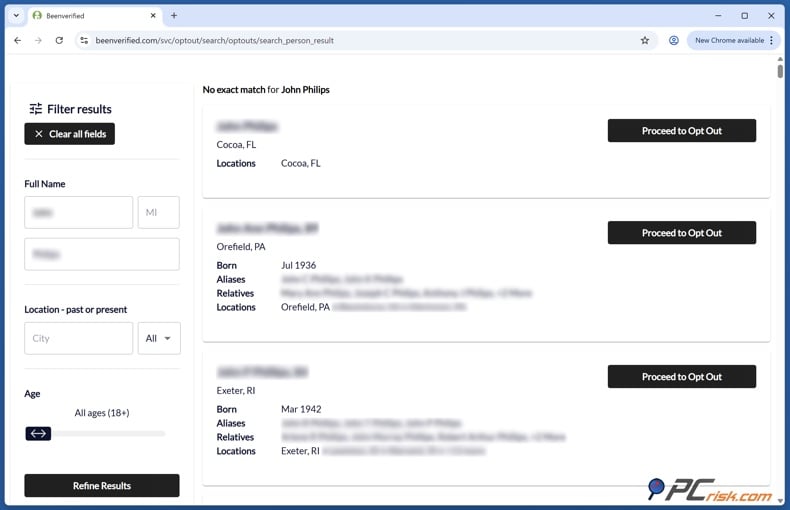
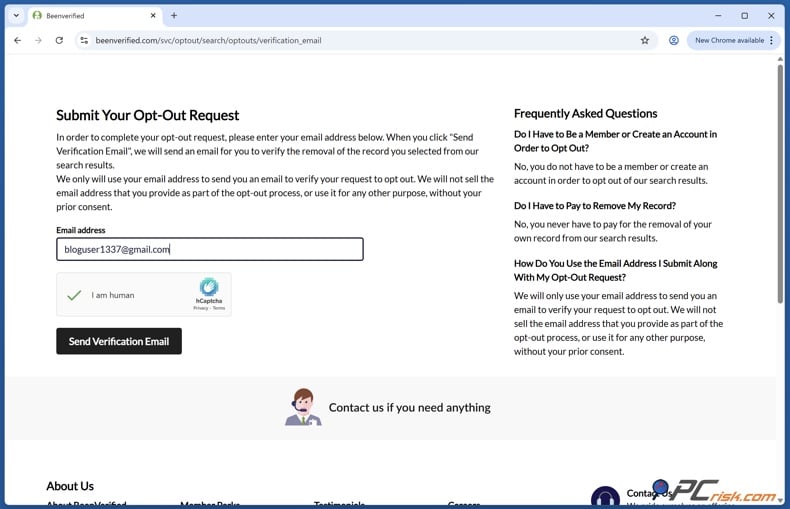
3. Proceed to opt out and submit the form - Once you find the right listing, select the option usually called "Proceed to Opt Out." You will be asked to enter your email address and complete a CAPTCHA or similar "I am human" check. Email verification is required for BeenVerified's standard opt-out process.
We at PCrisk suggest using a separate email address just for broker opt-outs. Each opt-out request creates a new data point: your email. Many privacy guides recommend using a different or disposable email for this, as long as it stays active long enough for you to receive and reply to the verification email.
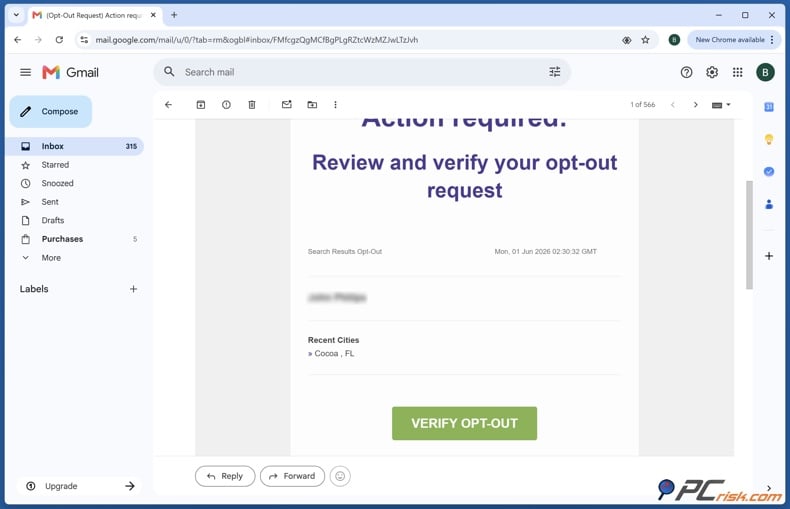
4. Verify the request by email - Open your inbox and look for BeenVerified's verification email. If it does not appear right away, check spam, junk, promotions, and any filtered folders. Once the message arrives, click the button or link typically labeled "Verify Opt-Out" to confirm that the request is really yours. Without this step, the listing usually remains active.
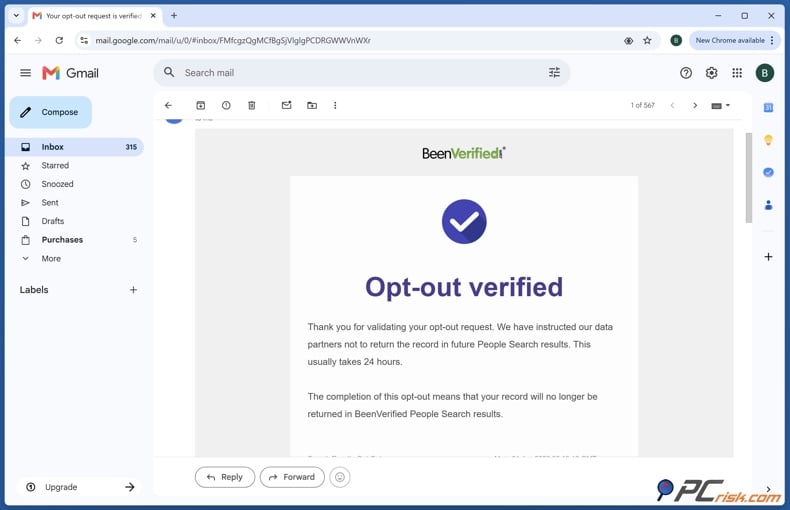
After you verify your request, save the confirmation email. Store it in a special folder or take a screenshot for your records. This is helpful if the listing does not go away, if you need to contact support, or if a similar profile appears later and you need proof you already opted out. Keeping this documentation is especially useful when removing your data from several broker sites at once.
5. Repeat the process for every matching profile - Many people miss this step. If BeenVerified shows more than one listing for you, such as from old addresses, different spellings, maiden names, or duplicate profiles, you need to repeat the opt-out process for each one. BeenVerified removals are profile-specific, not for your whole identity by default.
So, you are not done after removing the first matching profile. Search again using other versions of your name and check if any records still belong to you. If you have lived in different states, changed your last name, or used several phone numbers, spending a few extra minutes on this follow-up search is worth it.
6. Check that the listing is really gone - After you verify your request, wait a little while and then search for yourself again. BeenVerified removals usually happen within 24 to 72 hours, but sometimes it can take a few business days. The safest approach is to check again after a few days and then once more after a week.
If the record no longer appears in BeenVerified's search results, your manual opt-out likely worked. If it is still there after waiting, search again carefully and make sure you opted out of the right profile. If you did, try the support options mentioned later in this article and include your confirmation email when you contact them.
Common issues with manual removal and alternative opt-out routes
Manual opt-outs seem simple, but can be frustrating in real life. The most common problems are not technical errors but tricky situations: you cannot find your record, there are several records for you, the verification email does not arrive, or the listing is gone from BeenVerified but still shows up on Google or another broker. These issues can be solved, but it helps to know what they mean.
When you cannot find your record
If your first search shows nothing, do not assume you are absent from the database. Try variations of your name, including a middle initial, prior last name, or old state of residence. Filters such as age range and location can narrow or broaden results, and older listings may appear under outdated city or state data. Double-check obvious typos before you give up.
Sometimes your listing is hard to find with just one search term. Data brokers are not perfect. They can merge or split records or be slow to update changes. If you do not find your record the first time, try searching with different versions of your name or details, rather than repeating the same search. Taking your time with a second search is more effective than repeating the same search over and over.
When there are several records for the same person
Duplicate or nearly identical records are a common problem on BeenVerified. If you find multiple profiles linked to different addresses, aliases, or life stages, you need to opt out of each one separately. We recommend contacting support for bulk or duplicate cases, since leaving one matching record behind defeats the purpose of the cleanup.
If you are dealing with obvious duplicate records and the website process becomes too frustrating, contact support. BeenVerified's app listing and privacy registry both provide support@beenverified.com and the support phone number (888) 579-5910. When you reach out, include the details you used to find the records and copies of your confirmation emails if you have already sent opt-out requests through the site.
When the verification email does not arrive
If you do not get a verification email, it usually does not mean your request was denied. More often, the message went to spam, the address was mistyped, or the email alias expired too soon. We recommend checking your junk folder first, then resubmitting the request if needed, once your inbox is stable.
If you use a disposable email address, make sure it remains active long enough for verification and any follow-up messages. A dedicated email alias is helpful, but if it disappears too soon, it can cause problems. If you still do not get the email after trying again, contact BeenVerified support and let them know the verification message never arrived.
When the listing returns, or Google still shows it
This is where many people feel let down by opt-outs. Removing your information from BeenVerified does not erase the original public record, nor does it automatically remove the same data from other brokers. In our review of personal data removal services, we note that broker removals do not delete social posts, news articles, court records, or government databases.
Google may still show an old BeenVerified result even after the source page is removed. Data removal services help by removing the source page from Google's listings. Once the source is gone and Google updates its index, the old result should disappear, but this can take some time. If the result is gone from BeenVerified but still shows up in search, give it a little time for search engines to update.
Other ways to opt out if the web form does not work
If the standard web flow fails, you still have other options. BeenVerified's official app listing gives a support email, support@beenverified.com, and phone support at +1 888-579-5910. That gives you a documented fallback channel if the site form breaks, the CAPTCHA fails repeatedly, or you need help with duplicate records.
If you are a California resident, you also have broader privacy rights that can complement site-specific opt-outs. CalPrivacy says Californians can submit privacy requests under the CCPA to know, delete, or stop the sale or sharing of their data, and businesses subject to the law must honor those requests and notify relevant service providers or third parties of them. If a covered business does not honor your rights, CalPrivacy says you can submit a complaint.
California's new DROP system is the most notable alternative in 2026, but timing matters. As of May 28, 2026, Californians can already submit requests through DROP, yet data brokers are not required to begin processing those requests until August 1, 2026. Once that date arrives, registered data brokers must process requests, and the official DROP site says brokers must delete your data within 90 days while processing batches every 45 days. Since BeenVerified appears in California's registered data broker list, DROP is likely to become one of the most efficient ways for eligible residents to address it and many other brokers at once later this year.
How to remove your information automatically
Manually opting out of one site is manageable. But if you need to remove your data from ten, twenty, or even a hundred sites, it becomes a big job. This is where automated personal data removal services can help. Manual opt-outs work well for a few important sites, but automation is better when your data is on many brokers and you want ongoing monitoring and repeat removals.
Opt out of BeenVerified with Incogni
What personal data removal services are
We at PCrisk define personal data removal services as tools that do the work you would otherwise have to do manually across numerous people-search sites and broker databases. You provide basic information such as your name and past addresses, the service scans broker and people-search sites to find your data, then sends removal requests by web form, email, or even regular mail and follows up until the listings are removed. We also stresse an important limit: these services are good at broker listings, but they do not erase everything online, especially news articles, social media posts, court records, or government databases.
This is the main benefit. You are not getting a magic delete button, but paying for scale, persistence, and monitoring. Paid services are usually much more convenient than doing it yourself because they cover hundreds of sites and keep checking if your data reappears. Re-subscribing can also help, since your data might show up again or on new broker sites later.
Not every service in this category works equally well. Consumer Reports found in 2024 that removal-service results were mixed and that some services did worse than manual removals. That is why, if you use automation, you should choose vendors that are clear about what they cover, show you which brokers they contacted, and tell you if a record is still in progress or actually gone.
How to use Incogni for BeenVerified and similar brokers
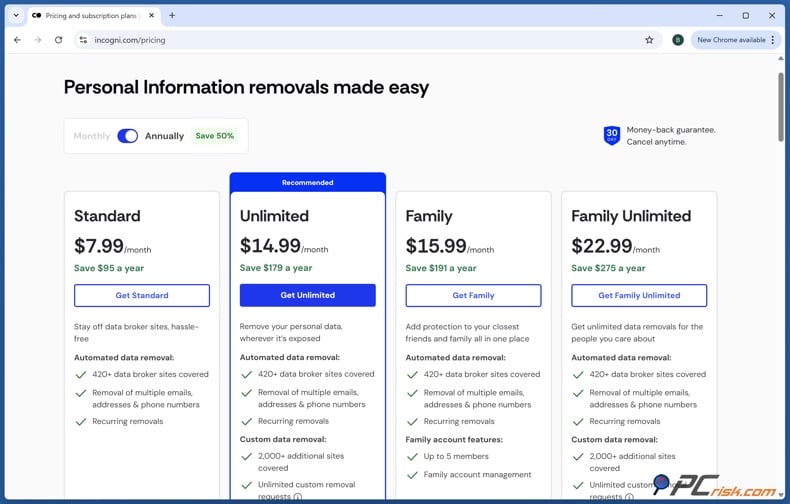
We suggest considering Incogni because it automates opt-out requests, works with hundreds of brokers, gives clear updates, and allows custom removals on higher plans. Incogni's help center says it can remove your data from over 420 brokers automatically. This broad coverage is helpful since BeenVerified is just one of many sites that might show your information.
Getting started is straightforward. After you pick a plan and confirm your email, you'll be asked to fill out a profile with your name, any aliases, current and past addresses, email addresses, phone numbers, and date of birth. Adding more details helps match your records more accurately, since brokers often keep old addresses or extra emails linked to you.
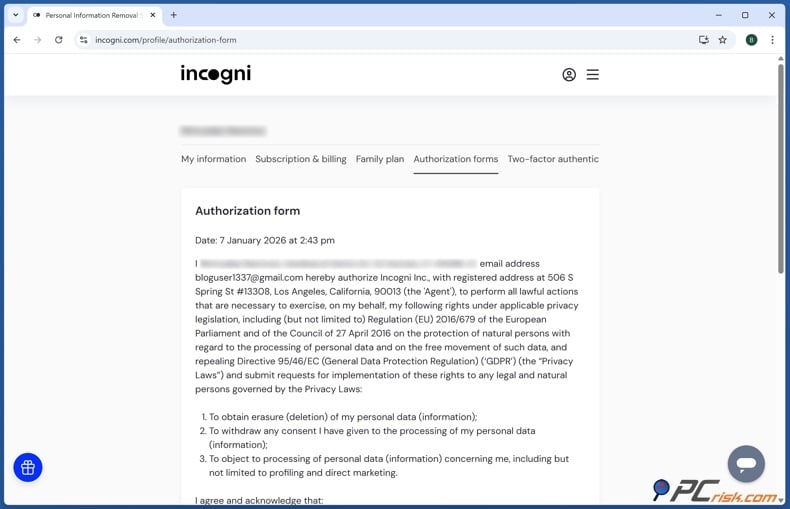
The next step is authorization. Incogni uses a digital form so it can act as your representative when sending deletion and opt-out requests. This step matters because many brokers need proof that the request comes from you or someone you've authorized. Once you give consent, Incogni can start reaching out to brokers for you.
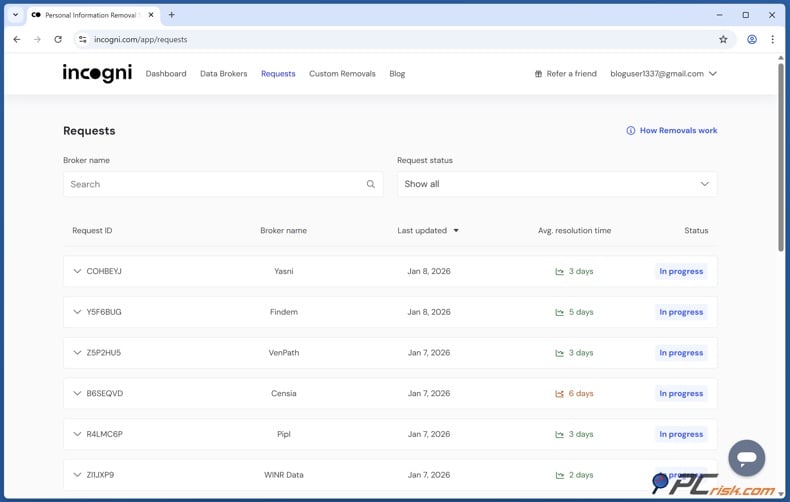
After that, most of the process is automatic. The dashboard shows updates like "In progress," "Removed," and "Awaiting response." In our tests, many removals happened in the first week, but some brokers took longer to respond. Some replied within weeks, while others took 30 to 45 days, which is common for privacy-law requests.
If Incogni finds several similar profiles with one broker, the dashboard will ask you to confirm which ones are yours. You might need to click once or twice if there are duplicate or unclear matches, but Incogni takes care of the follow-up. Incogni keeps monitoring and sends new requests every 60 days for people-search sites and every 90 days for private brokers. This regular checking is a key difference between a one-time manual opt-out and a subscription service.
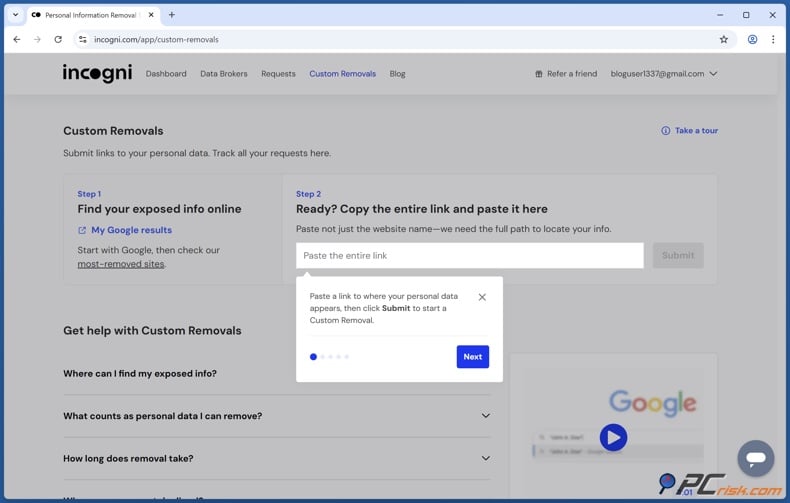
Incogni's support materials confirm that if a broker isn't on their usual list, you can still get help using the Custom Removal feature. Unlimited plan lets you request removals from sites outside Incogni's standard list, which is helpful if your data shows up on smaller directories, blogs, or people-search sites. So, Incogni is more than just a shortcut for BeenVerified - it's a broader tool for cleaning up your data across many brokers.
Even if you use an automated service, it's smart to check a few key sites yourself after the first round of requests, including BeenVerified. Automation saves time and covers more sites, but checking on your own is the fastest way to see if a listing is actually gone. This is especially important for sensitive or high-risk records, or anything linked to your home address.
Why you should remove your information from BeenVerified
The main reason to opt out of BeenVerified is straightforward: when your information is all in one place, it's much easier for others to find and use it. BeenVerified's descriptions show how much can be linked from just a few details. CalPrivacy says brokered data can include contact info, browsing history, location, and other sensitive details. The easier it is for strangers to connect your name, phone number, address, and relatives, the easier it is for them to target you.
Check our top personal data removal services
CalPrivacy's DROP site is clear about the risks. It says cutting down your exposure to data brokers can help reduce unwanted texts, calls, and emails, and lower your risk of identity theft, fraud, AI impersonation, and data leaks. This is not just theory. If your details spread widely, scammers can use them to look convincing in phishing messages, social engineering, romance scams, account takeovers, or impersonation attempts.
There's also a physical safety concern. Privacy Rights has warned for years that making home addresses easy to find can be dangerous for people facing stalking or domestic violence. Consumer Reports has also said people-search sites can expose anyone to fraud, identity theft, scams, and even stalking or harassment. For many, opting out isn't about secrecy - it's about making misuse harder.
Even if you're not at high risk, having your information out there can still cause problems. You might get more spam, robocalls, unexpected contacts, or questions from strangers, and your data could end up in more databases. The FTC has warned that most people don't know which brokers have their data or how it was collected. Opting out of BeenVerified doesn't solve everything, but it does remove one easy way for your information to be found.
How to prevent data brokers from collecting more of your data
The first defense is to use privacy rights at scale where you can. If you are in California, submit site-level privacy requests under the CCPA and use DROP for broker-wide deletion. CalPrivacy says Californians can ask covered businesses what they collect, order them to delete it, and tell them to stop selling or sharing it. Meanwhile, DROP lets eligible residents send one request to over 500 registered data brokers.
The second defense is to turn on an opt-out preference signal in your browser. CalPrivacy says these signals tell websites not to sell or share your personal information automatically, which is far easier than opting out one site at a time. California's Opt Me Out Act, signed in 2025, will require browsers operating in California to include these signals no later than January 1, 2027, but some browsers and plug-ins already support them today.
The third defense is to limit web tracking. CalPrivacy recommends clearing browsing data, blocking third-party cookies, using visible privacy toggles when available, reading privacy policies, and considering privacy-centric browsers or extensions. Deleting cookies alone is not a complete solution, but it makes long-term recognition and cross-site tracking harder, especially when combined with stricter browser settings.
The fourth defense is to limit mobile tracking. CalPrivacy explains that your phone's advertising ID can be used to track activity and serve targeted ads, and it recommends disabling tracking, opting out of ad personalization, reviewing app permissions, and removing precise geolocation data from broker circulation when possible. For Californians, the guidance is especially clear: use DROP to tell data brokers to delete and stop selling location-linked personal information.
The fifth defense is to harden your accounts and reduce public oversharing. CalPrivacy says reused passwords, phishing, and data breaches make account compromise easier, and it recommends unique passwords and multi-factor authentication. Its breach-monitoring guidance also recommends using services that alert you when an email address appears in a leak. In a separate security post, CalPrivacy also advises deleting unused accounts and being cautious about what you share publicly, since bad actors can scrape social profiles to build a more useful dossier on you.
We recommend treating this as an ongoing process rather than a one-time task. Remove yourself from major people-search sites, use browser opt-out signals, limit app and site tracking, keep your accounts secure, and check your exposure regularly. Data brokers are persistent, so your privacy efforts should be as well.
In closing
BeenVerified isn't the only data broker out there, but it's a big part of the problem. The service collects and displays details most people want to keep private, like addresses, phone numbers, relatives, property info, and other linked records. Its product descriptions show how much can be found from just a little information, so it's important to take opting out seriously.
If you only need to remove yourself from BeenVerified, the manual method still works in 2026. Search for your listing, opt out of each matching record, verify by email, and check your results after a few days. If the form doesn't work, use support@beenverified.com or the support number. If you're in California, plan to combine this with broader privacy requests and DROP when processing starts on August 1, 2026.
If your information is on many brokers, automation is usually the better long-term option. Our testing found Incogni helpful because it automates requests, clearly tracks status, and maintains ongoing monitoring for new appearances. You should still check some sites yourself, but automation turns what could be dozens or hundreds of opt-outs into one ongoing process.
The bottom line is simple: removing your BeenVerified profile won't erase every public trace of you online, but it does make your personal information harder to find, combine, and misuse. For most people, that's the main goal.
Check our top personal data removal services
Frequently asked questions (FAQs)
Do I need a BeenVerified account to opt out?
No, you do not need an account. You can use the public opt-out tool without signing up or paying for a subscription. However, you still need to confirm the removal by email.
Is BeenVerified a consumer reporting agency?
No. BeenVerified says in its app listings that it is not a consumer reporting agency under the Fair Credit Reporting Act. Its information is not meant for consumer reports, so it should not be used for decisions about jobs, housing, credit, insurance, or other FCRA-covered areas.
How long does BeenVerified usually take to remove a listing?
There is no official public timeline, but removals usually take about 24 to 72 hours after you verify by email. One test found it could take several business days. It is a good idea to check again after a few days and then after a week.
Why do I have to verify the request by email?
The BeenVerified opt-out process requires email verification. You must enter your email and click the verification link to finish the request. Without this step, your opt-out will not go through.
Will opting out of BeenVerified remove me from Google, too?
No, not right away, and sometimes not in just one step. Once the BeenVerified page is removed, Google may eventually stop showing it after search engines update, but the listing can stay in search results for a while. If your information is on other sites, those can still show up in searches, too.
Does removing myself from BeenVerified remove the original public record?
No. Opting out of BeenVerified usually removes your information from their public search results, but not from the original court, property, government, or other databases that provided the data. Removing your info from a broker does not delete public records or data on other websites.
Can California residents use DROP instead of opting out site by site?
Yes, but timing is important in 2026. California's DROP system began on January 1, 2026, and allows eligible residents to submit one request to over 500 data brokers. However, brokers will not start processing these requests until August 1, 2026. After that, they must delete data within 90 days and handle new requests every 45 days.
What does Incogni do differently from a manual BeenVerified opt-out?
Incogni is a wider data-removal service, not just a shortcut for BeenVerified. According to Incogni's help center, it can send deletion requests to over 420 data brokers, track each request in a dashboard, and check whether your data shows up again. This is helpful if your information is on many sites, not just BeenVerified.
Will my information stay gone forever after I opt out?
Do not expect your information to stay gone forever. Consumer Reports says people-search removals often require ongoing attention because data can resurface. We also recommend regular monitoring for this reason. If you are at high risk, check important sites often or use a service that keeps scanning and sending new requests.
What should I do if BeenVerified shows more than one profile for me?
Remove every profile that is yours. Guides and tests say that duplicate or similar listings often need separate opt-out steps. If the duplicates are too hard to fix on the website, contact BeenVerified support at support@beenverified.com or by phone, and include your confirmation emails.
Share:
 Facebook
 X.com
X.com
 LinkedIn
 Copy Link

Rimvydas Iliavicius
Researcher, author
Rimvydas is a researcher with over four years of experience in the cybersecurity industry. He attended Kaunas University of Technology and graduated with a Master's degree in Translation and Localization of Technical texts. His interests in computers and technology led him to become a versatile author in the IT industry. At PCrisk, he's responsible for writing in-depth how-to articles for Microsoft Windows.
▼ Show Discussion