
We may earn commissions from products we recommend. Learn more.
How to stop Alexa from spying on you in 5 steps

Is Alexa spying on you? Here are 5 steps to protect your privacy
Alexa is not secretly recording everything you say, like you might see in movies. Amazon says Alexa devices only listen for a chosen wake word, and audio is not saved or sent to the cloud unless that word is detected. There is also a second check to confirm the wake word after streaming begins. While this seems simple, things are actually more complicated. Alexa still has microphones that are always on, uses cloud processing, and creates records that can be stored, reviewed, and managed in your Amazon account.
So the real privacy question is not just "Does Alexa spy on you?" It is also about when Alexa starts listening, what gets uploaded, how long your data is kept, what can be learned from those interactions, and what controls you actually have. These questions became even more important after Amazon ended a privacy feature on March 28, 2025, which had let some Echo users keep voice recordings off Amazon's cloud. Since then, cloud processing has become an even bigger part of using Alexa.
Protect your privacy with Incogni
Table of Contents:
- Introduction
- How Amazon's Alexa is invading people's privacy
- How to prevent Alexa from spying on you
- What are the privacy risks posed by Alexa?
- How your data is being harvested and sold for profit
- In closing
- Frequently asked questions (FAQs)
How Amazon's Alexa is invading people's privacy
In short, Alexa is not meant to act like a hidden surveillance device, but it can still pose real privacy risks. Amazon says Alexa only starts listening after it hears your chosen wake word, like "Alexa," "Amazon," "Echo," "Computer," or "Ziggy." The company also says the device does not store or send audio to the cloud unless the wake word is detected. So, Alexa is not designed to record everything you say at home.
However, just because Alexa is not designed to record everything does not mean it cannot pick up things by accident. Alexa is always passively listening for the wake word. This passive listening helps the device decide when to start recording and uploading. According to Amazon, the device matches acoustic patterns to detect the wake word, and only then does it start streaming to the cloud. In simple terms, Alexa has to listen to what is happening around it to know if you are talking to it.
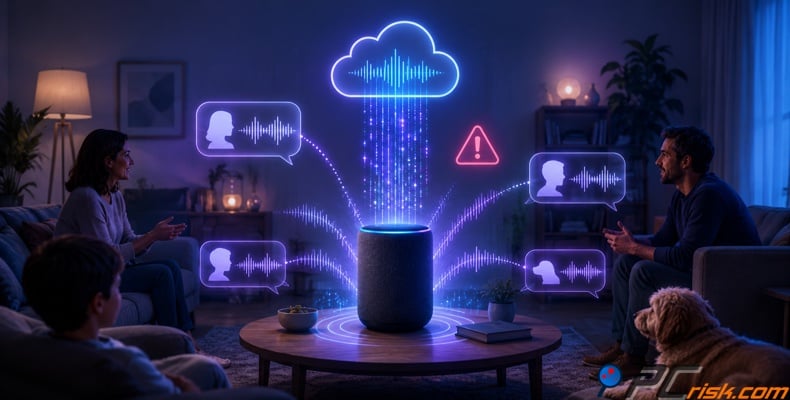
So, is Alexa always listening? Yes, it is always listening for the wake word. No, it is not constantly recording every conversation. This difference is important, but users should not get too comfortable. Studies have shown that smart speakers can mistake regular sounds or words for the wake word, which can make them start recording and sending audio that was not meant for Alexa. Researchers see this as a serious privacy problem because private conversations can be captured and sent to the cloud by mistake.
This brings up another question: does Alexa record conversations? Amazon says it does not by default, unless the wake word is detected or you press a button to activate it. However, false activations can happen, and when they do, private conversations can be recorded. In a well-known 2018 case, Amazon confirmed that an Echo device in Oregon accidentally recorded a family's conversation and sent it to one of their contacts after a series of mistakes. Amazon called this an "extremely rare occurrence," but for people concerned about privacy, rare does not mean impossible.
What happens after Alexa captures audio also affects your privacy. Amazon lets users review and delete voice recordings, transcripts, and typed requests linked to their account. This is helpful, but it also shows that these interactions can be stored in your account history for you to manage. Amazon also says voice recordings are used to improve Alexa's accuracy, and there are settings to review, delete, and control how your data is used.
Amazon has come under ongoing scrutiny from regulators and courts for these practices. In 2023, the FTC and DOJ accused Amazon of breaking children's privacy laws by keeping kids' Alexa voice recordings indefinitely, ignoring deletion requests, and using this data to improve Alexa's algorithms. As a result, a court ordered Amazon to change its deletion practices, remove certain data, and pay a $25 million fine.
Legal challenges over Alexa's recording practices continued. In July 2025, Reuters reported that a federal judge in Seattle let tens of millions of Alexa users move forward as a nationwide class in a lawsuit. The suit claims Amazon secretly recorded and collected private conversations without clearly telling users how long recordings would be kept or how they might be used. Amazon denied any wrongdoing and said Alexa has safeguards to prevent accidental recordings. While this does not prove the lawsuit's claims, it shows that Alexa's privacy approach is still controversial and faces major legal challenges.
How to prevent Alexa from spying on you
If you want to keep using Alexa's voice features, you cannot fully stop it from processing your data. When an Echo device hears its wake word, it sends your request to Amazon's cloud for processing. In March 2025, Amazon removed the limited "Do Not Send Voice Recordings" option, which had let some Echo devices process requests locally. However, you can still control how long recordings are kept, prevent Amazon from using them to improve its services, and turn off the device's microphones.
Check our top personal data removal services list
The following five-step action plan is verified against Amazon's current Alexa privacy documentation. Menu names may vary slightly depending on your country, device, and Alexa app version.
Step 1: Stop Amazon from using your recordings to improve Alexa
Amazon may use a portion of Alexa interactions to develop new features, improve voice recognition, and evaluate the accuracy of its services. Depending on your settings, some recordings may also be manually reviewed.
To restrict this use:
- Open the Alexa app on your phone or tablet.
- Tap "More."
- Select "Settings."
- Open "Alexa Privacy."
- Select "Manage Your Alexa Data."
- Find the option labeled "Use of Voice Recordings" or similar.
- Turn off permission to use your voice recordings for service improvement.
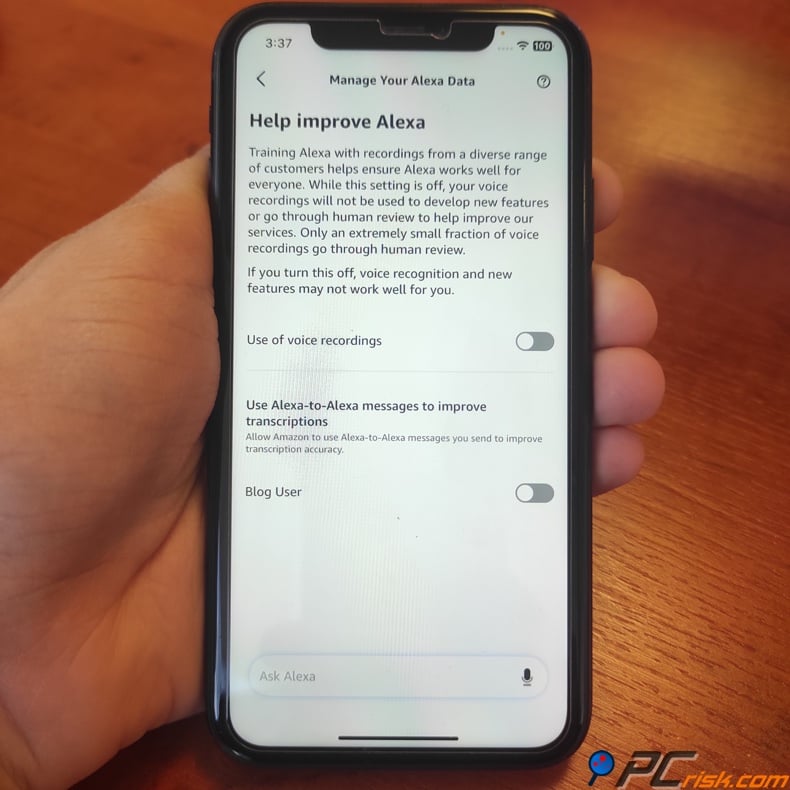
Turning off this setting lowers the chance that your recordings will be used to improve Amazon's services or be reviewed by people. Amazon warns that opting out might make voice recognition less accurate or limit personalized features, but this is a fair trade-off for those who care most about privacy. Amazon also says you can use Alexa Privacy Settings to control whether your recordings are reviewed or used to develop new features.
Look over the page carefully before you leave. Alexa's privacy settings are often spread across different menus, and Amazon may have separate controls for voice recordings, messages, ads, and other types of data. Turn off any data-sharing options you do not need.
Step 2: Mute Alexa's microphone during private conversations
Adjusting software settings can help reduce data collection, but the surest way to stop an Echo device from listening is to physically turn off its microphones.
All Echo devices have a microphone-off button, usually marked with a microphone or circle crossed by a line. Pressing this button cuts power to the microphones, and a red light indicates they are off.
Use the microphone-off button when:
- Discussing financial, medical, legal, or employment matters.
- Sharing passwords, payment details, or other confidential information.
- Holding private family conversations.
- Hosting visitors who have not agreed to voice data collection.
- Leaving the device unused for an extended period.
When you press the microphone-off button, Amazon says the microphones lose power and cannot pick up your voice. Alexa will ignore voice commands until you turn the microphones back on. Some features can still be managed through the Alexa app. If you have an Echo Show, close the camera shutter when you are not using the camera.
Always look for the red light to make sure the device is muted. If you are in a sensitive area, unplugging the Echo gives you the most privacy.
Step 3: Select "Don't save recordings" or enable automatic deletion
Alexa needs to process your request before it can answer, but you do not have to let Amazon retain the resulting voice recording indefinitely.
To change the retention period:
- Open the Alexa app.
- Tap "More."
- Select "Settings."
- Open "Alexa Privacy."
- Select "Manage Your Alexa Data."
- Select Voice "Recordings and Transcripts."
Select "Don't retain" for the greatest available level of protection.
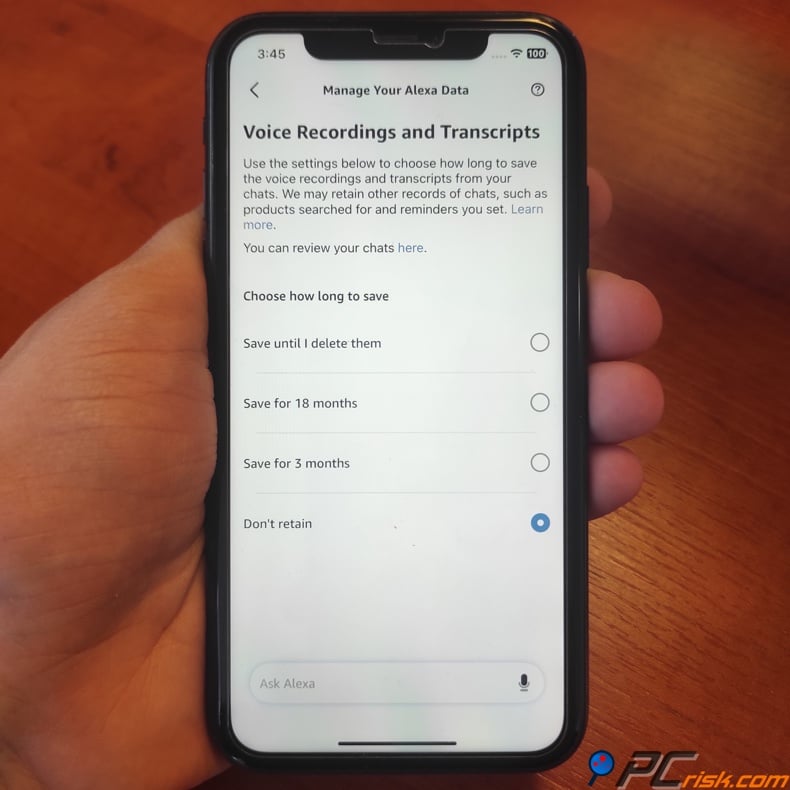
If you turn on "Don't save recordings," Amazon deletes the audio after handling your request. Still, some data stays. Amazon says text transcripts and typed requests can stay for up to 30 days unless you delete them yourself. Other records, like Alexa's actions, reminders, shopping, and info from third-party skills, might also be kept.
If you cannot use "Don't save recordings," or if turning it off affects a feature you want, pick the shortest auto-delete period. Amazon lets you delete recordings after 3 or 18 months. 3 months is safer for your privacy than 18 months.
If you choose not to save recordings, Voice ID might stop working, and Alexa may be less personalized. Alexa uses saved audio to tell household members apart and adjust its answers. For most people who care about privacy, limiting data is more important than keeping every personalized feature.
Step 4: Review and delete your existing Alexa history
Changing how long Alexa keeps your data does not erase old recordings or transcripts. Check your Alexa history and delete anything you do not want Amazon to keep.
To access the history:
- Open the Alexa app.
- Tap "More."
- Select "Alexa Privacy."
- Open "Review Alexa History."
- Choose a date range, device, or household profile.
- Listen to or review the stored interactions.
- Delete individual entries or remove the entire selected history.
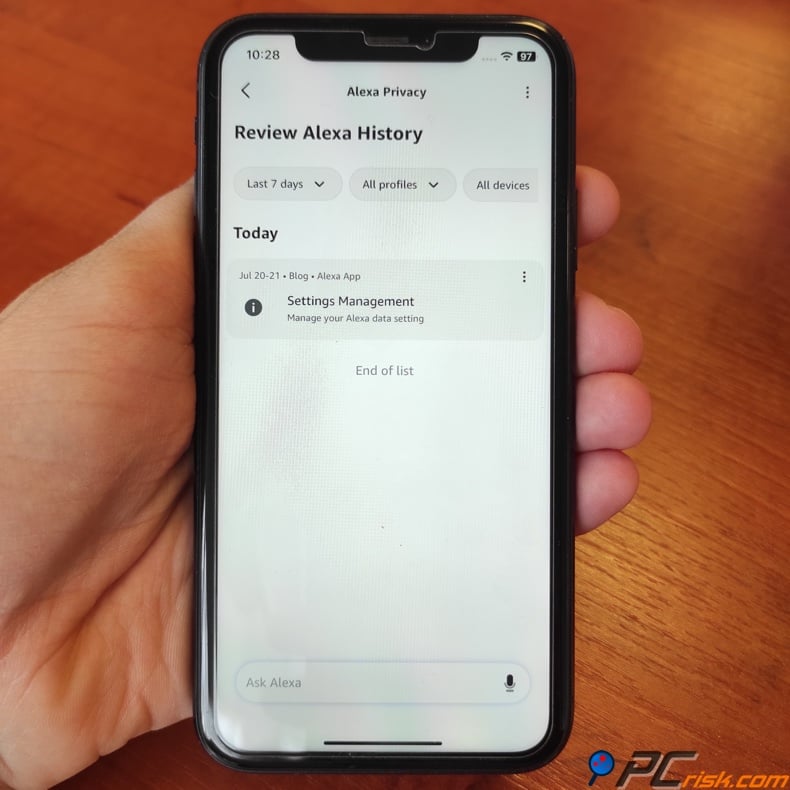
Look for entries labeled as audio "not intended for Alexa." These show when the device picks up sounds by mistake, such as a regular word, a TV show, or background noise. Amazon admits false activations happen and says you can review and delete these recordings in Alexa Privacy Settings.
Do not just use voice commands like "Alexa, delete what I just said." Amazon says these requests do not always work and can be misunderstood. Use the Alexa app or Amazon's privacy controls online to make sure unwanted entries are really gone.
There are limits to deleting Alexa history. Amazon can still keep records of things Alexa did for you, such as alarms, purchases, lists, reminders, searches, and information needed for ongoing services. Deleting a recording does not remove data collected by third-party skills. Check the permissions and privacy policy for each skill you use.
Get in the habit of checking your Alexa history every month. This can help you spot accidental activations, strange commands, or devices you no longer use.
Step 5: Change Alexa's wake word
Alexa can turn on by mistake if it hears something that sounds like its wake word. Names like "Alex" or words from the TV can trigger it by accident. Picking a wake word that is not used much in your home can help prevent this.
To change it:
- Open the Alexa app.
- Select "Devices."
- Tap "Echo & Alexa."
- Choose the Echo device you want to configure.
- Open its device settings.
- Select "Wake Word."
- Choose a different word and confirm the change.
Amazon lets you pick from options like "Ziggy," "Amazon," "Echo," and "Computer." We recommend choosing a word that sounds unique and is not used in daily talk. For example, "Ziggy" could work well if no one in your home says it often.
You have to change the wake word on each Echo device separately. Do this for every speaker or display you own. After a few days, check your voice history to see if there are fewer accidental activations.
These five steps cannot make an internet-connected microphone fully private. But they do help cut down on extra recordings, long-term storage, human review, and accidental activations. For the best privacy, mute Alexa when you are not using it and avoid putting Echo devices in bedrooms, home offices, or places where you have private talks.
What are the privacy risks posed by Alexa?
The main privacy risk is Alexa picking up speech by accident. If it hears a false wake word or is triggered by mistake, it can record things you never meant to share with Amazon. This risk comes with any device that listens for a wake word in normal household noise. The 2018 Oregon case showed how a series of mistakes can turn a private talk into a recording that gets sent out.
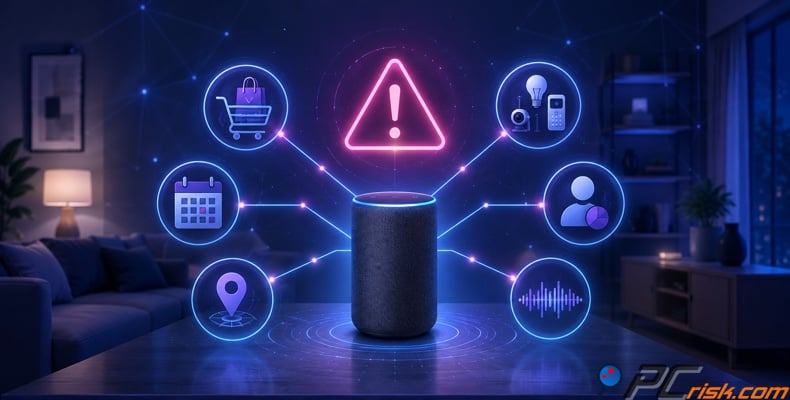
Another risk is that Alexa relies more on cloud processing. Amazon now expects most voice requests to be handled in the cloud. AP reported that Amazon removed the "Do Not Send Voice Recordings" feature on March 28, 2025, saying new AI features need cloud processing. This means users have less control over keeping voice requests local, even on devices that used to allow it.
Protect your privacy with Incogni
A third risk is how long Amazon keeps your data and how it is used. In 2023, the FTC accused Amazon of keeping children's recordings forever, making it hard for parents to delete them, and using the data to train algorithms. This shows that once Amazon has your data, there is pressure to keep it longer and use it in more ways than you might expect.
The fourth risk is ecosystem sprawl. Alexa skills may ask for access to your personal information, and studies have shown that privacy disclosures in the Alexa skills ecosystem are often incomplete, inconsistent, or hard for users to understand. Even if Amazon's main assistant works as intended, the wider ecosystem can still lead to permission creep and data leaks.
The fifth risk comes from communication and remote access features. Alexa's Drop In feature works like an intercom, but it also makes your device more accessible to household members and approved contacts. Amazon lets you turn off Drop In, and it's a good idea to do this on devices in private rooms. Often, it's these convenience features that quietly reduce your privacy at home.
How your data is being harvested and sold for profit
The reality is that raw recordings are just one part of the data economy. What matters more is the profile built from your interactions. Researchers found that Amazon and third parties collect data from smart speaker use, Amazon uses it to figure out your interests and show targeted ads, and these interactions can lead to higher ad bids from advertisers. So, the real money isn't in selling audio files, but in turning your interactions into advertising signals.

Regulators have also found that Amazon's use of retained Alexa data serves its business interests. The FTC reported that Amazon used some unlawfully kept children's voice recordings to improve Alexa's speech recognition. This matters because data that seems operational at first can end up being used to train the product and help the business.
Beyond Alexa, there is a larger data broker industry. The FTC says people-search sites are a type of data broker. They may buy information from other brokers, collect details from public social media, and gather data from public records. California now lets residents use the Delete Request and Opt-out Platform (DROP) to send one deletion request to over 600 registered data brokers, starting August 1, 2026. This is a big improvement, but it only helps Californians and only covers brokers registered in that state.
For everyone else, opting out manually is still slow and repetitive. That's why personal data removal services exist. At PCrisk, we recommend considering Incogni. In our 2026 review, we noted its easy setup, dashboard tracking, and wide broker coverage. We also found that Incogni automates removals from over 420 data brokers and people-search sites and continues monitoring, since broker profiles can return after deletion. If you care about privacy, the best approach is layered: secure Alexa, limit what Amazon keeps, and remove your exposed identity data from broker databases.
In closing
So, is Alexa spying on you? Not in the simple sense of secretly recording every conversation and sending it all to Amazon on purpose. Alexa listens for a wake word before streaming audio, and there's no strong evidence that Amazon made Alexa a full-time hidden listening device. But this defense misses the bigger issue. Wake word systems can fail, cloud processing is more important than before, recordings and transcripts can be kept, third-party skills increase risks, and the data economy is designed to turn your interactions into profit.
The practical takeaway is clear. Alexa is convenient, but it comes with real privacy risks. If you keep using it, manage your voice history, reduce how long recordings are kept, opt out of service-improvement uses, limit permissions, turn off features you don't need, and use the mute button when privacy is important. If you still don't feel comfortable, the most private option isn't in the settings - it's turning Alexa off, unplugging it, or not using it at all.
At PCrisk, we recommend a layered approach. First, limit what Alexa can collect. Next, clean up the data trails you've already left. Then, remove your broader identity footprint from data brokers and people search sites. Privacy usually isn't set with a single switch. It's improved by reducing your exposure step by step until there's much less left to find.
Check our top personal data removal services list
Frequently asked questions (FAQs)
Is Alexa really spying on me?
No, Alexa is not intentionally recording everything you say by default. According to Amazon, Alexa devices are supposed to listen only for your chosen wake word and do not store or send audio unless they hear it. However, privacy concerns remain because false activations, cloud processing, data retention, and other features can still reveal more about your private life than you might realize.
Is Alexa always listening?
Alexa is always listening for its wake word. Amazon explains that this passive listening helps the device know when to start sending audio to the cloud. While this is not the same as recording everything, it does mean the microphones are always on unless you turn them off.
Can Alexa record conversations without me saying "Alexa"?
Yes, it is possible if the device mistakenly thinks it heard the wake word or if something else activates it. Researchers have found that smart speakers can be triggered by accident, and Amazon confirmed a 2018 case in Oregon where an Echo accidentally recorded and sent part of a private conversation.
Can Amazon employees listen to Alexa recordings?
Amazon offers settings that let you opt out of having your voice recordings used to improve services or reviewed by people. This means some recordings can be used in these ways unless you change your settings. In 2019, reports showed that Amazon had teams who listened to samples of Alexa recordings to help make the service better.
Can I stop Alexa from saving my recordings?
You can limit how much is stored, but you usually cannot avoid cloud processing when using Alexa. Amazon lets you delete recordings, turn on auto-deletion, or choose not to save recordings. After March 28, 2025, Amazon ended a feature that had stopped some devices from sending voice recordings to the cloud.
Does muting the microphone really work?
Yes. Amazon says that pressing the microphone off button electronically disconnects the microphones, and a red light shows they are off. When the microphones are disabled, the device cannot send audio to the cloud, even if someone says the wake word.
Are third-party Alexa skills a privacy risk?
Yes, they can be a risk. Amazon's developer guides show that skills can ask for things like your address or contact details, and studies have found problems with how privacy is explained in the Alexa skills system. If you do not need a skill, remove it. If a skill asks for information that seems unnecessary, deny the request.
Is Alexa safe for children?
Children face even greater privacy risks. The FTC and DOJ accused Amazon of keeping children's Alexa voice recordings for too long, ignoring parents' deletion requests, and using this data to train algorithms. Parents should be extra careful with Alexa in children's rooms and review Amazon Kids, communication, and deletion settings closely.
What is the single best way to protect my privacy if I keep Alexa?
Use the device's hardware controls and limit how much data is kept. Turn off the microphone during private conversations, close the camera shutter on Echo Show devices, regularly delete your voice history, and turn off optional data sharing. These steps will not remove all cloud use, but they will greatly lower your risk.
Share:
 Facebook
 X.com
X.com
 LinkedIn
 Copy Link

Rimvydas Iliavicius
Researcher, author
Rimvydas is a researcher with over four years of experience in the cybersecurity industry. He attended Kaunas University of Technology and graduated with a Master's degree in Translation and Localization of Technical texts. His interests in computers and technology led him to become a versatile author in the IT industry. At PCrisk, he's responsible for writing in-depth how-to articles for Microsoft Windows.
▼ Show Discussion