
We may earn commissions from products we recommend. Learn more.
How to bypass speed throttling by Comcast Xfinity in 2026 with a VPN

How to bypass speed throttling by Comcast Xfinity in 2026 with a VPN?
Comcast Xfinity is a leading Internet service provider in the United States, relied on for work, streaming, gaming, smart home devices, and daily browsing. However, users frequently report issues such as slow speeds, network management, data usage limits on older plans, and concerns about the extent of browsing information visible to the provider.
A reputable VPN can help in certain situations by encrypting traffic, reducing local network visibility, making selective traffic shaping more difficult, and strengthening privacy from ISPs, hotspot operators, employers, schools, or other network administrators. While a VPN will not significantly increase speeds or resolve all Xfinity slowdowns, it remains an important privacy and troubleshooting tool when properly configured.
Disclaimer: PCrisk.com does not promote, encourage, or endorse bypassing lawful network management, violating terms of service, or using VPNs to conceal illegal activity. This article is for informational and educational purposes to help users understand VPNs, ISP privacy concerns, network troubleshooting, and online security. Always follow applicable laws and use any method described at your own risk.
Bypass Comcast Xfinity throttling with NordVPNSpecial deal30-day money-back guarantee→
Table of Contents:
- Introduction
- Comcast Xfinity speed throttling and privacy concerns
- How can a VPN help with Comcast Xfinity?
- Setting up a VPN in 2026
- Best VPNs for Comcast Xfinity
- Can you use a free VPN to help with Comcast Xfinity speed throttling?
- Common VPN issues and solutions with Comcast Xfinity
- Is using a VPN to help with Comcast Xfinity speed throttling legal?
- In closing
- Frequently Asked Questions (FAQ)
Comcast Xfinity speed throttling and privacy concerns
Comcast Xfinity is the consumer brand for Comcast's home Internet, Wi-Fi gateways, TV, mobile, and voice services, as well as related account tools. Xfinity Internet offers cable and fiber-powered broadband in many US markets. Customers connect devices such as phones, computers, smart TVs, and game consoles using either Comcast-provided gateways or their own compatible modems/routers.
The term "speed throttling" is often used broadly, but it has several meanings. Strictly, throttling occurs when an Internet Service Provider (ISP) intentionally slows a connection, specific traffic, a website, a protocol, or a user after certain conditions are met. For example, throttling may involve reducing video traffic, limiting Peer-to-Peer activity, slowing a mobile line after a data threshold, or applying congestion controls during heavy use.
Not every slowdown is the result of throttling. Xfinity customers may encounter reduced speeds caused by Wi-Fi interference, outdated modems, weak signals, network congestion, distant servers, overloaded streaming services, browser issues, DNS problems, VPN misconfiguration, malware, or excessive device usage. This distinction is important because a VPN (Virtual Private Network) can address some issues, but it cannot fix poor signal quality, increase a plan's maximum speed, replace faulty equipment, or speed up overloaded websites.
Comcast's public disclosures state that it does not degrade or impair access to lawful Internet traffic based on content, application, service, user, or device. However, Comcast employs network management practices and reserves the right to manage its network to maintain service quality. Mobile and legacy plans may differ from current home Internet offerings. For example, some mobile plans use priority thresholds, and older home Internet plans may still have data usage rules depending on the account and market.
Many Xfinity users report symptoms they associate with throttling, such as evening slowdowns, poor upload speeds, buffering, unstable downloads, and improved speeds when using a VPN. However, these issues do not necessarily indicate intentional app-specific throttling, as they could result from congestion, Wi-Fi or equipment problems, routing or DNS issues, or plan limitations. The frequency of these reports highlights why throttling is a common concern for Comcast Xfinity customers. A VPN is most effective if the slowdown is caused by traffic identification, destination-based routing, DNS handling, or local network interference. If the issue is general congestion or a plan limit, a VPN may not improve speed and could slightly reduce it due to encryption overhead.
Our top recommendation for streaming and privacy. NordVPN consistently leads our tests with fast speeds, reliable geo-unblocking, and a strict no-logs policy.
- ✔ Unblocks geo-restricted streaming services reliably
- ✔ 202+ locations across 111 countries
- ✔ 30-day money-back guarantee · Special deal available
Privacy concerns are more straightforward. Your ISP sits between your home network and the Internet. When you browse, your ISP can see your account, assigned IP address, connection times, data usage, and often DNS requests or destination IP addresses. HTTPS prevents your ISP from viewing most page contents, passwords, payment details, and private messages, but it does not make your entire connection invisible.
Xfinity customers may also have concerns about advertising identifiers, data sharing settings, Wi-Fi hotspot features, gateway telemetry, smart home features, account logs, law enforcement requests, and how privacy options are presented in the account portal. A VPN adds an important layer by preventing the ISP from easily seeing which websites and services you access through the encrypted tunnel.
How can a VPN help with Comcast Xfinity?
A VPN establishes an encrypted tunnel between your device and a VPN server. When you connect, your Internet traffic is first routed to the VPN provider, then to your intended site or service. Most websites perceive the VPN server's IP instead of your Xfinity IP address. Your ISP can detect your VPN connection, data usage, and connection times, but cannot easily view the specific sites or services you access within the tunnel.
A VPN can help reduce Comcast Xfinity speed throttling in specific situations. If an ISP, hotspot, or network restricts certain types of traffic, a VPN makes it more difficult to identify and limit that traffic. To elaborate, activities such as streaming, gaming, video calls, and file downloads - are encrypted, and this may bypass basic traffic-based restrictions. Additionally, a VPN can alter routing, sometimes avoiding congested or inefficient ISP paths.
It is important to manage your expectations. A VPN will not increase your Internet speed beyond your Xfinity plan or resolve issues such as poor Wi-Fi coverage, weak coax signals, overloaded infrastructure, device limitations, outdated equipment, or slow destination servers. It also does not conceal total bandwidth usage from Comcast. If your plan, mobile line, or hotspot policy limits data based on total usage, a VPN will not bypass these restrictions.
From a privacy standpoint, a VPN is incredibly beneficial. It reduces ISP visibility by consolidating your website connections into a single encrypted link to the VPN server. It also hides your home IP address from websites, trackers, and online services, which can reduce profiling, limit location exposure, and make it more difficult to associate your browsing activity with your Xfinity connection.
VPNs are also valuable beyond Comcast Xfinity. They protect traffic on public Wi-Fi, help access content blocked on managed networks, reduce website tracking, and enable access to regionally restricted (geoblocked) content when allowed by law and platform policies. VPNs are especially useful when traveling, using hotel Wi-Fi, connecting at airports, working remotely, or browsing on networks with strict filtering.
However, it must be mentioned that a VPN should be considered one layer of privacy, not a complete security solution. VPN services do not remove malware, block phishing sites, protect compromised passwords, or legalize prohibited activities. Dedicated security software remains crucial, especially when visiting unfamiliar websites or encountering suspicious pages. We recommend Combo Cleaner for real-time protection. Combo Cleaner's features include blocking malicious websites and scanning for suspect items, as well as detecting and removing unwanted software and malware.
A VPN encrypts your traffic — but your device still needs protection against malware and ransomware. Combo Cleaner adds the missing layer of defense.
Download Combo CleanerAntivirusDetect & remove malware threats→Setting up a VPN in 2026
In 2026, setting up a VPN is usually a straightforward process. To address Comcast Xfinity speed throttling, choose a provider with fast local servers, reliable applications, a kill switch, leak protection, modern protocols, router support, and a strict no-logs policy.
The standard VPN setup is typically a simple, four-step process:
1. Select a reputable VPN provider. As mentioned above, your priorities should include fast and plentiful local servers, strong and consistent speeds, a solid privacy stance, and quality protective features. We recommend NordVPN; it is our Top Choice for 2026 due to delivering broad server coverage, fast servers, effective privacy features, and router compatibility. NordVPN performs consistently for browsing, streaming, gaming, and privacy.
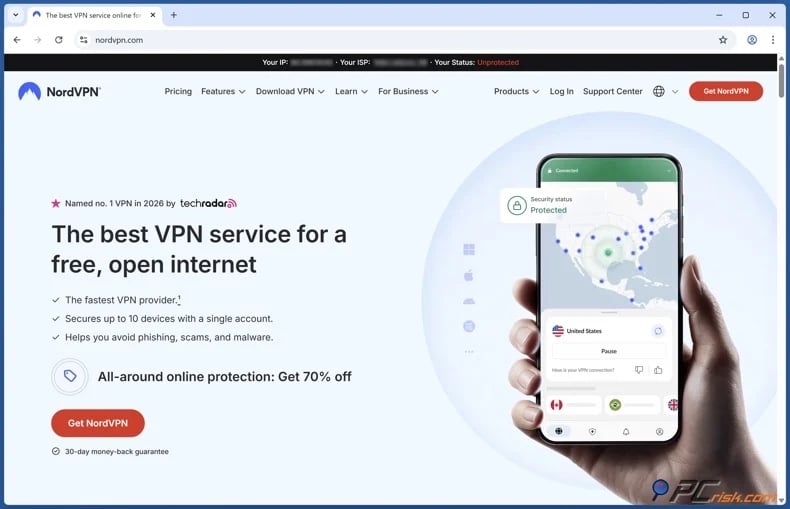
2. Download/Install the VPN app and sign in. Most major VPNs support Windows, macOS, Android, iOS, Linux, browser extensions, smart TVs, and routers. Likewise, services from mainstream providers typically allow for multiple device coverage on a single subscription.
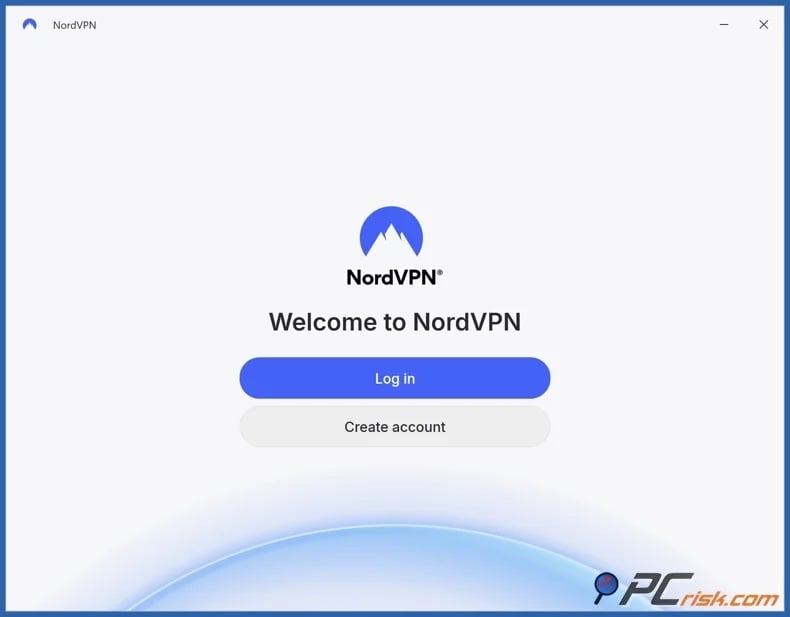
3. Connect to a nearby VPN server. If your concern is speed, select a server in your country and as close to your location as possible, as this ensures lower latency and higher speeds. And if it is privacy, a local server is usually sufficient.
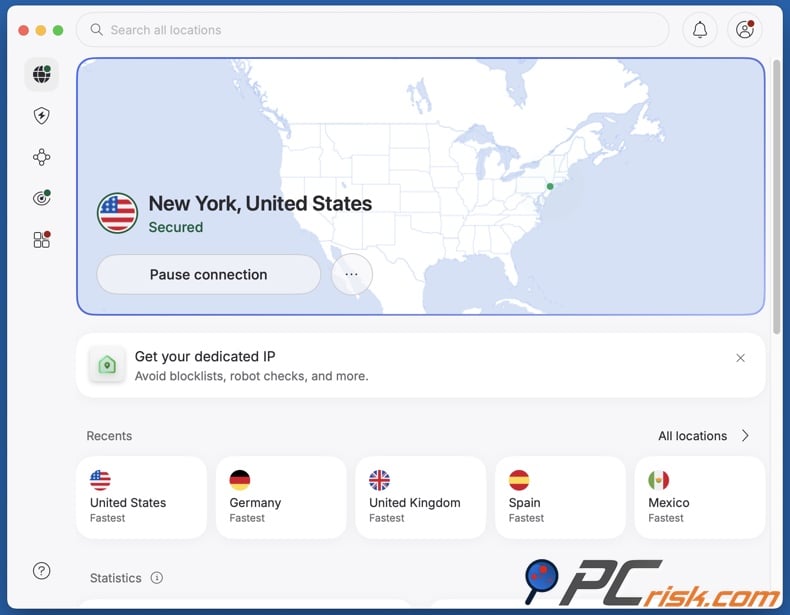
4. Test your connection before and after enabling the VPN. Run a speed test without the VPN, then connect to a nearby server and test again. Additionally, test the specific activity that raised speed throttling concerns, such as streaming, gaming, video conferencing, or downloading.
Router setup for Comcast Xfinity
A router-level VPN protects devices that do not support VPN applications, such as certain smart TVs, game consoles, streaming sticks, and IoT (Internet of Things) devices. It also secures all devices on your home network.
There are two common approaches:
Use a third-party router that supports VPN connections. This approach works with any VPN provider that allows manual router configuration using protocols like OpenVPN or WireGuard. In this setup, your modem or Xfinity gateway supplies Internet access, while the third-party router manages the VPN connection for all connected devices. If your VPN does not offer router configuration files or your router lacks VPN client mode, you will need to install the VPN app on each device instead.
Set the Xfinity gateway to bridge mode and use your own router. Bridge mode disables most routing functions on the gateway, allowing your router to manage the network. This approach sidesteps double NAT issues and provides greater control over DNS, firewall, and VPN settings, making it preferable for advanced users.
General router setup steps:
- Ensure your router supports VPN client mode; VPN server mode is different and will not provide the same protection.
- Download configuration files from your VPN provider or use the provider's router app, if available.
- Log in to your router's admin panel and add the VPN profile.
- Enter your VPN credentials, server information, and protocol settings.
- Save the profile and connect.
- Test multiple devices to confirm their public IP address corresponds to the VPN server.
- Maintain a non-VPN network if needed; some banking apps, work tools, streaming services, or gaming platforms may function better without a VPN.
Router VPNs are convenient, but may reduce speed if the router has limited processing power. For best performance, use a router designed for VPN throughput or install the VPN app directly on devices that require the highest speeds.
It is important to note that a VPN will not always provide speed improvements with Comcast Xfinity. It cannot address speed issues unrelated to throttling, such as outdated hardware, account limits, signal quality, or neighborhood congestion. A VPN can help only if the issue involves traffic identification, local network restrictions, DNS behavior, or inefficient routing. Furthermore, a VPN does not guarantee continuous, uninterrupted access to all websites/services from all locations. What is more, using a VPN does not make unlawful activity legal.
Best VPNs for Comcast Xfinity
The best VPNs for Comcast Xfinity offer fast speeds, stable connections, and strong privacy to limit ISP visibility. Router compatibility is essential for households with multiple devices.
The following are our Top 5 VPN Recommendations for 2026:
1. NordVPN
NordVPN is our top recommendation for Comcast Xfinity users. It delivers fast speeds, an extensive server network, strong encryption, a kill switch, DNS leak protection, and a strict no-logs policy. For those concerned about throttling, NordVPN offers reliable servers and modern protocols designed for performance.
NordVPN is also well-suited for privacy. It limits Comcast's visibility into your browsing, hides your home IP address from websites, and secures traffic on public Wi-Fi. Its router compatibility enables you to protect smart TVs, consoles, and other devices without installing separate applications.
2. Surfshark
Surfshark is ideal for users requiring protection for many devices. Its unlimited simultaneous device connections are especially useful for families, shared homes, and users with multiple devices. For Comcast Xfinity households, Surfshark offers a convenient way to secure most devices under one subscription.
Surfshark offers fast speeds, a broad server network, modern security features, and user-friendly applications. It balances cost, convenience, and privacy. The unlimited device policy also helps determine if Xfinity slowdowns impact a single device or the entire network.
3. Mullvad VPN
Mullvad VPN is the top choice for privacy-focused users. It does not even require an email address to create an account and minimizes personal data collection. This appeals to those who value reducing tracking and limiting information linked to their VPN account.
Mullvad VPN addresses Comcast Xfinity privacy concerns, especially for those seeking straightforward encrypted browsing without extra features. However, it may not match mainstream competitors for streaming or unblocking. If maximum privacy is your priority, Mullvad is an excellent choice.
4. Proton VPN
Proton VPN is a strong choice for users wanting transparency, security, and a reputable free plan. Paid plans offer better speeds, broader server access, and advanced features, while the free tier stands out for having no data caps and no ads.
Proton VPN is helpful for testing whether a VPN resolves Comcast Xfinity throttling or privacy concerns before committing to a paid plan. The paid version is better for consistent streaming, gaming, and router use, but Proton's free tier is our recommendation for a non-trial free VPN.
5. ExpressVPN
ExpressVPN is the best choice for users who value simplicity. Its apps are polished, easy to configure, and supported by clear setup guides. This benefits Comcast Xfinity users who prefer not to spend time adjusting protocols, DNS settings, or server options.
ExpressVPN offers strong speeds, reliable privacy features, broad device support, and router compatibility. While it is a premium service, it is a practical option for users seeking a dependable VPN with minimal troubleshooting.
Can you use a free VPN to help with Comcast Xfinity speed throttling?
While a free VPN may help in some situations, these services are generally ineffective for addressing Comcast Xfinity speed throttling or privacy concerns. Free services typically offer fewer servers, higher congestion, weaker performance, and tighter data limits. Because speed and stability are essential when testing ISP slowdowns, these limitations can produce misleading results.
Top VPN ReviewsExclusive dealsExpert-tested · hands-on reviews→
Below are some of the key limitations linked to free VPNs:
Limited server choice - free VPN plans typically provide access to only a few locations. If these servers are distant or overloaded, your connection may slow down regardless of Xfinity's performance.
Congested performance - free servers often experience heavy user loads, which increases latency, reduces download speeds, and causes unstable video calls, buffering, lag, or failed downloads.
Data caps - many free VPNs restrict daily or monthly data usage, making them unfit for streaming, gaming, large downloads, remote work, or extended troubleshooting.
Weak privacy practices - some free VPNs rely on advertising, tracking, or questionable data practices to maintain and monetize their services. Using these VPNs to enhance privacy from your ISP undermines your privacy goals.
Limited security features - free plans may lack essential features like a kill switch, DNS leak protection, router support, split tunneling, or modern protocols. These gaps can expose your traffic or seriously reduce reliability.
Blocked VPN servers - many websites and services block free VPN IP addresses due to abuse by spammers and automated traffic. This often results in continuous CAPTCHA tests, log-in warnings, or access errors.
Poor customer support - free VPNs rarely offer quality assistance. Hence, if you experience DNS leaks, app crashes, router setup issues, or speed problems, you may then need to resolve them on your own.
For those who want a free option, Proton VPN's free tier is a strong option. It has no data caps, does not rely on advertisements, and is offered by a reputable privacy-focused provider. However, for reliable Comcast Xfinity speed testing, streaming, router setup, and long-term privacy - a reputable paid VPN is usually a better investment.
Common VPN issues and solutions with Comcast Xfinity
Using a VPN with Comcast Xfinity is generally simple, though issues may still arise. Problems may result from the VPN, local Wi-Fi, the Xfinity gateway, your device, or the website.
Below are some of the primary issues and their potential solutions:
VPN connection is slower than expected - encryption adds overhead, and distant servers increase latency. The VPN server may also be overloaded, or the device may be using an inefficient protocol.
Solutions:
- Connect to another nearby VPN server.
- If this information is available, connect to a less crowded server.
- If available, switch to a faster protocol.
- Test both your wired connection and Wi-Fi to rule out wireless interference.
- Restart the VPN app and connect to a different server.
- Update the VPN app, operating system, and router firmware.
- Temporarily disable bandwidth-intensive activities (e.g., background downloads, cloud backups, streams, etc.).
VPN does not improve Xfinity speed - if the slowdown is not related to throttling, it may be caused by your plan speed, local congestion, weak signal, outdated equipment, or the website.
Solutions:
- Run speed tests with and without the VPN at different times of day.
- If possible, test a wired connection.
- Check whether multiple devices are consuming bandwidth.
- Restart the modem/router.
- Review your Xfinity plan and account for usage rules or legacy limits.
- Contact Xfinity support if signal levels, outages, or line issues are suspected.
Websites block or challenge the VPN - some sites block or challenge VPN use by restricting known IP addresses. This is particularly common on streaming platforms, banking websites, and services with anti-fraud measures.
Solutions:
- Connect to another server in the same country.
- Clear cookies and cache, then try a private browsing window.
- If available, use split tunneling to exclude the affected app or site from the VPN.
- Avoid switching locations repeatedly during account log-ins.
- Contact the VPN provider for recommended servers.
DNS leaks occur - your device may still be using Comcast DNS or another DNS resolver outside the VPN tunnel. This can reduce privacy and cause location conflicts.
Solutions:
- If available, enable DNS leak protection in the VPN app.
- If available, set the VPN provider's DNS inside the app.
- Disable custom DNS settings on the device or router.
- Restart the browser after connecting to the VPN.
VPN disconnects randomly - unstable Wi-Fi, power-saving settings, application conflicts, or frequent network switching can interrupt the VPN tunnel.
Solutions:
- If available, enable the kill switch in the VPN app.
- Disable battery optimization for the VPN app on mobile devices.
- If possible, use a wired connection for desktops, consoles, and streaming boxes.
- Switch VPN protocols.
- Reinstall the VPN app if the issue persists.
Router VPN setup is slow - many consumer routers cannot encrypt traffic at high speeds. If the router CPU is weak, the VPN connection may bottleneck the entire network.
Solutions:
- If possible, use a router designed for VPN performance.
- If supported, use the WireGuard protocol.
- Install VPN apps directly on high-speed devices instead of routing everything through the router.
- Keep only necessary devices on the VPN router profile.
- Consider bridge mode with a dedicated third-party router.
Apps, such as streaming platform applications, continue to show the wrong region - GPS, account or app store region, cached data, DNS, or payment information may be used in addition to the IP address to determine your location.
Solutions:
- Clear app cache and browser cookies.
- Disable browser location permissions where appropriate.
- Check the account region and payment settings.
- Test in a desktop browser first.
- Connect to another server in the same country.
Xfinity gateway features interfere with connectivity - advanced security, parental controls, custom DNS settings, or double NAT may interfere with VPN traffic or router configurations.
Solutions:
- Review Xfinity app security and parental control settings.
- Restart the gateway after changing network settings.
- Use bridge mode when running a separate VPN router.
- Avoid running two routers with conflicting DHCP settings.
- Contact the VPN provider for router-specific configuration guidance.
Reputable VPN providers offer strong support and in-depth guides for connection issues, router setup, DNS leaks, blocked websites, and app-specific errors. If your VPN works on other networks but not on Xfinity, share with the support team your device type, VPN protocol, router model, error messages, and whether the issue occurs on Wi-Fi, wired connection, or both.
Is using a VPN to help with Comcast Xfinity speed throttling legal?
VPNs are legal in the United States and commonly used for privacy, remote work, public WiFi security, and secure business access. Using a VPN with Comcast Xfinity is lawful. Many customers rely on VPNs daily for work, education, travel, privacy, and general browsing.
The legality of speed throttling is more complex. In the US, Internet providers may use reasonable network management practices and must disclose key network management, performance, and commercial terms. Whether a specific practice is lawful depends on the facts, current federal and state laws, contract terms, disclosures, and whether the practice is reasonable, discriminatory, deceptive, or anti-competitive.
For Comcast Xfinity users, using a VPN for privacy or to test encrypted routing is generally lawful. However, a VPN does not override your service agreement, remove accountability, or legalize prohibited activities. Copyright infringement, harassment, hacking, fraud, illegal streaming, and other unlawful actions remain illegal even when using a VPN.
A VPN does not guarantee that a provider, website, employer, school, or service platform will permit VPN traffic. Some networks and services block VPNs for policy, compliance, licensing, or security reasons. If you use Xfinity through a workplace, apartment-managed network, school connection, or other controlled environment, additional rules may apply.
This article is for informational and educational purposes only and should not be considered legal advice. If you believe your ISP is violating the law or its disclosures, document the issue, test carefully, contact the provider, and consider filing a complaint with the appropriate regulator or consumer protection authority.
In closing
Comcast Xfinity users can encounter slow speeds for various reasons beyond throttling. Common causes include Wi-Fi interference, outdated equipment, network congestion, plan limitations, line issues, and overloaded websites. However, a VPN can help when issues involve traffic identification, local network restrictions, DNS handling, and inefficient routing, and these tools can also alleviate privacy concerns. A reputable VPN encrypts your connection, hides your home IP address, limits ISP visibility into your browsing, and may improve performance for certain services. It is also beneficial on public Wi-Fi, managed networks, and during travel.
For Comcast Xfinity in 2026, we recommend NordVPN as the top choice, with Surfshark, Mullvad VPN, Proton VPN, and ExpressVPN as strong alternatives depending on your needs. To achieve the best results, test your connection, select nearby servers, and enable leak protection. Keep in mind that a VPN cannot resolve physical line issues or plan limitations. VPNs are the most effective when utilized as part of a comprehensive privacy and security strategy.
Frequently Asked Questions (FAQ)
Is speed throttling legal?
Speed throttling is legal if it is part of reasonable network management and fully disclosed. Deceptive, discriminatory, or anti-competitive practices may violate legal or regulatory requirements, depending on the situation.
Does Comcast Xfinity throttle speed?
Comcast states that it does not degrade or impair lawful Internet traffic based on content, application, service, user, or device. However, Xfinity uses network management practices, and some mobile or legacy plans could have certain limits or rules. Slowdowns can also result from congestion, Wi-Fi issues, equipment limitations, signal problems, or destination server issues, rather than throttling.
How can I bypass Comcast Xfinity speed throttling?
A reputable VPN may help if slowdowns are due to traffic identification, local network filtering, DNS issues, or inefficient routing. Install a trusted VPN, connect to a nearby server, enable DNS leak protection, and test the service again. While a VPN improves privacy by limiting Comcast's visibility into your activity, it cannot resolve poor Wi-Fi, weak signals, plan limits, or general network congestion.
Is using a VPN for Comcast Xfinity legal?
Yes. VPNs are legal in the US, and using one with Comcast Xfinity for privacy, security, remote work, or troubleshooting is generally permitted. However, a VPN does not legalize prohibited activities or override website rules, workplace policies, or service agreements.
Share:
 Facebook
 X.com
X.com
 LinkedIn
 Copy Link

Karolis Liucveikis
Experienced software engineer, passionate about behavioral analysis of malicious apps
Author and general operator of PCrisk's News and Removal Guides section. Co-researcher working alongside Tomas to discover the latest threats and global trends in the cyber security world. Karolis has experience of over 8 years working in this branch. He attended Kaunas University of Technology and graduated with a degree in Software Development in 2017. Extremely passionate about technical aspects and behavior of various malicious applications.
▼ Show Discussion