
We may earn commissions from products we recommend. Learn more.
How to opt out of TruePeopleSearch in 2026

How to opt out of TruePeopleSearch in 2026?
TruePeopleSearch is a people-search website that compiles personal information from public records and other sources into searchable profiles. Searches can reveal names, addresses, phone numbers, email addresses, age, relatives, and other identifying details. While this data may be available elsewhere, consolidating it in one location increases privacy and security risks.
Removing your TruePeopleSearch listing does not delete the original records from government or commercial databases. However, it makes your information harder to access and limits how easily unwanted parties can find and use your data.
This guide covers how to manually remove your information from TruePeopleSearch, steps to take if the standard process fails, how using an automated personal data removal service works, and ways to limit future data collection by people-search sites and data brokers.
Opt out of TruePeopleSearch with Incogni
Table of Contents:
- Introduction
- What is TruePeopleSearch?
- How to manually remove your information from TruePeopleSearch?
- Common issues with manual removal and alternative opt-out routes
- How to automatically remove your information from TruePeopleSearch?
- Why should you remove your information from TruePeopleSearch?
- How to prevent data brokers from collecting more of your data?
- In closing
- Frequently Asked Questions (FAQ)
What is TruePeopleSearch?
TruePeopleSearch is a people-search service that helps users find information about individuals by organizing identifying details into structured records. Unlike standard search engines, it links names to addresses, phone numbers, email addresses, age-related information, relatives, and other connections, depending on available data.
The primary privacy concern is not whether each data point is public, but how aggregation increases its usefulness. While individual details may be difficult to find separately, a people-search profile compiles them in one place - thus making it much easier to identify, locate, or research someone.
The Federal Trade Commission (FTC) describes people-search websites as services that collect information about individuals and make it available to others. The FTC also warns that opting out of one such site does not necessarily remove information about you from related profiles, public records, or other people-search databases. Data may also return when source records change or a broker receives updated information.
Personal data concentration can benefit scammers. To elaborate, a scammer with access to your previous addresses, age, relatives, or phone number can craft far more convincing phishing messages or scams. The information may help someone impersonate a company representative, claim to know a family member, or otherwise make fraudulent messages appear credible. Data from people-search profiles can also be combined with information from unrelated data breaches. Physical privacy is also at risk. Publishing a current home address along with phone numbers and household relationships can be especially harmful for individuals experiencing stalking, harassment, abusive relationships, or unwelcome contact.
Not every TruePeopleSearch listing leads to fraud or harassment, but publicly accessible consolidated personal information increases your exposure. Removing your profile reduces this risk without needing to prove prior misuse. However, it is important to separate people-search information from official records. If TruePeopleSearch displays an address from a property, voter, court, licensing, or other public record - opting out merely removes the listing from TruePeopleSearch and does not affect the original record. This distinction is crucial when considering further privacy steps following removal.
How to manually remove your information from TruePeopleSearch?
Manual removal is free and recommended, even if you plan to use an extensive privacy service later. While TruePeopleSearch is only one source, removing your profile makes your address, contact information, and relationship data more difficult to access.
The removal process has changed over time. Older instructions may direct you to search for your record and then click a removal button. As of 2026, the process begins at TruePeopleSearch's removal page, where you submit a request, receive an email, and use the provided link to access the opt-out form. No paid account is required.
It must be emphasized that website layouts, button text, CAPTCHA tests, and privacy-page wording may change. Use the screenshots as visual references and focus on the intent of each step if labels differ.
You may start from the dedicated TruePeopleSearch removal page; however, accessing the page through the site's footer ensures you are using the current privacy workflow, not a potentially outdated third-party form.
How to navigate to the TruePeopleSearch opt-out page:
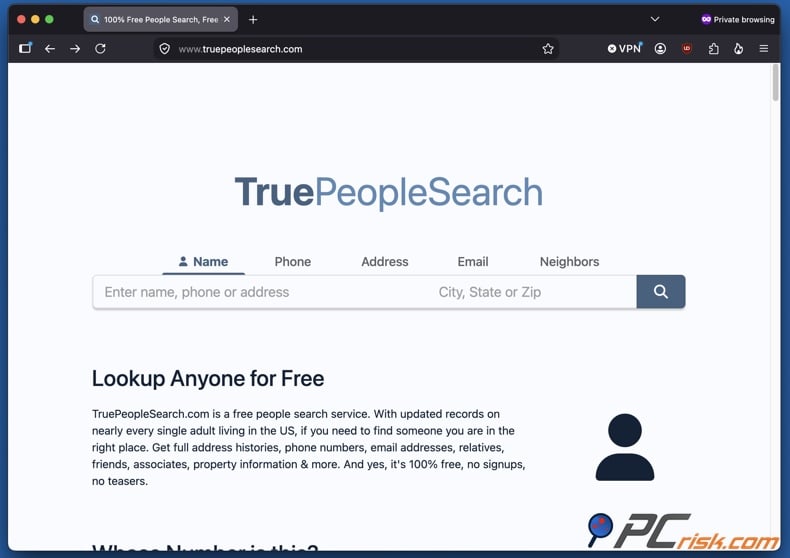
1. Open the TruePeopleSearch homepage and scroll to the bottom. Privacy and removal options are typically located in website footers.
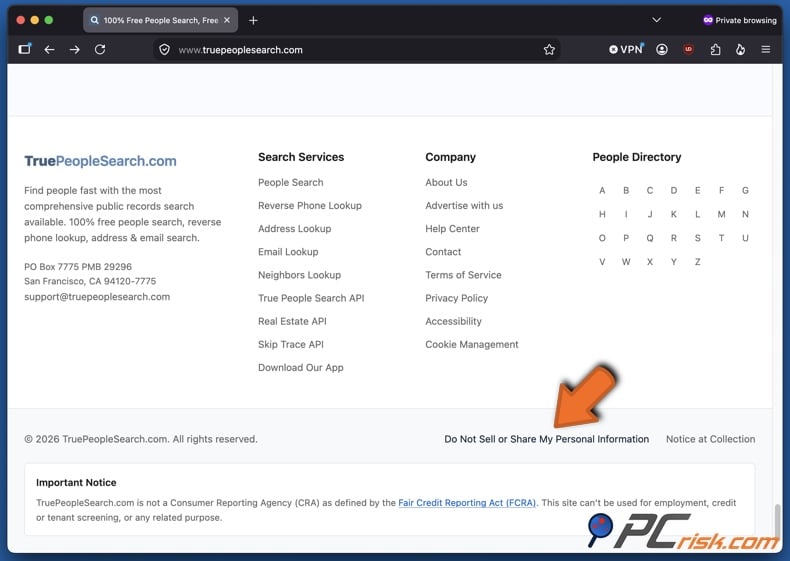
2. On the TruePeopleSearch homepage's footer, click "Do Not Sell or Share My Personal Information". As mentioned previously, exact wording may differ, so search for any similarly titled links.
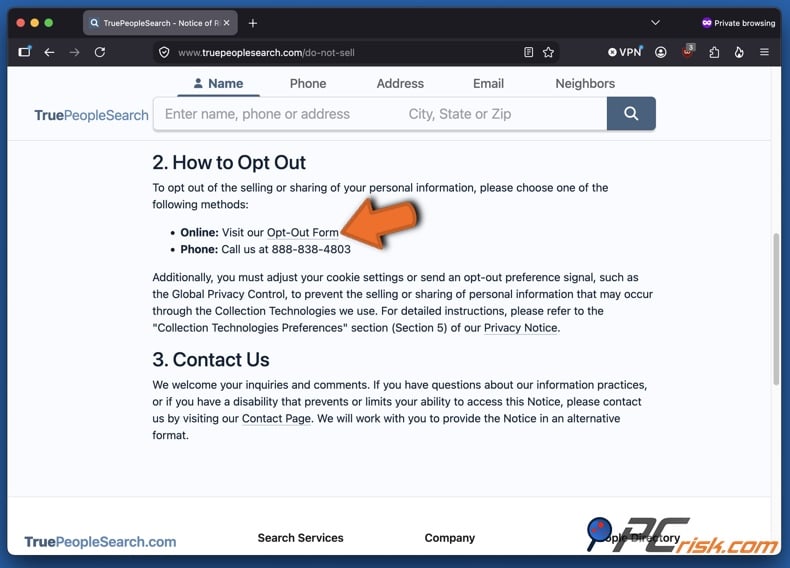
3. Locate the Opt-Out Form link in the opened page. Read the "TruePeopleSearch Notice of Right to Opt-Out of Sale and Sharing of Personal Information" and review the opt-out options.
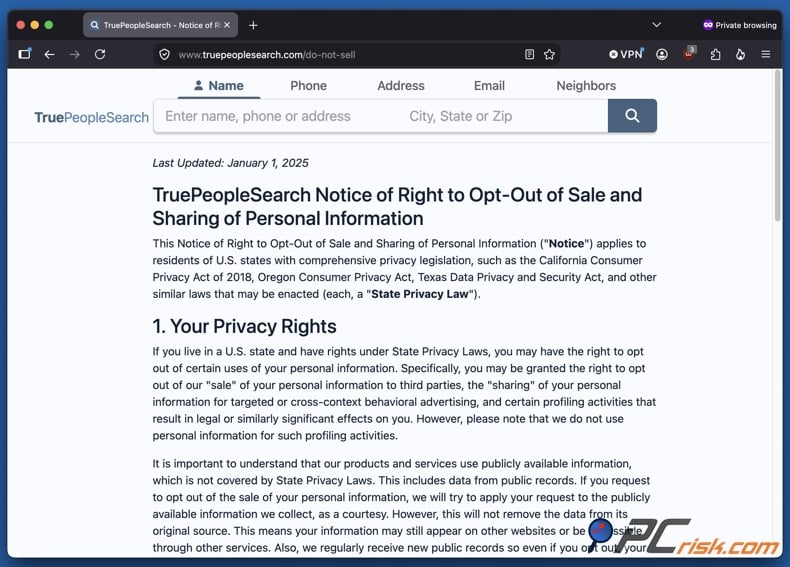
4. Click the "Visit our Opt-Out Form" link. In the "How to Opt Out" section, select the online option. Currently, there is a call-in option as well, and a link for the Contact Page.
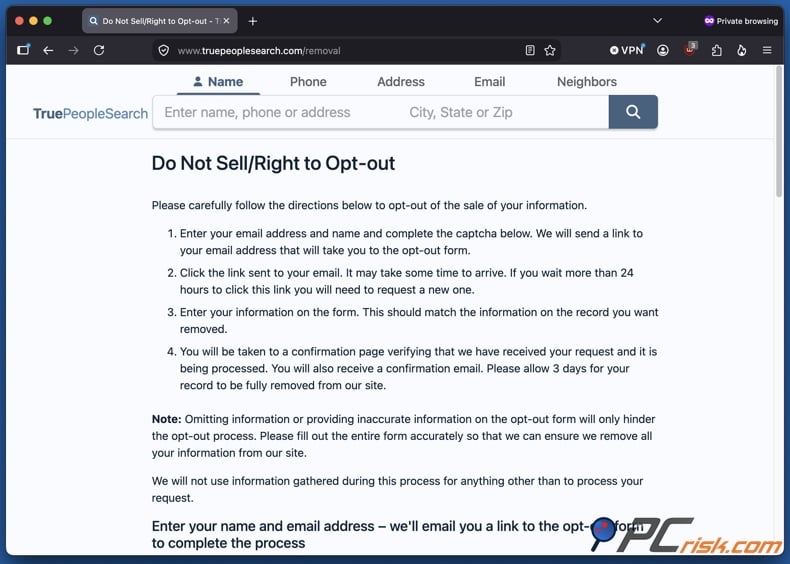
How to opt out of TruePeopleSearch:
1. Open the Do Not Sell/ Right to Opt-out page. Read the instructions on the removal page and proceed to fill out the requested information.
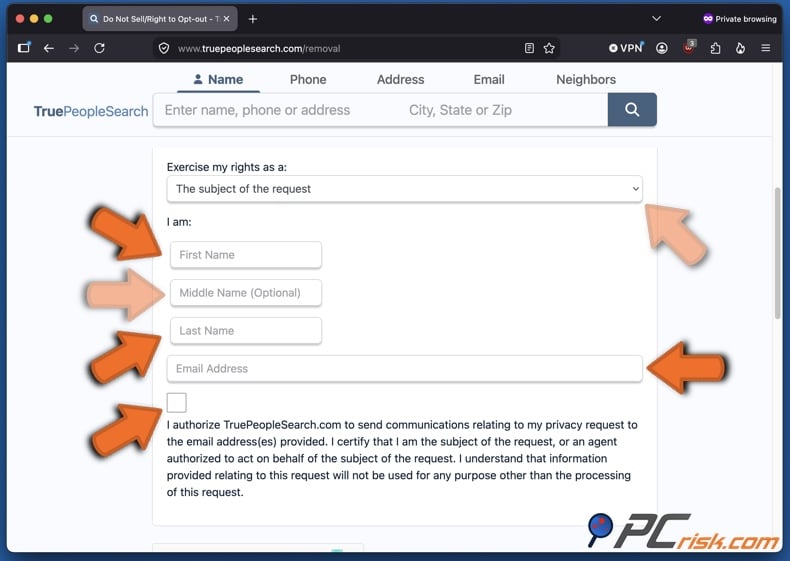
2. Choose the subject of the opt-out request and enter your name and email address. Open the "Exercise my rights as a:" dropdown menu and select whether you are removing your own information or someone else's for whom you are authorized. Proceed to provide your first, middle (optional), and last name. Enter a valid email address. TruePeopleSearch will send the next step of the removal process to this inbox, so ensure you can access it promptly. We recommend using a dedicated email for opt-out requests or a secondary one, as that helps track correspondence and limits the exposure of your primary personal email.
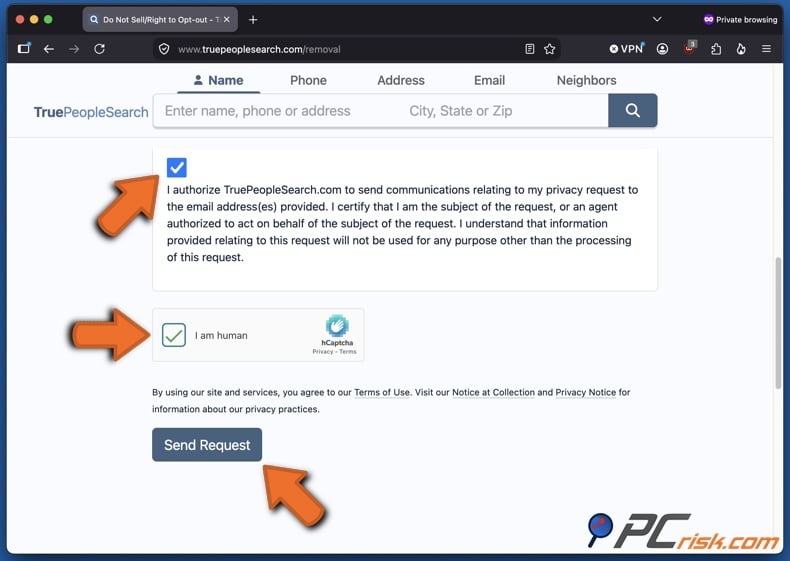
4. Click the communication authorization checkbox, complete the CAPTCHA verification, and click "Send Request". Verify your email address to allow communication via email, as the process requires you to receive and interact with TruePeopleSearch's message.
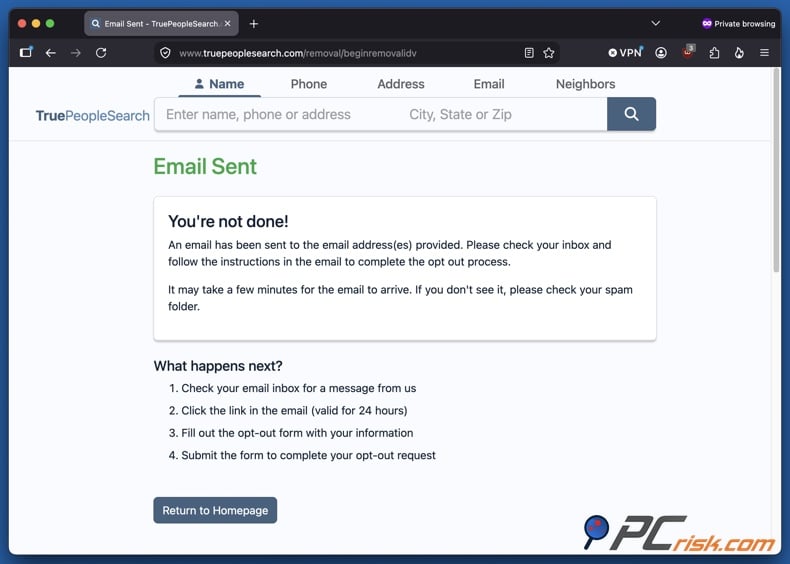
5. Open the TruePeopleSearch email and press "Click here to fill out the form". Check both your inbox and spam/junk folder. The email includes a link to the full opt-out form, which expires in about 24 hours. Therefore, do not delay clicking the link. Complete the following steps quickly. If the link has expired, return to the removal page and submit a new request.
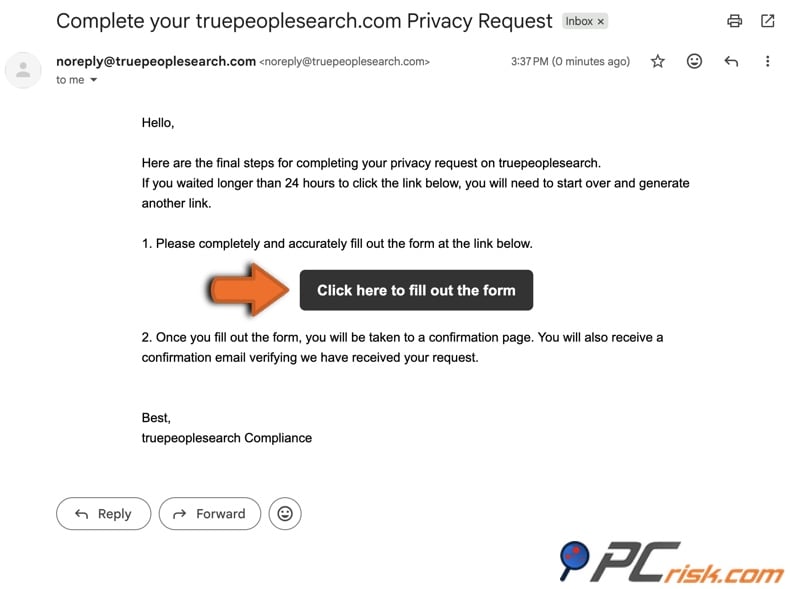
8. Review the full opt-out form. After verifying your email, TruePeopleSearch will open the next step, where your request is matched to their records.
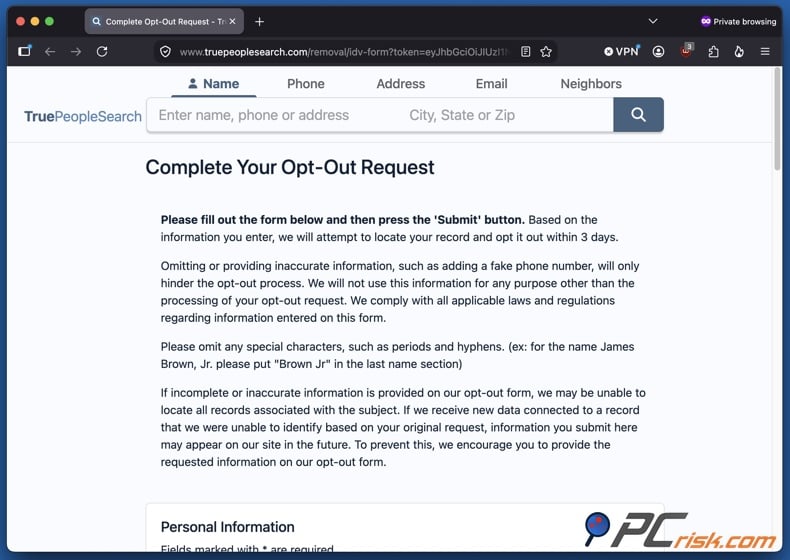
9. Enter the requested identifying information, which corresponds to the TruePeopleSearch record you wish to remove. Only provide information required by the form. If you have multiple historical names or addresses, check later to confirm all listings have been removed. You must provide your name, city, state, ZIP code, and either your birthdate or full address. Providing a telephone number is optional.
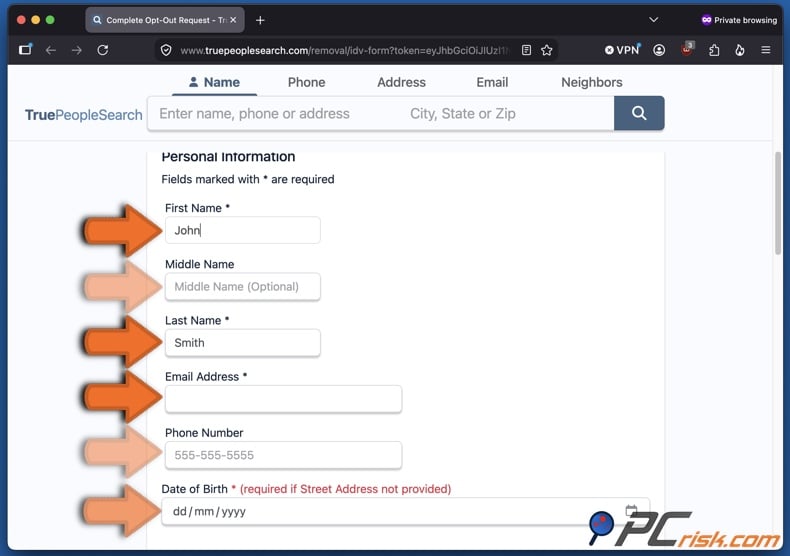
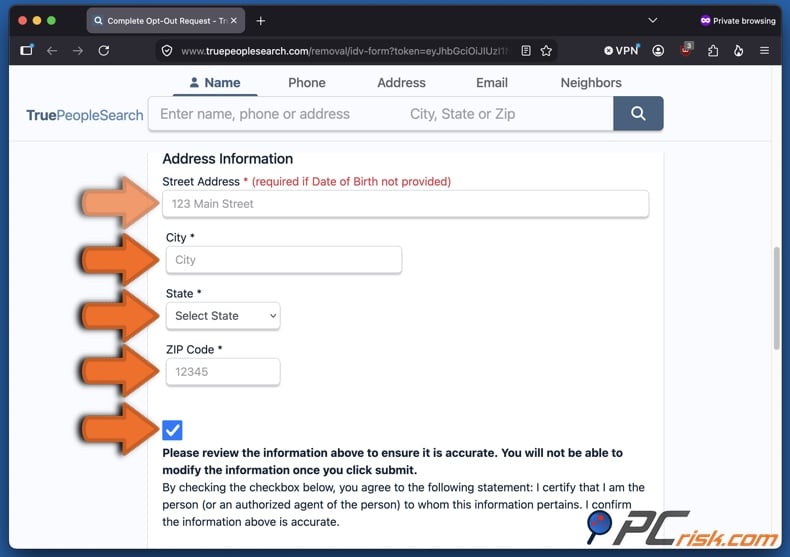
10. Confirm that your information is accurate, complete the CAPTCHA verification, and click "Send Request".
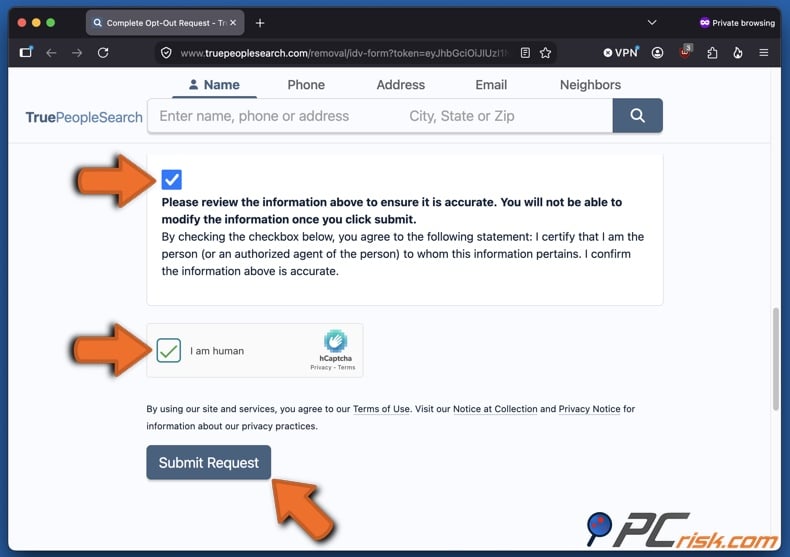
You will receive an on-screen confirmation when your request is accepted. It confirms that your request has been successfully submitted to the system and that removal is expected in 3 days or less. Save a screenshot of this page for your records in case you need to contact TruePeopleSearch.
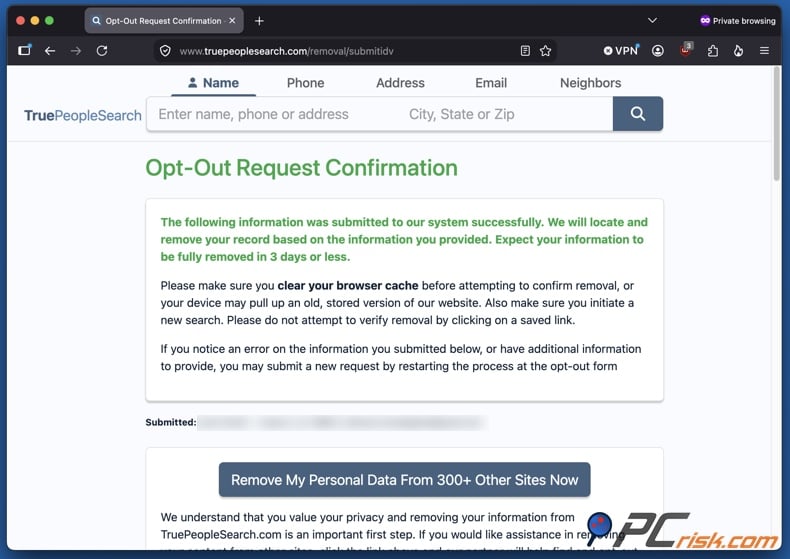
11. Keep the confirmation and check your listing again following the expected processing time. TruePeopleSearch may send an email verifying receipt of your request and another once processing is complete. Retain these messages until you have confirmed your record has been removed. The removal page does not guarantee a specific completion time. It is suggested to wait at least several days. During our test, the Privacy Request In Progress email from TruePeopleSearch stated that the removal results would be sent within 45 days.
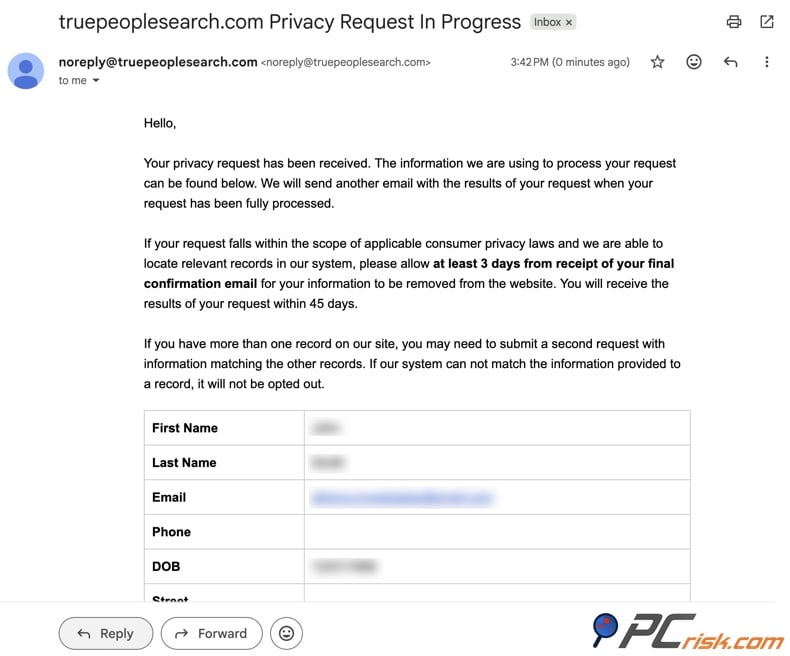
Remember to expand your search beyond your current name by using previous addresses, phone numbers, or name variations that may have appeared in listings. People-search databases often contain duplicate or overlapping records, so a single successful removal does not guarantee all versions are deleted.
How to remove outdated TruePeopleSearch results from Google:
Removing your profile from TruePeopleSearch and removing its appearance in Google search results are separate steps. Once TruePeopleSearch deletes or suppresses your profile, Google may still display outdated results until it recrawls the page. Use Google's "Refresh outdated content" tool for pages that have been removed or significantly changed but still appear in search results.
Furthermore, Google's "Results about you" feature allows you to find and request removal of search results containing personal contact information, such as your home address, phone number, or email address. However, removing a result from Google does not delete the information from the original website, so you should complete the TruePeopleSearch opt-out first.
If the TruePeopleSearch page has been removed but still appears in Google, request a refresh. If the live page still displays sensitive contact information, submit a separate removal request to Google. Always check both the source website and the search result to ensure complete removal.
Common issues with manual removal and alternative opt-out routes
Manual people-search removals are usually straightforward, but several issues may disrupt the process:
Human verification issues - CAPTCHAs may fail, reload repeatedly, or not complete. Browser extensions, content blockers, VPNs, disabled scripts, and strict cookie settings can interfere with these functions. If the TruePeopleSearch form does not load, try reloading the page or using another mainstream browser with JavaScript enabled. You do not need to disable security software across your system.
Verification email issues - messages may be delayed, filtered as spam, or sent to an incorrect address. Because the TruePeopleSearch verification link is time-limited, you must restart the process if the email expires.
Incomplete matching - your current name and address may match one record, while previous addresses, former surnames, old phone numbers, or alternate spellings may match others. If the information you submit differs from what the broker has on file, some records may remain following the opt-out.
Information reappears - removals may be temporary, as people-search websites often update their data. Your information can reappear after public records change, and opting out of one service does not remove the underlying public records. Your data may also remain visible through profiles of relatives, neighbors, or associates.
If the standard TruePeopleSearch process fails, consider these alternatives:
Contact TruePeopleSearch - use the current support, contact, or appeal options. Provide enough information to identify the affected record, the date of your failed request, and a copy of any confirmation if available. Only send identity documents if the website specifically requests them.
Exercise your state privacy rights - some states have extensive privacy rights, but they vary by state, organization, and data type. For example, California residents can use the government-operated Delete Request and Opt-out Platform (DROP) to send a single deletion request to over 600 registered data brokers. Brokers began processing DROP requests on August 1, 2026.
Repeat the removal process for duplicate records - after removing the first record, search using previous addresses, phone numbers, and name variations. Go through the removal process for any repeat listings.
Consider an automated personal data removal service - if you want to reduce your exposure across multiple brokers, not just remove a single TruePeopleSearch profile, you can use an automated service to expedite the process. You can read further on this topic in the next section.
Regardless of the method you choose, keep records of your request date, confirmation emails, screenshots, and the specific profile you requested for removal. This will make follow-up much easier if a listing persists or reappears.
How to automatically remove your information from TruePeopleSearch?
Manual removal from TruePeopleSearch is free, but the problem lies in scale. TruePeopleSearch is just one of many people-search services, and repeating searches, CAPTCHAs, verifications, and follow-ups across numerous data brokers can be very time-consuming.
We recommend Incogni for greater, ongoing personal data removal; it is our top choice for 2026 (you can read our dedicated article for an in-depth service comparison). Incogni's standard network covers over 420 data brokers, and its August 2026 guide confirms that TruePeopleSearch is included.
Opt out of TruePeopleSearch with Incogni
How to automatically opt out of TruePeopleSearch with Incogni:
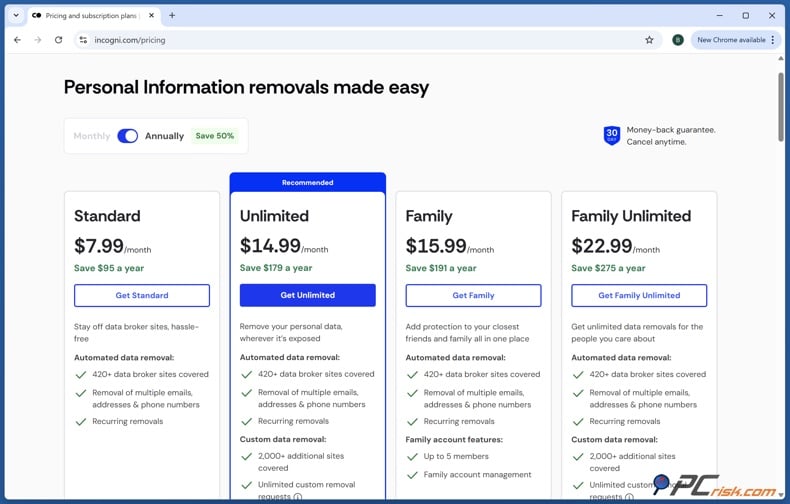
1. Create an Incogni account and select a subscription plan that meets your needs. The standard Incogni plan covers 420+ data brokers and includes TruePeopleSearch. Some higher-tiered plans include Custom Data Removal, which enables users to submit removal requests to services that are not included in the standard network.
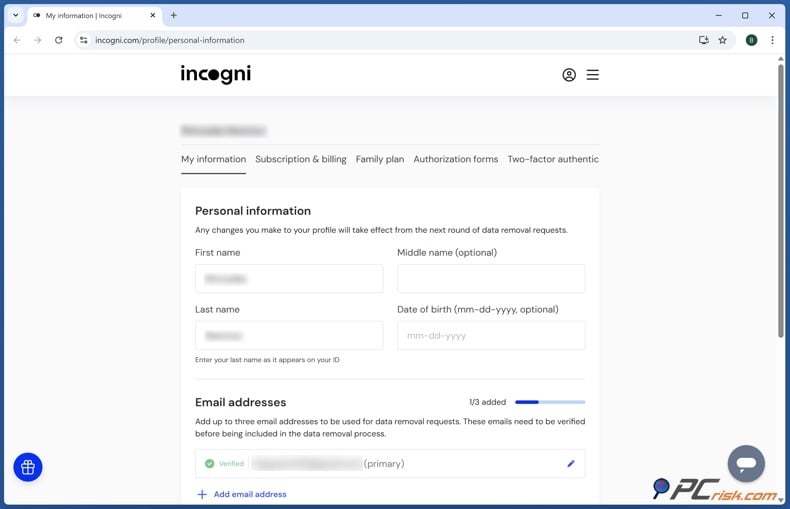
2. Provide the required information to identify your records. Incogni requires sufficient personal details to match you with data broker records and prepare valid removal requests. Make sure the information you enter is accurate. As with any privacy service, there is a tradeoff. You must provide identifying information so the company can locate and remove your data elsewhere.
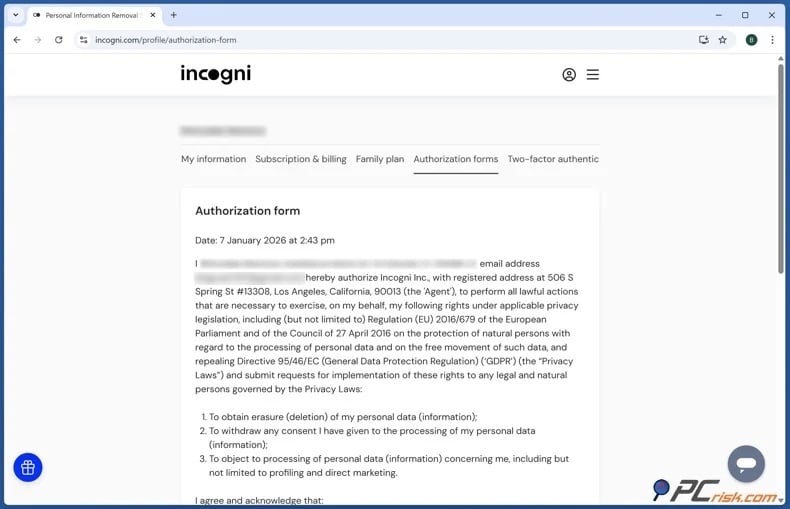
3. Sign the authorization form. Incogni requires your authorization to act on your behalf with data brokers. This enables the service to submit privacy or opt-out requests without you having to complete each broker's process yourself.
4. Allow Incogni to send and track removal requests. Once set up, the service identifies supported brokers and initiates requests. Since TruePeopleSearch is included, it is handled as part of the overall process rather than separately.
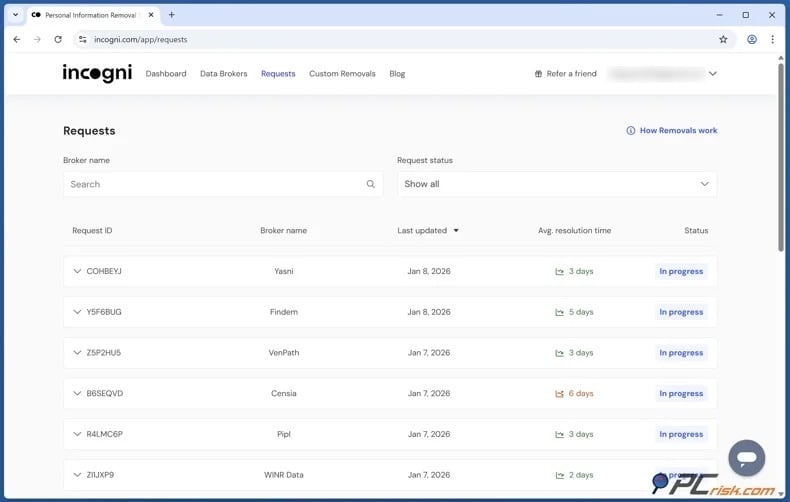
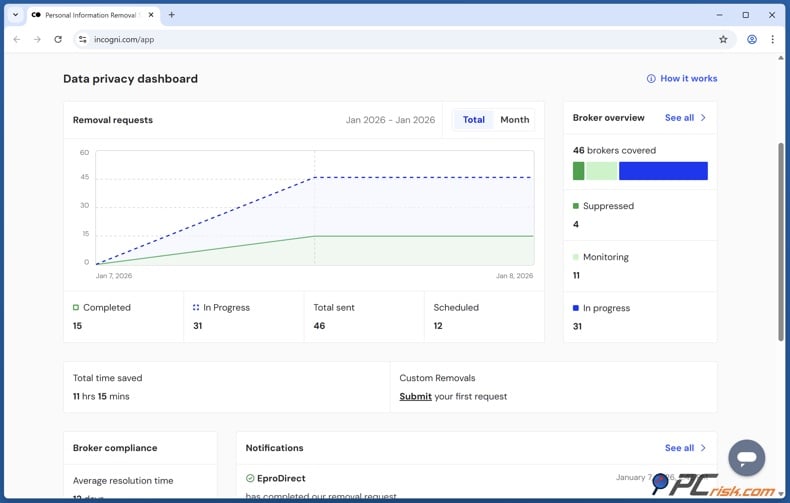
5. Monitor the progress in your dashboard. The privacy dashboard displays removal requests and their status. Some brokers respond quickly, while others may take longer or entail further processing. Automation decreases manual effort, but removal is not immediate. Note that you may be asked for confirmation of potential matches; respond when necessary.
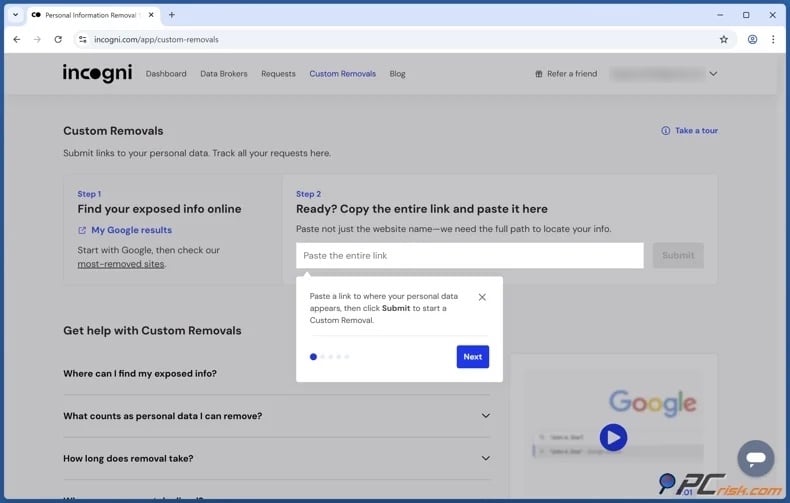
Use Custom Removals if needed. Higher Incogni tiers offer a custom data removal feature for exposures not covered by the standard broker list. If eligible, you can submit a direct link to a webpage displaying your personal information and request removal. This is helpful for additional people-search profiles outside automated coverage.
It must be mentioned that automated services cannot remove public records or guarantee that all personal information will be erased from the Internet. Incogni notes that government records, social media, and some other sources may be beyond the removal service's control.
The main advantage of using a personal data removal service is broad and repeated coverage. Manual removal is suitable for a few specific profiles, but automation is preferable when contacting many brokers, checking progress, and repeating requests as new information appears.
Why should you remove your information from TruePeopleSearch?
The primary reason to remove a people-search profile is not that any single address or phone number is confidential, but that a consolidated profile makes multiple disconnected facts easily accessible together. With access to your full name, age, address history, phone numbers, email addresses, and relatives - someone can infer significant personal details. Even in the absence of financial access, an attacker may gather enough information to create a convincing narrative. For example, a scammer could reference a family member, mention a previous city, call from a familiar area code, or send a highly credible email.
Privacy should be viewed in terms of attack surface. Each searchable profile is a resource for attackers, stalkers, spammers, aggressive marketers, or fraudsters. Removing a profile does not guarantee anonymity, but it requires others to obtain your information through less convenient means.
Home addresses require special attention. For most, an exposed address leads to unwanted marketing or privacy issues. For those facing harassment, abuse, stalking, or targeted threats, limiting the visibility of a current residence is a direct safety measure.
Persistence is another concern. Once multiple companies collect your personal information, correcting or removing it becomes increasingly difficult. One broker may have your current address, another an old one, and others may rebuild records from new data. Additionally, information can reappear after public records change and may remain visible through records linked to relatives or others.
Removing yourself from TruePeopleSearch is best seen as risk reduction, not complete erasure. It eliminates one convenient lookup source, reduces casual discoverability, and supports wider efforts to limit how easily your information can be correlated.
There is an added benefit to acting proactively. Privacy measures are more effective when taken in advance. Attempting to remove listings during active harassment, fraud, or identity abuse adds unnecessary stress. Regularly searching for your contact information and removing exposed records makes future cleanup easier.
How to prevent data brokers from collecting more of your data?
You cannot fully prevent data brokers from accessing your information. Some data comes from public records required by law, while other information is generated through routine commercial and online activity. Therefore, focus on data limitation by reducing the information you share, disabling unnecessary tracking, using available opt-outs, and regularly removing resurfaced data.
Limit what you share publicly. Review your social media profiles and remove details that are unnecessary for strangers, such as your birthday, employer, hometown, phone number, family relationships, school history, or location-tagged photos. Restrict profile visibility and avoid posting your home address or personal phone number. Note that deleting information from one social media profile does not remove copies already collected by third-parties. The goal is to limit future collection and make data correlation more difficult.
Use separate contact information for different purposes. Maintain a dedicated email address for shopping, newsletters, promotions, and privacy requests, rather than using the same address for banking and personal communication. Email aliases can help identify the source of unwanted marketing.
Avoid providing your phone number unless it is required. Do not submit false information on government, financial, or contractual forms that require accuracy, but distinguish between mandatory fields and those used for marketing.
Review app permissions regularly. Unless functionally critical, disable access to location, contacts, photos, advertising identifiers, and other data. Remove unused applications.
Reduce advertising and web tracking. Review cookie consent options instead of accepting all categories. Use browser privacy settings, tracker-blocking tools, and advertising preferences to limit behavioral data collection. Reset or restrict advertising identifiers on mobile devices as needed. Do not rely on private browsing as an anti-tracking solution, as it only affects local data retention and does not prevent sites from tracking your online activity during use.
Use legally recognized opt-out mechanisms when available. Some privacy laws require businesses to honor requests regarding the sale, sharing, or deletion of personal information. Your rights depend on your state, the company, and the data type.
For California residents, DROP is now a key option. The platform can send a single deletion request to over 600 registered data brokers. Brokers began processing requests on August 1, 2026, and must return periodically to handle new requests. California reported strong early adoption - by August 25, 2026, over half a million residents had signed up, and 654 brokers participated. However, since DROP is new, do not stop monitoring key people-search websites independently rather than assuming all exposures are immediately removed.
Remove information at the source whenever possible. Opting out of people-search sites hides the broker's copy but does not change the original public record. If a public record is incorrect, contact the responsible organization and follow its correction process. For records that must remain public by law, check if your jurisdiction offers address-confidentiality programs or other protections if you are at increased risk. Eligibility and procedures vary, so use official government programs rather than submitting sensitive documents to unrelated websites.
Monitor Google and people-search sites. Google's "Results about you" can help identify search results with your home address, phone number, or email address, and can notify you of new results. Removing a search result does not remove the source page, but monitoring helps you track where your information appears. You can also use Google's "Refresh outdated content" tool to remove search results whose source has changed or been removed.
Repeat your privacy audit regularly. Data-broker cleanup is ongoing. Periodically search your name, phone number, key email addresses, and home address. Revisit services you previously opted out of, as the information can reappear.
Consider using an automated personal data removal service. These services search supported brokers for your information, submit opt-out requests, track responses, and repeat removals if your data reappears. We recommend Incogni for automated removal, including recurring and custom requests on eligible plans. However, remember that automated services cannot remove all public records or guarantee permanent deletion. Continued monitoring remains important.
Check our top personal data removal services
A layered approach is most effective. Share less, limit unnecessary tracking, use legal opt-outs, remove broker profiles, clean up outdated search results, and repeat these steps. While no single measure ensures complete privacy, these actions together can greatly reduce the personal information available to others.
In closing
TruePeopleSearch compiles information from public and other sources into searchable personal profiles. While convenient, this approach raises privacy concerns by consolidating details that would otherwise remain dispersed. Removing your profile reduces unnecessary exposure, especially when listings include your current address, phone numbers, email addresses, relatives, or past contact information.
The 2026 removal process opens with a request form and email verification, followed by a detailed opt-out submission. This process is free, but it should not be considered the final step in protecting your privacy. Search for duplicate records, review the site after processing, and remove outdated Google results as needed. Keep in mind that opting out of TruePeopleSearch does not remove your information from the original public records or other databases. Your information may reappear if these databases are updated.
Check our top personal data removal services
Manual removal may be sufficient for a few sites. For greater cleanup, automated services like Incogni can help with requests across many data brokers. Regardless of your approach, treat personal data removal as ongoing maintenance, not a one-off task.
Frequently Asked Questions (FAQ)
Is TruePeopleSearch legal?
Operating a people-search service that compiles legally available information is generally permitted in the United States. However, federal and state laws may restrict the collection, sale, disclosure, and use of personal information. Additional regulations apply when information is used for decisions related to credit, employment, or housing.
Is it dangerous to have my data on TruePeopleSearch?
Having your data on TruePeopleSearch can increase your exposure. Aggregated information can enable more convincing phishing or impersonation attempts and increases risks for those concerned about stalking or harassment. Scams, stalking, and surveillance are major risks tied to easy access to brokered personal information.
How do I remove my data from TruePeopleSearch?
Begin the TruePeopleSearch removal process by clicking the privacy link in the homepage footer. Fill out the initial request form with your name and a valid email address and submit your request. When you receive the email from TruePeopleSearch, use the verification link within 24 hours. Complete and submit the full opt-out form, and keep the confirmation until you confirm the listing has been removed. After removal, search for duplicate records using previous addresses, phone numbers, or name variations.
How long does it take TruePeopleSearch to remove my data?
Currently, there is no guaranteed processing time. TruePeopleSearch recommends allowing about three days for full removal. If the listing remains after the estimated processing time, contact the TruePeopleSearch support team and include your original request details.
Does removing myself from TruePeopleSearch remove the original public record?
No. An opt-out normally removes or suppresses the TruePeopleSearch profile. It does not delete the original government record, court record, property record, or other source. If an original record is inaccurate, contact the organization maintaining it for a potential correction.
Will opting out of TruePeopleSearch remove me from Google search?
Not necessarily. Google may continue to display an old TruePeopleSearch result until it recrawls the page. After the source page is removed or changed, you can use Google's "Refresh Outdated Content" tool to request an update. Google's "Results about you" feature can also help with removal of eligible search results containing personal contact information. Keep in mind that removing a Google search result does not delete its source.
How is using Incogni different from manually removing my data from TruePeopleSearch?
Incogni automates much of the removal process across more than 420 data brokers, including TruePeopleSearch. Incogni can submit requests, track their status, and continue addressing records if data is collected again. Higher-tier plans offer Custom Removals for websites outside standard coverage. Note that automated removal will not delete government records or guarantee anonymity on the Internet.
Will my data come back to TruePeopleSearch after I opt out?
Yes, your data can return. Data brokers and people-search websites regularly receive updates. Your information may also remain visible through records linked to relatives, neighbors, or others. Hence, check TruePeopleSearch and similar sites periodically, even after a successful removal.
Share:
 Facebook
 X.com
X.com
 LinkedIn
 Copy Link

Karolis Liucveikis
Experienced software engineer, passionate about behavioral analysis of malicious apps
Author and general operator of PCrisk's News and Removal Guides section. Co-researcher working alongside Tomas to discover the latest threats and global trends in the cyber security world. Karolis has experience of over 8 years working in this branch. He attended Kaunas University of Technology and graduated with a degree in Software Development in 2017. Extremely passionate about technical aspects and behavior of various malicious applications.
▼ Show Discussion